# vision-sdk-java-demo-springboot
**Repository Path**: zhoujiayaoo/vision-sdk-java-demo-springboot
## Basic Information
- **Project Name**: vision-sdk-java-demo-springboot
- **Description**: vision-sdk-java-demo-springboot
- **Primary Language**: Unknown
- **License**: Not specified
- **Default Branch**: master
- **Homepage**: None
- **GVP Project**: No
## Statistics
- **Stars**: 0
- **Forks**: 0
- **Created**: 2025-05-20
- **Last Updated**: 2025-05-29
## Categories & Tags
**Categories**: Uncategorized
**Tags**: None
## README
# vision-sdk-java说明文档v1.0.0
[TOC]
## 说明
> * 版本:v1.0.0
## 参考工程demo
**gitee仓库地址**:https://gitee.com/zhoujiayaoo/vision-sdk-java-demo-springboot
## 使用步骤
### 引入jar包
将jar包放置在项目根路径下lib文件夹下,参考目录结构
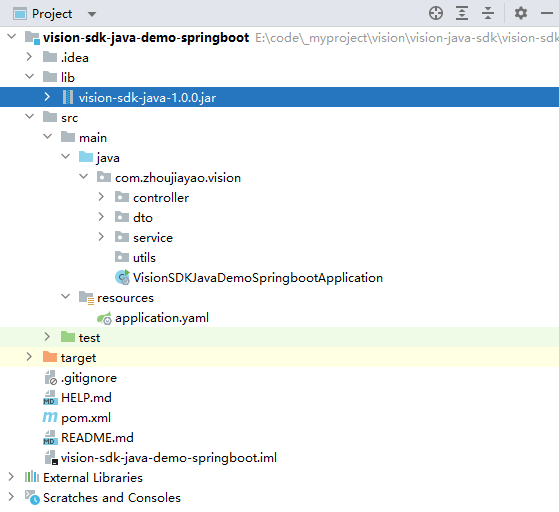
> 注意:jar包位置需要与pom文件配置匹配
### pom文件核心配置
```xml
com.zhoujiayao
vision-sdk-java
1.0.0
system
${project.basedir}/lib/vision-sdk-java-1.0.0.jar
vision-sdk-java-demo-springboot
org.apache.maven.plugins
maven-compiler-plugin
3.8.1
8
8
UTF-8
org.springframework.boot
spring-boot-maven-plugin
${spring-boot.version}
com.zhoujiayao.vision.VisionSDKJavaDemoSpringbootApplication
true
repackage
```
### 调用sdk接口
参考测试类
```java
public class MainTest {
public static void main(String[] args) {
// 读取项目根目录下的这张图片
String imagePath = StrUtil.format("{}/images/1.jpg", System.getProperty("user.dir"));
// 初始化
VDetectionApi vDetectionApi = VDetectionApi.getInstance();
VDetectionInitConf initConf = new VDetectionInitConf();
boolean init = vDetectionApi.init(new VDetectionInitConf());
// 检测图片
VDetectionResult vDetectionResult = vDetectionApi.detectByImagePath(imagePath);
log.info(JSONUtil.toJsonPrettyStr(vDetectionResult));
}
}
```
## 接口文档
### vDetectionApi.init() 初始化接口
接口说明:用于sdk初始化、设置默认参数等。
> 示例代码:
```java
// 初始化
VDetectionApi vDetectionApi = VDetectionApi.getInstance();
VDetectionInitConf initConf = new VDetectionInitConf();
boolean init = vDetectionApi.init(new VDetectionInitConf());
```
### vDetectionApi.detectByImagePath() 车牌图片检测接口
接口说明:传入图片绝对路径,识别车牌
```java
// 检测图片
VDetectionResult vDetectionResult = vDetectionApi.detectByImagePath(imagePath);
log.info(JSONUtil.toJsonPrettyStr(vDetectionResult));
```
> 请求参数:
| 参数名称 | 数据类型 | 说明 |
| --------- | -------- | ---------------- |
| imagePath | String | 图片文件绝对路径 |
> 响应参数:
| 参数名称 | 数据类型 | 说明 |
| --------------- | ----------------- | ---------------------------------------------- |
| detectionTime | String | 接口检测时间 |
| plateInfoList | List\ | 车牌信息列表 |
| ++ plateNo | String | 车牌号 |
| ++ plateColor | String | 车牌颜色 |
| ++ width | Float | 车牌号宽度 |
| ++ height | Float | 车牌号高度 |
| ++ KeyPointList | List\ | 车牌关键点列表(分别为左上、右上、右下、左下) |
| ++ ++ x | Float | 关键点横坐标 |
| ++ ++ y | Float | 关键点纵坐标 |
> 响应参数示例
```json
{
"detectionTime": 131,
"plateInfoList": [
{
"plateNo": "皖C-10031",
"plateColor": "蓝色",
"width": 2321,
"height": 3431,
"KeyPointList": [
{
"x": 1323.34,
"y": 23123
},
{
"x": 1323.34,
"y": 23123
},
{
"x": 1323.34,
"y": 23123
},
{
"x": 1323.34,
"y": 23123
}
]
},
{
"plateNo": "皖C-10032",
"plateColor": "白色",
"width": 2321,
"height": 3431,
"KeyPointList": [
{
"x": 1323.34,
"y": 23123
},
{
"x": 1323.34,
"y": 23123
},
{
"x": 1323.34,
"y": 23123
},
{
"x": 1323.34,
"y": 23123
}
]
}
]
}
```