# hades
**Repository Path**: zhbking/hades
## Basic Information
- **Project Name**: hades
- **Description**: 基于openresty、给java开发人员的mvc框架
- **Primary Language**: Lua
- **License**: Apache-2.0
- **Default Branch**: master
- **Homepage**: None
- **GVP Project**: No
## Statistics
- **Stars**: 12
- **Forks**: 1
- **Created**: 2016-11-18
- **Last Updated**: 2022-06-06
## Categories & Tags
**Categories**: Uncategorized
**Tags**: None
## README
# hades,基于OpenResty的mvc框架 #
* * *
## 简介 ##
* * *
OpenResty是一个基于 Nginx 与 Lua 的高性能 Web 平台,其内部集成了大量精良的 Lua 库、第三方模块以及大多数的依赖项。用于方便地搭建能够处理超高并发、扩展性极高的动态 Web 应用、Web 服务和动态网关。
通过汇聚各种设计精良的 Nginx 模块(主要由 OpenResty 团队自主开发),从而将 Nginx 有效地变成一个强大的通用 Web 应用平台。这样,Web 开发人员和系统工程师可以使用 Lua 脚本语言调动 Nginx 支持的各种 C 以及 Lua 模块,快速构造出足以胜任 10K 乃至 1000K 以上单机并发连接的高性能 Web 应用系统。
(以上信息来自于[OpenResty](http://openresty.org/cn/) 官网)
由于工作原因,对OpenResty有一定的使用经验和了解,也在一些项目中进行了实践,由于其过于强大的性能非符合目前的业务需要,以致于对其爱不释手;随着时间的推移,依赖OpenResty的项目越来越多,学习和使用OpenResty的项目组成员也越来越多
随着业务越来越复杂,项目工程中的lua源文件越来越多,工程变得难以管理和维护,lua源代码的规范上也没有统一的标准,代码之间的沟通成本高,多人维护和开一个项目越来越困难,急需要一种约定(或者规范)来对工程结构和源代码进行约束
由于我们的项目大多是Web项目,在过去,我们都是基于Struts2或Spring mvc进行开发,因此第一时间想到了mvc框架,于是将一些Struts2&spring mvc的思想在该框架中得以实现,
由于团队成员大多是从事Java语言开发,因此该框架在设计上和api的命名上借鉴了servlet api
该框架并非是重复造轮子,是将开发的流程做了轻量级的封装,你既可以使用框架提供的api也可以使用OpenResty提供的原生api,她与OpenResty的关系,好比:servlet开发&Struts2或Spring mvc的关系
> 该框架的设计目标是:让研发人员专注于业务逻辑开发
## 功能模块 ##
**框架配置解析模块**,初始化框架所需的配置参数
**URL重定向模块**,URL重定向、规范化
**拦截器处理模块**,拦截器配置解析、校验,动态加载和根据uri调用拦截器
**请求路由模块**,Action配置解析,动态加载指定包路径Action文件,并根据uri调用指定的Action方法
**表单验证模块**,服务端表单验证模块
**文件上传处理模块**,多文件上传处理
**Cookie处理模块**,封装Cookie读写
**请求响应处理模块**,封装request和response
**异常处理模块**,封装框架异常处理
## 使用说明 ##
* * *
### 第一步 下载OpenResty ###
为了简单方便易于测试,使用openresty windows版本,
[nginx-openresty-windows](https://github.com/LomoX-Offical/nginx-openresty-windows) 下载
解压至X:\nginx文件夹
### 第二步 下载hades ###
git clone https://git.oschina.net/zhbking/hades.git
将hades文件夹移动到X:\nginx文件夹
### 第三步 创建配置文件 ###
在nginx/conf/文件夹下创建hades.app.net文件,并将以下内容复制粘贴进去
```
lua_package_path "/?.dll;/lualib;/lua;D:/nginx/hades/?.lua;";
server {
listen 80;
server_name hades.app.net;
access_log logs/hades.app.net/hades.app.net_access.log main;
error_log logs/hades.app.net/hades.app.net_error.log warn;
error_log logs/hades.app.net/hades.app.net_debug.log debug;
set $app_root /nginx/hades; ##应用根文件路径
set $template_root $app_root/view; ##模板文件根路径
default_type "text/html";
proxy_set_header Host $host;
proxy_set_header X-Forwarded-For $proxy_add_x_forwarded_for;
proxy_connect_timeout 3000;
proxy_send_timeout 3000;
proxy_read_timeout 3000;
location ~* \.(html|htm|gif|jpg|png|js|css)$ {
root $app_root/html;
}
location / {
lua_code_cache off;
lua_need_request_body on;
content_by_lua_file $app_root/mvc/dispatch_filter.lua;
}
}
```
修改nginx.conf文件,在http block的 } 结束前增加:
include hades.app.net;
### 第四步 启动Nginx ###
通过命令行:start nginx 启动Nginx
### 第五步 修改host文件 ###
打开C:\Windows\System32\drivers\etc\host文件,增加:
127.0.0.1 hades.app.net
保存文件
### 第五步 打开浏览器测试 ###
打开浏览器,输入http://hades.app.net 即可看到主页面
* * *
## 快速入门 ##
### Hello hades Action ###
开发一个Action,hades/action/user_action.lua
```
local user_action = {};
function user_action.add(req, resp)
return "success";
end
function user_action.do_add(req, resp)
local context = {};
--执行业务逻辑
context["success"] = true;
return context;
end
function user_action.update(req, resp)
return "success";
end
function user_action.do_update(req, resp)
local context = {};
--执行业务逻辑
context["success"] = true;
return context;
end
function user_action.edit(req, resp)
ngx.say("some thing");
end
```
action的方法,可以接受的返回值有:
**string**,根据返回的值和url路由配置,渲染指定的模板页面
**table**,返回table时,将以json形式输出
**nil**,即不返回值,当返回为nil时不需要配置url路由,即不用在config/router.lua中进行配置
添加页面:hades/view/user/add.html,内容如下:
```
{%
local string_utils = require("mvc.utils.string_utils")
local tag = require("mvc.view.tag")
local ix = 10;
%}
添加用户
{(include/header.html)}
用户添加
```
配置Action:打开hades/config/router.lua配置文件,增加配置:
```
{
namespace = "/user",
action = "action.user_action",
result = {
add = {
success = "/user/add.html"
},
do_add = {
success = "/user/add_success.html",
fail = "/user/add.html"
}
}
}
```
启动或reload nginx
打开浏览器,输入:http://hades.app.net/user/add
### 表单验证 ###
打开hades/action/user_action.lua,增加以下包引用:
```
local form_validation = require("config.form_validation");
local form_validate = require("mvc.form.form_validate");
local form_handler = require("mvc.form.form_handler"):new();
```
在do_add方法中,增加表单验证代码:
```
local form = form_handler.get_form();
local validate_result = form_validate.do_validate(form_validation.form_name_1, form);
if !validate_result.success then
return validate_result.messages;
end
```
验证结果table结构说明:
```
{
success = false, --验证结果状态true:成功,false:失败
messages = { --验证结果消息table
userName = {"不能为空", "长度不能大于xx"}, --字段名称对应的验证结果消息,字段名称=表单项的name属性的值
email = {"不是标准的邮箱地址"}
}
}
```
### 文件上传 ###
待完善
### 拦截器 ###
为Action:user_action控制器添加一个拦截器
创建拦截器:hades/interceptor/user_interceptor.lua
```
local function do_before(req, resp)
ngx.log(ngx.DEBUG, "do_before");
end
local function do_after(req, resp)
ngx.log(ngx.DEBUG, "do_after");
end
local _M = {
do_before = do_before,
do_after = do_after
};
return _M;
```
拦截器模块的实现必须对外暴露两个方法:do_before和do_after
do_before表示在Action执行之前调用
do_after表示在Action执行之后调用
当定义了多个拦截器时,do_before方法的执行是按拦截器定义顺序依次执行,而do_after则是按拦截器定义顺序倒序执行,如:
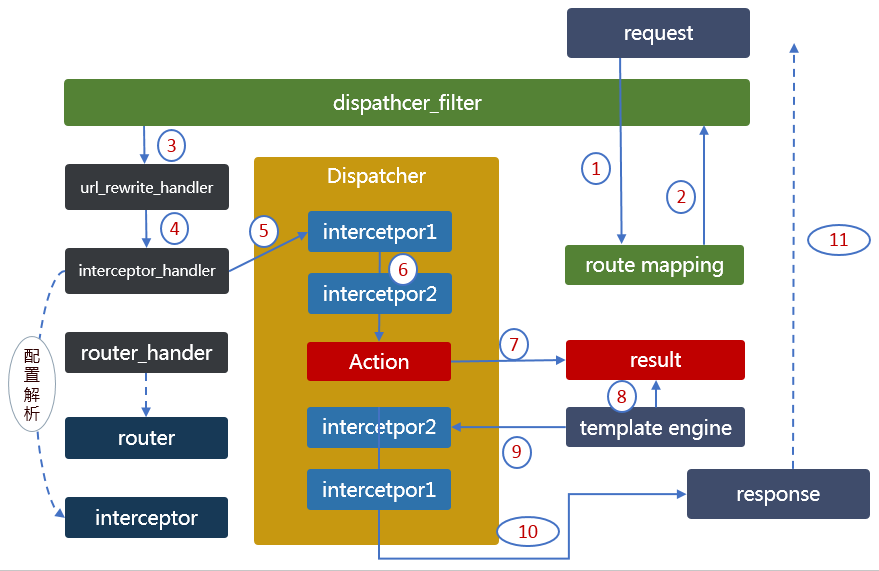
拦截器1.do_before -> 拦截器2.do_before -> Action -> 拦截器2.do_after -> 拦截器1.do_after
配置拦截器:打开hades/config/interceptors.lua配置文件,增加配置:
```
{
mapping = "/user/*", --表示匹配uri为/user/*的请求路径
interceptor = "interceptor.user_interceptor", --拦截器的包路径
exclude = {
"/user/add" --表示排除该请求路径,多个用逗号分隔
}
}
```
### Cookie操作 ###
创建一个Cookie实例:
```
local cookie = Cookie:new(".app.net", "/", "sso_lc", "111", 3600 * 24);
resp.add_cookie(cookie);
```
获取全部Cookie:
```
local req = require("mvc.req");
local cookies = req.get_cookies(); --将所有cookie封装为一个table返回
local value = cookies["sso_lc"] --获取名称为sso_lc的cookie的值
```
按名称删除Cookie,实际上就是添加名称相同的过期cookie
```
local cookie = Cookie:new(".app.net", "/", "sso_lc", "111", -1);
resp.add_cookie(cookie);
```
### 使用hades api ###
待完善
### router配置说明 ###
Action请求路由配置,默认配置文件路径:hades/config/router.lua
```
{
namespace = "/user", --uri前缀
action = "action.user_action", --Action包路径
result = { --返回结果配置
add = { --请求方法名称
success = "/user/add.html" --方法返回结果名称对对应的Actionhtml页面
},
do_add = {
success = "/user/add_success.html",
fail = "/user/add.html",
err = "redirect:/error/500.html", --redirect:/开头,表示重定向到另一个uri
}
}
}
```
这种方法需要对每一个action方法进行配置,较为繁琐,可以使用通配符简化配置,如下:
```
{
namespace = "/user", --uri前缀
action = "action.user_action", --Action包路径
result = { --返回结果配置
__ = { --注意双下划线表示该Action方法名称使用通配符匹配
success = "/user/{1}.html" --Action对应的html页面
}
}
}
```
### 表单验证配置说明 ###
表单验证配置文件默认路径:hades/config/form_validation.lua
```
local form_validation = {
form_name_1 = { --表单配置名称
userName = { --字段名称与表单项name的值一一对应
display = "用户姓名", --字段中文描述,用于错误提示
validator = {
{
must = true, --必填
message = "{1}不能为空" --错误提示{1}将被display替换
},
{
maxlength = 20, --最大长度
message = "{1}长度不能超过{maxlength}" --错误提示{1}将被display替换,{maxlength}将被其值替换
}
}
},
email = {
display = "用户姓名", --字段中文描述,用于错误提示
validator = {
{
handler = "email", --使用email验证handler验证,handler实现,参照hades/form/form_validate.lua文件form_validate.handlers
message = "xxx"
}
}
}
}
}
```
### urlrewrite配置 ###
默认配置文件路径:hades/config/rewrite.lua
```
local rewrite = {
{
from = "^/at/(%w+).html", --uri匹配正则表达式
to = "/view/view?urlStr={1}" --目标action路径{1}被(%w+)匹配的值替换
}
}
return rewrite;
```
举例:当请求/at/ac313ab.html时,将会转发到action:/view/view?urlStr=ac313ab
在整个请求上下文中的uri为:/view/view
ngx.var.uri,获取的仍然是浏览器地址栏的uri
## 一些约定 ##
如:创建一个应用,名称:app-test,即应用根路径为:app-test
* app-test/config,hades框架配置的根文件夹
* app-test/config/form_validation.lua,表单验证配置文件
* app-test/config/hades.lua,hades框架全局配置文件
* app-test/config/interceptors.lua,拦截器配置文件
* app-test/config/rewrite.lua,urlrewrite配置文件
* app-test/config/router.lua,请求路由配置文件
* app-test/interceptor,拦截器源文件的根文件夹
* app-test/mvc,hades框架根文件夹,名称不能被修改
## hades架构 ##
## 相关资源 ##
[OpenResty](http://openresty.org/cn/)官网
[lua.org](http://www.lua.org/)
[Lua book](http://book.luaer.cn/)
[OpenResty最佳实践](https://moonbingbing.gitbooks.io/openresty-best-practices/content/)
[openresty/lua-nginx-module](https://www.nginx.com/resources/wiki/modules/lua/)
[Lua模板引擎 lua-resty-template](https://github.com/bungle/lua-resty-template)
[跟我学Nginx+Lua开发目录贴](http://jinnianshilongnian.iteye.com/blog/2190344)
## 更新日志 ##
待完善