# pyprobml
**Repository Path**: xygone/pyprobml
## Basic Information
- **Project Name**: pyprobml
- **Description**: No description available
- **Primary Language**: Unknown
- **License**: MIT
- **Default Branch**: master
- **Homepage**: None
- **GVP Project**: No
## Statistics
- **Stars**: 0
- **Forks**: 0
- **Created**: 2025-09-02
- **Last Updated**: 2025-09-02
## Categories & Tags
**Categories**: Uncategorized
**Tags**: None
## README
# pyprobml
 Python 3 code to reproduce the figures in the books
[Probabilistic Machine Learning: An Introduction](https://probml.github.io/pml-book/book1.html) (aka "book 1")
and
[Probabilistic Machine Learning: Advanced Topics](https://probml.github.io/pml-book/book2.html)
(aka "book 2").
The code uses the standard Python libraries, such as numpy, scipy, matplotlib, sklearn, etc.
Some of the code (especially in book 2) also uses [JAX](https://github.com/google/jax),
and in some parts of book 1, we also use [Tensorflow 2](https://github.com/tensorflow/tensorflow)
and a little bit of [Torch](https://github.com/pytorch).
See also [probml-utils](https://github.com/probml/probml-utils) for some utility code that is shared across multiple notebooks.
For the latest status of the code,
see [Book 1 dashboard](https://github.com/probml/pyprobml/blob/workflow_testing_indicator/dashboard_figures_book1.md)
and [Book 2 dashboard](https://github.com/probml/pyprobml/blob/workflow_testing_indicator/dashboard_figures_book2.md).
As of September 2022, this code is now in maintenance mode.
## Running the notebooks
The notebooks needed to make all the figures are available at the following locations.
* [All notebooks (sorted by filename)](https://probml.github.io/notebooks)
* [Book 1 notebooks (sorted by chapter)](https://github.com/probml/pyprobml/tree/master/notebooks/book1)
* [Book 2 notebooks (sorted by chapter)](https://github.com/probml/pyprobml/tree/master/notebooks/book2).
### Running notebooks in colab
[Colab](https://colab.research.google.com/notebooks/intro.ipynb) has most of the libraries you will need (e.g., scikit-learn, JAX) pre-installed, and gives you access to a free GPU and TPU. We have a created a
[colab intro](https://colab.research.google.com/github/probml/pyprobml/blob/master/notebooks/tutorials/colab_intro.ipynb)
notebook with more details. To run the notebooks on colab in any browser, you can go to a particular notebook on GitHub and change the domain from `github.com` to `githubtocolab.com` as suggested [here](https://stackoverflow.com/a/67344477/13330701). If you are using Google Chrome browser, you can use ["Open in Colab" Chrome extension](https://chrome.google.com/webstore/detail/open-in-colab/iogfkhleblhcpcekbiedikdehleodpjo) to do the same with a single click.
## Running the notebooks locally
We assume you have already installed [JAX](https://github.com/google/jax#installation) and
[Tensorflow](https://www.tensorflow.org/install) and [Torch](https://pytorch.org/),
since the details on how to do this depend on whether you have a CPU, GPU, etc.
You can use any of the following options to install the other requirements.
* Option 1
```bash
pip install -r https://raw.githubusercontent.com/probml/pyprobml/master/requirements.txt
```
* Option 2
Download [requirements.txt](https://github.com/probml/pyprobml/blob/master/requirements.txt) locally to your path and run
```bash
pip install -r requirements.txt
```
* Option 3
Run the following. (Note the `--depth 1` prevents installing the whole history, which is very large).
```
git clone --depth 1 https://github.com/probml/pyprobml.git
```
Then install manually.
If you want to save the figures, you first need to execute something like this
```
#export FIG_DIR="/teamspace/studios/this_studio/figures"
import os
os.environ["FIG_DIR"] = "/teamspace/studios/this_studio/pyprobml/notebooks/figures"
os.environ["DUAL_SAVE"] = "1" # both pdf and png
```
This is used by the [savefig](https://github.com/probml/probml-utils/blob/main/probml_utils/plotting.py#L78) function
to store pdf files.
## Cloud computing
When you want more power or control than colab gives you,
I recommend you use
https://lightning.ai/docs/overview/studios,
which makes it very easy to develop using VScode, running on a VM accessed from your web browser;
you can then launch on one or more GPUs when needed with a single button click.
Alternatively, if you are a power user, you can try Google Cloud Platform, which supports GPUs and TPUs;
see this [short tutorial on Colab, GCP and TPUs](https://github.com/probml/pyprobml/blob/master/notebooks/tutorials/colab_gcp_tpu_tutorial.md).
## How to contribute
See [this guide](https://github.com/probml/pyprobml/blob/master/CONTRIBUTING.md) for how to contribute code. Please follow [these guidelines](https://github.com/probml/pyprobml/blob/master/notebooks/README.md) to contribute new notebooks to the notebooks directory.
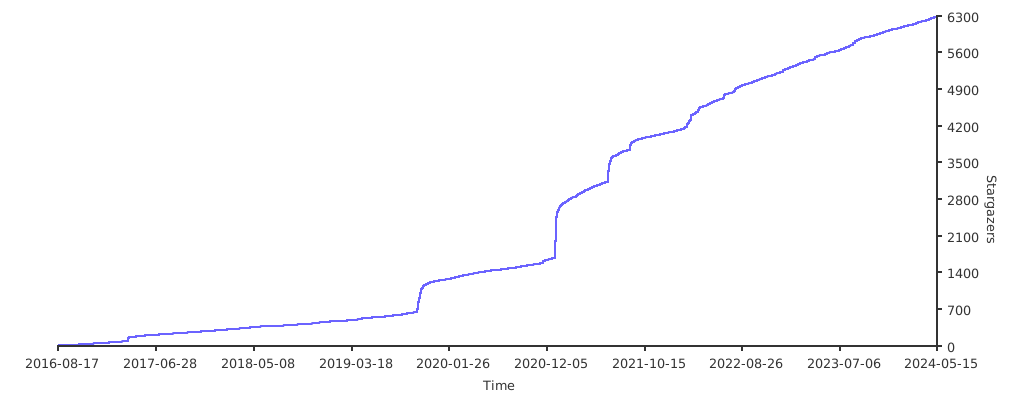
## Metrics
[](https://starchart.cc/probml/pyprobml)
## GSOC
For a summary of some of the contributions to this codebase during Google Summer of Code (GSOC),
see these links: [2021](https://probml.github.io/pml-book/gsoc/gsoc2021.html)
and [2022](https://probml.github.io/pml-book/gsoc/gsoc2022.html).
Python 3 code to reproduce the figures in the books
[Probabilistic Machine Learning: An Introduction](https://probml.github.io/pml-book/book1.html) (aka "book 1")
and
[Probabilistic Machine Learning: Advanced Topics](https://probml.github.io/pml-book/book2.html)
(aka "book 2").
The code uses the standard Python libraries, such as numpy, scipy, matplotlib, sklearn, etc.
Some of the code (especially in book 2) also uses [JAX](https://github.com/google/jax),
and in some parts of book 1, we also use [Tensorflow 2](https://github.com/tensorflow/tensorflow)
and a little bit of [Torch](https://github.com/pytorch).
See also [probml-utils](https://github.com/probml/probml-utils) for some utility code that is shared across multiple notebooks.
For the latest status of the code,
see [Book 1 dashboard](https://github.com/probml/pyprobml/blob/workflow_testing_indicator/dashboard_figures_book1.md)
and [Book 2 dashboard](https://github.com/probml/pyprobml/blob/workflow_testing_indicator/dashboard_figures_book2.md).
As of September 2022, this code is now in maintenance mode.
## Running the notebooks
The notebooks needed to make all the figures are available at the following locations.
* [All notebooks (sorted by filename)](https://probml.github.io/notebooks)
* [Book 1 notebooks (sorted by chapter)](https://github.com/probml/pyprobml/tree/master/notebooks/book1)
* [Book 2 notebooks (sorted by chapter)](https://github.com/probml/pyprobml/tree/master/notebooks/book2).
### Running notebooks in colab
[Colab](https://colab.research.google.com/notebooks/intro.ipynb) has most of the libraries you will need (e.g., scikit-learn, JAX) pre-installed, and gives you access to a free GPU and TPU. We have a created a
[colab intro](https://colab.research.google.com/github/probml/pyprobml/blob/master/notebooks/tutorials/colab_intro.ipynb)
notebook with more details. To run the notebooks on colab in any browser, you can go to a particular notebook on GitHub and change the domain from `github.com` to `githubtocolab.com` as suggested [here](https://stackoverflow.com/a/67344477/13330701). If you are using Google Chrome browser, you can use ["Open in Colab" Chrome extension](https://chrome.google.com/webstore/detail/open-in-colab/iogfkhleblhcpcekbiedikdehleodpjo) to do the same with a single click.
## Running the notebooks locally
We assume you have already installed [JAX](https://github.com/google/jax#installation) and
[Tensorflow](https://www.tensorflow.org/install) and [Torch](https://pytorch.org/),
since the details on how to do this depend on whether you have a CPU, GPU, etc.
You can use any of the following options to install the other requirements.
* Option 1
```bash
pip install -r https://raw.githubusercontent.com/probml/pyprobml/master/requirements.txt
```
* Option 2
Download [requirements.txt](https://github.com/probml/pyprobml/blob/master/requirements.txt) locally to your path and run
```bash
pip install -r requirements.txt
```
* Option 3
Run the following. (Note the `--depth 1` prevents installing the whole history, which is very large).
```
git clone --depth 1 https://github.com/probml/pyprobml.git
```
Then install manually.
If you want to save the figures, you first need to execute something like this
```
#export FIG_DIR="/teamspace/studios/this_studio/figures"
import os
os.environ["FIG_DIR"] = "/teamspace/studios/this_studio/pyprobml/notebooks/figures"
os.environ["DUAL_SAVE"] = "1" # both pdf and png
```
This is used by the [savefig](https://github.com/probml/probml-utils/blob/main/probml_utils/plotting.py#L78) function
to store pdf files.
## Cloud computing
When you want more power or control than colab gives you,
I recommend you use
https://lightning.ai/docs/overview/studios,
which makes it very easy to develop using VScode, running on a VM accessed from your web browser;
you can then launch on one or more GPUs when needed with a single button click.
Alternatively, if you are a power user, you can try Google Cloud Platform, which supports GPUs and TPUs;
see this [short tutorial on Colab, GCP and TPUs](https://github.com/probml/pyprobml/blob/master/notebooks/tutorials/colab_gcp_tpu_tutorial.md).
## How to contribute
See [this guide](https://github.com/probml/pyprobml/blob/master/CONTRIBUTING.md) for how to contribute code. Please follow [these guidelines](https://github.com/probml/pyprobml/blob/master/notebooks/README.md) to contribute new notebooks to the notebooks directory.
## Metrics
[](https://starchart.cc/probml/pyprobml)
## GSOC
For a summary of some of the contributions to this codebase during Google Summer of Code (GSOC),
see these links: [2021](https://probml.github.io/pml-book/gsoc/gsoc2021.html)
and [2022](https://probml.github.io/pml-book/gsoc/gsoc2022.html).
Acknowledgements
For a list of contributors, see
[this list](https://github.com/probml/pyprobml/graphs/contributors).