# tokyo
**Repository Path**: xiaobaima/tokyo
## Basic Information
- **Project Name**: tokyo
- **Description**: No description available
- **Primary Language**: Unknown
- **License**: GPL-3.0
- **Default Branch**: main
- **Homepage**: None
- **GVP Project**: No
## Statistics
- **Stars**: 0
- **Forks**: 0
- **Created**: 2024-12-02
- **Last Updated**: 2024-12-02
## Categories & Tags
**Categories**: Uncategorized
**Tags**: None
## README

~ Rxyhn's configuration files ~
### Thanks for dropping by!
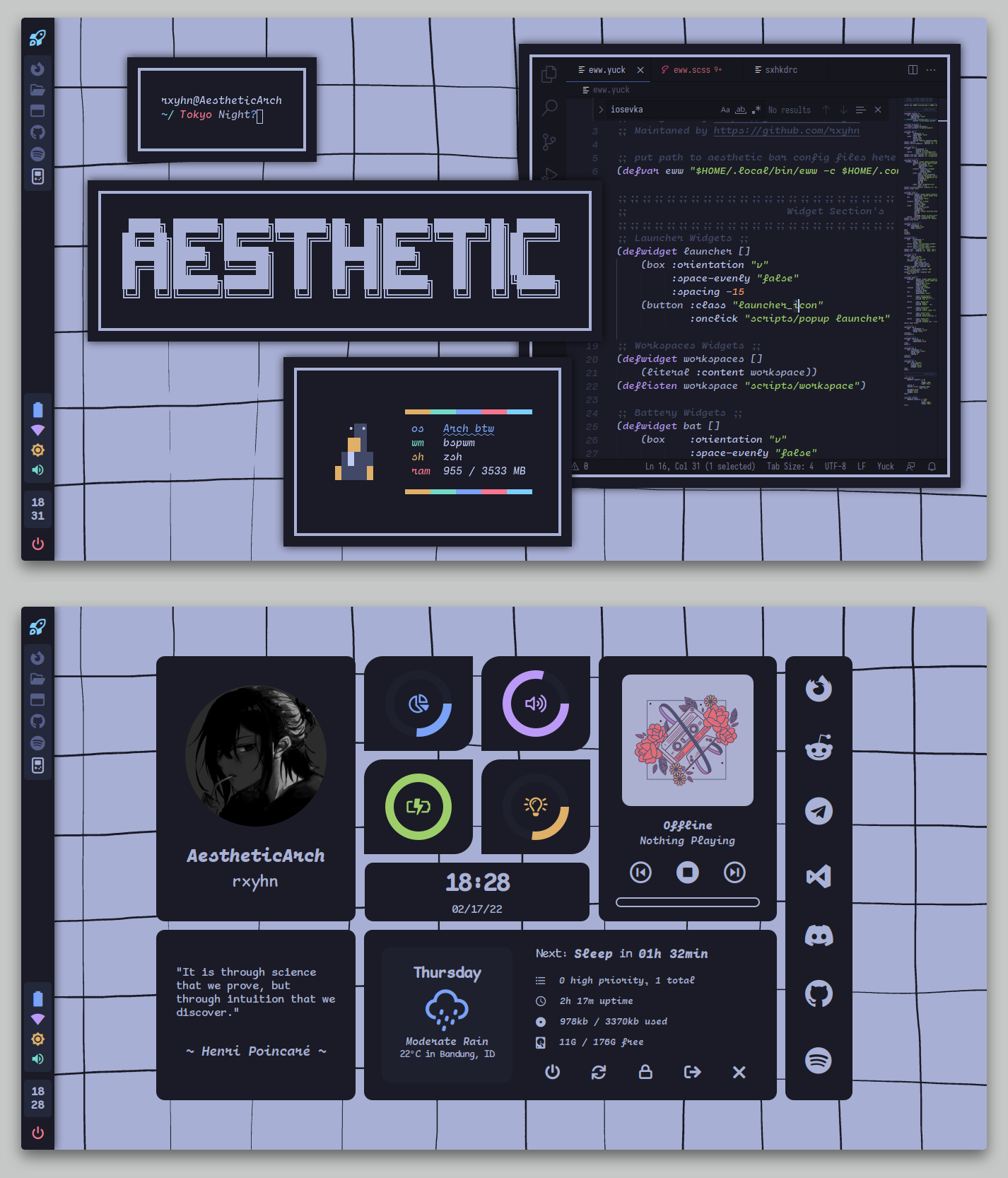 This is my personal collection of configuration files.
You are probably here for my **Aesthetic BSPWM** configuration.
The [setup section](#setup) will guide you through the installation process.
Here are some details about my setup:
- **WM:** [bspwm](https://github.com/baskerville/bspwm)
- **OS:** [Arch Linux](https://archlinux.org)
- **Terminal:** [kitty](https://github.com/kovidgoyal/kitty)
- **Shell:** [zsh](https://wiki.archlinux.org/index.php/Zsh)
- **Widgets:** [eww](https://github.com/elkowar/eww)
- **Compositor:** [picom](https://github.com/ibhagwan/picom)
- **Editor:** [neovim](https://github.com/neovim/neovim)
- **Browser:** [firefox](https://www.mozilla.org/en-US/firefox)
- **File Manager:** [thunar](https://github.com/xfce-mirror/thunar)
- **Application Launcher:** [rofi](https://github.com/davatorium/rofi)
---
## Setup.
> This is step-by-step how to install these bspwm dotfiles. Just [R.T.F.M](https://en.wikipedia.org/wiki/RTFM).
### Installation (Manual)
> After cloning the repository, install the necessary dependencies to replicate by setup.
This is my personal collection of configuration files.
You are probably here for my **Aesthetic BSPWM** configuration.
The [setup section](#setup) will guide you through the installation process.
Here are some details about my setup:
- **WM:** [bspwm](https://github.com/baskerville/bspwm)
- **OS:** [Arch Linux](https://archlinux.org)
- **Terminal:** [kitty](https://github.com/kovidgoyal/kitty)
- **Shell:** [zsh](https://wiki.archlinux.org/index.php/Zsh)
- **Widgets:** [eww](https://github.com/elkowar/eww)
- **Compositor:** [picom](https://github.com/ibhagwan/picom)
- **Editor:** [neovim](https://github.com/neovim/neovim)
- **Browser:** [firefox](https://www.mozilla.org/en-US/firefox)
- **File Manager:** [thunar](https://github.com/xfce-mirror/thunar)
- **Application Launcher:** [rofi](https://github.com/davatorium/rofi)
---
## Setup.
> This is step-by-step how to install these bspwm dotfiles. Just [R.T.F.M](https://en.wikipedia.org/wiki/RTFM).
### Installation (Manual)
> After cloning the repository, install the necessary dependencies to replicate by setup.
Arch Linux (and Arch-based distributions)
> Assuming your **AUR Helper** is [yay](https://github.com/Jguer/yay).
```sh
$ yay -S bspwm sxhkd rofi kitty picom-ibhagwan-git calcurse todotxt \
feh jq dunst betterlockscreen brightnessctl playerctl maim \
xclip imagemagick
```
> Then after the dependencies are installed, copy the files to it's respective folders.
Config and Binaries
```sh
$ mkdir -p $HOME/.config/ && cp -r ./config/* $HOME/.config/
$ mkdir -p $HOME/.local/bin/ && cp -r ./bin/* $HOME/.local/bin/
$ cp -r ./misc/* $HOME/
```
> You will need to install a few fonts.
- **Cartograph CF:** [here](https://coding-fonts.css-tricks.com/fonts/cartograph-cf/)
- **JetBrainsMono NF:** [here](https://github.com/ryanoasis/nerd-fonts)
- **Font Awesome:** [here](https://fontawesome.com/download)
- **Comic Mono :** [here](https://dtinth.github.io/comic-mono-font/)
> Once finished copying the files, you might want to finalize the changes to your system.
```sh
# Rebuilds the font cache
$ fc-cache -fv
```
> Lastly, log out from your current desktop session and log in into bspwm.
## Miscellaneous.
- **Elkowar's Wacky Widgets**
> If you're **NOT** using a monitor with a 1366x768 resolution, you might want to change the `x` and `y` values of the widgets on the config.
- **GTK Theme**
> You can find TokyoNight GTK theme [here](https://github.com/koiosdev/Tokyo-Night-Linux/tree/master/usr/share/themes/TokyoNight).
- **Icon Theme Suggested**
> You can install [this](https://github.com/PapirusDevelopmentTeam/papirus-icon-theme) icon theme that suits the GTK theme.
## Acknowledgements.
- **Thanks to**
- [niraj](https://github.com/niraj998/) for some widgets.