# MobiAgent
**Repository Path**: x92021/MobiAgent
## Basic Information
- **Project Name**: MobiAgent
- **Description**: No description available
- **Primary Language**: Unknown
- **License**: Apache-2.0
- **Default Branch**: main
- **Homepage**: None
- **GVP Project**: No
## Statistics
- **Stars**: 0
- **Forks**: 0
- **Created**: 2025-12-16
- **Last Updated**: 2025-12-16
## Categories & Tags
**Categories**: Uncategorized
**Tags**: None
## README
MobiAgent: A Systematic Framework for Customizable Mobile Agents
| 论文 | Huggingface | App |
English | 中文
---
## 简介
**MobiAgent**是一个强大的、可定制的移动端智能体系统,包含:
* **智能体模型家族:** MobiMind
* **智能体加速框架:** AgentRR
* **智能体评测基准:** MobiFlow
**系统架构**:

## 新闻
- `[2025.12.08]` 🔥 我们发布了全新的推理模型(同时支持 Android 与鸿蒙系统):**MobiMind-Reasoning-4B**
- 原始版本:[MobiMind-Reasoning-4B-1208](https://huggingface.co/IPADS-SAI/MobiMind-Reasoning-4B-1208)
- 4-bit 权重量化(W4A16)版本:[MobiMind-Reasoning-4B-1208-AWQ](https://huggingface.co/IPADS-SAI/MobiMind-Reasoning-4B-1208-AWQ)
使用 **vLLM** 部署量化版本时,请添加 `--dtype float16` 参数以确保兼容性。
- `[2025.11.03]` ✅ 新增"多任务执行模块"与"用户偏好支持"。多任务的使用方式与配置说明见 [此处](runner/mobiagent/multi_task/README.md)。
- `[2025.11.03]` 🧠 新增"用户画像偏好记忆"能力:基于 Mem0 的偏好存储与检索,任务完成后异步用 LLM 提取偏好(原文存储、原文检索,不做本地正则结构化),支持可选 GraphRAG(Neo4j)以增强语义关系检索;检索到的偏好原文会拼接进经验模板,个性化规划流程。详见 [此处](runner/mobiagent/README.md)。
- `[2025.10.31]` 🔥 我们更新了基于 Qwen3-VL-4B-Instruct 的 MobiMind-Mixed 模型!下载地址:[MobiMind-Mixed-4B-1031](https://huggingface.co/IPADS-SAI/MobiMind-Mixed-4B-1031),运行数据集创建和智能体执行器脚本时请添加 `--use_qwen3` 参数。
- `[2025.9.30]` 🚀 增加"本地经验检索"模块,支持基于任务描述的经验模版检索,显著提升任务规划的智能性与效率。
- `[2025.9.29]` 🔥 开源 MobiMind 混合版本,可同时胜任 Decider 与 Grounder 任务!下载试用:[MobiMind-Mixed-7B](https://huggingface.co/IPADS-SAI/MobiMind-Mixed-7B)
- `[2025.8.30]` 我们开源了 MobiAgent!
## 评测结果

## 演示
**移动端应用演示**:
**AgentRR 演示** (左:首次任务;右:后续任务)
**多任务演示**
任务:`帮我在小红书找一下推荐的最畅销的男士牛仔裤,然后在淘宝搜这一款裤子,把淘宝中裤子品牌、名称和价格用微信发给小赵`
## 项目结构
- `agent_rr/` - Agent Record & Replay框架
- `collect/` - 数据收集、标注、处理与导出工具
- `runner/` - 智能体执行器,通过ADB连接手机、执行任务、并记录执行轨迹
- `MobiFlow/` - 基于里程碑DAG的智能体评测基准
- `app/` - MobiAgent安卓App
- `deployment/` - MobiAgent移动端应用的服务部署方式
## 快速开始
### 通过 MobiAgent APP 使用
如果您想直接通过我们的 APP 体验 MobiAgent,请通过 [下载链接](https://github.com/IPADS-SAI/MobiAgent/releases/tag/v1.0) 进行下载,祝您使用愉快!
### 使用 Python 脚本
如果您想通过 Python 脚本来使用 MobiAgent,并借助Android Debug Bridge (ADB) 来控制您的手机,请遵循以下步骤进行:
#### 环境配置
创建虚拟环境,例如,使用conda:
```bash
conda create -n MobiMind python=3.10
conda activate MobiMind
```
最简环境(如果您只想运行agent runner):
```bash
# 安装最简化依赖
pip install -r requirements_simple.txt
```
完整环境(如果您想运行完整流水线):
```bash
pip install -r requirements.txt
# 下载OmniParser模型权重
for f in icon_detect/{train_args.yaml,model.pt,model.yaml} ; do huggingface-cli download microsoft/OmniParser-v2.0 "$f" --local-dir weights; done
# 下载embedding模型
huggingface-cli download BAAI/bge-small-zh --local-dir ./utils/experience/BAAI/bge-small-zh
# Install OCR utils (可选)
sudo apt install tesseract-ocr tesseract-ocr-chi-sim
# 如果需要使用gpu加速ocr,需要根据cuda版本,手动安装paddlepaddle-gpu
# 详情参考 https://www.paddlepaddle.org.cn/install/quick,例如cuda 11.8版本:
python -m pip install paddlepaddle-gpu>=3.1.0 -i https://www.paddlepaddle.org.cn/packages/stable/cu118/
```
#### 手机配置
- 在Android设备上下载并安装 [ADBKeyboard](https://github.com/senzhk/ADBKeyBoard/blob/master/ADBKeyboard.apk)
- 在Android设备上,开启开发者选项,并允许USB调试
- 使用USB数据线连接手机和电脑
#### 模型部署
下载好模型检查点后,使用 vLLM 部署模型推理服务:
**对于 MobiMind-Mixed/Reasoning 模型(基于 Qwen3-VL-4B)**:
```bash
vllm serve IPADS-SAI/MobiMind-Mixed-4B --port
vllm serve Qwen/Qwen3-4B-Instruct --port
```
**对于旧版 MobiMind-Decider/Grounder 模型**:
```bash
vllm serve IPADS-SAI/MobiMind-Decider-7B --port
vllm serve IPADS-SAI/MobiMind-Grounder-3B --port
vllm serve Qwen/Qwen3-4B-Instruct --port
```
#### 启动Agent执行器
在 `runner/mobiagent/task.json` 中写入想要测试的任务列表,然后启动Agent执行器
```bash
python -m runner.mobiagent.mobiagent \
--service_ip <服务IP> \
--decider_port \
--grounder_port \
--planner_port \
--device
```
**参数说明**
- `--service_ip`:服务IP(默认:`localhost`)
- `--decider_port`:决策服务端口(默认:`8000`)
- `--grounder_port`:定位服务端口(默认:`8001`)
- `--planner_port`:规划服务端口(默认:`8002`)
- `--device`: 运行的设备(默认:Android)
执行器启动后,将会自动控制手机并调用Agent模型,完成列表中指定的任务。
**重要提示**:如果您部署的是 MobiMind-Mixed 模型,请将 decider/grounder 端口都设置为 ``。
## 子模块详细使用方式
详细使用方式见各子模块目录下的 `README.md` 文件。
## 引用
如果您在研究中使用了 MobiAgent,欢迎引用我们的[论文](https://arxiv.org/abs/2509.00531):
```
@misc{zhang2025mobiagentsystematicframeworkcustomizable,
title={MobiAgent: A Systematic Framework for Customizable Mobile Agents},
author={Cheng Zhang and Erhu Feng and Xi Zhao and Yisheng Zhao and Wangbo Gong and Jiahui Sun and Dong Du and Zhichao Hua and Yubin Xia and Haibo Chen},
year={2025},
eprint={2509.00531},
archivePrefix={arXiv},
primaryClass={cs.MA},
url={https://arxiv.org/abs/2509.00531},
}
```
## 致谢
我们感谢MobileAgent,UI-TARS,Qwen-VL等优秀的开源工作,同时,感谢国家高端智能化家用电器创新中心对项目的支持。
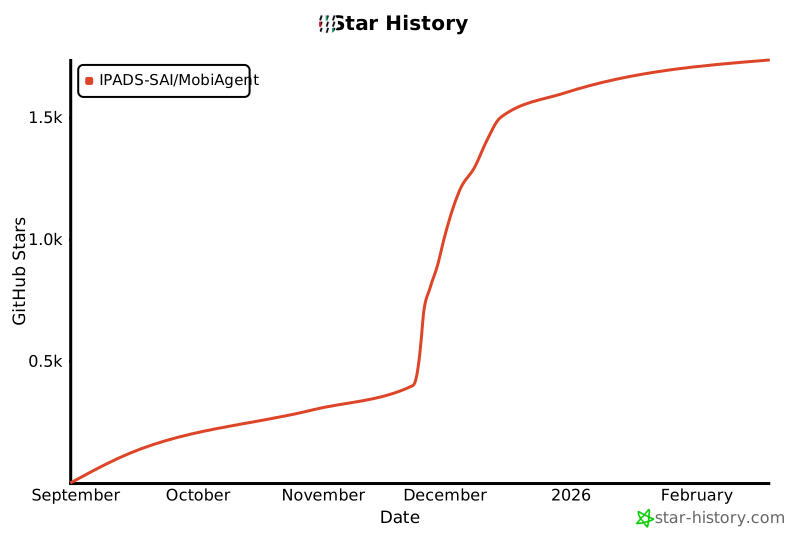
## Star History
[](https://www.star-history.com/#IPADS-SAI/MobiAgent&Date) 


