# SwiftWebUI
**Repository Path**: wy2010344/SwiftWebUI
## Basic Information
- **Project Name**: SwiftWebUI
- **Description**: No description available
- **Primary Language**: Unknown
- **License**: Apache-2.0
- **Default Branch**: master
- **Homepage**: None
- **GVP Project**: No
## Statistics
- **Stars**: 0
- **Forks**: 0
- **Created**: 2021-11-20
- **Last Updated**: 2021-11-20
## Categories & Tags
**Categories**: Uncategorized
**Tags**: None
## README
SwiftWebUI


More details can be found on the related blog post at the
[Always Right Institute](http://www.alwaysrightinstitute.com).
At
[WWDC 2019](https://developer.apple.com/wwdc19/)
Apple announced
[SwiftUI](https://developer.apple.com/xcode/swiftui/).
A single "cross platform", "declarative" framework used to build
tvOS, macOS, watchOS and iOS
UIs.
[SwiftWebUI](https://github.com/SwiftWebUI/SwiftWebUI)
is bringing that to the Web ✔️
**Disclaimer**: This is a toy project!
Do not use for production.
Use it to learn more about SwiftUI and its inner workings.
## SwiftWebUI
So what exactly is
SwiftWebUI?
It allows you to write SwiftUI
[Views](https://developer.apple.com/documentation/swiftui/view)
which display in a web browser:
```swift
import SwiftWebUI
struct MainPage: View {
@State var counter = 0
func countUp() {
counter += 1
}
var body: some View {
VStack {
Text("🥑🍞 #\(counter)")
.padding(.all)
.background(.green, cornerRadius: 12)
.foregroundColor(.white)
.onTapGesture(self.countUp)
}
}
}
```
Results in:
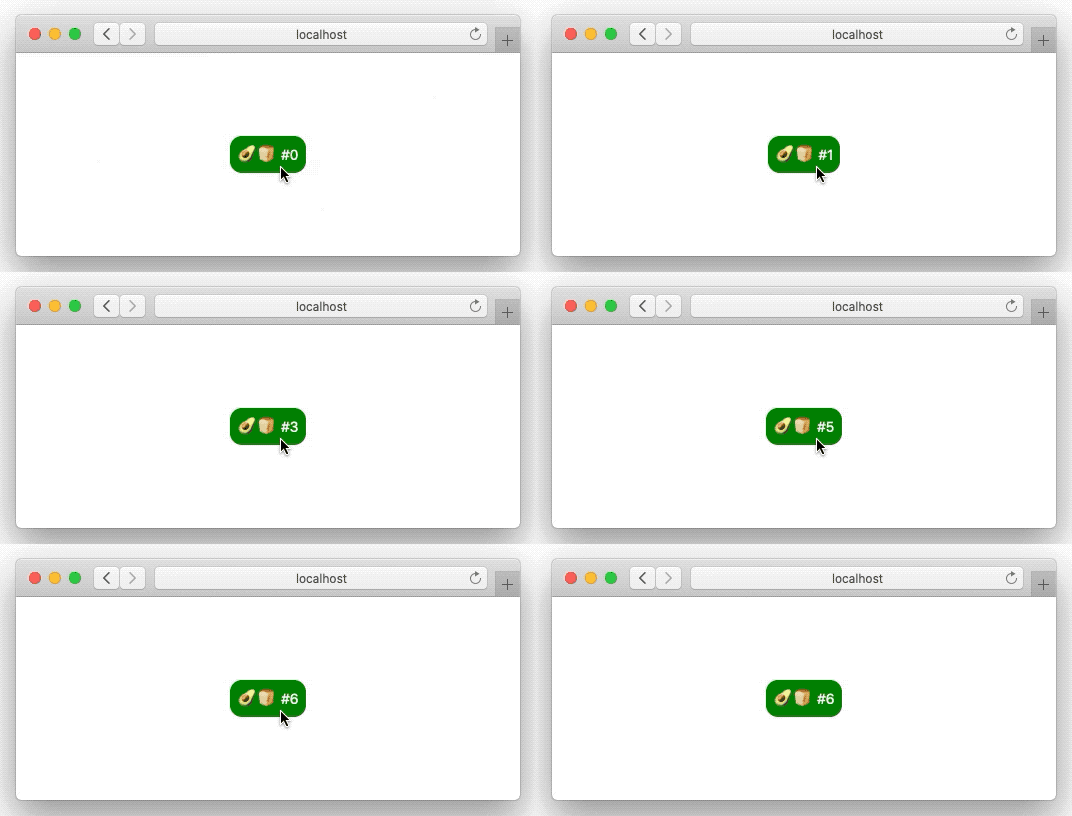 Unlike some other efforts this doesn't just render SwiftUI Views
as HTML.
It also sets up a connection between the browser and the code hosted
in the Swift server, allowing for interaction -
buttons, pickers, steppers, lists, navigation, you get it all!
In other words:
[SwiftWebUI](https://github.com/SwiftWebUI/SwiftWebUI)
is an implementation of (many but not all parts of) the SwiftUI API for the browser.
To repeat the
**Disclaimer**: This is a toy project!
Do not use for production.
Use it to learn more about SwiftUI and its inner workings.
## Requirements
Update 2019-07-08: There are three options to run SwiftWebUI:
### macOS Catalina
One can use a
[macOS Catalina](https://www.apple.com/macos/catalina-preview/)
installation to run SwiftWebUI.
Make sure that the Catalina version matches your Xcode 11 beta! (“Swift ABI” 🤦♀️)
Fortunately it is really easy to
[install Catalina on a separate APFS volume](https://support.apple.com/en-us/HT208891).
And an installation of
[Xcode 11](https://developer.apple.com/xcode/)
is required to get the new Swift 5.1 features SwiftUI makes heavy use of.
Got that? Very well!
> Why is Catalina required? SwiftUI makes use of new Swift 5.1 runtime features
> (e.g. opaque result types).
> Those features are not available in the Swift 5 runtime that ships with
> Mojave.
> (another reason is the use of Combine which is only available in Catalina,
> though that part could be fixed using
> [OpenCombine](https://github.com/broadwaylamb/OpenCombine))
### tuxOS
SwiftWebUI now runs on Linux using
[OpenCombine](https://github.com/broadwaylamb/OpenCombine) (also works without
that, but then some things don't work, e.g. `NavigationView`).
A [Swift 5.1 snapshot](https://swift.org/download/#snapshots) is required.
We also provide a Docker image containing a 5.1 snapshot over here:
[helje5/swift](https://cloud.docker.com/repository/docker/helje5/swift/tags).
### Mojave
The Xcode 11beta iOS 13 simulators do run on Mojave.
You might be able to run SwiftWebUI within an iOS app.
## SwiftWebUI Hello World
To setup a SwiftWebUI project,
create a "macOS tool project" in Xcode 11,
then use the new SwiftPM integration and add
`https://github.com/SwiftWebUI/SwiftWebUI`
as a dependency.
Open the `main.swift` file and replace it's content
with:
```swift
import SwiftWebUI
SwiftWebUI.serve(Text("Holy Cow!"))
```
Compile and run the app in Xcode, open Safari and hit
[`http://localhost:1337/`](http://localhost:1337/):
Unlike some other efforts this doesn't just render SwiftUI Views
as HTML.
It also sets up a connection between the browser and the code hosted
in the Swift server, allowing for interaction -
buttons, pickers, steppers, lists, navigation, you get it all!
In other words:
[SwiftWebUI](https://github.com/SwiftWebUI/SwiftWebUI)
is an implementation of (many but not all parts of) the SwiftUI API for the browser.
To repeat the
**Disclaimer**: This is a toy project!
Do not use for production.
Use it to learn more about SwiftUI and its inner workings.
## Requirements
Update 2019-07-08: There are three options to run SwiftWebUI:
### macOS Catalina
One can use a
[macOS Catalina](https://www.apple.com/macos/catalina-preview/)
installation to run SwiftWebUI.
Make sure that the Catalina version matches your Xcode 11 beta! (“Swift ABI” 🤦♀️)
Fortunately it is really easy to
[install Catalina on a separate APFS volume](https://support.apple.com/en-us/HT208891).
And an installation of
[Xcode 11](https://developer.apple.com/xcode/)
is required to get the new Swift 5.1 features SwiftUI makes heavy use of.
Got that? Very well!
> Why is Catalina required? SwiftUI makes use of new Swift 5.1 runtime features
> (e.g. opaque result types).
> Those features are not available in the Swift 5 runtime that ships with
> Mojave.
> (another reason is the use of Combine which is only available in Catalina,
> though that part could be fixed using
> [OpenCombine](https://github.com/broadwaylamb/OpenCombine))
### tuxOS
SwiftWebUI now runs on Linux using
[OpenCombine](https://github.com/broadwaylamb/OpenCombine) (also works without
that, but then some things don't work, e.g. `NavigationView`).
A [Swift 5.1 snapshot](https://swift.org/download/#snapshots) is required.
We also provide a Docker image containing a 5.1 snapshot over here:
[helje5/swift](https://cloud.docker.com/repository/docker/helje5/swift/tags).
### Mojave
The Xcode 11beta iOS 13 simulators do run on Mojave.
You might be able to run SwiftWebUI within an iOS app.
## SwiftWebUI Hello World
To setup a SwiftWebUI project,
create a "macOS tool project" in Xcode 11,
then use the new SwiftPM integration and add
`https://github.com/SwiftWebUI/SwiftWebUI`
as a dependency.
Open the `main.swift` file and replace it's content
with:
```swift
import SwiftWebUI
SwiftWebUI.serve(Text("Holy Cow!"))
```
Compile and run the app in Xcode, open Safari and hit
[`http://localhost:1337/`](http://localhost:1337/):
 ## 🥑🍞 AvocadoToast
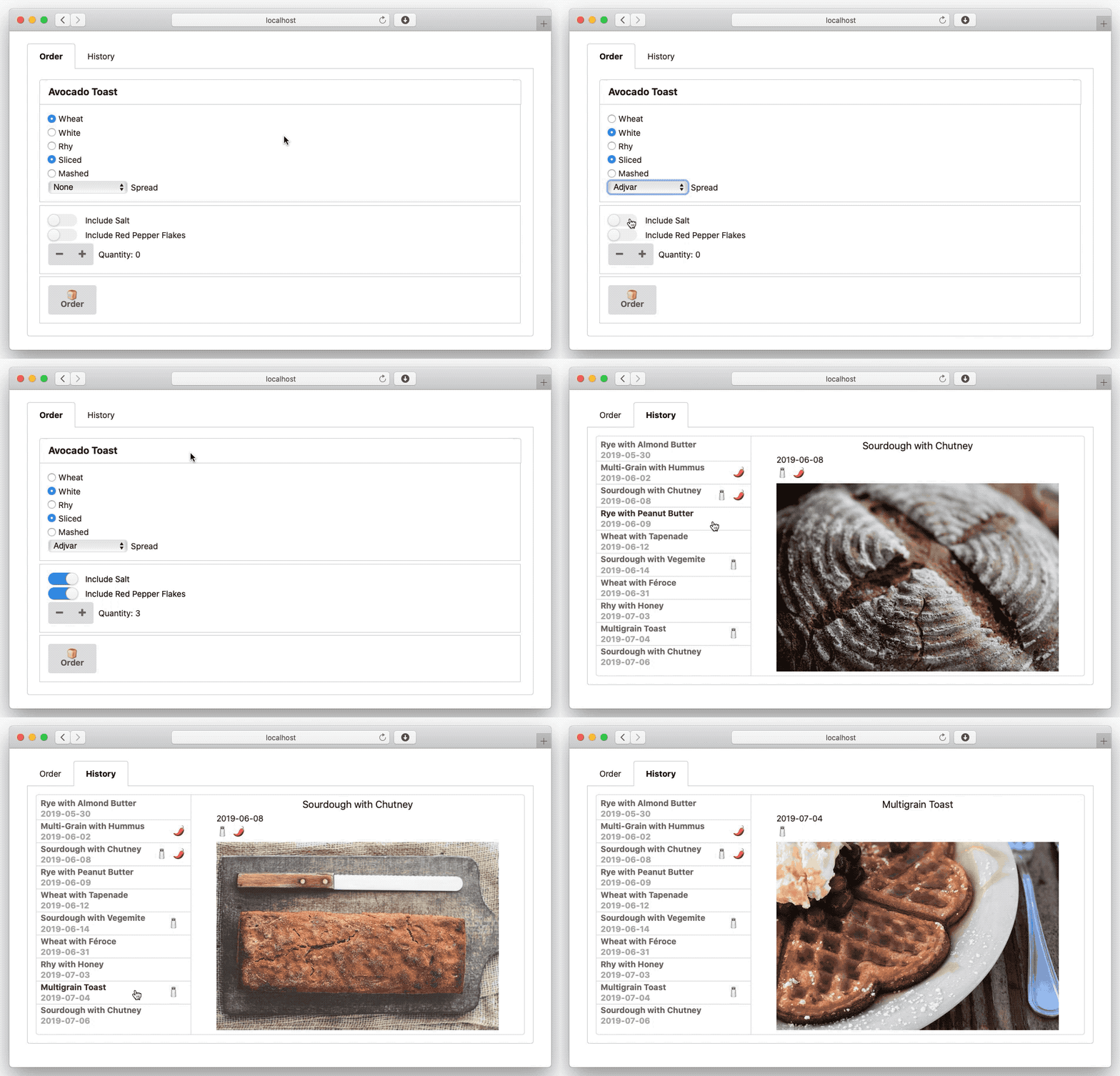
A small SwiftWebUI sample based on the
[SwiftUI Essentials](https://developer.apple.com/videos/play/wwdc2019/216)
"Avocado Toast App".
Find it over here:
[AvocadoToast](https://github.com/SwiftWebUI/AvocadoToast).
## 🥑🍞 AvocadoToast
A small SwiftWebUI sample based on the
[SwiftUI Essentials](https://developer.apple.com/videos/play/wwdc2019/216)
"Avocado Toast App".
Find it over here:
[AvocadoToast](https://github.com/SwiftWebUI/AvocadoToast).
 ## Who
Brought to you by
[The Always Right Institute](http://www.alwaysrightinstitute.com)
and
[ZeeZide](http://zeezide.de).
We like
[feedback](https://twitter.com/ar_institute),
GitHub stars,
cool [contract work](http://zeezide.com/en/services/services.html),
presumably any form of praise you can think of.
## Who
Brought to you by
[The Always Right Institute](http://www.alwaysrightinstitute.com)
and
[ZeeZide](http://zeezide.de).
We like
[feedback](https://twitter.com/ar_institute),
GitHub stars,
cool [contract work](http://zeezide.com/en/services/services.html),
presumably any form of praise you can think of.