# UIEffect
**Repository Path**: wangbenchong/uieffect
## Basic Information
- **Project Name**: UIEffect
- **Description**: 在github上看到一个日本人写的各种ui效果,我把它从built-in扩展到支持urp,并在最新版Unity6上测试运行通过
- **Primary Language**: Unknown
- **License**: MIT
- **Default Branch**: master
- **Homepage**: None
- **GVP Project**: No
## Statistics
- **Stars**: 2
- **Forks**: 0
- **Created**: 2024-08-07
- **Last Updated**: 2025-06-25
## Categories & Tags
**Categories**: Uncategorized
**Tags**: None
## README
# What I Do After Fork
Test on Unity6 URP pipeline. just work well(I don't know why built-in pipeline code also work in urp pipeline)
- Add Folder "Resources/SRP"
- Add `SetNewMaterialShader` function in `BaseMaterialEffect.cs`
```c#
///
/// Set New Material Shader. Based on the current pipeline.
///
///
///
protected void SetNewMaterialShader(Material newMaterial, string baseName)
{
//Built-in renderer pipeline
if (GraphicsSettings.defaultRenderPipeline == null)
{
newMaterial.shader = Shader.Find($"Hidden/{newMaterial.shader.name} ({baseName})");
}
//SRP renderer pipeline
else
{
newMaterial.shader = Shader.Find($"Hidden/SRP_{newMaterial.shader.name} ({baseName})");
}
}
```
- All the code `newMaterial.shader = ...` replaced by `SetNewMaterialShader` function we just add.
UIEffect
===
UIEffect provides visual effect components for Unity UI.
[](https://openupm.com/packages/com.coffee.ui-effect/)
[](https://github.com/mob-sakai/UIEffect/releases)
[](https://github.com/mob-sakai/UIEffect/releases)

[](https://github.com/mob-sakai/UIEffect/blob/master/LICENSE.txt)
[](http://makeapullrequest.com)
[](https://github.com/mob-sakai/UIEffect/subscription)
[](https://twitter.com/intent/follow?screen_name=mob_sakai)
<< [Description](#Description) | [WebGL Demo](#demo) | [Installation](#installation) | [Usage](#usage) | [Example of using](#example-of-using) | [Change log](https://github.com/mob-sakai/UIEffect/blob/upm/CHANGELOG.md) | [Support](#support) >>
## Description
Let's decorate your UI with effects!
You can control parameters as you like from the script as well as inspector.
AnimationClip is supported as a matter of course!
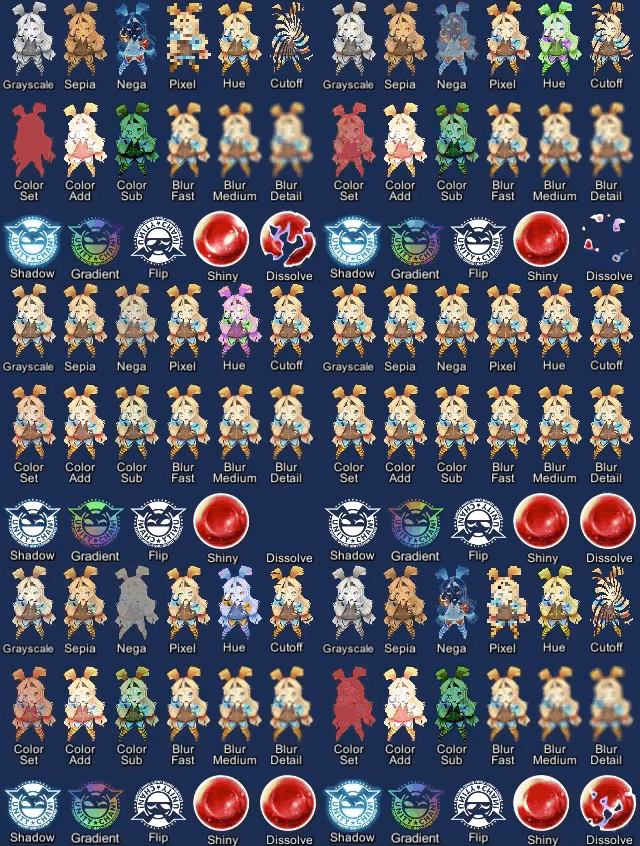
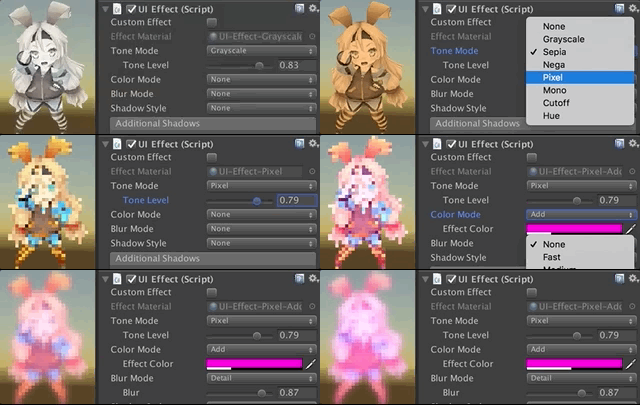
#### Available effects
| Component | Features | Screenshot |
| -- | -- | -- |
| **UIEffect** | Combine some visual effects.
**Effect Mode:** Grayscale, Sepia, Nega, Pixelation
**Color Mode:** Multiply, Fill, Additive, Subtract
**Blur Mode:** Fast, Medium, Detail
**Advanced Blur:** Enable more beautiful blurring. | ![][eff1] |
| **UIShiny** | Apply shining effect to a graphic.
The effect does not require Mask component or normal map.
**Parameters:** Effect factor, Width, Rotation, Softness, Brightness, Gloss | ![][eff2] |
| **UIDissolve** | Apply dissolve effect to a graphic.
**Color Mode for edge:** Multiply, Fill, Additive, Subtract
**Parameters:** Effect factor, Width, Rotation, Softness, Edge color
**Options:** Effect area, Keep effect aspect ratio | ![][eff3] |
| **UIHsvModifier** | Modify HSV for graphic.
**Target:** Color, Range
**Adjustment:** Hue, Saturation, Value | ![][eff4] |
| **UITransition Effect** | Apply transition effect with a single channel texture.
**Effect Mode:** Cutoff, Fade, Dissolve
**Options:** Effect area, Keep effect aspect ratio, transition texture
**Pass Ray On Hidden:** Disable the graphic's raycastTarget on hidden. | ![][eff5] |
[eff1]:https://user-images.githubusercontent.com/12690315/46639603-258df180-cba2-11e8-8f50-9e93bdc4c96e.png
[eff2]:https://user-images.githubusercontent.com/12690315/46639689-b1078280-cba2-11e8-8716-cbc634af7293.gif
[eff3]:https://user-images.githubusercontent.com/12690315/46639690-b1078280-cba2-11e8-8aa9-1d2650fe9a62.gif
[eff4]:https://user-images.githubusercontent.com/12690315/43200006-d6e2bf54-904e-11e8-9f22-0c0f9ce5912f.gif
[eff5]:https://user-images.githubusercontent.com/12690315/46639688-b1078280-cba2-11e8-8bbb-16b8498bca5f.gif
##### The following effects can be used with the above components.
| Component | Features | Screenshot |
| -- | -- | -- |
| **UIShadow** | Add shadow/outline to a graphic.
The performance is better than the default Shadow/Outline component.
**ShadowStyle:** Shadow, Shadow3, Outline, Outline8 | ![][meff1] |
| **UIGradient** | Change vertex color as gradient with angle and offset.
**Direction:** Horizontal, Vertical, Angle, Diagonal
**Options:** Offset, Color space | ![][meff2] |
| **UIFlip** | Flip a graphic.
**Direction:** Horizontal, Vertical, Both | ![][meff3] |
[meff1]:https://user-images.githubusercontent.com/12690315/46639604-258df180-cba2-11e8-98a9-aa31f04c695d.png
[meff2]:https://user-images.githubusercontent.com/12690315/40716995-ca87665e-6445-11e8-8233-ec2e21fefd6b.png
[meff3]:https://user-images.githubusercontent.com/12690315/40716996-cab1fd7e-6445-11e8-9753-962d23991d86.png
## Demo
[WebGL Demo](http://mob-sakai.github.io/UIEffect)
## Installation
#### Requirement
* Unity 2017.1 or later
* No other SDK are required
#### Using OpenUPM (for Unity 2018.3 or later)
This package is available on [OpenUPM](https://openupm.com).
You can install it via [openupm-cli](https://github.com/openupm/openupm-cli).
```
openupm add com.coffee.ui-effect
```
#### Using Git (for Unity 2018.3 or later)
Find the manifest.json file in the Packages folder of your project and edit it to look like this:
```js
{
"dependencies": {
"com.coffee.ui-effect": "https://github.com/mob-sakai/UIEffect.git",
...
},
}
```
To update the package, change suffix `#{version}` to the target version.
* e.g. `"com.coffee.ui-effect": "https://github.com/mob-sakai/UIEffect.git#4.0.0",`
Or, use [UpmGitExtension](https://github.com/mob-sakai/UpmGitExtension) to install and update the package.
#### For Unity 2018.2 or earlier
1. Download a source code zip file from [Releases](https://github.com/mob-sakai/UIEffect/releases) page
2. Extract it
3. Import it into the following directory in your Unity project
- `Packages` (It works as an embedded package. For Unity 2018.1 or later)
- `Assets` (Legacy way. For Unity 2017.1 or later)
## How to play demo
- For Unity 2019.1 or later
- Open `Package Manager` window and select `UI Effect` package in package list and click `Demo > Import in project` button
- For Unity 2018.4 or earlier
- Click `Assets/Samples/UIEffect/Import Demo` from menu
The assets will be imported into `Assets/Samples/UI Effect/{version}/Demo`.
Open `
## Usage
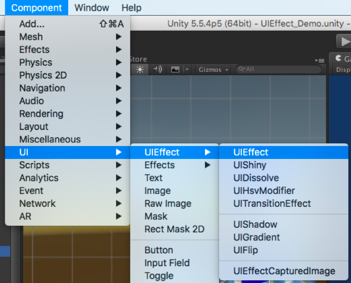
1. Add any effect component to UI element (Image, RawImage, Text, etc...) from `Add Component` in inspector or `Component > UI > UIEffect > ...` menu.
2. Adjust the parameters of the effect as you like, in inspector.

3. You can add or modify effects from the script.
```cs
var uieffect = gameObject.AddComponent();
uieffect.effectMode = EffectMode.Grayscale;
uieffect.effectFactor = 0.85f;
uieffect.colorMode = ColorMode.Add;
uieffect.effectColor = Color.white;
uieffect.colorFactor = 0.1f;
uieffect.blurMode = BlurMode.FastBlur;
uieffect.blurFactor = 1;
```
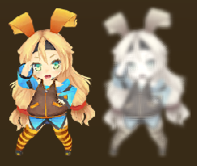
4. Enjoy!
## Example of using
UIEffect can easily be used in a variety of cases in the game.
| Case | Description | Screenshot |
| -- | -- | -- |
| Lock/unlock contents | Use UIEffect to apply grayscale.
Indicate to user that the content is unavailable. | ![][ex1] |
| Silhouette | Use UIEffect for filling color. | ![][ex2] |
| Soft shadow/
Outer glow | Use UIEffect and UIShadow to blur the shadow. | ![][ex3] |
| Colored shadow | Use UIEffect and UIShadow to fill shadow with color. | ![][ex4] |
| Blurred dynamic font | Use UIEffect to blur text.
To blur dynamic font cleanly, enable `Advanced Blur` option. | ![][ex5] |
| Text with outline & shadow | Use two UIShadows to add outline and shadow.
There is less overdraw than default Outline/Shadow. | ![][ex6] |
| Shining button | Use UIShiny for shining button.
Indicate to user that you can press the button. | ![][ex7] |
| Screen transition | Use UITransitionEffect to transition the screen with any transition texture. | ![][ex8] |
[ex1]:https://user-images.githubusercontent.com/12690315/46563469-aba8fe80-c93c-11e8-850f-949f6f8da742.png
[ex2]:https://user-images.githubusercontent.com/12690315/46563576-3db10700-c93d-11e8-960e-4336ff3ce481.png
[ex3]:https://user-images.githubusercontent.com/12690315/46566001-452edb00-c952-11e8-9cc4-6098a9eb67f3.png
[ex4]:https://user-images.githubusercontent.com/12690315/46566000-452edb00-c952-11e8-8d20-6ccc3fa92ae4.png
[ex5]:https://user-images.githubusercontent.com/12690315/46566002-45c77180-c952-11e8-87cb-4d915e0614be.png
[ex6]:https://user-images.githubusercontent.com/12690315/46566003-45c77180-c952-11e8-9b47-7bf563ffbaa7.png
[ex7]:https://user-images.githubusercontent.com/12690315/46563539-fb87c580-c93c-11e8-8c08-0f21872c47d4.gif
[ex8]:https://user-images.githubusercontent.com/12690315/46565182-dfd5ec80-c947-11e8-834f-a2ef67ad0d95.gif
## License
* MIT
* © UTJ/UCL
## Support(这是给原作者的充电,与我无关)
This is an open-source project that I am developing in my free time.
If you like it, you can support me.
By supporting, you let me spend more time working on better tools that you can use for free. :)
[](https://www.patreon.com/join/2343451?)
[](https://github.com/users/mob-sakai/sponsorship)
## Author
[mob-sakai](https://github.com/mob-sakai)
[](https://twitter.com/intent/follow?screen_name=mob_sakai)
## See Also
* GitHub page : https://github.com/mob-sakai/UIEffect
* Releases : https://github.com/mob-sakai/UIEffect/releases
* Issue tracker : https://github.com/mob-sakai/UIEffect/issues
* Change log : https://github.com/mob-sakai/UIEffect/blob/upm/CHANGELOG.md