# Fastis
**Repository Path**: vcxgo_admin/Fastis
## Basic Information
- **Project Name**: Fastis
- **Description**: No description available
- **Primary Language**: Unknown
- **License**: MIT
- **Default Branch**: master
- **Homepage**: None
- **GVP Project**: No
## Statistics
- **Stars**: 0
- **Forks**: 0
- **Created**: 2024-05-23
- **Last Updated**: 2024-05-23
## Categories & Tags
**Categories**: Uncategorized
**Tags**: None
## README
 [](https://github.com/apple/swift-package-manager)
[](https://cocoapods.org/pods/Fastis)
[](https://swift.org)
[](https://developer.apple.com/xcode)
[](https://en.wikipedia.org/wiki/MIT_License)
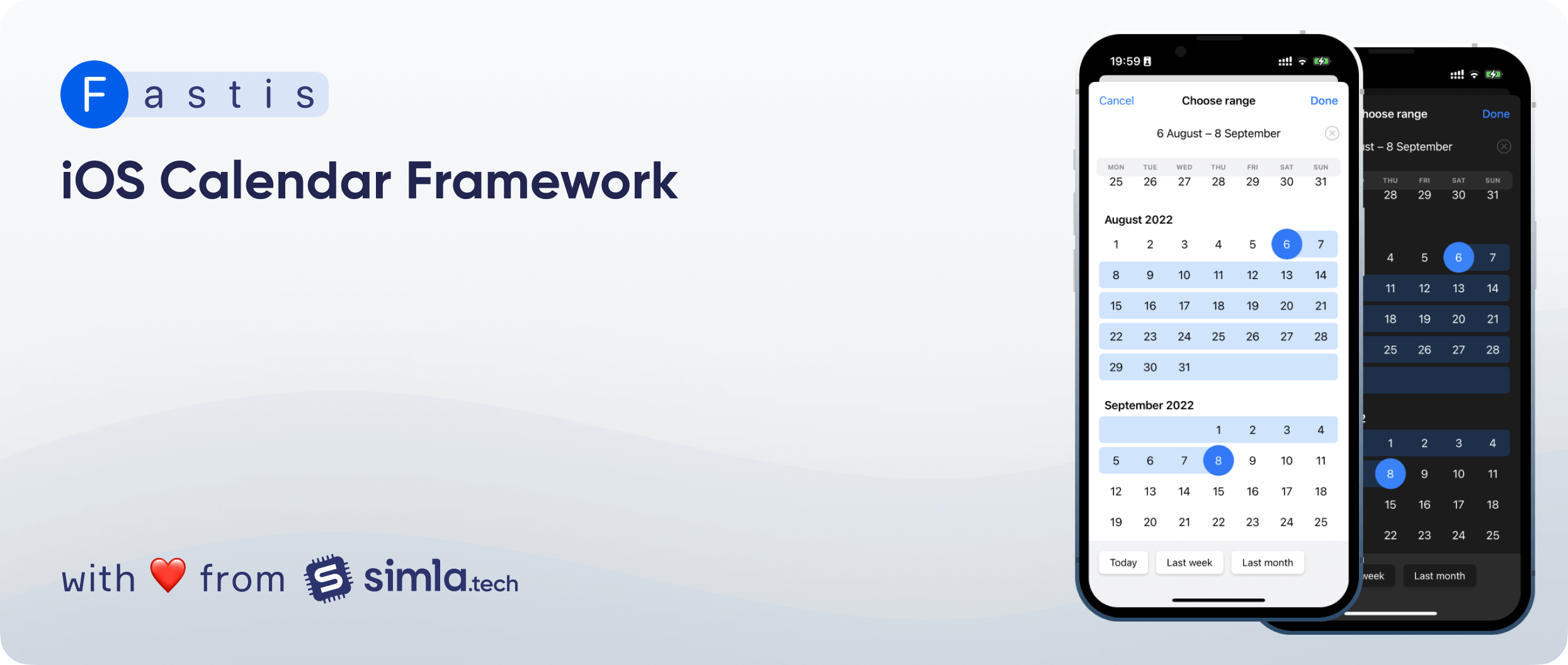
Fastis is a fully customisable UI component for picking dates and ranges created using the [JTAppleCalendar](https://github.com/patchthecode/JTAppleCalendar) library.
- [Requirements](#requirements)
- [Features](#features)
- [Android implementation](#android-implementation)
- [Installation](#installation)
- [Usage](#usage)
- [Quick Start](#quick-start)
- [Single and range modes](#single-and-range-modes)
- [Configuration](#configuration)
- [Shortcuts](#shortcuts)
- [Customization](#customization)
- [SwiftUI](#swiftui)
- [Documentation](#documentation)
- [Credits](#credits)
- [License](#license)
## Requirements
- iOS 13.0+
- Xcode 11.0+
- Swift 5.0+
## Features
- [x] Flexible customization
- [x] Shortcuts for dates and ranges
- [x] Single date and date range modes
- [x] Detailed [documentation](https://simla-tech.github.io/Fastis/documentation/fastis)
## Android implementation
* [appmonkey8010/AMCalendar](https://github.com/appmonkey8010/AMCalendar)
## Installation
### CocoaPods
[CocoaPods](http://cocoapods.org) is a dependency manager for Cocoa projects. You can install it with the following command:
```bash
$ gem install cocoapods
```
To integrate Fastis into your Xcode project using CocoaPods, specify it in your `Podfile`:
```ruby
source 'https://github.com/CocoaPods/Specs.git'
platform :ios, '13.0'
use_frameworks!
target '' do
pod 'Fastis', '~> 2.0'
end
```
Then, run the following command:
```bash
$ pod install
```
### Swift Package Manager
The [Swift Package Manager](https://swift.org/package-manager/) is a tool for automating the distribution of Swift code and is integrated into the `swift` compiler.
Once you have your Swift package set up, adding Fastis as a dependency is as easy as adding it to the `dependencies` value of your `Package.swift`.
```swift
dependencies: [
.package(url: "https://github.com/simla-tech/Fastis.git", .upToNextMajor(from: "2.0.0"))
]
```
### Carthage
Carthage isn't supported.
### Manually
If you prefer not to use either of the dependency managers mentioned above, you can manually integrate Fastis into your project.
## Usage
### Quick Start
```swift
import Fastis
class MyViewController: UIViewController {
func chooseDate() {
let fastisController = FastisController(mode: .range)
fastisController.title = "Choose range"
fastisController.maximumDate = Date()
fastisController.allowToChooseNilDate = true
fastisController.shortcuts = [.today, .lastWeek]
fastisController.dismissHandler = { [weak self] action in
switch action {
case .done(let newValue):
...
case .cancel:
...
}
}
fastisController.present(above: self)
}
}
```
### Single and range modes
If you want to get a single date, you have to use the `Date` type:
```swift
let fastisController = FastisController(mode: .single)
fastisController.initialValue = Date()
fastisController.dismissHandler = { [weak self] action in
switch action {
case .done(let resultDate):
print(resultDate) // resultDate is Date
case .cancel:
...
}
}
```
If you want to get a date range, you have to use the `FastisRange` type:
```swift
let fastisController = FastisController(mode: .range)
fastisController.initialValue = FastisRange(from: Date(), to: Date()) // or .from(Date(), to: Date())
fastisController.dismissHandler = { [weak self] action in
switch action {
case .done(let resultRange):
print(resultRange) // resultRange is FastisRange
case .cancel:
...
}
}
```
### Configuration
FastisController has the following default configuration parameters:
```swift
var shortcuts: [FastisShortcut] = []
var allowsToChooseNilDate: Bool = false
var dismissHandler: ((DismissAction) -> Void)? = nil
var initialValue: Value? = nil
var minimumDate: Date? = nil
var maximumDate: Date? = nil
var selectMonthOnHeaderTap: Bool = true
var allowDateRangeChanges: Bool = true
var closeOnSelectionImmediately: Bool = false
```
- `shortcuts`- Shortcuts array. The default value is `[]`. See [Shortcuts](#shortcuts) section
- `allowsToChooseNilDate`- Allow to choose `nil` date. If you set `true`, the done button will always be enabled and you will be able to reset selection by you tapping on selected date again. The default value is `false`.
- `dismissHandler`- The block to execute after the dismissal finishes. The default value is `nil`. Return DismissAction.done(FastisValue?) after the "Done" button will be tapped or DismissAction.cancel when controller dismissed without tapped the "Done" button.
- `initialValue`- And initial value which will be selected by default. The default value is `nil`.
- `minimumDate`- Minimal selection date. Dates less than current will be marked as unavailable. The default value is `nil`.
- `maximumDate`- Maximum selection date. Dates more significant than current will be marked as unavailable. The default value is `nil`.
- `selectMonthOnHeaderTap` (Only for `.range` mode) - Set this variable to `true` if you want to allow select date ranges by tapping on months. The default value is `true`.
- `allowDateRangeChanges` (Only for `.range` mode) - Set this variable to `false` if you want to disable date range changes. Next tap after selecting a range will start a new range selection. The default value is `true`.
- `closeOnSelectionImmediately` (Only for `.single` mode) - Set this variable to `true` if you want to hide view of the selected date and close the controller right after the date is selected. The default value is `false`
[Documentation Reference](https://simla-tech.github.io/Fastis/documentation/fastis/fastiscontroller)
### Shortcuts
Using shortcuts allows you to select set dates or date ranges quickly.
By default `.shortcuts` is empty. The bottom container will be hidden if you don't provide any shortcuts.
In Fastis available some prepared shortcuts for each mode:
- For **`.single`**: `.today`, `.tomorrow`, `.yesterday`
- For **`.range`**: `.today`, `.lastWeek`, `.lastMonth`
Also, you can create your own shortcut:
```swift
var customShortcut = FastisShortcut(name: "Today") {
let now = Date()
return FastisRange(from: now.startOfDay(), to: now.endOfDay())
}
fastisController.shortcuts = [customShortcut, .lastWeek]
```
[Documentation Reference](https://simla-tech.github.io/Fastis/documentation/fastis/fastisshortcut)
### Customization
Fastis can be customised global or local. `FastisConfig` have some sections:
- `calendar` - Base calendar that used to render UI. Default value is `.current`.
- `controller` - base view controller (`cancelButtonTitle`, `doneButtonTitle`, etc.)
- `monthHeader` - month titles
- `dayCell` - day cells (selection parameters, font, etc.)
- `todayCell` - today cell (selection parameters, font, circle view, etc.). If you set `todayCell` to `nil`, view will use `dayCell` instead
- `weekView` - top header view with weekday names
- `currentValueView` - current value view appearance (clear button, date format, etc.)
- `shortcutContainerView` - bottom view with shortcuts
- `shortcutItemView` - shortcut item in the bottom view
To customise all Fastis controllers in your app, use `FastisConfig.default`:
```swift
FastisConfig.default.monthHeader.labelColor = .red
```
To customise a special FastisController instance:
```swift
var customConfig = FastisConfig.default
customConfig.controller.dayCell.dateLabelColor = .blue
let fastisController = FastisController(mode: .range, config: customConfig)
```
To customise a special FastisController instance with custom calendar:
```swift
var customConfig: FastisConfig = .default
var calendar = Calendar(identifier: .islamicUmmAlQura)
calendar.locale = .autoupdatingCurrent
customConfig.calendar = calendar
let fastisController = FastisController(mode: .range, config: customConfig)
fastisController.minimumDate = calendar.date(byAdding: .month, value: -2, to: Date())
fastisController.maximumDate = calendar.date(byAdding: .month, value: 3, to: Date())
```
To customise a today cell:
```swift
let config = FastisConfig.withCurrentDate
config.todayCell.dateLabelColor = .red
config.todayCell.onRangeLabelColor = .red
config.todayCell.circleSize = 4
config.todayCell.circleViewColor = .red
```
If you don't want to customzie today date cell, just set `config.todayCell = nil` and today cell will use `dayCell` config.
[Documentation Reference](https://simla-tech.github.io/Fastis/documentation/fastis/fastisconfig)
### SwiftUI
The library also contains a SwiftUI wrapper
If you want to get a date range:
```swift
FastisView(mode: .single, dismissHandler: { action in
switch action {
case .done(let resultDate):
print(resultDate) // resultDate is Date
case .cancel:
...
}
})
.title("Choose range")
.initialValue(self.currentValue as? FastisRange)
.minimumDate(Calendar.current.date(byAdding: .month, value: -2, to: Date()))
.maximumDate(Calendar.current.date(byAdding: .month, value: 3, to: Date()))
.allowToChooseNilDate(true)
.allowDateRangeChanges(false)
.shortcuts([.lastWeek, .lastMonth])
.selectMonthOnHeaderTap(true)
```
If you want to get a single date:
```swift
FastisView(mode: .range, dismissHandler: { action in
switch action {
case .done(let resultRange):
print(resultRange) // resultRange is FastisRange
case .cancel:
...
}
})
.title("Choose date")
.initialValue(self.currentValue as? Date)
.minimumDate(Calendar.current.date(byAdding: .month, value: -2, to: Date()))
.maximumDate(Date())
.allowToChooseNilDate(true)
.allowDateRangeChanges(false)
.shortcuts([.yesterday, .today, .tomorrow])
.closeOnSelectionImmediately(true)
```
[Documentation Reference]([https://simla-tech.github.io/Fastis/documentation/fastis/fastisconfig](https://simla-tech.github.io/Fastis/documentation/fastis/fastisview))
## Documentation
You can use **detailed DocC documentation** which contains reference documentation about all components.
[-> Go to DocC documentation](https://simla-tech.github.io/Fastis/documentation/fastis/)
## Credits
- Ilya Kharlamov ([@ilia3546](https://github.com/ilia3546))
- Uriy Devyataev ([@UriyDevyataev](https://github.com/UriyDevyataev))
## License
Fastis is released under the MIT license. See LICENSE for details.
[](https://github.com/apple/swift-package-manager)
[](https://cocoapods.org/pods/Fastis)
[](https://swift.org)
[](https://developer.apple.com/xcode)
[](https://en.wikipedia.org/wiki/MIT_License)
Fastis is a fully customisable UI component for picking dates and ranges created using the [JTAppleCalendar](https://github.com/patchthecode/JTAppleCalendar) library.
- [Requirements](#requirements)
- [Features](#features)
- [Android implementation](#android-implementation)
- [Installation](#installation)
- [Usage](#usage)
- [Quick Start](#quick-start)
- [Single and range modes](#single-and-range-modes)
- [Configuration](#configuration)
- [Shortcuts](#shortcuts)
- [Customization](#customization)
- [SwiftUI](#swiftui)
- [Documentation](#documentation)
- [Credits](#credits)
- [License](#license)
## Requirements
- iOS 13.0+
- Xcode 11.0+
- Swift 5.0+
## Features
- [x] Flexible customization
- [x] Shortcuts for dates and ranges
- [x] Single date and date range modes
- [x] Detailed [documentation](https://simla-tech.github.io/Fastis/documentation/fastis)
## Android implementation
* [appmonkey8010/AMCalendar](https://github.com/appmonkey8010/AMCalendar)
## Installation
### CocoaPods
[CocoaPods](http://cocoapods.org) is a dependency manager for Cocoa projects. You can install it with the following command:
```bash
$ gem install cocoapods
```
To integrate Fastis into your Xcode project using CocoaPods, specify it in your `Podfile`:
```ruby
source 'https://github.com/CocoaPods/Specs.git'
platform :ios, '13.0'
use_frameworks!
target '' do
pod 'Fastis', '~> 2.0'
end
```
Then, run the following command:
```bash
$ pod install
```
### Swift Package Manager
The [Swift Package Manager](https://swift.org/package-manager/) is a tool for automating the distribution of Swift code and is integrated into the `swift` compiler.
Once you have your Swift package set up, adding Fastis as a dependency is as easy as adding it to the `dependencies` value of your `Package.swift`.
```swift
dependencies: [
.package(url: "https://github.com/simla-tech/Fastis.git", .upToNextMajor(from: "2.0.0"))
]
```
### Carthage
Carthage isn't supported.
### Manually
If you prefer not to use either of the dependency managers mentioned above, you can manually integrate Fastis into your project.
## Usage
### Quick Start
```swift
import Fastis
class MyViewController: UIViewController {
func chooseDate() {
let fastisController = FastisController(mode: .range)
fastisController.title = "Choose range"
fastisController.maximumDate = Date()
fastisController.allowToChooseNilDate = true
fastisController.shortcuts = [.today, .lastWeek]
fastisController.dismissHandler = { [weak self] action in
switch action {
case .done(let newValue):
...
case .cancel:
...
}
}
fastisController.present(above: self)
}
}
```
### Single and range modes
If you want to get a single date, you have to use the `Date` type:
```swift
let fastisController = FastisController(mode: .single)
fastisController.initialValue = Date()
fastisController.dismissHandler = { [weak self] action in
switch action {
case .done(let resultDate):
print(resultDate) // resultDate is Date
case .cancel:
...
}
}
```
If you want to get a date range, you have to use the `FastisRange` type:
```swift
let fastisController = FastisController(mode: .range)
fastisController.initialValue = FastisRange(from: Date(), to: Date()) // or .from(Date(), to: Date())
fastisController.dismissHandler = { [weak self] action in
switch action {
case .done(let resultRange):
print(resultRange) // resultRange is FastisRange
case .cancel:
...
}
}
```
### Configuration
FastisController has the following default configuration parameters:
```swift
var shortcuts: [FastisShortcut] = []
var allowsToChooseNilDate: Bool = false
var dismissHandler: ((DismissAction) -> Void)? = nil
var initialValue: Value? = nil
var minimumDate: Date? = nil
var maximumDate: Date? = nil
var selectMonthOnHeaderTap: Bool = true
var allowDateRangeChanges: Bool = true
var closeOnSelectionImmediately: Bool = false
```
- `shortcuts`- Shortcuts array. The default value is `[]`. See [Shortcuts](#shortcuts) section
- `allowsToChooseNilDate`- Allow to choose `nil` date. If you set `true`, the done button will always be enabled and you will be able to reset selection by you tapping on selected date again. The default value is `false`.
- `dismissHandler`- The block to execute after the dismissal finishes. The default value is `nil`. Return DismissAction.done(FastisValue?) after the "Done" button will be tapped or DismissAction.cancel when controller dismissed without tapped the "Done" button.
- `initialValue`- And initial value which will be selected by default. The default value is `nil`.
- `minimumDate`- Minimal selection date. Dates less than current will be marked as unavailable. The default value is `nil`.
- `maximumDate`- Maximum selection date. Dates more significant than current will be marked as unavailable. The default value is `nil`.
- `selectMonthOnHeaderTap` (Only for `.range` mode) - Set this variable to `true` if you want to allow select date ranges by tapping on months. The default value is `true`.
- `allowDateRangeChanges` (Only for `.range` mode) - Set this variable to `false` if you want to disable date range changes. Next tap after selecting a range will start a new range selection. The default value is `true`.
- `closeOnSelectionImmediately` (Only for `.single` mode) - Set this variable to `true` if you want to hide view of the selected date and close the controller right after the date is selected. The default value is `false`
[Documentation Reference](https://simla-tech.github.io/Fastis/documentation/fastis/fastiscontroller)
### Shortcuts
Using shortcuts allows you to select set dates or date ranges quickly.
By default `.shortcuts` is empty. The bottom container will be hidden if you don't provide any shortcuts.
In Fastis available some prepared shortcuts for each mode:
- For **`.single`**: `.today`, `.tomorrow`, `.yesterday`
- For **`.range`**: `.today`, `.lastWeek`, `.lastMonth`
Also, you can create your own shortcut:
```swift
var customShortcut = FastisShortcut(name: "Today") {
let now = Date()
return FastisRange(from: now.startOfDay(), to: now.endOfDay())
}
fastisController.shortcuts = [customShortcut, .lastWeek]
```
[Documentation Reference](https://simla-tech.github.io/Fastis/documentation/fastis/fastisshortcut)
### Customization
Fastis can be customised global or local. `FastisConfig` have some sections:
- `calendar` - Base calendar that used to render UI. Default value is `.current`.
- `controller` - base view controller (`cancelButtonTitle`, `doneButtonTitle`, etc.)
- `monthHeader` - month titles
- `dayCell` - day cells (selection parameters, font, etc.)
- `todayCell` - today cell (selection parameters, font, circle view, etc.). If you set `todayCell` to `nil`, view will use `dayCell` instead
- `weekView` - top header view with weekday names
- `currentValueView` - current value view appearance (clear button, date format, etc.)
- `shortcutContainerView` - bottom view with shortcuts
- `shortcutItemView` - shortcut item in the bottom view
To customise all Fastis controllers in your app, use `FastisConfig.default`:
```swift
FastisConfig.default.monthHeader.labelColor = .red
```
To customise a special FastisController instance:
```swift
var customConfig = FastisConfig.default
customConfig.controller.dayCell.dateLabelColor = .blue
let fastisController = FastisController(mode: .range, config: customConfig)
```
To customise a special FastisController instance with custom calendar:
```swift
var customConfig: FastisConfig = .default
var calendar = Calendar(identifier: .islamicUmmAlQura)
calendar.locale = .autoupdatingCurrent
customConfig.calendar = calendar
let fastisController = FastisController(mode: .range, config: customConfig)
fastisController.minimumDate = calendar.date(byAdding: .month, value: -2, to: Date())
fastisController.maximumDate = calendar.date(byAdding: .month, value: 3, to: Date())
```
To customise a today cell:
```swift
let config = FastisConfig.withCurrentDate
config.todayCell.dateLabelColor = .red
config.todayCell.onRangeLabelColor = .red
config.todayCell.circleSize = 4
config.todayCell.circleViewColor = .red
```
If you don't want to customzie today date cell, just set `config.todayCell = nil` and today cell will use `dayCell` config.
[Documentation Reference](https://simla-tech.github.io/Fastis/documentation/fastis/fastisconfig)
### SwiftUI
The library also contains a SwiftUI wrapper
If you want to get a date range:
```swift
FastisView(mode: .single, dismissHandler: { action in
switch action {
case .done(let resultDate):
print(resultDate) // resultDate is Date
case .cancel:
...
}
})
.title("Choose range")
.initialValue(self.currentValue as? FastisRange)
.minimumDate(Calendar.current.date(byAdding: .month, value: -2, to: Date()))
.maximumDate(Calendar.current.date(byAdding: .month, value: 3, to: Date()))
.allowToChooseNilDate(true)
.allowDateRangeChanges(false)
.shortcuts([.lastWeek, .lastMonth])
.selectMonthOnHeaderTap(true)
```
If you want to get a single date:
```swift
FastisView(mode: .range, dismissHandler: { action in
switch action {
case .done(let resultRange):
print(resultRange) // resultRange is FastisRange
case .cancel:
...
}
})
.title("Choose date")
.initialValue(self.currentValue as? Date)
.minimumDate(Calendar.current.date(byAdding: .month, value: -2, to: Date()))
.maximumDate(Date())
.allowToChooseNilDate(true)
.allowDateRangeChanges(false)
.shortcuts([.yesterday, .today, .tomorrow])
.closeOnSelectionImmediately(true)
```
[Documentation Reference]([https://simla-tech.github.io/Fastis/documentation/fastis/fastisconfig](https://simla-tech.github.io/Fastis/documentation/fastis/fastisview))
## Documentation
You can use **detailed DocC documentation** which contains reference documentation about all components.
[-> Go to DocC documentation](https://simla-tech.github.io/Fastis/documentation/fastis/)
## Credits
- Ilya Kharlamov ([@ilia3546](https://github.com/ilia3546))
- Uriy Devyataev ([@UriyDevyataev](https://github.com/UriyDevyataev))
## License
Fastis is released under the MIT license. See LICENSE for details.