# Portrait-Segmentation
**Repository Path**: tfsong2/Portrait-Segmentation
## Basic Information
- **Project Name**: Portrait-Segmentation
- **Description**: No description available
- **Primary Language**: Unknown
- **License**: Not specified
- **Default Branch**: master
- **Homepage**: None
- **GVP Project**: No
## Statistics
- **Stars**: 0
- **Forks**: 0
- **Created**: 2020-10-18
- **Last Updated**: 2020-12-19
## Categories & Tags
**Categories**: Uncategorized
**Tags**: None
## README
# Portrait-Segmentation
**Real-time Automatic Deep Matting For Mobile Devices**
**Portrait segmentation** refers to the process of segmenting a person in an image from its background.
Here we use the concept of **semantic segmentation** to predict the label of every pixel (dense prediction) in an image.
This technique is widely used in computer vision applications like **background replacement and background blurring** on mobile devices.
Here we limit ourselves to **binary classes** (person or background) and use only plain **portrait-selfie** images for matting. We experimented with the following **architectures** for implementing a real-time portrait segmentation model for mobile devices.
1. Mobile-Unet
2. DeeplabV3+
3. Prisma-Net
4. Portrait-Net
5. Slim-Net
The models were trained with standard(and custom) **portrait datasets** and their performance was compared with the help of standard **evaluation metrics and benchmarking** tools. Finally, the models were deployed on **edge devices**, using popular embedded(mobile) machine-learning platforms for **real-time inference**.
## Dependencies
* Tensorflow(>=1.14.0), Python 3
* Keras(>=2.2.4), Kito, Scipy
* Opencv(>=3.4), PIL, Matplotlib
```
pip uninstall -y tensorflow
pip install -U tf-nightly
pip install keras
pip install kito
```
## Prerequisites
* Download training [data-set](https://drive.google.com/file/d/1UBLzvcqvt_fin9Y-48I_-lWQYfYpt_6J/view?usp=sharing)
* GPU with CUDA support
* Download caffe harmonization [model](https://drive.google.com/file/d/1bWafRdYBupr8eEuxSclIQpF7DaC_2MEY/view?usp=sharing)
* Download portrait dataset: [AISegment](https://datasetsearch.research.google.com/search?query=portrait%20segmentation&docid=O3kWsG%2FOg%2FZspufiAAAAAA%3D%3D)
## Datasets
The dataset consists of **18698 human portrait images of size 128x128 in RGB format**, along with their **masks(ALPHA)**. Here we augment the [**PFCN**](https://1drv.ms/u/s!ApwdOxIIFBH19Ts5EuFd9gVJrKTo) dataset with (handpicked) portrait images form **supervisely** dataset. Additionaly, we download **random selfie** images from web and generate their masks using state-of-the-art **deeplab-xception** model for semantic segmentation.
Now to increase the size of dataset and model robustness, we perform augmentation like **cropping, brightness alteration, flipping, curve filters, motion blur etc.**. Since most of our images contain plain background, we create new **synthetic images** using random backgrounds (natural) using the default dataset, with the help of a **python script**.
Besides the aforesaid augmentation techniques, we **normalize(also standardize)** the images and perform **run-time augmentations like flip, shift and zoom** using keras data generator and preprocessing module.
**AISegment**: It is a human matting dataset for **binary segmentation** of humans and their background. This dataset is currently the largest portrait matting dataset, containing **34,427 images** and corresponding matting results. The data set was marked by the high quality of Beijing Play Star Convergence Technology Co., Ltd., and the portrait soft segmentation model trained using this data set has been **commercialized**.
### Annotation Tools
A [good dataset](https://hackernoon.com/stop-feeding-garbage-to-your-model-the-6-biggest-mistakes-with-datasets-and-how-to-avoid-them-3cb7532ad3b7) is always the first step for coming up with a robust and and accurate model, especially in the case of semantic segmentation. There are many standard datsets available for portrait(or person) segmentation like **PFCN, MSCOCO Person, PascalVOV Person, Supervisely** etc. But it seems that either the **quality or quantity** of the images are still insufficient for our use case. So, it would be a good idea to **collect custom images** for our training process. It is easy to collect images and create ground truth for tasks like classification or object detection; but for semantic segmentation we need to be extra-careful regarding the **quality of masks**. Also, data collection and annotation takes a lot of **time and effort**, compared to other computer vision tasks.
Here are some tools for **annotation and data collection** which i found to be useful in this regard:-
1. **Offline Image Editors** - Pros: Free, High Accuracy; Cons: Manual Annotation Time; Eg: **GIMP, Photoshop** etc.
2. **Pretrained Models**: Pros - Fast, Easy to Use; Cons: Limited Accuracy; Eg: **Deeplab Xception, MaskRCNN** etc.
3. **Online Annotation Tools** - Pros: Automated, Easy to Use, Flexible; Cons: Price; Eg: **Supervisely, Remove.bg**.
4. **Crowd Sourcing Tools** - Pros: Potential Size and Variety, Less Effort; Cons: Time, Quality; Eg: **Amazon MTurk**.
If you are planning to use the model on mobile phones specifically for **portrait selfies**, it would be a good idea to include lots of such **portrait images captured using mobile phones** in your dataset.
Also checkout the datset: [UCF Selfie](https://www.crcv.ucf.edu/data/Selfie)
## Mobile-Unet Architecture
Here we use **Mobilent v2** with **depth multiplier 0.5** as encoder (feature extractor).
For the **decoder part**, we have two variants. You can use a upsampling block with either **Transpose Convolution** or **Upsample2D+Convolution**. In the former case we use a **stride of 2**, whereas in the later we use **resize bilinear** for upsampling, along with Conv2d. Ensure proper **skip connections** between encoder and decoder parts for better results.
Additionaly, we use **dropout** regularization to prevent **overfitting**.It also helps our network to learn more **robust** features during training.
Here is the **snapshot** of the **upsampled** version of model.

The other two architectures that we've experimented include **mobilenet_v3 and prisma-net** ,and their block diagrams are provided in the **pictures** directory.
## How to run
Download the **dataset** from the above link and put them in **data** folder.
After ensuring the data files are stored in the **desired directorires**, run the scripts in the **following order**.
```python
1. python train.py # Train the model on data-set
2. python eval.py checkpoints/up_super_model-102-0.06.hdf5 # Evaluate the model on test-set
3. python export.py checkpoints/up_super_model-102-0.06.hdf5 # Export the model for deployment
4. python test.py test/four.jpeg # Test the model on a single image
5. python webcam.py test/beach.jpg # Run the model on webcam feed
6. python tflite_webcam.py # Run the model using tflite interpreter
7. python segvideo.py test/sunset.jpg # Apply blending filters on video
8. python bgsub.py # Perform static background subtraction
9. python portrait_video.py # Use portrait-net for video segmentation
10. python3 tftrt_convert.py # Convert keras model to tf-trt format
11. python3 tftrt_infer.py test/beach.jpg # Perform inference on jetson tx2
```
You may also run the **Jupyter Notebook** (ipynb) in google colaboratory, after downloading the training dataset.
In case you want to train with a **custom dataset**, check out the scripts in **utils** directory for data preparation.
## Training graphs
Since we are using a **pretrained mobilentv2** as encoder for a head start, the training **quickly converges to 90% accuracy** within first couple of epochs. Also, here we use a flexible **learning rate schedule** (ReduceLROnPlateau) for training the model.
### Training Loss

### Training Accuracy

### Validation Loss

### Validation Accuracy

### Learning Rate Schedule

## Demo
### Result
#### 1. Model Type - 1
Here the **inputs and outputs** are images of size **128x128**.The backbone is **mobilenetv2** with **depth multiplier 0.5**.
The **first row** represents the **input** and the **second row** shows the corresponding **cropped image** obtained by cropping the input image with the **mask output** of the model.

**Accuracy: 96%**,
**FPS: 10-15**
#### 2. Model Type - 2
Here the **inputs and outputs** are images of size **224x224**. The backbone is **mobilenetv3** with **depth multiplier 1.0**.
The **first row** represents the **input** and the **second row** shows the corresponding **cropped image** obtained by cropping the input image with the **mask output** of the model.

**Accuracy: 97%**,
**FPS: 10-15**
#### 3. Model Type - 3
Here the **inputs and outputs** are images of size **256x256**. The prisma-net architecture is based on **unet** and uses residual blocks with **depthwise separable convolutions** instead of regular convolutional blocks(Conv+BN+Relu). Also,it uses **elementwise addition** instead of feature concatenation in the decoder part.
The **first row** represents the **input** and the **second row** shows the corresponding **cropped image** obtained by cropping the input image with the **mask output** of the model.

**Accuracy: 96%**,
**FPS: 8-10**
**NB:** Accuracy measured on a predefined test data-set and FPS on the android application, using Oneplus3.
### Failure cases

When there are objects like **clothes, bags** etc. in the background the model fails to segment them properly as background, especially if they seem connected to the foreground person. Also if there are **variations in lighting** or illumination within the image, there seems to be a **flickering** effect on the video resulting in holes in the foreground object.
#### Portrait-net
The **decoder** module consists of refined residual block with **depthwise convolution** and up-sampling blocks with **transpose convolution**. Also,it uses **elementwise addition** instead of feature concatenation in the decoder part. The encoder of the model is **mobilnetev2** and it uses a **four channel input**, unlike the ohter models, for leveraging temporal consistency. As a result, the output video segmentaion appears more **stabilized** compared to other models. Also, it was observed that depthwise convolution and elementwise addition in decoder greatly **improves the speed** of the model.
Here is the model **summary**:-
**1. Model 1**
* Dataset: Portrait-mix (PFCN+Baidu+Supervisely)
* Device: Oneplus3 (GPU: Adreno 530)
* Size: 224x224
| **Metrics** | **Values** |
|----|----|
| **mIOU** | 94% |
| **Time** | 33ms |
| **Size** | 8.3 MB |
| **Params** | 2.1M |
**2. Model 2**
* Dataset: AISegment
* Device: Redmi Note 8 Pro (GPU: Mali-G76 MC4)
* Size: 256x256
| **Metrics** | **Values** |
|----|----|
| **mIOU** | 98% |
| **Time** | 37ms |
| **Size** | 8.3 MB |
| **Params** | 2.1M |
**NB:** Accuracy measured on a random **test data-set** and **executiom time**(GPU) using **tflite benchmark tool**.
#### Deeplab, Quantization Aware Training and ML Accelerators
DeepLab is a **state-of-art** deep learning model for semantic **image segmentation**. It was originally used in google **pixel** phones for implementing the **portrait mode** in their cameras. Later, it was shown to produce great results with popular segmentation datsets like **pascal voc, cityscapes, ADE20K** etc. Here, we use a deeplab model with **mobilenetv2** as backbone for portrait segmentation. The **deeplabv3+** model uses features like **depthwise convolution, atrous convolution(dilated) and relu6 activation function**, for fast and accurate segmentation. Here, we do not use **ASPP** blocks for training, for the sake of **higher inference speeds**. The model is trained with **output stride 16** and exported for **inference** with output stride of **8**.
Initially, we need to train a **non-quantized** model with **AISegment** dataset until convergence. For this purpose, we use a **pretrained** deeplab model trained on coco and pascal voc with mobilenetv2 backbone and **depth multiplier 0.5**. For the initial checkpoint, the number of classes was 21 and input size was 513x513. We may **reuse** all the layer weights from the pretrained model for finetuning; except the **logits**. In the official training script, re-configure the settings for **dataset**(AISegment), final logits layer, **number of classes(2)** and initial checkpoint(dm 0.5). Once the model is completely trained, **fine-tune** this float model with **quantization** using a small learning rate. Finally, convert this model to **tflite** format for inference on android.
The quantized models can be run on android phone using it's CPU; whereas **GPU** typically reguires a **float model**. It was found that the **float model** on gpu and **quantized model** on cpu (4 threads) took about the **same time** for inference. Even though the quantized model seems to suffer from small accuracy loss, there were **no visible differences** on inference. On the other hand, **gpu consumes less power** than cpu for the same task. If the inference is carried out using gpu rather than cpu **asynchronously**, the cpu can run other operations in parallel, for maximizig the overall **throughput**.

A third alternative is to offload the computations to specialized devices like **DSP or NPU's**. These chips like the **Hexagon 685 DSP**(Redmi Note 7 Pro), which are sometimes referred to as “neural processing units”, “neural engines”, or “machine learning cores”, are **tailored** specifically to **AI algorithms**’ mathematical needs. They’re much more rigid in design than a traditional CPUs, and contain **special instructions and arrangements** (HVX architecture, Tensor Cores etc.) that accelerate certain scalar and vector operations, which become noticeable in large-scale implementations. They consume **less power** than CPU's or GPU's and usually runs models in **FP16 or UINT8** format in a **faster and efficient** manner. In android we can run the quantized models on DSP using **NNAPI delegate or Hexagon Delegate**. The hexagon delegate leverages the Qualcomm Hexagon library to execute **quantized kernels** on the **DSP**.The delegate is intended to **complement** NNAPI functionality, particularly for devices where NNAPI DSP acceleration is unavailable.
Here are the **benchmark** results:-
**Deeplab Training:-**
* Tensorflow version: 1.15
* Float Train: 150k epochs,
* Quant Train: 30k
* Eval mIOU: 97%
**Deeplab Testing:-**
* Device: Redmi Note 7 Pro, Snapdragon 675
* Model: Deeplab_Mobilenetv2_DM05
* Input SIze: 513x513
* Output Classes: 2
| **Device** | **Time** | **Mode** |
|----|----|----|
| GPU: Adreno 612 | 190 ms | Float |
| CPU: Kryo 460 | 185 ms | Uint8 |
| DSP: Hexagon 685 | 80 ms | Uint8 |
The automatic **mixed precision** feature in TensorFlow, PyTorch and MXNet provides deep learning researcher and engineers with AI training **speedups** of up to **3X** on NVIDIA Volta and Turing GPUs with adding just a few lines of code (Automatic Mixed Precision Training). On recent nvidia GPU's, they use **tensor cores** with **half precision(FP16)** computations to speed up the training process, while maintaining the **same accuracy**. Using other techniques like **TensorRT and XLA** we can further improve the inference speed on such devices. However, tensor cores which provide mix precision(float and int8), requires certain **dimensions of tensors** such as dimensions of your dense layer, number of filters in Conv layers, number of units in RNN layer to be a **multiple of 8**. Also, currently they support very **few operations** and are still in **experimental** stage.
Here is a bar chart comparing the **INT8 performance** of ML accelerators across various platforms.

#### SlimNet: Real-time Portrait Segmentation on High Resolution Images
Slim-net is a light weight CNN for performing **real-time portrait segmentation** on mobile devices, using **high resolution** images. We were able to achieve **99% training accuracy** on the aisegment portrait dataset and run the model(**1.5MB**) on a mid-range android smartphone at **20 fps** on deployment. Using the high resolution input images, we were able to preserve **fine details** and **avoid sharp edges** on segmentation masks, during inference .The architecture is heavily inspired from the mediapipe **hair-segmentation** model for android and the tflite model runs on any **android** device without additional API's.
The following is a brief **summary** of the **architectural features** of the model:-
1. The model is based on **encoder-decoder** architecture and uses **PReLU** activation throught the network. It hepls us to achieve **faster convergence** and **improved accuracy**.
2. The inputs are initially **downsampled** from a size of 512 to 128 (i,e 1/4'th). This helps us to **reduce** the overall **computation** costs; while preseving the details.
3. It uses **skip connections** between the encoder and decoder blocks (like unet) and helps us to extract **fine details** and improves **gradient flow** across layers.
4. Further, it uses **bottleneck** layers (like resnet) with **depthwise** convolutions for **faster inference**.
5. Also, it uses **dilated** convolution(like deeplab) and helps us to maintain **larger receptive field** with **same computation and memory costs**, while also **preserving resolution**.
6. Finally, the features are **upsampled** to full resolution(512) with the help of **transposed convolutions**.
**Benchmark and Test Summary**:-
* Dataset: AISegment
* Device: Redmi Note 8 Pro (GPU: Mali-G76 MC4)
* Size: 512x512
| **Metrics** | **Values** |
|----|----|
| **Accuracy** | 99% |
| **Time** | 50ms |
| **Size** | 1.5 MB |
| **Params** | 0.35M |
| **Size** | 512x512 |
The **slim-net** model for portrait segmentation was successfully trained using **tensorflow 1.15** and exported to **tflite** format. The new dataset consist of **55082** images for **training** and **13770** images for **testing**. It includes portrait images fromm **AISegment** dataset and sythetic images with custom backgrounds. This model with input size of **512x512** took about **2 days** for training on a GTX 1080 Ti with **batch size** of **64**. Finally, a **test accuracy** of **99%** was obtained on the test-set after **300 epochs**, using a minimal **learning rate** of **1e^-6**(after decay).

The model seems to perform well on **still images**; but on videos in mobile it shows some flickering effect.
### Android Application
#### SegMe_V0
This version of android demo application uses the **nightly experimental gpu delegate** for on-device inferencing and **GLSurfaceView** for displaying the output on screen.
Real-time portrait video in android application

(Shot on OnePlus 3 😉)
#### SegMe_V1
The android tflite [gpu inference library](https://github.com/tensorflow/tensorflow/tree/2621a4957221bab2ff97c8a15712dbf41b21abd0/tensorflow/lite/delegates/gpu) seems to be in active development and is being **constantly updated**. The recent **OpenCL backed** seems to have improved the overall performance of the gpu delegate. Also, they have released an android support library for basic image handling and processing. Hopefully, in the next release they might include full support for **fp16 models and faster gpu io** mechanisms.
Here is a demo of android **video bokeh** filter ...

This version of android demo application uses the **nightly experimental gpu delegate**. You can directly import the **gradle project using android studio** and run them on you android phones. Also, ensure you have the **latest updated version** of android studio and gradle.
The following figure shows the overall **flow of data** in the demo android application.

Here, we have used image view for displaying the output for the sake of simplicity. In practice it would be a good idea to display it on a **GLSurfaceview or TextureView**, which are hardware accelerated. Also, the videos and textures **looks better** on such views(the first gif is actually a glsurface-view). Also, there is still scope for reducing the latency due to **CPU-GPU data copy** by directly accessing the pixel buffers from GPU, without transfering the image to CPU memory.
#### SegMe_V2
This version of android demo application uses the **tensorflow-lite-gpu:1.15.0**.The following are the additional changes and **improvements** from the previos version:-
1. Replace imageview with gpuimageview
2. Add additionals filters on video
3. Improve quality of mask and video
4. Add color harmonization using opencv-dnn
5. Add slider control for mask thresholding
6. Save the image on device
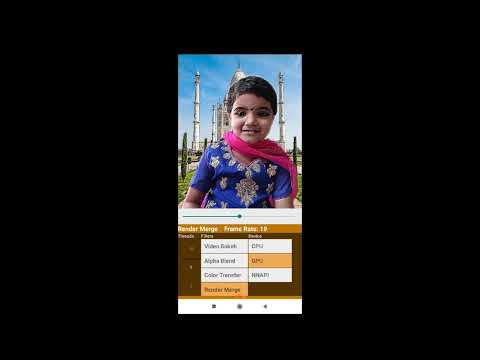
Initially, download the [caffe-harmonization](http://vllab.ucmerced.edu/ytsai/CVPR17/harmonize_iter_200000.caffemodel) model and put it itn **assets** folder. Use **single-tap** on the image to **change filters** and **long-press** for **saving**(and harmonizing) the current frame as an image on device.
Here is a demo video of the application ...
 ### Model running time
Summary of model size and runnig time in android
| Model Name | CPU Time (ms) | GPU Time (ms)| Parameters (M) | Size (MB) | Input Shape |
|----|----|----|----|-----|-----|
| **deconv_fin_munet.tflite** | 165 | 54 | 3.624 | 14.5 | 128 |
| **bilinear_fin_munet.tflite** | 542 | 115 | 3.620 | 14.5 | 128 |
| **munet_mnv3_wm10.tflite** | 167 | 59.5 | 2.552 | 10.2 | 224 |
| **munet_mnv3_wm05.tflite** | 75 | 30 | 1.192 | 4.8 | 224 |
| **prisma-net.tflite** | 426 | 107 | 0.923 | 3.7 | 256 |
The parameter 'wm' refers to the **width multiplier** (similar to depth multiplier). We can configure the **number of filters** of particular layers and adjust the **speed-accuracy tradeoffs** of the network using this paramter.
#### CPU Profiling :-
The benchmark tool allows us to profile the running time of **each operator in CPU** of the mobile device. Here is the summary of the operator profiling.
**1. Deconv model**
$ adb shell /data/local/tmp/benchmark_model_tf14 --graph=/data/local/tmp/deconv_fin_munet.tflite --enable_op_profiling=true --num_threads=1
```
Number of nodes executed: 94
============================== Summary by node type ==============================
[Node type] [count] [avg ms] [avg %] [cdf %] [mem KB] [times called]
TRANSPOSE_CONV 6 130.565 79.275% 79.275% 0.000 6
ADD 21 13.997 8.499% 87.773% 0.000 21
CONV_2D 34 8.962 5.441% 93.215% 0.000 34
MUL 5 7.022 4.264% 97.478% 0.000 5
DEPTHWISE_CONV_2D 17 3.177 1.929% 99.407% 0.000 17
CONCATENATION 4 0.635 0.386% 99.793% 0.000 4
PAD 5 0.220 0.134% 99.927% 0.000 5
LOGISTIC 1 0.117 0.071% 99.998% 0.000 1
RESHAPE 1 0.004 0.002% 100.000% 0.000 1
Timings (microseconds): count=50 first=164708 curr=162772 min=162419 max=167496 avg=164746 std=1434
```
**2. Bilinear model**
$ adb shell /data/local/tmp/benchmark_model_tf14 --graph=/data/local/tmp/bilinear_fin_munet.tflite --enable_op_profiling=true --num_threads=1
```
Number of nodes executed: 84
============================== Summary by node type ==============================
[Node type] [count] [avg ms] [avg %] [cdf %] [mem KB] [times called]
CONV_2D 39 534.319 98.411% 98.411% 0.000 39
RESIZE_BILINEAR 5 3.351 0.617% 99.028% 0.000 5
DEPTHWISE_CONV_2D 17 3.110 0.573% 99.601% 0.000 17
TRANSPOSE_CONV 1 0.871 0.160% 99.761% 0.000 1
CONCATENATION 4 0.763 0.141% 99.901% 0.000 4
PAD 5 0.246 0.045% 99.947% 0.000 5
ADD 11 0.166 0.031% 99.977% 0.000 11
LOGISTIC 1 0.119 0.022% 99.999% 0.000 1
RESHAPE 1 0.004 0.001% 100.000% 0.000 1
Timings (microseconds): count=50 first=544544 curr=540075 min=533873 max=551555 avg=542990 std=4363
```
The **upsamling block** in the **bilinear model** seems to be **expensive** than the corresponding block in deconv model.This seems to be due to the the convolution layer using a **stride of 1** with a larger image size with **more channels**; whereas in the case of transpose convoltuion we use a **stride of 2**, with **lesser channels**.

* Unfortunately, the benchmark tool doesn't allow **gpu operator profiling**.
* For the current models, it was observed that **single threaded CPU** execution was faster than multithreaded execution.
* Also, if you properly **fuse** layers like Add, Mul etc. and **eliminate** layers like Pad you may gain couple of milliseconds on GPU (may be more on CPU).
* We were unable to properly run the current models in NNAPI or FP16 mode due to some operator and compatibility issues.
**Note**: All timings measured using [tflite benchmark tool](https://github.com/tensorflow/tensorflow/tree/master/tensorflow/lite/tools/benchmark) on OnePlus3.
### The Paradoxical GPU
Lets create some simple keras models to demonstrate and compare gpu performance with cpu ...
1. Model-1
It has a convolution layer with a 3x3 identity kernel.
```
Model: "model_1"
_________________________________________________________________
Layer (type) Output Shape Param #
=================================================================
input_1 (InputLayer) (None, 256, 256, 1) 0
_________________________________________________________________
conv2d_1 (Conv2D) (None, 256, 256, 1) 10
=================================================================
Total params: 10
Trainable params: 10
Non-trainable params: 0
_________________________________________________________________
```
2. Model-2
It has one convolution layer with identity kernel and a special 1x16 kernel for data compression.
```
Model: "model_2"
_________________________________________________________________
Layer (type) Output Shape Param #
=================================================================
input_2 (InputLayer) (None, 256, 256, 1) 0
_________________________________________________________________
conv2d_2 (Conv2D) (None, 256, 256, 1) 10
_________________________________________________________________
conv2d_3 (Conv2D) (None, 256, 16, 1) 17
=================================================================
Total params: 27
Trainable params: 27
Non-trainable params: 0
_________________________________________________________________
```
3. Model-3
It is similar to model 1; but it has four channels instead of one.
```
Model: "model_3"
_________________________________________________________________
Layer (type) Output Shape Param #
=================================================================
input_3 (InputLayer) (None, 256, 256, 4) 0
_________________________________________________________________
conv2d_4 (Conv2D) (None, 256, 256, 4) 148
=================================================================
Total params: 148
Trainable params: 148
Non-trainable params: 0
```
4. Model-4
The model is simialr to model-3.
The input channels are four and we add an additional reshape layer at the end.
```
Model: "model_4"
_________________________________________________________________
Layer (type) Output Shape Param #
=================================================================
input_4 (InputLayer) (None, 256, 256, 4) 0
_________________________________________________________________
conv2d_5 (Conv2D) (None, 256, 256, 1) 37
_________________________________________________________________
conv2d_6 (Conv2D) (None, 256, 16, 1) 17
_________________________________________________________________
reshape_1 (Reshape) (None, 256, 16) 0
=================================================================
Total params: 54
Trainable params: 54
Non-trainable params: 0
```
5. Model-5
The model is similar to model-4.
It has an additional reshape operator for resizing the flattened input tensor.
```
Model: "model_5"
_________________________________________________________________
Layer (type) Output Shape Param #
=================================================================
input_1 (InputLayer) (None, 196608) 0
_________________________________________________________________
reshape_1 (Reshape) (None, 256, 256, 3) 0
_________________________________________________________________
conv2d_1 (Conv2D) (None, 256, 256, 1) 28
_________________________________________________________________
conv2d_2 (Conv2D) (None, 256, 16, 1) 17
_________________________________________________________________
reshape_2 (Reshape) (None, 256, 16) 0
=================================================================
Total params: 45
Trainable params: 45
Non-trainable params: 0
```
6. Model-6
It is similar to model-5.
Here we use strided slice operator to remove the fourth channle from input instead of reshape.
```
Model: "model_6"
_________________________________________________________________
Layer (type) Output Shape Param #
=================================================================
input_1 (InputLayer) (None, 256, 256, 4) 0
_________________________________________________________________
lambda_1 (Lambda) (None, 256, 256, 3) 0
_________________________________________________________________
conv2d_1 (Conv2D) (None, 256, 256, 1) 28
_________________________________________________________________
conv2d_2 (Conv2D) (None, 256, 16, 1) 17
_________________________________________________________________
reshape_1 (Reshape) (None, 256, 16) 0
=================================================================
Total params: 45
Trainable params: 45
Non-trainable params: 0
```
7. Model-7
It is similar to mode-3.
Herw we use strided-slice to remove the fourth channel of input and pad operator to make the number of channels of output=4.
```
Model: "model_7"
_________________________________________________________________
Layer (type) Output Shape Param #
=================================================================
input_1 (InputLayer) (None, 256, 256, 4) 0
_________________________________________________________________
lambda_1 (Lambda) (None, 256, 256, 3) 0
_________________________________________________________________
conv2d_1 (Conv2D) (None, 256, 256, 1) 28
_________________________________________________________________
lambda_2 (Lambda) (None, 256, 256, 4) 0
=================================================================
Total params: 28
Trainable params: 28
Non-trainable params: 0
```
Now, lets convert them into tflite and benchmark their performance ....
| Model Name | CPU Time (ms) | GPU Time (ms)| Parameters | Model Size (B) | Input Shape | Output Shape |
|----|----|----|----|-----|-----|-----|
| **model-1** | 3.404 | 16.5 | 10 | 772 | 1x256x256x1 | 1x256x256x1 |
| **model-2** | 3.610 | 6.5 | 27 | 1204 | 1x256x256x1 | 1x256x16x1 |
| **model-3** | 10.145 | 4.8 | 148 | 1320 | 1x256x256x4 | 1x256x256x4 |
| **model-4** | 7.300 | 2.7 | 54 | 1552 | 1x256x256x4 | 1x256x16 |
| **model-5** | 7.682 | 4.0 | 45 | 1784 | 1x196608 | 1x256x16 |
| **model-6** | 7.649 | 3.0 | 45 | 1996 | 1x256x256x4 | 1x256x16 |
| **model-7** | 9.283 | 5.7 | 28 | 1608 | 1x256x256x4 | 1x256x256x4 |
Clearly, the second model has one extra layer than the first model and their final output shapes differ slightly.
Comparing the cpu speed of the two models, there is no surprise i.e The second model(bigger) takes slightly more time than the first.
However, if you compare the cpu performance of a model with the gpu performance, it seems counter-intutive !!!
**The cpu takes less time than gpu !!!**
Similarly, if you compare the gpu speed of the two models, the **second one(bigger) seems to be faster than the first one**, which is again contrary to our expectations !!!
So why is this happening ??? Enter the **IO** ...
It looks like something other than 'our model nodes' are taking up time, behind the scenes. If you closely observe, the **output shape** of the second model is smaller(256 vs 16). In the case of a gpu (mobile-gpu particularly), the input data is initially copied to the gpu memory from main memory (or cache) and finally after execution the result is copied back to the main memory (or cache) from the gpu memory. This **copy process takes considerable amount of time** and is normally proportional to data size and also depend on the hardware, copy mechanism etc. Also, for considerable speed-up the **gpu should be fed with a larger model or data**; otherwise the gains in terms of speed-up will be small. In the extreme cases(i.e very small inputs) the **overheads will outweigh the possible benefits**.
In our case, around 10ms(worst case) is taken for gpu copy or IO and this corresponds to the difference in output data size(or shape) mostly.
**So, for this difference ...
i.e 256x256 - 256x16 = 61440 fp32 values = 61440x4 Bytes = 245760 Bytes ~ 240KB
it takes about 10ms extra copy time !!!**
However, you can avoid this problem by using **SSBO and and opengl**, as described in the [tflite-gpu documentation](https://www.tensorflow.org/lite/performance/gpu_advanced#inputoutput_buffers).
For more info refer github issue: [Tensorflow lite gpu delegate inference using opengl and SSBO in android](https://github.com/tensorflow/tensorflow/issues/26297)
Anyway, i haven't figure it out yet ... 😜
But wait.. what was that **special filter** that we mentioned perviously ??? Enter the **compression** ...
Let's suppose we have a **binary mask** as the output of the model in **float32** format.i.e output of **float32[1x256x256x1]** type has values 0.0 or 1.0 corresponding to masked region.Now, we have a matrix(sparse) with only two values, resulting in lot of redundancies. May be we can compress them using a standard mechanisms like **run length encoding(RLE)** or **bit packing**. Considering the choices of available operators in tflite-gpu, bit packing seems to be a better alternative than RLE.
In this simple filter we perform a dot product of consecutive 16 numbers(0.0's & 1.0's) with the following filter...
[2-8, 2-7,2-6, 2-5,2-4, 2-3,2-2, 2-1,20, 21,22, 23,24, 25,26, 27]
We do this for all consecutive 16 numbers and convert each of them(group) into a sigle float32 number. We can use a **convolution operation** with a **stride and filter of size (1,16)**. So, in the end we will have a output shape float32[1,256,16,1] with **16x** reduced memory(copy).i.e each float32 number now represents a 16 bit binary pattern in original mask. Now the **data copy time** from GPU memory to cpu memory will be reduced and at the same time **no information is lost** due to compression.
But this method will be useful only if we can **decode this data in less than 10ms**(in this particular case).
Now, the **third model** is similar to the the first one; but it has **4 channles insted of 1**.The number of paramters, size and cpu execution time of third model is greater than the first one. This is not surprising since the third model has four times the number of channels than the first one.
Now in the case of gpu, the trend is just opposite i.e gpu execution time of model-3 is less than that of model-1.This difference in number of channels alone accounts for **more than 10ms time**. This is beacuse of the **hidden data copy** happening within the gpu as mentioned in the [official documentation](https://www.tensorflow.org/lite/performance/gpu_advanced#tips_and_tricks).So, it would be a good idea to make the **number of channels in layers a multiple of four** throughout our model.
In **model-5**, we **flatten the input** of shape(1x256x256x3) into 1x196608, instead of adding an additional channel (i.e 4 insted of 3). But we have to include an additional **rehshape** operator before subsequent layers for further processing. However, it was observed that the **gpu time increased** considerably, even though the cpu time was almost unchanged. It looks like **reshape operators** takes significant amount of **time in a gpu**; unlike the cpu. Another strategy is to exclude the fourth channel from input using a **strided slice** operator as shown on **model-6**. This approach is slightly better than the former method of reshape operator; even though the cpu time is same for both.
Finally, we combine all the **tricks and tips** discussed so far in **model-4**. It is the **largest** and most complex model among the four; but it has the least gpu execution time. We have added an additional **reshape layer** and made the last dimension a **multiple of four**(i.e 16), besides the aforementioned **compression** technique.
These **techniques** have helped us to reduce the gpu execution time by **6x**. Lastly, we should also note that the overall gain depends on the **hardware** and the **model architecture**.
In summary, make your **data/layer size as small as possile and data/layer shape a multiple of four** for improved gpu performance.Also, **reduce** the usage of operators that change the **tensor shapes**.
For more info refer code: gpucom.ipynb
* Now according to the official tensorflow-gpu paper -[On-Device Neural Net Inference with Mobile GPUs](https://arxiv.org/pdf/1907.01989.pdf), we need to **redesign** our network around those **4-channel boundaries** so as to avoid the redundant memory copy; but at the same time they also recommend **not to use reshape** operators. Now, this is huge **burden** put on the network designers(or application developer) part(due to limitation of opengl backend). I feel it is better to do some compile-time optimization of the model(say during conversion or internally) to avoid runtime redundant copies. But, since tflite-gpu is in it's **early development stage**, it's too much to ask!!!. Also, in the future we can expect the models to run **faster** with better **hardwares**(GPU,Memory etc.) and more **mobile-friendly architectures**.
* Finally, if the **model is very small**,then we won't gain any **speed-up with gpu**; we can use cpu instead. Also, we cannot use a **large model**(say 513x513 input with 100 or more channles). It won't run due to **resource constraints**. Also, if it's a **real-time application** and you run the model **continously** for a long time, the device may start **heating** up(or slow down) and in extreme cases **crashes** the application.
Here is the **official benchmark** and comparsion of tflite models on a variety of smartphones...

To know more about the latest advances in deep learning on smartphones, checkout: [AI Benchmark](https://arxiv.org/pdf/1910.06663.pdf)
### Fun With Filters (Python)
### Model running time
Summary of model size and runnig time in android
| Model Name | CPU Time (ms) | GPU Time (ms)| Parameters (M) | Size (MB) | Input Shape |
|----|----|----|----|-----|-----|
| **deconv_fin_munet.tflite** | 165 | 54 | 3.624 | 14.5 | 128 |
| **bilinear_fin_munet.tflite** | 542 | 115 | 3.620 | 14.5 | 128 |
| **munet_mnv3_wm10.tflite** | 167 | 59.5 | 2.552 | 10.2 | 224 |
| **munet_mnv3_wm05.tflite** | 75 | 30 | 1.192 | 4.8 | 224 |
| **prisma-net.tflite** | 426 | 107 | 0.923 | 3.7 | 256 |
The parameter 'wm' refers to the **width multiplier** (similar to depth multiplier). We can configure the **number of filters** of particular layers and adjust the **speed-accuracy tradeoffs** of the network using this paramter.
#### CPU Profiling :-
The benchmark tool allows us to profile the running time of **each operator in CPU** of the mobile device. Here is the summary of the operator profiling.
**1. Deconv model**
$ adb shell /data/local/tmp/benchmark_model_tf14 --graph=/data/local/tmp/deconv_fin_munet.tflite --enable_op_profiling=true --num_threads=1
```
Number of nodes executed: 94
============================== Summary by node type ==============================
[Node type] [count] [avg ms] [avg %] [cdf %] [mem KB] [times called]
TRANSPOSE_CONV 6 130.565 79.275% 79.275% 0.000 6
ADD 21 13.997 8.499% 87.773% 0.000 21
CONV_2D 34 8.962 5.441% 93.215% 0.000 34
MUL 5 7.022 4.264% 97.478% 0.000 5
DEPTHWISE_CONV_2D 17 3.177 1.929% 99.407% 0.000 17
CONCATENATION 4 0.635 0.386% 99.793% 0.000 4
PAD 5 0.220 0.134% 99.927% 0.000 5
LOGISTIC 1 0.117 0.071% 99.998% 0.000 1
RESHAPE 1 0.004 0.002% 100.000% 0.000 1
Timings (microseconds): count=50 first=164708 curr=162772 min=162419 max=167496 avg=164746 std=1434
```
**2. Bilinear model**
$ adb shell /data/local/tmp/benchmark_model_tf14 --graph=/data/local/tmp/bilinear_fin_munet.tflite --enable_op_profiling=true --num_threads=1
```
Number of nodes executed: 84
============================== Summary by node type ==============================
[Node type] [count] [avg ms] [avg %] [cdf %] [mem KB] [times called]
CONV_2D 39 534.319 98.411% 98.411% 0.000 39
RESIZE_BILINEAR 5 3.351 0.617% 99.028% 0.000 5
DEPTHWISE_CONV_2D 17 3.110 0.573% 99.601% 0.000 17
TRANSPOSE_CONV 1 0.871 0.160% 99.761% 0.000 1
CONCATENATION 4 0.763 0.141% 99.901% 0.000 4
PAD 5 0.246 0.045% 99.947% 0.000 5
ADD 11 0.166 0.031% 99.977% 0.000 11
LOGISTIC 1 0.119 0.022% 99.999% 0.000 1
RESHAPE 1 0.004 0.001% 100.000% 0.000 1
Timings (microseconds): count=50 first=544544 curr=540075 min=533873 max=551555 avg=542990 std=4363
```
The **upsamling block** in the **bilinear model** seems to be **expensive** than the corresponding block in deconv model.This seems to be due to the the convolution layer using a **stride of 1** with a larger image size with **more channels**; whereas in the case of transpose convoltuion we use a **stride of 2**, with **lesser channels**.

* Unfortunately, the benchmark tool doesn't allow **gpu operator profiling**.
* For the current models, it was observed that **single threaded CPU** execution was faster than multithreaded execution.
* Also, if you properly **fuse** layers like Add, Mul etc. and **eliminate** layers like Pad you may gain couple of milliseconds on GPU (may be more on CPU).
* We were unable to properly run the current models in NNAPI or FP16 mode due to some operator and compatibility issues.
**Note**: All timings measured using [tflite benchmark tool](https://github.com/tensorflow/tensorflow/tree/master/tensorflow/lite/tools/benchmark) on OnePlus3.
### The Paradoxical GPU
Lets create some simple keras models to demonstrate and compare gpu performance with cpu ...
1. Model-1
It has a convolution layer with a 3x3 identity kernel.
```
Model: "model_1"
_________________________________________________________________
Layer (type) Output Shape Param #
=================================================================
input_1 (InputLayer) (None, 256, 256, 1) 0
_________________________________________________________________
conv2d_1 (Conv2D) (None, 256, 256, 1) 10
=================================================================
Total params: 10
Trainable params: 10
Non-trainable params: 0
_________________________________________________________________
```
2. Model-2
It has one convolution layer with identity kernel and a special 1x16 kernel for data compression.
```
Model: "model_2"
_________________________________________________________________
Layer (type) Output Shape Param #
=================================================================
input_2 (InputLayer) (None, 256, 256, 1) 0
_________________________________________________________________
conv2d_2 (Conv2D) (None, 256, 256, 1) 10
_________________________________________________________________
conv2d_3 (Conv2D) (None, 256, 16, 1) 17
=================================================================
Total params: 27
Trainable params: 27
Non-trainable params: 0
_________________________________________________________________
```
3. Model-3
It is similar to model 1; but it has four channels instead of one.
```
Model: "model_3"
_________________________________________________________________
Layer (type) Output Shape Param #
=================================================================
input_3 (InputLayer) (None, 256, 256, 4) 0
_________________________________________________________________
conv2d_4 (Conv2D) (None, 256, 256, 4) 148
=================================================================
Total params: 148
Trainable params: 148
Non-trainable params: 0
```
4. Model-4
The model is simialr to model-3.
The input channels are four and we add an additional reshape layer at the end.
```
Model: "model_4"
_________________________________________________________________
Layer (type) Output Shape Param #
=================================================================
input_4 (InputLayer) (None, 256, 256, 4) 0
_________________________________________________________________
conv2d_5 (Conv2D) (None, 256, 256, 1) 37
_________________________________________________________________
conv2d_6 (Conv2D) (None, 256, 16, 1) 17
_________________________________________________________________
reshape_1 (Reshape) (None, 256, 16) 0
=================================================================
Total params: 54
Trainable params: 54
Non-trainable params: 0
```
5. Model-5
The model is similar to model-4.
It has an additional reshape operator for resizing the flattened input tensor.
```
Model: "model_5"
_________________________________________________________________
Layer (type) Output Shape Param #
=================================================================
input_1 (InputLayer) (None, 196608) 0
_________________________________________________________________
reshape_1 (Reshape) (None, 256, 256, 3) 0
_________________________________________________________________
conv2d_1 (Conv2D) (None, 256, 256, 1) 28
_________________________________________________________________
conv2d_2 (Conv2D) (None, 256, 16, 1) 17
_________________________________________________________________
reshape_2 (Reshape) (None, 256, 16) 0
=================================================================
Total params: 45
Trainable params: 45
Non-trainable params: 0
```
6. Model-6
It is similar to model-5.
Here we use strided slice operator to remove the fourth channle from input instead of reshape.
```
Model: "model_6"
_________________________________________________________________
Layer (type) Output Shape Param #
=================================================================
input_1 (InputLayer) (None, 256, 256, 4) 0
_________________________________________________________________
lambda_1 (Lambda) (None, 256, 256, 3) 0
_________________________________________________________________
conv2d_1 (Conv2D) (None, 256, 256, 1) 28
_________________________________________________________________
conv2d_2 (Conv2D) (None, 256, 16, 1) 17
_________________________________________________________________
reshape_1 (Reshape) (None, 256, 16) 0
=================================================================
Total params: 45
Trainable params: 45
Non-trainable params: 0
```
7. Model-7
It is similar to mode-3.
Herw we use strided-slice to remove the fourth channel of input and pad operator to make the number of channels of output=4.
```
Model: "model_7"
_________________________________________________________________
Layer (type) Output Shape Param #
=================================================================
input_1 (InputLayer) (None, 256, 256, 4) 0
_________________________________________________________________
lambda_1 (Lambda) (None, 256, 256, 3) 0
_________________________________________________________________
conv2d_1 (Conv2D) (None, 256, 256, 1) 28
_________________________________________________________________
lambda_2 (Lambda) (None, 256, 256, 4) 0
=================================================================
Total params: 28
Trainable params: 28
Non-trainable params: 0
```
Now, lets convert them into tflite and benchmark their performance ....
| Model Name | CPU Time (ms) | GPU Time (ms)| Parameters | Model Size (B) | Input Shape | Output Shape |
|----|----|----|----|-----|-----|-----|
| **model-1** | 3.404 | 16.5 | 10 | 772 | 1x256x256x1 | 1x256x256x1 |
| **model-2** | 3.610 | 6.5 | 27 | 1204 | 1x256x256x1 | 1x256x16x1 |
| **model-3** | 10.145 | 4.8 | 148 | 1320 | 1x256x256x4 | 1x256x256x4 |
| **model-4** | 7.300 | 2.7 | 54 | 1552 | 1x256x256x4 | 1x256x16 |
| **model-5** | 7.682 | 4.0 | 45 | 1784 | 1x196608 | 1x256x16 |
| **model-6** | 7.649 | 3.0 | 45 | 1996 | 1x256x256x4 | 1x256x16 |
| **model-7** | 9.283 | 5.7 | 28 | 1608 | 1x256x256x4 | 1x256x256x4 |
Clearly, the second model has one extra layer than the first model and their final output shapes differ slightly.
Comparing the cpu speed of the two models, there is no surprise i.e The second model(bigger) takes slightly more time than the first.
However, if you compare the cpu performance of a model with the gpu performance, it seems counter-intutive !!!
**The cpu takes less time than gpu !!!**
Similarly, if you compare the gpu speed of the two models, the **second one(bigger) seems to be faster than the first one**, which is again contrary to our expectations !!!
So why is this happening ??? Enter the **IO** ...
It looks like something other than 'our model nodes' are taking up time, behind the scenes. If you closely observe, the **output shape** of the second model is smaller(256 vs 16). In the case of a gpu (mobile-gpu particularly), the input data is initially copied to the gpu memory from main memory (or cache) and finally after execution the result is copied back to the main memory (or cache) from the gpu memory. This **copy process takes considerable amount of time** and is normally proportional to data size and also depend on the hardware, copy mechanism etc. Also, for considerable speed-up the **gpu should be fed with a larger model or data**; otherwise the gains in terms of speed-up will be small. In the extreme cases(i.e very small inputs) the **overheads will outweigh the possible benefits**.
In our case, around 10ms(worst case) is taken for gpu copy or IO and this corresponds to the difference in output data size(or shape) mostly.
**So, for this difference ...
i.e 256x256 - 256x16 = 61440 fp32 values = 61440x4 Bytes = 245760 Bytes ~ 240KB
it takes about 10ms extra copy time !!!**
However, you can avoid this problem by using **SSBO and and opengl**, as described in the [tflite-gpu documentation](https://www.tensorflow.org/lite/performance/gpu_advanced#inputoutput_buffers).
For more info refer github issue: [Tensorflow lite gpu delegate inference using opengl and SSBO in android](https://github.com/tensorflow/tensorflow/issues/26297)
Anyway, i haven't figure it out yet ... 😜
But wait.. what was that **special filter** that we mentioned perviously ??? Enter the **compression** ...
Let's suppose we have a **binary mask** as the output of the model in **float32** format.i.e output of **float32[1x256x256x1]** type has values 0.0 or 1.0 corresponding to masked region.Now, we have a matrix(sparse) with only two values, resulting in lot of redundancies. May be we can compress them using a standard mechanisms like **run length encoding(RLE)** or **bit packing**. Considering the choices of available operators in tflite-gpu, bit packing seems to be a better alternative than RLE.
In this simple filter we perform a dot product of consecutive 16 numbers(0.0's & 1.0's) with the following filter...
[2-8, 2-7,2-6, 2-5,2-4, 2-3,2-2, 2-1,20, 21,22, 23,24, 25,26, 27]
We do this for all consecutive 16 numbers and convert each of them(group) into a sigle float32 number. We can use a **convolution operation** with a **stride and filter of size (1,16)**. So, in the end we will have a output shape float32[1,256,16,1] with **16x** reduced memory(copy).i.e each float32 number now represents a 16 bit binary pattern in original mask. Now the **data copy time** from GPU memory to cpu memory will be reduced and at the same time **no information is lost** due to compression.
But this method will be useful only if we can **decode this data in less than 10ms**(in this particular case).
Now, the **third model** is similar to the the first one; but it has **4 channles insted of 1**.The number of paramters, size and cpu execution time of third model is greater than the first one. This is not surprising since the third model has four times the number of channels than the first one.
Now in the case of gpu, the trend is just opposite i.e gpu execution time of model-3 is less than that of model-1.This difference in number of channels alone accounts for **more than 10ms time**. This is beacuse of the **hidden data copy** happening within the gpu as mentioned in the [official documentation](https://www.tensorflow.org/lite/performance/gpu_advanced#tips_and_tricks).So, it would be a good idea to make the **number of channels in layers a multiple of four** throughout our model.
In **model-5**, we **flatten the input** of shape(1x256x256x3) into 1x196608, instead of adding an additional channel (i.e 4 insted of 3). But we have to include an additional **rehshape** operator before subsequent layers for further processing. However, it was observed that the **gpu time increased** considerably, even though the cpu time was almost unchanged. It looks like **reshape operators** takes significant amount of **time in a gpu**; unlike the cpu. Another strategy is to exclude the fourth channel from input using a **strided slice** operator as shown on **model-6**. This approach is slightly better than the former method of reshape operator; even though the cpu time is same for both.
Finally, we combine all the **tricks and tips** discussed so far in **model-4**. It is the **largest** and most complex model among the four; but it has the least gpu execution time. We have added an additional **reshape layer** and made the last dimension a **multiple of four**(i.e 16), besides the aforementioned **compression** technique.
These **techniques** have helped us to reduce the gpu execution time by **6x**. Lastly, we should also note that the overall gain depends on the **hardware** and the **model architecture**.
In summary, make your **data/layer size as small as possile and data/layer shape a multiple of four** for improved gpu performance.Also, **reduce** the usage of operators that change the **tensor shapes**.
For more info refer code: gpucom.ipynb
* Now according to the official tensorflow-gpu paper -[On-Device Neural Net Inference with Mobile GPUs](https://arxiv.org/pdf/1907.01989.pdf), we need to **redesign** our network around those **4-channel boundaries** so as to avoid the redundant memory copy; but at the same time they also recommend **not to use reshape** operators. Now, this is huge **burden** put on the network designers(or application developer) part(due to limitation of opengl backend). I feel it is better to do some compile-time optimization of the model(say during conversion or internally) to avoid runtime redundant copies. But, since tflite-gpu is in it's **early development stage**, it's too much to ask!!!. Also, in the future we can expect the models to run **faster** with better **hardwares**(GPU,Memory etc.) and more **mobile-friendly architectures**.
* Finally, if the **model is very small**,then we won't gain any **speed-up with gpu**; we can use cpu instead. Also, we cannot use a **large model**(say 513x513 input with 100 or more channles). It won't run due to **resource constraints**. Also, if it's a **real-time application** and you run the model **continously** for a long time, the device may start **heating** up(or slow down) and in extreme cases **crashes** the application.
Here is the **official benchmark** and comparsion of tflite models on a variety of smartphones...

To know more about the latest advances in deep learning on smartphones, checkout: [AI Benchmark](https://arxiv.org/pdf/1910.06663.pdf)
### Fun With Filters (Python)
Let's add some filters to harmonize our output image with the background. Our aim is to give a natural blended feel to the output image i.e the edges should look smooth and the lighting(colour) of foreground should match(or blend) with its background.
The first method is the traditional alpha blending, where the foreground images are blended with background using the blurred(gaussian) version of the mask.In the smooth-step filter, we clamp the blurred edges and apply a polynomial function to give a curved appearence to the foreground image edges.Next, we use the colour transfer algorithm to transfer the global colour to the foreground image.Also, opencv(computational photography) provides a function called seamless clone to blend an image onto a new background using an alpha mask.Finally, we use the dnn module of opencv to load a colour harmonization model(deep model) in caffe and transfer the background style to the foreground.
Here are some sample results:-

For **live action**, checkout the script **segvideo.py** to see the effects applied on a **webcam video**.
Also download the **caffe model** and put it inside **models/caffe** folder.
#### Keyboard Controls:-
Hold **down** the following keys for **filter** selection.
* **C**- Colour transfer
* **S**- Seamless clone
* **M**- Smooth step
* **H**- Colour harmonize
Move the **slider** to change the background image.
### Tensorflowjs: Running the model on a browser
To ensure that your applications runs in a platform independent way(portabe), the easiest way is to implement them as a web-application and run it using a browser.You can easily convert the trained model to tfjs format and run them using javascript with the help of tensorflowjs conversion tools.If you are familiar with React/Vue js , you can easily incorporate the tfjs into you application and come up with a really cool AI webapp, in no time!!!
Here is the **link** to the portrait segmentation **webapp**: [CVTRICKS](https://mycvtricks.000webhostapp.com)
If you want to run it **locally**, start a local server using python **SimpleHTTPServer**. Initially configure the **hostname, port and CORS permissions** and then run it using your browser.
**NB:** The application is **computaionally intensive** and resource heavy.
### Openvino: Deploying deep vision models at the edge
Intel's openvino toolkit allows us to **convert and optimize** deep neural network models trained in popular frameworks like **Tensorflow, Caffe, ONNX** etc. on **Intel CPU's, GPU's and Vision Accelerators(VPU)**, for efficient inferencing at the edge.
Here, we will convert and optimize a pretrained deeplab model in tensorflow using openvino toolkit, for **person segmentation**.
As an additional step, we will see how we can **send the output video to an external server** using ffmpeg library and pipes.
1. Download and install [openvino toolkit](https://docs.openvinotoolkit.org/latest/index.html).
2. Download the tensorflow [deeplabv3_pascal_voc_model](http://download.tensorflow.org/models/deeplabv3_mnv2_pascal_trainval_2018_01_29.tar.gz), for semantic segmentation.
3. Download and install [ant-media server](https://github.com/ant-media/Ant-Media-Server/wiki/Getting-Started).
Once you install and configure the openvino inference engine and model optimizer, you can directly **convert the tensroflow deeplab model** with a single command:
```
python3 /opt/intel/openvino/deployment_tools/model_optimizer/mo.py --input_model frozen_inference_graph.pb --output SemanticPredictions --input ImageTensor --input_shape "(1,513,513,3)"
```
If the conversion is successful, two new files viz. **'frozen_inference_graph.xml'** and **'frozen_inference_graph.bin'** will be generated. Now, you can run the openvino python edge application for person segmentation as follows:
```
python3 app.py -m models/deeplabv3_mnv2_pascal_trainval/frozen_inference_graph.xml
```
You may view the live output rtmp stream using **ant-media LiveApp** in a browser or use **ffplay**(or vlc).
```
ffplay 'rtmp://localhost:1935/LiveApp/segme live=1'
```
The application also saves a **local copy** of output using **OpenCV VideoWriter**.
**NB: Make sure that both opencv and ffmpeg are properly configured**
### Deploying Model on Jetson TX2 with TensorRT
**Jetson TX2** is a high performance embedded AI computing device from nvidia. The module consist of six 64 bit ARM CPU's, 8 GB RAM and a **256 core Pascal GPU**. The device consumes only **15W power** and runs on Ubuntu 18.04. **TensorRT** is a C++ library that facilitates high performance inference on NVIDIA GPU's. TensorRT takes a trained network, which consists of a network definition and a set of trained parameters, and produces a **highly optimized runtime engine** which performs inference for that network. The library is integrated with the latest tensorflow binary(TF-TRT) and can be directly accessed via **C++ or Python API**.
The following are the steps to **configure and run** your model on jetson devices:-
1. [Install](https://www.youtube.com/watch?v=s1QDsa6SzuQ) latest Jetpack on you device with Ubuntu 18.04.
2. [Install](https://jkjung-avt.github.io/tf-trt-revisited/) C++ version of protocol buffers library (python version has extremely long model loading time)
3. [Install](https://docs.nvidia.com/deeplearning/frameworks/install-tf-jetson-platform/index.html) latest tensorflow framework on your machine for jetpack 4.3.
3. Convert your keras model to optimized tf-trt format using the python script (tftrt_convert).
4. Run the inference code using the optimized model on webcam streams (tftrt_infer).
The inference time was reduced from 40 ms to **28 ms** on using tf-trt (i.e **30% speed-up**), for our **prisma-net** segmentation model. The new tf-trt **FP16 saved model** includes generic tensorflow optimizations as well as TensorRT device specific tunings. In comparsions to the original **keras model**, the optimized model seems to perform **10x faster** inference on jetson TX2.
**NB:** For maximum performance, switch the power mode to **MAXN**(nvpmodel 0) and run the **jetson_clocks** script(/usr/bin) for maximum clock speed.
### Mult-stream Segmentation Pipeline with Nvidia Deepstream and Jetson TX2
The **deepstream sdk** generic streaming analytics architecture defines an extensible **video processing pipeline** that can be used to perform **inference, object tracking and reporting**. As deepstream applications analyze each video frame, plugins extract information and store it as part of cascaded **metadata records**, maintaining a record's association with the source frame. The full metadata collection at the end of the pipeline represents the complete set of information extracted from the frame by deep learning models and other **analytics plugins**. This information can be used by the DeepStream application for **display**, or **transmitted externally** as part of a message for further analysis or long term archival. Currently, it supports applications like **object detection, image classification and instance/semantic segmentation**, and model formats like **Caffe, Onnx and Uff** for inference. Other features include plugins for **IOT deployment, streaming support, multi-gpu, multi-stream and batching support** for high throughput inference. These applications can be developed in **C/C++ or Python** and can be easily deployed on system's with a **nvidia dGPU** or on embedded platforms like **jetson**. Also, they also support **FP16 and INT8** inferecne on selected hardware accelerators.
In the deepstream python application we connect **two webcameras** to th system(i.e. jeston dev-board) as inputs. We **decode and batch** the frames together with the help of various nvgst plugins and perform **inference on gpu**, in rela-time using **nvinfer** plugin. In the first application the multiple output **segmentation maps** are combined and displayed on screen with the help of **nvsegvisual**, nvegl and nvmultistreamtiler plugins; whereas in the second one, the results are **streamed using rtsp** streaming plugins.
Here is the **schematic diagram** of the segmentation pipeline (deepstream_egl_multiseg).

The above **segmentation pipeline** consists of the following plugins (ordered):
* **GstV4l2Src** - Used to capture video from v4l2 devices, like webcams and tv cards
* **GstVideoConvert** - Convert video frames between a great variety of video formats
* **Gst-nvvideoconvert** - Performs video color format conversion (I420 to RGBA)
* **GstCapsFilter** - Enforces limitations on data (no data modification)
* **Gst-nvstreammux** - Batch video streams before sending for AI inference
* **Gst-nvinfer** - Runs inference using TensorRT
* **Gst-nvsegvisual** - Visualizes segmentation results
* **Gst-nvmultistreamtiler** - Composites a 2D tile from batched buffers
* **Gst-nvegltransform** - Transform input from NVMM to EGLimage format
* **Gst-nveglglessink** - Render the EGL/GLES output on screen
The second **streaming application** (deepstream_rtsp_multiseg) includes additional plugins for rtsp streaming i.e **nvv4l2h264enc, rtph264pay and udpsink**.
Run the **applications on jetson** devices:-
1. Install nvidia [deepstream sdk](https://docs.nvidia.com/metropolis/deepstream/dev-guide/index.html)(>=4.0) for jetson or tesla platform, pyton-gst bindings and gst-rtsp-server components by following the **deepstream dev-guide** documentation.
2. Connect two **webcams** to the jetson module through USB ports.
3. Run these commands on the jetson device to **boost the clocks**: sudo nvpmodel -m 0; sudo jetson_clocks
4. Run the applications from the **directory** '*/sources/python*' (i.e python deepstream samples).
5. For the streaming application, open the rtsp stream using **VLC** player i.e '*rtsp://{jetson-ip}:8554/ds-seg*' on another system (try vlc on android).

**Note:** Refer **onnx_nchw_conversion** ipython notebooks for converting **tensorflow/keras** models to onnx_nchw format for deepstream inference. Also,before running the application configure the **webcam properites**(video source and resolution) based on your hardware settings.
### Portrait Segmentaion Using Mediapipe And Slimnet
Mediapipe is an **open-source** framework for developing machine learning application, for **mobile**, desktop, web and IoT devices.
It can be used to process data in various formats like **images, audio and video streams**. The basic idea is to construct a high-level **pipeline graph** for a ML workflow by integrating a set of modular components for individual operations like **data transformations, model inference, I/O operations** etc
**Advantages**:-
1. **Portable pipelines**: The same **pipeline graphs** can be developed and deployed on desktops, mobile or IOT devices.
2. **Rapid prototyping**: Most of the common **image, video and ML operations** can be integrated as **nodes** in the development workflow.
3. **Documentation and support**: It was developed by **google** and has a very good documentation, with lots of **demo** applications.
4. **Extensibility**: Custom operations can be easily developed in **opencv(C++)** and integrated into the mediapipe workflow.
**Portrait segmentaion mediapipe graphs**:-
The basic pipeline for **video segmentaion** is described in the mediapipe [hair_segmentaion](https://google.github.io/mediapipe/solutions/hair_segmentation.html#mobile) application. Here, we use our **slimnet model** on the pipeline and segment out the foreground person from the background. Additionally, we apply an **edge detection** filter on the masked background region of the image.

The following are the **steps** for building android application with bazel, mediapipe and tflite:-
1. Install bazel, jdk, **android sdk & ndk**, and mediapipe
2. Convert the **slim_net** model for portrait segmentaion to tflite format
3. Modify the **hair_segmentaion** demo application from mediapipe repository
4. Build the portrait_segmentaion application for android devices using **bazel**
5. Install and run the portrait_segmentation application on **mobile**
Mediapipe slimnet application screenshot:-

Mediapipe portrait_segmentation(APK): [slimnet android](https://drive.google.com/file/d/1-67V2MFGmPRJadENxvnqnYiuI6XpD70g/view?usp=sharing)
In the android demo, we used the default **mask_overlay_calculator** for performing alpha blending operation. Now, if we want to perfrom some advanced blending opertations, we will have to implement it as a **custom calculator** in mediapipe. In this [demo](https://github.com/anilsathyan7/Portrait-Segmentation/blob/master/mediapipe_slimnet/desktop/mediapipe_custom_calculator.ipynb), we will build a portrait segmentaion aplication using custom calculators on desktop, using mediapipe. There will be two inputs: a portrait video and a background video and a single output in the form of a video file. Our aim is to **blend** the portrait foreground region into the background video, with the help of a **segmentaion mask**. As in the case of android, we will follow the basic segmentation pipeline from **hair segmentaion** example. Since the application uses **gpu** operations, choose a GPU runtime for development and deployment.
Portrait segmentation desktop:-

### Segmentation via Background Subtraction: A Naive Approach
If we have a **static background**, we can easily obtain the mask of new objects appearing on the scene using the methods of background subtraction. Even though this seems straight-forward; there seems to be couple of **challenges** in this scenario. Firstly, even if objects does not move in the background, there will be small variations in corresponding pixel values due to changes in **lighting**, noise, camera quality etc. Secondly, if the new objects have **colour** similar to that of the background, it becomes difficult to find the **image difference**.
Here is a simple **algorithm** for segmentation, using background subtraction. We assume that the backgroud image or camera is **static** during the entire experiment.
1. Capture the first 'N' background images and find the mean background image.
2. Convert the background image to grayscale and apply gaussian blur.
3. Capture the next frame in grayscale, with new objects and apply gaussian blur.
4. Find the absolute differece between current frame and background image.
5. Threshold the differecne with a value 'T' and create the binary difference-mask.
6. Apply morphological operations to fill up the holes in the mask.
7. Find the largest contour and remove the smaller blobs in the mask.
8. Apply alpha blend on the frame with any background image, using the mask.
9. Display the output on screen.
10. Repeat steps 3 to 9, until a keyborad interruption.
The algorithm works pretty well, if there is **proper lighting and clear colour difference** between the foreground object and background. Another idea is to detect the face and exclude potential background regions based on some heuristics. Other classical methods include **grabcut, active contours**, feature based(**HOG**) detectors etc. But none of them seems to be **robust, real-time and light-weight** like our deep neural network models. Additionaly, using trimap-masks and [depth sensors(ToF)](https://community.arm.com/developer/tools-software/graphics/b/blog/posts/the-rise-of-depth-on-mobile) on phone could help us acheive better visual perception and accuracy on the mobile application eg. [uDepth](https://ai.googleblog.com/2020/04/udepth-real-time-3d-depth-sensing-on.html).
Also check-out this cool application: [Virtual Stage Camera](https://www.roland.com/global/products/virtual_stage_camera/)
### Techniques For Improving Robustness, Accuracy and Speed
Here are some **advanced** techniques to improve the **accuracy, speed and robustness** of the portrait segmentation model for **videos**. Most of them are inspired from the following two papers:-
1. **PortraitNet: Real-time portrait segmentation network for mobiledevice**
2. **Real-time Hair Segmentation and Recoloring on Mobile GPUs**
**Boundary Loss**: In order to improve the boundary accuracy and sharpness, we modify the last layer in the decoder module by adding a new convolution layer in parallel to generate a **boundary detection map**. We generate the boundary ground truth from manual labeled mask using traditional edge detection algorithm like **canny** or sobel, on-the-fly. Also, we need to use **focal loss** instead of BCE, for training the network with boundary masks. Finally, we can remove this additional convolution layer for edges and export the model for inference.
**Consistency Constraint Loss**: A novel method to generate soft labels using the tiny network itself with data augmentation, where we use **KL divergence** between the heatmap outputs of the original image and texture enhanced image, for training the model. It further improves the accuracy and **robustness** of the model under various **lighting** conditions.
**Refined Decoder Module**: The decoder module consists of refined residual block with **depthwise convolution** and up-sampling blocks with transpose convolution. Even though it includes the skip connectios similar to unet architecture, they are **added** to the layers in decoder module channel-wise instead of usual concatenation. Overall, this improves the execution **speed** of the model.
**Temporal Consistency**: A video model should exhibit **temporal redundancy** across adjacent frames. Since the neighbouring frames are similar, their corresponding segmentation masks should also be similar(ideally). Current methods that utilize LSTM, GRU(Deep) or Optical flow(Classic) to realize this are too computationally expensive for real-time applications on mobile phones. So, to leverage this temporal redundancy, we append the segmentation output of the **previous frame** as the **fourth channel(prior)** of the current input frame during inference. During training, we can apply techniques like **affine transformations, thin plate spline smoothing, motion blur** etc. on the annotated ground truth to use it as a previous-mask. Also, to make sure that the model robustly handles all the use cases, we must also train it using an **empty previous mask**.
**High resolution Input**: In our original pipeline, we **downsample** our full resolution image from mobile camera to a lower resolution(say 128 or 224) and finally after inference, we upsample the output mask to full resolution. Even though output results are satisfactory; there are couple of problems with this approach. Firstly, the resized mask **edges** will be coarse(stair-case) or **rough** and extra **post-processing** steps will be needed to smoothen the mask. Secondly, we loose lots of **details** in the input due to downsampling and thus it affects the output mask quality. If we use a larger input size, it would obviously increase the computation time of the model. The primary reason for this increase, is the increase in number of parameters. Also, on a mobile device the CPU-GPU data transfer takes considerable amount of time, especially when the inputs are large. To solve the latter problem, we can use techniques like **SSBO**(low level) or frameworks like **mediapipe**(high-level) which already comes with a optimized inference pipeline. As for the former one, we can slightly modify the architecture of the model such that, for most part **convolutions** happen at a **lower spatial dimension**. The idea is to rapidly downsample the input at the beginning of the network and work with a smaller resolution image throughout a **deeper** version of the network . Finally, **upsample** the result from the final layers to full scale, **within-the model**. Thus, it ensures that the model **learns the upsampling or downsampling** itself and eliminates the need for a separate post-inference resize or smoothing.
**Advanced Activation Function**: Newer activation functions like **Swish**(mobilenetv3) or **PRelu**(mediapipe hair segmentation) seems to give better **accuracy** with lower execution time. However, we may need to restructure our network and implement **custom-layers** for such operators to properly run on mobile **GPU**, using tensorflow-lite.
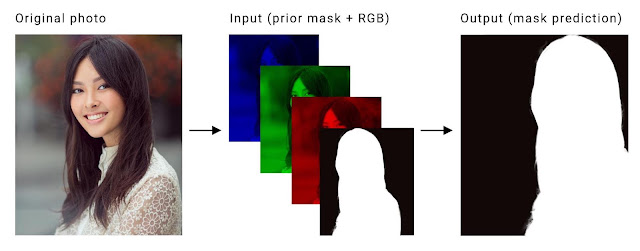
The portrait-net model for **videos** was successfully trained using **pytorch** and exported to **tflite** format. The new dataset consist of **60,000** images for training and **8852** images for testing.It includes portrait images from **AISegment** dataset and **sythetic images** with custom backgrounds. This model with **input size of 256x256** took about **5 days** for training on a **GTX 1080 Ti** with batch size of **48**. Finally, an **mIOU of 98%** was obtained on the test-set after **500 epochs**, using a minimal learning rate of **1e^-6**(after decay). The new portrait dataset, conversion scripts, **trained models** and corresponding inference code in python are also available in the respective folders. It can be easily used with the current **android application**(SegMeV2) by slightly modifying the **I/O** handling steps. A frame rate of **30 FPS** was acheived using this model.
Here is the link to **Android application**: [SegVid.apk](https://drive.google.com/file/d/1iTQUC9mXudfeUQBeavD1Rv0Cyh-T7E1o/view?usp=sharing)
It supports **32 and 64 bit ARM** architectures(armeabi-v7a and amr64-v8a).
The application works best on portrait videos with **good lighting** conditions.
**Note**: For more information on training, check out the respective **papers and repositories**.
### Post-Training Quantization and Edge TPU Inference
**Quantizing** deep neural networks uses techniques that allow for **reduced precision** representations of weights and, optionally, activations for both storage and computation(for eg. UINT8 or FLOAT16). It can **reduce model size** while also improving CPU and hardware accelerator **latency**, with little **degradation in model accuracy**. Tensorflow lite supports two types of quantization viz. **quantization qware training and post training quantization**. Even though the former method produces better accuracy, it is only **supported** by a few subset of convolutional neural network architectures. Also, currently tensorflow 2.0 and keras does not support this technique. Therefore, we are left with only one option i.e Post-training quantization.
Again, there are two types of post-training quantization: **weight quantization and full integer quantization**(float also). In the weight quantization, only the weights are converted to **8 bit integer** format. At inference, weights are converted from 8-bits of precision to floating point and computed using **floating-point kernels**. In full integer quantization, we use integer weights and **integer computations** on the model layers. For this purpose, you need to measure the dynamic range of activations and inputs by supplying a **representative data set**, during the conversion process. The potential advantages include **faster inference, reduced memory usage** and access to hardware accelerators like TPU, NPU etc. On the flip side, it can lead to **accuracy degradation**, especially in scenarios where high **pixel accuracies** or precise boundaries are desired.
The **Coral USB Accelerator** is a USB device that provides an Edge TPU as a coprocessor for your computer. It accelerates inferencing for your machine learning models when attached to the host computer. Initially, we need to convert our float model to a **fully quantized** format, using the aforementioned techniques. Then, we need to convert the quantized model to tpu format with the help of **edge tpu compiler**. Finally, we can run the tpu model on the device with the help of **edge tpu runtime** library. Compared to quantized inference on CPU, TPU offers additional advantages like **faster inference, reduced power** etc.
The **portrait-net and prisma-net** models were successfully converted to quantized format. Their **size** was reduced by about **3x** and their outputs were verified using a test dataset. We were able to convert the prisma-net model to tpu format; but unfortunately the portrait-net model failed in the conversion process(layer compatability issue). The edge tpu model took only a mere **12.2 ms** for inference, in comparison to the inference on CPU, which took about **4357.0ms** with quantized model and **500ms** with float model. The **CPU**(i7-3632QM CPU @ 2.20GHz) might mostly be using a **single core** for inference. But even if we include other possible overheads, this **40x speed-up** seems to be worth the effort. Besides, it consumes **20 times less power** than CPU.
## Key Insights and Drawbacks
1. Always start experimentation with **standard/pretrained** networks. Also try out **default/standard hyperparameter** settings before experimentation. Often **standard datasets may not be sufficient** for your particular application scenario .So, do not hesitate to re-train your model with a **custom dataset** specific to your application or use case (For eg:- if a model can’t handle a specific **pose**, it may be that the **dataset is not representative enough**).
2. Make sure your **ground truth is correct/uncorrupted** and is in **desired format** before training (even standard dataset).Your model is only as good as your dataset. If you want **very high accuracy and robustness** on a mobile app, make sure you have a **large dataset**(10K or more)of images for training, preferably **captured using a mobile device**.
3. For **mobile devices**, make sure you use a **mobile-friendly architecture (like mobilenet)** for training and deployment. These architectures extensively use **depth-wise or separable convolutions** instead of normal convolutions.
4. Using **google colaboratory** along with google drive for training was **EASY & FUN**.It provides **high end GPU** (RAM also) for free.
5. Some of the mobile **optimization tools**(even TF) are still **experimental** (GPU deegate, NNAPI, FP16 etc.) and are buggy.They support only **limited operations and edge devices**.
6. Even **state-of-the art segmenation models**(deeplab-xception) seems to suffer from **false positives** (even at higher sizes), when we test them on a random image.
7. The **segmentaion maps** produced at this low resolution (128x128) have coarse or **sharp edges** (stair-case effect), especially when we resize them to higher resolution.
8. To tackle the problem of coarse edges, we apply a **blur filter** (also antialiasing at runtime) using **opencv** and perform **alpha blending** with the background image. Other approach was to **threshold** the blurred segmentation map with **smooth-step** function and finally **mix** the foreground and background with mask, using **GLSL shaders or Renderscript**.
9. In android we can use **tensorflow-lite gpu-delegate** to speed up the inference.It was found that **flattening** the model output into a **rank 1 (or 2)** tensor helped us to reduce the **latency** due to **GPU-CPU** data transfer.Also this helped us to **post-process** the mask without looping over a multi-dimensional array.
10. Using **opencv (Android NEON)** for post-processing helped us to improve the **speed** of inference.But this comes at the cost of **additional memory** for opencv libraray in the application.
11. Still, there is a scope for improving the **latency** of inference by performing all the **postprocessing in the GPU**, without transfering the data to CPU. This can be acheived by using opengl shader storge buffers (**SSBO**). We can configure the GPU delegate to **accept input from SSBO** and also access model **output from GPU memory** for further processing (wihout CPU) and subsequent rendering.
12. Make sure most(all if possible) of your nodes or **layers** have a shape of the form **NHWC4** (i.e channels-C are multiple of four), if you plan to use **tflite gpu delegate**. This ensures that there are no **redundant memory copies** during shader execution. Similarly **avoid reshape** operators, whenever possible.These tricks can significanlty improve the overall **speed** or runnig time of your model on a mobile device(GPU).
13. The parameters like **image size, kernel size and strides** (ie. of form - [x,x]) have significant impact on model running time(especially cpu). Clearly, the **model layer running time** seems to be proportional to the **square of image and kernel size(x)** and **inversely proportional to the square of stride values(x)**,(other params. being const. in each case). This could be mostly due to the proportional increase/decreae in **MAC operations**.
14. The **difference** between the **input image frame rate and output mask generation frame rate** may lead to an output(rendering), where the segmentation **mask lags behind current frame**.This **stale mask** phenomena arises due to the model(plus post-processing) taking more than 40ms (corr. to 25 fps input) per frame (real-time video), during an asynchronous execution. The **solution** is to render the output image in accordance to the **mask generation fps** (depends on device capability) or **reduce the input frame rate**.
15. If your segmentaion-mask output contains **minor artifacts**, you can clean them up using **morphological operations** like **opening or closing**. However it can be slightly **expensive** if your output image size is **large**, especially if you perform them on every frame output.
16. If the background consists of **noise, clutter or objects like clothes, bags** etc. the model **fails** miserably.
17. Even though the stand-alone **running time** of exported (tflite) model is **low(around 100 ms)**,other operations like **pre/post-processing, data loading, data-transfer** etc. consumes **significant time** in a mobile device.
18. The models trained with **resize bilinear**(default parameters) in tensorflow seems to suffer from a problem of **mask shifting**.This problem occurs if the image size is **even** (i.e bilinear_128 model in our case).The pixels in the output mask seems to be **sligtly shifted horizontaly** in one direction(left/right).
19. **Opencv dnn** module provides support for running models trained on popular platforms like **Caffe,Tensorflow, Torch** etc.It supports acceleration through **OpenCL, Vulkan, Intel IE** etc.It also supports variety of hardwares like **CPU,GPU and VPU**.Finally, we can also run smaller **FP16 models** for improved speed.
20. Once you are familiar with tensorflow, it is fairly easy to **train and perform inference** using **tensorflowjs**.It also comes with support of **WebGL** backend for accelerating the **inference** and training process.Th main advantage is the **portability** of the application i.e it can be run on **PC, phones or tablet** without any modifications.
21. The minimalistic version of **mobilenetv3** with **depth-multiplier 1 and input size 224** has almost the **same latency** as the **mobilenetv2** with **input size 128 and depth multiplier 0.5**. The accuracy was also found to be same on the test-datastet; however the edges of the segmentation map was **much smoother** in mobilenetv3, with higher image size. Theoretically, it should also be able to capture **more details** than the smaller 128 model.
22. Instead of using an explicit softmax layer as the final layer of the model during training, pushing this **softmax** activation into the cross-entropy loss layer(with **from_logits=True**) significantly simplifies the loss computation and makes it more **numerically stable**. In the training dataset, the input images may be encoded in **jpg** format for saving memory; but the segmentation masks should be saved in **png** format(lossless). Also during preprocessing step, ensure that you use **nearest neighbour interpolation** while resizing the segmentation masks(hard labels).
23. A fully quantized tflite seems to be significantly slower than float32 version, while performing inference on a pc using tflite python interpreter.But for **mobile CPUs**, considerable speedup can be observed. On the other hand, the quantized model gives more than **10x** speed-up on a **edge TPU** compared to the float32 model on **CPU**.
24. No amount of skillful **post-processing** and attempting to extract useful data from the output will make up for a **poor model choice**, or one where too many **sacrifices** were made for **speed**.
25. Recently, many vendors like Apple, Huawei and Qualcomm have come up with their own **Vision API's, NPU's, DSP's, ISP's** etc. The performace of these devices seems to be on par with the high-end PC's. After model exporting, we can directly run them on **high resolution** images in real-time. However, many of the features are still **experimental**, some are **not open-source** and there is a **lack of proper standardization** among the hardware and software vendors in this domain.
## TODO
- [ ] **Combine** all techniques and train a **TF2.0** model
- [x] Use a **bigger image** for training(224x224)
- [x] Try **quantization-aware** training
- [ ] Train with **mixed precision** (FP16)
- [ ] Optimize the model by performing weight **pruning**
- [ ] Improve **accuracy** & reduce **artifacts** at runtime
- [x] Leverage **temporal consistency** in video
- [x] Include **boundary refinement** techniques
- [ ] Reduce GPU memory **copy time**
- [ ] Incroporate **depth** information
- [ ] Apply **photorealistic style transfer** on foreground based on **background image**
## Versioning
Version 1.0
## Authors
Anil Sathyan
## Acknowledgments
* https://www.tensorflow.org/model_optimization
* https://www.tensorflow.org/lite/performance/gpu_advanced
* https://github.com/cainxx/image-segmenter-ios
* https://github.com/gallifilo/final-year-project
* https://github.com/dong-x16/PortraitNet
* https://github.com/clovaai/ext_portrait_segmentation
* https://github.com/tantara/JejuNet
* https://github.com/lizhengwei1992/mobile_phone_human_matting
* https://github.com/dailystudio/ml/tree/master/deeplab
* https://github.com/PINTO0309/TensorflowLite-UNet
* https://github.com/xiaochus/MobileNetV3
* https://github.com/yulu/GLtext
* https://github.com/berak/opencv_smallfry/blob/master/java_dnn
* https://github.com/HasnainRaz/SemSegPipeline
* https://github.com/onnx/tensorflow-onnx
* https://github.com/onnx/keras-onnx
* https://machinethink.net/blog/mobilenet-v2/
* [On-Device Neural Net Inference with Mobile GPUs](https://arxiv.org/pdf/1907.01989.pdf)
* [AI Benchmark: All About Deep Learning on Smartphones in 2019](https://arxiv.org/pdf/1910.06663.pdf)
* [Searching for MobileNetV3](https://arxiv.org/abs/1905.02244)
* [Google AI Blog: MobilenetV3](https://ai.googleblog.com/2019/11/introducing-next-generation-on-device.html)
* [Youtube Stories: Mobile Real-time Video Segmentation ](https://ai.googleblog.com/2018/03/mobile-real-time-video-segmentation.html)
* [Facebook SparkAR: Background Segmentation](https://sparkar.facebook.com/ar-studio/learn/documentation/tracking-people-and-places/segmentation/)
* [Learning to Predict Depth on the Pixel 3 Phones](https://ai.googleblog.com/2018/11/learning-to-predict-depth-on-pixel-3.html)
* [uDepth: Real-time 3D Depth Sensing on the Pixel 4](https://ai.googleblog.com/2020/04/udepth-real-time-3d-depth-sensing-on.html)
* [iOS Video Depth Maps Tutorial](https://www.raywenderlich.com/5999357-video-depth-maps-tutorial-for-ios-getting-started)
* [Huawei: Portrait Segmentation](https://developer.huawei.com/consumer/en/doc/20201601)
* [Deeplab Image Segmentation](https://colab.research.google.com/github/tensorflow/models/blob/master/research/deeplab/deeplab_demo.ipynb)
* [Tensorflow - Image segmentation](https://www.tensorflow.org/beta/tutorials/images/segmentation)
* [Official Tflite Segmentation Demo](https://github.com/tensorflow/examples/tree/master/lite/examples/image_segmentation)
* [Tensorflowjs - Tutorials](https://www.tensorflow.org/js)
* [Hyperconnect - Tips for fast portrait segmentation](https://hyperconnect.github.io/2018/07/06/tips-for-building-fast-portrait-segmentation-network-with-tensorflow-lite.html)
* [Prismal Labs: Real-time Portrait Segmentation on Smartphones](https://blog.prismalabs.ai/real-time-portrait-segmentation-on-smartphones-39c84f1b9e66)
* [Keras Documentation](https://keras.io/)
* [Boundary-Aware Network for Fast and High-Accuracy Portrait Segmentation](https://arxiv.org/pdf/1901.03814.pdf)
* [Fast Deep Matting for Portrait Animation on Mobile Phone](https://arxiv.org/pdf/1707.08289.pdf)
* [Adjust Local Brightness for Image Augmentation](https://medium.com/@fanzongshaoxing/adjust-local-brightness-for-image-augmentation-8111c001059b)
* [Pyimagesearch - Super fast color transfer between images](https://www.pyimagesearch.com/2014/06/30/super-fast-color-transfer-images/)
* [OpenCV with Python Blueprints](https://subscription.packtpub.com/book/application_development/9781785282690/1/ch01lvl1sec11/generating-a-warming-cooling-filter)
* [Pysource - Background Subtraction](https://pysource.com/2018/05/17/background-subtraction-opencv-3-4-with-python-3-tutorial-32/)
* [Learn OpenCV - Seamless Cloning using OpenCV](https://www.learnopencv.com/seamless-cloning-using-opencv-python-cpp/)
* [Deep Image Harmonization](https://github.com/wasidennis/DeepHarmonization)
* [Tfjs Examples - Webcam Transfer Learning](https://github.com/tensorflow/tfjs-examples/blob/fc8646fa87de990a2fc0bab9d1268731186d9f04/webcam-transfer-learning/index.js)
* [Opencv Samples: DNN-Classification](https://github.com/opencv/opencv/blob/master/samples/dnn/classification.py)
* [Deep Learning In OpenCV](https://elinux.org/images/9/9e/Deep-Learning-in-OpenCV-Wu-Zhiwen-Intel.pdf)
* [BodyPix - Person Segmentation in the Browser](https://github.com/tensorflow/tfjs-models/tree/master/body-pix)
* [High-Resolution Network for Photorealistic Style Transfer](https://arxiv.org/pdf/1904.11617.pdf)
* [Tflite Benchmark Tool](https://github.com/tensorflow/tensorflow/tree/master/tensorflow/lite/tools/benchmark)
* [TensorFlow Lite Android Support Library](https://github.com/tensorflow/tensorflow/blob/764a3ab93ac7425b49b9c13dc151bc9c2f2badf6/tensorflow/lite/experimental/support/java/README.md)
* [TensorFlow Lite Hexagon delegate](https://www.tensorflow.org/lite/performance/hexagon_delegate)
* [Tensorflow lite gpu delegate inference using opengl and SSBO in android](https://github.com/tensorflow/tensorflow/issues/26297)
* [Udacity: Intel Edge AI Fundamentals Course](https://www.udacity.com/scholarships/intel-edge-ai-scholarship)
* [Udacity: Introduction to TensorFlow Lite](https://www.udacity.com/course/intro-to-tensorflow-lite--ud190)
* [Android: Hair Segmentation with GPU](https://github.com/google/mediapipe/blob/master/mediapipe/docs/examples.md#hair-segmentation-with-gpu)
* [Image Effects for Android using OpenCV: Image Blending](https://heartbeat.fritz.ai/image-effects-for-android-using-opencv-image-blending-319e0e042e27)
* [Converting Bitmap to ByteBuffer (float) in Tensorflow-lite Android](https://stackoverflow.com/questions/55777086/converting-bitmap-to-bytebuffer-float-in-tensorflow-lite-android)
* [Real-time Hair Segmentation and Recoloring on Mobile GPUs](https://arxiv.org/pdf/1907.06740.pdf)
* [PortraitNet: Real-time portrait segmentation network for mobile device](https://www.sciencedirect.com/science/article/abs/pii/S0097849319300305)
* [ONNX2Keras Converter](https://github.com/nerox8664/onnx2keras)
* [Google: Coral AI](https://coral.ai/docs/accelerator/get-started/)
* [Hacking Google Coral Edge TPU](https://towardsdatascience.com/hacking-google-coral-edge-tpu-motion-blur-and-lanczos-resize-9b60ebfaa552)
* [Peter Warden's Blog: How to Quantize Neural Networks with TensorFlow](https://petewarden.com/2016/05/03/how-to-quantize-neural-networks-with-tensorflow/)
* [Tensorflow: Post Training Quantization](https://www.tensorflow.org/lite/performance/post_training_quantization)
* [Qualcomm Hexagon 685 DSP is a Boon for Machine Learning](https://www.xda-developers.com/qualcomm-snapdragon-845-hexagon-685-dsp)
* [How Qualcomm Brought Tremendous Improvements in AI Performance to the Snapdragon 865](https://www.xda-developers.com/qualcomm-snapdragon-865-ai-performance-machine-learning-analysis/)
* [TF-TRT 2.0 Workflow With A SavedModel](https://docs.nvidia.com/deeplearning/frameworks/tf-trt-user-guide/index.html#worflow-with-savedmodel)
* [NVIDIA-AI-IOT: Deepstream_Python_Applications](https://github.com/NVIDIA-AI-IOT/deepstream_python_apps)
* [Awesome Tflite: Models, Samples, Tutorials, Tools & Learning Resources.](https://github.com/margaretmz/awesome-tflite)
* [Google: Machine Learning Bootcamp for Mobile Developers](https://www.youtube.com/watch?v=uMokEy_921Q)
* [Machinethink: New mobile neural network architectures](https://machinethink.net/blog/mobile-architectures/)
* [Deeplab Tflite Tfhub](https://tfhub.dev/s?publisher=sayakpaul)
* [MediaPipe with Custom tflite Model](https://blog.gofynd.com/mediapipe-with-custom-tflite-model-d3ea0427b3c1)
* [Google Mediapipe Github](https://github.com/google/mediapipe)