
# xmake-vscode
**Repository Path**: tboox/xmake-vscode
## Basic Information
- **Project Name**: xmake-vscode
- **Description**: 一个XMake的Visual Studio Code插件
- **Primary Language**: TypeScript
- **License**: Apache-2.0
- **Default Branch**: master
- **Homepage**: https://xmake.io
- **GVP Project**: No
## Statistics
- **Stars**: 31
- **Forks**: 5
- **Created**: 2017-10-01
- **Last Updated**: 2026-03-24
## Categories & Tags
**Categories**: ci, vsc-plugins
**Tags**: None
## README
xmake-vscode
A XMake integration in Visual Studio Code
## Introduction
A XMake integration in Visual Studio Code.
You need install [xmake](https://github.com/xmake-io/xmake) first and a project with `xmake.lua`.
Please see [xmake-github](https://github.com/xmake-io/xmake) and [website](https://xmake.io) if you want to know more about xmake.
## Features
* **Project Management**: Create new projects, add files, and manage project structure
* **Language Support**: Colorization and syntax highlighting for `xmake.lua` files
* **IntelliSense**: Auto-completion for XMake APIs and functions
* **Status Bar**: Quick access to build configuration and actions
* **Command Palette**: Full integration with VS Code commands
* **Configuration Management**: Configure platforms, architectures, toolchains, and build modes
* **Build System**: Build, rebuild, clean, and package projects
* **Run and Debug**: Integrated debugging with multiple debugger support
* **Problem Detection**: Real-time error and warning detection
* **Macro Recording**: Record and playback command sequences
* **File Explorer**: Dedicated XMake project explorer with target management
* **Task Integration**: VS Code tasks support for XMake commands
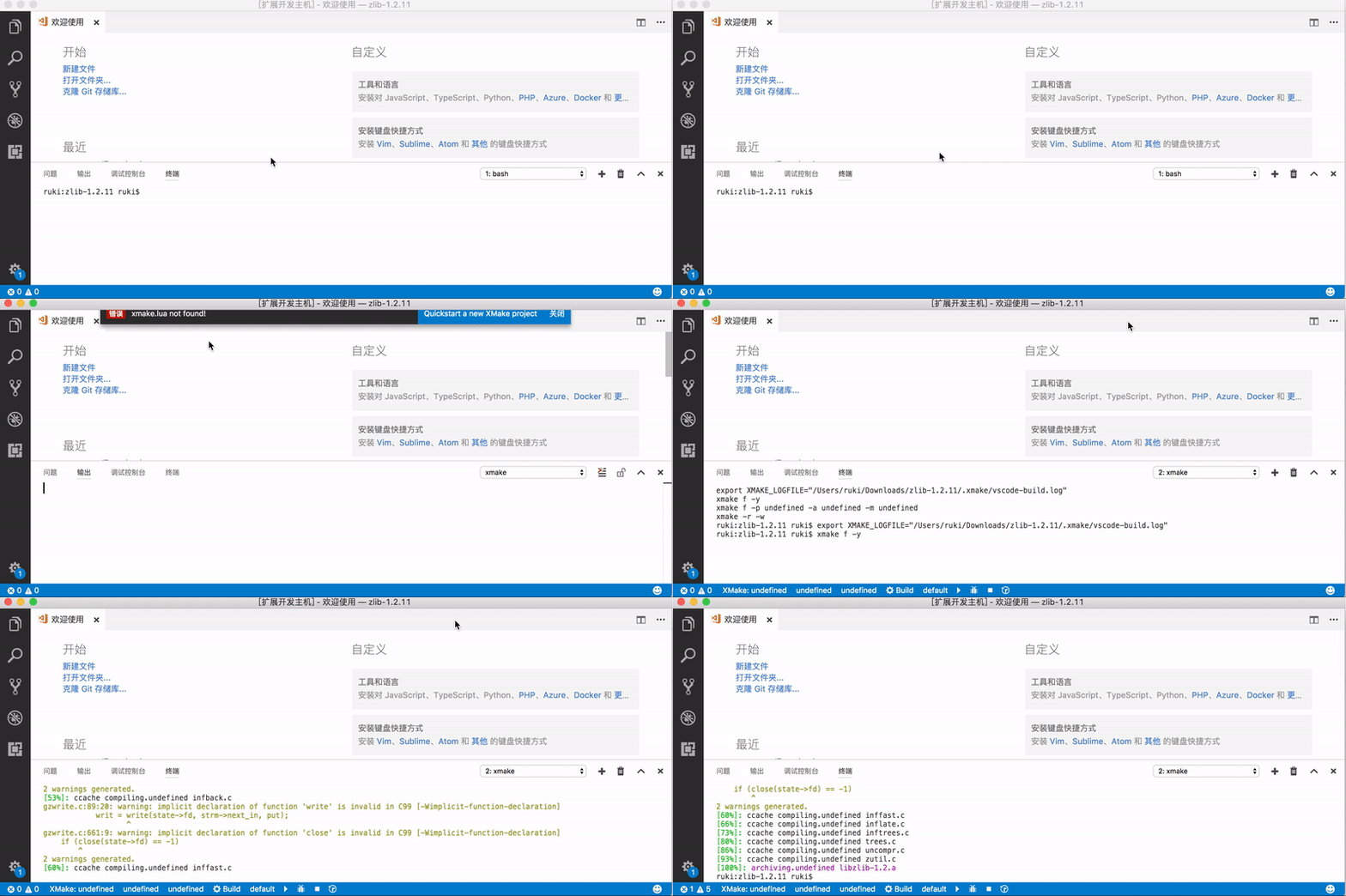
## Quickstart
## Colorization and Completion Lists
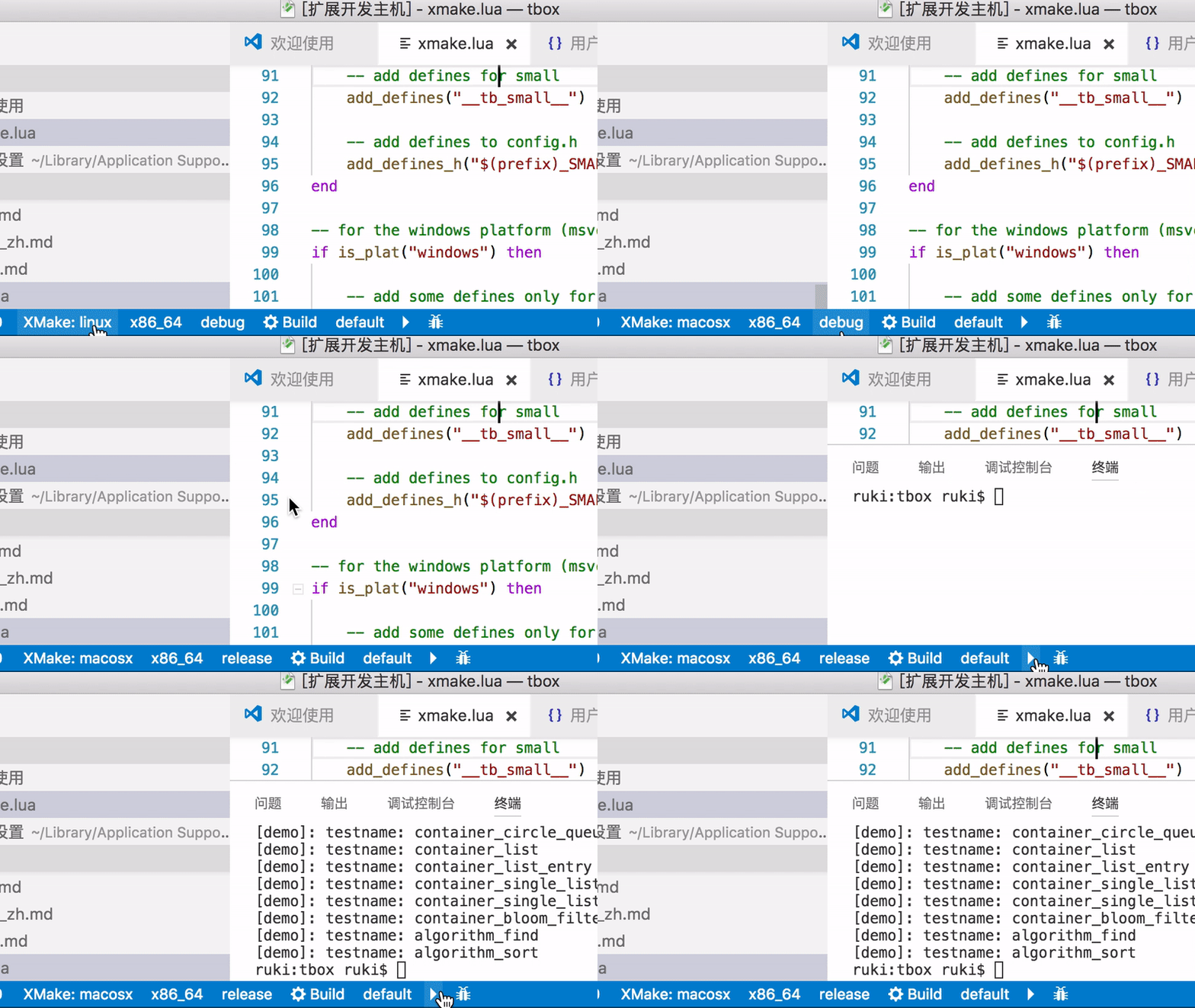
## StatusBar

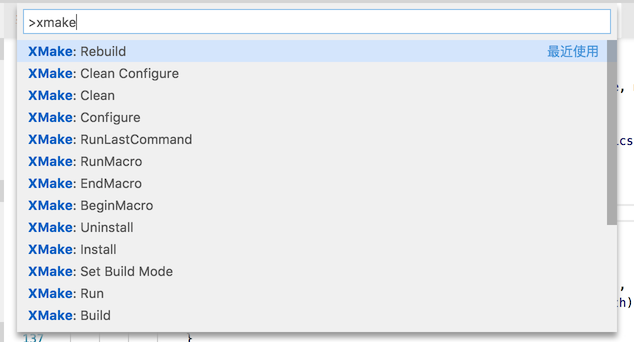
## Commands
## Configuration
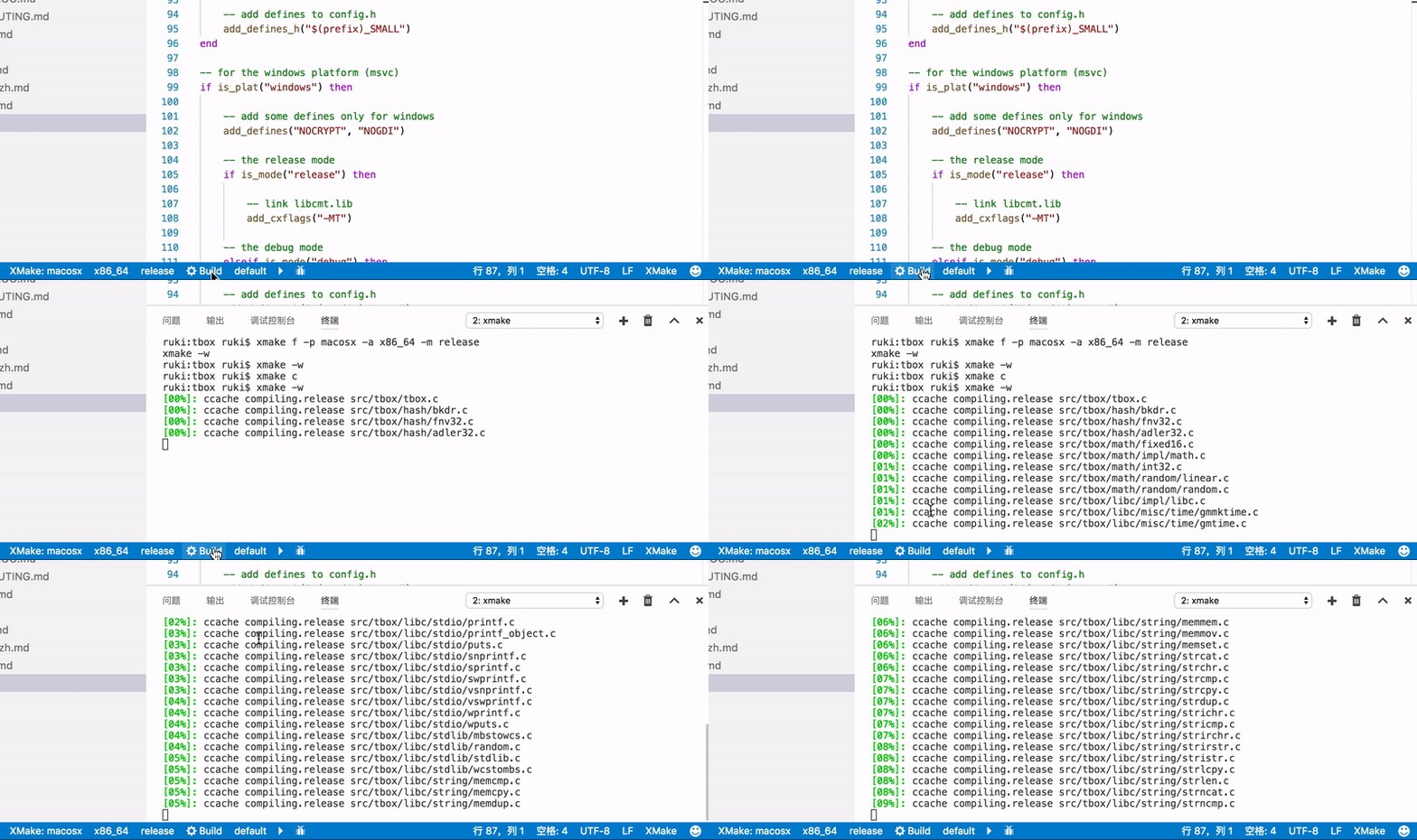
## Build
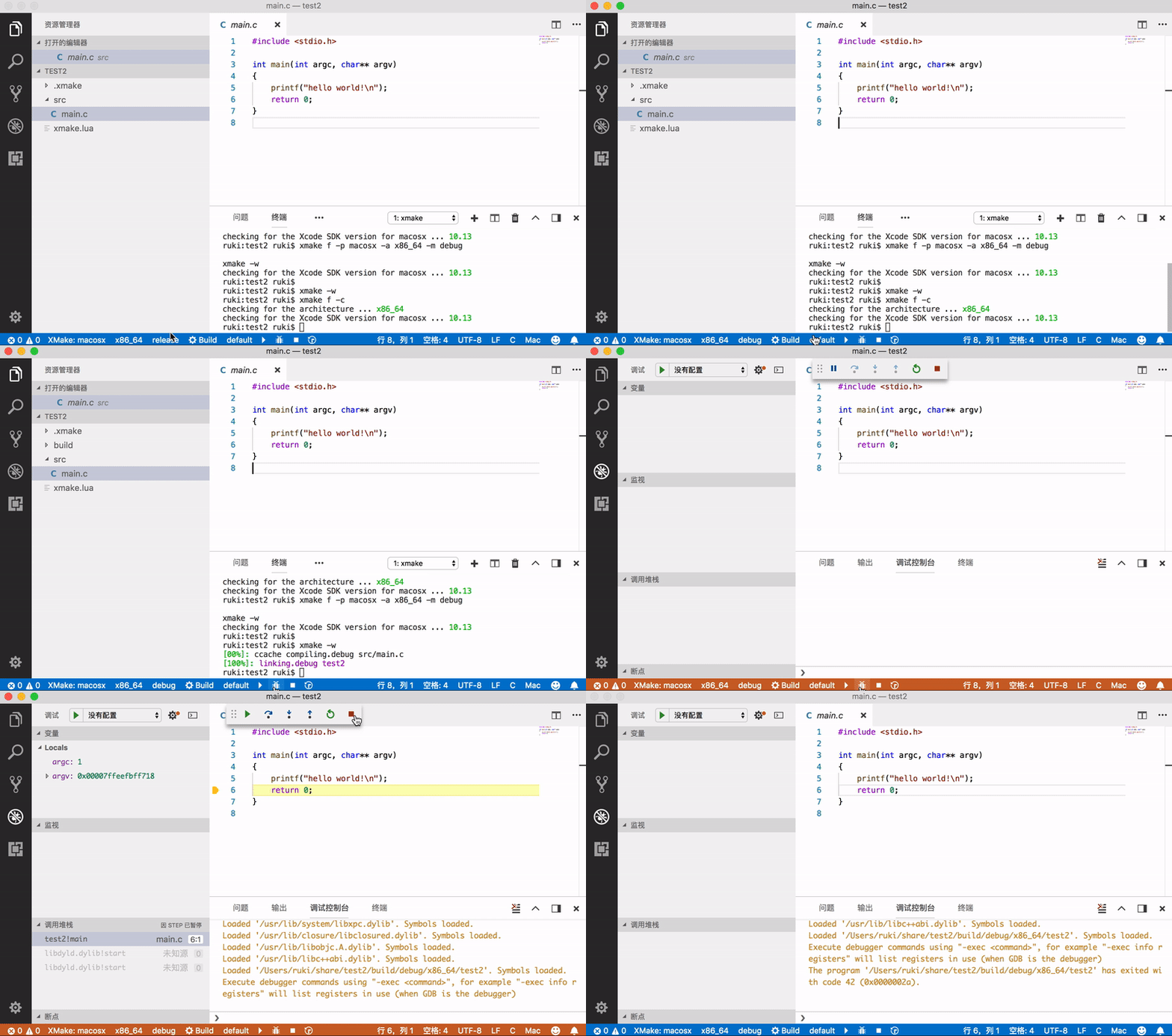
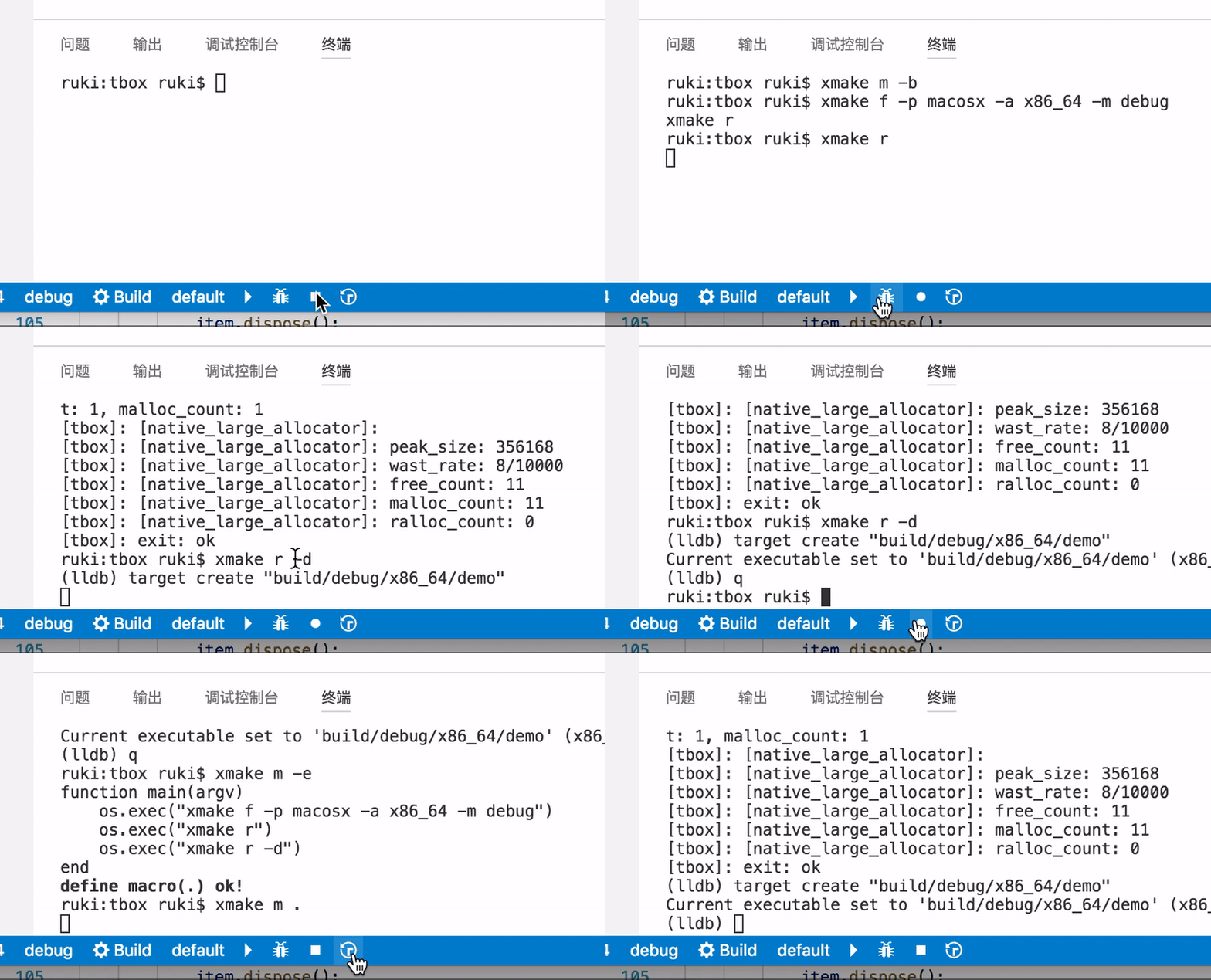
## Run and Debug
## Record and Playback
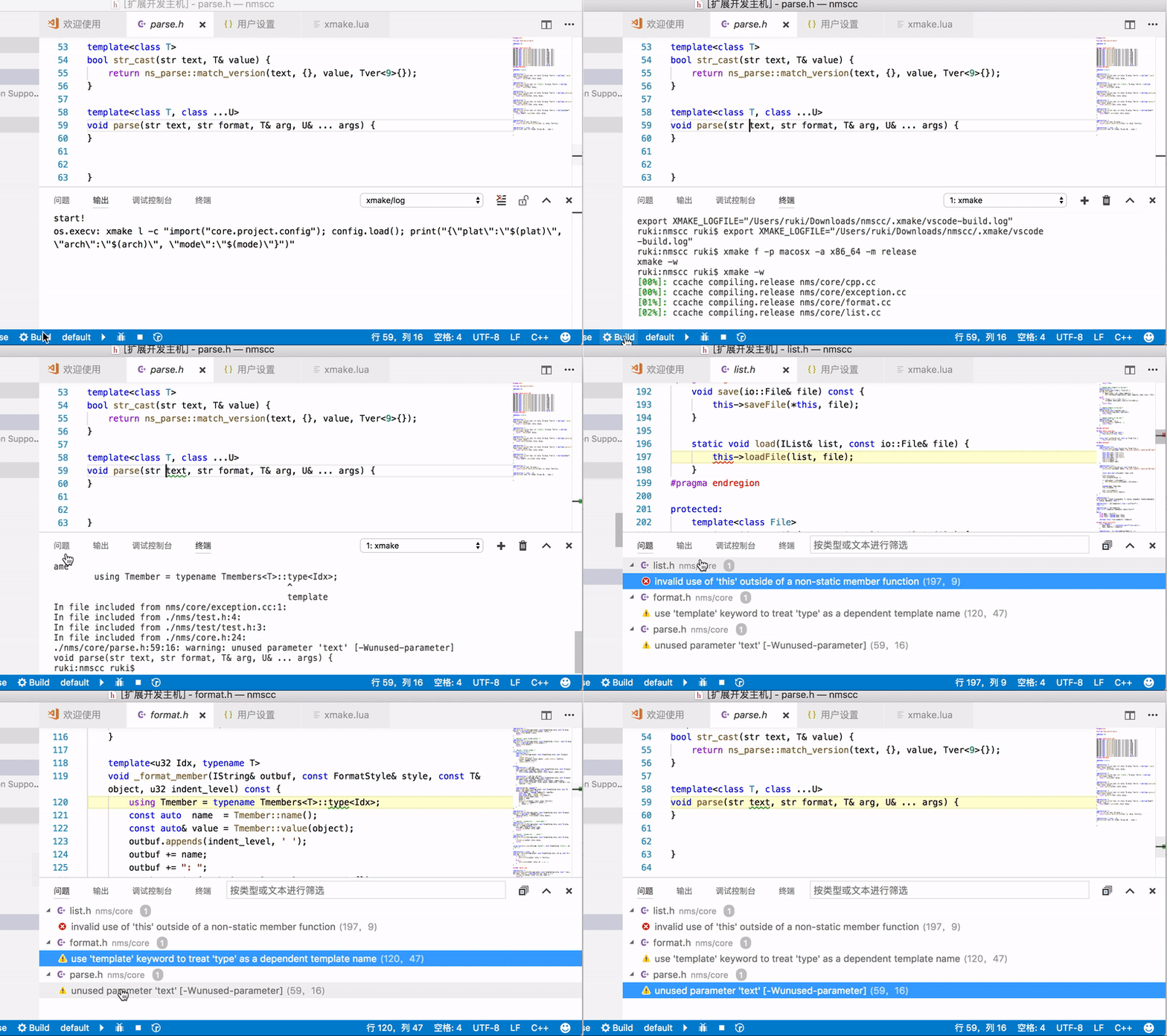
## Problem
## IntelliSense
xmake-vscode will generate `.vscode/compile_commands.json` file, so you need only add it to `.vscode/c_cpp_properties.json` to enable IntelliSense.
### Automatic Generation Modes
The extension provides three modes for automatic generation of `compile_commands.json`:
- **onFileChange** (default): Generate compile_commands.json when xmake.lua files change
- **onBuild**: Generate compile_commands.json after building the project
- **disabled**: Disable automatic generation (manual generation via "XMake: UpdateIntellisense" command is still available)
You can configure this in VSCode settings with `xmake.autoGenerateCompileCommands`.
for example (`.vscode/c_cpp_properties.json`):
```json
{
"configurations": [
{
"compileCommands": ".vscode/compile_commands.json"
}
],
"version": 4
}
```
### How can I generate c_cpp_properties.json?
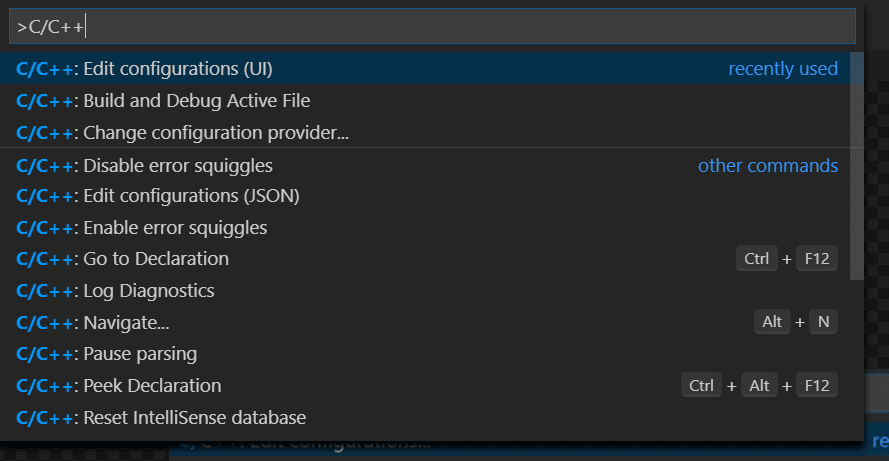
These configuration settings are stored in your project's c_cpp_properties.json file. To edit this file, in VS Code, select C/C++: Edit Configurations (UI) from the Command Palette (⇧⌘P):
Please see [IntelliSense for cross-compiling](https://code.visualstudio.com/docs/cpp/configure-intellisense-crosscompilation)
## Debugging
Debug via launch configurations (launch.json) is accessible only with Run->Start Debugging (not F5 keybinding) or via Launch Debug command.
|attribute |type | |
|-------------------|------|---------|
|**name** |string| *Required.* Launch configuration name, as you want it to appear in the Run and Debug panel.
|**type** |string| *Required.* Set to `xmake`.
|**request** |string| *Required.* Session initiation method:`launch` or `attach`.
|**target** |string| *Required.* XMake target.
|env |object| Additional environment variables. `{"PATH" : "some/path"}`
|args |string ❘ [string]| Command line parameters. If not defined args are taken from `debuggingTargetsArguments` config.
|cwd |string| If not defined xmake will use the target directory.
|stopAtEntry |boolean| If set to true, the debugger should stop at the entry-point of the target (ignored on attach). Default value is false.
|terminal |string| Destination of stdio streams: - `console` for Debug Console
- `integrated` (default) for VSCode integrated terminal
- `external` for a new terminal window
- `newExternal` for a new terminal window but only with cli application (only cpptools / with lldb it will be converted to `external`)
|
Example:
```json
{
"configurations": [
{
"name": "XMake Debug",
"type": "xmake",
"request": "launch",
"target": "example",
"stopAtEntry": true
}
]
}
```
### Configurations related to debugging
#### Debugger extension
You can choose the debugger extension with `xmake.debugConfigType`, set it to:
* `default` for cpptools debugger
* `codelldb` for lldb debugger
#### Envs behaviour
You can choose the behaviour between xmake envs and envs that are defined in `launch.json`
For an xmake envs that are like this `{"PATH: "path/from/xmake"}` and in `launch.json`
`{"PATH": "path/from/config"}`.
Default is `merge`.
* With `xmake.envBehaviour` set to `merge`, the result is: `{"PATH": "path/from/xmake;path/from/config"}`.
* With `xmake.envBehaviour` set to `erase`, the result is: `{"PATH": "path/from/xmake"}`
* And with `xmake.envBehaviour` set to `override`, the result is: `{"PATH": "path/from/config"}`.
XMake envs will only be replaced for the same key, if another xmake env key is present, it will be present in the final result.
## Global Configuration
We can configure them in settings.json
### Basic Configuration
```json
{
"xmake.executable": "xmake",
"xmake.logLevel": "normal",
"xmake.buildLevel": "normal",
"xmake.buildDirectory": "${workspaceRoot}/build",
"xmake.workingDirectory": "${workspaceRoot}"
}
```
### Advanced Configuration
```json
{
"xmake.executable": "xmake",
"xmake.logLevel": "normal",
"xmake.buildLevel": "normal",
"xmake.buildDirectory": "${workspaceRoot}/build",
"xmake.installDirectory": "",
"xmake.packageDirectory": "",
"xmake.workingDirectory": "${workspaceRoot}",
"xmake.androidNDKDirectory": "",
"xmake.QtDirectory": "",
"xmake.WDKDirectory": "",
"xmake.compileCommandsDirectory": ".vscode",
"xmake.compileCommandsBackend": "clangd",
"xmake.additionalConfigArguments": [],
"xmake.runningTargetsArguments": {
"default": []
},
"xmake.debuggingTargetsArguments": {
"default": []
},
"xmake.debugConfigType": "default",
"xmake.customDebugConfig": {},
"xmake.envBehaviour": "merge",
"xmake.enableSyntaxCheck": true,
"xmake.runMode": "runOnly"
}
```
### Status Bar Configuration
Control which buttons appear in the status bar:
```json
{
"xmake.status.showProject": false,
"xmake.status.showXMake": true,
"xmake.status.showPlatform": false,
"xmake.status.showArch": false,
"xmake.status.showMode": false,
"xmake.status.showToolchain": false,
"xmake.status.showTarget": false,
"xmake.status.showBuild": true,
"xmake.status.showRun": true,
"xmake.status.showDebug": true
}
```
### Configuration Options Details
| Option | Type | Default | Description |
|--------|------|---------|-------------|
| **xmake.executable** | string | "xmake" | The xmake executable name / path |
| **xmake.logLevel** | string | "normal" | Log Level: `verbose`, `normal`, `minimal` |
| **xmake.buildLevel** | string | "normal" | Build Output Level: `verbose`, `normal`, `debug` |
| **xmake.runMode** | string | "runOnly" | Run Mode: `runOnly`, `buildRun` |
| **xmake.buildDirectory** | string | "${workspaceRoot}/build" | Build Output Directory |
| **xmake.installDirectory** | string | "" | Install Output Directory |
| **xmake.packageDirectory** | string | "" | Package Output Directory |
| **xmake.workingDirectory** | string | "${workspaceRoot}" | Project Working Directory |
| **xmake.androidNDKDirectory** | string | "" | Android NDK Directory |
| **xmake.QtDirectory** | string | "" | Qt Directory |
| **xmake.WDKDirectory** | string | "" | Windows Driver Kit Directory |
| **xmake.compileCommandsDirectory** | string | ".vscode" | compile_commands.json file directory |
| **xmake.compileCommandsBackend** | string | "clangd" | LSP backend for compile_commands |
| **xmake.autoGenerateCompileCommands** | string | "onFileChange" | Automatic generation mode: `onFileChange`, `onBuild`, `disabled` |
| **xmake.additionalConfigArguments** | array | [] | Additional config arguments, e.g. `["--cc=gcc", "--myopt=xxx"]` |
| **xmake.runningTargetsArguments** | object | {"default": []} | Running targets arguments, e.g. `{"targetName": ["args", "..."]}` |
| **xmake.debuggingTargetsArguments** | object | {"default": []} | Debugging targets arguments |
| **xmake.debugConfigType** | string | "default" | Debug configuration type: `default`, `codelldb`, `lldb-dap`, `gdb-dap` |
| **xmake.customDebugConfig** | object | {} | Custom debugging configurations |
| **xmake.envBehaviour** | string | "merge" | Environment behaviour: `erase`, `merge`, `override` |
| **xmake.enableSyntaxCheck** | boolean | true | Enable Lua syntax check |
## XMake Explorer
The extension provides a dedicated XMake Explorer in the Activity Bar for project management.
### Features
* **Project Overview**: View all targets and their configurations
* **Target Management**: Build, rebuild, clean, run, and debug individual targets
* **Configuration Panel**: Quick access to platform, architecture, mode, and toolchain settings
* **Context Menu**: Right-click actions for quick operations
### Explorer Actions
- **Build All**: Build all targets in the project
- **Rebuild All**: Clean and build all targets
- **Clean All**: Clean all build artifacts
- **Run All**: Run all executable targets
- **Configure**: Open configuration settings
## Available Commands
Access all XMake commands through the Command Palette (`Ctrl+Shift+P` or `Cmd+Shift+P`):
### Project Commands
- **XMake: CreateProject**: Create a new XMake project
- **XMake: NewFiles**: Add new files to the project
- **XMake: Show Explorer**: Show/hide the XMake Explorer
### Configuration Commands
- **XMake: Configure**: Configure the project
- **XMake: Clean Configure**: Clean and reconfigure the project
- **XMake: Set Target Platform**: Set the target platform
- **XMake: Set Target Architecture**: Set the target architecture
- **XMake: Set Build Mode**: Set the build mode (debug/release)
- **XMake: Set Default Target**: Set the default target
- **XMake: toolchain**: Set the toolchain
### Build Commands
- **XMake: Build**: Build the current target
- **XMake: BuildAll**: Build all targets
- **XMake: Rebuild**: Rebuild the current target
- **XMake: Clean**: Clean the current target
- **XMake: CleanAll**: Clean all targets
### Run and Debug Commands
- **XMake: Run**: Run the current target
- **XMake: BuildRun**: Build and run the target
- **XMake: Debug**: Start debugging
- **XMake: Launch Debug**: Launch with debugger
### Package and Install Commands
- **XMake: Package**: Package the project
- **XMake: Install**: Install the project
- **XMake: Uninstall**: Uninstall the project
### Utility Commands
- **XMake: BeginMacro**: Start recording commands
- **XMake: EndMacro**: Stop recording commands
- **XMake: RunMacro**: Run recorded macro
- **XMake: RunLastCommand**: Repeat the last command
- **XMake: UpdateIntellisense**: Update IntelliSense configuration
## Task Integration
The extension supports VS Code tasks for XMake operations. Create a `.vscode/tasks.json` file:
```json
{
"version": "2.0.0",
"tasks": [
{
"label": "XMake: Build",
"type": "xmake",
"task": "build",
"problemMatcher": ["$gcc"],
"group": {
"kind": "build",
"isDefault": true
}
},
{
"label": "XMake: Clean",
"type": "xmake",
"task": "clean",
"problemMatcher": []
},
{
"label": "XMake: Run",
"type": "xmake",
"task": "run",
"problemMatcher": []
}
]
}
```
### Available Task Types
- `build`: Build the project
- `clean`: Clean build artifacts
- `run`: Run the target
- `package`: Package the project
- `install`: Install the project
- `configure`: Configure the project
## Key Bindings
The extension provides the following default key bindings:
| Key | Command | Description |
|-----|---------|-------------|
| `F5` | `xmake.onDebug` | Start debugging (when xmake is enabled) |
You can customize these key bindings in VS Code preferences.
## Platform-Specific Configuration
The extension supports platform-specific configuration. You can use platform prefixes in your settings:
```json
{
"xmake.executable": "xmake",
"windows.xmake.executable": "xmake.exe",
"linux.xmake.executable": "/usr/bin/xmake",
"osx.xmake.executable": "/usr/local/bin/xmake"
}
```
Supported platform prefixes:
- `windows` for Windows
- `linux` for Linux
- `osx` for macOS
## Troubleshooting
### Common Issues
**XMake not found**
- Ensure XMake is installed and accessible in your system PATH
- Use `xmake.executable` setting to specify the full path to xmake executable
**IntelliSense not working**
- Check your `xmake.autoGenerateCompileCommands` setting:
- Set to `onFileChange` to generate when xmake.lua changes
- Set to `onBuild` to generate after building
- Set to `disabled` and use `XMake: UpdateIntellisense` command manually
- Run `XMake: UpdateIntellisense` command to generate `compile_commands.json` manually
- Ensure your `.vscode/c_cpp_properties.json` references the correct compile commands file
- Check that the C/C++ extension is installed and enabled
**Debugging not working**
- Verify your `launch.json` configuration has the correct target name
- Check that the debugger extension (C/C++ or CodeLLDB) is installed
- Ensure the debug configuration type matches your debugger extension
**Build fails**
- Check the output panel for detailed error messages
- Verify your `xmake.lua` configuration is correct
- Ensure all required dependencies and tools are installed
### Getting Help
- **Documentation**: [XMake Official Documentation](https://xmake.io/#/docs)
- **Issues**: [GitHub Issues](https://github.com/xmake-io/xmake-vscode/issues)
- **Community**:
- [Reddit](https://www.reddit.com/r/xmake/)
- [Discord](https://discord.gg/xmake)
- [Telegram](https://t.me/tbooxorg)
- [QQ Group](https://jq.qq.com/?_wv=1027&k=5hpwWFv)
## Contributing
Contributions are welcome! Please see [CONTRIBUTING.md](https://github.com/xmake-io/xmake-vscode/blob/master/CONTRIBUTING.md) for guidelines.
## License
This project is licensed under the Apache License 2.0 - see the [LICENSE](https://github.com/xmake-io/xmake-vscode/blob/master/LICENSE) file for details.
## Donation
If you find this extension helpful, consider supporting the project:
[](https://xmake.io/about/sponsor.html)