# ARVideoKit
**Repository Path**: skyjieying/ARVideoKit
## Basic Information
- **Project Name**: ARVideoKit
- **Description**: Capture & record ARKit videos 📹, photos 🌄, Live Photos 🎇, and GIFs 🎆.
- **Primary Language**: Unknown
- **License**: Apache-2.0
- **Default Branch**: swift_5
- **Homepage**: None
- **GVP Project**: No
## Statistics
- **Stars**: 0
- **Forks**: 0
- **Created**: 2020-10-13
- **Last Updated**: 2020-12-19
## Categories & Tags
**Categories**: Uncategorized
**Tags**: None
## README
> Use [swift_4_2](https://github.com/AFathi/ARVideoKit/tree/swift_4_2) branch for projects written in Swift 4.2
> Use [master](https://github.com/AFathi/ARVideoKit/tree/master) branch for projects written in Swift 4.0
## Sponsors
[**Chemical Wedding**](https://www.chemicalwedding.tv)

**GitAds**
 ## ARVideoKit
An iOS Framework that enables developers to capture videos 📹, photos 🌄, Live Photos 🎇, and GIFs 🎆 with ARKit content.
In other words, you **NO LONGER** have to ~screen record~/~screenshot~ to capture videos 📹 and photos 🌄 of your awesome ARKit apps!
| Table of Contents | Description |
| ------------------ |:------------------:|
| [Documentation](https://github.com/AFathi/ARVideoKit/wiki) | Describes the configuration options `ARVideoKit` offers |
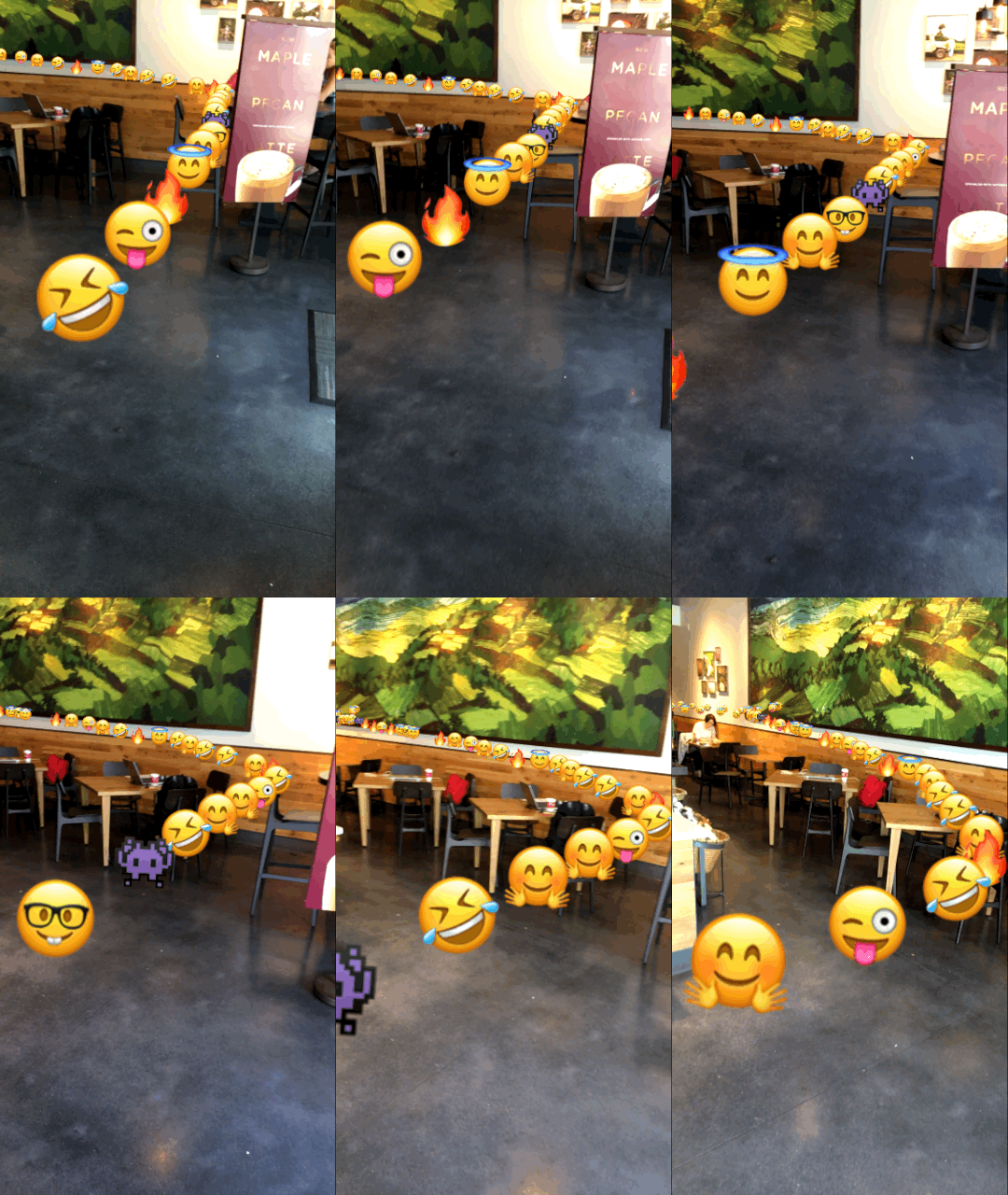
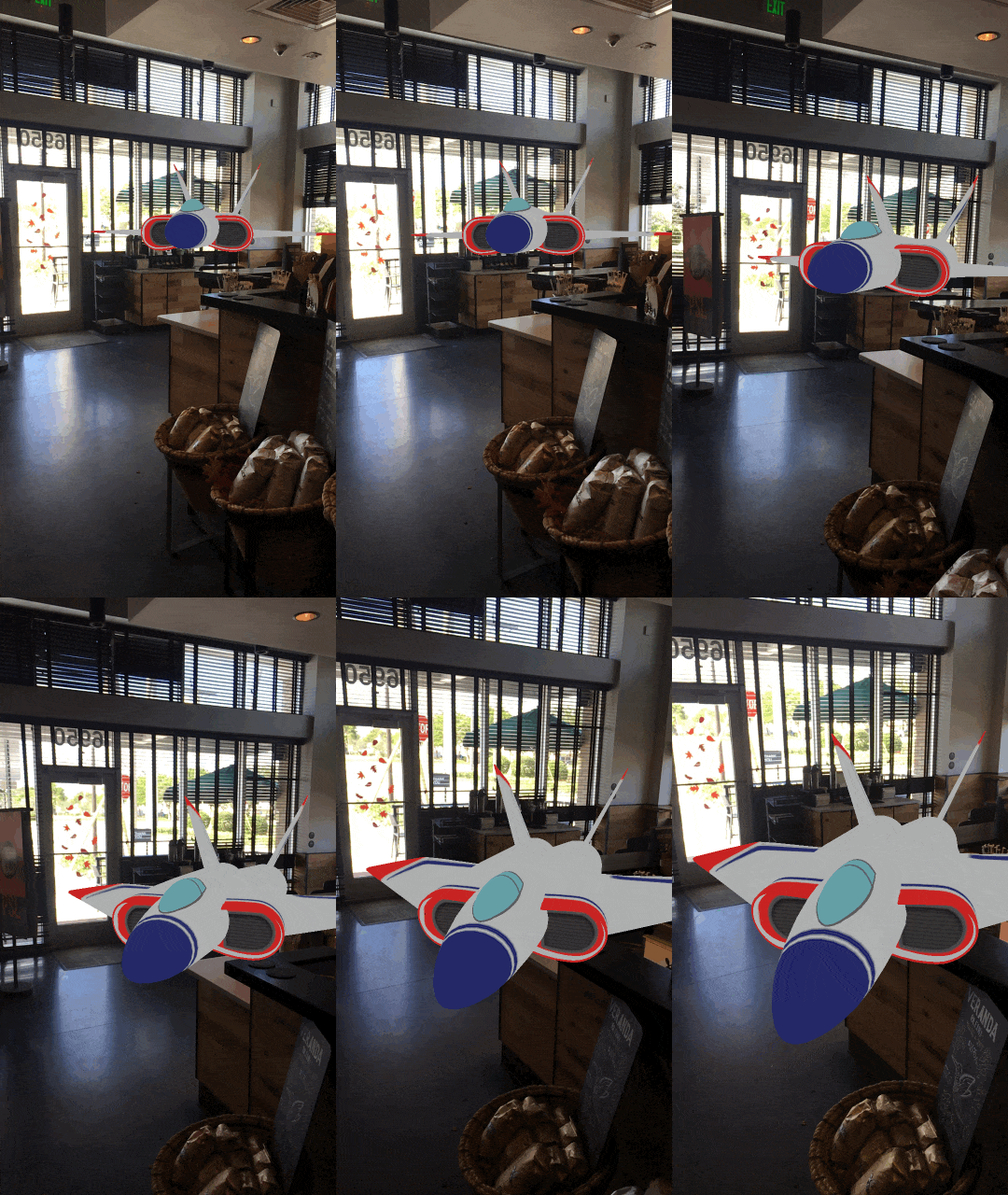
| [Preview](#preview) | Displays 2 GIF images captured using the supported [`gif`](https://github.com/AFathi/ARVideoKit/wiki/RecordAR#func-gifforduration-durationtimeinterval-exportbool-_-finished-_-statusbool-_-gifpath-url-_-permissionstatusphauthorizationstatus-_-exportedbool---swiftvoid--nil) method in `ARVideoKit`|
| [Key Features](#key-features) | Lists the key features `ARVideoKit` offers |
| [Compatibility](#compatibility) | Describes the `ARVideoKit` device and iOS compatibality |
| [Example Projects](#example-projects) | Explains how to run the example project provided in this repository |
| [Installation](#installation) | Describes the [Cocoapods](#cocoapods), [Carthage](#carthage) & [Manual](#manual) options to install `ARVideoKit` |
| [Implementation](#implementation) | Lists the [steps needed](#implementation) for Objective-C & Swift, [notes](#note), and [reference](#youre-all-set-) for more options |
| [Publishing to the App Store](#publishing-to-the-app-store) | Describes the steps **required** before submitting an application using `ARVideoKit` to the App Store. |
|[](https://www.paypal.com/cgi-bin/webscr?cmd=_donations&business=ahmedfbekhit@gmail.com&item_name=Support+ARVideoKit+Developer&item_number=ARVideoKit+Framework+Donations&amount=0%2e00¤cy_code=USD) | [Donations](#donate) will support me to keep maintaining `ARVideoKit` ❤️|
|[Sponsors](#sponsors) | Featuring the sponsors of this project |
| [Contributions](#contributions) | Describes how you can contribute to this project |
| [Apps using ARVideoKit](#apps-using-arvideokit) | A list of published applications using ARVideoKit |
| [License](#license) | Describes `ARVideoKit` license |
| [AppCoda Tutorial](https://www.appcoda.com/record-arkit-video/) | Check out a detailed tutorial about implementing `ARVideoKit` with SpriteKit ☺️ |
## Preview
|👾 [Initialized with SpriteKit](https://github.com/AFathi/ARVideoKit/wiki/RecordAR#init-arspritekitarskview)👇|🚀 [Initialized with SceneKit](https://github.com/AFathi/ARVideoKit/wiki/RecordAR#init-arscenekitarscnview) 👇|
|--------------|--------------|
|  | |
## Key Features
✅ Capture [Photos](https://github.com/AFathi/ARVideoKit/wiki/RecordAR#func-photo---uiimage) from [`ARSCNView`](https://developer.apple.com/documentation/arkit/arscnview), [`ARSKView`](https://developer.apple.com/documentation/arkit/arskview), and [`SCNView`](https://developer.apple.com/documentation/scenekit/scnview)
✅ Capture [Live Photos](https://github.com/AFathi/ARVideoKit/wiki/RecordAR#func-livephotoexportbool-_-finished-_-statusbool-_-livephotophlivephotoplus-_-permissionstatusphauthorizationstatus-_-exportedbool---swiftvoid--nil) & [GIFs](https://github.com/AFathi/ARVideoKit/wiki/RecordAR#func-gifforduration-durationtimeinterval-exportbool-_-finished-_-statusbool-_-gifpath-url-_-permissionstatusphauthorizationstatus-_-exportedbool---swiftvoid--nil) from [`ARSCNView`](https://developer.apple.com/documentation/arkit/arscnview), [`ARSKView`](https://developer.apple.com/documentation/arkit/arskview), and [`SCNView`](https://developer.apple.com/documentation/scenekit/scnview)
✅ [Record](https://github.com/AFathi/ARVideoKit/wiki/RecordAR#func-record) Videos from [`ARSCNView`](https://developer.apple.com/documentation/arkit/arscnview), [`ARSKView`](https://developer.apple.com/documentation/arkit/arskview), and [`SCNView`](https://developer.apple.com/documentation/scenekit/scnview)
✅ [Pause/Resume](https://github.com/AFathi/ARVideoKit/wiki/RecordAR#func-pause) video
✅ Allow device's Music playing in the [background while recording a video](https://github.com/AFathi/ARVideoKit/wiki/RecordAR#var-enablemixwithothersbool)
✅ [Returns](https://github.com/AFathi/ARVideoKit/wiki/RecordAR#var-onlyrenderwhilerecordingbool) rendered and raw buffers in a [protocol](https://github.com/AFathi/ARVideoKit/wiki/RecordAR#var-renderarrenderardelegate) [method](https://github.com/AFathi/ARVideoKit/wiki/RenderARDelegate#func-framedidrender-buffercvpixelbuffer-with-timecmtime-using-rawbuffercvpixelbuffer) for additional Image & Video processing
## Compatibility
`ARVideoKit` is compatible on iOS devices that support both [`ARKit`](https://developer.apple.com/documentation/arkit) and [`Metal`](https://developer.apple.com/documentation/metal). Check Apple's [iOS Device Compatibility Reference](https://developer.apple.com/library/content/documentation/DeviceInformation/Reference/iOSDeviceCompatibility/DeviceCompatibilityMatrix/DeviceCompatibilityMatrix.html#//apple_ref/doc/uid/TP40013599-CH17-SW1) for more information.
`ARVideoKit` requires:
- iOS 11
- Swift 3.2 or higher
## Example Projects
To try the example project, simply clone this repository and open the `Examples` folder to choose between the Objective-C and Swift project files.
## Installation
### Cocoapods
1. Add this line to your project's `Podfile` (for Swift 5.0)
```
pod 'ARVideoKit', '~> 1.5.51'
```
2. Install the pod
```
$ pod install
```
### Carthage
1. Add this line to your project's `Cartfile`
```
github "AFathi/ARVideoKit" ~> 1.31
```
2. Update your Carthage directory
```
$ carthage update
```
### Swift Package Manager (available Xcode 11.2 and forward)
1. In Xcode, select File > Swift Packages > Add Package Dependency.
2. Follow the prompts using the URL for this repository.
### Manual
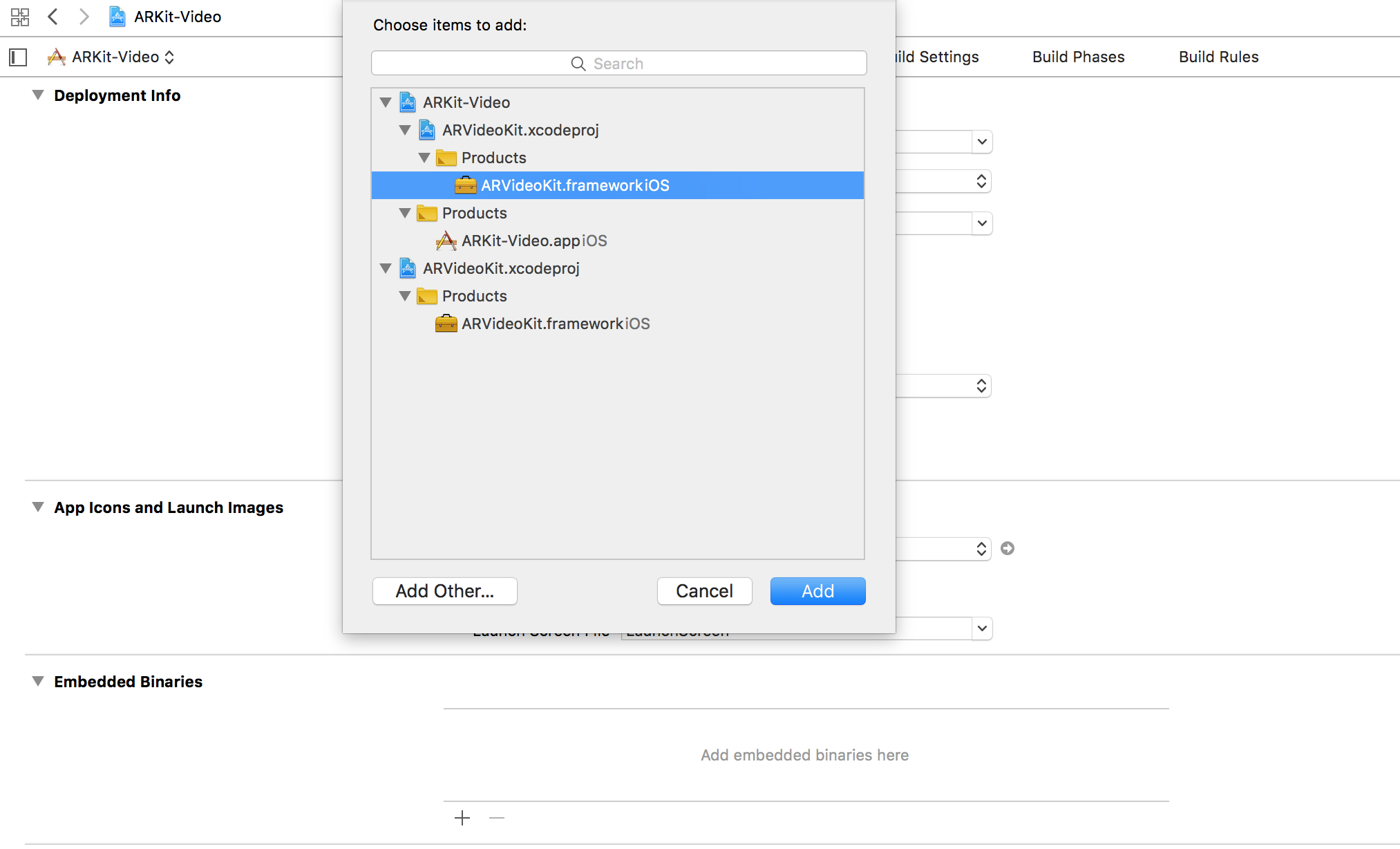
Drag `ARVideoKit.xcodeproj` into your project and click the **+** button in the embedded binaries section of your project's target.
## Implementation
### Swift
[Click here to check the Swift implementation steps.](https://github.com/AFathi/ARVideoKit/tree/master/Examples/Swift)
### Objective-C
[Click here to check the Objective-C implementation steps.](https://github.com/AFathi/ARVideoKit/tree/master/Examples/Objective-C)
### NOTE
Make sure you add the usage description of the `camera`, `microphone`, and `photo library` in the app's `Info.plist`.
```
NSCameraUsageDescription
AR Camera
NSPhotoLibraryAddUsageDescription
Export AR Media
NSPhotoLibraryUsageDescription
Export AR Media
NSMicrophoneUsageDescription
Audiovisual Recording
```

### You're all set. 🤓
Check [`RecordAR`](https://github.com/AFathi/ARVideoKit/wiki/RecordAR) documentation for more options!
## Publishing to the App Store
Before publishing to the App Store make sure to add the [ARVideoKit License](#license) to your app licences list.
1. Build ARVideoKit for release
> Open ARVideoKit.xcodeproj
> Select ARVideoKitRelease scheme with Generic iOS Device
> Build the project (cmd + B)
> Right click on Products/ARVideoKit.framework -> Show in finder
> Copy and replace ARVideoKit.framework in your project
Additionally, if you are using the binary build from `Framework Build` or the latest release, you MUST **strip out the simulator architectures** from the framework before pushing an application to the App Store.
To do so, follow those steps:
2. Install Carthage
> Download `Carthage.pkg` [from here](https://github.com/Carthage/Carthage/releases)
> Or install with Homebrew using this command `brew install carthage`
3. Go to your project target's `Build Phase`
## ARVideoKit

An iOS Framework that enables developers to capture videos 📹, photos 🌄, Live Photos 🎇, and GIFs 🎆 with ARKit content.
In other words, you **NO LONGER** have to ~screen record~/~screenshot~ to capture videos 📹 and photos 🌄 of your awesome ARKit apps!
| Table of Contents | Description |
| ------------------ |:------------------:|
| [Documentation](https://github.com/AFathi/ARVideoKit/wiki) | Describes the configuration options `ARVideoKit` offers |
| [Preview](#preview) | Displays 2 GIF images captured using the supported [`gif`](https://github.com/AFathi/ARVideoKit/wiki/RecordAR#func-gifforduration-durationtimeinterval-exportbool-_-finished-_-statusbool-_-gifpath-url-_-permissionstatusphauthorizationstatus-_-exportedbool---swiftvoid--nil) method in `ARVideoKit`|
| [Key Features](#key-features) | Lists the key features `ARVideoKit` offers |
| [Compatibility](#compatibility) | Describes the `ARVideoKit` device and iOS compatibality |
| [Example Projects](#example-projects) | Explains how to run the example project provided in this repository |
| [Installation](#installation) | Describes the [Cocoapods](#cocoapods), [Carthage](#carthage) & [Manual](#manual) options to install `ARVideoKit` |
| [Implementation](#implementation) | Lists the [steps needed](#implementation) for Objective-C & Swift, [notes](#note), and [reference](#youre-all-set-) for more options |
| [Publishing to the App Store](#publishing-to-the-app-store) | Describes the steps **required** before submitting an application using `ARVideoKit` to the App Store. |
|[](https://www.paypal.com/cgi-bin/webscr?cmd=_donations&business=ahmedfbekhit@gmail.com&item_name=Support+ARVideoKit+Developer&item_number=ARVideoKit+Framework+Donations&amount=0%2e00¤cy_code=USD) | [Donations](#donate) will support me to keep maintaining `ARVideoKit` ❤️|
|[Sponsors](#sponsors) | Featuring the sponsors of this project |
| [Contributions](#contributions) | Describes how you can contribute to this project |
| [Apps using ARVideoKit](#apps-using-arvideokit) | A list of published applications using ARVideoKit |
| [License](#license) | Describes `ARVideoKit` license |
| [AppCoda Tutorial](https://www.appcoda.com/record-arkit-video/) | Check out a detailed tutorial about implementing `ARVideoKit` with SpriteKit ☺️ |
## Preview
|👾 [Initialized with SpriteKit](https://github.com/AFathi/ARVideoKit/wiki/RecordAR#init-arspritekitarskview)👇|🚀 [Initialized with SceneKit](https://github.com/AFathi/ARVideoKit/wiki/RecordAR#init-arscenekitarscnview) 👇|
|--------------|--------------|
|  | |
## Key Features
✅ Capture [Photos](https://github.com/AFathi/ARVideoKit/wiki/RecordAR#func-photo---uiimage) from [`ARSCNView`](https://developer.apple.com/documentation/arkit/arscnview), [`ARSKView`](https://developer.apple.com/documentation/arkit/arskview), and [`SCNView`](https://developer.apple.com/documentation/scenekit/scnview)
✅ Capture [Live Photos](https://github.com/AFathi/ARVideoKit/wiki/RecordAR#func-livephotoexportbool-_-finished-_-statusbool-_-livephotophlivephotoplus-_-permissionstatusphauthorizationstatus-_-exportedbool---swiftvoid--nil) & [GIFs](https://github.com/AFathi/ARVideoKit/wiki/RecordAR#func-gifforduration-durationtimeinterval-exportbool-_-finished-_-statusbool-_-gifpath-url-_-permissionstatusphauthorizationstatus-_-exportedbool---swiftvoid--nil) from [`ARSCNView`](https://developer.apple.com/documentation/arkit/arscnview), [`ARSKView`](https://developer.apple.com/documentation/arkit/arskview), and [`SCNView`](https://developer.apple.com/documentation/scenekit/scnview)
✅ [Record](https://github.com/AFathi/ARVideoKit/wiki/RecordAR#func-record) Videos from [`ARSCNView`](https://developer.apple.com/documentation/arkit/arscnview), [`ARSKView`](https://developer.apple.com/documentation/arkit/arskview), and [`SCNView`](https://developer.apple.com/documentation/scenekit/scnview)
✅ [Pause/Resume](https://github.com/AFathi/ARVideoKit/wiki/RecordAR#func-pause) video
✅ Allow device's Music playing in the [background while recording a video](https://github.com/AFathi/ARVideoKit/wiki/RecordAR#var-enablemixwithothersbool)
✅ [Returns](https://github.com/AFathi/ARVideoKit/wiki/RecordAR#var-onlyrenderwhilerecordingbool) rendered and raw buffers in a [protocol](https://github.com/AFathi/ARVideoKit/wiki/RecordAR#var-renderarrenderardelegate) [method](https://github.com/AFathi/ARVideoKit/wiki/RenderARDelegate#func-framedidrender-buffercvpixelbuffer-with-timecmtime-using-rawbuffercvpixelbuffer) for additional Image & Video processing
## Compatibility
`ARVideoKit` is compatible on iOS devices that support both [`ARKit`](https://developer.apple.com/documentation/arkit) and [`Metal`](https://developer.apple.com/documentation/metal). Check Apple's [iOS Device Compatibility Reference](https://developer.apple.com/library/content/documentation/DeviceInformation/Reference/iOSDeviceCompatibility/DeviceCompatibilityMatrix/DeviceCompatibilityMatrix.html#//apple_ref/doc/uid/TP40013599-CH17-SW1) for more information.
`ARVideoKit` requires:
- iOS 11
- Swift 3.2 or higher
## Example Projects
To try the example project, simply clone this repository and open the `Examples` folder to choose between the Objective-C and Swift project files.
## Installation
### Cocoapods
1. Add this line to your project's `Podfile` (for Swift 5.0)
```
pod 'ARVideoKit', '~> 1.5.51'
```
2. Install the pod
```
$ pod install
```
### Carthage
1. Add this line to your project's `Cartfile`
```
github "AFathi/ARVideoKit" ~> 1.31
```
2. Update your Carthage directory
```
$ carthage update
```
### Swift Package Manager (available Xcode 11.2 and forward)
1. In Xcode, select File > Swift Packages > Add Package Dependency.
2. Follow the prompts using the URL for this repository.
### Manual
Drag `ARVideoKit.xcodeproj` into your project and click the **+** button in the embedded binaries section of your project's target.

## Implementation
### Swift
[Click here to check the Swift implementation steps.](https://github.com/AFathi/ARVideoKit/tree/master/Examples/Swift)
### Objective-C
[Click here to check the Objective-C implementation steps.](https://github.com/AFathi/ARVideoKit/tree/master/Examples/Objective-C)
### NOTE
Make sure you add the usage description of the `camera`, `microphone`, and `photo library` in the app's `Info.plist`.
```
NSCameraUsageDescription
AR Camera
NSPhotoLibraryAddUsageDescription
Export AR Media
NSPhotoLibraryUsageDescription
Export AR Media
NSMicrophoneUsageDescription
Audiovisual Recording
```

### You're all set. 🤓
Check [`RecordAR`](https://github.com/AFathi/ARVideoKit/wiki/RecordAR) documentation for more options!
## Publishing to the App Store
Before publishing to the App Store make sure to add the [ARVideoKit License](#license) to your app licences list.
1. Build ARVideoKit for release
> Open ARVideoKit.xcodeproj
> Select ARVideoKitRelease scheme with Generic iOS Device
> Build the project (cmd + B)
> Right click on Products/ARVideoKit.framework -> Show in finder
> Copy and replace ARVideoKit.framework in your project
Additionally, if you are using the binary build from `Framework Build` or the latest release, you MUST **strip out the simulator architectures** from the framework before pushing an application to the App Store.
To do so, follow those steps:
2. Install Carthage
> Download `Carthage.pkg` [from here](https://github.com/Carthage/Carthage/releases)
> Or install with Homebrew using this command `brew install carthage`
3. Go to your project target's `Build Phase`
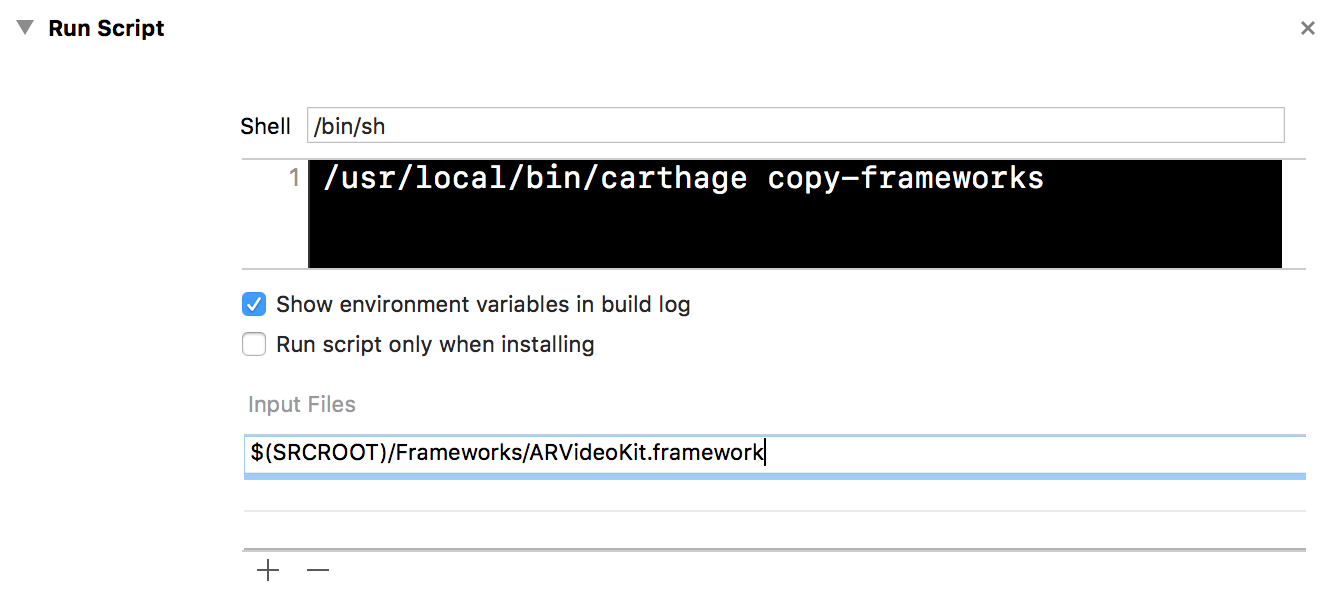
 4. Add a new `Run Script Phase`
 5. Add the following command to the `Run Script Phase`
```
/usr/local/bin/carthage copy-frameworks
```
5. Add the following command to the `Run Script Phase`
```
/usr/local/bin/carthage copy-frameworks
```
 6. Finally, add `ARVideoKit.framework` file path as an `Input File`. In my case, I have it in a folder named `Frameworks` inside my project folder
 ## Donate
Donations will support me to keep maintining **ARVideoKit Framework** ❤️
[](https://www.paypal.com/cgi-bin/webscr?cmd=_donations&business=ahmedfbekhit@gmail.com&item_name=Support+ARVideoKit+Developer&item_number=ARVideoKit+Framework+Donations&amount=0%2e00¤cy_code=USD)
## Contributions
If you have an idea for a new **ARVideoKit** feature/functionality and want to add it to this repository, feel free to fork the project and create a pull request!
Also, feel free to create an issue if you have any suggestions or need any help ☺️
## Apps using ARVideoKit
| App | Description |
| ------------------ |:------------------:|
| [Our SolAR](https://itunes.apple.com/app/id1267675913) | An app that allows you to see our Solar System anywhere at all! |
| [In The Walls](https://apps.apple.com/us/app/id1522257130) | Uses real time face tracking and AR to put your face in any real world wall! |
_Feel free to add your application to this list!_
## License
### ARVideoKit Framework
Copyright 2018 Ahmed Fathi Bekhit, www.ahmedbekhit.com, me@ahmedbekhit.com
`ARVideoKit` is licensed under the Apache License, Version 2.0 (the "License"); you may not use this file except in compliance with the License. You may obtain a copy of the License at
[http://www.apache.org/licenses/LICENSE-2.0](http://www.apache.org/licenses/LICENSE-2.0)
Unless required by applicable law or agreed to in writing, software distributed under the License is distributed on an "AS IS" BASIS, WITHOUT WARRANTIES OR CONDITIONS OF ANY KIND, either express or implied. See the License for the specific language governing permissions and limitations under the License.
### ARVideoKit Logo & Header
Designed by [**Gabriel Garcia**](https://github.com/ggabogarcia) and licensed under the [Creative Commons Attribution 4.0 International License](https://creativecommons.org/licenses/by/4.0/)

## Donate
Donations will support me to keep maintining **ARVideoKit Framework** ❤️
[](https://www.paypal.com/cgi-bin/webscr?cmd=_donations&business=ahmedfbekhit@gmail.com&item_name=Support+ARVideoKit+Developer&item_number=ARVideoKit+Framework+Donations&amount=0%2e00¤cy_code=USD)
## Contributions
If you have an idea for a new **ARVideoKit** feature/functionality and want to add it to this repository, feel free to fork the project and create a pull request!
Also, feel free to create an issue if you have any suggestions or need any help ☺️
## Apps using ARVideoKit
| App | Description |
| ------------------ |:------------------:|
| [Our SolAR](https://itunes.apple.com/app/id1267675913) | An app that allows you to see our Solar System anywhere at all! |
| [In The Walls](https://apps.apple.com/us/app/id1522257130) | Uses real time face tracking and AR to put your face in any real world wall! |
_Feel free to add your application to this list!_
## License
### ARVideoKit Framework
Copyright 2018 Ahmed Fathi Bekhit, www.ahmedbekhit.com, me@ahmedbekhit.com
`ARVideoKit` is licensed under the Apache License, Version 2.0 (the "License"); you may not use this file except in compliance with the License. You may obtain a copy of the License at
[http://www.apache.org/licenses/LICENSE-2.0](http://www.apache.org/licenses/LICENSE-2.0)
Unless required by applicable law or agreed to in writing, software distributed under the License is distributed on an "AS IS" BASIS, WITHOUT WARRANTIES OR CONDITIONS OF ANY KIND, either express or implied. See the License for the specific language governing permissions and limitations under the License.
### ARVideoKit Logo & Header
Designed by [**Gabriel Garcia**](https://github.com/ggabogarcia) and licensed under the [Creative Commons Attribution 4.0 International License](https://creativecommons.org/licenses/by/4.0/)
