# camel
**Repository Path**: robelHbq/camel
## Basic Information
- **Project Name**: camel
- **Description**: No description available
- **Primary Language**: Unknown
- **License**: Not specified
- **Default Branch**: master
- **Homepage**: None
- **GVP Project**: No
## Statistics
- **Stars**: 0
- **Forks**: 0
- **Created**: 2024-08-15
- **Last Updated**: 2024-11-22
## Categories & Tags
**Categories**: Uncategorized
**Tags**: None
## README
[![Colab][colab-image]][colab-url]
[![Hugging Face][huggingface-image]][huggingface-url]
[![Slack][slack-image]][slack-url]
[![Discord][discord-image]][discord-url]
[![Wechat][wechat-image]][wechat-url]
[![Twitter][twitter-image]][twitter-url]
______________________________________________________________________
# CAMEL: Communicative Agents for “Mind” Exploration of Large Language Model Society
[![Python Version][python-image]][python-url]
[![PyTest Status][pytest-image]][pytest-url]
[![Documentation][docs-image]][docs-url]
[![Star][star-image]][star-url]
[![Package License][package-license-image]][package-license-url]
[![Data License][data-license-image]][data-license-url]
Community |
Installation |
Documentation |
Examples |
Paper |
Citation |
Contributing |
CAMEL-AI

## Overview
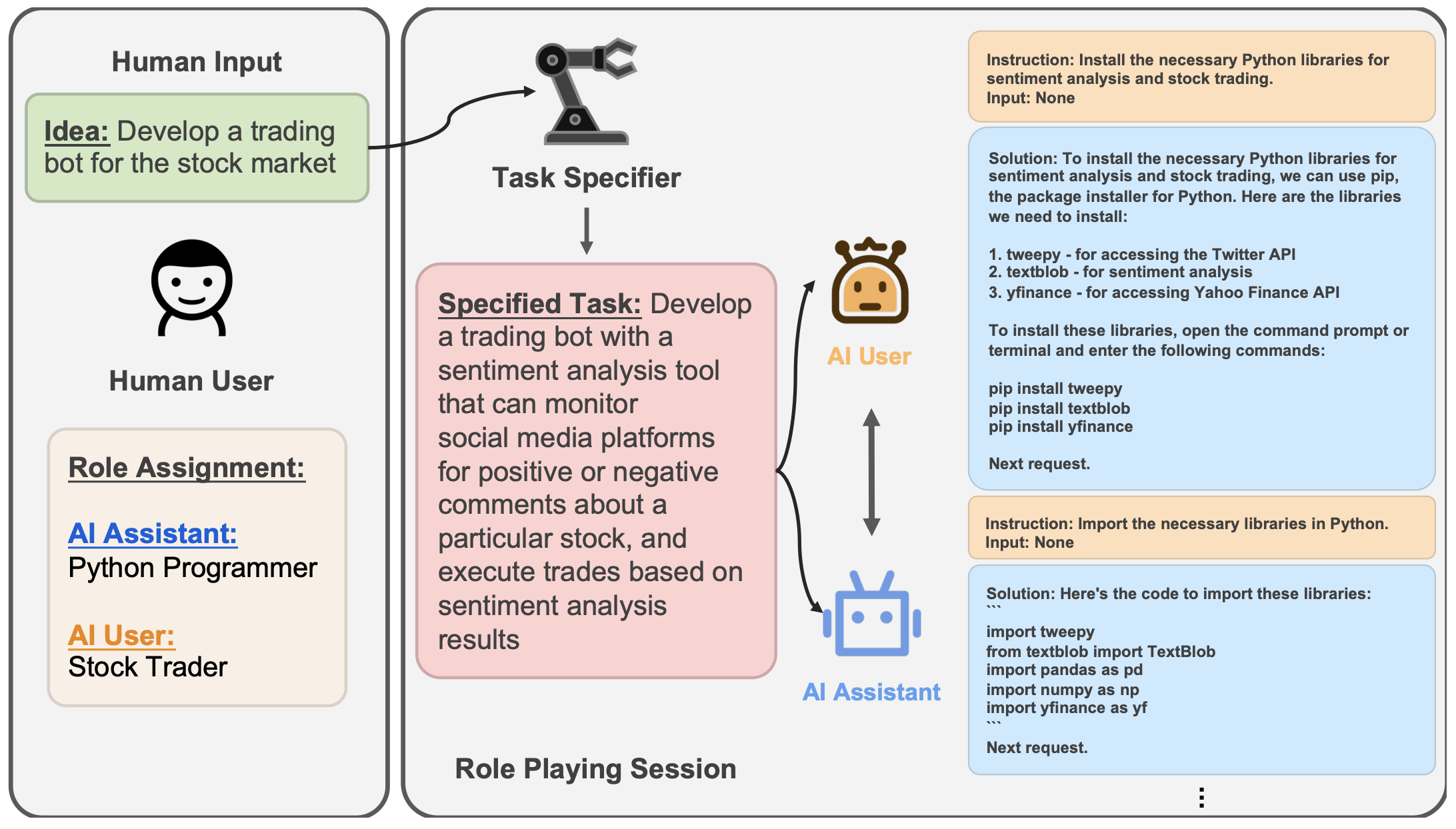
The rapid advancement of conversational and chat-based language models has led to remarkable progress in complex task-solving. However, their success heavily relies on human input to guide the conversation, which can be challenging and time-consuming. This paper explores the potential of building scalable techniques to facilitate autonomous cooperation among communicative agents and provide insight into their "cognitive" processes. To address the challenges of achieving autonomous cooperation, we propose a novel communicative agent framework named *role-playing*. Our approach involves using *inception prompting* to guide chat agents toward task completion while maintaining consistency with human intentions. We showcase how role-playing can be used to generate conversational data for studying the behaviors and capabilities of chat agents, providing a valuable resource for investigating conversational language models. Our contributions include introducing a novel communicative agent framework, offering a scalable approach for studying the cooperative behaviors and capabilities of multi-agent systems, and open-sourcing our library to support research on communicative agents and beyond. The GitHub repository of this project is made publicly available on: [https://github.com/camel-ai/camel](https://github.com/camel-ai/camel).
## Community
🐫 CAMEL is an open-source library designed for the study of autonomous and communicative agents. We believe that studying these agents on a large scale offers valuable insights into their behaviors, capabilities, and potential risks. To facilitate research in this field, we implement and support various types of agents, tasks, prompts, models, and simulated environments.
Join us ([*Slack*](https://join.slack.com/t/camel-ai/shared_invite/zt-2g7xc41gy-_7rcrNNAArIP6sLQqldkqQ), [*Discord*](https://discord.gg/CNcNpquyDc) or [*WeChat*](https://ghli.org/camel/wechat.png)) in pushing the boundaries of building AI Society.
## Try it yourself
We provide a [](https://colab.research.google.com/drive/1AzP33O8rnMW__7ocWJhVBXjKziJXPtim?usp=sharing) demo showcasing a conversation between two ChatGPT agents playing roles as a python programmer and a stock trader collaborating on developing a trading bot for stock market.
## Installation
### From PyPI
To install the base CAMEL library:
```bash
pip install camel-ai
```
Some features require extra dependencies:
- To install with all dependencies:
```bash
pip install 'camel-ai[all]'
```
- To use the HuggingFace agents:
```bash
pip install 'camel-ai[huggingface-agent]'
```
- To enable RAG or use agent memory:
```bash
pip install 'camel-ai[tools]'
```
### From Source
Install `CAMEL` from source with poetry (Recommended):
```sh
# Make sure your python version is later than 3.9
# You can use pyenv to manage multiple python verisons in your sytstem
# Clone github repo
git clone https://github.com/camel-ai/camel.git
# Change directory into project directory
cd camel
# If you didn't install peotry before
pip install poetry # (Optional)
# We suggest using python 3.10
poetry env use python3.10 # (Optional)
# Activate CAMEL virtual environment
poetry shell
# Install the base CAMEL library
# It takes about 90 seconds
poetry install
# Install CAMEL with all dependencies
poetry install -E all # (Optional)
# Exit the virtual environment
exit
```
Install `CAMEL` from source with conda and pip:
```sh
# Create a conda virtual environment
conda create --name camel python=3.9
# Activate CAMEL conda environment
conda activate camel
# Clone github repo
git clone -b v0.1.6.5 https://github.com/camel-ai/camel.git
# Change directory into project directory
cd camel
# Install CAMEL from source
pip install -e .
# Or if you want to use all other extra packages
pip install -e .[all] # (Optional)
```
### From Docker
Detailed guidance can be find [here](https://github.com/camel-ai/camel/blob/master/.container/README.md)
## Documentation
[CAMEL package documentation pages](https://camel-ai.github.io/camel/).
## Example
You can find a list of tasks for different sets of assistant and user role pairs [here](https://drive.google.com/file/d/194PPaSTBR07m-PzjS-Ty6KlPLdFIPQDd/view?usp=share_link).
As an example, to run the `role_playing.py` script:
First, you need to add your OpenAI API key to system environment variables. The method to do this depends on your operating system and the shell you're using.
**For Bash shell (Linux, macOS, Git Bash on Windows):**
```bash
# Export your OpenAI API key
export OPENAI_API_KEY=
OPENAI_API_BASE_URL= #(Should you utilize an OpenAI proxy service, kindly specify this)
```
**For Windows Command Prompt:**
```cmd
REM export your OpenAI API key
set OPENAI_API_KEY=
set OPENAI_API_BASE_URL= #(Should you utilize an OpenAI proxy service, kindly specify this)
```
**For Windows PowerShell:**
```powershell
# Export your OpenAI API key
$env:OPENAI_API_KEY=""
$env:OPENAI_API_BASE_URL="" #(Should you utilize an OpenAI proxy service, kindly specify this)
```
Replace `` with your actual OpenAI API key in each case. Make sure there are no spaces around the `=` sign.
After setting the OpenAI API key, you can run the script:
```bash
# You can change the role pair and initial prompt in role_playing.py
python examples/ai_society/role_playing.py
```
Please note that the environment variable is session-specific. If you open a new terminal window or tab, you will need to set the API key again in that new session.
## Use Open-Source Models as Backends (ex. using Ollama to set Llama 3 locally)
- Download [Ollama](https://ollama.com/download).
- After setting up Ollama, pull the Llama3 model by typing the following command into the terminal:
```bash
ollama pull llama3
```
- Create a ModelFile similar the one below in your project directory.
```bash
FROM llama3
# Set parameters
PARAMETER temperature 0.8
PARAMETER stop Result
# Sets a custom system message to specify the behavior of the chat assistant
# Leaving it blank for now.
SYSTEM """ """
```
- Create a script to get the base model (llama3) and create a custom model using the ModelFile above. Save this as a .sh file:
```bash
#!/bin/zsh
# variables
model_name="llama3"
custom_model_name="camel-llama3"
#get the base model
ollama pull $model_name
#create the model file
ollama create $custom_model_name -f ./Llama3ModelFile
```
- Navigate to the directory where the script and ModelFile are located and run the script. Enjoy your Llama3 model, enhanced by CAMEL's excellent agents.
```python
from camel.agents import ChatAgent
from camel.messages import BaseMessage
from camel.models import ModelFactory
from camel.types import ModelPlatformType
ollama_model = ModelFactory.create(
model_platform=ModelPlatformType.OLLAMA,
model_type="llama3",
url="http://localhost:11434/v1",
model_config_dict={"temperature": 0.4},
)
assistant_sys_msg = BaseMessage.make_assistant_message(
role_name="Assistant",
content="You are a helpful assistant.",
)
agent = ChatAgent(assistant_sys_msg, model=ollama_model, token_limit=4096)
user_msg = BaseMessage.make_user_message(
role_name="User", content="Say hi to CAMEL"
)
assistant_response = agent.step(user_msg)
print(assistant_response.msg.content)
```
## Use Open-Source Models as Backends (ex. using vLLM to set Phi-3 locally)
- [Install vLLM](https://docs.vllm.ai/en/latest/getting_started/installation.html)
- After setting up vLLM, start an OpenAI compatible server for example by
```bash
python -m vllm.entrypoints.openai.api_server --model microsoft/Phi-3-mini-4k-instruct --api-key vllm --dtype bfloat16
```
- Create and run following script (more details please refer to this [example](https://github.com/camel-ai/camel/blob/master/examples/models/vllm_model_example.py))
```python
from camel.agents import ChatAgent
from camel.messages import BaseMessage
from camel.models import ModelFactory
from camel.types import ModelPlatformType
vllm_model = ModelFactory.create(
model_platform=ModelPlatformType.VLLM,
model_type="microsoft/Phi-3-mini-4k-instruct",
url="http://localhost:8000/v1",
model_config_dict={"temperature": 0.0},
api_key="vllm",
)
assistant_sys_msg = BaseMessage.make_assistant_message(
role_name="Assistant",
content="You are a helpful assistant.",
)
agent = ChatAgent(assistant_sys_msg, model=vllm_model, token_limit=4096)
user_msg = BaseMessage.make_user_message(
role_name="User",
content="Say hi to CAMEL AI",
)
assistant_response = agent.step(user_msg)
print(assistant_response.msg.content)
```
## Data (Hosted on Hugging Face)
| Dataset | Chat format | Instruction format | Chat format (translated) |
|----------------|-----------------------------------------------------------------------------------------------------|------------------------------------------------------------------------------------------------------------------|--------------------------------------------------------------------------------------------|
| **AI Society** | [Chat format](https://huggingface.co/datasets/camel-ai/ai_society/blob/main/ai_society_chat.tar.gz) | [Instruction format](https://huggingface.co/datasets/camel-ai/ai_society/blob/main/ai_society_instructions.json) | [Chat format (translated)](https://huggingface.co/datasets/camel-ai/ai_society_translated) |
| **Code** | [Chat format](https://huggingface.co/datasets/camel-ai/code/blob/main/code_chat.tar.gz) | [Instruction format](https://huggingface.co/datasets/camel-ai/code/blob/main/code_instructions.json) | x |
| **Math** | [Chat format](https://huggingface.co/datasets/camel-ai/math) | x | x |
| **Physics** | [Chat format](https://huggingface.co/datasets/camel-ai/physics) | x | x |
| **Chemistry** | [Chat format](https://huggingface.co/datasets/camel-ai/chemistry) | x | x |
| **Biology** | [Chat format](https://huggingface.co/datasets/camel-ai/biology) | x | x |
## Visualizations of Instructions and Tasks
| Dataset | Instructions | Tasks |
|------------------|----------------------------------------------------------------------------------------------------------------------|---------------------------------------------------------------------------------------------------------------|
| **AI Society** | [Instructions](https://atlas.nomic.ai/map/3a559a06-87d0-4476-a879-962656242452/db961915-b254-48e8-8e5c-917f827b74c6) | [Tasks](https://atlas.nomic.ai/map/cb96f41b-a6fd-4fe4-ac40-08e101714483/ae06156c-a572-46e9-8345-ebe18586d02b) |
| **Code** | [Instructions](https://atlas.nomic.ai/map/902d6ccb-0bbb-4294-83a8-1c7d2dae03c8/ace2e146-e49f-41db-a1f4-25a2c4be2457) | [Tasks](https://atlas.nomic.ai/map/efc38617-9180-490a-8630-43a05b35d22d/2576addf-a133-45d5-89a9-6b067b6652dd) |
| **Misalignment** | [Instructions](https://atlas.nomic.ai/map/5c491035-a26e-4a05-9593-82ffb2c3ab40/2bd98896-894e-4807-9ed8-a203ccb14d5e) | [Tasks](https://atlas.nomic.ai/map/abc357dd-9c04-4913-9541-63e259d7ac1f/825139a4-af66-427c-9d0e-f36b5492ab3f) |
## Implemented Research Ideas from Other Works
We implemented amazing research ideas from other works for you to build, compare and customize your agents. If you use any of these modules, please kindly cite the original works:
- `TaskCreationAgent`, `TaskPrioritizationAgent` and `BabyAGI` from *Nakajima et al.*: [Task-Driven Autonomous Agent](https://yoheinakajima.com/task-driven-autonomous-agent-utilizing-gpt-4-pinecone-and-langchain-for-diverse-applications/). [[Example](https://github.com/camel-ai/camel/blob/master/examples/ai_society/babyagi_playing.py)]
## News
- Released AI Society and Code dataset (April 2, 2023)
- Initial release of `CAMEL` python library (March 21, 2023)
## Citation
```
@inproceedings{li2023camel,
title={CAMEL: Communicative Agents for "Mind" Exploration of Large Language Model Society},
author={Li, Guohao and Hammoud, Hasan Abed Al Kader and Itani, Hani and Khizbullin, Dmitrii and Ghanem, Bernard},
booktitle={Thirty-seventh Conference on Neural Information Processing Systems},
year={2023}
}
```
## Acknowledgement
Special thanks to [Nomic AI](https://home.nomic.ai/) for giving us extended access to their data set exploration tool (Atlas).
We would also like to thank Haya Hammoud for designing the initial logo of our project.
## License
The source code is licensed under Apache 2.0.
The datasets are licensed under CC BY NC 4.0, which permits only non-commercial usage. It is advised that any models trained using the dataset should not be utilized for anything other than research purposes.
## Contributing to CAMEL 🐫
We appreciate your interest in contributing to our open-source initiative. We provide a document of [contributing guidelines](https://github.com/camel-ai/camel/blob/master/CONTRIBUTING.md) which outlines the steps for contributing to CAMEL. Please refer to this guide to ensure smooth collaboration and successful contributions. 🤝🚀
## Contact
For more information please contact camel.ai.team@gmail.com.
[python-image]: https://img.shields.io/badge/Python-3.9%2B-brightgreen.svg
[python-url]: https://docs.python.org/3.9/
[pytest-image]: https://github.com/camel-ai/camel/actions/workflows/pytest_package.yml/badge.svg
[pytest-url]: https://github.com/camel-ai/camel/actions/workflows/pytest_package.yml
[docs-image]: https://img.shields.io/badge/Documentation-grey.svg?logo=github
[docs-url]: https://camel-ai.github.io/camel/index.html
[star-image]: https://img.shields.io/github/stars/camel-ai/camel?label=stars&logo=github&color=brightgreen
[star-url]: https://github.com/camel-ai/camel/stargazers
[package-license-image]: https://img.shields.io/badge/License-Apache_2.0-blue.svg
[package-license-url]: https://github.com/camel-ai/camel/blob/master/licenses/LICENSE
[data-license-image]: https://img.shields.io/badge/License-CC_BY--NC_4.0-lightgrey.svg
[data-license-url]: https://github.com/camel-ai/camel/blob/master/licenses/DATA_LICENSE
[colab-url]: https://colab.research.google.com/drive/1AzP33O8rnMW__7ocWJhVBXjKziJXPtim?usp=sharing
[colab-image]: https://colab.research.google.com/assets/colab-badge.svg
[huggingface-url]: https://huggingface.co/camel-ai
[huggingface-image]: https://img.shields.io/badge/%F0%9F%A4%97%20Hugging%20Face-CAMEL--AI-ffc107?color=ffc107&logoColor=white
[slack-url]: https://join.slack.com/t/camel-ai/shared_invite/zt-2g7xc41gy-_7rcrNNAArIP6sLQqldkqQ
[slack-image]: https://img.shields.io/badge/Slack-CAMEL--AI-blueviolet?logo=slack
[discord-url]: https://discord.gg/CNcNpquyDc
[discord-image]: https://img.shields.io/badge/Discord-CAMEL--AI-7289da?logo=discord&logoColor=white&color=7289da
[wechat-url]: https://ghli.org/camel/wechat.png
[wechat-image]: https://img.shields.io/badge/WeChat-CamelAIOrg-brightgreen?logo=wechat&logoColor=white
[twitter-url]: https://twitter.com/CamelAIOrg
[twitter-image]: https://img.shields.io/twitter/follow/CamelAIOrg?style=social&color=brightgreen&logo=twitter