# MCppServer
**Repository Path**: qtlover/MCppServer
## Basic Information
- **Project Name**: MCppServer
- **Description**: MCppServer is a high-performance Minecraft server developed in C++. It is designed for speed and efficiency, providing a seamless gaming experience while maintaining compatibility with Java clients.
- **Primary Language**: Unknown
- **License**: MIT
- **Default Branch**: main
- **Homepage**: None
- **GVP Project**: No
## Statistics
- **Stars**: 0
- **Forks**: 0
- **Created**: 2025-07-03
- **Last Updated**: 2025-07-03
## Categories & Tags
**Categories**: Uncategorized
**Tags**: None
## README

#
[](https://opensource.org/licenses/MIT)

Fast and super efficient C++ 1.21.1 Minecraft Server. Compatible with Java Clients. Designed to feel like Vanilla Minecraft, but with the power of C++.
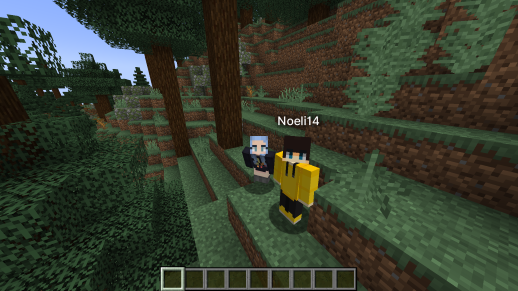
MCpp Server is a high-performance Minecraft server developed entirely in C++. Designed for speed, efficiency, and extensive customization, MCpp Server aims to provide a seamless and enjoyable experience for players while trying to maintain full compatibility with the latest Minecraft features.
## ⚠️ Important ⚠️
### This project is in early development and may contain bugs and incomplete features, aswell as temporary and unoptimized code.
## 🙌 Progress
### Want to see what I’m working on? Check out the [discussion](https://github.com/Noeli14/MCppServer/discussions/categories/show-and-tell) tab under Show and Tell!
## 🚀 Features
### 🏎️ Performance
- **Multi-threaded Architecture:** Leverages multiple threads to handle various server tasks simultaneously.
- **Super fast and efficient Chunk Loading and Generation**: Uses multiple threads to load and generate chunks with minimal Memory usage.
- **Optimized Codebase:** Written in C++ for maximum efficiency and low latency.
### 🔧 Customization & Extensibility
- **Configurable Settings:** Easily adjustable configuration files to tailor server behavior to your needs.
- ***Plugin Support soon*:** Provides a foundation for developing and integrating custom plugins.
### 🌐 Networking
- **Packet Compression:** Reduces bandwidth usage by compressing data packets.
- **Server Status & Ping:** Provides real-time server status information and latency measurements.
### 🧩 Supported and WIP Features
- Login
- [x] Authentication (online mdoe)
- [x] Encryption
- [x] Packet Compression
- Server Configuration
- [x] Server Links
- [x] Registries
- [x] Resource Packs (multiple)
- [x] Server Brand
- [ ] Cookies
- Server
- [ ] Lua Plugin API
- [x] Query
- [x] RCON
- [x] Commands
- [x] Chat
- [x] Translations
- World
- [x] World Joining
- [x] Chunk Loading
- [x] Tablist
- [x] Entity Spawning
- [x] World Loading
- [x] Chunk Generation
- [x] World Border
- [x] World Time
- [x] Bossbar
- [x] Weather
- [ ] Scoreboard
- [ ] World Saving
- Player
- [x] Player Skins
- [x] Client brand
- [x] Movement
- [x] Inventory
- [x] Equipment
- [x] Item Pickup
- [ ] Combat
- Entities
- [x] Players
- [ ] Mobs (Animals, Monsters)
- [ ] Entity AI
- [ ] Boss
- [ ] Minecart
- [ ] Lightning Bolt
- Physics
- [x] Item Physics
- [ ] Falling Blocks
## 🌍 Use Pre-Generated World
Just put the world folder of your Vanilla Minecraft world in the Directory where the server executable is and it will be loaded when the server starts.
## ⚠️ Important Notes
- **Linux Compatibility:** The Linux version has not been thoroughly tested. You may encounter issues when running MCpp Server on Linux systems. To still be able to join the server, you should turn off online mode in the config.json file.
- **Ongoing Development:** MCpp Server is actively being developed. Contributions and feedback are welcome to help improve the server.
## 🛠️ Installation & Building
### 📋 Prerequisites
- **C++20 Compiler:** Ensure you have a modern C++ compiler installed (e.g., GCC, Clang). On Windows you need MingW.
- **CMake:** Version 3.14 or higher.
- **Git:** To clone the repository.
### 🔧 Build Instructions
#### **Linux:**
1. **Clone the Repository**
```bash
git clone https://github.com/Noeli14/MCppServer.git
cd MCppServer
```
2. **Create a Build Directory**
```bash
mkdir build
cd build
```
3. **Generate Build Files with CMake**
```bash
cmake ..
```
For Debug Build:
```bash
cmake -DCMAKE_BUILD_TYPE=Debug ..
```
For Release Build:
```bash
cmake -DCMAKE_BUILD_TYPE=Release ..
```
4. **Compile the Project**
```bash
make
```
#### **Windows (MingW & Make):**
1. **Clone the Repository**
```bash
git clone https://github.com/Noeli14/MCppServer.git
cd MCppServer
```
2. **Create a Build Directory**
```bash
mkdir build
cd build
```
3. **Generate Build Files with CMake**
```bash
cmake .. -G "Unix Makefiles"
```
For Debug Build:
```bash
cmake -G "Unix Makefiles" -DCMAKE_BUILD_TYPE=Debug ..
```
For Release Build:
```bash
cmake -G "Unix Makefiles" -DCMAKE_BUILD_TYPE=Release ..
```
4. **Compile the Project**
```bash
make
```
#### **Windows (MingW & Ninja):**
1. **Clone the Repository**
```bash
git clone https://github.com/Noeli14/MCppServer.git
cd MCppServer
```
2. **Create a Build Directory**
```bash
mkdir build
cd build
```
3. **Generate Build Files with CMake**
```bash
cmake .. -G "Ninja"
```
For Debug Build:
```bash
cmake -G "Ninja" -DCMAKE_BUILD_TYPE=Debug ..
```
For Release Build:
```bash
cmake -G "Ninja" -DCMAKE_BUILD_TYPE=Release ..
```
4. **Compile the Project**
```bash
ninja
```
### 🚀 Running the Server
After a successful build, execute the server binary:
```bash
./MCppServer
```
## 📦 Data Sources
MCpp Server utilizes data from the [PrismarineJS](https://github.com/PrismarineJS/minecraft-data) Minecraft Data repository to ensure accurate and up-to-date game mechanics and data.
## 🤝 Contributing
Contributions are welcome! Whether it's reporting bugs, suggesting features, or submitting pull requests, your help is greatly appreciated.
## 📄 License
MCpp Server is licensed under the MIT License.
## 📫 Contact
For any questions or support, feel free to open an issue or discussion on the [GitHub repository](https://github.com/Noeli14/MCppServer)