# fsuper **Repository Path**: qhblog/fsuper ## Basic Information - **Project Name**: fsuper - **Description**: A super powerful widget to help developers build complex views quickly and comfortably. - **Primary Language**: Unknown - **License**: Apache-2.0 - **Default Branch**: master - **Homepage**: None - **GVP Project**: No ## Statistics - **Stars**: 0 - **Forks**: 0 - **Created**: 2021-08-17 - **Last Updated**: 2024-06-15 ## Categories & Tags **Categories**: Uncategorized **Tags**: None ## README

FSuper

FSuper 能够帮助开发者快速舒适的构建复杂视图。

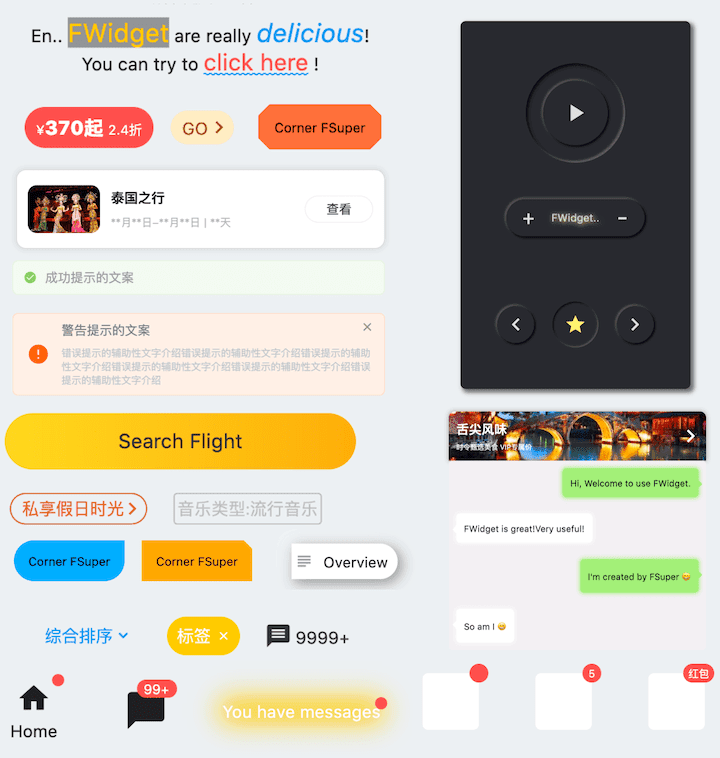
支持富文本、圆角、边框、图片、小红点、以及同时设置多达两个子组件,且控制它们的相对位置,高质感的 Neumorphism 风格。

主理人:纽特(coorchice.cb@alibaba-inc.com)

**[English](https://github.com/Fliggy-Mobile/fsuper) | 简体中文** > 感觉还不错?请投出您的 **Star** 吧 🥰 ! # ✨ 特性 - 丰富的 **边角** 效果 - 精美的 **边框** 装饰 - 天然支持精彩的 **富文本** - **渐变效果** 也不在话下 - 更具空间感的 **阴影** - 不简单的 **小红点** - 灵活且强大的 **相对位置布局** - 高质感的 **Neumorphism** 风格 # 🛠 使用指南 ## ⚙️ 参数 ### 🔩 基础参数 |参数|类型|必要|默认值|说明| |---|---|:---:|---|---| |width|double|否|null|宽度| |height|double|否|null|高度。不能设置为 double.infinity| |maxWidth|double|否|null|最大宽度。如果 width > maxWidth,会覆盖 width。如果没有 width,最大扩展宽度为 maxWidth| |maxHeight|double|否|null|最大高度。如果 height > maxHeight,会覆盖 height。如果没有 height,最大扩展宽度为 maxHeight| |backgroundColor|Color|否|null|背景颜色| |backgroundImage|ImageProvider|否|null|背景图。会覆盖 backgroundColor 和 gradient| |gradient|Gradient|否|null|渐变色。会覆盖 backgroundColor| |padding|EdgeInsetsGeometry|否|null|文本和各边的边距。这十分有用,通过它来给 FSuper 中的 child 预留展示空间| |margin|EdgeInsets|否|null|FSuper 在父容器中的边距| |corner|FCorner|否|null|边角大小| |cornerStyle|FFCornerStyle|否|FFCornerStyle.round|边角样式。默认为圆角,设置 FCornerStyle.bevel 为斜角| |text|String|否|null|文本| |style|TextStyle|false|null|文本样式| |textAlign|TextAlign|否|TextAlign.center|文本的对齐方式| |spans|List|否|null|富文本。可以接到 text 文本之后,默认会继承 text 的配置。可以通过 TextStyle 单独设置| |onClick|GestureTapCallback|否|null|设置 FSuper 的点击事件| ### 🧸 子组件参数 |参数|类型|必要|默认值|说明| |---|---|:---:|---|---| |child1|Widget|否|null|子组件1| |child1Alignment|Alignment|否|null|子组件1在 FSuper 中的相对位置| |child1Margin|EdgeInsets|否|null|子组件1基于相对位置的偏移| |onChild1Click|GestureTapCallback|否|null|子组件1的点击事件| |child2|Widget|否|null|子组件2| |child2Alignment|Alignment|否|null|子组件2在 FSuper 中的相对位置| |child2Margin|EdgeInsets|否|null|子组件2基于相对位置的偏移| |onChi2d1Click|GestureTapCallback|否|null|子组件2的点击事件| ### 🎈 小红点参数 |参数|类型|必要|默认值|说明| |---|---|:---:|---|---| |redPoint|bool|否|false|是否展示小红点| |redPointColor|Color|否|Colors.redAccent|小红点颜色| |redPointSize|double|否|20|小红点大小| |redPointText|String|否|null|小红点上的文本| |redPointTextStyle|TextStyle|false|null|小红点文本样式| |redPointOffset|Offset|否|null|小红点向右上方的位置偏移量。Offset(0,0)小红点在 FSuper 的右上角。默认会向右上方偏移小红点size的1/4| ### 🖼 边框参数 |参数|类型|必要|默认值|说明| |---|---|:---:|---|---| |strokeWidth|double|否|null|边框宽度。>0 时边框就会显示| |strokeColor|Color|否|null|边框颜色| ### 🔳 阴影参数 |参数|类型|必要|默认值|说明| |---|---|:---:|---|---| |shadowColor|Color|否|null|阴影颜色| |shadowOffset|Offset|否|null|阴影偏移量| |shadowBlur|double|否|null|值越大,阴影越大| ### 🍭 Neumorphism 风格 |参数|类型|必要|默认值|说明| |---|---|:---:|---|---| |isSupportNeumorphism|bool|false|false|是否支持 Neumorphism 风格。开启该项 [highlightColor] 将会失效| |lightOrientation|FLightOrientation|false|FLightOrientation.LeftTop|当 [isSupportNeumorphism] 为 true 时有效。光源方向,分为左上、左下、右上、右下四个方向。用来控制光源照射方向,会影响高亮方向和阴影方向| |highlightShadowColor|Color|false|null|开启 Neumorphism 风格后的,亮部阴影颜色| |float|bool|false|false|开启 Neumorphism 风格后,是否呈浮起效果,否则为凹陷效果,默认为 true| ## 📺 使用示例 ### 🔩 基本使用 ![](https://gw.alicdn.com/tfs/TB1GwWEtRv0gK0jSZKbXXbK2FXa-856-580.png) ``` FSuper( margin: EdgeInsets.fromLTRB(12, 0, 12, 0), width: double.infinity, text: "This is FSuper!", backgroundColor: Color(0xffffc900), ), FSuper( text: "En.. ", spans: [ TextSpan( text: "FWidget", style: TextStyle( color: Color(0xffffc900), backgroundColor: Colors.black38, fontSize: 20, )), ... ], ), ``` **FSuper** 通过 `text` 属性设置文字的第一部分,且有相关的文本样式属性可以设置。如果你希望实现富文本效果,可以通过 `spans` 属性传入一个 **TextSpan** 数组。 当然,默认情况下,你没有给 **TextSpan** 设置的属性,将会自动继承 **FSuper** 的文本样式配置。 默认情况下,**FSuper** 能够自适应文本内容大小。 但你仍然可以通过 `width`、`height` 属性来指定一个具体的大小。如果你想要让组件充满的父容器的,可以将它们的值设置为 `double.infinity`。 > ⚠️ 你始终都不要在一个无限大的父容器中,给 **FSuper** 的尺寸值设置为 `double.infinity`,因为它真的不知道自己该有多大! 此外,**FSuper** 还提供了 `maxWidth` 和 `maxHeight` 来辅助布局,这在一个不确定组件大小的情况下十分有用。你的组件将始终不能超过它们的限制。 ## 🖼 圆角和边框 ![](https://gw.alicdn.com/tfs/TB1PCWDtKL2gK0jSZPhXXahvXXa-854-860.png) ``` FSuper( width: 130, padding: EdgeInsets.only(top: 16, bottom: 16) text: 'Corner FSuper', backgroundColor: Color(0xffFF7043), corner: FCorner.all(12), cornerStyle: FCornerStyle.bevel, ), FSuper( text: '音乐类型:流行音乐', padding: EdgeInsets.all(2), corner: FCorner.all(3), strokeColor: Color(0xffc2bfc2), strokeWidth: 1, ), ``` 使用 **FSuper** 声明一个边角、边框组件是十分简单的。 仅仅通过 `corner` 属性就能声明边角,一个 **Corner** 对象将会描述组件的边角情况,你可以单独控制每一个边角。 **FSuper** 支持两种类型的边角: - **FCornerStyle.round**:圆角。这是大多数时候我们需要的。 - **FCornerStyle.bevel**:斜角。 如果你想要边框,只需要让 **FSuper** 的 `strokeWidth > 0` 就可以了。此外,`strokeColor` 属性让你能够描述边框的颜色。 ## 🔳 渐变和阴影 ![](https://gw.alicdn.com/tfs/TB1kz9EtKT2gK0jSZFvXXXnFXXa-852-580.png) ``` FSuper( width: 280, height: 45, text: 'Search Flight', textAlignment: Alignment.center, corner: FCorner.all(23), gradient: LinearGradient(colors: [ Color(0xfffed83a), Color(0xfffcad2c), ]), ), ``` `gradient` 属性允许你使用一个渐变对象来为 **FSuper** 声明一个渐变色背景。 渐变色背景会覆盖 `backgroundColor` 设置的纯色背景色。 > ⚠️ 背景优先级:backgroundImage > gradient > backgroundColor. ``` FSuper( text: 'Overview', backgroundColor: Colors.white, padding: EdgeInsets.fromLTRB(6.0 + 18.0 + 6.0, 9, 9, 9), corner: Corner(rightTopCorner: 20, rightBottomCorner: 20), child1: Icon( Icons.subject, size: 18, color: Color(0xffa6a4a7), ), child1Alignment: Alignment.centerLeft, child1Margin: EdgeInsets.only(left: 3), shadowColor: Colors.black38, shadowBlur: 10, onClick: () { _showDialog(context, "Disco"); }, ), ``` 如果你在考虑为组件添加阴影效果,那使用 **FSuper** 就是一个绝佳的选择。 ## 🎈 小红点 ![](https://gw.alicdn.com/tfs/TB1TpN6tF67gK0jSZPfXXahhFXa-858-662.png) ``` FSuper( width: 60, height: 60, backgroundColor: Color(0xffeeeeee), corner: FCorner.all(6), redPoint: true, readPointTextStyle: TextStyle(fontSize: 20.0), redPointText: "红包", ), ``` 使用 **FSuper** 能够十分简单的实现很常见的小红点效果。只需配置 `redPoint: true`。 此外,你可以为小红点添加任意的文本内容(真是方便),以及设置它的位置。 > ⚠️ 小红点的 (0,0)位置,在 **FSuper** 的右上角。 一条龙服务,满足你的所有需求。 ## 🧸 子组件 ![](https://gw.alicdn.com/tfs/TB10XKGtKH2gK0jSZFEXXcqMpXa-856-848.png) ``` FSuper( width: double.infinity, padding: EdgeInsets.fromLTRB( (16.0 + 25.0 + 12), 8, (0.0 + 8.0), 8), margin: EdgeInsets.fromLTRB(10, 10, 10, 0), corner: FCorner.all(6), backgroundColor: Color(0xfffff0e7), strokeColor: Color(0xfffee0cd), strokeWidth: 1, text: '警告提示的文案', textAlignment: Alignment.centerLeft, textAlign: TextAlign.left, spans: [ ... ], child1: Transform.rotate( angle: pi, child: Icon( Icons.info, size: 25, color: Color(0xfffd6721), ), ), child1Alignment: Alignment.centerLeft, child1Margin: EdgeInsets.fromLTRB(16, 0, 0, 0), child2: Icon( Icons.close, size: 15, color: Colors.black38, ), child2Alignment: Alignment.topRight, child2Margin: EdgeInsets.fromLTRB(0, 8, 12, 0), onChild2Click: () { _showDialog(context, "关闭警告⚠️"); }, ), ``` 在 **FSuper** 中,可以通过 `child1、child2` 来声明两个子组件。你可以指定它们的位置和声明点击事件。 这在一些常见的复杂布局中,将会大大提升开发速度。尤其是在 **一个组件大小小不确定,而另一个组件要基于它的大小确定位置** 的场景中,**FSuper** 处理好了一切。 图中这些组件效果,均只需要一个 **FSuper** 组件就能够完成。 ## 🍭 Neumorphism 风格 ![](https://gw.alicdn.com/tfs/TB1F3evNpT7gK0jSZFpXXaTkpXa-720-1037.gif) ```dart FSuper( /// 开启 Neumorphism 支持 /// /// Turn on Neumorphism support isSupportNeumorphism: true, /// 配置光源方向 /// /// Configure light source direction lightOrientation: lightOrientation, /// 配置暗部阴影 /// /// Configure dark shadows shadowColor: Colors.black87, /// 配置亮部阴影 /// /// Configure highlight shadow highlightShadowColor: Colors.white24, /// 是否呈浮起视效 /// /// Whether it is floating visual effect float: false, shadowOffset: Offset(0.0, 1.0), width: 50, height: 50, backgroundColor: Color(0xff28292f), corner: FCorner.all(40), child1: Icon( Icons.star, color: Color(0xfffff176), size: 23, ), ), ``` **FSuper** 为开发者带来了不可思议的,超高质感的 **Neumorphism** 风格。 开发者只需要简单的通过配置 `isSupportNeumorphism` 参数,就可以开启和关闭 **Neumorphism** 风格。 如果想要调整 **Neumorphism** 的样式,可以通过 Shadow 相关的几个属性进行细微的调整,其中: - shadowColor: 配置暗部阴影 - highlightShadowColor:配置亮部阴影 **FSuper** 还提供了 `lightOrientation` 参数,甚至使得开发者能够调整关照角度,已获得不同的 **Neumorphism** 效果。 通过 `float` 参数,开发者轻松的在 **浮起视效** 和 **凹陷视效** 间任意切换。 ## 🎞 更多示例 ![](https://gw.alicdn.com/tfs/TB1__eItHj1gK0jSZFOXXc7GpXa-854-1542.png) 不要惊讶,图中效果都使用 **FSuper** 来实现。 子组件的设计使得 **FSuper** 的灵活性有了质的飞跃,绝大部分复杂视图,均可胜任。 比如图中的聊天框气泡,不需要使用背景图,直接使用 **FSuper** 即可实现。这使得这样的组件获得了极大的灵活性,易于修改。 ``` FSuper( maxWidth: 220, textAlign: TextAlign.left, text: "I'm created by FSuper 😄", padding: EdgeInsets.only( left: 12, right: 12, top: 15, bottom: 15), backgroundColor: Color(0xffa5ed7e), corner: FCorner.all(6), child1: Transform.rotate( angle: pi / 4, child: FSuper( width: 10, height: 10, backgroundColor: Color(0xffa5ed7e), corner: FCorner.all(1.5), ), ), child1Alignment: Alignment.topRight, child1Margin: EdgeInsets.only(right: -4, top: 20), shadowColor: Color(0xffa5ed7e), shadowBlur: 5, ), ``` # 😃 如何使用? 在项目 `pubspec.yaml` 文件中添加依赖: ## 🌐 pub 依赖方式 ``` dependencies: fsuper: ^<版本号> ``` > ⚠️ 注意,请到 [**pub**](https://pub.dev/packages/fsuper) 获取 **FSuper** 最新版本号 ## 🖥 git 依赖方式 ``` dependencies: fsuper: git: url: 'git@github.com:Fliggy-Mobile/fsuper.git' ref: '<分支号 或 tag>' ``` > ⚠️ 注意,分支号 或 tag 请以 [**FSuper**](https://github.com/Fliggy-Mobile/fsuper) 官方项目为准。 # 💡 License ``` Copyright 2020-present Fliggy Android Team . Licensed under the Apache License, Version 2.0 (the "License"); you may not use this file except in compliance with the License. You may obtain a copy of the License at following link. http://www.apache.org/licenses/LICENSE-2.0 Unless required by applicable law or agreed to in writing, software distributed under the License is distributed on an "AS IS" BASIS, WITHOUT WARRANTIES OR CONDITIONS OF ANY KIND, either express or implied. See the License for the specific language governing permissions and limitations under the License. ``` ### 感觉还不错?请投出您的 [**Star**](https://github.com/Fliggy-Mobile/fsuper) 吧 🥰 ! --- # 如何运行 Demo 工程? 1.**clone** 工程到本地 2.进入工程 `example` 目录,运行以下命令 ``` flutter create . ``` 3.运行 `example` 中的 Demo