# pigo
**Repository Path**: qdmc/pigo
## Basic Information
- **Project Name**: pigo
- **Description**: No description available
- **Primary Language**: Unknown
- **License**: MIT
- **Default Branch**: master
- **Homepage**: None
- **GVP Project**: No
## Statistics
- **Stars**: 0
- **Forks**: 0
- **Created**: 2024-04-02
- **Last Updated**: 2024-04-02
## Categories & Tags
**Categories**: Uncategorized
**Tags**: None
## README

[](https://github.com/esimov/pigo/actions/workflows/ci.yml)
[](https://goreportcard.com/report/github.com/esimov/pigo)
[](https://pkg.go.dev/github.com/esimov/pigo/core)
[](./LICENSE)
[](https://github.com/esimov/pigo/releases/tag/v1.4.6)
[](https://snapcraft.io/pigo)
Pigo is a pure Go face detection, pupil/eyes localization and facial landmark points detection library based on the **[Pixel Intensity Comparison-based Object detection](https://arxiv.org/pdf/1305.4537.pdf)** paper.
| Rectangle face marker | Circle face marker
|:--:|:--:
|  | 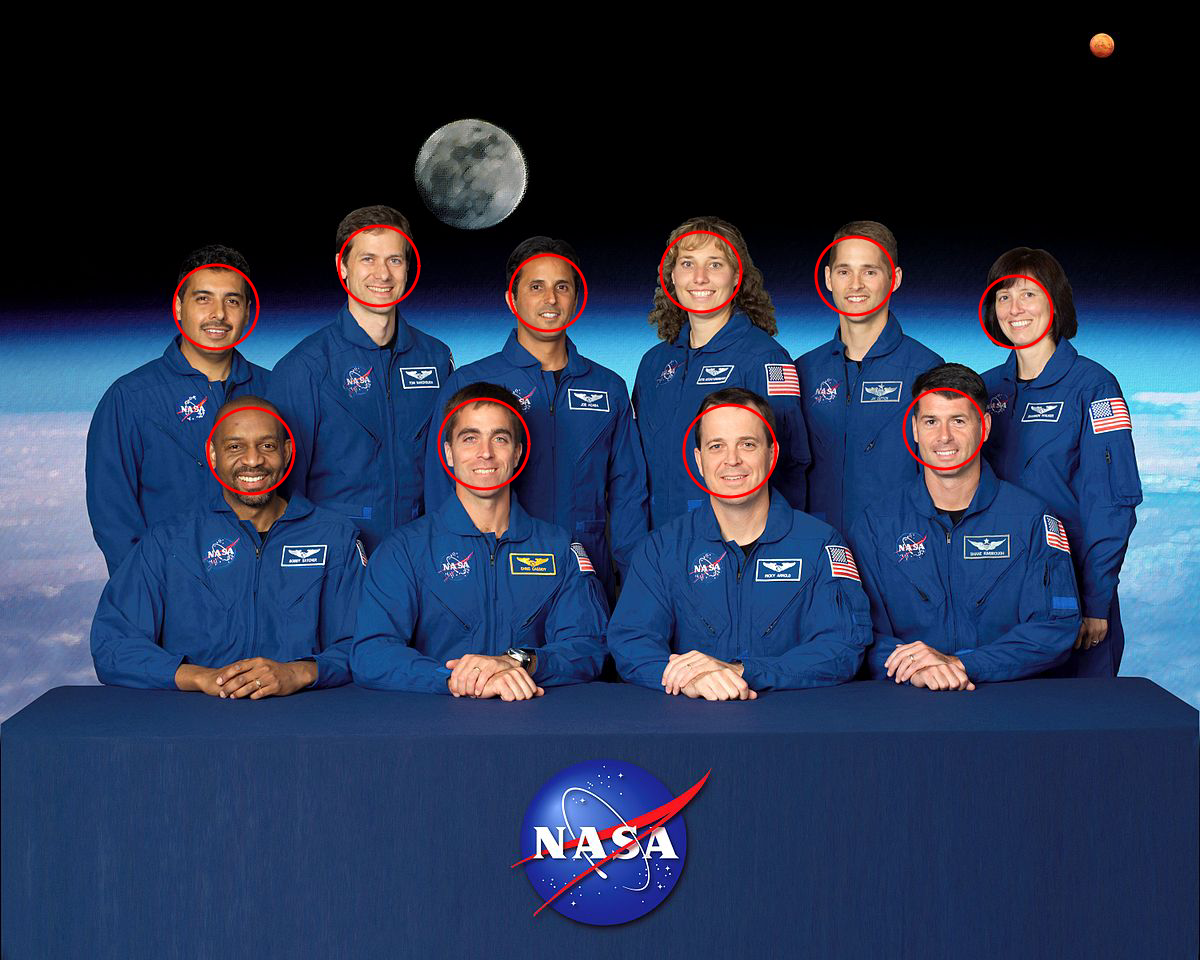 |
### Motivation
The reason why Pigo has been developed is because almost all of the currently existing solutions for face detection in the Go ecosystem are purely bindings to some C/C++ libraries like `OpenCV` or `dlib`, but calling a C program through `cgo` introduces huge latencies and implies a significant trade-off in terms of performance. Also, in many cases installing OpenCV on various platforms is cumbersome.
**The Pigo library does not require any additional modules or third party applications to be installed**, although you might need to install Python and OpenCV if you wish to run the library in a real time desktop application. Head over to this [subtopic](#real-time-face-detection-running-as-a-shared-object) for more details.
### Key features
- [x] Does not require OpenCV or any 3rd party modules to be installed
- [x] High processing speed
- [x] There is no need for image preprocessing prior to detection
- [x] There is no need for the computation of integral images, image pyramid, HOG pyramid or any other similar data structure
- [x] The face detection is based on pixel intensity comparison encoded in the binary file tree structure
- [x] Fast detection of in-plane rotated faces
- [x] The library can detect even faces with eyeglasses
- [x] [Pupils/eyes localization](#pupils--eyes-localization)
- [x] [Facial landmark points detection](#facial-landmark-points-detection)
- [x] **[Webassembly support 🎉](#wasm-webassembly-support-)**
### Todo
- [ ] Object detection and description
**The library can also detect in plane rotated faces.** For this reason a new `-angle` parameter has been included into the command line utility. The command below will generate the following result (see the table below for all the supported options).
```bash
$ pigo -in input.jpg -out output.jpg -cf cascade/facefinder -angle=0.8 -iou=0.01
```
| Input file | Output file
|:--:|:--:
|  | 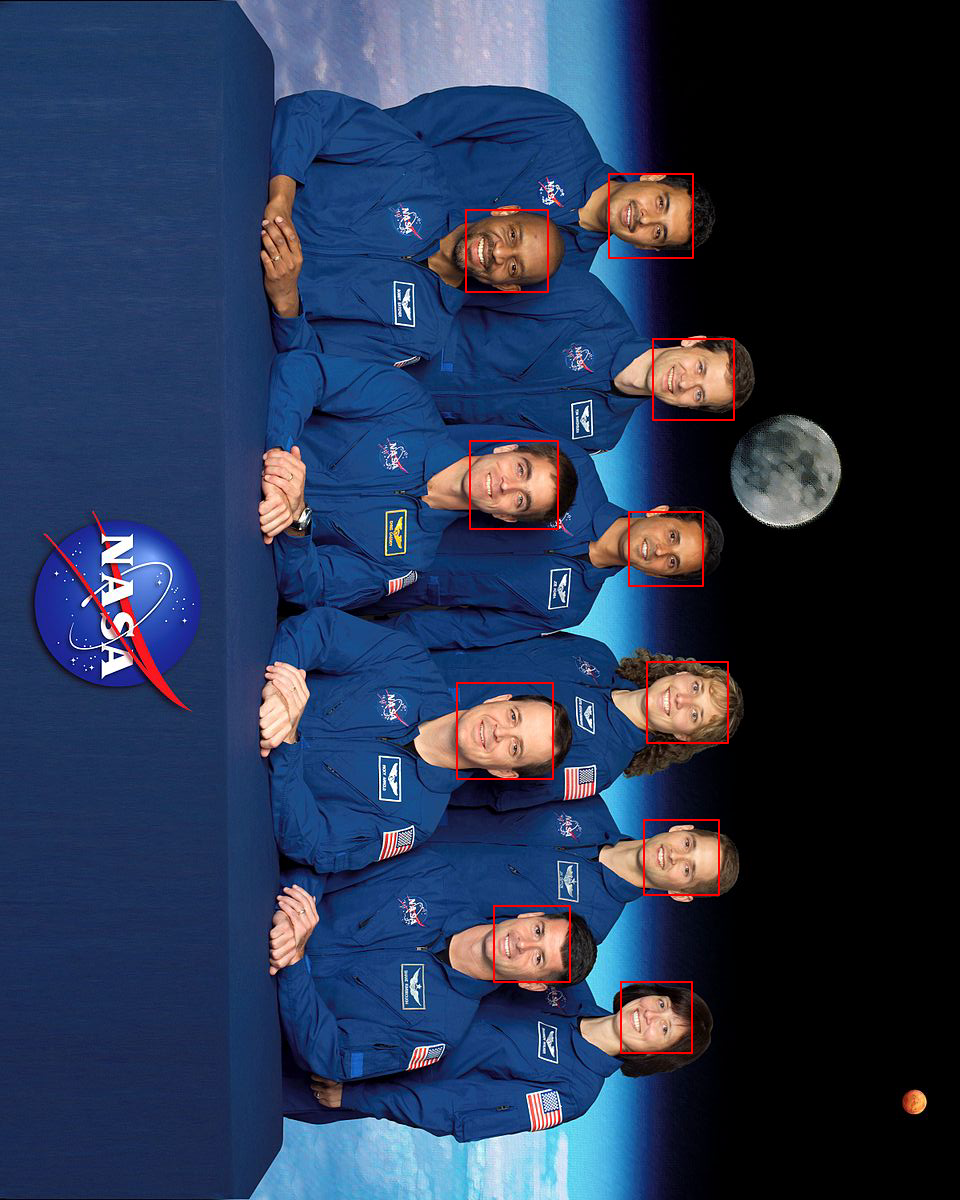 |
Note: In case of in plane rotated faces the angle value should be adapted to the provided image.
### Pupils / eyes localization
Starting from **v1.2.0** Pigo offers pupils/eyes localization capabilities. The implementation is based on [Eye pupil localization with an ensemble of randomized trees](https://www.sciencedirect.com/science/article/abs/pii/S0031320313003294).
Check out this example for a realtime demo: https://github.com/esimov/pigo/tree/master/examples/puploc

### Facial landmark points detection
**v1.3.0** marks a new milestone in the library evolution, Pigo being able to detect facial landmark points. The implementation is based on [Fast Localization of Facial Landmark Points](https://arxiv.org/pdf/1403.6888.pdf).
Check out this example for a realtime demo: https://github.com/esimov/pigo/tree/master/examples/facial_landmark

## Install
Install Go, set your `GOPATH`, and make sure `$GOPATH/bin` is on your `PATH`.
```bash
$ go install github.com/esimov/pigo/cmd/pigo@latest
```
### Binary releases
In case you do not have installed or do not wish to install Go, you can obtain the binary file from the [releases](https://github.com/esimov/pigo/releases) folder.
The library can be accessed as a snapcraft function too.
 ## API
Below is a minimal example of using the face detection API.
First, you need to load and parse the binary classifier, then convert the image to grayscale mode,
and finally run the cascade function which returns a slice containing the row, column, scale and the detection score.
```Go
cascadeFile, err := ioutil.ReadFile("/path/to/cascade/file")
if err != nil {
log.Fatalf("Error reading the cascade file: %v", err)
}
src, err := pigo.GetImage("/path/to/image")
if err != nil {
log.Fatalf("Cannot open the image file: %v", err)
}
pixels := pigo.RgbToGrayscale(src)
cols, rows := src.Bounds().Max.X, src.Bounds().Max.Y
cParams := pigo.CascadeParams{
MinSize: 20,
MaxSize: 1000,
ShiftFactor: 0.1,
ScaleFactor: 1.1,
ImageParams: pigo.ImageParams{
Pixels: pixels,
Rows: rows,
Cols: cols,
Dim: cols,
},
}
pigo := pigo.NewPigo()
// Unpack the binary file. This will return the number of cascade trees,
// the tree depth, the threshold and the prediction from tree's leaf nodes.
classifier, err := pigo.Unpack(cascadeFile)
if err != nil {
log.Fatalf("Error reading the cascade file: %s", err)
}
angle := 0.0 // cascade rotation angle. 0.0 is 0 radians and 1.0 is 2*pi radians
// Run the classifier over the obtained leaf nodes and return the detection results.
// The result contains quadruplets representing the row, column, scale and detection score.
dets := classifier.RunCascade(cParams, angle)
// Calculate the intersection over union (IoU) of two clusters.
dets = classifier.ClusterDetections(dets, 0.2)
```
**A note about imports**: in order to decode the generated image you have to import `image/jpeg` or `image/png` (depending on the provided image type) as in the following example, otherwise you will get a `"Image: Unknown format"` error.
```Go
import (
_ "image/jpeg"
pigo "github.com/esimov/pigo/core"
)
```
## Usage
A command line utility is bundled into the library.
```bash
$ pigo -in input.jpg -out out.jpg -cf cascade/facefinder
```
### Supported flags:
```bash
$ pigo --help
┌─┐┬┌─┐┌─┐
├─┘││ ┬│ │
┴ ┴└─┘└─┘
Go (Golang) Face detection library.
Version: 1.4.2
-angle float
0.0 is 0 radians and 1.0 is 2*pi radians
-cf string
Cascade binary file
-flpc string
Facial landmark points cascade directory
-in string
Source image (default "-")
-iou float
Intersection over union (IoU) threshold (default 0.2)
-json string
Output the detection points into a json file
-mark
Mark detected eyes (default true)
-marker string
Detection marker: rect|circle|ellipse (default "rect")
-max int
Maximum size of face (default 1000)
-min int
Minimum size of face (default 20)
-out string
Destination image (default "-")
-plc string
Pupils/eyes localization cascade file
-scale float
Scale detection window by percentage (default 1.1)
-shift float
Shift detection window by percentage (default 0.1)
```
**Important notice:** In case you also wish to run the pupil/eyes localization, then you need to use the `plc` flag and provide a valid path to the pupil localization cascade file. The same applies for facial landmark points detection, only that this time the parameter accepted by the `flpc` flag is a directory pointing to the facial landmark points cascade files found under `cascades/lps`.
### CLI command examples
You can also use the `stdin` and `stdout` pipe commands:
```bash
$ cat input/source.jpg | pigo > -in - -out - >out.jpg -cf=/path/to/cascade
```
`in` and `out` default to `-` so you can also use:
```bash
$ cat input/source.jpg | pigo >out.jpg -cf=/path/to/cascade
$ pigo -out out.jpg < input/source.jpg -cf=/path/to/cascade
```
Using the `empty` string as value for the `-out` flag will skip the image generation part. This, combined with the `-json` flag will encode the detection results into the specified json file. You can also use the pipe `-` value combined with the `-json` flag to output the detection coordinates to the standard (`stdout`) output.
## Real time face detection (running as a shared object)
If you wish to test the library's real time face detection capabilities, the `examples` folder contains a few demos written in Python.
**But why Python you might ask?** Because the Go ecosystem is (still) missing a cross platform and system independent library for accessing the webcam.
In the Python program we access the webcam and transfer the pixel data as a byte array through `cgo` as a **shared object** to the Go program where the core face detection is happening. But as you can imagine this operation is not cost effective, resulting in lower frame rates than the library is capable of.
## WASM (Webassembly) support 🎉
**Important note: In order to run the Webassembly demos at least Go 1.13 is required!**
Starting from version **v1.4.0** the library has been ported to [**WASM**](http://webassembly.org/). This proves the library's real time face detection capabilities, constantly producing **~60 FPS**.
### WASM demo
To run the `wasm` demo select the `wasm` folder and type `make`.
For more details check the subpage description: https://github.com/esimov/pigo/tree/master/wasm.
## Benchmark results
Below are the benchmark results obtained running Pigo against [GoCV](https://github.com/hybridgroup/gocv) using the same conditions.
```
BenchmarkGoCV-4 3 414122553 ns/op 704 B/op 1 allocs/op
BenchmarkPIGO-4 10 173664832 ns/op 0 B/op 0 allocs/op
PASS
ok github.com/esimov/gocv-test 4.530s
```
The code used for the above test can be found under the following link: https://github.com/esimov/pigo-gocv-benchmark
## Author
* Endre Simo ([@simo_endre](https://twitter.com/simo_endre))
## License
Copyright © 2019 Endre Simo
This software is distributed under the MIT license. See the [LICENSE](https://github.com/esimov/pigo/blob/master/LICENSE) file for the full license text.
## API
Below is a minimal example of using the face detection API.
First, you need to load and parse the binary classifier, then convert the image to grayscale mode,
and finally run the cascade function which returns a slice containing the row, column, scale and the detection score.
```Go
cascadeFile, err := ioutil.ReadFile("/path/to/cascade/file")
if err != nil {
log.Fatalf("Error reading the cascade file: %v", err)
}
src, err := pigo.GetImage("/path/to/image")
if err != nil {
log.Fatalf("Cannot open the image file: %v", err)
}
pixels := pigo.RgbToGrayscale(src)
cols, rows := src.Bounds().Max.X, src.Bounds().Max.Y
cParams := pigo.CascadeParams{
MinSize: 20,
MaxSize: 1000,
ShiftFactor: 0.1,
ScaleFactor: 1.1,
ImageParams: pigo.ImageParams{
Pixels: pixels,
Rows: rows,
Cols: cols,
Dim: cols,
},
}
pigo := pigo.NewPigo()
// Unpack the binary file. This will return the number of cascade trees,
// the tree depth, the threshold and the prediction from tree's leaf nodes.
classifier, err := pigo.Unpack(cascadeFile)
if err != nil {
log.Fatalf("Error reading the cascade file: %s", err)
}
angle := 0.0 // cascade rotation angle. 0.0 is 0 radians and 1.0 is 2*pi radians
// Run the classifier over the obtained leaf nodes and return the detection results.
// The result contains quadruplets representing the row, column, scale and detection score.
dets := classifier.RunCascade(cParams, angle)
// Calculate the intersection over union (IoU) of two clusters.
dets = classifier.ClusterDetections(dets, 0.2)
```
**A note about imports**: in order to decode the generated image you have to import `image/jpeg` or `image/png` (depending on the provided image type) as in the following example, otherwise you will get a `"Image: Unknown format"` error.
```Go
import (
_ "image/jpeg"
pigo "github.com/esimov/pigo/core"
)
```
## Usage
A command line utility is bundled into the library.
```bash
$ pigo -in input.jpg -out out.jpg -cf cascade/facefinder
```
### Supported flags:
```bash
$ pigo --help
┌─┐┬┌─┐┌─┐
├─┘││ ┬│ │
┴ ┴└─┘└─┘
Go (Golang) Face detection library.
Version: 1.4.2
-angle float
0.0 is 0 radians and 1.0 is 2*pi radians
-cf string
Cascade binary file
-flpc string
Facial landmark points cascade directory
-in string
Source image (default "-")
-iou float
Intersection over union (IoU) threshold (default 0.2)
-json string
Output the detection points into a json file
-mark
Mark detected eyes (default true)
-marker string
Detection marker: rect|circle|ellipse (default "rect")
-max int
Maximum size of face (default 1000)
-min int
Minimum size of face (default 20)
-out string
Destination image (default "-")
-plc string
Pupils/eyes localization cascade file
-scale float
Scale detection window by percentage (default 1.1)
-shift float
Shift detection window by percentage (default 0.1)
```
**Important notice:** In case you also wish to run the pupil/eyes localization, then you need to use the `plc` flag and provide a valid path to the pupil localization cascade file. The same applies for facial landmark points detection, only that this time the parameter accepted by the `flpc` flag is a directory pointing to the facial landmark points cascade files found under `cascades/lps`.
### CLI command examples
You can also use the `stdin` and `stdout` pipe commands:
```bash
$ cat input/source.jpg | pigo > -in - -out - >out.jpg -cf=/path/to/cascade
```
`in` and `out` default to `-` so you can also use:
```bash
$ cat input/source.jpg | pigo >out.jpg -cf=/path/to/cascade
$ pigo -out out.jpg < input/source.jpg -cf=/path/to/cascade
```
Using the `empty` string as value for the `-out` flag will skip the image generation part. This, combined with the `-json` flag will encode the detection results into the specified json file. You can also use the pipe `-` value combined with the `-json` flag to output the detection coordinates to the standard (`stdout`) output.
## Real time face detection (running as a shared object)
If you wish to test the library's real time face detection capabilities, the `examples` folder contains a few demos written in Python.
**But why Python you might ask?** Because the Go ecosystem is (still) missing a cross platform and system independent library for accessing the webcam.
In the Python program we access the webcam and transfer the pixel data as a byte array through `cgo` as a **shared object** to the Go program where the core face detection is happening. But as you can imagine this operation is not cost effective, resulting in lower frame rates than the library is capable of.
## WASM (Webassembly) support 🎉
**Important note: In order to run the Webassembly demos at least Go 1.13 is required!**
Starting from version **v1.4.0** the library has been ported to [**WASM**](http://webassembly.org/). This proves the library's real time face detection capabilities, constantly producing **~60 FPS**.
### WASM demo
To run the `wasm` demo select the `wasm` folder and type `make`.
For more details check the subpage description: https://github.com/esimov/pigo/tree/master/wasm.
## Benchmark results
Below are the benchmark results obtained running Pigo against [GoCV](https://github.com/hybridgroup/gocv) using the same conditions.
```
BenchmarkGoCV-4 3 414122553 ns/op 704 B/op 1 allocs/op
BenchmarkPIGO-4 10 173664832 ns/op 0 B/op 0 allocs/op
PASS
ok github.com/esimov/gocv-test 4.530s
```
The code used for the above test can be found under the following link: https://github.com/esimov/pigo-gocv-benchmark
## Author
* Endre Simo ([@simo_endre](https://twitter.com/simo_endre))
## License
Copyright © 2019 Endre Simo
This software is distributed under the MIT license. See the [LICENSE](https://github.com/esimov/pigo/blob/master/LICENSE) file for the full license text.