# logly
**Repository Path**: py-service/logly
## Basic Information
- **Project Name**: logly
- **Description**: https://github.com/muhammad-fiaz/logly logly特别适合需要处理大量日志、对性能有严苛要求的Web开发项目(尤其是FastAPI)、数据处理管道和任何高并发应用场景。 https://mp.weixin.qq.com/s/Gg3W-lvXIXM7V3V2jkGn-Q
- **Primary Language**: Unknown
- **License**: MIT
- **Default Branch**: main
- **Homepage**: None
- **GVP Project**: No
## Statistics
- **Stars**: 0
- **Forks**: 0
- **Created**: 2026-01-11
- **Last Updated**: 2026-01-11
## Categories & Tags
**Categories**: Uncategorized
**Tags**: None
## README
---
📋 Table of Contents
- [Overview](#overview)
- [🚀 Core Features](#-core-features)
- [📝 Logging Capabilities](#-logging-capabilities)
- [🎯 Output Management](#-output-management)
- [🔧 File Management](#-file-management)
- [🔍 Advanced Filtering](#-advanced-filtering)
- [📞 Callbacks \& Extensions](#-callbacks--extensions)
- [🎉 Recent Changes](#-recent-changes)
- [Installation](#installation)
- [From PyPI (Recommended)](#from-pypi-recommended)
- [From Source (Development)](#from-source-development)
- [Platform Support](#platform-support)
- [Quick Start](#quick-start)
- [Advanced Usage](#advanced-usage)
- [Advanced Features](#advanced-features)
- [1. File Rotation \& Retention](#1-file-rotation--retention)
- [2. Per-Sink Filtering](#2-per-sink-filtering)
- [3. Structured JSON Logging](#3-structured-json-logging)
- [4. Async Callbacks](#4-async-callbacks)
- [5. Per-Level Control](#5-per-level-control)
- [6. Custom Formatting](#6-custom-formatting)
- [Testing \& Quality](#testing--quality)
- [Documentation](#documentation)
- [Contributing](#contributing)
- [Want to contribute?](#want-to-contribute)
- [Changelog](#changelog)
- [Acknowledgements](#acknowledgements)
- [License](#license)
---
## Overview
**Logly** is a high-performance logging library for Python, powered by Rust. It combines the familiar Loguru-like API with the performance and safety guarantees of Rust.
Built with a modular Rust backend using PyO3/Maturin, Logly provides fast logging while maintaining memory safety and thread safety through Rust's ownership system.
**If you like Logly, please give it a star ⭐ on GitHub! It really helps!**
> ⚠️ **Active Development**: Logly is a newer project and actively developed. Performance continues to improve with each release. also if you find a bug or a missing feature, please report it on GitHub. and Logly is not Production Ready yet :)
🎯 Why Logly?
Logly offers a comprehensive set of logging features designed for modern Python applications:
### 🚀 Core Features
- **Rust-Powered Backend**: High-performance logging engine built with Rust, providing exceptional speed and memory efficiency
- **Memory Safety**: Zero-cost abstractions with Rust's ownership system prevent data races and memory corruption
- **Thread Safety**: Lock-free operations with optimized synchronization for concurrent applications
- **Zero-Configuration Setup**: Start logging immediately with sensible defaults - no configuration required
### 📝 Logging Capabilities
- **Multiple Log Levels**: Support for TRACE, DEBUG, INFO, SUCCESS, WARNING, ERROR, FAIL, and CRITICAL levels
- **Structured Logging**: Native JSON output with custom fields and metadata
- **Context Binding**: Attach persistent context to loggers for request tracking and correlation
- **Exception Handling**: Automatic exception logging with stack traces and context
### 🎯 Output Management
- **Multi-Sink Support**: Route logs to multiple destinations (console, files, custom handlers) simultaneously
- **Per-Sink Filtering**: Independent filtering and formatting for each output destination
- **Auto-Sink Levels**: Automatic file creation and management for different log levels
- **Console Control**: Fine-grained control over console output, colors, and timestamps per log level
### 🔧 File Management
- **Smart Rotation**: Time-based (daily/hourly/minutely) and size-based log rotation
- **Compression**: Built-in gzip and zstd compression for rotated log files
- **Retention Policies**: Configurable retention periods and file count limits
- **Async Writing**: Background thread writing for non-blocking file operations
### 🔍 Advanced Filtering
- **Level-Based Filtering**: Filter logs by minimum severity level (threshold-based)
- **Module Filtering**: Include/exclude logs from specific Python modules
- **Function Filtering**: Target logs from specific functions or methods
- **Custom Filters**: Implement custom filtering logic with callback functions
### 📞 Callbacks & Extensions
- **Async Callbacks**: Real-time log processing with background execution
- **Custom Formatting**: Flexible template-based formatting with custom fields
- **Color Styling**: Rich color support for console output and callback processing
- **Extensibility**: Plugin architecture for custom sinks and processors and more...
---
### 🎉 Recent Changes
**NEW in v0.1.6:**
- ✅ **Python 3.14 Support** ([#83](https://github.com/muhammad-fiaz/logly/issues/83)) - Full compatibility with Python 3.14's latest features
- ✅ **Time Format Specifications** ([#79](https://github.com/muhammad-fiaz/logly/issues/79)) - Custom time formatting with Loguru-style patterns (`{time:YYYY-MM-DD HH:mm:ss}`)
- ✅ **Internal Debugging Mode** - New `internal_debug=True` parameter for troubleshooting and bug reports
- ✅ **Enhanced Documentation** - Comprehensive Python 3.14 guide, template string examples, and improved API reference
**Recent Fixes:**
- ✅ **Jupyter/Colab Support** ([#76](https://github.com/muhammad-fiaz/logly/issues/76)) - Logs now display correctly in notebook environments
- ✅ **File Retention** ([#77](https://github.com/muhammad-fiaz/logly/issues/77)) - Retention now properly limits total log files with size_limit
> 🎯 **Python 3.14 Users**: Check out the [Python 3.14 Support Guide](https://muhammad-fiaz.github.io/logly/guides/python-3.14-support/) to learn how to use new features like deferred annotations, UUID7, improved pathlib, and InterpreterPoolExecutor with Logly!
---
## Installation
### From PyPI (Recommended)
```bash
pip install logly
```
### From Source (Development)
Requires: Python 3.10+, Rust 1.70+, Maturin
```bash
git clone https://github.com/muhammad-fiaz/logly.git
cd logly
pip install maturin
maturin develop # Development build
```
For detailed installation instructions, see the [Installation Guide](https://muhammad-fiaz.github.io/logly/installation/).
---
## Platform Support
Logly supports Python 3.10+ and is available for multiple platforms. The minimum required version is **0.1.4+**.
| Python Version | Windows | macOS | Linux |
|----------------|---------|-------|-------|
| 3.10 | ✅ | ✅ | ✅ |
| 3.11 | ✅ | ✅ | ✅ |
| 3.12 | ✅ | ✅ | ✅ |
| 3.13 | ✅ | ✅ | ✅ |
| 3.14 | ✅ | ✅ | ✅ |
**Notes:**
- **Python 3.14 support** added in v0.1.6+ with full compatibility for new features
- Pre-built wheels available for all platforms ([view on PyPI](https://pypi.org/project/logly/#files))
- All major Linux distributions are supported
- Both Intel and Apple Silicon macOS are supported
- Windows 10 and later versions are supported
> 💡 **Python 3.14 Features**: Logly v0.1.6+ supports Python 3.14's deferred annotations, UUID7, improved pathlib, and InterpreterPoolExecutor. See the [Python 3.14 Support Guide](https://muhammad-fiaz.github.io/logly/guides/python-3.14-support/) for examples.
---
## Quick Start
**NEW in v0.1.5+:** Start logging immediately - no configuration needed!
```python
from logly import logger
# That's it! Start logging immediately
logger.info("Hello, Logly!") # ✅ Works right away
logger.warning("Super simple!") # ⚠️ No configure() needed
logger.error("Just import and log!") # ❌ Auto-configured on import
# Logs appear automatically because:
# - Auto-configure runs when you import logger
# - Console sink is created automatically (auto_sink=True)
# - Logging is enabled globally (console=True)
```
### Advanced Usage
```python
from logly import logger
# Optional: Customize configuration
logger.configure(
level="DEBUG", # Set minimum log level
color=True, # Enable colored output
console=True, # Enable console output (default: True)
auto_sink=True # Auto-create console sink (default: True)
)
# Add file output with rotation
logger.add(
"logs/app.log",
rotation="daily", # Rotate daily
retention=7, # Keep 7 days
date_enabled=True, # Add date to filename
async_write=True # Async writing for performance
)
# **NEW in v0.1.5:** Auto-Sink Levels - Automatic file management
logger.configure(
level="DEBUG",
color=True,
auto_sink=True, # Console output
auto_sink_levels={
"DEBUG": "logs/debug.log", # All logs (DEBUG and above)
"INFO": "logs/info.log", # INFO and above
"ERROR": "logs/error.log", # ERROR and above
}
)
# ✅ Three files created automatically with level filtering!
# Configure global settings
logger.configure(
level="INFO",
color=True,
show_time=True,
json=False
)
# Basic logging
logger.info("Application started", version="1.0.0")
logger.success("Deployment successful 🚀", region="us-west")
logger.warning("High memory usage", usage_percent=85)
logger.error("Database connection failed", retry_count=3)
# Structured logging with context
request_logger = logger.bind(request_id="r-123", user="alice")
request_logger.info("Processing request")
# Context manager for temporary context
with logger.contextualize(step=1):
logger.debug("Processing step 1")
# Exception logging
@logger.catch(reraise=False)
def may_fail():
return 1 / 0
# Async callbacks for real-time processing
def alert_on_error(record):
if record["level"] == "ERROR":
send_alert(record["message"])
callback_id = logger.add_callback(alert_on_error)
# Ensure all logs are written before exit
logger.complete()
```
---
## Advanced Features
### 1. File Rotation & Retention
```python
# Time-based rotation
logger.add("logs/app.log", rotation="daily", retention=30) # Keep 30 days
logger.add("logs/app.log", rotation="hourly", retention=24) # Keep 24 hours
# Size-based rotation (supports B/b, KB/kb, MB/mb, GB/gb, TB/tb - case-insensitive)
logger.add("logs/app.log", size_limit="10MB", retention=5) # Keep 5 files
logger.add("logs/app.log", size_limit="100mb", retention=10) # Lowercase works too
logger.add("logs/tiny.log", size_limit="500b") # Bytes with lowercase 'b'
logger.add("logs/small.log", size_limit="5K") # Short form (5 kilobytes)
# Combined rotation
logger.add("logs/app.log", rotation="daily", size_limit="50MB", retention=7)
```
### 2. Per-Sink Filtering
```python
# Level-based filtering
logger.add("logs/debug.log", filter_min_level="DEBUG")
logger.add("logs/errors.log", filter_min_level="ERROR")
# Module-based filtering
logger.add("logs/database.log", filter_module="myapp.database")
logger.add("logs/api.log", filter_module="myapp.api")
# Function-based filtering
logger.add("logs/auth.log", filter_function="authenticate")
```
### 3. Structured JSON Logging
```python
# Enable JSON output
logger.configure(json=True)
# Pretty JSON for development
logger.configure(json=True, pretty_json=True)
# Log structured data
logger.info("User login", user_id=123, ip="192.168.1.1", success=True)
# Output: {"timestamp":"2025-10-02T12:00:00Z","level":"INFO","message":"User login","fields":{"user_id":123,"ip":"192.168.1.1","success":true}}
```
### 4. Async Callbacks
```python
# Register callback for real-time processing
def send_to_monitoring(record):
if record["level"] in ["ERROR", "CRITICAL"]:
monitoring_service.send_alert(record)
callback_id = logger.add_callback(send_to_monitoring)
# Callbacks execute in background threads (zero blocking)
logger.error("Critical system failure", service="database")
# Remove callback when done
logger.remove_callback(callback_id)
```
### 5. Per-Level Control
```python
# Control console output per level
logger.configure(
console_levels={"DEBUG": False, "INFO": True, "ERROR": True}
)
# Control timestamps per level
logger.configure(
show_time=False,
time_levels={"ERROR": True} # Only show time for errors
)
# Control colors per level
logger.configure(
color_levels={"INFO": False, "ERROR": True}
)
# Control file storage per level
logger.configure(
storage_levels={"DEBUG": False} # Don't write DEBUG to files
)
```
### 6. Custom Formatting
```python
# Simple format
logger.add("console", format="{time} [{level}] {message}")
# Detailed format
logger.add(
"logs/detailed.log",
format="{time} | {level:8} | {module}:{function} | {message} | {extra}"
)
# JSON-like format
logger.add(
"logs/json-like.log",
format='{{"timestamp": "{time}", "level": "{level}", "msg": "{message}"}}'
)
# **NEW in v0.1.6:** Time Format Specifications
# Customize time format using Loguru-style patterns
logger.add("console", format="{time:YYYY-MM-DD HH:mm:ss} | {level} | {message}")
# Output: 2025-10-11 13:46:27 | INFO | Application started
# Date-only format
logger.add("logs/daily.log", format="{time:YYYY-MM-DD} [{level}] {message}")
# Output: 2025-10-11 [INFO] User logged in
# Milliseconds precision
logger.add("logs/precise.log", format="{time:HH:mm:ss.SSS} {message}")
# Output: 13:46:27.324 Database query completed
# ISO 8601 format
logger.add("logs/api.log", format="{time:YYYY-MM-DDTHH:mm:ss} {level} {message}")
# Output: 2025-10-11T13:46:27 INFO Request processed
# Month names
logger.add("logs/verbose.log", format="{time:MMMM DD, YYYY} - {message}")
# Output: October 11, 2025 - System initialized
```
**Supported Time Format Patterns** (v0.1.6+):
- **Year**: `YYYY` (2025), `YY` (25)
- **Month**: `MM` (10), `MMM` (Oct), `MMMM` (October)
- **Day**: `DD` (11), `ddd` (Mon), `dddd` (Monday)
- **Hour**: `HH` (13, 24-hour), `hh` (01, 12-hour)
- **Minute**: `mm` (46)
- **Second**: `ss` (27)
- **Millisecond**: `SSS` (324), `SS` (32), `SSSSSS` (324000 microseconds)
- **AM/PM**: `A` (PM), `a` (pm)
- **Timezone**: `ZZ` (+0000), `Z` (+00:00), `zz` (UTC)
- **Unix Timestamp**: `X` (1728647187)
For complete format pattern reference, see [Template Strings Documentation](https://muhammad-fiaz.github.io/logly/examples/template-strings/).
For complete feature documentation, see the [API Reference](https://muhammad-fiaz.github.io/logly/api-reference/).
---
## Testing & Quality
Logly maintains **96%+ code coverage** with comprehensive testing:
```bash
# Run tests
pytest
# With coverage
pytest --cov=logly --cov-report=term-missing
# Code quality (10.00/10 score)
pylint logly/
```
For development guidelines, see the [Development Guide](https://muhammad-fiaz.github.io/logly/guides/development/).
---
## Documentation
Complete documentation is available at [muhammad-fiaz.github.io/logly](https://muhammad-fiaz.github.io/logly/):
- 📖 [Getting Started Guide](https://muhammad-fiaz.github.io/logly/guides/getting-started/)
- 📚 [API Reference](https://muhammad-fiaz.github.io/logly/api-reference/)
- 🔧 [Configuration Guide](https://muhammad-fiaz.github.io/logly/guides/configuration/)
- 🚀 [Production Deployment](https://muhammad-fiaz.github.io/logly/guides/production-deployment/)
- 💡 [Examples](https://muhammad-fiaz.github.io/logly/examples/)
---
## Contributing
Contributions are welcome! Please see our [Contributing Guidelines](CONTRIBUTING.md) and [Code of Conduct](CODE_OF_CONDUCT.md).
### Want to contribute?
1. Fork the repository
2. Create a feature branch (`git checkout -b feature/amazing-feature`)
3. Commit your changes (`git commit -m 'Add amazing feature'`)
4. Push to the branch (`git push origin feature/amazing-feature`)
5. Open a Pull Request
A big thank you to all contributors! 💖
[](https://github.com/muhammad-fiaz/logly/graphs/contributors)
---
## Changelog
See the [GitHub Releases](https://github.com/muhammad-fiaz/logly/releases) page for detailed release notes.
---
## Acknowledgements
Special thanks to:
- **Loguru**: For inspiring the API design
- **tracing**: The Rust logging framework powering the backend
- **PyO3**: For seamless Python-Rust integration
- **Maturin**: For simplifying the build process
- **All contributors**: For valuable feedback and contributions
> 📝 **Note on Loguru**: Logly is not the same as Loguru. Logly is only inspired by Loguru's design, but all features and functionality are completely different. Logly is built with Rust for performance and safety, while Loguru is a pure Python library.
---
## License
This project is licensed under the MIT License. See the [LICENSE](LICENSE) file for details.
---
[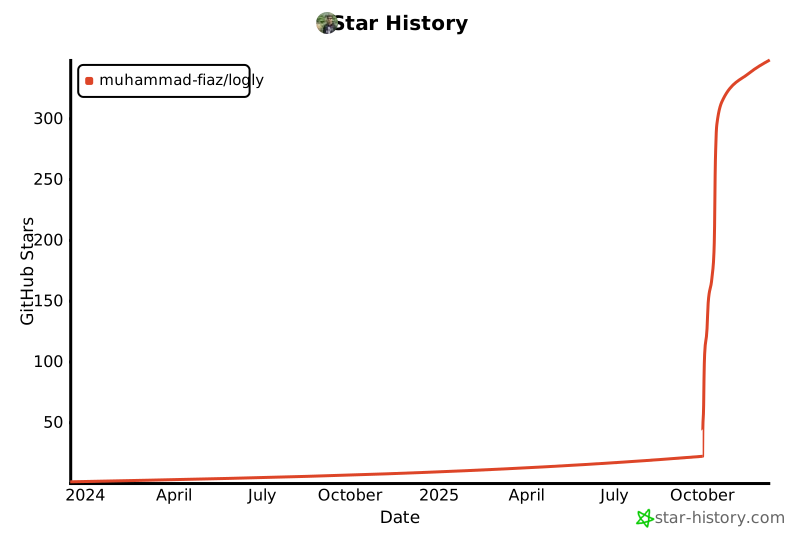](https://github.com/muhammad-fiaz/logly/)
**⭐ Star the repository if you find Logly useful!**










