# ngx-notification
**Repository Path**: powersky/ngx-notification
## Basic Information
- **Project Name**: ngx-notification
- **Description**: Angular通知组件
- **Primary Language**: Unknown
- **License**: MIT
- **Default Branch**: master
- **Homepage**: None
- **GVP Project**: No
## Statistics
- **Stars**: 0
- **Forks**: 0
- **Created**: 2020-10-11
- **Last Updated**: 2020-12-19
## Categories & Tags
**Categories**: Uncategorized
**Tags**: None
## README
# ngx-notification
It is a flexible and usable component.

## Demo
[Demo](https://93alliance.github.io/ngx-notification/)
## Installation
1.You need install `@flywine93/ngx-notification` by npm
```
npm install @flywine93/ngx-notification --save
```
2.You need install `@flywine93/ngx-autounsubscrb`
```
npm i @flywine93/ngx-autounsubscrb --save
```
> [ngx-autounsubscrb Introduction](https://github.com/93Alliance/ngx-autounsubscrb)
3.You need install `@angular/animations`
```
npm install --save @angular/animations
```
## Import
You need to import `NgxNotificationModule`, `BrowserAnimationsModule`.
```
import {BrowserAnimationsModule} from '@angular/platform-browser/animations';
import { NgxNotificationModule } from '@flywine93/ngx-notification';
@NgModule({
declarations: [
AppComponent
],
imports: [
BrowserModule,
BrowserAnimationsModule,
AppRoutingModule,
CommonModule,
NgxNotificationModule,
],
providers: [],
bootstrap: [AppComponent]
})
export class AppModule { }
```
## Usage
1.Add ngx-notification to the component, which should be global.
eg. `app.component.html`
```
```
2.The message is triggered through the `NgxNotificationService` service.
```
import { NgxNotificationService } from '@flywine93/ngx-notification';
@Component({
selector: 'app-root',
templateUrl: './app.component.html',
styleUrls: ['./app.component.scss']
})
export class AppComponent {
constructor(private notification: NgxNotificationService) {
}
}
```
3. Send message by service.
```
sendInfo() {
this.notification.notify(NotificationType.INFO, 'Hello World', 'This is an information', 0);
}
sendSuccess() {
this.notification.notify(NotificationType.SUCCESS, 'Hello World', 'This is a success !', 3000);
}
sendWarning() {
this.notification.notify(NotificationType.WARNING, 'Hello World', 'This is a warning !');
}
sendError() {
this.notification.notify(NotificationType.ERROR, 'Hello World', 'This is an error :(');
}
```
**It's that simple!!!**
## Advanced usage
### Component Options
`options: NotifyOptions`
```
export type NotificationPosition = 't' | 'b' | 'lt' | 'lb' | 'rt' | 'rb';
export interface NotifyOptions {
position?: NotificationPosition;
startDistance?: number;
animation?: boolean;
shadow?: boolean;
title?: {
infoFontColor?: string,
successFontColor?: string,
warningFontColor?: string,
errorFontColor?: string,
background?: string;
bold?: boolean;
};
msg?: {
infoFontColor?: string,
successFontColor?: string,
warningFontColor?: string,
errorFontColor?: string,
background?: string;
maxHeight?: number;
};
infoBgColor?: string;
successBgColor?: string;
warningBgColor?: string;
errorBgColor?: string;
}
```
| Option | Description | Default Value |
| ----------- | ------------------------------------------------------ | ------------- |
| `position` | The position of the notification message box, `'t' | 'b' | 'lt' | 'lb' | 'rt' | 'rb'` | `rt` |
| `startDistance` | The distance between the starting position of the notification box and the top or bottom.`number` | `0`
`animation` | Whether to turn on the appear and disappear animations.`boolean` | `true`
`shadow` | Whether to turn on shadow effects.`boolean` | `true`
`title` | The theme of the title in the notification box. | `material theme`
`msg` | The theme of the message in the notification box. | `material theme`
`infoBgColor` | general notification box background color | `material theme`
`successBgColor` | success notification box background color | `material theme`
`warningBgColor` | warning notification box background color | `material theme`
`errorBgColor` | error notification box background color | `material theme`
- **position**--`t`: top,`b`: bottom, `lt`: left top, `lb`: left bottom, `rb`: right bottom, `rt`: right top
### Component Theme
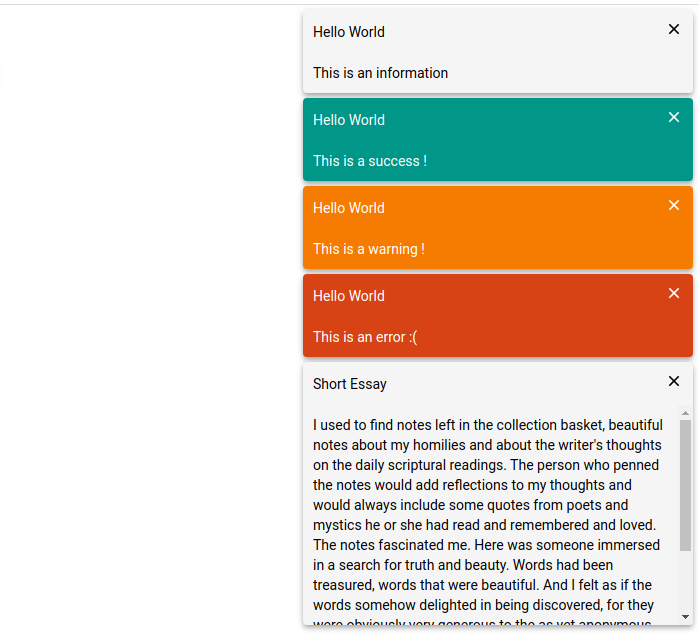
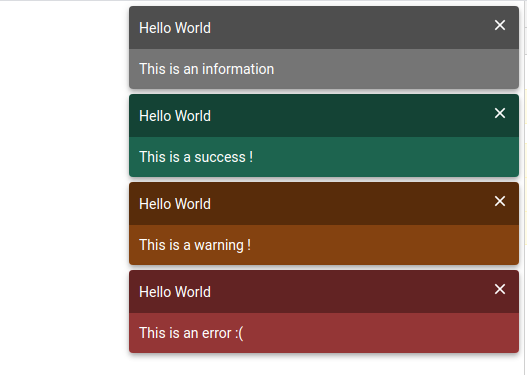
There are now two themes available, `material theme` and `darkWindstorm theme`.
1. **material theme**
2.**darkWindstorm theme**
### Component Usage
1.change notification box **position** to `b`.
`app.component.html`
```
```
`app.component.ts`
```
import {
NgxNotificationService,
NotificationType,
NotificationThemes, NotifyOptions, ThemeName } from '@flywine93/ngx-notification';
export class AppComponent {
theme = ThemeName.MATERILA;
options: NotifyOptions;
constructor(private notification: NgxNotificationService) {
this.options = {
position: 'b'
};
sendInfo() {
this.notification.notify(NotificationType.INFO, 'Hello World', 'This is an information', 0);
}
sendSuccess() {
this.notification.notify(NotificationType.SUCCESS, 'Hello World', 'This is a success !');
}
sendWarning() {
this.notification.notify(NotificationType.WARNING, 'Hello World', 'This is a warning !');
}
sendError() {
this.notification.notify(NotificationType.ERROR, 'Hello World', 'This is an error :(');
}
}
}
```

2.change theme
`app.component.html`
```
```
`app.component.ts`
```
import {
NgxNotificationService,
NotificationType,
NotificationThemes,
NotifyOptions,
ThemeName } from '@flywine93/ngx-notification';
export class AppComponent {
theme = ThemeName.DARK_WINDSTORM;
options: NotifyOptions;
constructor(private notification: NgxNotificationService) {
this.options = {
position: 'b'
};
}
}
```
You can also customize colors by **options** property.
eg.
```
export class AppComponent {
theme = ThemeName.MATERILA;
options: NotifyOptions;
constructor(private notification: NgxNotificationService) {
this.options = {
title: {
infoFontColor: '#fff',
successFontColor: '#fff',
warningFontColor: '#fff',
errorFontColor: '#fff',
background: 'rgba(0, 0, 0, 0.6)',
bold: true
},
msg: {
infoFontColor: '#fff',
successFontColor: '#fff',
warningFontColor: '#fff',
errorFontColor: '#fff',
background: 'rgba(0, 0, 0, 0.4)'
},
infoBgColor: 'rgba(189, 189, 189, 0.9)',
successBgColor: 'rgba(27, 158, 119, 0.9)',
warningBgColor: 'rgba(217, 95, 2, 0.9)',
errorBgColor: 'rgba(246, 71, 71, 0.9)'
};
}
}
```
The custom configuration will override the default configuration.
### notification service
#### method
- **notify** --- Send a message.
`notify(type: NotificationType, title: string, message: string, timeout = 3000): void`
- type: NotificationType enum, `SUCCESS`|`WARNING`|`ERROR`|`INFO`。
- title: message title
- message: text
- timeout: delay closing time,If it is 0ms, it will not close actively, it needs to close manually.
- **update** --- Forced update options, eg. change position.
- **changeTheme** --- change notification box theme
- **changeOptions** --- change notification options then update
#### Usage
1.send a info notification.
You need inject `NgxNotificationService` service.
```
import {
NgxNotificationService,
NotificationType,
ThemeName } from '@flywine93/ngx-notification';
export class AppComponent {
theme = ThemeName.MATERILA;
options: NotifyOptions;
constructor(private notification: NgxNotificationService) {
}
sendInfo() {
this.notification.notify(NotificationType.INFO, 'Hello World', 'This is an information', 1000);
}
}
```
2.change options
```
export class AppComponent {
theme = ThemeName.MATERILA;
options: NotifyOptions = {position: 'rt'};
constructor(private notification: NgxNotificationService) {
}
changeOptions(): void {
this.options.position = 'b';
this.notification.update();
}
}
```
If the update is not forced, it will be updated at the next change.
3.change options or theme by service
```
changePosition(dir: NotificationPosition): void {
this.notification.changeOptions({position: dir});
}
```
```
changeTheme(theme: ThemeName): void {
this.notification.changeTheme(theme);
}
```
## TODO
- [x] add update options by service
- [x] add change theme by service
### License
The MIT License (see the [LICENSE](https://github.com/93Alliance/ngx-notification/blob/master/LICENSE) file for the full text)