# cartoonize
**Repository Path**: physicsandprogram/cartoonize
## Basic Information
- **Project Name**: cartoonize
- **Description**: No description available
- **Primary Language**: Unknown
- **License**: Not specified
- **Default Branch**: master
- **Homepage**: None
- **GVP Project**: No
## Statistics
- **Stars**: 0
- **Forks**: 0
- **Created**: 2020-09-16
- **Last Updated**: 2024-11-23
## Categories & Tags
**Categories**: Uncategorized
**Tags**: None
## README
# Cartoonizer
> Convert images and videos into a cartoon!
The webapp is deployed here - https://cartoonize-lkqov62dia-de.a.run.app
You can find a writeup on this webapp's architecture [here](https://medium.com/@Niraj_pandkar/how-we-built-an-inexpensive-scalable-architecture-to-cartoonize-the-world-8610050f90a0)!
## Prerequisites for Google Cloud and Algorithmia
**These are important steps if you want to leverage Google buckets, signed URLs and Algorithmia's platform.**
### Cloud Run authentication
To use any functionalities pertaining to Google Cloud, you'll need a global authentication file (JSON). You can obtain this JSON by following the steps given here - [Getting started with authentication](https://cloud.google.com/docs/authentication/getting-started)
After you get the JSON file, rename it to `token.json` (so that it's compatible with the codebase).
Set the environment variable in your terminal -
```
export GOOGLE_APPLICATION_CREDENTIALS="/path/to/token.json"
```
**Notes**:
- You can set it permanently by adding this line to `~/.bashrc`.
- `Dockerfile` already includes the setting of this particular environment variable. :)
### Algorithmia
We used the Serveless AI Layer product of [Algorithmia](https://algorithmia.com/serverless-ai-layer) for inference on videos.
To learn more on how to deploy your model in Algorithmia, check here - https://algorithmia.com/developers
## Installation
### Application tested on:
- python 3.7
- tensorflow 2.1.0
- tf_slim 1.1.0
- Cuda version 10.1
- OS: Linux (Ubuntu 18.04)
### Using Docker
The easiest way to get the webapp running is by using the Dockerfile:
1. `cd` into the root directory and build the image
```
docker build -t cartoonize .
```
**Note**: Set the appropriate values in `config.yaml` before building the image.
2. Run the container by exposing the appropriate ports
```
docker run -p 8080:8080 cartoonize
```
### Using `virtualenv`
1. Make a virtual environment using `virutalenv` and activate it
```
virtualenv -p python3 cartoonize
source cartoonize/bin/activate
```
2. Install python dependencies
```
pip install -r requirements.txt
```
3. Run the webapp. Be sure to set the appropriate values in `config.yaml` file before running the application.
```
python app.py
```
## Sample Image and Video
### Emma Watson Cartoonized
 ### Youtube Video of Avenger's Bar Scene Cartoonized
[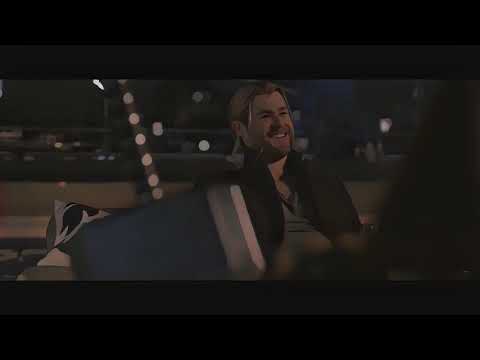](http://www.youtube.com/watch?v=GqduSLcmhto "AVENGERS BAR SCENE [Cartoonized Version]")
## License
1. Copyright © Cartoonizer ([Demo webapp](https://cartoonize-lkqov62dia-de.a.run.app/))
- Authors: [Niraj Pandkar](https://twitter.com/Niraj_pandkar) and [Tejas Mahajan](https://twitter.com/tjdevWorks).
- Licensed under the [CC BY-NC-SA 4.0](https://creativecommons.org/licenses/by-nc-sa/4.0/legalcode)
- Commercial application is prohibited by license
2. Copyright (C) Xinrui Wang, Jinze Yu. ([White box cartoonization](https://github.com/SystemErrorWang/White-box-Cartoonization))
- All rights reserved.
- Licensed under the CC BY-NC-SA 4.0
- Also, Commercial application is prohibited license (https://creativecommons.org/licenses/by-nc-sa/4.0/legalcode).
### Youtube Video of Avenger's Bar Scene Cartoonized
[](http://www.youtube.com/watch?v=GqduSLcmhto "AVENGERS BAR SCENE [Cartoonized Version]")
## License
1. Copyright © Cartoonizer ([Demo webapp](https://cartoonize-lkqov62dia-de.a.run.app/))
- Authors: [Niraj Pandkar](https://twitter.com/Niraj_pandkar) and [Tejas Mahajan](https://twitter.com/tjdevWorks).
- Licensed under the [CC BY-NC-SA 4.0](https://creativecommons.org/licenses/by-nc-sa/4.0/legalcode)
- Commercial application is prohibited by license
2. Copyright (C) Xinrui Wang, Jinze Yu. ([White box cartoonization](https://github.com/SystemErrorWang/White-box-Cartoonization))
- All rights reserved.
- Licensed under the CC BY-NC-SA 4.0
- Also, Commercial application is prohibited license (https://creativecommons.org/licenses/by-nc-sa/4.0/legalcode).