# manakin
**Repository Path**: orgcollector/manakin
## Basic Information
- **Project Name**: manakin
- **Description**: No description available
- **Primary Language**: Unknown
- **License**: Not specified
- **Default Branch**: master
- **Homepage**: None
- **GVP Project**: No
## Statistics
- **Stars**: 0
- **Forks**: 0
- **Created**: 2017-12-27
- **Last Updated**: 2024-12-10
## Categories & Tags
**Categories**: Uncategorized
**Tags**: None
## README
manakin
=======
[](https://travis-ci.org/vitaly-t/manakin)
[](https://coveralls.io/r/vitaly-t/manakin?branch=master)
[](https://www.npmjs.com/package/manakin)
[](https://gitter.im/vitaly-t/manakin?utm_source=badge&utm_medium=badge&utm_campaign=pr-badge&utm_content=badge)
 The quickest and safest way to set default colorful output for your Node.js console, without messing with the colors,
and to continue using the rich syntax and the output format supported by Node.js console methods:
• with a list of parameters: `console.log(obj1 [, obj2, ..., objN]);`
The quickest and safest way to set default colorful output for your Node.js console, without messing with the colors,
and to continue using the rich syntax and the output format supported by Node.js console methods:
• with a list of parameters: `console.log(obj1 [, obj2, ..., objN]);`
• with message formatting: `console.log(msg [, subst1, ..., substN]);`
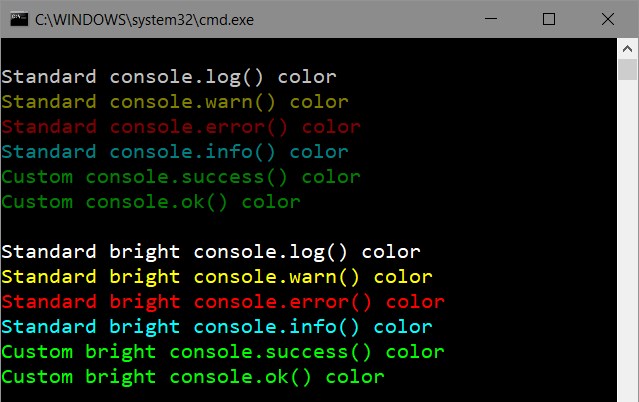
Can be used either locally or globally (by overriding the `console` object), with automatic colors applied according to which
method is used - see the screenshot below.
_minimum code_ ✔ _no dependencies_ ✔
This library provides consistent output format for console methods after applying the colors, in contrast to generic color
libraries that only apply colors to text.
 ## Installing
```
$ npm install manakin --save
```
## Usage
#### Using colors globally
```js
require('manakin').global; // sets colors globally, for the `console` object
console.log(val1, val2, ...); // white/default text output
console.warn(val1, val2, ...); // yellow text output
console.error(val1, val2, ...); // red text output
console.info(val1, val2, ...); // cyan text output
console.success(val1, val2, ...); // green text output (custom method)
console.ok(val1, val2, ...); // green text output (custom method)
```
#### Using colors locally
```js
var con = require('manakin').local; // use colors locally
con.log(val1, val2, ...); // white/default text output
con.warn(val1, val2, ...); // yellow text output
con.error(val1, val2, ...); // red text output
con.info(val1, val2, ...); // cyan text output
con.success(val1, val2, ...); // green text output (custom method)
con.ok(val1, val2, ...); // green text output (custom method)
```
#### Customization Features
You can easily do the following:
- change brightness individually for each available method
- [override predefined colors](https://github.com/vitaly-t/manakin/blob/master/docs/API.md#overriding-colors) for existing methods
- create [custom-color methods](https://github.com/vitaly-t/manakin/blob/master/docs/API.md#custom-methods), with the same output formatting
For more details and examples, see [the full API] and [examples].
## License
Copyright © 2017 [Vitaly Tomilov](https://github.com/vitaly-t);
Released under the MIT license.
[the full API]:https://github.com/vitaly-t/manakin/tree/master/docs/API.md
[examples]:https://github.com/vitaly-t/manakin/tree/master/docs/examples
## Installing
```
$ npm install manakin --save
```
## Usage
#### Using colors globally
```js
require('manakin').global; // sets colors globally, for the `console` object
console.log(val1, val2, ...); // white/default text output
console.warn(val1, val2, ...); // yellow text output
console.error(val1, val2, ...); // red text output
console.info(val1, val2, ...); // cyan text output
console.success(val1, val2, ...); // green text output (custom method)
console.ok(val1, val2, ...); // green text output (custom method)
```
#### Using colors locally
```js
var con = require('manakin').local; // use colors locally
con.log(val1, val2, ...); // white/default text output
con.warn(val1, val2, ...); // yellow text output
con.error(val1, val2, ...); // red text output
con.info(val1, val2, ...); // cyan text output
con.success(val1, val2, ...); // green text output (custom method)
con.ok(val1, val2, ...); // green text output (custom method)
```
#### Customization Features
You can easily do the following:
- change brightness individually for each available method
- [override predefined colors](https://github.com/vitaly-t/manakin/blob/master/docs/API.md#overriding-colors) for existing methods
- create [custom-color methods](https://github.com/vitaly-t/manakin/blob/master/docs/API.md#custom-methods), with the same output formatting
For more details and examples, see [the full API] and [examples].
## License
Copyright © 2017 [Vitaly Tomilov](https://github.com/vitaly-t);
Released under the MIT license.
[the full API]:https://github.com/vitaly-t/manakin/tree/master/docs/API.md
[examples]:https://github.com/vitaly-t/manakin/tree/master/docs/examples