# OpenInTerminal
**Repository Path**: mtdev/OpenInTerminal
## Basic Information
- **Project Name**: OpenInTerminal
- **Description**: No description available
- **Primary Language**: Unknown
- **License**: MIT
- **Default Branch**: master
- **Homepage**: None
- **GVP Project**: No
## Statistics
- **Stars**: 0
- **Forks**: 0
- **Created**: 2020-09-26
- **Last Updated**: 2020-12-19
## Categories & Tags
**Categories**: Uncategorized
**Tags**: None
## README




English | [OpenInTerminal 中文说明](./Resources/README-zh.md)
[OpenInTerminal-Lite English](./Resources/README-Lite.md) | [OpenInTerminal-Lite 中文说明](./Resources/README-Lite-zh.md)
## How to use 🚀
| Features | OpenInTerminal | OpenInTerminal-Lite & OpenInEditor-Lite |
| --- | --- | --- |
| Open current directory in Terminal (or Editor) |  | 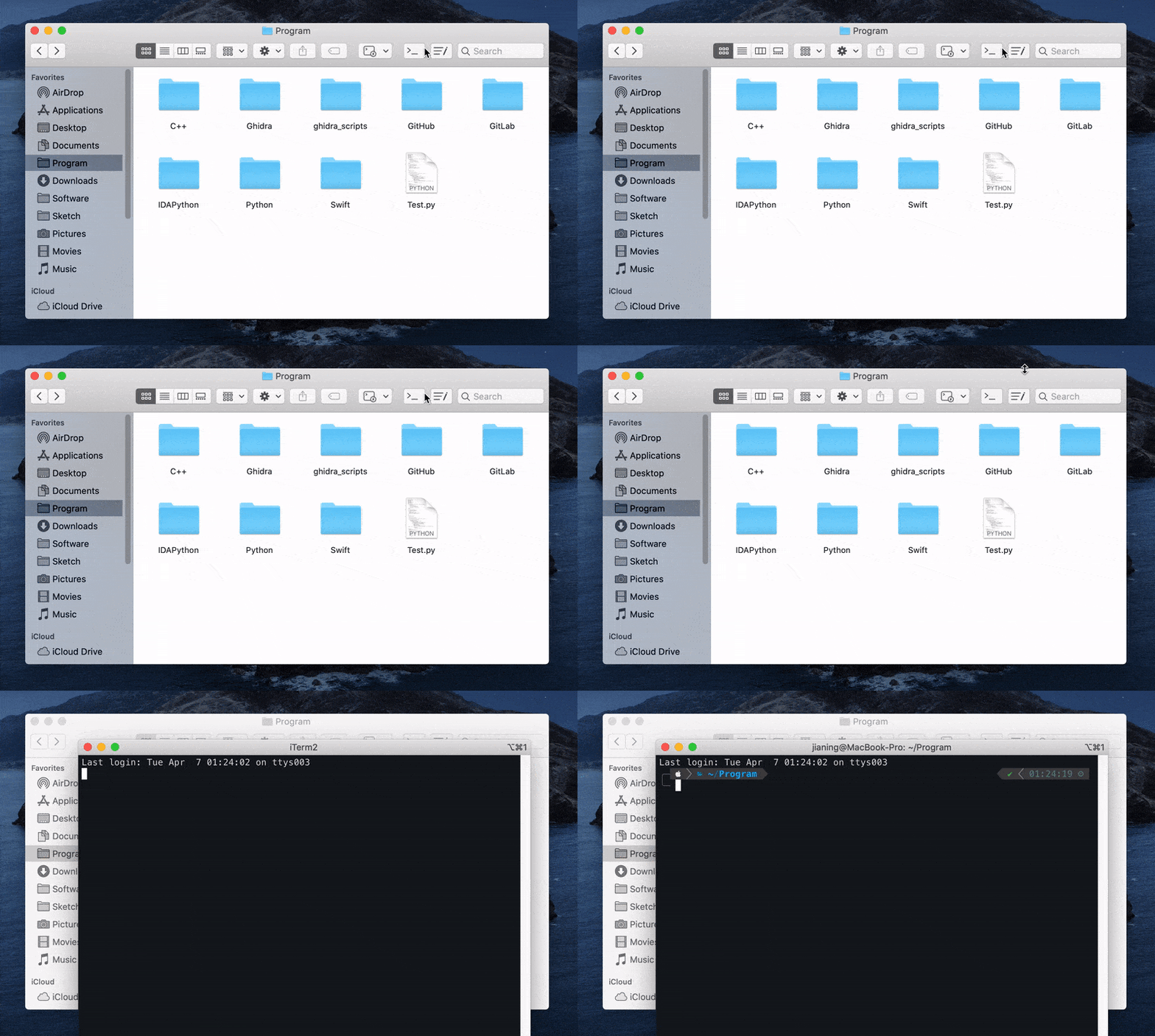 |
| Open selected folder or file in Terminal (or Editor) |  |  |
### More features
| Features | OpenInTerminal | OpenInTerminal-Lite & OpenInEditor-Lite |
| --- | --- | --- |
| Support Terminal, [iTerm](https://www.iterm2.com/), [Hyper](https://github.com/zeit/hyper), [Alacritty](https://github.com/jwilm/alacritty) and [kitty](https://sw.kovidgoyal.net/kitty/). | ✅ | ✅ |
| Support TextEdit, [Visual Studio Code](https://code.visualstudio.com/), [VSCode Insiders](https://code.visualstudio.com/insiders/), [Atom](https://atom.io/), [Sublime Text](https://www.sublimetext.com/), [VSCodium](https://github.com/VSCodium/vscodium), [BBEdit](https://www.barebones.com/products/bbedit/), [TextMate](https://macromates.com), [CotEditor](https://coteditor.com/), [MacVim](https://github.com/macvim-dev/macvim) and [JetBrains](https://www.jetbrains.com/)(AppCode, CLion, GoLand, IntelliJ IDEA, PhpStorm, PyCharm, RubyMine, WebStorm). | ✅ | ✅ |
| Set to open a new tab or window. | ✅ | ✅ |
| Support English, Chinese, French, Russian, Italian and Spanish. | ✅ | ✅ |
| Copy path of the selected file or Finder window to Clipboard | ✅ | ❌ |
| GUI preferences | ✅ | ❌ |
| Support keyboard shortcuts. | ✅ | ❌ |
| Support Dark Mode. | ✅ | ❌ |
## OpenInTerminal and OpenInTerminal-Lite (OpenInEditor-Lite) 👀
Which one to choose? Both of these apps are my children. If you like more powerful features and GUI preferences, then you can use `OpenInTerminal`. If you just need to open terminal faster and more stably, then you can use `OpenInTerminal-Lite`.
For me, I prefer `OpenInTerminal-Lite` which only needs to click once to complete the function (and the other needs to click twice 😂) and it is more lightweight.
For `OpenInTerminal-Lite` users:
Please check the document: [OpenInTerminal-Lite English](./Resources/README-Lite.md) | [OpenInTerminal-Lite 中文说明](./Resources/README-Lite-zh.md)
## How to install 🖥
### 1. Download
#### a) Homebrew
```
brew cask install openinterminal
```
#### b) Manual
1. Download from [release](https://github.com/Ji4n1ng/OpenInTerminal/releases).
2. Move the app into `/Applications`.
> ⚠️ macOS will ask your permissions to access Finder and other applications when you run the app for the first time. Please give OpenInTerminal the permissions.
### 2. Check Finder Extension permission
Open the OpenInTerminal app. Go to `System Preferences` -> `Extensions` -> `Finder Extensions`, check the permission button as below.
## Todo 👨💻
If you have a good idea, feel welcome to open a new [issue](https://github.com/Ji4n1ng/OpenInTerminal/issues/new/choose).
- Open iTerm in split pane
- Fix: open multiple selected files in editor
## Support ❤️
Hello, I am Ji4n1ng. I am a student and OpenInTerminal is an open source project I maintain in my spare time. It is free and open source. I will be very grateful that you can support me in purchasing an Apple Developer account. $99/year is not a small expense for students. It's close to my three-week living expenses. Thanks a lot!
| PayPal | AliPay | WeChat Pay |
| --- | --- | --- |
| [paypal.me/ji4ning](https://www.paypal.me/ji4ning) |  |
|  |
## FAQ ❓
|
## FAQ ❓
1. What is the difference between OpenInTerminal and OpenInTerminal-Lite?
OpenInTerminal currently has a normal version and a lite version. If you like more powerful features and GUI preferences, then you can use OpenInTerminal. If you just need to open terminal faster and more stably, then you can use OpenInTerminal-Lite.
2. I accidentally clicked on the Don't Allow button.
You can run the following command in the terminal. This will reset the permissions in the System Preferences.
tccutil reset AppleEvents wang.jianing.app.OpenInTerminal
3. Special characters in the path.
Please do not use backslash \ and double quotes " in the path.
4. Open two Terminal windows on Mojave
This problem usually occurs when Terminal is first started. So you can use ⌘W to close Terminal window instead of using ⌘Q to quit Terminal.
5. Finder Extension Standalone Operation Mode
Currently Finder extension is completely dependent on AppleScript in order to run independently. So it is hard to guarantee its stability. When you find that Finder extension doesn't work properly, you need to hold down the Option(⌥) key, right-click on Finder, and select Relaunch.
6. OpenInTerminal doesn't work as I expected
OpenInTerminal will open terminal or editor as the following order:
- 1. Open the file or folder that you selected.
- 2. Open the top Finder window.
- 3. Neither. Then open the desktop.
For example, if you select a file in the bottom Finder window and you want to open the above Finder window in terminal, this will not work as you expected according to the above order.
Q: I right-click on the desktop but no terminal or editor appears. But actions in status bar menu work.
A: Try to select a file(folder) or open a Finder window. Because when you right-click on the desktop and nothing is selected, system does not provide program with the path of selected files. Under this situation, the program does not work.
Currently they(Fidner extension and actions in status bar menu) do not work as the same way. Finder extension is completely dependent on AppleScript in order to run independently, while status bar icon works as before. So they have different behaviors. This problem will be improved in the future.
7. The implementation mechanism of OpenInTerminal and why there are two versions.
There are two ways to achieve "open in terminal".
- 1. ScriptingBridge. It's faster and more stable than the second one, although the differences are small.
OpenInTerminal-Lite and actions of OpenInTerminal in status bar menu are based on this way. Its disadvantage is that applications which use ScriptingBridge to access user's directory infomation or something else cannot be sandboxed.
- 2. AppleScript. Finder extension of
OpenInTerminal is completely dependent on AppleScript in order to run independently. The first way cannot be applied to Finder extension because it is required to be sandboxed.
Some people want OpenInTerminal to be fast and stable(the lite version), while others want OpenInTerminal to be powerful and easier to configure(the normal version). Some people hope that OpenInTerminal can automatically adapt to dark mode(the normal version), while others just want to open the terminal with one click(the lite version).
When one version can no longer meet these needs, OpenInTerminal was split into a normal version and a lite version a few months ago.
(BTW, I know there are apps that are sandboxed and can achieve the same effect as OpenInTerminal. But I don't know how it implements this. If anyone knows it and is willing to talk to me, that would be great. I'm very happy to make OpenInTerminal more perfect so that one version is enough.😀)
show all
version 2.2.3
- Support kitty
- Open multi-selected files in editors
version 2.2.2
- Support Italian and Spanish
- Fix: does not show Terminal and TextEdit
version 2.2.1
- Support JetBrains
- Fix: check whether an application exists
version 2.2.0
- Custom Finder menu options
- Support Russian
- Support PhpStorm
- Fix: doesn't work when opening desktop in terminal
version 2.1.1
- Signed the application with the developer account. Bundle ID has changed
- Support Finder Extension Standalone Operation Mode
- Support CotEditor and MacVim
- User can hide context menu items
- Finder context menu item's title will change to the current default terminal or editor
version 2.0.5
- Fix: check application exist bug
version 2.0.4
- Support TextMate
- Fix: keyboard shortcut bug
version 2.0.3
- Fix: Finder context menu icon supports dark mode
version 2.0.2
- Support Visual Studio Code - Insiders
- Support for hiding the status bar icon
version 2.0.1
- Support BBEdit
- Add icon in Finder context menu
- Fix: check application folder under home directory
version 0.10.2
- Fix: Finder context menu does not appear on other disks.
version 0.10.1
- iTerm will not leave `cd xxx` in history.
- You need to click the `window` button or the `tab` button of iTerm again in `Preferences`.
version 0.10.0
- Support keyboard shortcuts.
- Support VSCodium.
version 0.9.1
version 0.9.0
- OpenInTerminal has been released after several weeks of development. If you have suggestions or there are bugs, please feel free to open an issue.
version 0.4.1
version 0.4.0
- You can set a default to open a new tab or window when using
Terminal and Hyper.
version 0.3.0
- Change name to
OpenInTerminal-Lite (OpenInTerminal will come as a more powerful version in the future.)
- Fix a bug that some special characters in the path would crash the program when opening Hyper.
version 0.2.0
- Add terminal selector
- Cancel running
clear command when opening iTerm
version 0.1.1
- Support
Hyper
- Give priority to creating a new tab when opening iTerm
version 0.1.0
