# grumpy
**Repository Path**: mrcaobin/grumpy
## Basic Information
- **Project Name**: grumpy
- **Description**: No description available
- **Primary Language**: Unknown
- **License**: Apache-2.0
- **Default Branch**: master
- **Homepage**: None
- **GVP Project**: No
## Statistics
- **Stars**: 0
- **Forks**: 0
- **Created**: 2025-05-13
- **Last Updated**: 2025-05-13
## Categories & Tags
**Categories**: Uncategorized
**Tags**: None
## README
grumpy
=============

[](https://maven-badges.herokuapp.com/maven-central/com.github.davidmoten/grumpy)
[](https://codecov.io/gh/davidmoten/grumpy)
[OGC WMS](http://www.opengeospatial.org/standards/wms) 1.3.0 Server in java allowing custom rendering of WMS layers using projection utilities and Graphics2D.
Status: *released to Maven Central*
[Release Notes](RELEASE_NOTES.md)
 [Maven reports](http://davidmoten.github.io/grumpy/project-reports.html) including [javadocs](http://davidmoten.github.io/grumpy/apidocs/index.html).
Features
----------
* Great circle navigation utilities in ```grumpy-core```
* Map projection utilities in ```grumpy-projection```
* WMS Server utilities in ```grumpy-ogc```
* Create a lightweight WMS server (about 12MB war)
* Supports BBOX parameters handled differently by WMS 1.1.1 and 1.3
* Handles boundary discontinuities with ```Reducer``` and ```RendererUtil``` methods
* War artifact to deploy Darkness layer as WMS service (```grumpy-app```)
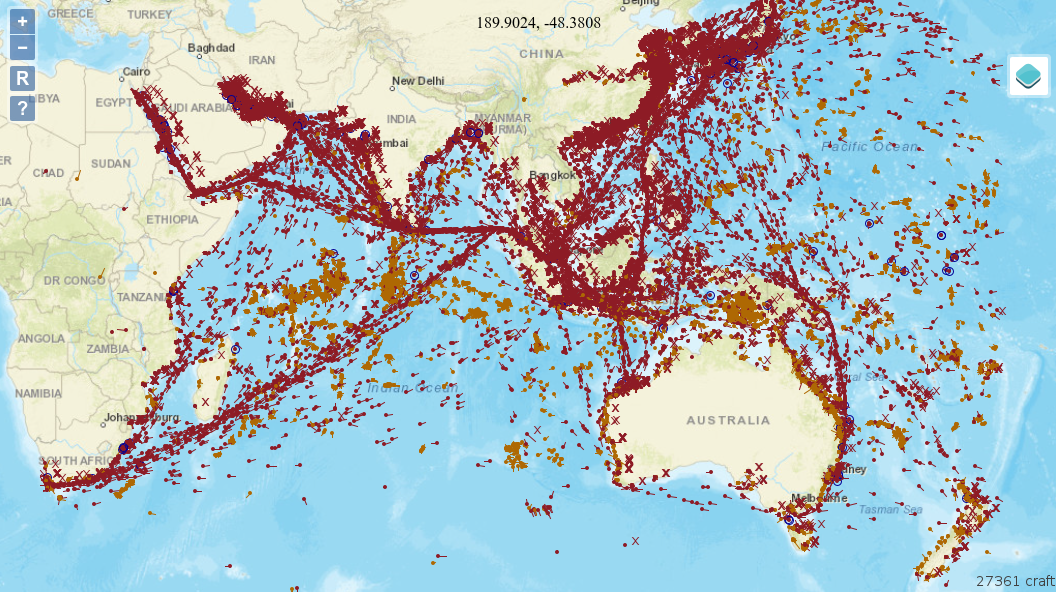
Serverless AWS implementation of grumpy with OpenLayers 6 and ArcGIS base layers:
[Maven reports](http://davidmoten.github.io/grumpy/project-reports.html) including [javadocs](http://davidmoten.github.io/grumpy/apidocs/index.html).
Features
----------
* Great circle navigation utilities in ```grumpy-core```
* Map projection utilities in ```grumpy-projection```
* WMS Server utilities in ```grumpy-ogc```
* Create a lightweight WMS server (about 12MB war)
* Supports BBOX parameters handled differently by WMS 1.1.1 and 1.3
* Handles boundary discontinuities with ```Reducer``` and ```RendererUtil``` methods
* War artifact to deploy Darkness layer as WMS service (```grumpy-app```)
Serverless AWS implementation of grumpy with OpenLayers 6 and ArcGIS base layers:
 Run demo locally
------------------
```
git clone https://github.com/davidmoten/grumpy.git
cd grumpy
mvn clean install
cd wms-demo
mvn jetty:run
```
Go to [http://localhost:8080](http://localhost:8080/wms-demo) with a browser.
And at the map link you will see this:
Run demo locally
------------------
```
git clone https://github.com/davidmoten/grumpy.git
cd grumpy
mvn clean install
cd wms-demo
mvn jetty:run
```
Go to [http://localhost:8080](http://localhost:8080/wms-demo) with a browser.
And at the map link you will see this:
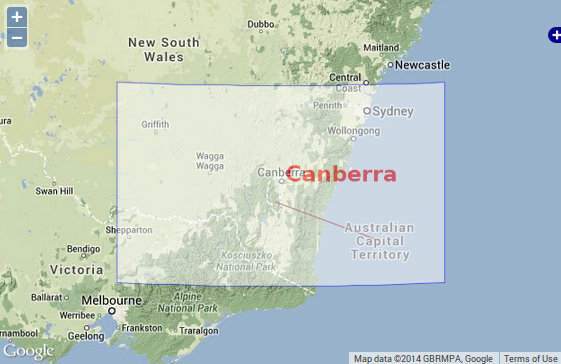 This demonstrates a custom filled shape and some text that is placed with transparency over the position of Canberra on the map. Notice that the borders are great circle paths.
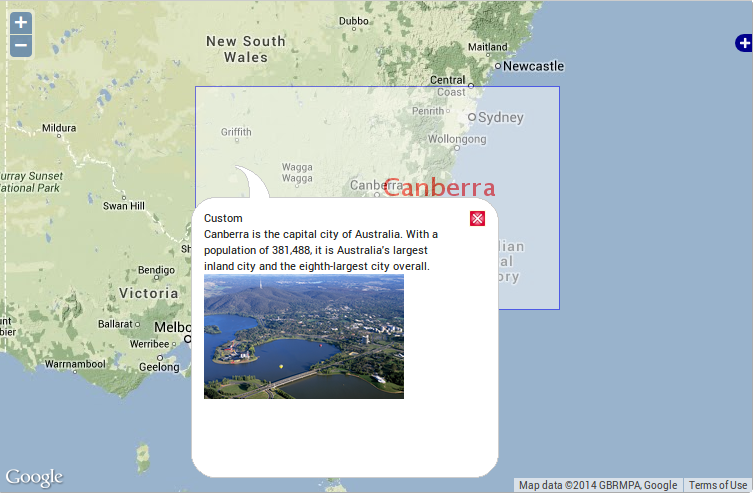
Click in the Canberra box and you will see a demo of WMS GetFeatureInfo:
This demonstrates a custom filled shape and some text that is placed with transparency over the position of Canberra on the map. Notice that the borders are great circle paths.
Click in the Canberra box and you will see a demo of WMS GetFeatureInfo:
 How is it all done? Easy!
Getting started
-------------------
To make your own WMS service add this dependency to the pom.xml of your war project:
```xml
com.github.davidmoten
grumpy-ogc
VERSION_HERE
```
How to make your own WMS
---------------------------
Using a war project (you could just copy the ```wms-demo``` project and change its artifact and group id, remove the parent reference as well):
### Create a layer:
See [CustomLayer.java](wms-demo/src/main/java/com/github/davidmoten/grumpy/wms/demo/CustomLayer.java) for how to render a layer using a ```Projector``` and a ```RendererUtil```.
### Create a servlet to serve the layer and capabilities:
See [WmsServlet.java](wms-demo%2Fsrc%2Fmain%2Fjava%2Fcom%2Fgithub%2Fdavidmoten%2Fgrumpy%2Fwms%2Fdemo%2FWmsServlet.java) for how an ```HttpServlet``` is created to server WMS requests. You do need to register this servlet against a url of course in [web.xml](wms-demo/src/main/webapp/WEB-INF/web.xml).
### Define the service capabilities:
Note that this enables service discovery and is required from WMS clients like ArcGIS but is not required for an OpenLayers WMS client like in ```wms-demo```.
There are two options
* Use ```Capabilities.builder()``` as in [WmsServlet.java](wms-demo%2Fsrc%2Fmain%2Fjava%2Fcom%2Fgithub%2Fdavidmoten%2Fgrumpy%2Fwms%2Fdemo%2FWmsServlet.java)
* Use a classpath resource such as ```/wms-capabilities.xml``` with ```WmsServletRequestProcessor.builder().capabilitiesFromClasspath()```
See [wms-capabilities.xml](wms-demo%2Fsrc%2Fmain%2Fresources%2Fwms-capabilities.xml) which should conform to the OGC WMS 1.3 schema.
From this point you have a working WMS service against the url for the ```WmsServlet```!
### View the WMS:
Example WMS clients are included in ```wms-demo``` in [map-3857.jsp](wms-demo%2Fsrc%2Fmain%2Fwebapp%2Fmap-3857.jsp) and [map-4326.jsp](wms-demo%2Fsrc%2Fmain%2Fwebapp%2Fmap-4326.jsp). The custom layer is referenced in [layers.js](wms-demo/src/main/webapp/js/layers.js).
```wms-demo``` project uses [OpenLayers](http://openlayers.org/) javascript libraries and google maps v3 to display the world and the custom layer using the Spherical Mercator projection (EPSG 3857). See OpenLayers [documentation](http://docs.openlayers.org/) and [examples](http://openlayers.org/dev/examples/) to play with this client as you see fit.
How to build
----------------
```
git clone https://github.com/davidmoten/grumpy.git
cd grumpy
mvn clean install
```
Drawing Regions
----------------
Drawing regions that extend over the polar areas is a bit tricky. The safest method is to use ```Reducer.render``` with an *is inside* value function and a filling ```ValueRenderer```. See [FiddleLayer.java](wms-demo%2Fsrc%2Fmain%2Fjava%2Fcom%2Fgithub%2Fdavidmoten%2Fgrumpy%2Fwms%2Fdemo%2FFiddleLayer.java). The Fiddle layer is visible in the demo.
Another example using the ```Reducer``` is the [Darkness layer](grumpy-ogc-layers/src/main/java/com/github/davidmoten/grumpy/wms/layer/darkness/DarknessLayer.java) (also in the demo).
What is the Reducer?
---------------------
The reducer is an abstraction of Steven Ring's original idea for implementing the [Darkness layer](grumpy-ogc-layers/src/main/java/com/github/davidmoten/grumpy/wms/layer/darkness/DarknessLayer.java). A reduction rendering comprises:
* a value function
* a rectangle sampler
* a rectangle renderer
In short the recursive algorithm is to start with a rectangle the size of the screen and if the points sampled across the rectangle (according to the *rectangle sampler*) differ in value (calculated using the *value function*) then the rectangle is split into sub-rectangles and the process continued recursively. Once the values sampled across a rectangle are all the same the rectangle is rendered with its one value using the *rectangle renderer*.
It's a useful way of handling projection weirdness by concentrating on the screen pixels. If the region you are trying to draw is irregular or small then you might need to use a custom sampler to be sure the region is detected at low scales. The ```Darkness``` layer is an example of a region that is smooth and large enough that corner sampling of rectangles is sufficient.
The Darkness layer
----------------------
The module ```grumpy-ogc-layers``` contains the Darkness layer and it looks like this:
How is it all done? Easy!
Getting started
-------------------
To make your own WMS service add this dependency to the pom.xml of your war project:
```xml
com.github.davidmoten
grumpy-ogc
VERSION_HERE
```
How to make your own WMS
---------------------------
Using a war project (you could just copy the ```wms-demo``` project and change its artifact and group id, remove the parent reference as well):
### Create a layer:
See [CustomLayer.java](wms-demo/src/main/java/com/github/davidmoten/grumpy/wms/demo/CustomLayer.java) for how to render a layer using a ```Projector``` and a ```RendererUtil```.
### Create a servlet to serve the layer and capabilities:
See [WmsServlet.java](wms-demo%2Fsrc%2Fmain%2Fjava%2Fcom%2Fgithub%2Fdavidmoten%2Fgrumpy%2Fwms%2Fdemo%2FWmsServlet.java) for how an ```HttpServlet``` is created to server WMS requests. You do need to register this servlet against a url of course in [web.xml](wms-demo/src/main/webapp/WEB-INF/web.xml).
### Define the service capabilities:
Note that this enables service discovery and is required from WMS clients like ArcGIS but is not required for an OpenLayers WMS client like in ```wms-demo```.
There are two options
* Use ```Capabilities.builder()``` as in [WmsServlet.java](wms-demo%2Fsrc%2Fmain%2Fjava%2Fcom%2Fgithub%2Fdavidmoten%2Fgrumpy%2Fwms%2Fdemo%2FWmsServlet.java)
* Use a classpath resource such as ```/wms-capabilities.xml``` with ```WmsServletRequestProcessor.builder().capabilitiesFromClasspath()```
See [wms-capabilities.xml](wms-demo%2Fsrc%2Fmain%2Fresources%2Fwms-capabilities.xml) which should conform to the OGC WMS 1.3 schema.
From this point you have a working WMS service against the url for the ```WmsServlet```!
### View the WMS:
Example WMS clients are included in ```wms-demo``` in [map-3857.jsp](wms-demo%2Fsrc%2Fmain%2Fwebapp%2Fmap-3857.jsp) and [map-4326.jsp](wms-demo%2Fsrc%2Fmain%2Fwebapp%2Fmap-4326.jsp). The custom layer is referenced in [layers.js](wms-demo/src/main/webapp/js/layers.js).
```wms-demo``` project uses [OpenLayers](http://openlayers.org/) javascript libraries and google maps v3 to display the world and the custom layer using the Spherical Mercator projection (EPSG 3857). See OpenLayers [documentation](http://docs.openlayers.org/) and [examples](http://openlayers.org/dev/examples/) to play with this client as you see fit.
How to build
----------------
```
git clone https://github.com/davidmoten/grumpy.git
cd grumpy
mvn clean install
```
Drawing Regions
----------------
Drawing regions that extend over the polar areas is a bit tricky. The safest method is to use ```Reducer.render``` with an *is inside* value function and a filling ```ValueRenderer```. See [FiddleLayer.java](wms-demo%2Fsrc%2Fmain%2Fjava%2Fcom%2Fgithub%2Fdavidmoten%2Fgrumpy%2Fwms%2Fdemo%2FFiddleLayer.java). The Fiddle layer is visible in the demo.
Another example using the ```Reducer``` is the [Darkness layer](grumpy-ogc-layers/src/main/java/com/github/davidmoten/grumpy/wms/layer/darkness/DarknessLayer.java) (also in the demo).
What is the Reducer?
---------------------
The reducer is an abstraction of Steven Ring's original idea for implementing the [Darkness layer](grumpy-ogc-layers/src/main/java/com/github/davidmoten/grumpy/wms/layer/darkness/DarknessLayer.java). A reduction rendering comprises:
* a value function
* a rectangle sampler
* a rectangle renderer
In short the recursive algorithm is to start with a rectangle the size of the screen and if the points sampled across the rectangle (according to the *rectangle sampler*) differ in value (calculated using the *value function*) then the rectangle is split into sub-rectangles and the process continued recursively. Once the values sampled across a rectangle are all the same the rectangle is rendered with its one value using the *rectangle renderer*.
It's a useful way of handling projection weirdness by concentrating on the screen pixels. If the region you are trying to draw is irregular or small then you might need to use a custom sampler to be sure the region is detected at low scales. The ```Darkness``` layer is an example of a region that is smooth and large enough that corner sampling of rectangles is sufficient.
The Darkness layer
----------------------
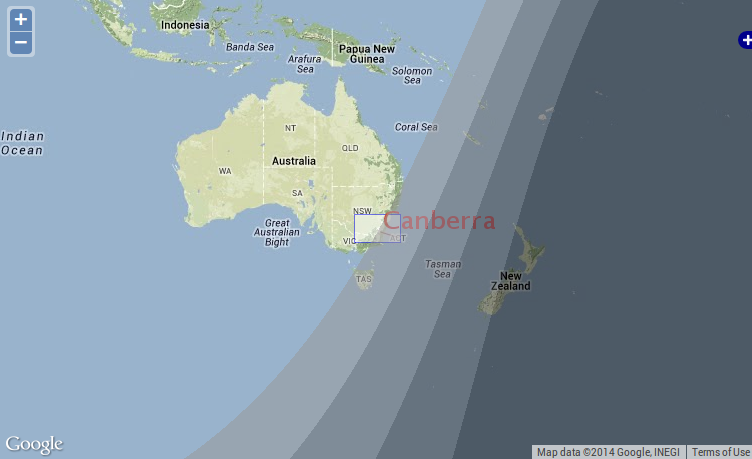
The module ```grumpy-ogc-layers``` contains the Darkness layer and it looks like this:
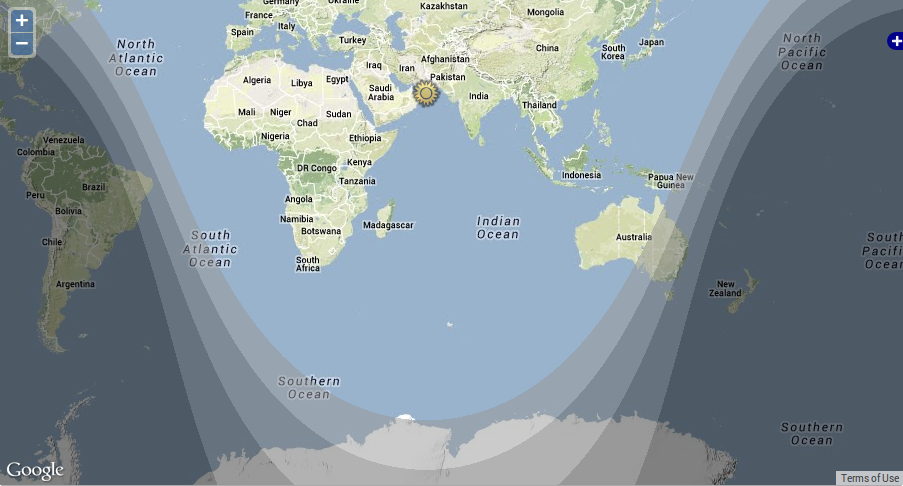 The bands correspond to the following twilight categories:
* Civil (the lightest)
* Nautical
* Astronomical
* Night (the darkest)
The layer is visible in the demo.
The ```grumpy-app``` artifact is a war artifact that can be deployed to a java servlet container (tomcat, glassfish, jetty, jboss, others) to offer a WMS service with the Darkness layer (and any other layers that get added to ```grumpy-ogc-layers```).
Why Grumpy?
---------------
The project name was chosen at random and is no hint at the disposition of the primary developer! I'm very happy to receive contributions on this project. Just raise an issue.
The bands correspond to the following twilight categories:
* Civil (the lightest)
* Nautical
* Astronomical
* Night (the darkest)
The layer is visible in the demo.
The ```grumpy-app``` artifact is a war artifact that can be deployed to a java servlet container (tomcat, glassfish, jetty, jboss, others) to offer a WMS service with the Darkness layer (and any other layers that get added to ```grumpy-ogc-layers```).
Why Grumpy?
---------------
The project name was chosen at random and is no hint at the disposition of the primary developer! I'm very happy to receive contributions on this project. Just raise an issue.