# cayenne
**Repository Path**: mirrors_apache/cayenne
## Basic Information
- **Project Name**: cayenne
- **Description**: Mirror of Apache Cayenne
- **Primary Language**: Unknown
- **License**: Not specified
- **Default Branch**: master
- **Homepage**: None
- **GVP Project**: No
## Statistics
- **Stars**: 0
- **Forks**: 0
- **Created**: 2020-08-22
- **Last Updated**: 2026-03-29
## Categories & Tags
**Categories**: Uncategorized
**Tags**: None
## README
Apache Cayenne
==============
[](https://cayenne.apache.org/download/)
[](https://github.com/apache/cayenne/actions/workflows/verify-deploy-on-push.yml)

[Apache Cayenne](https://cayenne.apache.org) is an open source persistence framework licensed under the Apache License, providing object-relational mapping (ORM) and remoting services.
Table Of Contents
-----------------
* [Quick Start](#quick-start)
* [Create Project](#create-xml-mapping)
* [Cayenne Modeler](#modeler-gui-application)
* [Maven plugin](#maven-plugin)
* [Gradle plugin](#gradle-plugin)
* [Include Cayenne Into Project](#include-cayenne-into-project)
* [Create Cayenne Runtime](#create-cayenne-runtime)
* [Create New Objects](#create-new-objects)
* [Queries](#queries)
* [Select Objects](#select-objects)
* [Aggregate Functions](#aggregate-functions)
* [Raw SQL queries](#raw-sql-queries)
* [Documentation](#documentation)
* [About](#about)
* [License](#license)
* [Collaboration](#collaboration)
Quick Start
----------------
#### Create XML mapping
##### Modeler GUI application
You can use Cayenne Modeler to manually create Cayenne project without DB.
Binary distributions can be downloaded from https://cayenne.apache.org/download/
[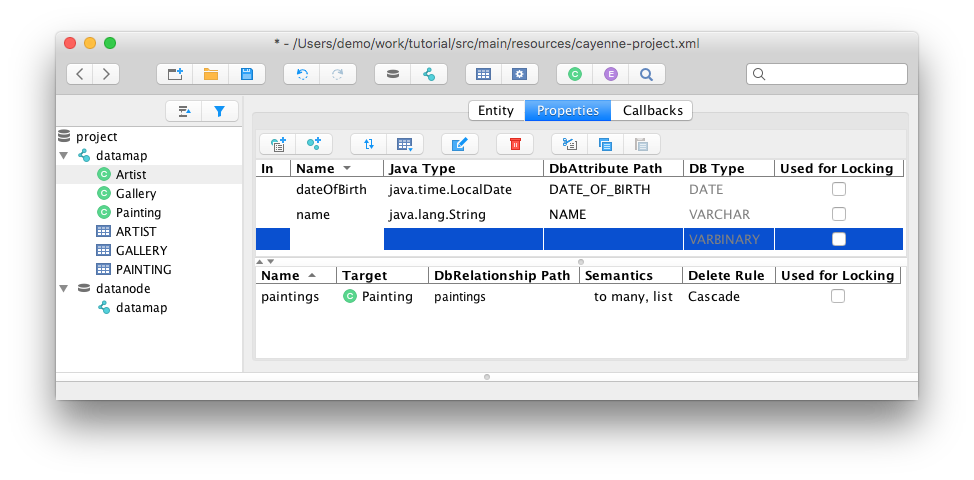](https://cayenne.apache.org/download/)
See tutorial https://cayenne.apache.org/docs/4.2/getting-started-guide/
##### Maven plugin
Additionally, you can use Cayenne Maven (or [Gradle](#gradle-plugin)) plugin to create model based on existing DB structure.
Here is example of Cayenne Maven plugin setup that will do it:
```xml
org.apache.cayenne.plugins
cayenne-maven-plugin
4.2.1
com.mysql
mysql-connector-j
8.4.0
${project.basedir}/src/main/resources/cayenne-demo.xml
jdbc:mysql://localhost:3306/cayenne_demo?nullNamePatternMatchesAll=true
com.mysql.cj.jdbc.Driver
user
password
org.apache.cayenne.demo.model
```
Run it:
```bash
mvn cayenne:cdbimport
mvn cayenne:cgen
```
See tutorial https://cayenne.apache.org/docs/4.2/getting-started-db-first/
##### Gradle plugin
And here is example of Cayenne Gradle plugin setup:
```gradle
buildscript {
repositories {
mavenCentral()
}
dependencies {
classpath 'org.apache.cayenne.plugins:cayenne-gradle-plugin:4.2.1'
classpath 'com.mysql:mysql-connector-j:8.4.0'
}
}
apply plugin: 'org.apache.cayenne'
cayenne.defaultDataMap 'demo.map.xml'
cdbimport {
cayenneProject 'cayenne-demo.xml'
dataSource {
driver 'com.mysql.cj.jdbc.Driver'
url 'jdbc:mysql://127.0.0.1:3306/cayenne_demo?nullNamePatternMatchesAll=true'
username 'user'
password 'password'
}
dbImport {
defaultPackage = 'org.apache.cayenne.demo.model'
}
}
cgen.dependsOn cdbimport
compileJava.dependsOn cgen
```
Run it:
```bash
gradlew build
```
#### Include Cayenne into project
##### Maven
```xml
org.apache.cayenne
cayenne-server
4.2.1
```
##### Gradle
```gradle
compile group: 'org.apache.cayenne', name: 'cayenne-server', version: '4.2.1'
// or, if Gradle plugin is used
compile cayenne.dependency('server')
```
#### Create Cayenne Runtime
```java
ServerRuntime cayenneRuntime = ServerRuntime.builder()
.addConfig("cayenne-demo.xml")
.dataSource(DataSourceBuilder
.url("jdbc:mysql://localhost:3306/cayenne_demo")
.driver("com.mysql.cj.jdbc.Driver")
.userName("username")
.password("password")
.build())
.build();
```
#### Create New Objects
```java
ObjectContext context = cayenneRuntime.newContext();
Artist picasso = context.newObject(Artist.class);
picasso.setName("Pablo Picasso");
picasso.setDateOfBirth(LocalDate.of(1881, 10, 25));
Gallery metropolitan = context.newObject(Gallery.class);
metropolitan.setName("Metropolitan Museum of Art");
Painting girl = context.newObject(Painting.class);
girl.setName("Girl Reading at a Table");
Painting stein = context.newObject(Painting.class);
stein.setName("Gertrude Stein");
picasso.addToPaintings(girl);
picasso.addToPaintings(stein);
girl.setGallery(metropolitan);
stein.setGallery(metropolitan);
context.commitChanges();
```
#### Queries
##### Select Objects
```java
List paintings = ObjectSelect.query(Painting.class)
.where(Painting.ARTIST.dot(Artist.DATE_OF_BIRTH).year().lt(1900))
.prefetch(Painting.ARTIST.joint())
.select(context);
```
##### Aggregate functions
```java
// this is artificial property signaling that we want to get full object
Property artistProperty = Property.createSelf(Artist.class);
List artistAndPaintingCount = ObjectSelect.columnQuery(Artist.class, artistProperty, Artist.PAINTING_ARRAY.count())
.where(Artist.ARTIST_NAME.like("a%"))
.having(Artist.PAINTING_ARRAY.count().lt(5L))
.orderBy(Artist.PAINTING_ARRAY.count().desc(), Artist.ARTIST_NAME.asc())
.select(context);
for(Object[] next : artistAndPaintingCount) {
Artist artist = (Artist)next[0];
long paintingsCount = (Long)next[1];
System.out.println(artist.getArtistName() + " has " + paintingsCount + " painting(s)");
}
```
##### Raw SQL queries
```java
// Selecting objects
List paintings = SQLSelect
.query(Painting.class, "SELECT * FROM PAINTING WHERE PAINTING_TITLE LIKE #bind($title)")
.params("title", "painting%")
.upperColumnNames()
.localCache()
.limit(100)
.select(context);
// Selecting scalar values
List paintingNames = SQLSelect
.scalarQuery(String.class, "SELECT PAINTING_TITLE FROM PAINTING WHERE ESTIMATED_PRICE > #bind($price)")
.params("price", 100000)
.select(context);
// Insert values
int inserted = SQLExec
.query("INSERT INTO ARTIST (ARTIST_ID, ARTIST_NAME) VALUES (#bind($id), #bind($name))")
.paramsArray(55, "Picasso")
.update(context);
```
Documentation
----------------
#### Getting Started
https://cayenne.apache.org/docs/4.2/getting-started-guide/
#### Getting Started Db-First
https://cayenne.apache.org/docs/4.2/getting-started-db-first/
#### Full documentation
https://cayenne.apache.org/docs/4.2/cayenne-guide/
#### JavaDoc
https://cayenne.apache.org/docs/4.2/api/
About
-----
With a wealth of unique and powerful features, Cayenne can address a wide range of persistence needs. Cayenne seamlessly binds one or more database schemas directly to Java objects, managing atomic commit and rollbacks, SQL generation, joins, sequences, and more.
Cayenne is designed to be easy to use, without sacrificing flexibility or design. To that end, Cayenne supports database reverse engineering and generation, as well as a Velocity-based class generation engine. All of these functions can be controlled directly through the CayenneModeler, a fully functional GUI tool. No cryptic XML or annotation based configuration is required! An entire database schema can be mapped directly to Java objects within minutes, all from the comfort of the GUI-based CayenneModeler.
Cayenne supports numerous other features, including caching, a complete object query syntax, relationship pre-fetching, on-demand object and relationship faulting, object inheritance, database auto-detection, and generic persisted objects. Most importantly, Cayenne can scale up or down to virtually any project size. With a mature, 100% open source framework, an energetic user community, and a track record of solid performance in high-volume environments, Cayenne is an exceptional choice for persistence services.
Collaboration
--------------
* [Bug/Feature Tracker](https://issues.apache.org/jira/browse/CAY)
* [Mailing lists](https://cayenne.apache.org/mailing-lists.html)
* [Support](https://cayenne.apache.org/support.html)
* [Contributing](https://cayenne.apache.org/how-can-i-help.html)
License
---------
Cayenne is available as free and open source under the [Apache License, Version 2.0](https://www.apache.org/licenses/LICENSE-2.0).