# pytorch-lightning
**Repository Path**: mirrors_ROCmSoftwarePlatform/pytorch-lightning
## Basic Information
- **Project Name**: pytorch-lightning
- **Description**: The lightweight PyTorch wrapper for high-performance AI research. Scale your models, not the boilerplate.
- **Primary Language**: Unknown
- **License**: Apache-2.0
- **Default Branch**: master
- **Homepage**: None
- **GVP Project**: No
## Statistics
- **Stars**: 0
- **Forks**: 0
- **Created**: 2022-06-16
- **Last Updated**: 2026-02-21
## Categories & Tags
**Categories**: Uncategorized
**Tags**: None
## README

**The lightweight PyTorch wrapper for high-performance AI research.
Scale your models, not the boilerplate.**
______________________________________________________________________
Website •
Key Features •
How To Use •
Docs •
Examples •
Community •
Grid AI •
License
[](https://pypi.org/project/pytorch-lightning/)

[](https://badge.fury.io/py/pytorch-lightning)
[](https://pepy.tech/project/pytorch-lightning)

[](https://anaconda.org/conda-forge/pytorch-lightning)
[](https://hub.docker.com/r/pytorchlightning/pytorch_lightning)

[](https://codecov.io/gh/PyTorchLightning/pytorch-lightning)

[](https://pytorch-lightning.readthedocs.io/en/stable/)
[](https://www.pytorchlightning.ai/community)
[](https://github.com/PytorchLightning/pytorch-lightning/blob/master/LICENSE)

###### \*Codecov is > 90%+ but build delays may show less
______________________________________________________________________
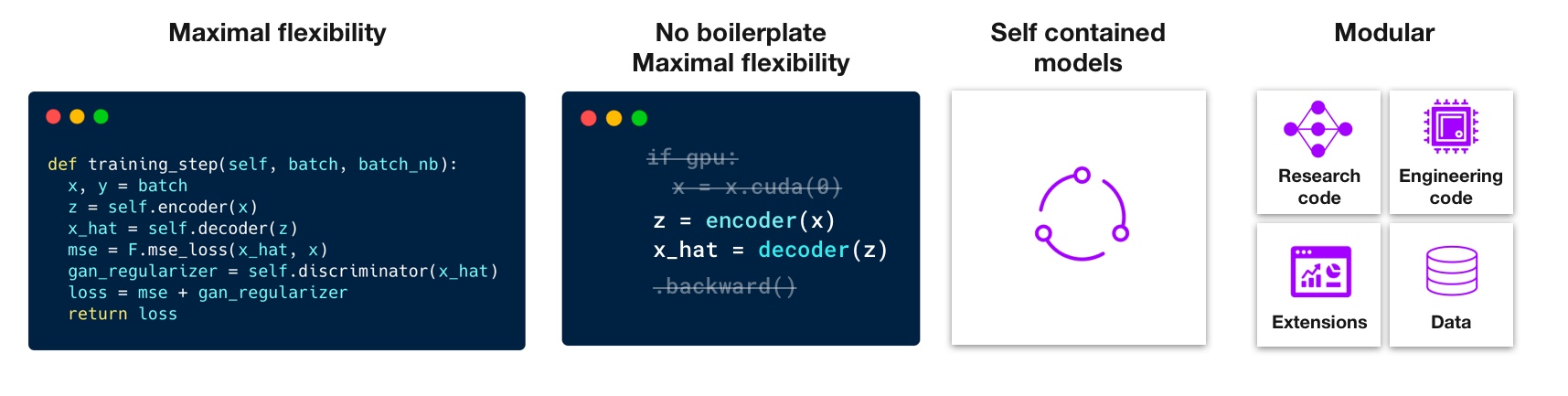
## PyTorch Lightning is just organized PyTorch
Lightning disentangles PyTorch code to decouple the science from the engineering.

______________________________________________________________________
## Lightning Design Philosophy
Lightning structures PyTorch code with these principles:
Lightning forces the following structure to your code which makes it reusable and shareable:
- Research code (the LightningModule).
- Engineering code (you delete, and is handled by the Trainer).
- Non-essential research code (logging, etc... this goes in Callbacks).
- Data (use PyTorch DataLoaders or organize them into a LightningDataModule).
Once you do this, you can train on multiple-GPUs, TPUs, CPUs, IPUs, HPUs and even in 16-bit precision without changing your code!
Get started with our [2 step guide](https://pytorch-lightning.readthedocs.io/en/latest/starter/new-project.html)
______________________________________________________________________
## Continuous Integration
Lightning is rigorously tested across multiple CPUs, GPUs, TPUs, IPUs, and HPUs and against major Python and PyTorch versions.
Current build statuses
| System / PyTorch ver. | 1.8 (LTS, min. req.) | 1.9 | 1.10 | 1.11 (latest) |
| :------------------------: | :-------------------------------------------------------------------------------------------------------------------------------------------------------------------------------------------------------------------------------------------------------: | :-------------------------------------------------------------------------------------------------------------------------------------------------------------------------------------------------------------------------------------------------------: | :-------------------------------------------------------------------------------------------------------------------------------------------------------------------------------------------------------------------------------------------------------: | :--------------------------------------------------------------------------------------------------------------------------------------------------------------------------------------------------------------------------------: |
| Linux py3.7 \[GPUs\*\*\] | [![Build Status]()](https://dev.azure.com/PytorchLightning/pytorch-lightning/_build/latest?definitionId=6&branchName=master) | - | - | - |
| Linux py3.7 \[TPUs\*\*\*\] | - | [](https://circleci.com/gh/PyTorchLightning/pytorch-lightning/tree/master) | - | - |
| Linux py3.8 \[IPUs\] | - | [![Build Status]()](https://dev.azure.com/PytorchLightning/pytorch-lightning/_build/latest?definitionId=6&branchName=master) | - | - |
| Linux py3.8 \[HPUs\] | - | - | [![Build Status]()](https://dev.azure.com/PytorchLightning/pytorch-lightning/_build/latest?definitionId=6&branchName=master) | - |
| Linux py3.8 (with Conda) | [](https://github.com/PyTorchLightning/pytorch-lightning/actions/workflows/ci_test-conda.yml) | [](https://github.com/PyTorchLightning/pytorch-lightning/actions/workflows/ci_test-conda.yml) | [](https://github.com/PyTorchLightning/pytorch-lightning/actions/workflows/ci_test-conda.yml) | - |
| Linux py3.9 (with Conda) | - | - | - | [](https://github.com/PyTorchLightning/pytorch-lightning/actions/workflows/ci_test-conda.yml) |
| Linux py3.{7,9} | [](https://github.com/PyTorchLightning/pytorch-lightning/actions/workflows/ci_test-full.yml) | - | - | [](https://github.com/PyTorchLightning/pytorch-lightning/actions/workflows/ci_test-full.yml) |
| OSX py3.{7,9} | [](https://github.com/PyTorchLightning/pytorch-lightning/actions/workflows/ci_test-full.yml) | - | - | [](https://github.com/PyTorchLightning/pytorch-lightning/actions/workflows/ci_test-full.yml) |
| Windows py3.{7,9} | [](https://github.com/PyTorchLightning/pytorch-lightning/actions/workflows/ci_test-full.yml) | - | - | [](https://github.com/PyTorchLightning/pytorch-lightning/actions/workflows/ci_test-full.yml) |
- _\*\* tests run on two NVIDIA P100_
- _\*\*\* tests run on Google GKE TPUv2/3. TPU py3.7 means we support Colab and Kaggle env._
______________________________________________________________________
## How To Use
### Step 0: Install
Simple installation from PyPI
```bash
pip install pytorch-lightning
```
Other installation options
#### Install with optional dependencies
```bash
pip install pytorch-lightning['extra']
```
#### Conda
```bash
conda install pytorch-lightning -c conda-forge
```
#### Install stable 1.5.x
the actual status of 1.5 \[stable\] is following:


Install future release from the source
```bash
pip install git+https://github.com/PytorchLightning/pytorch-lightning.git@release/1.5.x --upgrade
```
#### Install bleeding-edge - future 1.6
Install nightly from the source (no guarantees)
```bash
pip install https://github.com/PyTorchLightning/pytorch-lightning/archive/master.zip
```
or from testing PyPI
```bash
pip install -iU https://test.pypi.org/simple/ pytorch-lightning
```
### Step 1: Add these imports
```python
import os
import torch
from torch import nn
import torch.nn.functional as F
from torchvision.datasets import MNIST
from torch.utils.data import DataLoader, random_split
from torchvision import transforms
import pytorch_lightning as pl
```
### Step 2: Define a LightningModule (nn.Module subclass)
A LightningModule defines a full *system* (ie: a GAN, autoencoder, BERT or a simple Image Classifier).
```python
class LitAutoEncoder(pl.LightningModule):
def __init__(self):
super().__init__()
self.encoder = nn.Sequential(nn.Linear(28 * 28, 128), nn.ReLU(), nn.Linear(128, 3))
self.decoder = nn.Sequential(nn.Linear(3, 128), nn.ReLU(), nn.Linear(128, 28 * 28))
def forward(self, x):
# in lightning, forward defines the prediction/inference actions
embedding = self.encoder(x)
return embedding
def training_step(self, batch, batch_idx):
# training_step defines the train loop. It is independent of forward
x, y = batch
x = x.view(x.size(0), -1)
z = self.encoder(x)
x_hat = self.decoder(z)
loss = F.mse_loss(x_hat, x)
self.log("train_loss", loss)
return loss
def configure_optimizers(self):
optimizer = torch.optim.Adam(self.parameters(), lr=1e-3)
return optimizer
```
**Note: Training_step defines the training loop. Forward defines how the LightningModule behaves during inference/prediction.**
### Step 3: Train!
```python
dataset = MNIST(os.getcwd(), download=True, transform=transforms.ToTensor())
train, val = random_split(dataset, [55000, 5000])
autoencoder = LitAutoEncoder()
trainer = pl.Trainer()
trainer.fit(autoencoder, DataLoader(train), DataLoader(val))
```
## Advanced features
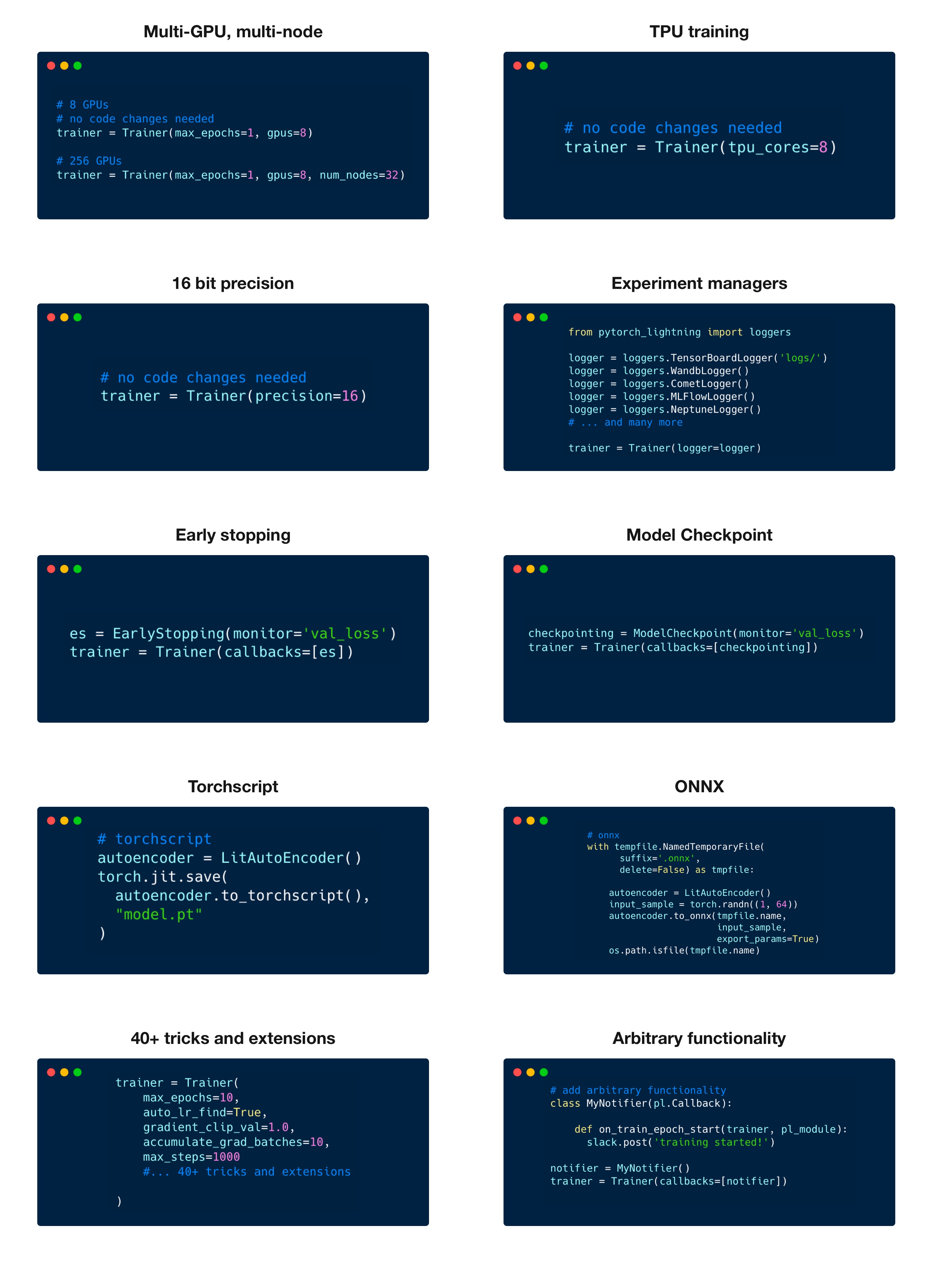
Lightning has over [40+ advanced features](https://pytorch-lightning.readthedocs.io/en/latest/common/trainer.html#trainer-flags) designed for professional AI research at scale.
Here are some examples:
Highlighted feature code snippets
```python
# 8 GPUs
# no code changes needed
trainer = Trainer(max_epochs=1, accelerator="gpu", devices=8)
# 256 GPUs
trainer = Trainer(max_epochs=1, accelerator="gpu", devices=8, num_nodes=32)
```
Train on TPUs without code changes
```python
# no code changes needed
trainer = Trainer(accelerator="tpu", devices=8)
```
16-bit precision
```python
# no code changes needed
trainer = Trainer(precision=16)
```
Experiment managers
```python
from pytorch_lightning import loggers
# tensorboard
trainer = Trainer(logger=TensorBoardLogger("logs/"))
# weights and biases
trainer = Trainer(logger=loggers.WandbLogger())
# comet
trainer = Trainer(logger=loggers.CometLogger())
# mlflow
trainer = Trainer(logger=loggers.MLFlowLogger())
# neptune
trainer = Trainer(logger=loggers.NeptuneLogger())
# ... and dozens more
```
EarlyStopping
```python
es = EarlyStopping(monitor="val_loss")
trainer = Trainer(callbacks=[es])
```
Checkpointing
```python
checkpointing = ModelCheckpoint(monitor="val_loss")
trainer = Trainer(callbacks=[checkpointing])
```
Export to torchscript (JIT) (production use)
```python
# torchscript
autoencoder = LitAutoEncoder()
torch.jit.save(autoencoder.to_torchscript(), "model.pt")
```
Export to ONNX (production use)
```python
# onnx
with tempfile.NamedTemporaryFile(suffix=".onnx", delete=False) as tmpfile:
autoencoder = LitAutoEncoder()
input_sample = torch.randn((1, 64))
autoencoder.to_onnx(tmpfile.name, input_sample, export_params=True)
os.path.isfile(tmpfile.name)
```
### Pro-level control of training loops (advanced users)
For complex/professional level work, you have optional full control of the training loop and optimizers.
```python
class LitAutoEncoder(pl.LightningModule):
def __init__(self):
super().__init__()
self.automatic_optimization = False
def training_step(self, batch, batch_idx):
# access your optimizers with use_pl_optimizer=False. Default is True
opt_a, opt_b = self.optimizers(use_pl_optimizer=True)
loss_a = ...
self.manual_backward(loss_a, opt_a)
opt_a.step()
opt_a.zero_grad()
loss_b = ...
self.manual_backward(loss_b, opt_b, retain_graph=True)
self.manual_backward(loss_b, opt_b)
opt_b.step()
opt_b.zero_grad()
```
______________________________________________________________________
## Advantages over unstructured PyTorch
- Models become hardware agnostic
- Code is clear to read because engineering code is abstracted away
- Easier to reproduce
- Make fewer mistakes because lightning handles the tricky engineering
- Keeps all the flexibility (LightningModules are still PyTorch modules), but removes a ton of boilerplate
- Lightning has dozens of integrations with popular machine learning tools.
- [Tested rigorously with every new PR](https://github.com/PyTorchLightning/pytorch-lightning/tree/master/tests). We test every combination of PyTorch and Python supported versions, every OS, multi GPUs and even TPUs.
- Minimal running speed overhead (about 300 ms per epoch compared with pure PyTorch).
______________________________________________________________________
## Lightning Lite
In the Lightning 1.5 release, LightningLite now enables you to leverage all the capabilities of PyTorch Lightning Accelerators without any refactoring to your training loop. Check out the
[blogpost](https://devblog.pytorchlightning.ai/scale-your-pytorch-code-with-lightninglite-d5692a303f00) and
[docs](https://pytorch-lightning.readthedocs.io/en/stable/starter/lightning_lite.html) for more info.
______________________________________________________________________
## Examples
###### Hello world
- [MNIST hello world](https://pytorch-lightning.readthedocs.io/en/latest/notebooks/lightning_examples/mnist-hello-world.html)
###### Contrastive Learning
- [BYOL](https://lightning-bolts.readthedocs.io/en/stable/deprecated/models/self_supervised.html#byol)
- [CPC v2](https://lightning-bolts.readthedocs.io/en/stable/deprecated/models/self_supervised.html#cpc-v2)
- [Moco v2](https://lightning-bolts.readthedocs.io/en/stable/deprecated/models/self_supervised.html#moco-v2-api)
- [SIMCLR](https://lightning-bolts.readthedocs.io/en/stable/deprecated/models/self_supervised.html#simclr)
###### NLP
- [GPT-2](https://lightning-bolts.readthedocs.io/en/stable/deprecated/models/convolutional.html#gpt-2)
- [BERT](https://pytorch-lightning.readthedocs.io/en/latest/notebooks/lightning_examples/text-transformers.html)
###### Reinforcement Learning
- [DQN](https://lightning-bolts.readthedocs.io/en/stable/deprecated/models/reinforce_learn.html#dqn-models)
- [Dueling-DQN](https://lightning-bolts.readthedocs.io/en/stable/deprecated/models/reinforce_learn.html#dueling-dqn)
- [Reinforce](https://lightning-bolts.readthedocs.io/en/stable/deprecated/models/reinforce_learn.html#reinforce)
###### Vision
- [GAN](https://pytorch-lightning.readthedocs.io/en/latest/notebooks/lightning_examples/basic-gan.html)
###### Classic ML
- [Logistic Regression](https://lightning-bolts.readthedocs.io/en/stable/deprecated/models/classic_ml.html#logistic-regression)
- [Linear Regression](https://lightning-bolts.readthedocs.io/en/stable/deprecated/models/classic_ml.html#linear-regression)
______________________________________________________________________
## Community
The lightning community is maintained by
- [10+ core contributors](https://pytorch-lightning.readthedocs.io/en/latest/governance.html) who are all a mix of professional engineers, Research Scientists, and Ph.D. students from top AI labs.
- 590+ active community contributors.
Want to help us build Lightning and reduce boilerplate for thousands of researchers? [Learn how to make your first contribution here](https://devblog.pytorchlightning.ai/quick-contribution-guide-86d977171b3a)
Lightning is also part of the [PyTorch ecosystem](https://pytorch.org/ecosystem/) which requires projects to have solid testing, documentation and support.
### Asking for help
If you have any questions please:
1. [Read the docs](https://pytorch-lightning.rtfd.io/en/latest).
1. [Search through existing Discussions](https://github.com/PyTorchLightning/pytorch-lightning/discussions), or [add a new question](https://github.com/PyTorchLightning/pytorch-lightning/discussions/new)
1. [Join our slack](https://www.pytorchlightning.ai/community).
### Funding
[We're venture funded](https://techcrunch.com/2020/10/08/grid-ai-raises-18-6m-series-a-to-help-ai-researchers-and-engineers-bring-their-models-to-production/) to make sure we can provide around the clock support, hire a full-time staff, attend conferences, and move faster through implementing features you request.
______________________________________________________________________
## Grid AI
Grid AI is our platform for training models at scale on the cloud!
**Sign up for our FREE community Tier [here](https://www.grid.ai/pricing/)**
To use grid, take your regular command:
```
python my_model.py --learning_rate 1e-6 --layers 2 --accelerator 'gpu' --devices 4
```
And change it to use the grid train command:
```
grid train --grid_gpus 4 my_model.py --learning_rate 'uniform(1e-6, 1e-1, 20)' --layers '[2, 4, 8, 16]'
```
The above command will launch (20 * 4) experiments each running on 4 GPUs (320 GPUs!) - by making ZERO changes to
your code.