
 ## Pytest plugin
If you want an easy and convenient way to use `memray` in your test suite, you can consider using [pytest-memray](https://github.com/bloomberg/pytest-memray). Once installed, this pytest plugin allows you to simply add `--memray` to the command line invocation:
```shell
pytest --memray tests/
```
And will automatically get a report like this:
```
python3 -m pytest tests --memray
=============================================================================================================================== test session starts ================================================================================================================================
platform linux -- Python 3.8.10, pytest-6.2.4, py-1.10.0, pluggy-0.13.1
rootdir: /mypackage, configfile: pytest.ini
plugins: cov-2.12.0, memray-0.1.0
collected 21 items
tests/test_package.py ..................... [100%]
================================================================================================================================= MEMRAY REPORT ==================================================================================================================================
Allocations results for tests/test_package.py::some_test_that_allocates
📦 Total memory allocated: 24.4MiB
📏 Total allocations: 33929
📊 Histogram of allocation sizes: |▂ █ |
🥇 Biggest allocating functions:
- parse:/opt/bb/lib/python3.8/ast.py:47 -> 3.0MiB
- parse:/opt/bb/lib/python3.8/ast.py:47 -> 2.3MiB
- _visit:/opt/bb/lib/python3.8/site-packages/astroid/transforms.py:62 -> 576.0KiB
- parse:/opt/bb/lib/python3.8/ast.py:47 -> 517.6KiB
- __init__:/opt/bb/lib/python3.8/site-packages/astroid/node_classes.py:1353 -> 512.0KiB
```
You can also use some of the included markers to make tests
fail if the execution of said test allocates more memory than allowed:
```python
@pytest.mark.limit_memory("24 MB")
def test_foobar():
# do some stuff that allocates memory
```
To learn more on how the plugin can be used and configured check out [the plugin documentation](https://bloomberg.github.io/pytest-memray/#).
# Native mode
Memray supports tracking native C/C++ functions as well as Python functions. This can be especially useful when profiling applications that have C extensions (such as `numpy` or `pandas`) as this gives holistic vision of how much memory is allocated by the extension and how much is allocated by Python itself.
To activate native tracking, you need to provide the `--native` argument when using the `run` subcommand:
```shell
memray run --native my_script.py
```
This will automatically add native information to the result file and it will be automatically used by any reporter (such the flamegraph or table reporters). This means that instead of seeing this in the flamegraphs:
## Pytest plugin
If you want an easy and convenient way to use `memray` in your test suite, you can consider using [pytest-memray](https://github.com/bloomberg/pytest-memray). Once installed, this pytest plugin allows you to simply add `--memray` to the command line invocation:
```shell
pytest --memray tests/
```
And will automatically get a report like this:
```
python3 -m pytest tests --memray
=============================================================================================================================== test session starts ================================================================================================================================
platform linux -- Python 3.8.10, pytest-6.2.4, py-1.10.0, pluggy-0.13.1
rootdir: /mypackage, configfile: pytest.ini
plugins: cov-2.12.0, memray-0.1.0
collected 21 items
tests/test_package.py ..................... [100%]
================================================================================================================================= MEMRAY REPORT ==================================================================================================================================
Allocations results for tests/test_package.py::some_test_that_allocates
📦 Total memory allocated: 24.4MiB
📏 Total allocations: 33929
📊 Histogram of allocation sizes: |▂ █ |
🥇 Biggest allocating functions:
- parse:/opt/bb/lib/python3.8/ast.py:47 -> 3.0MiB
- parse:/opt/bb/lib/python3.8/ast.py:47 -> 2.3MiB
- _visit:/opt/bb/lib/python3.8/site-packages/astroid/transforms.py:62 -> 576.0KiB
- parse:/opt/bb/lib/python3.8/ast.py:47 -> 517.6KiB
- __init__:/opt/bb/lib/python3.8/site-packages/astroid/node_classes.py:1353 -> 512.0KiB
```
You can also use some of the included markers to make tests
fail if the execution of said test allocates more memory than allowed:
```python
@pytest.mark.limit_memory("24 MB")
def test_foobar():
# do some stuff that allocates memory
```
To learn more on how the plugin can be used and configured check out [the plugin documentation](https://bloomberg.github.io/pytest-memray/#).
# Native mode
Memray supports tracking native C/C++ functions as well as Python functions. This can be especially useful when profiling applications that have C extensions (such as `numpy` or `pandas`) as this gives holistic vision of how much memory is allocated by the extension and how much is allocated by Python itself.
To activate native tracking, you need to provide the `--native` argument when using the `run` subcommand:
```shell
memray run --native my_script.py
```
This will automatically add native information to the result file and it will be automatically used by any reporter (such the flamegraph or table reporters). This means that instead of seeing this in the flamegraphs:
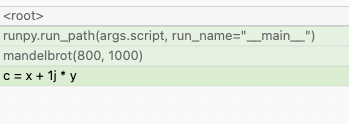 You will now be able to see what's happening inside the Python calls:
 Reporters display native frames in a different color than Python frames. They can also be distinguished by looking at the file location in a frame (Python frames will generally be generated from files with a .py extension while native frames will be generated from files with extensions like .c, .cpp or .h).
# Live mode
Memray's live mode runs a script or a module in a terminal-based interface that allows you to interactively inspect its memory usage while it runs. This is useful for debugging scripts or modules that take a long time to run or that exhibit multiple complex memory patterns. You can use the `--live` option to run the script or module in live mode:
```shell
memray run --live my_script.py
```
or if you want to execute a module:
```shell
memray run --live -m my_module
```
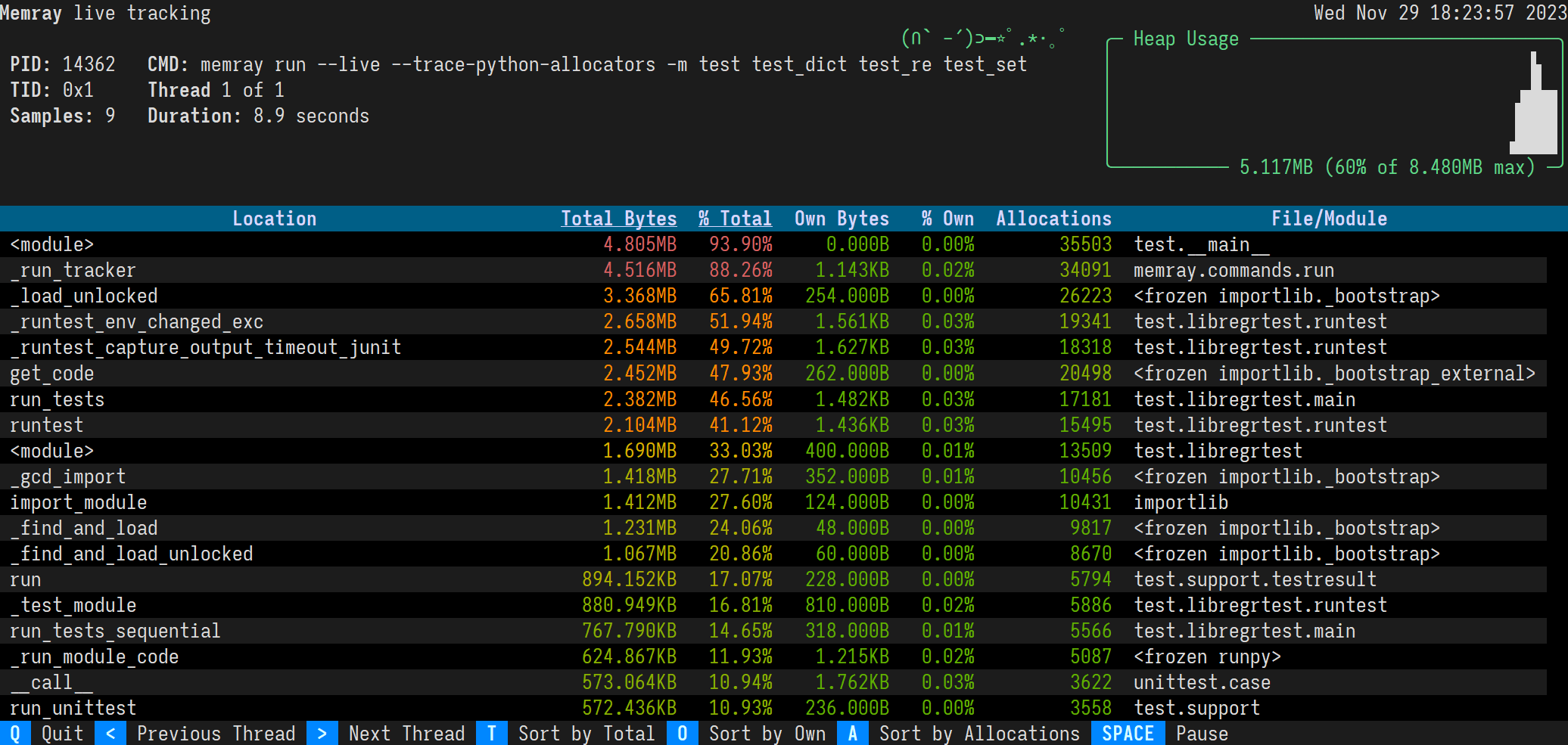
This will show the following TUI interface in your terminal:
Reporters display native frames in a different color than Python frames. They can also be distinguished by looking at the file location in a frame (Python frames will generally be generated from files with a .py extension while native frames will be generated from files with extensions like .c, .cpp or .h).
# Live mode
Memray's live mode runs a script or a module in a terminal-based interface that allows you to interactively inspect its memory usage while it runs. This is useful for debugging scripts or modules that take a long time to run or that exhibit multiple complex memory patterns. You can use the `--live` option to run the script or module in live mode:
```shell
memray run --live my_script.py
```
or if you want to execute a module:
```shell
memray run --live -m my_module
```
This will show the following TUI interface in your terminal:
 ## Sorting results
The results are displayed in descending order of total memory allocated by a function and the subfunctions called by it. You can change the ordering with the following keyboard shortcuts:
- t (default): Sort by total memory
- o: Sort by own memory
- a: Sort by allocation count
The sorted column is highlighted with `< >` characters around the title.
## Viewing different threads
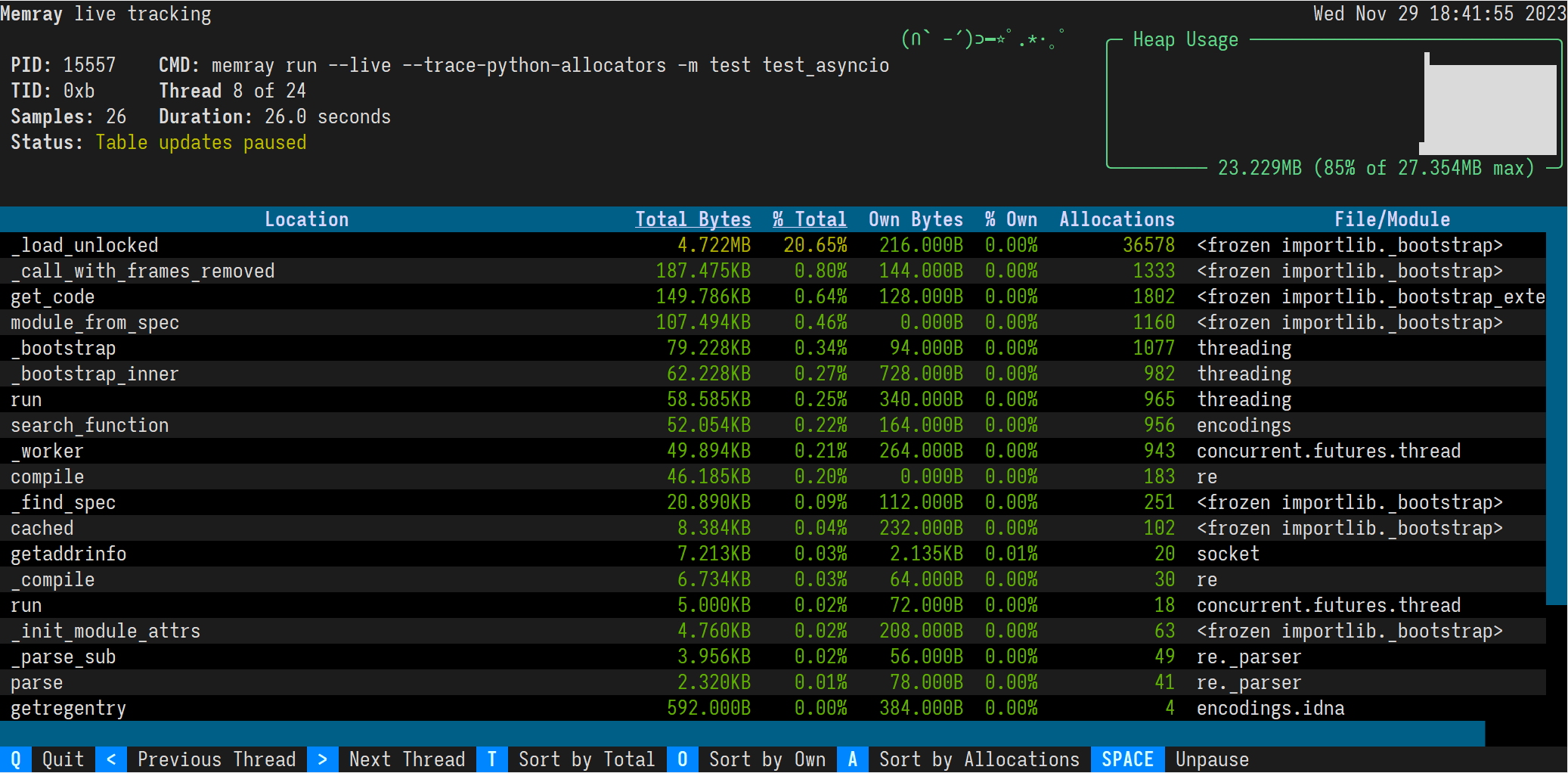
By default, the live command will present the main thread of the program. You can look at different threads of the program by pressing the left and right arrow keys.
## Sorting results
The results are displayed in descending order of total memory allocated by a function and the subfunctions called by it. You can change the ordering with the following keyboard shortcuts:
- t (default): Sort by total memory
- o: Sort by own memory
- a: Sort by allocation count
The sorted column is highlighted with `< >` characters around the title.
## Viewing different threads
By default, the live command will present the main thread of the program. You can look at different threads of the program by pressing the left and right arrow keys.
 # License
Memray is Apache-2.0 licensed, as found in the [LICENSE](LICENSE) file.
# Code of Conduct
- [Code of Conduct](https://github.com/bloomberg/.github/blob/main/CODE_OF_CONDUCT.md)
This project has adopted a Code of Conduct. If you have any concerns about the Code, or behavior which you have experienced in the project, please contact us at opensource@bloomberg.net.
# Security Policy
- [Security Policy](https://github.com/bloomberg/memray/security/policy)
If you believe you have identified a security vulnerability in this project, please send email to the project team at opensource@bloomberg.net, detailing the suspected issue and any methods you've found to reproduce it.
Please do NOT open an issue in the GitHub repository, as we'd prefer to keep vulnerability reports private until we've had an opportunity to review and address them.
# Contributing
We welcome your contributions to help us improve and extend this project!
Below you will find some basic steps required to be able to contribute to the project. If you have any questions about this process or any other aspect of contributing to a Bloomberg open source project, feel free to send an email to opensource@bloomberg.net and we'll get your questions answered as quickly as we can.
## Contribution Licensing
Since this project is distributed under the terms of an [open source license](LICENSE), contributions that you make
are licensed under the same terms. In order for us to be able to accept your contributions,
we will need explicit confirmation from you that you are able and willing to provide them under
these terms, and the mechanism we use to do this is called a Developer's Certificate of Origin
[(DCO)](https://github.com/bloomberg/.github/blob/main/DCO.md). This is very similar to the process used by the Linux(R) kernel, Samba, and many
other major open source projects.
To participate under these terms, all that you must do is include a line like the following as the
last line of the commit message for each commit in your contribution:
Signed-Off-By: Random J. Developer
# License
Memray is Apache-2.0 licensed, as found in the [LICENSE](LICENSE) file.
# Code of Conduct
- [Code of Conduct](https://github.com/bloomberg/.github/blob/main/CODE_OF_CONDUCT.md)
This project has adopted a Code of Conduct. If you have any concerns about the Code, or behavior which you have experienced in the project, please contact us at opensource@bloomberg.net.
# Security Policy
- [Security Policy](https://github.com/bloomberg/memray/security/policy)
If you believe you have identified a security vulnerability in this project, please send email to the project team at opensource@bloomberg.net, detailing the suspected issue and any methods you've found to reproduce it.
Please do NOT open an issue in the GitHub repository, as we'd prefer to keep vulnerability reports private until we've had an opportunity to review and address them.
# Contributing
We welcome your contributions to help us improve and extend this project!
Below you will find some basic steps required to be able to contribute to the project. If you have any questions about this process or any other aspect of contributing to a Bloomberg open source project, feel free to send an email to opensource@bloomberg.net and we'll get your questions answered as quickly as we can.
## Contribution Licensing
Since this project is distributed under the terms of an [open source license](LICENSE), contributions that you make
are licensed under the same terms. In order for us to be able to accept your contributions,
we will need explicit confirmation from you that you are able and willing to provide them under
these terms, and the mechanism we use to do this is called a Developer's Certificate of Origin
[(DCO)](https://github.com/bloomberg/.github/blob/main/DCO.md). This is very similar to the process used by the Linux(R) kernel, Samba, and many
other major open source projects.
To participate under these terms, all that you must do is include a line like the following as the
last line of the commit message for each commit in your contribution:
Signed-Off-By: Random J. Developer