# nativescript-picker
**Repository Path**: mirrors_NativeScript/nativescript-picker
## Basic Information
- **Project Name**: nativescript-picker
- **Description**: Plugin that provides a custom TextField which lets you pick a value from a list opened in a modal popup.
- **Primary Language**: Unknown
- **License**: Apache-2.0
- **Default Branch**: master
- **Homepage**: None
- **GVP Project**: No
## Statistics
- **Stars**: 0
- **Forks**: 0
- **Created**: 2023-02-13
- **Last Updated**: 2026-03-08
## Categories & Tags
**Categories**: Uncategorized
**Tags**: None
## README
## NativeScript 7+
* Use `@nativescript/picker`: `~3.0.0`
* [Source managed here](https://github.com/NativeScript/plugins)
## If using 6 and below, see the following:
# nativescript-picker
[](https://travis-ci.org/NativeScript/nativescript-picker)
[](https://www.npmjs.com/package/nativescript-picker)
[](https://www.npmjs.com/package/nativescript-picker)
[](https://david-dm.org/NativeScript/nativescript-picker)
[](https://david-dm.org/NativeScript/nativescript-picker?type=peer)
A NativeScript plugin that provides ui element for picking an object/value from a list opened in a modal popup.
- [Installation](#installation)
- [Configuration](#configuration)
- [Usage](#usage)
- [Features](#features)
- [PickerField](#PickerField)
- [API](#api)
- [Contribute](#contribute)
- [Get Help](#get-help)
## Screenshots
 ## Installation
```javascript
tns plugin add nativescript-picker
```
## Configuration
No additional configuration required!
## Usage
To use the `PickerField` in markup you need to:
- If you are developing a NativeScript Core app, you need to register the plugin namespace in the xml:
```xml
...
```
- If you are developing a NativeScript Angular app, you need to import the plugin module in the module of your component:
```ts
import { NativeScriptPickerModule } from "nativescript-picker/angular";
...
@NgModule({
imports: [
NativeScriptPickerModule,
...
],
...
```
Then you will be able to declare the fields in the html of your component:
```html
```
- If you are developing a NativeScript Vue app, you need to install the plugin in you app.js file:
```js
import Vue from "nativescript-vue";
import { PickerField } from 'nativescript-picker/vue';
Vue.use(PickerField);
```
Then you will be able to declare the fields in the template of your component:
```html
```
## Features
### PickerField
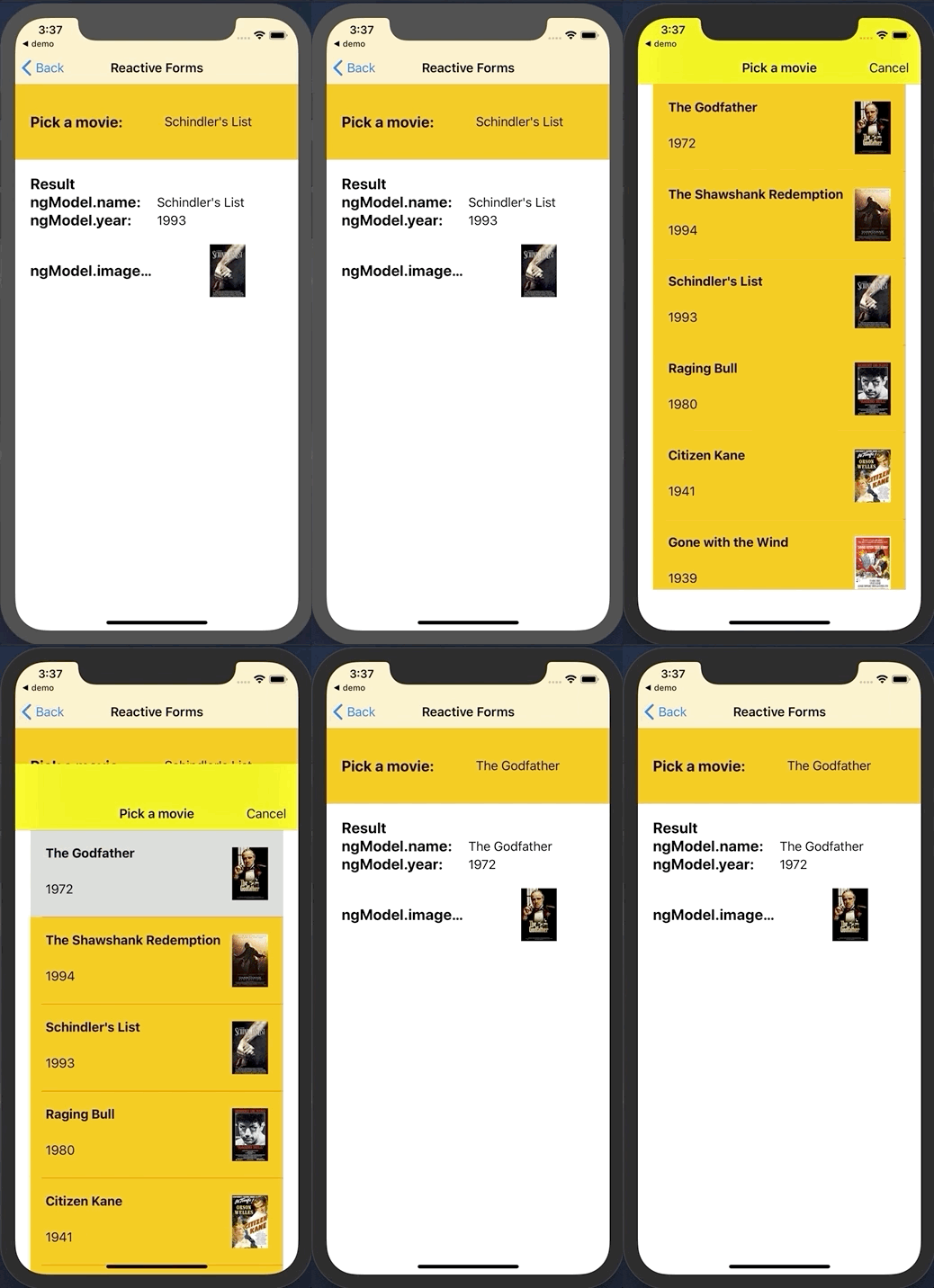
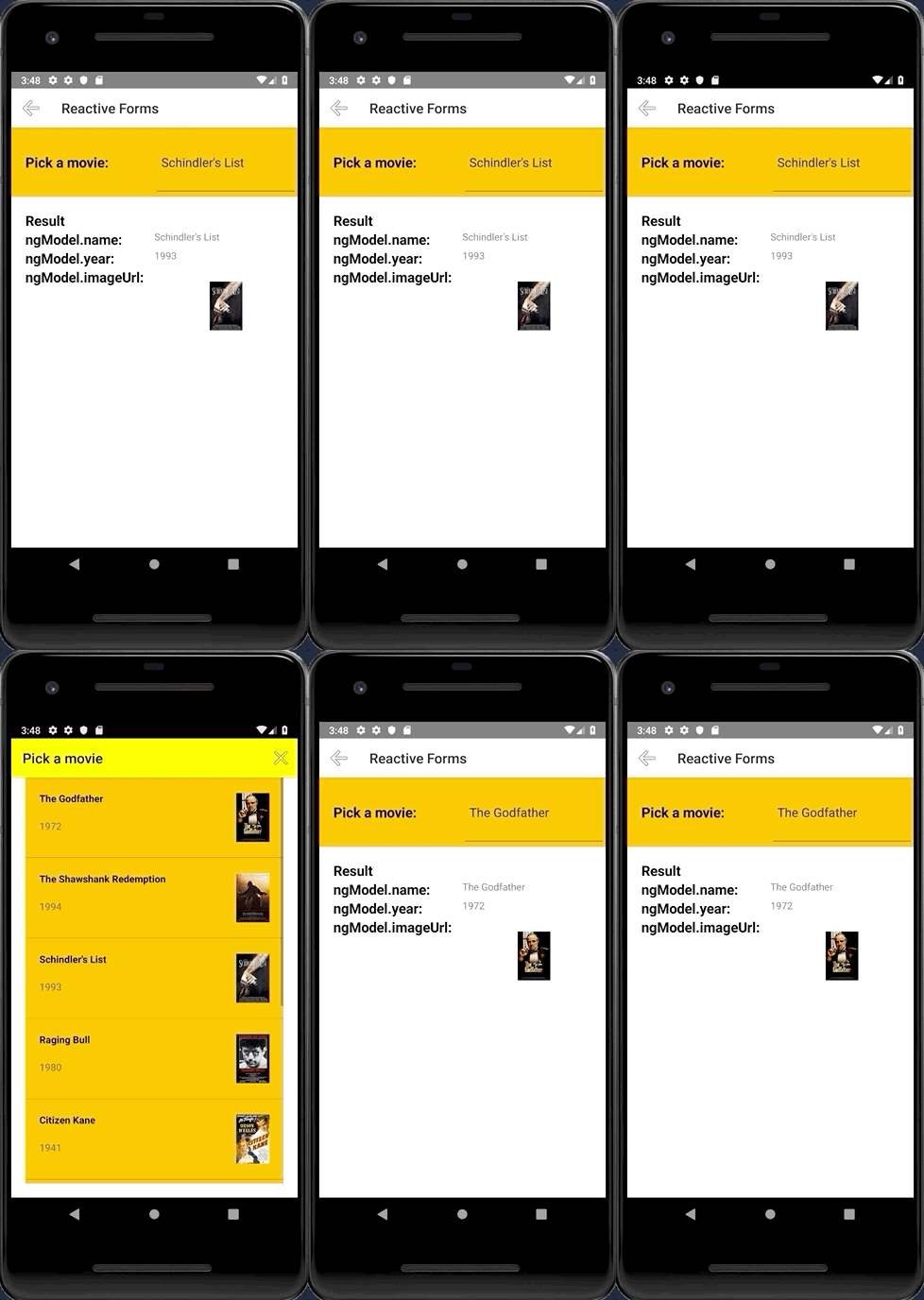
The `PickerField` is a NativeScript `TextField` which means that any functionality the default `TextField` provides is also available in the `PickerField` component. The only difference is that by design it is in "read-only" mode, or simply put you cannot change its text by input or select that text. Changing the text of the `PickerField` is done by its main functionality which is opening a modal popup that shows a list of objects from which you can select one by tapping it.
## API
| Property | Description |
| --- | --- |
| `pickerTitle` | The title of the modal view. |
| `items` | The source collection used to populate the list of the modal view. |
| `itemTemplate` | Тhe UI template for list view items of the list of the modal view. |
| `modalAnimated` | Optional parameter specifying whether to show the modal view with animation. |
| `textField` | The 'property' of the object from the 'items' collection that will be used by the 'text' property of the PickerField. |
| `valueField` | The 'property' of the object from the 'items' collection that will be used by when setting the 'selectedValue' property of the PickerField. |
| `selectedValue` | The object selected from the list in the modal view. |
| `selectedIndex` | The index of the object from the 'items' collection that has been selected from the list in the modal view. |
| `iOSCloseButtonPosition` | The position of the 'close' button of the ActionBar of the modal view. |
| `iOSCloseButtonIcon` | The icon of the 'close' button of the ActionBar of the modal view. |
| `androidCloseButtonPosition` | The position of the 'close' button of the ActionBar of the modal view. |
| `androidCloseButtonIcon` | The icon of the 'close' button of the ActionBar of the modal view. |
## Styling
### PickerField
The `PickerField` can be targeted in CSS through its element selector and additionally by setting a class. The `PickerField` also opens a modal window containing a Page element that contains an ActionBar and a ListView. This Page element can be targeted with the `PickerPage` selector and through it style all picker modals with selectors like `PickerPage ActionBar` and `PickerPage ListView`. In addition to that, if you set a class on the PickerField, it will be transferred on the `PickerPage` and with it you can style individual modals.
## Contribute
We love PRs! Check out the [contributing guidelines](https://github.com/NativeScript/nativescript-picker/blob/master/CONTRIBUTING.md). If you want to contribute, but you are not sure where to start - look for [issues labeled `help wanted`](https://github.com/NativeScript/nativescript-picker/issues?q=is%3Aopen+is%3Aissue+label%3A%22help+wanted%22).
## Get Help
Please, use [github issues](https://github.com/NativeScript/nativescript-picker/issues) strictly for [reporting bugs](https://github.com/NativeScript/nativescript-picker/blob/master/CONTRIBUTING.md#reporting-bugs) or [requesting features](https://github.com/NativeScript/nativescript-picker/blob/master/CONTRIBUTING.md#requesting-features). For general questions and support, check out [Stack Overflow](https://stackoverflow.com/questions/tagged/nativescript) or ask our experts in [NativeScript community Slack channel](http://developer.telerik.com/wp-login.php?action=slack-invitation).
## Installation
```javascript
tns plugin add nativescript-picker
```
## Configuration
No additional configuration required!
## Usage
To use the `PickerField` in markup you need to:
- If you are developing a NativeScript Core app, you need to register the plugin namespace in the xml:
```xml
...
```
- If you are developing a NativeScript Angular app, you need to import the plugin module in the module of your component:
```ts
import { NativeScriptPickerModule } from "nativescript-picker/angular";
...
@NgModule({
imports: [
NativeScriptPickerModule,
...
],
...
```
Then you will be able to declare the fields in the html of your component:
```html
```
- If you are developing a NativeScript Vue app, you need to install the plugin in you app.js file:
```js
import Vue from "nativescript-vue";
import { PickerField } from 'nativescript-picker/vue';
Vue.use(PickerField);
```
Then you will be able to declare the fields in the template of your component:
```html
```
## Features
### PickerField
The `PickerField` is a NativeScript `TextField` which means that any functionality the default `TextField` provides is also available in the `PickerField` component. The only difference is that by design it is in "read-only" mode, or simply put you cannot change its text by input or select that text. Changing the text of the `PickerField` is done by its main functionality which is opening a modal popup that shows a list of objects from which you can select one by tapping it.
## API
| Property | Description |
| --- | --- |
| `pickerTitle` | The title of the modal view. |
| `items` | The source collection used to populate the list of the modal view. |
| `itemTemplate` | Тhe UI template for list view items of the list of the modal view. |
| `modalAnimated` | Optional parameter specifying whether to show the modal view with animation. |
| `textField` | The 'property' of the object from the 'items' collection that will be used by the 'text' property of the PickerField. |
| `valueField` | The 'property' of the object from the 'items' collection that will be used by when setting the 'selectedValue' property of the PickerField. |
| `selectedValue` | The object selected from the list in the modal view. |
| `selectedIndex` | The index of the object from the 'items' collection that has been selected from the list in the modal view. |
| `iOSCloseButtonPosition` | The position of the 'close' button of the ActionBar of the modal view. |
| `iOSCloseButtonIcon` | The icon of the 'close' button of the ActionBar of the modal view. |
| `androidCloseButtonPosition` | The position of the 'close' button of the ActionBar of the modal view. |
| `androidCloseButtonIcon` | The icon of the 'close' button of the ActionBar of the modal view. |
## Styling
### PickerField
The `PickerField` can be targeted in CSS through its element selector and additionally by setting a class. The `PickerField` also opens a modal window containing a Page element that contains an ActionBar and a ListView. This Page element can be targeted with the `PickerPage` selector and through it style all picker modals with selectors like `PickerPage ActionBar` and `PickerPage ListView`. In addition to that, if you set a class on the PickerField, it will be transferred on the `PickerPage` and with it you can style individual modals.
## Contribute
We love PRs! Check out the [contributing guidelines](https://github.com/NativeScript/nativescript-picker/blob/master/CONTRIBUTING.md). If you want to contribute, but you are not sure where to start - look for [issues labeled `help wanted`](https://github.com/NativeScript/nativescript-picker/issues?q=is%3Aopen+is%3Aissue+label%3A%22help+wanted%22).
## Get Help
Please, use [github issues](https://github.com/NativeScript/nativescript-picker/issues) strictly for [reporting bugs](https://github.com/NativeScript/nativescript-picker/blob/master/CONTRIBUTING.md#reporting-bugs) or [requesting features](https://github.com/NativeScript/nativescript-picker/blob/master/CONTRIBUTING.md#requesting-features). For general questions and support, check out [Stack Overflow](https://stackoverflow.com/questions/tagged/nativescript) or ask our experts in [NativeScript community Slack channel](http://developer.telerik.com/wp-login.php?action=slack-invitation).