# vitals
**Repository Path**: mirrors/vitals
## Basic Information
- **Project Name**: vitals
- **Description**: Vitals 是一个 GNOME Shell 扩展,用于在 GNOME Shell 的顶部菜单栏中显示计算机的温度、电压、风扇速度、内存使用情况、处理器负载、系统资源、网络速度和存
- **Primary Language**: JavaScript
- **License**: GPL-2.0
- **Default Branch**: main
- **Homepage**: https://www.oschina.net/p/vitals
- **GVP Project**: No
## Statistics
- **Stars**: 2
- **Forks**: 0
- **Created**: 2022-06-16
- **Last Updated**: 2026-02-28
## Categories & Tags
**Categories**: Uncategorized
**Tags**: None
## README
Vitals
====================================
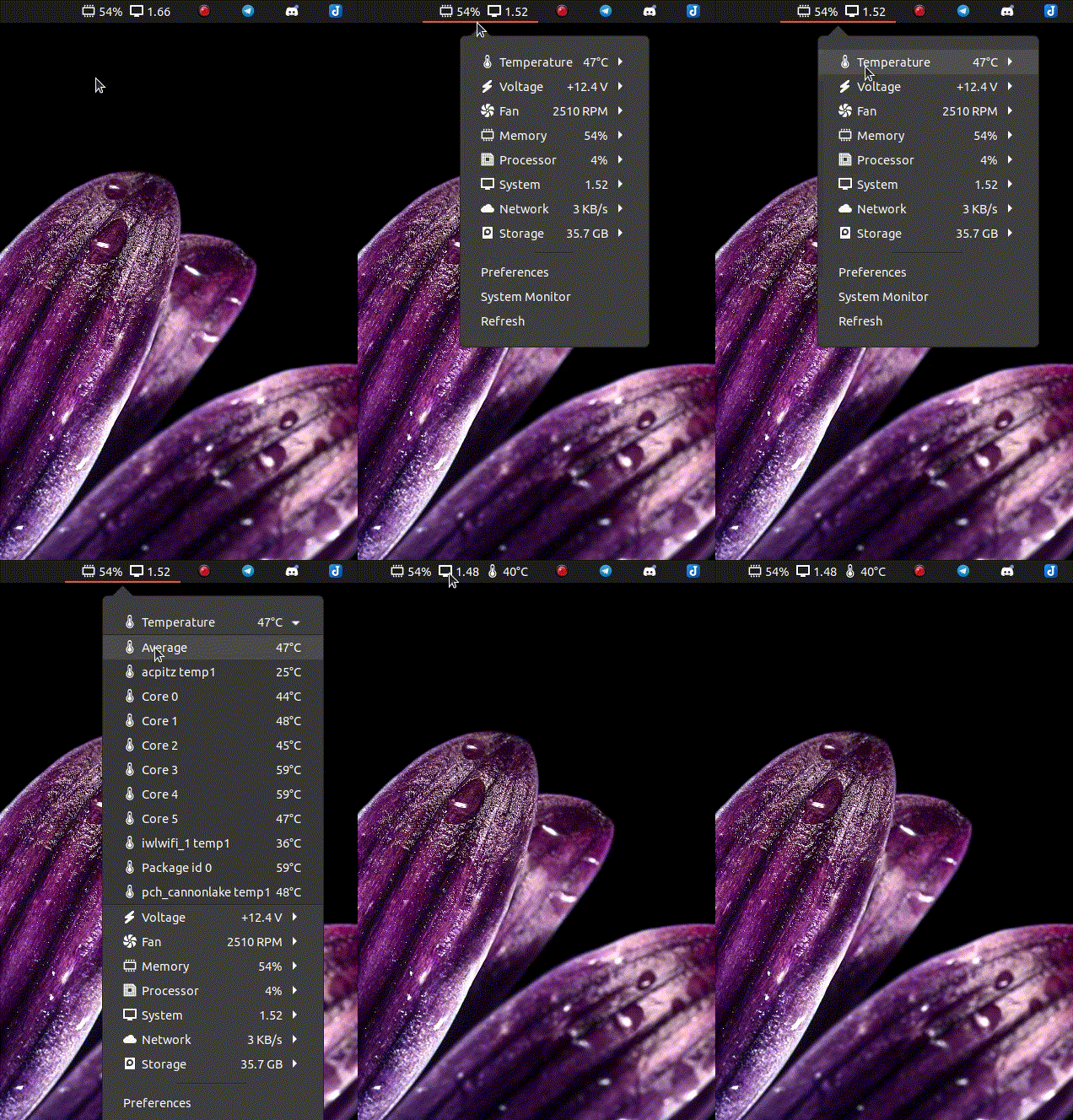
Vitals is a GNOME Shell extension for displaying your computer's temperature, voltage, fan speed, memory usage, processor load, system resources, network speed and storage stats in your GNOME Shell's top menu bar. This is a one stop shop to monitor all of your vital sensors. Vitals uses asynchronous polling to provide a smooth user experience.
## Installation
### 1) Install support packages
#### Ubuntu/Debian
sudo apt install gnome-shell-extension-manager gir1.2-gtop-2.0 lm-sensors
#### Fedora
sudo dnf install libgtop2-devel lm_sensors
#### Arch/Manjaro
sudo pacman -Syu libgtop lm_sensors gnome-icon-theme-symbolic gnome-icon-theme git
#### openSUSE
sudo zypper install libgtop-devel
### 2) Install extension
#### Ubuntu/Debian
#### Open the Extension Manager (installed above), search for Vitals and click Install.
#### Fedora
##### Visit [Gnome Extensions website](https://extensions.gnome.org/extension/1460/vitals/), search for Vitals and click switch (power on) icon.
##### [ ][gextension]
#### Arch/Manjaro
git clone https://aur.archlinux.org/gnome-shell-extension-vitals-git.git/
cd gnome-shell-extension-vitals-git
# always verify content before installing
less PKGBUILD
makepkg
# example filename, different each release
pacman -U gnome-shell-extension-vitals-git-v52.0.4.r0.gb446cfc-1-any.pkg.tar.zst
### 3) Activate after installation
#### Ubuntu/Debian/Fedora
##### At this point, Vitals should be running. If you reversed steps 1 and 2 above, you will need to restart your session by logging out and then back in.
#### Arch/Manjaro
##### Open the Extensions application and toggle on Vitals
## Beta testing
##### Advanced users requesting bug fixes or asking for new features may occasionally be asked to help QA.
### 1) Remove existing copy of Vitals
##### Remove existing copy of vitals - expert users only!
# rm -ri ~/.local/share/gnome-shell/extensions/Vitals@CoreCoding.com
### 2) Clone from GitHub
mkdir -p ~/.local/share/gnome-shell/extensions
git clone https://github.com/corecoding/Vitals.git ~/.local/share/gnome-shell/extensions/Vitals@CoreCoding.com -b develop
### 3) Activate develop version
#### Ubuntu/Debian/Fedora
##### You will need to restart your session by logging out and then back in.
#### Arch/Manjaro
##### Open the Extensions application and toggle on Vitals
## Credits
Vitals was originally forked from [gnome-shell-extension-freon](https://github.com/UshakovVasilii/gnome-shell-extension-freon). I was having trouble finding an up to date, resource friendly and fully featured system monitoring tool. My biggest pet peeve was random system delays because of I/O blocking polls, and thus, the idea for Vitals was born! It has been refactored several times over, so most of the code is new or different.
## Icons
### Original Theme
* (voltage|fan)-symbolic.svg - inherited from Freon project.
* (system|storage)-symbolic.svg - from Pop! OS theme.
* temperature-symbolic.svg - [iconnice studio](https://www.iconfinder.com/iconnice).
* (cpu|memory)-symbolic.svg - [DinosoftLabs](https://www.iconfinder.com/dinosoftlabs).
* network\*.svg - [Yannick Lung](https://www.iconfinder.com/yanlu).
* Health icon - [Dod Cosmin](https://www.iconfinder.com/icons/458267/cross_doctor_drug_health_healthcare_hospital_icon).
### GNOME Theme
* (battery | storage)-symbolic.svg - from [Adwaita Icon Theme](https://gitlab.gnome.org/GNOME/adwaita-icon-theme).
* (memory | network* | system | voltage)-symbolic.svg - from [Icon Development Kit](https://gitlab.gnome.org/Teams/Design/icon-development-kit).
* fan-symbolic.svg - inherited from [Freon](https://github.com/UshakovVasilii/gnome-shell-extension-freon) project, with mild modifications.
* (temperature | cpu)-symbolic.svg - designed by [daudix](https://github.com/daudix).
## Disclaimer
Sensor data is obtained from the system using hwmon and GTop. Core Coding and the Vitals authors are not responsible for improperly represented data. No warranty expressed or implied.
## Development Commands
| Description | Command |
| --- | --- |
| Launch preferences | `gnome-shell-extension-prefs Vitals@CoreCoding.com` |
| View logs | ``journalctl --since="`date '+%Y-%m-%d %H:%M'`" -f \| grep Vitals`` |
| Compile schemas | `glib-compile-schemas --strict schemas/` |
| Compile translation file | `msgfmt vitals.po -o vitals.mo` |
| Launch Wayland virtual window | `dbus-run-session -- gnome-shell --nested --wayland` |
| Read hot-sensors value | `dconf read /org/gnome/shell/extensions/vitals/hot-sensors` |
| Write hot-sensors value | `dconf write /org/gnome/shell/extensions/vitals/hot-sensors "['_memory_usage_', '_system_load_1m_']"`
][gextension]
#### Arch/Manjaro
git clone https://aur.archlinux.org/gnome-shell-extension-vitals-git.git/
cd gnome-shell-extension-vitals-git
# always verify content before installing
less PKGBUILD
makepkg
# example filename, different each release
pacman -U gnome-shell-extension-vitals-git-v52.0.4.r0.gb446cfc-1-any.pkg.tar.zst
### 3) Activate after installation
#### Ubuntu/Debian/Fedora
##### At this point, Vitals should be running. If you reversed steps 1 and 2 above, you will need to restart your session by logging out and then back in.
#### Arch/Manjaro
##### Open the Extensions application and toggle on Vitals
## Beta testing
##### Advanced users requesting bug fixes or asking for new features may occasionally be asked to help QA.
### 1) Remove existing copy of Vitals
##### Remove existing copy of vitals - expert users only!
# rm -ri ~/.local/share/gnome-shell/extensions/Vitals@CoreCoding.com
### 2) Clone from GitHub
mkdir -p ~/.local/share/gnome-shell/extensions
git clone https://github.com/corecoding/Vitals.git ~/.local/share/gnome-shell/extensions/Vitals@CoreCoding.com -b develop
### 3) Activate develop version
#### Ubuntu/Debian/Fedora
##### You will need to restart your session by logging out and then back in.
#### Arch/Manjaro
##### Open the Extensions application and toggle on Vitals
## Credits
Vitals was originally forked from [gnome-shell-extension-freon](https://github.com/UshakovVasilii/gnome-shell-extension-freon). I was having trouble finding an up to date, resource friendly and fully featured system monitoring tool. My biggest pet peeve was random system delays because of I/O blocking polls, and thus, the idea for Vitals was born! It has been refactored several times over, so most of the code is new or different.
## Icons
### Original Theme
* (voltage|fan)-symbolic.svg - inherited from Freon project.
* (system|storage)-symbolic.svg - from Pop! OS theme.
* temperature-symbolic.svg - [iconnice studio](https://www.iconfinder.com/iconnice).
* (cpu|memory)-symbolic.svg - [DinosoftLabs](https://www.iconfinder.com/dinosoftlabs).
* network\*.svg - [Yannick Lung](https://www.iconfinder.com/yanlu).
* Health icon - [Dod Cosmin](https://www.iconfinder.com/icons/458267/cross_doctor_drug_health_healthcare_hospital_icon).
### GNOME Theme
* (battery | storage)-symbolic.svg - from [Adwaita Icon Theme](https://gitlab.gnome.org/GNOME/adwaita-icon-theme).
* (memory | network* | system | voltage)-symbolic.svg - from [Icon Development Kit](https://gitlab.gnome.org/Teams/Design/icon-development-kit).
* fan-symbolic.svg - inherited from [Freon](https://github.com/UshakovVasilii/gnome-shell-extension-freon) project, with mild modifications.
* (temperature | cpu)-symbolic.svg - designed by [daudix](https://github.com/daudix).
## Disclaimer
Sensor data is obtained from the system using hwmon and GTop. Core Coding and the Vitals authors are not responsible for improperly represented data. No warranty expressed or implied.
## Development Commands
| Description | Command |
| --- | --- |
| Launch preferences | `gnome-shell-extension-prefs Vitals@CoreCoding.com` |
| View logs | ``journalctl --since="`date '+%Y-%m-%d %H:%M'`" -f \| grep Vitals`` |
| Compile schemas | `glib-compile-schemas --strict schemas/` |
| Compile translation file | `msgfmt vitals.po -o vitals.mo` |
| Launch Wayland virtual window | `dbus-run-session -- gnome-shell --nested --wayland` |
| Read hot-sensors value | `dconf read /org/gnome/shell/extensions/vitals/hot-sensors` |
| Write hot-sensors value | `dconf write /org/gnome/shell/extensions/vitals/hot-sensors "['_memory_usage_', '_system_load_1m_']"`
This value configures the list of sensors that show up in the panel. To specify a sensor name, click on the extension to show the drop-down menu, then take the category label and the label of the individual sensor, convert them to `snake_case`, and format them like this: `_category_sensor_`.|
## Donations
[Please consider donating if you find this extension useful.](https://corecoding.com/donate.php)
[gextension]: https://extensions.gnome.org/extension/1460/vitals/
## Star History
[](https://star-history.com/#corecoding/Vitals&Date)