
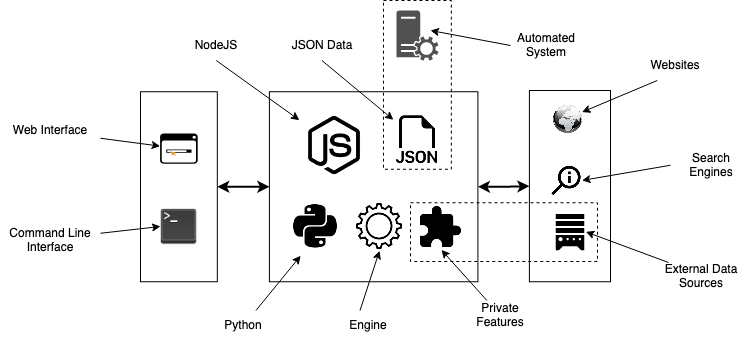
 ## APP (Preferred!)
Standard localhost WEB APP url: http://0.0.0.0:9005/app.html
## APP (Preferred!)
Standard localhost WEB APP url: http://0.0.0.0:9005/app.html
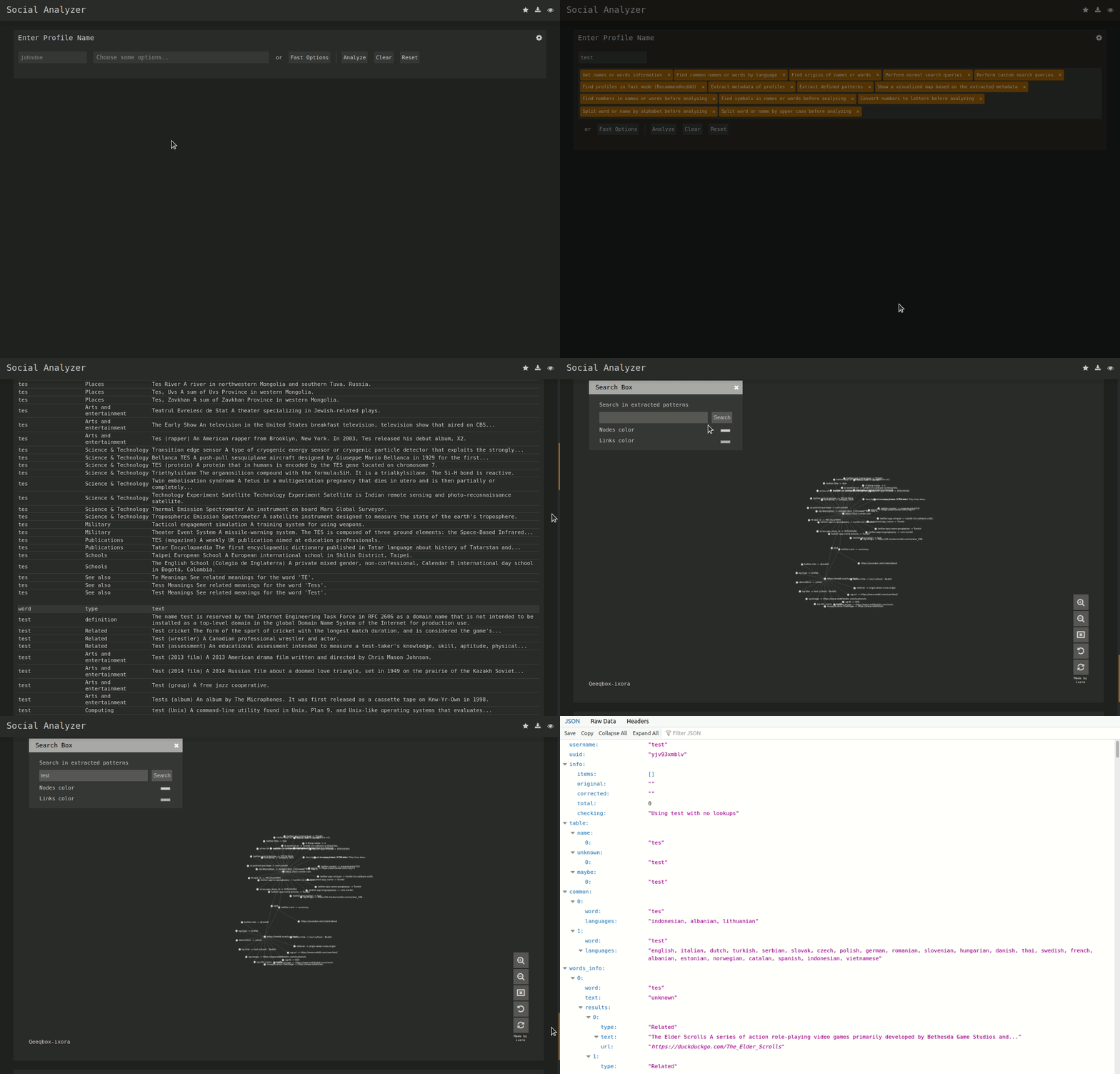 ## CLI
 ## Features
- String & name analysis (Permutations and Combinations)
- Find a profile using multiple techniques (HTTPS library & Webdriver)
- Multi profile search (Used for correlation - any combination separated with "," )
- Multilayers detections (OCR, normal, advanced & special)
- Visualized profile information using Ixora (Metadata & Patterns)
- Metadata & Patterns extraction (Added from Qeeqbox OSINT project)
- Force-directed Graph for Metadata (Needs ExtractPatterns)
- Search by top ranking or by country (Alexa Ranking)
- Search by type (adult, music, etc.. - automated websites stats)
- Profiles stats and static info (Category country)
- Cross Metadata stats (Added from Qeeqbox OSINT project)
- Auto-flirtation to unnecessary output (Enable javascript etc..)
- Search engine lookup (Google API - optional)
- Custom search queries (Google API & DuckDuckGo API - optional)
- Profile screenshot, title, info, and website description
- Find name origins, name similarity & common words by language
- Find possible profile\person age (Limited analysis)
- Custom user-agent, proxy, timeout & implicit wait
- Python CLI & NodeJS CLI (limited to FindUserProfilesFast option)
- Screenshots of detected profile (The latest version of Chrome must be installed)
- Grid option for faster checking (limited to docker-compose)
- Dump logs to folder or terminal (prettified)
- Adjust finding\getting profile workers (default 15)
- Re-checking option for failed profiles
- Filter profiles by good, maybe, and bad
- Save the analysis as a JSON file
- Simplified web interface and CLI
- And, more!!
## Special Detections
- Facebook (Phone number, name, or profile name)
- Gmail (example@gmail.com)
- Google (example@example.com)
## Install & Run
### Linux (As Node WebApp)
```bash
sudo apt-get update
#Depedning on your Linux distro, you may or may not need these 2 lines
sudo DEBIAN_FRONTEND=noninteractive apt-get install -y software-properties-common
sudo add-apt-repository ppa:mozillateam/ppa -y
sudo apt-get install -y firefox-esr tesseract-ocr git nodejs npm
git clone https://github.com/qeeqbox/social-analyzer.git
cd social-analyzer
npm update
npm install
npm start
```
### Linux (As Node CLI)
```bash
sudo apt-get update
#Depedning on your Linux distro, you may or may not need these 2 lines
sudo DEBIAN_FRONTEND=noninteractive apt-get install -y software-properties-common
sudo add-apt-repository ppa:mozillateam/ppa -y
sudo apt-get install -y firefox-esr tesseract-ocr git nodejs npm
git clone https://github.com/qeeqbox/social-analyzer.git
cd social-analyzer
npm install
nodejs app.js --username "johndoe"
#or
nodejs app.js --username "johndoe,janedoe" --metadata
#or
nodejs app.js --username "johndoe,janedoe" --metadata --top 100
#or
nodejs app.js --username "johndoe" --type "adult"
```
### Linux (As python package)
```bash
sudo apt-get update
sudo apt-get install python3 python3-pip
pip3 install social-analyzer
python3 -m social-analyzer --username "johndoe"
#or
python3 -m social-analyzer --username "johndoe" --metadata
#or
python3 -m social-analyzer --username "johndoe" --metadata --top 100
#or
python3 -m social-analyzer --username "johndoe" --type "adult"
#or
python3 -m social-analyzer --username "johndoe" --websites "car" --logs --screenshots
```
### Linux (As python script)
```bash
sudo apt-get update
sudo apt-get install git python3 python3-pip
git clone https://github.com/qeeqbox/social-analyzer
cd social-analyzer
pip3 install -r requirements.txt
python3 app.py --username "janedoe"
#or
python3 app.py --username "johndoe" --metadata
#or
python3 app.py --username "johndoe" --metadata --top 100
#or
python3 app.py --username "johndoe" --type "adult"
#or
python3 app.py --username "johndoe" --websites "car" --logs --screenshots
```
### Importing as object (python)
```python
#E.g. #1
from importlib import import_module
SocialAnalyzer = import_module("social-analyzer").SocialAnalyzer()
results = SocialAnalyzer.run_as_object(username="johndoe",silent=True)
print(results)
#E.g. #2
from importlib import import_module
SocialAnalyzer = import_module("social-analyzer").SocialAnalyzer()
results = SocialAnalyzer.run_as_object(username="johndoe,janedoe",silent=True,output="json",filter="good",metadata=False,timeout=10, profiles="detected")
print(results)
```
### Linux, Windows, MacOS, Raspberry pi..
- check this [wiki](https://github.com/qeeqbox/social-analyzer/wiki/install) for all possible installation methods
- check this [wiki](https://github.com/qeeqbox/social-analyzer/wiki/integration) for integrating social-analyzer with your OSINT tools, feeds, etc...
## social-analyzer --h
```
Required Arguments:
--username E.g. johndoe, john_doe or johndoe9999
Optional Arguments:
--websites A website or websites separated by space E.g. youtube, tiktokor tumblr
--mode Analysis mode E.g.fast -> FindUserProfilesFast, slow -> FindUserProfilesSlow or special -> FindUserProfilesSpecial
--output Show the output in the following format: json -> json outputfor integration or pretty -> prettify the output
--options Show the following when a profile is found: link, rate, titleor text
--method find -> show detected profiles, get -> show all profiles regardless detected or not, all -> combine find & get
--filter Filter detected profiles by good, maybe or bad, you can do combine them with comma (good,bad) or use all
--profiles Filter profiles by detected, unknown or failed, you can do combine them with comma (detected,failed) or use all
--countries select websites by country or countries separated by space as: us br ru
--type Select websites by type (Adult, Music etc)
--top select top websites as 10, 50 etc...[--websites is not needed]
--extract Extract profiles, urls & patterns if possible
--metadata Extract metadata if possible (pypi QeeqBox OSINT)
--trim Trim long strings
--gui Reserved for a gui (Not implemented)
--cli Reserved for a cli (Not needed)
Listing websites & detections:
--list List all available websites
Setting:
--headers Headers as dict
--logs_dir Change logs directory
--timeout Change timeout between each request
--silent Disable output to screen
```
## Open Shell
[](https://ssh.cloud.google.com/cloudshell/editor?cloudshell_git_repo=https://github.com/qeeqbox/social-analyzer&tutorial=README.md) [](https://repl.it/github/qeeqbox/social-analyzer)
## Resources
- DuckDuckGo API, Google API, NodeJS, bootstrap, selectize, jQuery, Wikipedia, font-awesome, selenium-webdriver & tesseract.js
- Let me know if I missed a reference or resource!
## Disclaimer\Notes
- Download this project from GitHub and treat it as a security project
- If you want your website to be excluded from this project list, please reach out to me
- This tool is meant to be used locally, not as a service (It does not have any Access Control)
- For issues related to modules that end with -private or under the private group , reach out directly to me (do not open an issue on GitHub)
## Other Projects
[](https://github.com/qeeqbox/analyzer) [](https://github.com/qeeqbox/chameleon) [](https://github.com/qeeqbox/honeypots) [](https://github.com/qeeqbox/osint) [](https://github.com/qeeqbox/url-sandbox) [](https://github.com/qeeqbox/mitre-visualizer) [](https://github.com/qeeqbox/woodpecker) [](https://github.com/qeeqbox/docker-images) [](https://github.com/qeeqbox/seahorse) [](https://github.com/qeeqbox/rhino) [](https://github.com/qeeqbox/raven) [](https://github.com/qeeqbox/image-analyzer)
## Features
- String & name analysis (Permutations and Combinations)
- Find a profile using multiple techniques (HTTPS library & Webdriver)
- Multi profile search (Used for correlation - any combination separated with "," )
- Multilayers detections (OCR, normal, advanced & special)
- Visualized profile information using Ixora (Metadata & Patterns)
- Metadata & Patterns extraction (Added from Qeeqbox OSINT project)
- Force-directed Graph for Metadata (Needs ExtractPatterns)
- Search by top ranking or by country (Alexa Ranking)
- Search by type (adult, music, etc.. - automated websites stats)
- Profiles stats and static info (Category country)
- Cross Metadata stats (Added from Qeeqbox OSINT project)
- Auto-flirtation to unnecessary output (Enable javascript etc..)
- Search engine lookup (Google API - optional)
- Custom search queries (Google API & DuckDuckGo API - optional)
- Profile screenshot, title, info, and website description
- Find name origins, name similarity & common words by language
- Find possible profile\person age (Limited analysis)
- Custom user-agent, proxy, timeout & implicit wait
- Python CLI & NodeJS CLI (limited to FindUserProfilesFast option)
- Screenshots of detected profile (The latest version of Chrome must be installed)
- Grid option for faster checking (limited to docker-compose)
- Dump logs to folder or terminal (prettified)
- Adjust finding\getting profile workers (default 15)
- Re-checking option for failed profiles
- Filter profiles by good, maybe, and bad
- Save the analysis as a JSON file
- Simplified web interface and CLI
- And, more!!
## Special Detections
- Facebook (Phone number, name, or profile name)
- Gmail (example@gmail.com)
- Google (example@example.com)
## Install & Run
### Linux (As Node WebApp)
```bash
sudo apt-get update
#Depedning on your Linux distro, you may or may not need these 2 lines
sudo DEBIAN_FRONTEND=noninteractive apt-get install -y software-properties-common
sudo add-apt-repository ppa:mozillateam/ppa -y
sudo apt-get install -y firefox-esr tesseract-ocr git nodejs npm
git clone https://github.com/qeeqbox/social-analyzer.git
cd social-analyzer
npm update
npm install
npm start
```
### Linux (As Node CLI)
```bash
sudo apt-get update
#Depedning on your Linux distro, you may or may not need these 2 lines
sudo DEBIAN_FRONTEND=noninteractive apt-get install -y software-properties-common
sudo add-apt-repository ppa:mozillateam/ppa -y
sudo apt-get install -y firefox-esr tesseract-ocr git nodejs npm
git clone https://github.com/qeeqbox/social-analyzer.git
cd social-analyzer
npm install
nodejs app.js --username "johndoe"
#or
nodejs app.js --username "johndoe,janedoe" --metadata
#or
nodejs app.js --username "johndoe,janedoe" --metadata --top 100
#or
nodejs app.js --username "johndoe" --type "adult"
```
### Linux (As python package)
```bash
sudo apt-get update
sudo apt-get install python3 python3-pip
pip3 install social-analyzer
python3 -m social-analyzer --username "johndoe"
#or
python3 -m social-analyzer --username "johndoe" --metadata
#or
python3 -m social-analyzer --username "johndoe" --metadata --top 100
#or
python3 -m social-analyzer --username "johndoe" --type "adult"
#or
python3 -m social-analyzer --username "johndoe" --websites "car" --logs --screenshots
```
### Linux (As python script)
```bash
sudo apt-get update
sudo apt-get install git python3 python3-pip
git clone https://github.com/qeeqbox/social-analyzer
cd social-analyzer
pip3 install -r requirements.txt
python3 app.py --username "janedoe"
#or
python3 app.py --username "johndoe" --metadata
#or
python3 app.py --username "johndoe" --metadata --top 100
#or
python3 app.py --username "johndoe" --type "adult"
#or
python3 app.py --username "johndoe" --websites "car" --logs --screenshots
```
### Importing as object (python)
```python
#E.g. #1
from importlib import import_module
SocialAnalyzer = import_module("social-analyzer").SocialAnalyzer()
results = SocialAnalyzer.run_as_object(username="johndoe",silent=True)
print(results)
#E.g. #2
from importlib import import_module
SocialAnalyzer = import_module("social-analyzer").SocialAnalyzer()
results = SocialAnalyzer.run_as_object(username="johndoe,janedoe",silent=True,output="json",filter="good",metadata=False,timeout=10, profiles="detected")
print(results)
```
### Linux, Windows, MacOS, Raspberry pi..
- check this [wiki](https://github.com/qeeqbox/social-analyzer/wiki/install) for all possible installation methods
- check this [wiki](https://github.com/qeeqbox/social-analyzer/wiki/integration) for integrating social-analyzer with your OSINT tools, feeds, etc...
## social-analyzer --h
```
Required Arguments:
--username E.g. johndoe, john_doe or johndoe9999
Optional Arguments:
--websites A website or websites separated by space E.g. youtube, tiktokor tumblr
--mode Analysis mode E.g.fast -> FindUserProfilesFast, slow -> FindUserProfilesSlow or special -> FindUserProfilesSpecial
--output Show the output in the following format: json -> json outputfor integration or pretty -> prettify the output
--options Show the following when a profile is found: link, rate, titleor text
--method find -> show detected profiles, get -> show all profiles regardless detected or not, all -> combine find & get
--filter Filter detected profiles by good, maybe or bad, you can do combine them with comma (good,bad) or use all
--profiles Filter profiles by detected, unknown or failed, you can do combine them with comma (detected,failed) or use all
--countries select websites by country or countries separated by space as: us br ru
--type Select websites by type (Adult, Music etc)
--top select top websites as 10, 50 etc...[--websites is not needed]
--extract Extract profiles, urls & patterns if possible
--metadata Extract metadata if possible (pypi QeeqBox OSINT)
--trim Trim long strings
--gui Reserved for a gui (Not implemented)
--cli Reserved for a cli (Not needed)
Listing websites & detections:
--list List all available websites
Setting:
--headers Headers as dict
--logs_dir Change logs directory
--timeout Change timeout between each request
--silent Disable output to screen
```
## Open Shell
[](https://ssh.cloud.google.com/cloudshell/editor?cloudshell_git_repo=https://github.com/qeeqbox/social-analyzer&tutorial=README.md) [](https://repl.it/github/qeeqbox/social-analyzer)
## Resources
- DuckDuckGo API, Google API, NodeJS, bootstrap, selectize, jQuery, Wikipedia, font-awesome, selenium-webdriver & tesseract.js
- Let me know if I missed a reference or resource!
## Disclaimer\Notes
- Download this project from GitHub and treat it as a security project
- If you want your website to be excluded from this project list, please reach out to me
- This tool is meant to be used locally, not as a service (It does not have any Access Control)
- For issues related to modules that end with -private or under the private group , reach out directly to me (do not open an issue on GitHub)
## Other Projects
[](https://github.com/qeeqbox/analyzer) [](https://github.com/qeeqbox/chameleon) [](https://github.com/qeeqbox/honeypots) [](https://github.com/qeeqbox/osint) [](https://github.com/qeeqbox/url-sandbox) [](https://github.com/qeeqbox/mitre-visualizer) [](https://github.com/qeeqbox/woodpecker) [](https://github.com/qeeqbox/docker-images) [](https://github.com/qeeqbox/seahorse) [](https://github.com/qeeqbox/rhino) [](https://github.com/qeeqbox/raven) [](https://github.com/qeeqbox/image-analyzer)