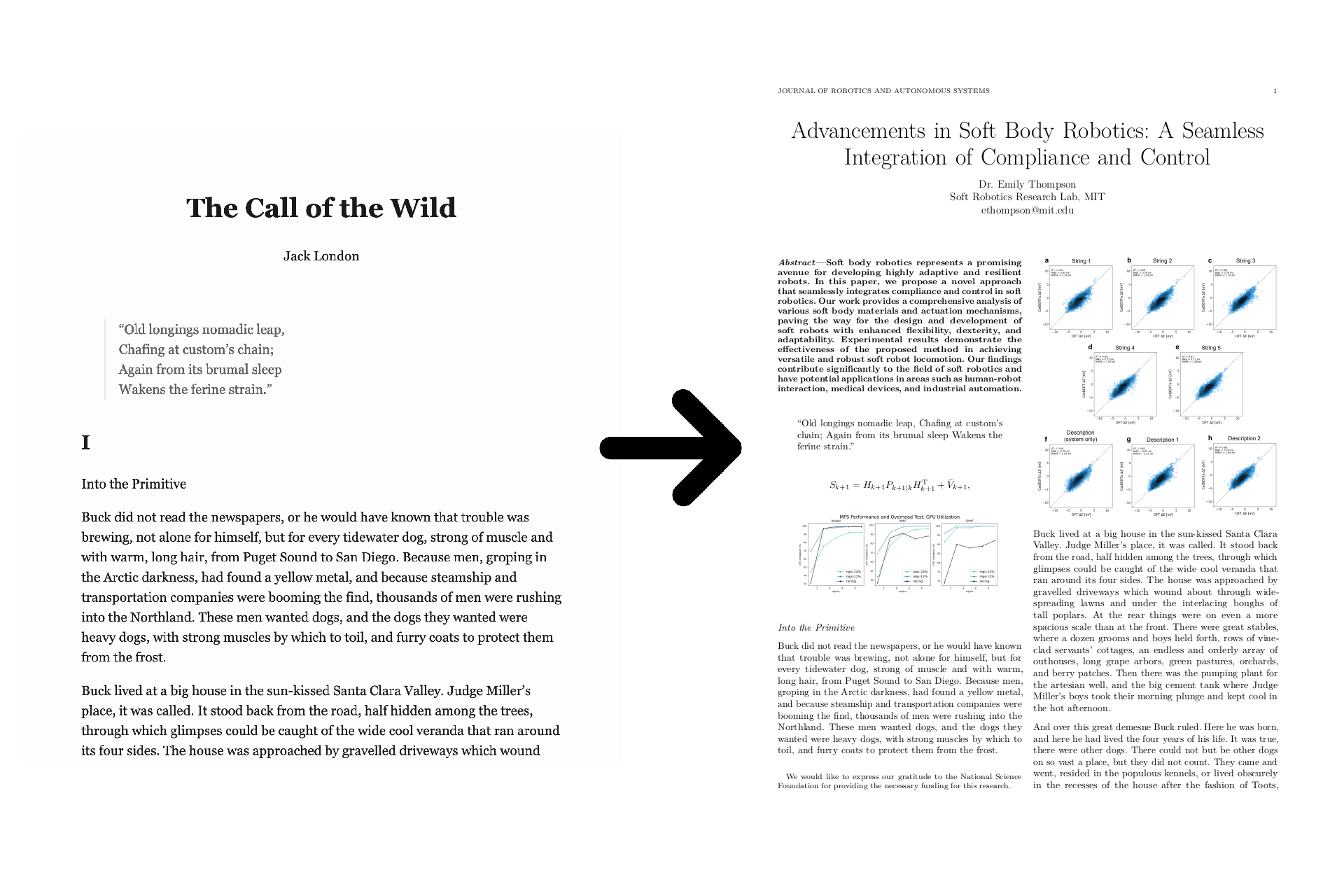
# paperify **Repository Path**: mirrors/paperify ## Basic Information - **Project Name**: paperify - **Description**: Paperify 可将任何文档、网页或电子书转化为研究论文 - **Primary Language**: Shell - **License**: MIT - **Default Branch**: master - **Homepage**: https://www.oschina.net/p/paperify - **GVP Project**: No ## Statistics - **Stars**: 2 - **Forks**: 0 - **Created**: 2023-09-14 - **Last Updated**: 2026-02-07 ## Categories & Tags **Categories**: Uncategorized **Tags**: None ## README # Paperify Paperify transforms any document, web page, or ebook into a research paper. The text of the generated paper is the same as the text of the original document, but figures and equations from real papers are interspersed throughout. A paper title and abstract are added (optionally generated by ChatGPT, if you provide an API key), and the entire paper is compiled with the IEEE $\LaTeX$ template for added realism.
![example](https://github.com/jstrieb/paperify/assets/7355528/6233c47e-fbff-4a71-8991-09ba3112f241)
# Install First, install the dependencies (or [use Docker](#docker)): - curl - Python 3 - Pandoc - jq - LaTeX (via TeXLive) - ImageMagick (optional) For example, on Debian-based systems (_e.g._, Debian, Ubuntu, Kali, WSL): ``` bash sudo apt update sudo apt install --no-install-recommends \ pandoc \ curl ca-certificates \ jq \ python3 \ imagemagick \ texlive texlive-publishers texlive-science lmodern texlive-latex-extra ``` Then, clone the repo (or directly pull the script), and execute it. ``` bash curl -L https://github.com/jstrieb/paperify/raw/master/paperify.sh \ | sudo tee /usr/local/bin/paperify sudo chmod +x /usr/local/bin/paperify paperify -h ``` # Examples - [`examples/cox.pdf`](examples/cox.pdf) Convert [Russ Cox's transcript of Doug McIlroy's talk on the history of Bell Labs](https://research.swtch.com/bell-labs) into a paper saved to the `/tmp/` directory as `article.pdf`. ``` paperify \ --from-format html \ "https://research.swtch.com/bell-labs" \ /tmp/article.pdf ``` - [`examples/london.pdf`](examples/london.pdf) Download figures and equations from the 1000 latest computer science papers on `arXiv.org`. Intersperse the figures and equations into Jack London's _Call of the Wild_ with a higher-than-default equation frequency. Use ChatGPT to generate a paper title, author, abstract, and metadata for an imaginary paper on soft body robotics. Save the file in the current directory as `london.pdf`. ``` paperify \ --arxiv-category cs \ --num-papers 1000 \ --equation-frequency 18 \ --chatgpt-token "sk-[REDACTED]" \ --chatgpt-topic "soft body robotics" \ "https://standardebooks.org/ebooks/jack-london/the-call-of-the-wild/downloads/jack-london_the-call-of-the-wild.epub" \ london.pdf ``` ## Docker Alternatively, run Paperify from within a Docker container. To run the first example from within Docker and build to `./build/cox.pdf`: ``` bash docker run \ --rm \ -it \ --volume "$(pwd)/build":/root/build \ jstrieb/paperify \ --from-format html \ "https://research.swtch.com/bell-labs" \ build/cox.pdf ``` # Usage ``` usage: paperify [OPTIONS] OPTIONS: --temp-dir Directory for assets (default: /tmp/paperify) --from-format Format of input file (default: input suffix) --arxiv-category arXiv.org paper category (default: math) --num-papers Number of papers to download (default: 100) --max-parallelism Maximum simultaneous processes (default: 32) --figure-frequency Chance of a figure is 1/N per paragraph (default: 25) --equation-frequency Chance of an equation is 1/N per paragraph (default: 25) --max-size Max allowed image size in bytes (default 2500000) --min-equation-length Minimum equation length in characters (default 5) --max-equation-length Maximum equation length in characters (default 120) --min-caption-length Minimum figure caption length in characters (default 20) --chatgpt-token ChatGPT token to generate paper title, abstract, etc. --chatgpt-topic Paper topic ChatGPT will generate metadta for --quiet Don't log statuses --skip-downloading Don't download papers from arXiv.org --skip-extracting Don't extract equations and captions --skip-metadata Don't regenerate metadata --skip-filtering Don't filter out large files or non-diagram images ``` Note that the `--skip-*` flags are useful when you have already run the script once and do not want to repeat the process of downloading and extracting data. # Known Issues - Images with query parameters in the `src` URL of some web pages are extracted by Pandoc with the query parameters in the filename, and LaTeX gives errors about "unknown file extension" when compiling. - Papers may contain images that are not diagrams, such as portraits of the authors or institution logos. Paperify uses a highly imperfect heuristic to remove these if the `convert` command line tool is present: only images with white, nearly-white, or transparent pixels in the top left and bottom right corners are kept. This works surprisingly well, but there are always some false positives and false negatives. - Non-ASCII Unicode characters cannot be processed by `pdflatex`, and will be stripped before the PDF is compiled. - Paperify uses Markdown as a (purposefully) lossy [intermediate representation](https://en.wikipedia.org/wiki/Intermediate_representation) for documents before they are converted to LaTeX. As a result, information and styling from the original may be stripped. - A handful of papers contain huge numbers of images. The ones that do this also tend to have some of the worst images. Images can be manually pruned from the `/tmp/paperify/images` directory, and the same command can be re-run with the `--skip-*` flags to rebuild the paper using new figures and equations. - Different systems install different LaTeX packages. If you're missing packages, you may want to bite the bullet and `apt install texlive-full`. It's very big, but it's got everything you'll ever need in there. - Figure captions usually have nothing to do with figures themselves. - No matter how convincing a paper may appear, anyone looking over your shoulder who actually reads the words will know very quickly that something is off. - Side effects of reading the code include nausea, dizziness, confusion, bleeding from the eyes, and deep love/hatred for the creators of Unix pipelines. # How to Read the Code In general, I'm a proponent of reading (or at least skimming) code before you run it, when possible. Usually, my code is written to be read. In this case, not so much. Apologies in advance to anyone who tries to read the code. It started as four very cursed lines of Bash (without line wrapping) that I attempted to clean up a little. It is now many more than four lines of Bash, most of which remain very cursed. The small Python portion is particularly hard on the eyes, though it may possess a grotesque beauty for true functional programmers. Everything is in `paperify.sh`. It can be read top-to-bottom or bottom-to-top, and there is a fat LaTeX template as a heredoc smack in the middle. # Project Status Strange as it may sound, this project is complete. I want to live in a world where working software doesn't always grow until it becomes a Lovecraftian spaghetti monster. I have added every feature that I wanted to add. It does what I wanted it to do, as well as I wanted it to do it. No further development required. As such, I will try to address issues opened on GitHub, but I do not expect to address feature requests. I may merge pull requests. Even if there are no recent commits, I'm hopeful that this script will continue to work many years from now. # Greetz & Acknowledgments Greetz to several unnamed friends who offered helpful commentary prior to release. Special shout out to the friends who suggested, as a follow-up project, making a browser extension to transform the current web page into a scientific paper. Sort of like Firefox reader mode, but for viewing Twitter when someone looking over your shoulder expects you to be doing something else. Thanks to [arXiv.org](https://arxiv.org) for hosting tons of papers with LaTeX source to mine. Greetz to Project Gutenberg, Standard Ebooks, and Alexandra Elbakyan. Lovingly released on Labor Day 2023; dedicated to procrastinating laborers of knowledge.