# arthas-idea-plugin
**Repository Path**: ly_copy/arthas-idea-plugin
## Basic Information
- **Project Name**: arthas-idea-plugin
- **Description**: No description available
- **Primary Language**: Unknown
- **License**: Not specified
- **Default Branch**: master
- **Homepage**: None
- **GVP Project**: No
## Statistics
- **Stars**: 0
- **Forks**: 0
- **Created**: 2020-01-19
- **Last Updated**: 2020-12-19
## Categories & Tags
**Categories**: Uncategorized
**Tags**: None
## README
# Idea arthas 插件
## [语雀arthas 插件使用介绍(更新及时)](https://www.yuque.com/docs/share/fa77c7b4-c016-4de6-9fa3-58ef25a97948?#)
# 一、背景
目前Arthas 官方的工具还不够足够的简单,需要记住一些命令,特别是一些扩展性特别强的高级语法,比如ognl获取spring context 为所欲为,watch、trace 不够简单,需要构造一些命令工具的信息,因此只需要一个能够简单处理字符串信息的插件即可使用。当在处理线上问题的时候需要最快速、最便捷的命令,因此Idea arthas 插件还是有存在的意义和价值的。
##
# 二、支持的功能
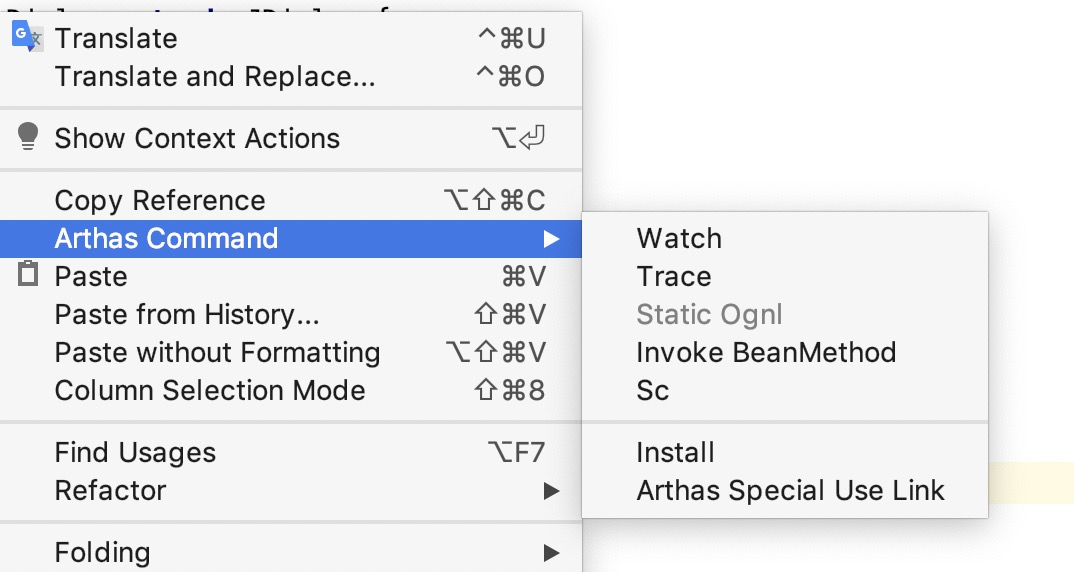
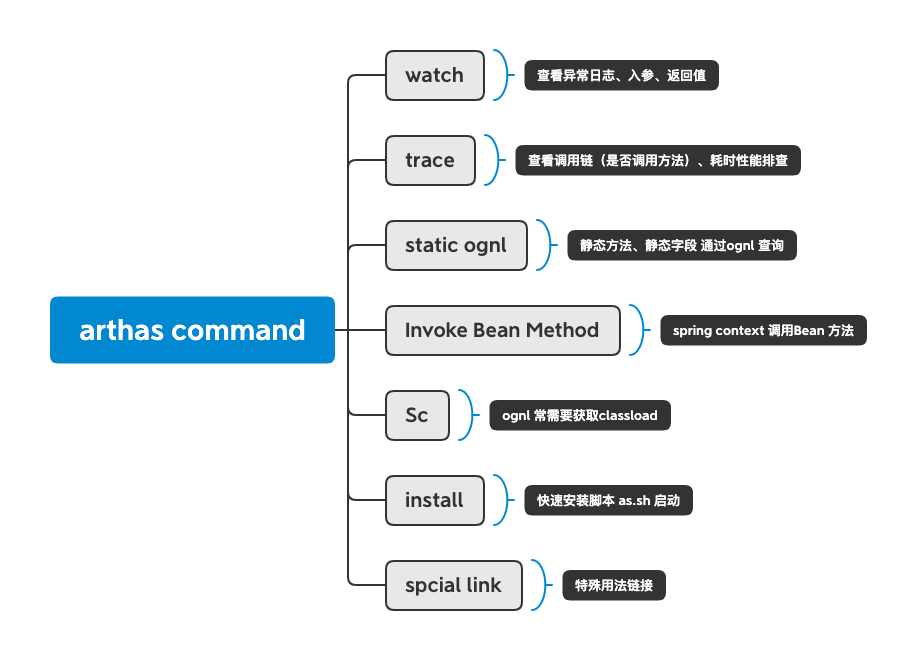
支持的功能都是平时处理最常用的一些功能,一些快捷的链接,在处理紧急问题时候不需要到处查找,都是一些基本的功能,自动复制到剪切板中去,方便快捷。
!
## 2.1 watch

```bash
watch StringUtils toLowerFristChar '{params,returnObj,throwExp}' -n 5 -x 3
```
## 2.2 trace
```bash
trace StringUtils toLowerFristChar -n 5
```
## 2.3 static ognl (字段或者方法)

### 2.3.1 右键static ognl
### 2.3.2 获取classload命令
必须要获取,不然会找不到classload,arthas 官方获取问题系统的classload,spring 项目应该无法获取到这个class的信息,因此首先执行一下这个命令
```bash
sc -d StringUtils
```

### 2.3.2 复制到界面,获取命令,执行即可

```bash
ognl -x 3 '@StringUtils@toLowerFristChar(" ")' -c 8bed358
```
## 2.4 Invoke Bean Method
实际上就是根据当前的spring项目中的获取静态的spring context这样可以直接根据这个context直接获取任何的Bean方法,一般在Java后端服务中都有这样的Utils类,因此这个可以看为一个常量! 可以参考:[http://www.dcalabresi.com/blog/java/spring-context-static-class/](http://www.dcalabresi.com/blog/java/spring-context-static-class/) 有了这个,我们可以跟进一步的进行数据简化,由于在idea这个环节中,可以获取方法参数,spring bean的名称等等,非常的方便。
```java
public class ApplicationContextProvider implements ApplicationContextAware {
private static ApplicationContext context;
public ApplicationContext getApplicationContext() {
return context;
}
@Override
public void setApplicationContext(ApplicationContext ctx) {
context = ctx;
}
}
```
### 2.4.1 设置获取spring context的上下文
> ps 这里可以使用@applicationContextProvider@context 这样,比如还行进行函数调用可以直接使用ognl逗号分割可以继续执行的语法,比如 @applicationContextProvider@context,#springContext.getBean("name").todo() 后续我们需要在界面调用任何的方法都会添加上这句话。

### 2.4.2 右键点击需要调用的方法
这里的策略和static ognl 一样的,本质还是ognl的调用。

```bash
ognl -x 3 '#springContext=@applicationContextProvider@context,#springContext.getBean("arthasInstallCommandAction").actionPerformed(new com.intellij.openapi.actionSystem.AnActionEvent())' -c desw22
```
**特别说明**
> 太复杂的参数不太适用于对于线上问题的诊断,因此方法参数尽可能的简单,这里有一套规则,因为ognl的语法和Java类似的,在获取到参数的时候会进行默认的参数构造处理。
> String ——> ""
> Number、Byte 、Char ——> 0
> Map ——> #{"":" "} ognl 语法
> List ——>{}
> 数组 int[] ——>new int[]{}
> other ——> new XXXClass() 参数太复杂了默认直接new了一个
> Special 你的参数可能是从springContext中获取,你可以修改表达式
> ......,#newParam= #springContext.getBean("beanName").todo(),#springContext.getBean("other").to(#newParam)
> 这样使用参数定义到你的bash脚本中去,这种属于特殊用法,不具有一般的通用性
## 2.5 install(linux)
安装脚本,可以一键的通过as.sh 进行执行
```bash
curl -sk https://arthas.gitee.io/arthas-boot.jar -o ~/.arthas-boot.jar && echo "alias as.sh='java -jar ~/.arthas-boot.jar --repo-mirror aliyun --use-http'" >> ~/.bashrc && source ~/.bashrc
```

## 2.6 常用特殊用法链接
- [special ognl](https://github.com/alibaba/arthas/issues/71)
- [tt get spring context](https://github.com/alibaba/arthas/issues/482)
- [get error filter](https://github.com/alibaba/arthas/issues/429)
- [dubbo 遇上arthas](http://hengyunabc.github.io/dubbo-meet-arthas/)
- [Arthas实践--jad/mc/redefine线上热更新一条龙](http://hengyunabc.github.io/arthas-online-hotswap/)
- [ognl 使用姿势](https://blog.csdn.net/u010634066/article/details/101013479)
# 三、其他
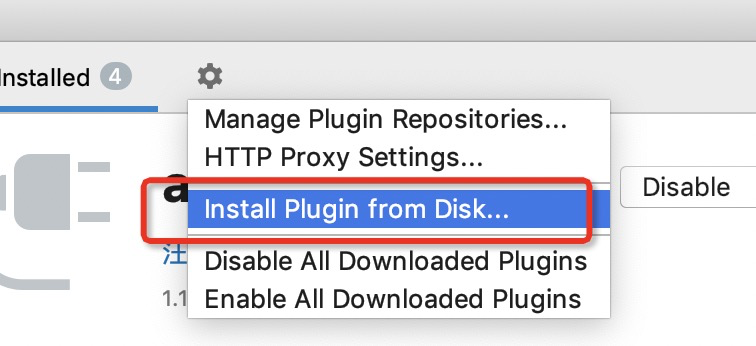
## 3.1 安装
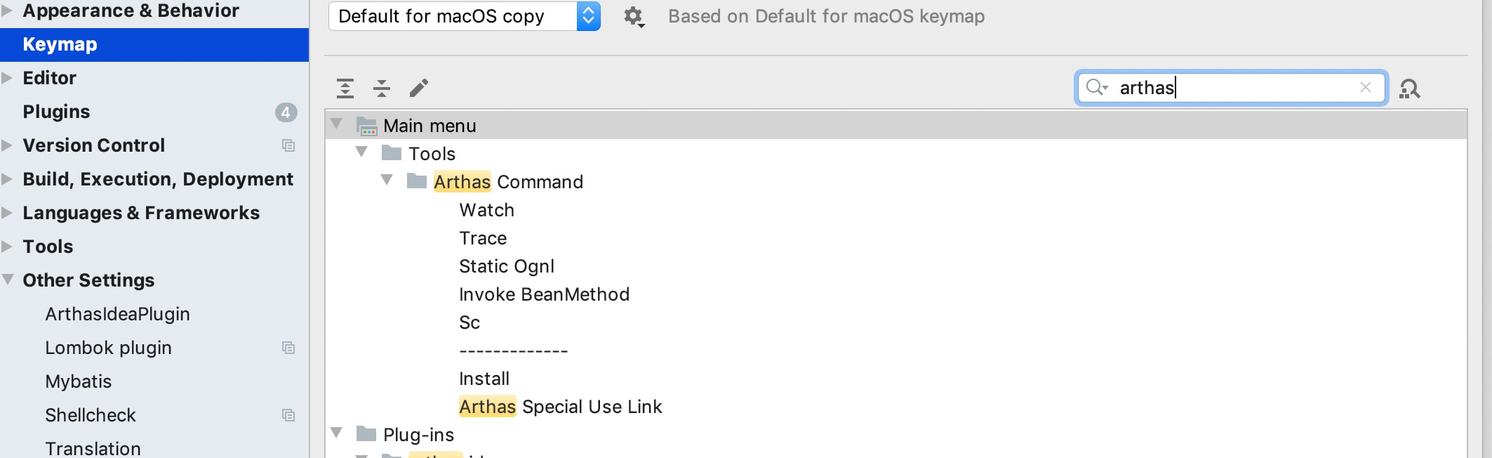
## 3.2 快捷键设置
## 3.3 代码地址
[https://github.com/WangJi92/arthas-idea-plugin](https://github.com/WangJi92/arthas-idea-plugin)
## 3.4 插件开发,发布
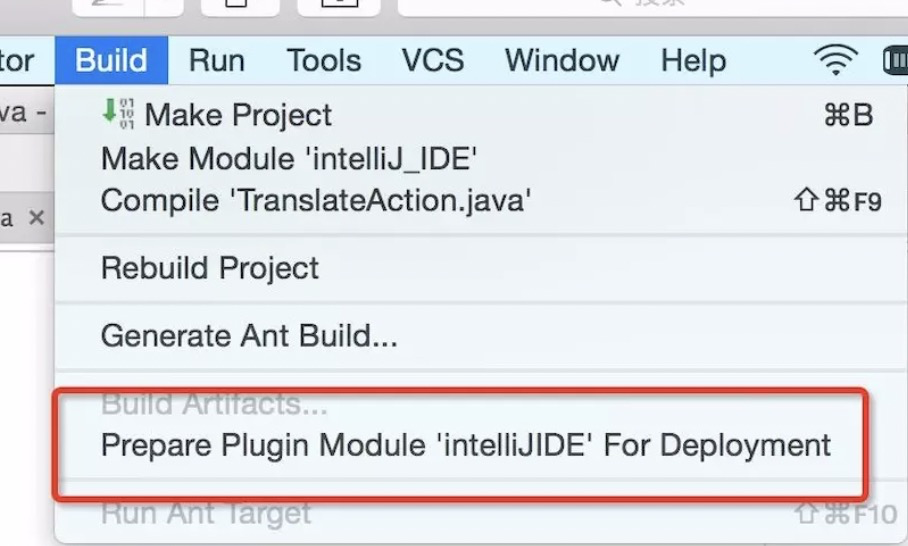
参考 插件开发: [https://www.jianshu.com/p/722841c6d0a9](https://www.jianshu.com/p/722841c6d0a9)
就可以看到编译后的zip包了
## 备注
github 图片加载不出来,[可以访问这个地址查看](https://www.yuque.com/docs/share/fa77c7b4-c016-4de6-9fa3-58ef25a97948?#)
## 使用视频介绍
[arthas idea 使用介绍](http://v.youku.com/v_show/id_XNDQ4Mjg3MzM4MA==.html)