# pfQuest
**Repository Path**: lime_qing/pfQuest
## Basic Information
- **Project Name**: pfQuest
- **Description**: No description available
- **Primary Language**: Unknown
- **License**: MIT
- **Default Branch**: master
- **Homepage**: None
- **GVP Project**: No
## Statistics
- **Stars**: 0
- **Forks**: 0
- **Created**: 2025-09-30
- **Last Updated**: 2025-09-30
## Categories & Tags
**Categories**: Uncategorized
**Tags**: None
## README
# pfQuest
This is an addon for World of Warcraft Vanilla (1.12) and The Burning Crusade (2.4.3). It helps players to find several ingame objects and quests. The addon reads questobjectives, parses them and uses its internal database to plot the found matches on the world- and minimap. It ships with a GUI to browse through all known objects. If one of the items is not yet available on your realm, you'll see a [?] in front of the name.
The addon is not designed to be a quest- or tourguide, instead the goals are to provide an accurate in-game version of [AoWoW](http://db.vanillagaming.org/) or [Wowhead](http://www.wowhead.com/). The vanilla version is powered by the database of [VMaNGOS](https://github.com/vmangos). The Burning Crusade version is using data from the [CMaNGOS](https://github.com/cmangos) project with translations taken from [MaNGOS Extras](https://github.com/MangosExtras).
pfQuest is the successor of [ShaguQuest](https://shagu.org/ShaguQuest/) and has been entirely written from scratch. In comparison to [ShaguQuest](https://shagu.org/ShaguQuest/), this addon does not depend on any specific map- or questlog addon. It's designed to support the default interface aswell as every other addon. In case you experience any addon conflicts, please add an issue to the bugtracker.
# Downloads
You can check the [[Latest Changes]](https://github.com/shagu/pfQuest/commits/master) page to see what has changed recently.
## World of Warcraft: **Vanilla**
1. **[[Download pfQuest]](https://github.com/shagu/pfQuest/releases/latest/download/pfQuest-full.zip)** (\*)
2. Unpack the Zip-file
3. Move the `pfQuest` folder into `Wow-Directory\Interface\AddOns`
4. Restart Wow
5. Set "Script Memory" to "0" ([HowTo](https://i.imgur.com/rZXwaK0.jpg))
\*) *You can optionally pick one of the slim version downloads instead. Those version are limited to only one specific language: [English](https://github.com/shagu/pfQuest/releases/latest/download/pfQuest-enUS.zip),
[Korean](https://github.com/shagu/pfQuest/releases/latest/download/pfQuest-koKR.zip),
[French](https://github.com/shagu/pfQuest/releases/latest/download/pfQuest-frFR.zip),
[German](https://github.com/shagu/pfQuest/releases/latest/download/pfQuest-deDE.zip),
[Chinese](https://github.com/shagu/pfQuest/releases/latest/download/pfQuest-zhCN.zip),
[Spanish](https://github.com/shagu/pfQuest/releases/latest/download/pfQuest-esES.zip),
[Russian](https://github.com/shagu/pfQuest/releases/latest/download/pfQuest-ruRU.zip)*
## World of Warcraft: **The Burning Crusade**
1. **[[Download pfQuest]](https://github.com/shagu/pfQuest/releases/latest/download/pfQuest-full-tbc.zip)** (\*)
2. Unpack the Zip-file
3. Move the `pfQuest-tbc` folder into `Wow-Directory\Interface\AddOns`
4. Restart Wow
\*) *You can optionally pick one of the slim version downloads instead. Those version are limited to only one specific language: [English](https://github.com/shagu/pfQuest/releases/latest/download/pfQuest-enUS-tbc.zip),
[Korean](https://github.com/shagu/pfQuest/releases/latest/download/pfQuest-koKR-tbc.zip),
[French](https://github.com/shagu/pfQuest/releases/latest/download/pfQuest-frFR-tbc.zip),
[German](https://github.com/shagu/pfQuest/releases/latest/download/pfQuest-deDE-tbc.zip),
[Chinese](https://github.com/shagu/pfQuest/releases/latest/download/pfQuest-zhCN-tbc.zip),
[Spanish](https://github.com/shagu/pfQuest/releases/latest/download/pfQuest-esES-tbc.zip),
[Russian](https://github.com/shagu/pfQuest/releases/latest/download/pfQuest-ruRU-tbc.zip)*
## World of Warcraft: **Wrath of the Lich King**
> [!IMPORTANT]
>
> **This is a BETA version of pfQuest**
>
> It is able to run on a WotLK (3.3.5a) client, but does not yet ship a WotLK database.
> Every available content is limited to Vanilla & TBC as of now.
1. **[[Download pfQuest]](https://github.com/shagu/pfQuest/releases/latest/download/pfQuest-full-wotlk.zip)** (\*)
2. Unpack the Zip-file
3. Move the `pfQuest-wotlk` folder into `Wow-Directory\Interface\AddOns`
4. Restart Wow
\*) *You can optionally pick one of the slim version downloads instead. Those version are limited to only one specific language: [English](https://github.com/shagu/pfQuest/releases/latest/download/pfQuest-enUS-wotlk.zip),
[Korean](https://github.com/shagu/pfQuest/releases/latest/download/pfQuest-koKR-wotlk.zip),
[French](https://github.com/shagu/pfQuest/releases/latest/download/pfQuest-frFR-wotlk.zip),
[German](https://github.com/shagu/pfQuest/releases/latest/download/pfQuest-deDE-wotlk.zip),
[Chinese](https://github.com/shagu/pfQuest/releases/latest/download/pfQuest-zhCN-wotlk.zip),
[Spanish](https://github.com/shagu/pfQuest/releases/latest/download/pfQuest-esES-wotlk.zip),
[Russian](https://github.com/shagu/pfQuest/releases/latest/download/pfQuest-ruRU-wotlk.zip)*
## Development Version
The development version includes databases of all languages and client expansions. Based on the folder name, this will launch in both vanilla and tbc mode. Due to the amount of included data, this snapshot will lead to a higher RAM/Disk-Usage and slightly increased loading times.
- Download via Git: [`https://github.com/shagu/pfQuest.git`](https://github.com/shagu/pfQuest.git)
- Download via Browser: **[Zip File](https://github.com/shagu/pfQuest/archive/master.zip)**
## Controls
- To change node colors on the World Map, **click** the node.
- To remove previously done quests from the map, **\-click** the quest giver on the world-map
- To temporarily hide clusters on the world-map, hold the **\-key**
- To temporarily hide nodes on the mini-map, hover it and hold the **\-key**
- To move the minimap-button, **\-drag** the icon
- To move the arrow, **\-drag** the frame
## Addon Memory Usage
The addon ships an entire database of all spawns, objects, items and quests and therefore includes a huge database (~80 MB incl. all locales) that gets loaded into memory on game launch. However, the memory usage of pfQuest is persistent and does not increase any further over time, so there's nothing bad on performance at all. Depending on the download you pick (especially the full packages), you might see a message that warns you about an addon consuming too much memory. To get rid of that warning, you can set the addon memory limit to `0` which reads as `no limit`. This option can be found in the [character selection screen](https://i.imgur.com/rZXwaK0.jpg).
# Map & Minimap Nodes
# Auto-Tracking
The addon features 4 different modes that define how the new or updated questobjectives should be handled. Those modes can be selected on the dropdown menu in the top-right area the map.
### Option: All Quests
Every quest will be automatically shown and updated on the map.
### Option: Tracked Quests
Only tracked quests (Shift-Click) will be automatically shown and updated on the map.
### Option: Manual Selection
Only quest objectives that have been manually displayed ("Show"-Button in the Questlog) will be displayed.
Completed quest objectives will be still automatically removed from the map.
### Option: Hide Quests
Same as "Manual Selection" and in addition to that, Quest-Givers won't be shown automatically.
Also completed quest objectives will remain on the map. This mode won't touch any of the map nodes created.
# Database Browser
The database GUI allows you to bookmark and browse through all entries within the pfQuest database. It can be opened by a click on the pfQuest minimap icon or via `/db show`. The browser will show a maximum of 100 entries at once for each tab. Use your scrollwheel or press the up/down arrows to go up and down the list.
# Questlog Integration
### Questlinks
On servers that support questlinks, a shift-click on a selected quest will add a questlink into chat. Those links are similar to the known questlinks from TBC+ and are compatible to ones produced by [ShaguQuest](https://shagu.org/ShaguQuest/), [Questie](https://github.com/AeroScripts/QuestieDev) and [QuestLink](http://addons.us.to/addon/questlink-0). Please be aware that some servers (e.g Kronos) are blocking questlinks and you'll have to disable this feature in the pfQuest settings, in order to print the quest name into the chat instead of adding a questlink. Questlinks sent from pfQuest to pfQuest are locale independent and rely on the Quest ID.
The tooltip will display quest information such as your current state on the quest (new, in progress, already done) as well as the quest objective text and the full quest description. In addition to that, the suggested level and the minimum level are shown.
### Questlog Buttons
The questlog will show 4 additional buttons on each quest in order to provide easy manual quest tracking. Those buttons can be used to show or hide individual quests on the map. Those buttons won't affect the entries that you've placed by using the database browser.
**Show**
The "Show" button will add the questobjectives of the current quest to the map.
**Hide**
The "Hide" button will remove the current selected quest from the map.
**Clean**
The "Clean" button will remove all nodes that have been placed by pfQuest from the map.
**Reset**
The "Reset" button will restore the default visibility of icons to match the set values on the map dropdown menu (e.g "All Quests" by default).
# Chat/Macro CLI
The addon features a CLI interface which allows you to easilly create macros to show your favourite herb or mining-veins. Let's say you want to display all **Iron Deposit** deposits, then type in chat or create a macro with the text: `/db object Iron Deposit`. You can also display all mines on the map by typing: `/db track mines`. This can be extended by giving the minimum and maximum required skill as paramter, like: `/db track mines 150 225` to display all ores between skill 150 and 225. The `mines` parameter can also be replaced by `herbs`, `rares`, `chests`, `taxi` and many more in order to show those instead. If `/db` doesn't work for you, there are also some other aliases available like `/shagu`, `pfquest` and `/pfdb`.
### Basic Commands
```
/db lock Lock map tracker
/db tracker Show map tracker
/db journal Show quest journal
/db arrow Show quest arrow
/db show Show database interface
/db config Show configuration interface
/db locale Display addon locales
/db scan Scan the server for custom items
```
### Questing
```
/db reset Reload all quests on map
/db query Query the server for completed quests
```
### Database
```
/db unit Search for specific units by name (e.g Thrall)
/db object
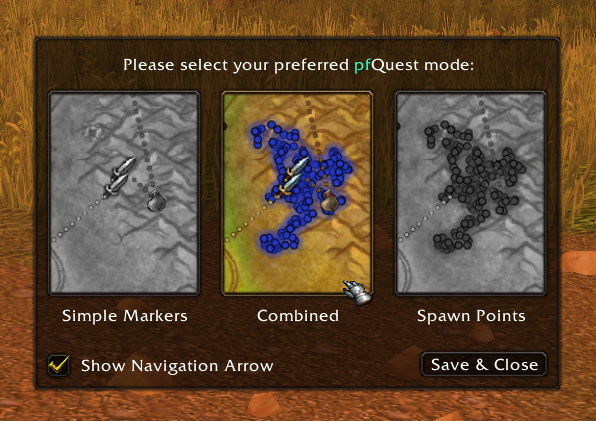 This is an addon for World of Warcraft Vanilla (1.12) and The Burning Crusade (2.4.3). It helps players to find several ingame objects and quests. The addon reads questobjectives, parses them and uses its internal database to plot the found matches on the world- and minimap. It ships with a GUI to browse through all known objects. If one of the items is not yet available on your realm, you'll see a [?] in front of the name.
The addon is not designed to be a quest- or tourguide, instead the goals are to provide an accurate in-game version of [AoWoW](http://db.vanillagaming.org/) or [Wowhead](http://www.wowhead.com/). The vanilla version is powered by the database of [VMaNGOS](https://github.com/vmangos). The Burning Crusade version is using data from the [CMaNGOS](https://github.com/cmangos) project with translations taken from [MaNGOS Extras](https://github.com/MangosExtras).
pfQuest is the successor of [ShaguQuest](https://shagu.org/ShaguQuest/) and has been entirely written from scratch. In comparison to [ShaguQuest](https://shagu.org/ShaguQuest/), this addon does not depend on any specific map- or questlog addon. It's designed to support the default interface aswell as every other addon. In case you experience any addon conflicts, please add an issue to the bugtracker.
# Downloads
You can check the [[Latest Changes]](https://github.com/shagu/pfQuest/commits/master) page to see what has changed recently.
## World of Warcraft: **Vanilla**
1. **[[Download pfQuest]](https://github.com/shagu/pfQuest/releases/latest/download/pfQuest-full.zip)** (\*)
2. Unpack the Zip-file
3. Move the `pfQuest` folder into `Wow-Directory\Interface\AddOns`
4. Restart Wow
5. Set "Script Memory" to "0" ([HowTo](https://i.imgur.com/rZXwaK0.jpg))
\*) *You can optionally pick one of the slim version downloads instead. Those version are limited to only one specific language: [English](https://github.com/shagu/pfQuest/releases/latest/download/pfQuest-enUS.zip),
[Korean](https://github.com/shagu/pfQuest/releases/latest/download/pfQuest-koKR.zip),
[French](https://github.com/shagu/pfQuest/releases/latest/download/pfQuest-frFR.zip),
[German](https://github.com/shagu/pfQuest/releases/latest/download/pfQuest-deDE.zip),
[Chinese](https://github.com/shagu/pfQuest/releases/latest/download/pfQuest-zhCN.zip),
[Spanish](https://github.com/shagu/pfQuest/releases/latest/download/pfQuest-esES.zip),
[Russian](https://github.com/shagu/pfQuest/releases/latest/download/pfQuest-ruRU.zip)*
## World of Warcraft: **The Burning Crusade**
1. **[[Download pfQuest]](https://github.com/shagu/pfQuest/releases/latest/download/pfQuest-full-tbc.zip)** (\*)
2. Unpack the Zip-file
3. Move the `pfQuest-tbc` folder into `Wow-Directory\Interface\AddOns`
4. Restart Wow
\*) *You can optionally pick one of the slim version downloads instead. Those version are limited to only one specific language: [English](https://github.com/shagu/pfQuest/releases/latest/download/pfQuest-enUS-tbc.zip),
[Korean](https://github.com/shagu/pfQuest/releases/latest/download/pfQuest-koKR-tbc.zip),
[French](https://github.com/shagu/pfQuest/releases/latest/download/pfQuest-frFR-tbc.zip),
[German](https://github.com/shagu/pfQuest/releases/latest/download/pfQuest-deDE-tbc.zip),
[Chinese](https://github.com/shagu/pfQuest/releases/latest/download/pfQuest-zhCN-tbc.zip),
[Spanish](https://github.com/shagu/pfQuest/releases/latest/download/pfQuest-esES-tbc.zip),
[Russian](https://github.com/shagu/pfQuest/releases/latest/download/pfQuest-ruRU-tbc.zip)*
## World of Warcraft: **Wrath of the Lich King**
> [!IMPORTANT]
>
> **This is a BETA version of pfQuest**
>
> It is able to run on a WotLK (3.3.5a) client, but does not yet ship a WotLK database.
> Every available content is limited to Vanilla & TBC as of now.
1. **[[Download pfQuest]](https://github.com/shagu/pfQuest/releases/latest/download/pfQuest-full-wotlk.zip)** (\*)
2. Unpack the Zip-file
3. Move the `pfQuest-wotlk` folder into `Wow-Directory\Interface\AddOns`
4. Restart Wow
\*) *You can optionally pick one of the slim version downloads instead. Those version are limited to only one specific language: [English](https://github.com/shagu/pfQuest/releases/latest/download/pfQuest-enUS-wotlk.zip),
[Korean](https://github.com/shagu/pfQuest/releases/latest/download/pfQuest-koKR-wotlk.zip),
[French](https://github.com/shagu/pfQuest/releases/latest/download/pfQuest-frFR-wotlk.zip),
[German](https://github.com/shagu/pfQuest/releases/latest/download/pfQuest-deDE-wotlk.zip),
[Chinese](https://github.com/shagu/pfQuest/releases/latest/download/pfQuest-zhCN-wotlk.zip),
[Spanish](https://github.com/shagu/pfQuest/releases/latest/download/pfQuest-esES-wotlk.zip),
[Russian](https://github.com/shagu/pfQuest/releases/latest/download/pfQuest-ruRU-wotlk.zip)*
## Development Version
The development version includes databases of all languages and client expansions. Based on the folder name, this will launch in both vanilla and tbc mode. Due to the amount of included data, this snapshot will lead to a higher RAM/Disk-Usage and slightly increased loading times.
- Download via Git: [`https://github.com/shagu/pfQuest.git`](https://github.com/shagu/pfQuest.git)
- Download via Browser: **[Zip File](https://github.com/shagu/pfQuest/archive/master.zip)**
## Controls
- To change node colors on the World Map, **click** the node.
- To remove previously done quests from the map, **\
This is an addon for World of Warcraft Vanilla (1.12) and The Burning Crusade (2.4.3). It helps players to find several ingame objects and quests. The addon reads questobjectives, parses them and uses its internal database to plot the found matches on the world- and minimap. It ships with a GUI to browse through all known objects. If one of the items is not yet available on your realm, you'll see a [?] in front of the name.
The addon is not designed to be a quest- or tourguide, instead the goals are to provide an accurate in-game version of [AoWoW](http://db.vanillagaming.org/) or [Wowhead](http://www.wowhead.com/). The vanilla version is powered by the database of [VMaNGOS](https://github.com/vmangos). The Burning Crusade version is using data from the [CMaNGOS](https://github.com/cmangos) project with translations taken from [MaNGOS Extras](https://github.com/MangosExtras).
pfQuest is the successor of [ShaguQuest](https://shagu.org/ShaguQuest/) and has been entirely written from scratch. In comparison to [ShaguQuest](https://shagu.org/ShaguQuest/), this addon does not depend on any specific map- or questlog addon. It's designed to support the default interface aswell as every other addon. In case you experience any addon conflicts, please add an issue to the bugtracker.
# Downloads
You can check the [[Latest Changes]](https://github.com/shagu/pfQuest/commits/master) page to see what has changed recently.
## World of Warcraft: **Vanilla**
1. **[[Download pfQuest]](https://github.com/shagu/pfQuest/releases/latest/download/pfQuest-full.zip)** (\*)
2. Unpack the Zip-file
3. Move the `pfQuest` folder into `Wow-Directory\Interface\AddOns`
4. Restart Wow
5. Set "Script Memory" to "0" ([HowTo](https://i.imgur.com/rZXwaK0.jpg))
\*) *You can optionally pick one of the slim version downloads instead. Those version are limited to only one specific language: [English](https://github.com/shagu/pfQuest/releases/latest/download/pfQuest-enUS.zip),
[Korean](https://github.com/shagu/pfQuest/releases/latest/download/pfQuest-koKR.zip),
[French](https://github.com/shagu/pfQuest/releases/latest/download/pfQuest-frFR.zip),
[German](https://github.com/shagu/pfQuest/releases/latest/download/pfQuest-deDE.zip),
[Chinese](https://github.com/shagu/pfQuest/releases/latest/download/pfQuest-zhCN.zip),
[Spanish](https://github.com/shagu/pfQuest/releases/latest/download/pfQuest-esES.zip),
[Russian](https://github.com/shagu/pfQuest/releases/latest/download/pfQuest-ruRU.zip)*
## World of Warcraft: **The Burning Crusade**
1. **[[Download pfQuest]](https://github.com/shagu/pfQuest/releases/latest/download/pfQuest-full-tbc.zip)** (\*)
2. Unpack the Zip-file
3. Move the `pfQuest-tbc` folder into `Wow-Directory\Interface\AddOns`
4. Restart Wow
\*) *You can optionally pick one of the slim version downloads instead. Those version are limited to only one specific language: [English](https://github.com/shagu/pfQuest/releases/latest/download/pfQuest-enUS-tbc.zip),
[Korean](https://github.com/shagu/pfQuest/releases/latest/download/pfQuest-koKR-tbc.zip),
[French](https://github.com/shagu/pfQuest/releases/latest/download/pfQuest-frFR-tbc.zip),
[German](https://github.com/shagu/pfQuest/releases/latest/download/pfQuest-deDE-tbc.zip),
[Chinese](https://github.com/shagu/pfQuest/releases/latest/download/pfQuest-zhCN-tbc.zip),
[Spanish](https://github.com/shagu/pfQuest/releases/latest/download/pfQuest-esES-tbc.zip),
[Russian](https://github.com/shagu/pfQuest/releases/latest/download/pfQuest-ruRU-tbc.zip)*
## World of Warcraft: **Wrath of the Lich King**
> [!IMPORTANT]
>
> **This is a BETA version of pfQuest**
>
> It is able to run on a WotLK (3.3.5a) client, but does not yet ship a WotLK database.
> Every available content is limited to Vanilla & TBC as of now.
1. **[[Download pfQuest]](https://github.com/shagu/pfQuest/releases/latest/download/pfQuest-full-wotlk.zip)** (\*)
2. Unpack the Zip-file
3. Move the `pfQuest-wotlk` folder into `Wow-Directory\Interface\AddOns`
4. Restart Wow
\*) *You can optionally pick one of the slim version downloads instead. Those version are limited to only one specific language: [English](https://github.com/shagu/pfQuest/releases/latest/download/pfQuest-enUS-wotlk.zip),
[Korean](https://github.com/shagu/pfQuest/releases/latest/download/pfQuest-koKR-wotlk.zip),
[French](https://github.com/shagu/pfQuest/releases/latest/download/pfQuest-frFR-wotlk.zip),
[German](https://github.com/shagu/pfQuest/releases/latest/download/pfQuest-deDE-wotlk.zip),
[Chinese](https://github.com/shagu/pfQuest/releases/latest/download/pfQuest-zhCN-wotlk.zip),
[Spanish](https://github.com/shagu/pfQuest/releases/latest/download/pfQuest-esES-wotlk.zip),
[Russian](https://github.com/shagu/pfQuest/releases/latest/download/pfQuest-ruRU-wotlk.zip)*
## Development Version
The development version includes databases of all languages and client expansions. Based on the folder name, this will launch in both vanilla and tbc mode. Due to the amount of included data, this snapshot will lead to a higher RAM/Disk-Usage and slightly increased loading times.
- Download via Git: [`https://github.com/shagu/pfQuest.git`](https://github.com/shagu/pfQuest.git)
- Download via Browser: **[Zip File](https://github.com/shagu/pfQuest/archive/master.zip)**
## Controls
- To change node colors on the World Map, **click** the node.
- To remove previously done quests from the map, **\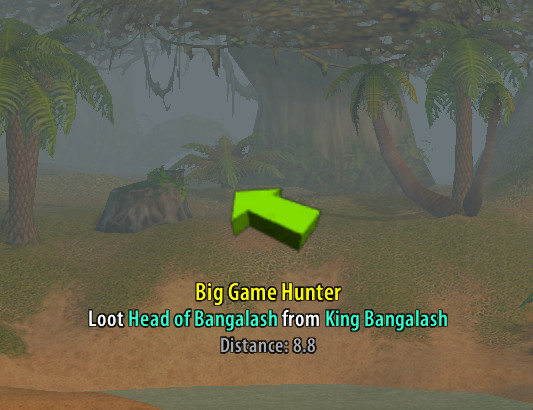
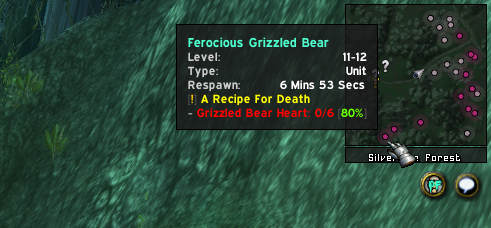
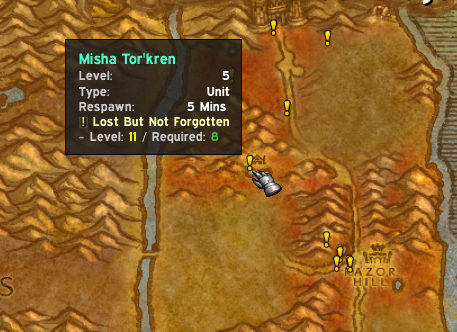
 # Auto-Tracking
 The addon features 4 different modes that define how the new or updated questobjectives should be handled. Those modes can be selected on the dropdown menu in the top-right area the map.
### Option: All Quests
Every quest will be automatically shown and updated on the map.
### Option: Tracked Quests
Only tracked quests (Shift-Click) will be automatically shown and updated on the map.
### Option: Manual Selection
Only quest objectives that have been manually displayed ("Show"-Button in the Questlog) will be displayed.
Completed quest objectives will be still automatically removed from the map.
### Option: Hide Quests
Same as "Manual Selection" and in addition to that, Quest-Givers won't be shown automatically.
Also completed quest objectives will remain on the map. This mode won't touch any of the map nodes created.
# Database Browser
The addon features 4 different modes that define how the new or updated questobjectives should be handled. Those modes can be selected on the dropdown menu in the top-right area the map.
### Option: All Quests
Every quest will be automatically shown and updated on the map.
### Option: Tracked Quests
Only tracked quests (Shift-Click) will be automatically shown and updated on the map.
### Option: Manual Selection
Only quest objectives that have been manually displayed ("Show"-Button in the Questlog) will be displayed.
Completed quest objectives will be still automatically removed from the map.
### Option: Hide Quests
Same as "Manual Selection" and in addition to that, Quest-Givers won't be shown automatically.
Also completed quest objectives will remain on the map. This mode won't touch any of the map nodes created.
# Database Browser
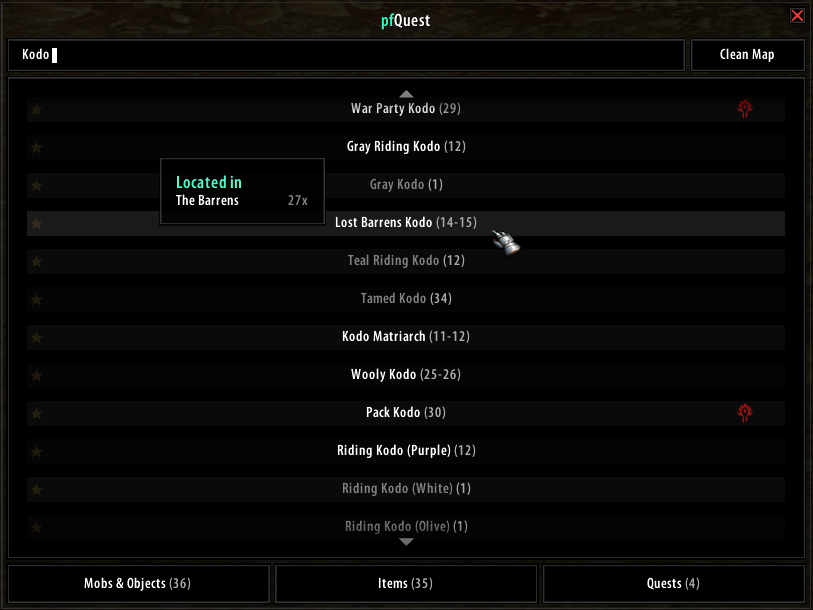
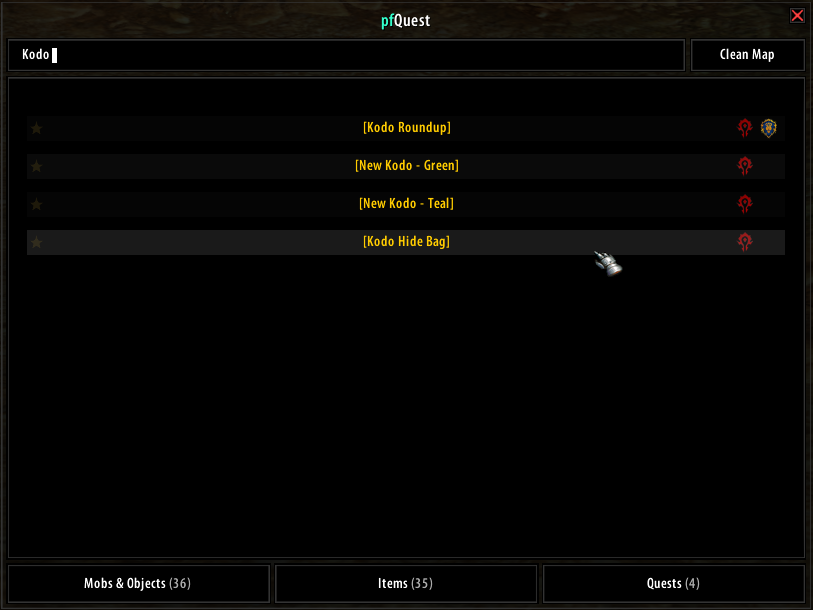
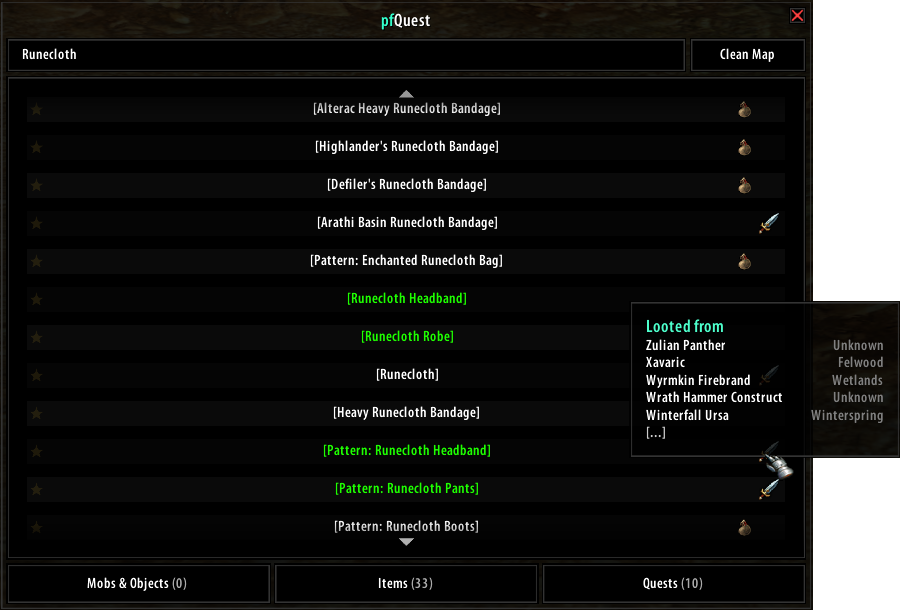 The database GUI allows you to bookmark and browse through all entries within the pfQuest database. It can be opened by a click on the pfQuest minimap icon or via `/db show`. The browser will show a maximum of 100 entries at once for each tab. Use your scrollwheel or press the up/down arrows to go up and down the list.
# Questlog Integration
### Questlinks
The database GUI allows you to bookmark and browse through all entries within the pfQuest database. It can be opened by a click on the pfQuest minimap icon or via `/db show`. The browser will show a maximum of 100 entries at once for each tab. Use your scrollwheel or press the up/down arrows to go up and down the list.
# Questlog Integration
### Questlinks
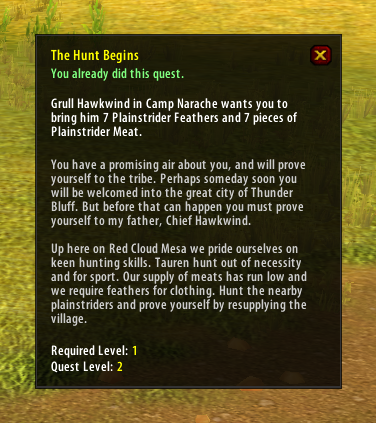 On servers that support questlinks, a shift-click on a selected quest will add a questlink into chat. Those links are similar to the known questlinks from TBC+ and are compatible to ones produced by [ShaguQuest](https://shagu.org/ShaguQuest/), [Questie](https://github.com/AeroScripts/QuestieDev) and [QuestLink](http://addons.us.to/addon/questlink-0). Please be aware that some servers (e.g Kronos) are blocking questlinks and you'll have to disable this feature in the pfQuest settings, in order to print the quest name into the chat instead of adding a questlink. Questlinks sent from pfQuest to pfQuest are locale independent and rely on the Quest ID.
The tooltip will display quest information such as your current state on the quest (new, in progress, already done) as well as the quest objective text and the full quest description. In addition to that, the suggested level and the minimum level are shown.
### Questlog Buttons
On servers that support questlinks, a shift-click on a selected quest will add a questlink into chat. Those links are similar to the known questlinks from TBC+ and are compatible to ones produced by [ShaguQuest](https://shagu.org/ShaguQuest/), [Questie](https://github.com/AeroScripts/QuestieDev) and [QuestLink](http://addons.us.to/addon/questlink-0). Please be aware that some servers (e.g Kronos) are blocking questlinks and you'll have to disable this feature in the pfQuest settings, in order to print the quest name into the chat instead of adding a questlink. Questlinks sent from pfQuest to pfQuest are locale independent and rely on the Quest ID.
The tooltip will display quest information such as your current state on the quest (new, in progress, already done) as well as the quest objective text and the full quest description. In addition to that, the suggested level and the minimum level are shown.
### Questlog Buttons
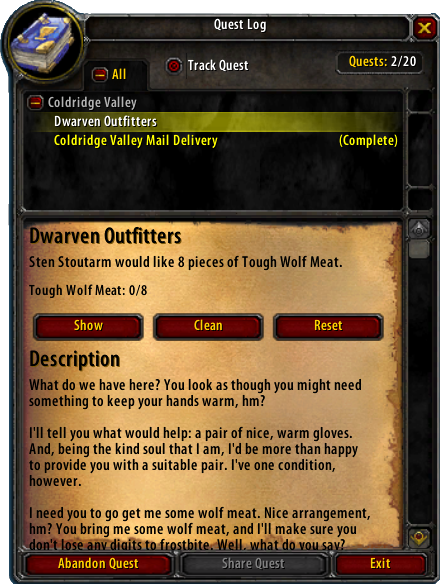 The questlog will show 4 additional buttons on each quest in order to provide easy manual quest tracking. Those buttons can be used to show or hide individual quests on the map. Those buttons won't affect the entries that you've placed by using the database browser.
**Show**
The "Show" button will add the questobjectives of the current quest to the map.
**Hide**
The "Hide" button will remove the current selected quest from the map.
**Clean**
The "Clean" button will remove all nodes that have been placed by pfQuest from the map.
**Reset**
The "Reset" button will restore the default visibility of icons to match the set values on the map dropdown menu (e.g "All Quests" by default).
# Chat/Macro CLI
The questlog will show 4 additional buttons on each quest in order to provide easy manual quest tracking. Those buttons can be used to show or hide individual quests on the map. Those buttons won't affect the entries that you've placed by using the database browser.
**Show**
The "Show" button will add the questobjectives of the current quest to the map.
**Hide**
The "Hide" button will remove the current selected quest from the map.
**Clean**
The "Clean" button will remove all nodes that have been placed by pfQuest from the map.
**Reset**
The "Reset" button will restore the default visibility of icons to match the set values on the map dropdown menu (e.g "All Quests" by default).
# Chat/Macro CLI
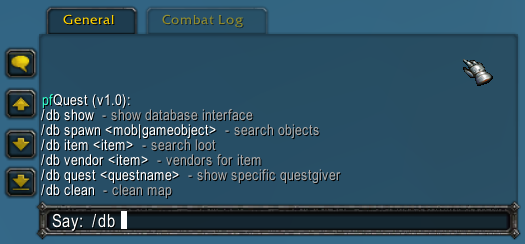 The addon features a CLI interface which allows you to easilly create macros to show your favourite herb or mining-veins. Let's say you want to display all **Iron Deposit** deposits, then type in chat or create a macro with the text: `/db object Iron Deposit`. You can also display all mines on the map by typing: `/db track mines`. This can be extended by giving the minimum and maximum required skill as paramter, like: `/db track mines 150 225` to display all ores between skill 150 and 225. The `mines` parameter can also be replaced by `herbs`, `rares`, `chests`, `taxi` and many more in order to show those instead. If `/db` doesn't work for you, there are also some other aliases available like `/shagu`, `pfquest` and `/pfdb`.
### Basic Commands
```
/db lock Lock map tracker
/db tracker Show map tracker
/db journal Show quest journal
/db arrow Show quest arrow
/db show Show database interface
/db config Show configuration interface
/db locale Display addon locales
/db scan Scan the server for custom items
```
### Questing
```
/db reset Reload all quests on map
/db query Query the server for completed quests
```
### Database
```
/db unit
The addon features a CLI interface which allows you to easilly create macros to show your favourite herb or mining-veins. Let's say you want to display all **Iron Deposit** deposits, then type in chat or create a macro with the text: `/db object Iron Deposit`. You can also display all mines on the map by typing: `/db track mines`. This can be extended by giving the minimum and maximum required skill as paramter, like: `/db track mines 150 225` to display all ores between skill 150 and 225. The `mines` parameter can also be replaced by `herbs`, `rares`, `chests`, `taxi` and many more in order to show those instead. If `/db` doesn't work for you, there are also some other aliases available like `/shagu`, `pfquest` and `/pfdb`.
### Basic Commands
```
/db lock Lock map tracker
/db tracker Show map tracker
/db journal Show quest journal
/db arrow Show quest arrow
/db show Show database interface
/db config Show configuration interface
/db locale Display addon locales
/db scan Scan the server for custom items
```
### Questing
```
/db reset Reload all quests on map
/db query Query the server for completed quests
```
### Database
```
/db unit