# StatCompare
**Repository Path**: lime_qing/StatCompare
## Basic Information
- **Project Name**: StatCompare
- **Description**: No description available
- **Primary Language**: Unknown
- **License**: Not specified
- **Default Branch**: master
- **Homepage**: None
- **GVP Project**: No
## Statistics
- **Stars**: 0
- **Forks**: 0
- **Created**: 2025-10-21
- **Last Updated**: 2025-10-21
## Categories & Tags
**Categories**: Uncategorized
**Tags**: None
## README
# StatCompare v2.0 for Vanilla World of Warcraft v 1.12.1
StatCompare adds a stats panel for gear checks or comparing your gear to another player.
## What does it show?
* Lists **stats**, **attack** power, **spell** power, **resistances**, **hit** and **crit** info
* Lists equipped **gear** and **enchants**
* * Great for **screenshotting gear** of players
* * Greatfor submitting **raid gear checks** (_especially so on servers that allow transmogrification_)
* Lists your **talent tree** summary (for submitting gear checks - lets raid leaders know you're, say, a Fire Mage not a Frost Mage)
* Lists **active buffs** (lets raid leaders know your stats might be inflated so you don't have to resubmit a screenshot)
* Lists custom private-server abilities such as **Haste** and **Vampirism** and talents like Crusader Strike (Turtle WoW)
## Screenshots
### View your own stats (e.g. for Gear Checks)
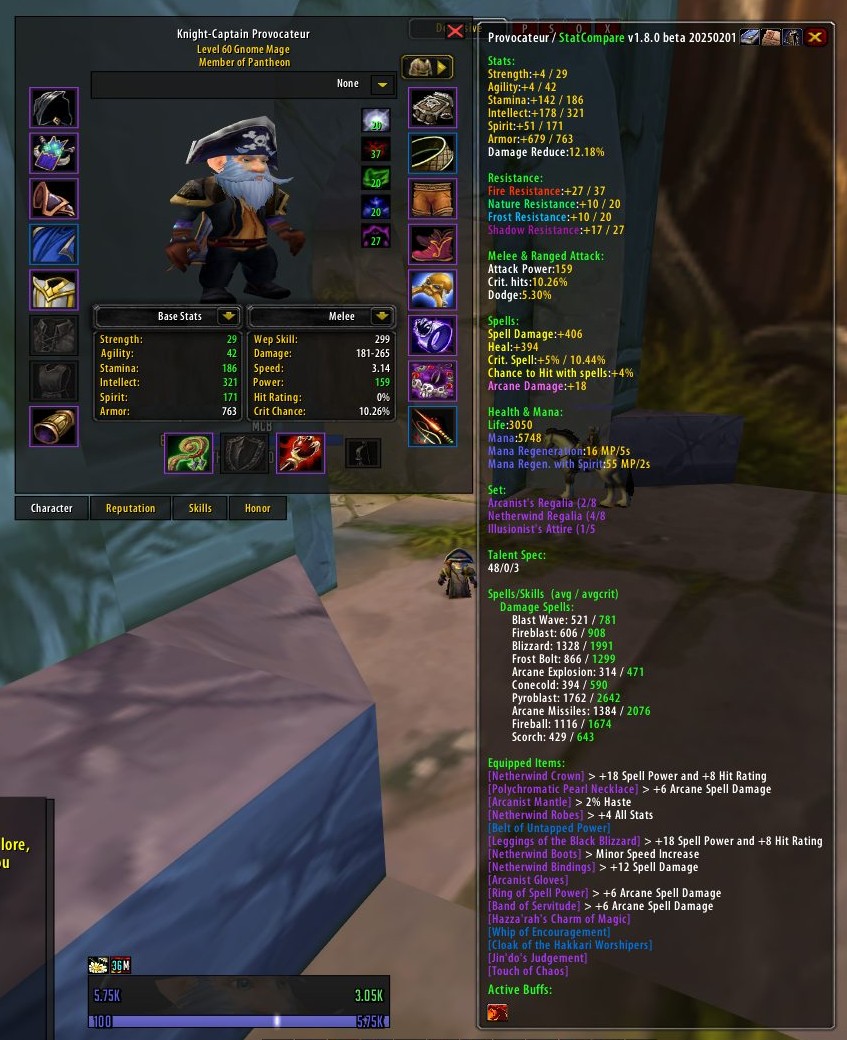
This screenshot shows all stats showing
Character's **Spell info** (toggle with  ),
**Stats** (toggle with
),
**Stats** (toggle with  ,
and **Armor/Enchants** (toggle with
,
and **Armor/Enchants** (toggle with  )
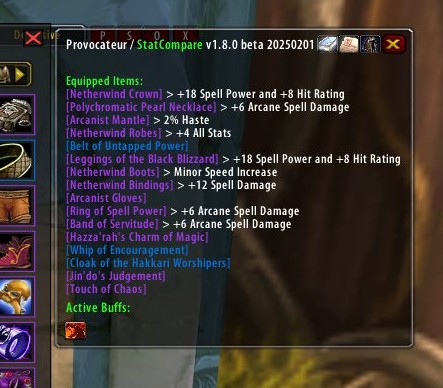
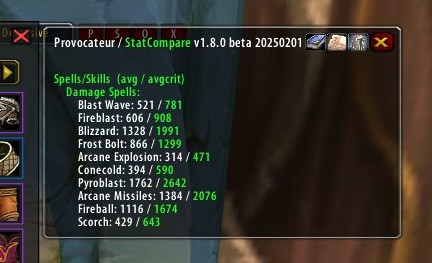
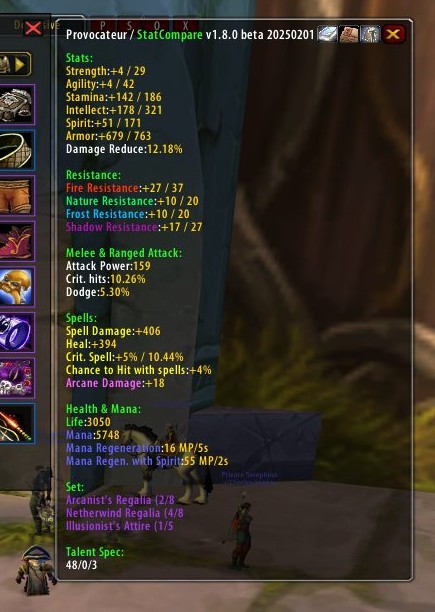
Examples of showing only what you want:
)

Examples of showing only what you want:
 ### Quickly review your target's stats
View detailed stats on your inspection target
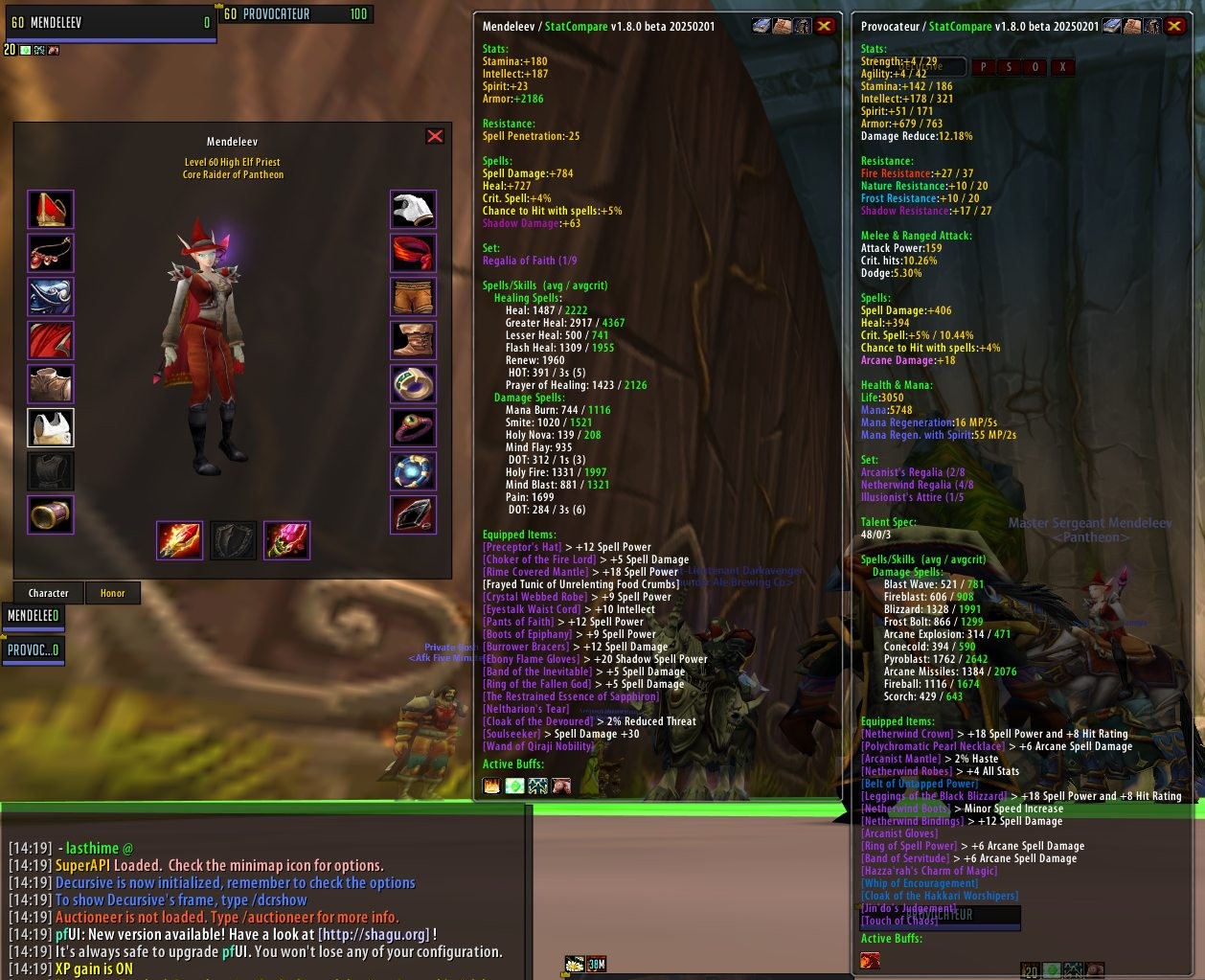
**Again - If this is too much information, just click the icons at the top-right to hide what you're not interested in.**
### 1.7 Screenshots
For comparison, here's the previous version (1.7)'s UI:

## Too long; Didn't Read
* _This version comes bundled with "StatCompareBuff", "StatCompareChar", "StatCompareSpell", "StatCompareArmor", "StatCompareBetterCharacterStats" and "StatCompareUI"._
* This addon was originally written in 2006 for what appears to be a primarily Chinese audience.
* [The Linae-Kronos version](https://github.com/Linae-Kronos/StatCompare) is a slightly updated one from 2007.
* [The shines77 version](https://gitee.com/shines77/TurtleWoW_AddOns) from 2020 is bundled with "child" addons, such as StatCompareBuffs. This addon is based on that codebase.
* Folder name was "StatCompare" and in-game name was "Character Status Compare", which was awkward and made it hard to find online, so I got rid of the "Character Status Compare" name in the English name of the addon.
## Installation
1. Close any instance of WoW
2. Download **[StatCompare Zip file](https://github.com/grimfiendish/StatCompare/archive/master.zip)**
3. Extract the zip file wherever you want
4. Copy the folder "StatCompare" to Wow_Folder\Interface\AddOns. Your addon folder should look like this :
```
├── WoW_Folder
├── Interface
├── Addons
├── StatCompare
├── StatCompare.toc
```
## Configuration
```
/statc on | off - Turns on/off the addon
/statc debug on | off - Prints debug information. Primarily useful if you discover an enchant is displaying incorrectly, it will show the effect ID in the Stat panel. Send a bug ticket on the github page, [here](https://github.com/grimfiendish/StatCompare/).
```
## Found a bug?
If you find an issue with the enchants, turn on debugging with `/statc debug on` then send me the ID and the correct name of the enchant via a bug ticket on [the project's github page](https://github.com/grimfiendish/StatCompare). If you're on a custom server, note that.
### Quickly review your target's stats
View detailed stats on your inspection target

**Again - If this is too much information, just click the icons at the top-right to hide what you're not interested in.**
### 1.7 Screenshots
For comparison, here's the previous version (1.7)'s UI:

## Too long; Didn't Read
* _This version comes bundled with "StatCompareBuff", "StatCompareChar", "StatCompareSpell", "StatCompareArmor", "StatCompareBetterCharacterStats" and "StatCompareUI"._
* This addon was originally written in 2006 for what appears to be a primarily Chinese audience.
* [The Linae-Kronos version](https://github.com/Linae-Kronos/StatCompare) is a slightly updated one from 2007.
* [The shines77 version](https://gitee.com/shines77/TurtleWoW_AddOns) from 2020 is bundled with "child" addons, such as StatCompareBuffs. This addon is based on that codebase.
* Folder name was "StatCompare" and in-game name was "Character Status Compare", which was awkward and made it hard to find online, so I got rid of the "Character Status Compare" name in the English name of the addon.
## Installation
1. Close any instance of WoW
2. Download **[StatCompare Zip file](https://github.com/grimfiendish/StatCompare/archive/master.zip)**
3. Extract the zip file wherever you want
4. Copy the folder "StatCompare" to Wow_Folder\Interface\AddOns. Your addon folder should look like this :
```
├── WoW_Folder
├── Interface
├── Addons
├── StatCompare
├── StatCompare.toc
```
## Configuration
```
/statc on | off - Turns on/off the addon
/statc debug on | off - Prints debug information. Primarily useful if you discover an enchant is displaying incorrectly, it will show the effect ID in the Stat panel. Send a bug ticket on the github page, [here](https://github.com/grimfiendish/StatCompare/).
```
## Found a bug?
If you find an issue with the enchants, turn on debugging with `/statc debug on` then send me the ID and the correct name of the enchant via a bug ticket on [the project's github page](https://github.com/grimfiendish/StatCompare). If you're on a custom server, note that.