# label-studio
**Repository Path**: kabobobo/label-studio
## Basic Information
- **Project Name**: label-studio
- **Description**: Label Studio是一个开源的,可配置的数据注释工具
- **Primary Language**: Unknown
- **License**: Apache-2.0
- **Default Branch**: master
- **Homepage**: None
- **GVP Project**: No
## Statistics
- **Stars**: 0
- **Forks**: 21
- **Created**: 2020-03-20
- **Last Updated**: 2020-12-19
## Categories & Tags
**Categories**: Uncategorized
**Tags**: None
## README
# Label Studio ·     ·
[Website](https://labelstud.io/) • [Docs](https://labelstud.io/guide/) • [Twitter](https://twitter.com/heartexlabs) • [Join Slack Community  ](https://join.slack.com/t/label-studio/shared_invite/zt-cr8b7ygm-6L45z7biEBw4HXa5A2b5pw)
**Label Studio is a swiss army knife of data labeling and annotation tools :v:**
Try it now in a **[running app](https://app.labelstud.io)** and check out the **[introductory post](https://towardsdatascience.com/introducing-label-studio-a-swiss-army-knife-of-data-labeling-140c1be92881#3907-fd502dc24c8d)**.
Its purpose is to help you label different types of data using a simple interface with a standardized output format. You're dealing with the custom dataset and thinking about creating your tool? Don't - using Label Studio, you can save time and create a custom tool and interface in minutes.
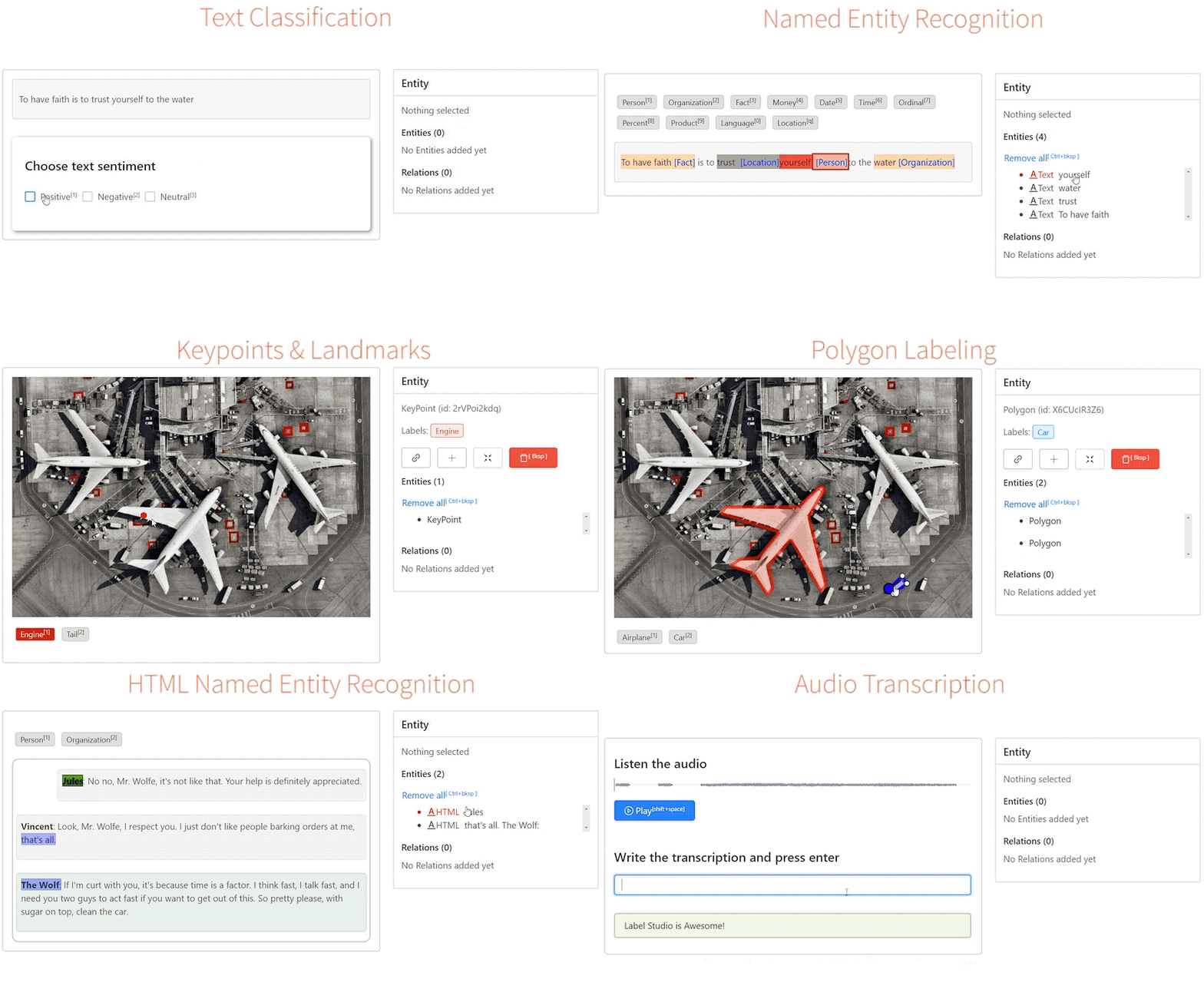
## Summary
 - [Quick Start](#quick-start)
- [One Click Deploy](#one-click-deploy)
- [Features :star2:](#features-star2)
- [Use Cases](#use-cases)
- [Machine Learning Integration](#machine-learning-integration)
- [For Teams and Enterprises :office:](#label-studio-for-teams-startups-and-enterprises-office)
- [Ecosystem](#ecosystem)
- [License](#license)
## Quick Start
```bash
# Requires >=Python3.5
pip install label-studio
# Initialize the project in labeling_project path
label-studio init labeling_project
# Start the server at http://localhost:8080
label-studio start labeling_project
```
#### Install on Windows
For running on Windows, the following wheel packages are needed to be manually downloaded from [Gohlke builds](https://www.lfd.uci.edu/~gohlke/pythonlibs), by ensuring the right python version:
- [lxml](https://www.lfd.uci.edu/~gohlke/pythonlibs/#lxml)
Install Label Studio:
```bash
# Upgrade pip
pip install -U pip
# Assuming you are running Win64 with Python 3.8, install packages downloaded form Gohlke:
pip install lxml‑4.5.0‑cp38‑cp38‑win_amd64.whl
# Install label studio
pip install label-studio
```
#### Install from Anaconda
```bash
conda create --name label-studio python=3.8
conda activate label-studio
pip install label-studio
```
If you see any errors during installation, try to rerun installation
```bash
pip install --ignore-installed label-studio
```
#### Local development
Running the latest Label Studio version locally without installing package from pip could be done by:
```bash
# Install all package dependencies
pip install -e .
```
```bash
# Start the server at http://localhost:8080
python label_studio/server.py start labeling_project --init
```
## Run docker
You can also start serving at `http://localhost:8080` by using docker:
```bash
docker run --rm -p 8080:8080 -v `pwd`/my_project:/label-studio/my_project --name label-studio heartexlabs/label-studio:latest label-studio start my_project --init
```
By default, it starts blank project in `./my_project` directory.
> Note: if `./my_project` folder exists, an exception will be thrown. Please delete this folder or use `--force` option.
You can override the default startup command by appending:
```bash
docker run -p 8080:8080 -v `pwd`/my_project:/label-studio/my_project --name label-studio heartexlabs/label-studio:latest label-studio start my_project --init --force --template text_classification
```
If you want to build a local image, run:
```bash
docker build -t heartexlabs/label-studio:latest .
```
## Using docker-compose
You can also start serving at `http://localhost:8080` using docker-compose.
### First time to run the app
```bash
INIT_COMMAND='--init' docker-compose up -d
```
### Run the app with existing project data
```bash
docker-compose up -d
```
### Run the app reseting project data
```bash
INIT_COMMAND='--init --force' docker-compose up -d
```
Or you can just use .env file instead of INIT_COMMAND='...' adding this line:
```bash
INIT_COMMAND=--init --force
```
## One Click Deploy
[
- [Quick Start](#quick-start)
- [One Click Deploy](#one-click-deploy)
- [Features :star2:](#features-star2)
- [Use Cases](#use-cases)
- [Machine Learning Integration](#machine-learning-integration)
- [For Teams and Enterprises :office:](#label-studio-for-teams-startups-and-enterprises-office)
- [Ecosystem](#ecosystem)
- [License](#license)
## Quick Start
```bash
# Requires >=Python3.5
pip install label-studio
# Initialize the project in labeling_project path
label-studio init labeling_project
# Start the server at http://localhost:8080
label-studio start labeling_project
```
#### Install on Windows
For running on Windows, the following wheel packages are needed to be manually downloaded from [Gohlke builds](https://www.lfd.uci.edu/~gohlke/pythonlibs), by ensuring the right python version:
- [lxml](https://www.lfd.uci.edu/~gohlke/pythonlibs/#lxml)
Install Label Studio:
```bash
# Upgrade pip
pip install -U pip
# Assuming you are running Win64 with Python 3.8, install packages downloaded form Gohlke:
pip install lxml‑4.5.0‑cp38‑cp38‑win_amd64.whl
# Install label studio
pip install label-studio
```
#### Install from Anaconda
```bash
conda create --name label-studio python=3.8
conda activate label-studio
pip install label-studio
```
If you see any errors during installation, try to rerun installation
```bash
pip install --ignore-installed label-studio
```
#### Local development
Running the latest Label Studio version locally without installing package from pip could be done by:
```bash
# Install all package dependencies
pip install -e .
```
```bash
# Start the server at http://localhost:8080
python label_studio/server.py start labeling_project --init
```
## Run docker
You can also start serving at `http://localhost:8080` by using docker:
```bash
docker run --rm -p 8080:8080 -v `pwd`/my_project:/label-studio/my_project --name label-studio heartexlabs/label-studio:latest label-studio start my_project --init
```
By default, it starts blank project in `./my_project` directory.
> Note: if `./my_project` folder exists, an exception will be thrown. Please delete this folder or use `--force` option.
You can override the default startup command by appending:
```bash
docker run -p 8080:8080 -v `pwd`/my_project:/label-studio/my_project --name label-studio heartexlabs/label-studio:latest label-studio start my_project --init --force --template text_classification
```
If you want to build a local image, run:
```bash
docker build -t heartexlabs/label-studio:latest .
```
## Using docker-compose
You can also start serving at `http://localhost:8080` using docker-compose.
### First time to run the app
```bash
INIT_COMMAND='--init' docker-compose up -d
```
### Run the app with existing project data
```bash
docker-compose up -d
```
### Run the app reseting project data
```bash
INIT_COMMAND='--init --force' docker-compose up -d
```
Or you can just use .env file instead of INIT_COMMAND='...' adding this line:
```bash
INIT_COMMAND=--init --force
```
## One Click Deploy
[ ](https://heroku.com/deploy)
[
](https://heroku.com/deploy)
[ ](https://azuredeploy.net/)
[
](https://azuredeploy.net/)
[ ](https://deploy.cloud.run)
## Features :star2:
- **Simple**: Crafted with minimal UI design. A simple design is the best design.
- **Configurable**: Using high-level jsx tags config, you can fully customize the visual interface for your data. It feels like building a custom labeling tool for your specific needs. And it's fast to do.
- **Collaborative Annotations**: Label the same task by two or more people and compare the results.
- **Multiple Data Types**: Label _Images_, _Audios_, _Texts_, _HTMLs_, _Pairwise_ types with different labeling scenarios that you define yourself.
- **Import Formats**: JSON, CSV, TSV, RAR and ZIP archives
- **Mobile-Friendly**: Works on devices of different sizes.
- **Embeddable**: It's an [NPM package](https://github.com/heartexlabs/label-studio-frontend) too. You can include it in your projects.
- **Machine Learning**: Integration support for machine learning. Visualize and compare predictions from different models. Use the best ones for pre-labeling.
- **Stylable**: Configure the visual appearance to match your company brand, distribute the labeling tasks as a part of your product.
- **Amazon S3 and Google GCS**: [Read more](https://labelstud.io/blog/release-070-cloud-storage-enablement.html) about Cloud Storages Support and release 0.7.0.
## Use Cases
The list of supported use cases for data annotation. Please contribute your own configs and feel free to extend the base types to support more scenarios. Note that it's not an extensive list and has only major scenarios.
| Task | Description |
|-|-|
| **Image** | |
| [Classification](https://labelstud.io/templates/image_classification.html) | Put images into categories |
| Object Detection | Detect objects in an image using a bounding box or polygons |
| Semantic Segmentation | Detect for each pixel the object category it belongs to |
| Pose Estimation | Mark positions of a person’s joints |
| **Text** | |
| [Classification](https://labelstud.io/templates/sentiment_analysis.html) | Put texts into categories |
| Summarization | Create a summary that represents the most relevant information within the original content |
| HTML Tagging | Annotate things like resumes, research, legal papers and excel sheet converted to HTML |
| **Audio** | |
| [Classification](https://labelstud.io/templates/audio_classification.html) | Put audios into categories |
| Speaker Diarisation | partitioning an input audio stream into homogeneous segments according to the speaker identity |
| Emotion Recognition | Tag and identifying emotion from the audio |
| Transcription | Write down verbal communication in text |
| **Video** | |
| [Classification](https://labelstud.io/templates/video_classification.html) | Put videos into categories |
| **Comparison** | |
| Pairwise | Comparing entities in pairs to judge which of each entity is preferred |
| Ranking | Sort items in the list according to some property |
## Machine Learning Integration
You can easily connect your favorite machine learning framework with Label Studio Machine Learning SDK. It's done in the simple 2 steps:
1. Start your own ML backend server ([check here for detailed instructions](label_studio/ml/README.md)),
2. Connect Label Studio to the running ML backend on [/model](http://localhost:8080/model.html) page
That gives you the opportunities to use:
- **Pre-labeling**: Use model predictions for pre-labeling (e.g. make use on-the-fly model predictions for creating rough image segmentations for further manual refinements)
- **Autolabeling**: Create automatic annotations
- **Online Learning**: Simultaneously update (retrain) your model while new annotations are coming
- **Active Learning**: Perform labeling in active learning mode - select only most complex examples
- **Prediction Service**: Instantly create running production-ready prediction service
## Label Studio for Teams, Startups, and Enterprises :office:
Label Studio for Teams is our enterprise edition (cloud & on-prem), that includes a data manager, high-quality baseline models, active learning, collaborators support, and more. Please visit the [website](https://www.heartex.ai/) to learn more.
## Ecosystem
| Project | Description |
|-|-|
| label-studio | Server part, distributed as a pip package |
| [label-studio-frontend](https://github.com/heartexlabs/label-studio-frontend) | Frontend part, written in JavaScript and React, can be embedded into your application |
| [label-studio-converter](https://github.com/heartexlabs/label-studio-converter) | Encode labels into the format of your favorite machine learning library |
| [label-studio-transformers](https://github.com/heartexlabs/label-studio-transformers) | Transformers library connected and configured for use with label studio |
## Citation
```tex
@misc{Label Studio,
title={{Label Studio}: Data labeling software},
url={https://github.com/heartexlabs/label-studio},
note={Open source software available from https://github.com/heartexlabs/label-studio},
author={
Maxim Tkachenko and
Mikhail Malyuk and
Nikita Shevchenko and
Andrey Holmanyuk and
Nikolai Liubimov},
year={2020},
}
```
## License
This software is licensed under the [Apache 2.0 LICENSE](/LICENSE) © [Heartex](https://www.heartex.ai/). 2020
](https://deploy.cloud.run)
## Features :star2:
- **Simple**: Crafted with minimal UI design. A simple design is the best design.
- **Configurable**: Using high-level jsx tags config, you can fully customize the visual interface for your data. It feels like building a custom labeling tool for your specific needs. And it's fast to do.
- **Collaborative Annotations**: Label the same task by two or more people and compare the results.
- **Multiple Data Types**: Label _Images_, _Audios_, _Texts_, _HTMLs_, _Pairwise_ types with different labeling scenarios that you define yourself.
- **Import Formats**: JSON, CSV, TSV, RAR and ZIP archives
- **Mobile-Friendly**: Works on devices of different sizes.
- **Embeddable**: It's an [NPM package](https://github.com/heartexlabs/label-studio-frontend) too. You can include it in your projects.
- **Machine Learning**: Integration support for machine learning. Visualize and compare predictions from different models. Use the best ones for pre-labeling.
- **Stylable**: Configure the visual appearance to match your company brand, distribute the labeling tasks as a part of your product.
- **Amazon S3 and Google GCS**: [Read more](https://labelstud.io/blog/release-070-cloud-storage-enablement.html) about Cloud Storages Support and release 0.7.0.
## Use Cases
The list of supported use cases for data annotation. Please contribute your own configs and feel free to extend the base types to support more scenarios. Note that it's not an extensive list and has only major scenarios.
| Task | Description |
|-|-|
| **Image** | |
| [Classification](https://labelstud.io/templates/image_classification.html) | Put images into categories |
| Object Detection | Detect objects in an image using a bounding box or polygons |
| Semantic Segmentation | Detect for each pixel the object category it belongs to |
| Pose Estimation | Mark positions of a person’s joints |
| **Text** | |
| [Classification](https://labelstud.io/templates/sentiment_analysis.html) | Put texts into categories |
| Summarization | Create a summary that represents the most relevant information within the original content |
| HTML Tagging | Annotate things like resumes, research, legal papers and excel sheet converted to HTML |
| **Audio** | |
| [Classification](https://labelstud.io/templates/audio_classification.html) | Put audios into categories |
| Speaker Diarisation | partitioning an input audio stream into homogeneous segments according to the speaker identity |
| Emotion Recognition | Tag and identifying emotion from the audio |
| Transcription | Write down verbal communication in text |
| **Video** | |
| [Classification](https://labelstud.io/templates/video_classification.html) | Put videos into categories |
| **Comparison** | |
| Pairwise | Comparing entities in pairs to judge which of each entity is preferred |
| Ranking | Sort items in the list according to some property |
## Machine Learning Integration
You can easily connect your favorite machine learning framework with Label Studio Machine Learning SDK. It's done in the simple 2 steps:
1. Start your own ML backend server ([check here for detailed instructions](label_studio/ml/README.md)),
2. Connect Label Studio to the running ML backend on [/model](http://localhost:8080/model.html) page
That gives you the opportunities to use:
- **Pre-labeling**: Use model predictions for pre-labeling (e.g. make use on-the-fly model predictions for creating rough image segmentations for further manual refinements)
- **Autolabeling**: Create automatic annotations
- **Online Learning**: Simultaneously update (retrain) your model while new annotations are coming
- **Active Learning**: Perform labeling in active learning mode - select only most complex examples
- **Prediction Service**: Instantly create running production-ready prediction service
## Label Studio for Teams, Startups, and Enterprises :office:
Label Studio for Teams is our enterprise edition (cloud & on-prem), that includes a data manager, high-quality baseline models, active learning, collaborators support, and more. Please visit the [website](https://www.heartex.ai/) to learn more.
## Ecosystem
| Project | Description |
|-|-|
| label-studio | Server part, distributed as a pip package |
| [label-studio-frontend](https://github.com/heartexlabs/label-studio-frontend) | Frontend part, written in JavaScript and React, can be embedded into your application |
| [label-studio-converter](https://github.com/heartexlabs/label-studio-converter) | Encode labels into the format of your favorite machine learning library |
| [label-studio-transformers](https://github.com/heartexlabs/label-studio-transformers) | Transformers library connected and configured for use with label studio |
## Citation
```tex
@misc{Label Studio,
title={{Label Studio}: Data labeling software},
url={https://github.com/heartexlabs/label-studio},
note={Open source software available from https://github.com/heartexlabs/label-studio},
author={
Maxim Tkachenko and
Mikhail Malyuk and
Nikita Shevchenko and
Andrey Holmanyuk and
Nikolai Liubimov},
year={2020},
}
```
## License
This software is licensed under the [Apache 2.0 LICENSE](/LICENSE) © [Heartex](https://www.heartex.ai/). 2020
