# flutter_downloaderr
**Repository Path**: inoya/flutter_downloaderr
## Basic Information
- **Project Name**: flutter_downloaderr
- **Description**: No description available
- **Primary Language**: Unknown
- **License**: BSD-3-Clause
- **Default Branch**: master
- **Homepage**: None
- **GVP Project**: No
## Statistics
- **Stars**: 0
- **Forks**: 0
- **Created**: 2019-02-17
- **Last Updated**: 2020-12-19
## Categories & Tags
**Categories**: Uncategorized
**Tags**: None
## README
 # Flutter Downloader
[](https://pub.dartlang.org/packages/flutter_downloader)
A plugin for creating and managing download tasks. Supports iOS and Android.
This plugin is based on [`WorkManager`][1] in Android and [`NSURLSessionDownloadTask`][2] in iOS to run download task in background mode.
## iOS integration
### Required configuration:
**Note:** following steps requires to open your `ios` project in Xcode.
* Enable background mode.
# Flutter Downloader
[](https://pub.dartlang.org/packages/flutter_downloader)
A plugin for creating and managing download tasks. Supports iOS and Android.
This plugin is based on [`WorkManager`][1] in Android and [`NSURLSessionDownloadTask`][2] in iOS to run download task in background mode.
## iOS integration
### Required configuration:
**Note:** following steps requires to open your `ios` project in Xcode.
* Enable background mode.
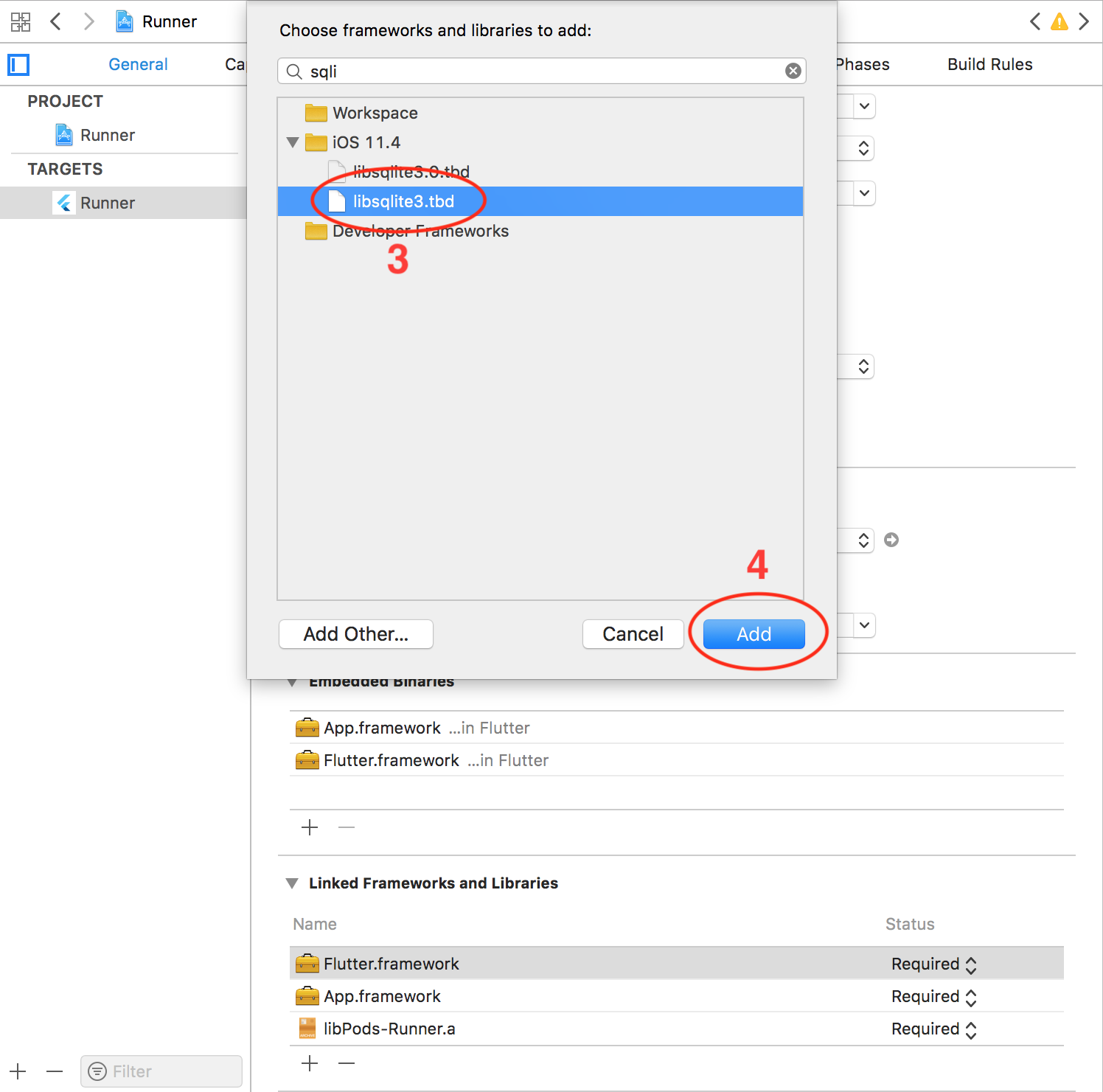
 * Add `sqlite` library.

### Optional configuration:
* **Support HTTP request:** if you want to download file with HTTP request, you need to disable Apple Transport Security (ATS) feature. There're two options:
1. Disable ATS for a specific domain only: (add following codes to your `Info.plist` file)
````xml
NSAppTransportSecurity
NSExceptionDomains
www.yourserver.com
NSIncludesSubdomains
NSTemporaryExceptionAllowsInsecureHTTPLoads
NSTemporaryExceptionMinimumTLSVersion
TLSv1.1
````
2. Completely disable ATS: (add following codes to your `Info.plist` file)
````xml
NSAppTransportSecurity
NSAllowsArbitraryLoads
````
* **Configure maximum number of concurrent tasks:** the plugin allows 3 download tasks running at a moment by default (if you enqueue more than 3 tasks, there're only 3 tasks running, other tasks are put in pending state). You can change this number by adding following codes to your `Info.plist` file.
````xml
FDMaximumConcurrentTasks
5
````
* **Localize notification messages:** the plugin will send a notification message to notify user in case all files are downloaded while your application is not running in foreground. This message is English by default. You can localize this message by adding and localizing following message in `Info.plist` file. (you can find the detail of `Info.plist` localization in this [link][3])
````xml
FDAllFilesDownloadedMessage
All files have been downloaded
````
## Android integration
### Required configuration:
* In order to handle click action on notification to open the downloaded file on Android, you need to add some additional configurations. Add the following codes to your `AndroidManifest.xml`:
````xml
````
**Note:**
- You have to save your downloaded files in external storage (where the other applications have permission to read your files)
- The downloaded files are only able to be opened if your device has at least an application that can read these file types (mp3, pdf, etc)
### Optional configuration:
* **Configure maximum number of concurrent tasks:** the plugin depends on `WorkManager` library and `WorkManager` depends on the number of available processor to configure the maximum number of tasks running at a moment. You can setup a fixed number for this configuration by adding following codes to your `AndroidManifest.xml`:
````xml
````
* **Localize notification messages:** you can localize notification messages of download progress by localizing following messages. (you can find the detail of string localization in Android in this [link][4])
````xml
Download started
Download in progress
Download canceled
Download failed
Download complete
Download paused
````
* **Firebase integration:** there's a conflict problem between `WorkManager` and `Firebase` library (related to `Guava` library). The problem is expected to be resolved in new version of `Guava` and `Gradle` build tools. For now, you can work around it by adding some codes to your `build.gradle` (in `android` folder).
````gradle
allprojects {
...
configurations.all {
exclude group: 'com.google.guava', module: 'failureaccess'
resolutionStrategy {
eachDependency { details ->
if('guava' == details.requested.name) {
details.useVersion '27.0-android'
}
}
}
}
}
````
## Usage
#### Import package:
````dart
import 'package:flutter_downloader/flutter_downloader.dart';
````
#### Create new download task:
````dart
final taskId = await FlutterDownloader.enqueue(
url: 'your download link',
savedDir: 'the path of directory where you want to save downloaded files',
showNotification: true, // show download progress in status bar (for Android)
openFileFromNotification: true, // click on notification to open downloaded file (for Android)
);
````
#### Update download progress:
````dart
FlutterDownloader.registerCallback((id, status, progress) {
// code to update your UI
});
````
- Note: set `callback` as `null` to remove listener. You should clean up callback to prevent from leaking references.
#### Load all tasks:
````dart
final tasks = await FlutterDownloader.loadTasks();
````
#### Load tasks with conditions:
````dart
final tasks = await FlutterDownloader.loadTasksWithRawQuery(query: query);
````
- Note: In order to parse data into `DownloadTask` object successfully, you should load data with all fields from DB (in the other word, use: `SELECT *` ). For example:
````SQL
SELECT * FROM task WHERE status=3
````
- Note: the following is the schema of `task` table where this plugin stores tasks information
````SQL
CREATE TABLE `task` (
`id` INTEGER PRIMARY KEY AUTOINCREMENT,
`task_id` VARCHAR ( 256 ),
`url` TEXT,
`status` INTEGER DEFAULT 0,
`progress` INTEGER DEFAULT 0,
`file_name` TEXT,
`saved_dir` TEXT,
`resumable` TINYINT DEFAULT 0,
`headers` TEXT,
`show_notification` TINYINT DEFAULT 0,
`open_file_from_notification` TINYINT DEFAULT 0,
`time_created` INTEGER DEFAULT 0
);
````
#### Cancel a task:
````dart
FlutterDownloader.cancel(taskId: taskId);
````
#### Cancel all tasks:
````dart
FlutterDownloader.cancelAll();
````
#### Pause a task:
````dart
FlutterDownloader.pause(taskId: taskId);
````
#### Resume a task:
````dart
FlutterDownloader.resume(taskId: taskId);
````
- Note: `resume()` will return a new `taskId` corresponding to a new background task that is created to continue the download process. You should replace the original `taskId` (that is marked as `paused` status) by this new `taskId` to continue tracking the download progress.
#### Retry a failed task:
````dart
FlutterDownloader.retry(taskId: taskId);
````
- Note: `retry()` will return a new `taskId` (like `resume()`)
#### Remove a task:
```dart
FlutterDownloader.remove(taskId: taskId, shouldDeleteContent:false);
```
#### Open and preview a downloaded file:
````dart
FlutterDownloader.open(taskId: taskId);
````
- Note: in Android, you can only open a downloaded file if it is placed in the external storage and there's at least one application that can read that file type on your device.
## Bugs/Requests
If you encounter any problems feel free to open an issue. If you feel the library is
missing a feature, please raise a ticket on Github. Pull request are also welcome.
[1]: https://developer.android.com/topic/libraries/architecture/workmanager
[2]: https://developer.apple.com/documentation/foundation/nsurlsessiondownloadtask?language=objc
[3]: https://medium.com/@guerrix/info-plist-localization-ad5daaea732a
[4]: https://developer.android.com/training/basics/supporting-devices/languages