# nova-dashboard
**Repository Path**: imcheese/nova-dashboard
## Basic Information
- **Project Name**: nova-dashboard
- **Description**: No description available
- **Primary Language**: Unknown
- **License**: MIT
- **Default Branch**: main
- **Homepage**: None
- **GVP Project**: No
## Statistics
- **Stars**: 0
- **Forks**: 0
- **Created**: 2026-01-29
- **Last Updated**: 2026-01-29
## Categories & Tags
**Categories**: Uncategorized
**Tags**: None
## README
# Nova Dashboard
[](https://packagist.org/packages/digital-creative/nova-dashboard)
[](https://packagist.org/packages/digital-creative/nova-dashboard)
[](https://github.com/dcasia/nova-dashboard/blob/main/LICENSE)
The missing dashboard for Laravel Nova!
# Installation
You can install the package via composer:
```
composer require digital-creative/nova-dashboard
```
## List of current available widgets:
- Value Widget: [https://github.com/dcasia/value-widget](https://github.com/dcasia/value-widget)
- Table Widget: [https://github.com/dcasia/table-widget](https://github.com/dcasia/table-widget)
- ChartJs Widget: [https://github.com/dcasia/chartjs-widget](https://github.com/dcasia/chartjs-widget)
- [Add your widget here.](https://github.com/dcasia/nova-dashboard/edit/main/README.md)
## Usage
The dashboard itself is simply a standard Laravel Nova card, so you can use it either as a card on any resource
or within the default Nova dashboard functionality.
```php
use DigitalCreative\NovaDashboard\Card\NovaDashboard;
use DigitalCreative\NovaDashboard\Card\View;
use Laravel\Nova\Dashboards\Main as Dashboard;
class Main extends Dashboard
{
public function cards(): array
{
return [
NovaDashboard::make()
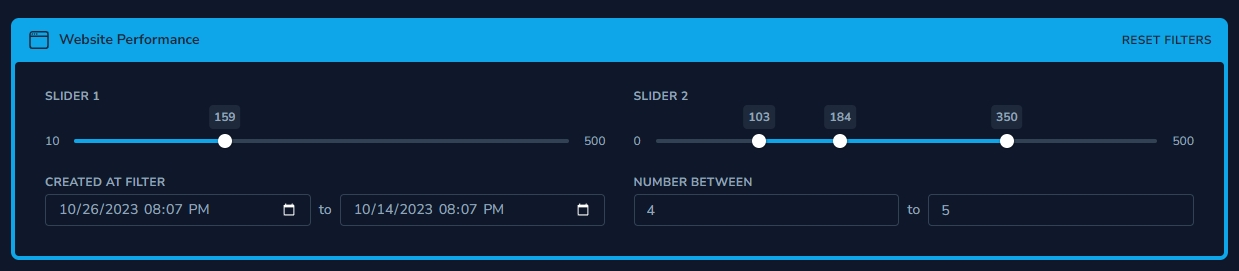
->addView('Website Performance', function (View $view) {
return $view
->icon('window')
->addWidgets([
BounceRate::make(),
ConversionRate::make(),
WebsiteTraffic::make(),
SessionDuration::make(),
])
->addFilters([
LocationFilter::make(),
UserTypeFilter::make(),
DateRangeFilter::make(),
]);
}),
];
}
}
```
#### Static
By default, each widget is draggable, and the user is able to rearrange it to their liking.
This behavior can be disabled by calling `$view->static()`.
## Widgets
The widgets are responsible for displaying your data on your views; they are essentially standard Nova cards.
However, they respond to dashboard events and reload their data whenever the filters change.
Once you have a widget, they are usually configured like this:
```php
class MyCustomWidget extends ValueWidget
{
/**
* Here you can configure your widget by calling whatever options are available for each widget
*/
public function configure(NovaRequest $request): void
{
$this->icon('');
$this->title('Session Duration');
$this->textColor('#f95738');
$this->backgroundColor('#f957384f');
}
/**
* This function is responsible for returning the actual data that will be shown on the widget,
* each widget expects its own format, so please refer to the widget documentation
*/
public function value(Filters $filters): mixed
{
/**
* $filters contain all the set values from the filters that were shown on the frontend.
* You can retrieve them and implement any custom logic you may have.
*/
$filterValue = $filters->getFilterValue(LikesFilter::class);
return 'example';
}
}
```
All widgets have common methods to configure their size and position.
The value is not in pixels but in grid units, ranging from `1` to `12` (corresponding to 12 columns).
```php
$widget->layout(width: 2, height: 1, x: 0, y: 1);
$widget->minWidth(2);
$widget->minHeight(1);
```
## Filters
These are standard nova filter classes with 1 simple difference, the method `->apply()` does not get called by default. Why?
```php
use Illuminate\Http\Request;
use Laravel\Nova\Filters\BooleanFilter;
class ExampleFilter extends BooleanFilter
{
public function apply(Request $request, $query, $value)
{
// this function is required however it is not used by the nova-dashboard
}
}
```
Usually your widget `->value()` function will receive an instance of `DigitalCreative\NovaDashboard\Filters` this class
contains a method for retrieving the value of any given filter, for example:
```php
class SessionDuration extends ValueWidget
{
public function value(Filters $filters): mixed
{
$filterA = $filters->getFilterValue(YourFilterClass::class);
$filterB = $filters->getFilterValue(YourSecondFilterClass::class);
}
}
```
However, if you want to reuse the logic that you have previously set on your filters or share existing filters with
the dashboard you can call the method `->applyToQueryBuilder()` to get the same behavior:
```php
class SessionDuration extends ValueWidget
{
public function value(Filters $filters): mixed
{
$result = $filters->applyToQueryBuilder(User::query())->get();
}
}
```
`->applyToQueryBuilder()` will run every filter through the default filter logic of nova.
## ⭐️ Show Your Support
Please give a ⭐️ if this project helped you!
### Other Packages You Might Like
- [Nova Dashboard](https://github.com/dcasia/nova-dashboard) - The missing dashboard for Laravel Nova!
- [Nova Welcome Card](https://github.com/dcasia/nova-welcome-card) - A configurable version of the `Help card` that comes with Nova.
- [Icon Action Toolbar](https://github.com/dcasia/icon-action-toolbar) - Replaces the default boring action menu with an inline row of icon-based actions.
- [Expandable Table Row](https://github.com/dcasia/expandable-table-row) - Provides an easy way to append extra data to each row of your resource tables.
- [Collapsible Resource Manager](https://github.com/dcasia/collapsible-resource-manager) - Provides an easy way to order and group your resources on the sidebar.
- [Resource Navigation Tab](https://github.com/dcasia/resource-navigation-tab) - Organize your resource fields into tabs.
- [Resource Navigation Link](https://github.com/dcasia/resource-navigation-link) - Create links to internal or external resources.
- [Nova Mega Filter](https://github.com/dcasia/nova-mega-filter) - Display all your filters in a card instead of a tiny dropdown!
- [Nova Pill Filter](https://github.com/dcasia/nova-pill-filter) - A Laravel Nova filter that renders into clickable pills.
- [Nova Slider Filter](https://github.com/dcasia/nova-slider-filter) - A Laravel Nova filter for picking range between a min/max value.
- [Nova Range Input Filter](https://github.com/dcasia/nova-range-input-filter) - A Laravel Nova range input filter.
- [Nova FilePond](https://github.com/dcasia/nova-filepond) - A Nova field for uploading File, Image and Video using Filepond.
- [Custom Relationship Field](https://github.com/dcasia/custom-relationship-field) - Emulate HasMany relationship without having a real relationship set between resources.
- [Column Toggler](https://github.com/dcasia/column-toggler) - A Laravel Nova package that allows you to hide/show columns in the index view.
- [Batch Edit Toolbar](https://github.com/dcasia/batch-edit-toolbar) - Allows you to update a single column of a resource all at once directly from the index page.
## License
The MIT License (MIT). Please see [License File](https://raw.githubusercontent.com/dcasia/nova-dashboard/main/LICENSE) for more information.