# flutter_blue_plus
**Repository Path**: haichen123/flutter_blue_plus
## Basic Information
- **Project Name**: flutter_blue_plus
- **Description**: No description available
- **Primary Language**: Dart
- **License**: BSD-3-Clause
- **Default Branch**: master
- **Homepage**: None
- **GVP Project**: No
## Statistics
- **Stars**: 0
- **Forks**: 1
- **Created**: 2025-03-29
- **Last Updated**: 2025-03-29
## Categories & Tags
**Categories**: Uncategorized
**Tags**: None
## README
[](https://pub.dartlang.org/packages/flutter_blue_plus)
[](https://discord.gg/Yk5Efra)

**Note: this plugin is continuous work from [FlutterBlue](https://github.com/pauldemarco/flutter_blue).**
Migrating from [FlutterBlue](https://github.com/pauldemarco/flutter_blue)? See [Migration Guide](MIGRATION.md)
## Contents
- [Introduction](#introduction)
- [Usage](#usage)
- [Getting Started](#getting-started)
- [Using Ble in App Background](#using-ble-in-app-background)
- [Reference](#reference)
- [Debugging](#debugging)
- [Mocking](#mocking)
- [Common Problems](#common-problems)
## Introduction
FlutterBluePlus is a Bluetooth Low Energy plugin for [Flutter](https://flutter.dev).
It supports BLE Central Role only (most common).
If you need BLE Peripheral Role, you should check out [FlutterBlePeripheral](https://pub.dev/packages/flutter_ble_peripheral).
## Tutorial
If you are new to Bluetooth, you should start by reading BLE tutorials.
* [Novel Bits BLE Tutorial](https://novelbits.io/bluetooth-low-energy-ble-complete-guide/)
* [All About Circuits BLE Tutorial](https://www.allaboutcircuits.com/technical-articles/exploring-the-basics-of-bluetooth-low-energy-a-beginners-guide-to-ble/)
* [Embetronicx BLE Tutorial](https://embetronicx.com/tutorials/tech_devices/bluetooth-low-energy-ble-introduction-part-1/)
## ❗ Bluetooth Classic is not supported ❗
i.e. **Arduino HC-05 & HC-06,** speakers, headphones, mice, keyboards, gamepads, and more are **not** supported. These all use Bluetooth Classic.
Also, iBeacons are **_not_** supported on iOS. Apple requires you to use CoreLocation.
## Cross-Platform Bluetooth Low Energy
FlutterBluePlus supports nearly every feature on all supported platforms: iOS, macOS, Android.
FlutterBluePlus was written to be simple, robust, and easy to understand.
## No Dependencies
FlutterBluePlus has zero dependencies besides Flutter, Android, and iOS themselves.
This makes FlutterBluePlus very stable, and easy to maintain.
## ⭐ Stars ⭐
Please star this repo & on [pub.dev](https://pub.dev/packages/flutter_blue_plus). We all benefit from having a larger community.
## Discord 💬
[](https://discord.gg/Yk5Efra) There is a community Discord server. ([Link](https://discord.gg/Yk5Efra))
## Example
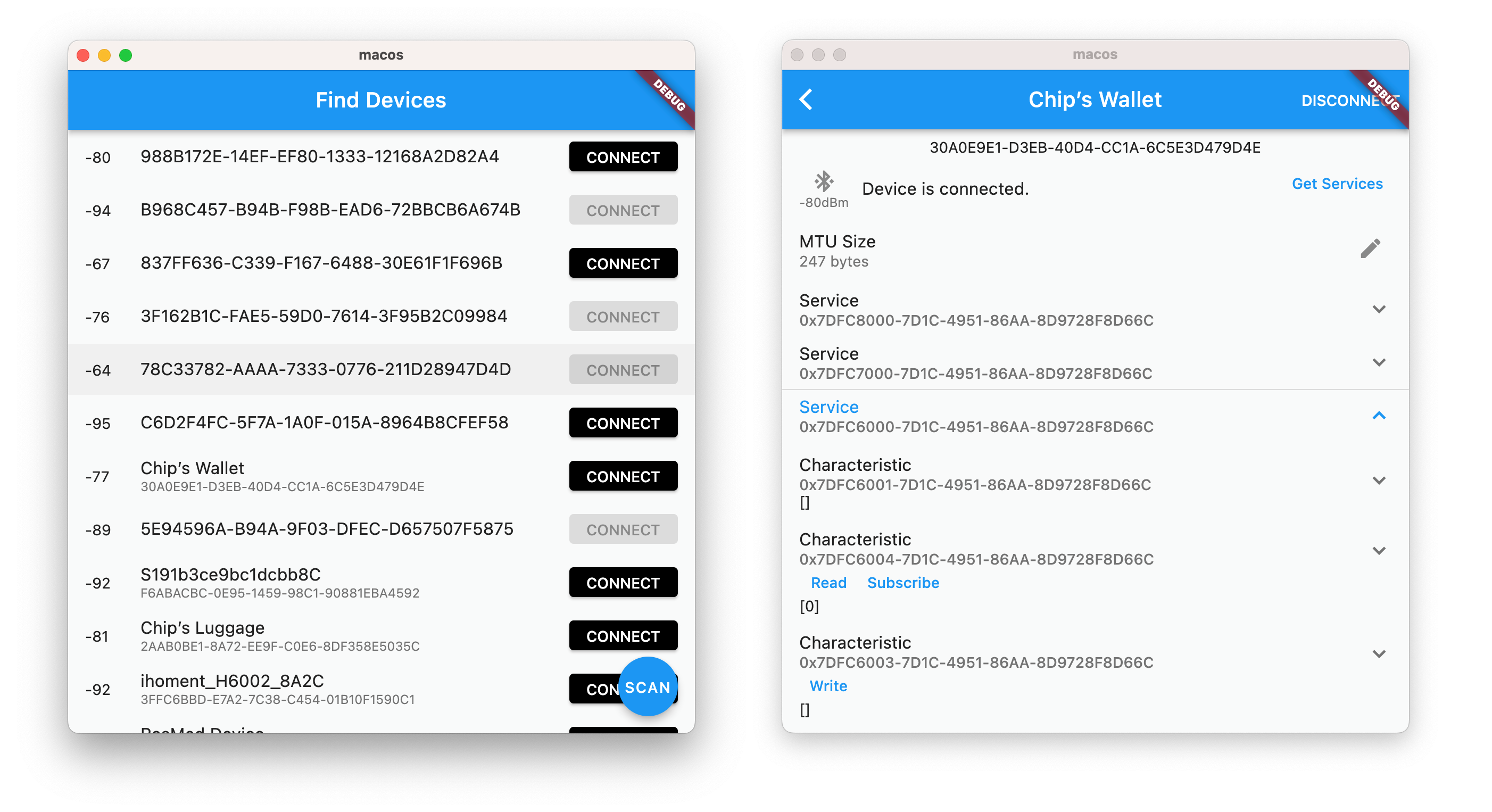
FlutterBluePlus has a beautiful example app, useful to debug issues.
```
cd ./example
flutter run
```
## Usage
### 🔥 Error Handling 🔥
Flutter Blue Plus takes error handling seriously.
Every error returned by the native platform is checked and thrown as an exception where appropriate. See [Reference](#reference) for a list of throwable functions.
**Streams:** Streams returned by FlutterBluePlus never emit any errors and never close. There's no need to handle `onError` or `onDone` for `stream.listen(...)`. The one exception is `FlutterBluePlus.scanResults`, which you should handle `onError`.
---
### Set Log Level
```dart
// if your terminal doesn't support color you'll see annoying logs like `\x1B[1;35m`
FlutterBluePlus.setLogLevel(LogLevel.verbose, color:false)
```
Setting `LogLevel.verbose` shows *all* data in and out.
⚫ = function name
🟣 = args to platform
🟡 = data from platform
 ### Bluetooth On & Off
**Note:** On iOS, a "*This app would like to use Bluetooth*" system dialogue appears on first call to any FlutterBluePlus method.
```dart
// first, check if bluetooth is supported by your hardware
// Note: The platform is initialized on the first call to any FlutterBluePlus method.
if (await FlutterBluePlus.isSupported == false) {
print("Bluetooth not supported by this device");
return;
}
// handle bluetooth on & off
// note: for iOS the initial state is typically BluetoothAdapterState.unknown
// note: if you have permissions issues you will get stuck at BluetoothAdapterState.unauthorized
var subscription = FlutterBluePlus.adapterState.listen((BluetoothAdapterState state) {
print(state);
if (state == BluetoothAdapterState.on) {
// usually start scanning, connecting, etc
} else {
// show an error to the user, etc
}
});
// turn on bluetooth ourself if we can
// for iOS, the user controls bluetooth enable/disable
if (Platform.isAndroid) {
await FlutterBluePlus.turnOn();
}
// cancel to prevent duplicate listeners
subscription.cancel();
```
### Scan for devices
If your device is not found, see [Common Problems](#common-problems).
**Note:** It is recommended to set scan filters to reduce main thread & platform channel usage.
**Note:** scan filters use an ***"or"*** behavior. i.e. if you set `withServices` & `withNames` we return all the advertisments that match any of the specified services ***or*** any of the specified names.
```dart
// listen to scan results
// Note: `onScanResults` only returns live scan results, i.e. during scanning
// Use: `scanResults` if you want live scan results *or* the previous results
var subscription = FlutterBluePlus.onScanResults.listen((results) {
if (results.isNotEmpty) {
ScanResult r = results.last; // the most recently found device
print('${r.device.remoteId}: "${r.advertisementData.advName}" found!');
}
},
onError: (e) => print(e),
);
// cleanup: cancel subscription when scanning stops
FlutterBluePlus.cancelWhenScanComplete(subscription);
// Wait for Bluetooth enabled & permission granted
// In your real app you should use `FlutterBluePlus.adapterState.listen` to handle all states
await FlutterBluePlus.adapterState.where((val) => val == BluetoothAdapterState.on).first;
// Start scanning w/ timeout
// optional: use `stopScan()` to stop the scan at anytime
await FlutterBluePlus.startScan(withServices:[Guid("180D")], timeout: Duration(seconds:15));
// wait for scanning to stop
await FlutterBluePlus.isScanning.where((val) => val == false).first;
```
### Connect to a device
```dart
// listen for disconnection
var subscription = device.connectionState.listen((BluetoothConnectionState state) async {
if (state == BluetoothConnectionState.disconnected) {
// 1. typically, start a periodic timer that tries to
// reconnect, or just call connect() again right now
// 2. you must always re-discover services after disconnection!
print("${device.disconnectReasonCode} ${device.disconnectReasonDescription}");
}
});
// Connect to the device
await device.connect();
// Disconnect from device
await device.disconnect();
// cancel to prevent duplicate listeners
subscription.cancel();
```
### Auto Connect
Connects whenever your device is found.
```dart
// enable auto connect
// - this function always returns immediately
// - you must listen to `device.connectionState` to know when connection occurs
// - autoConnect is incompatible with mtu argument, so you must call requestMtu yourself
await device.connect(mtu:null, autoConnect:true)
// disable auto connect
await device.disconnect()
```
### MTU
On Android, we request an mtu of 512 by default during connection (see: `connect` function arguments).
On iOS & macOS, the mtu is negotiated automatically, typically 135 to 255.
```dart
final subscription = device.mtu.listen((int mtu) {
// iOS: initial value is always 23, but iOS will quickly negotiate a higher value
print("mtu $mtu");
});
// cleanup: cancel subscription when disconnected
device.cancelWhenDisconnected(subscription);
// You can also manually change the mtu yourself.
if (Platform.isAndroid) {
await device.requestMtu(512);
}
```
### Discover services
```dart
// Note: You must call discoverServices after every re-connection!
List services = await device.discoverServices();
services.forEach((service) {
// do something with service
});
```
### Read Characteristics
```dart
// Reads all characteristics
var characteristics = service.characteristics;
for(BluetoothCharacteristic c in characteristics) {
if (c.properties.read) {
List value = await c.read();
print(value);
}
}
```
### Write Characteristic
```dart
// Writes to a characteristic
await c.write([0x12, 0x34]);
```
**allowLongWrite**: To write large characteristics (up to 512 bytes) regardless of mtu, use `allowLongWrite`:
```dart
/// allowLongWrite should be used with caution.
/// 1. it can only be used *with* response to avoid data loss
/// 2. the peripheral device must support the 'long write' ble protocol.
/// 3. Interrupted transfers can leave the characteristic in a partially written state
/// 4. If the mtu is small, it is very very slow.
await c.write(data, allowLongWrite:true);
```
**splitWrite**: To write lots of data (unlimited), you can define the `splitWrite` function.
```dart
import 'dart:math';
// split write should be used with caution.
// 1. due to splitting, `characteristic.read()` will return partial data.
// 2. it can only be used *with* response to avoid data loss
// 3. The characteristic must be designed to support split data
extension splitWrite on BluetoothCharacteristic {
Future splitWrite(List value, {int timeout = 15}) async {
int chunk = device.mtuNow - 3; // 3 bytes ble overhead
for (int i = 0; i < value.length; i += chunk) {
List subvalue = value.sublist(i, min(i + chunk, value.length));
await write(subvalue, withoutResponse:false, timeout: timeout);
}
}
}
```
### Subscribe to a characteristic
If `onValueReceived` is never called, see [Common Problems](#common-problems) in the README.
```dart
final subscription = characteristic.onValueReceived.listen((value) {
// onValueReceived is updated:
// - anytime read() is called
// - anytime a notification arrives (if subscribed)
});
// cleanup: cancel subscription when disconnected
device.cancelWhenDisconnected(subscription);
// subscribe
// Note: If a characteristic supports both **notifications** and **indications**,
// it will default to **notifications**. This matches how CoreBluetooth works on iOS.
await characteristic.setNotifyValue(true);
```
### Last Value Stream
`lastValueStream` is an alternative to `onValueReceived`. It emits a value any time the characteristic changes, **including writes.**
It is very convenient for simple characteristics that support both WRITE and READ (and/or NOTIFY). **e.g.** a "light switch toggle" characteristic.
```dart
final subscription = characteristic.lastValueStream.listen((value) {
// lastValueStream` is updated:
// - anytime read() is called
// - anytime write() is called
// - anytime a notification arrives (if subscribed)
// - also when first listened to, it re-emits the last value for convenience.
});
// cleanup: cancel subscription when disconnected
device.cancelWhenDisconnected(subscription);
// enable notifications
await characteristic.setNotifyValue(true);
```
### Read and write descriptors
```dart
// Reads all descriptors
var descriptors = characteristic.descriptors;
for(BluetoothDescriptor d in descriptors) {
List value = await d.read();
print(value);
}
// Writes to a descriptor
await d.write([0x12, 0x34])
```
### Services Changed Characteristic
FlutterBluePlus automatically listens to the Services Changed Characteristic (0x2A05)
In FlutterBluePlus, we call it `onServicesReset` because you must re-discover services.
```dart
// - uses the GAP Services Changed characteristic (0x2A05)
// - you must call discoverServices() again
device.onServicesReset.listen(() async {
print("Services Reset");
await device.discoverServices();
});
```
### Get Connected Devices
Get devices currently connected to your app.
```dart
List devs = FlutterBluePlus.connectedDevices;
for (var d in devs) {
print(d);
}
```
### Get System Devices
Get devices connected to the system by *any* app.
**Note:** you must connect *your app* to them before you can communicate with them.
```dart
List devs = await FlutterBluePlus.systemDevices;
for (var d in devs) {
await d.connect(); // Must connect *our* app to the device
await d.discoverServices();
}
```
### Create Bond (Android Only)
**Note:** calling this is usually not necessary!! The platform will do it automatically.
However, you can force the popup to show sooner.
```dart
final bsSubscription = device.bondState.listen((value) {
print("$value prev:{$device.prevBondState}");
});
// cleanup: cancel subscription when disconnected
device.cancelWhenDisconnected(bsSubscription);
// Force the bonding popup to show now (Android Only)
await device.createBond();
// remove bond
await device.removeBond();
```
### Events API
Access streams from all devices simultaneously.
There are streams for:
* events.onConnectionStateChanged
* events.onMtuChanged
* events.onReadRssi
* events.onServicesReset
* events.onDiscoveredServices
* events.onCharacteristicReceived
* events.onCharacteristicWritten
* events.onDescriptorRead
* events.onDescriptorWritten
* events.onNameChanged (iOS Only)
* events.onBondStateChanged (Android Only)
```dart
// listen to *any device* connection state changes
FlutterBluePlus.events.onConnectionStateChanged.listen((event)) {
print('${event.device} ${event.connectionState}');
}
```
## Mocking
To mock `FlutterBluePlus` for development, refer to the [Mocking Guide](MOCKING.md).
## Getting Started
### Change the minSdkVersion for Android
flutter_blue_plus is compatible only from version 21 of Android SDK so you should change this in **android/app/build.gradle**:
```dart
Android {
defaultConfig {
minSdkVersion: 21
```
### Add permissions for Android (No Location)
In the **android/app/src/main/AndroidManifest.xml** add:
```xml
```
### Add permissions for Android (With Fine Location)
If you want to use Bluetooth to determine location.
In the **android/app/src/main/AndroidManifest.xml** add:
```xml
```
And set androidUsesFineLocation when scanning:
```dart
// Start scanning
flutterBlue.startScan(timeout: Duration(seconds: 4), androidUsesFineLocation: true);
```
### Android Proguard
Add the following line in your `project/android/app/proguard-rules.pro` file:
```
-keep class com.lib.flutter_blue_plus.* { *; }
```
to avoid seeing the following kind errors in your `release` builds:
```
PlatformException(startScan, Field androidScanMode_ for m0.e0 not found. Known fields are
[private int m0.e0.q, private b3.b0$i m0.e0.r, private boolean m0.e0.s, private static final m0.e0 m0.e0.t,
private static volatile b3.a1 m0.e0.u], java.lang.RuntimeException: Field androidScanMode_ for m0.e0 not found
```
### Add permissions for iOS
In the **ios/Runner/Info.plist** let’s add:
```dart
NSBluetoothAlwaysUsageDescription
This app always needs Bluetooth to function
NSBluetoothPeripheralUsageDescription
This app needs Bluetooth Peripheral to function
NSLocationAlwaysAndWhenInUseUsageDescription
This app always needs location and when in use to function
NSLocationAlwaysUsageDescription
This app always needs location to function
NSLocationWhenInUseUsageDescription
This app needs location when in use to function
```
For location permissions on iOS see more at: [https://developer.apple.com/documentation/corelocation/requesting_authorization_for_location_services](https://developer.apple.com/documentation/corelocation/requesting_authorization_for_location_services)
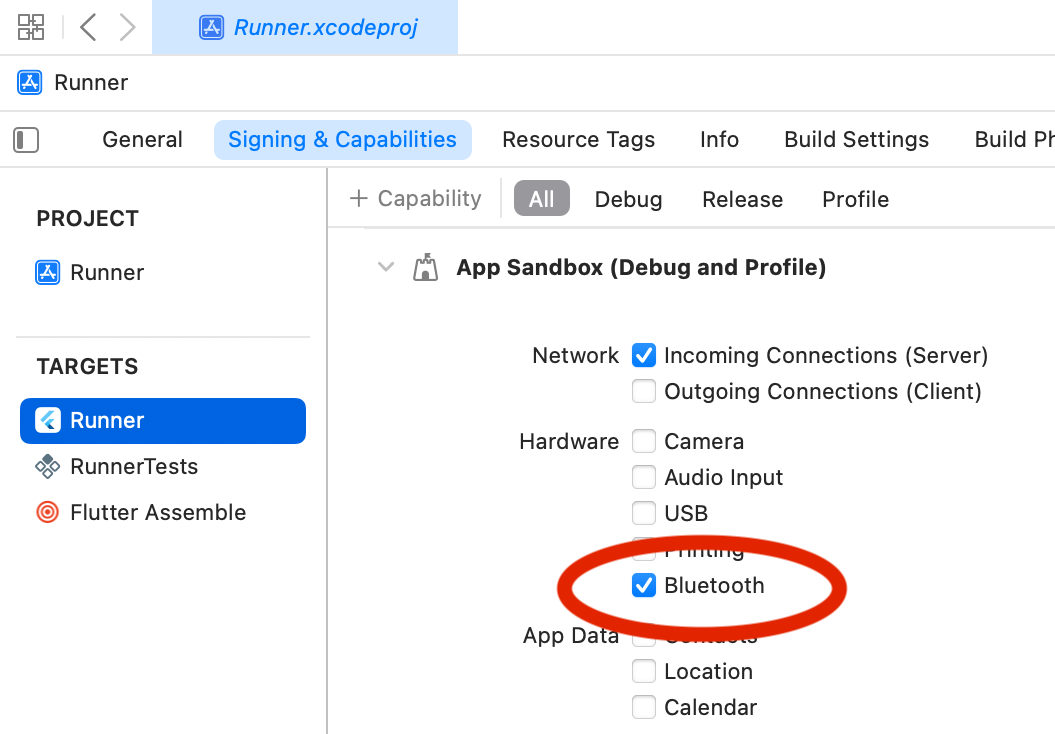
And in Xcode, add access to Bluetooth hardware:
`Xcode -> Runners -> Targets -> Runner-> Signing & Capabilities -> App Sandbox -> Hardware -> Enable Bluetooth`
### Bluetooth On & Off
**Note:** On iOS, a "*This app would like to use Bluetooth*" system dialogue appears on first call to any FlutterBluePlus method.
```dart
// first, check if bluetooth is supported by your hardware
// Note: The platform is initialized on the first call to any FlutterBluePlus method.
if (await FlutterBluePlus.isSupported == false) {
print("Bluetooth not supported by this device");
return;
}
// handle bluetooth on & off
// note: for iOS the initial state is typically BluetoothAdapterState.unknown
// note: if you have permissions issues you will get stuck at BluetoothAdapterState.unauthorized
var subscription = FlutterBluePlus.adapterState.listen((BluetoothAdapterState state) {
print(state);
if (state == BluetoothAdapterState.on) {
// usually start scanning, connecting, etc
} else {
// show an error to the user, etc
}
});
// turn on bluetooth ourself if we can
// for iOS, the user controls bluetooth enable/disable
if (Platform.isAndroid) {
await FlutterBluePlus.turnOn();
}
// cancel to prevent duplicate listeners
subscription.cancel();
```
### Scan for devices
If your device is not found, see [Common Problems](#common-problems).
**Note:** It is recommended to set scan filters to reduce main thread & platform channel usage.
**Note:** scan filters use an ***"or"*** behavior. i.e. if you set `withServices` & `withNames` we return all the advertisments that match any of the specified services ***or*** any of the specified names.
```dart
// listen to scan results
// Note: `onScanResults` only returns live scan results, i.e. during scanning
// Use: `scanResults` if you want live scan results *or* the previous results
var subscription = FlutterBluePlus.onScanResults.listen((results) {
if (results.isNotEmpty) {
ScanResult r = results.last; // the most recently found device
print('${r.device.remoteId}: "${r.advertisementData.advName}" found!');
}
},
onError: (e) => print(e),
);
// cleanup: cancel subscription when scanning stops
FlutterBluePlus.cancelWhenScanComplete(subscription);
// Wait for Bluetooth enabled & permission granted
// In your real app you should use `FlutterBluePlus.adapterState.listen` to handle all states
await FlutterBluePlus.adapterState.where((val) => val == BluetoothAdapterState.on).first;
// Start scanning w/ timeout
// optional: use `stopScan()` to stop the scan at anytime
await FlutterBluePlus.startScan(withServices:[Guid("180D")], timeout: Duration(seconds:15));
// wait for scanning to stop
await FlutterBluePlus.isScanning.where((val) => val == false).first;
```
### Connect to a device
```dart
// listen for disconnection
var subscription = device.connectionState.listen((BluetoothConnectionState state) async {
if (state == BluetoothConnectionState.disconnected) {
// 1. typically, start a periodic timer that tries to
// reconnect, or just call connect() again right now
// 2. you must always re-discover services after disconnection!
print("${device.disconnectReasonCode} ${device.disconnectReasonDescription}");
}
});
// Connect to the device
await device.connect();
// Disconnect from device
await device.disconnect();
// cancel to prevent duplicate listeners
subscription.cancel();
```
### Auto Connect
Connects whenever your device is found.
```dart
// enable auto connect
// - this function always returns immediately
// - you must listen to `device.connectionState` to know when connection occurs
// - autoConnect is incompatible with mtu argument, so you must call requestMtu yourself
await device.connect(mtu:null, autoConnect:true)
// disable auto connect
await device.disconnect()
```
### MTU
On Android, we request an mtu of 512 by default during connection (see: `connect` function arguments).
On iOS & macOS, the mtu is negotiated automatically, typically 135 to 255.
```dart
final subscription = device.mtu.listen((int mtu) {
// iOS: initial value is always 23, but iOS will quickly negotiate a higher value
print("mtu $mtu");
});
// cleanup: cancel subscription when disconnected
device.cancelWhenDisconnected(subscription);
// You can also manually change the mtu yourself.
if (Platform.isAndroid) {
await device.requestMtu(512);
}
```
### Discover services
```dart
// Note: You must call discoverServices after every re-connection!
List services = await device.discoverServices();
services.forEach((service) {
// do something with service
});
```
### Read Characteristics
```dart
// Reads all characteristics
var characteristics = service.characteristics;
for(BluetoothCharacteristic c in characteristics) {
if (c.properties.read) {
List value = await c.read();
print(value);
}
}
```
### Write Characteristic
```dart
// Writes to a characteristic
await c.write([0x12, 0x34]);
```
**allowLongWrite**: To write large characteristics (up to 512 bytes) regardless of mtu, use `allowLongWrite`:
```dart
/// allowLongWrite should be used with caution.
/// 1. it can only be used *with* response to avoid data loss
/// 2. the peripheral device must support the 'long write' ble protocol.
/// 3. Interrupted transfers can leave the characteristic in a partially written state
/// 4. If the mtu is small, it is very very slow.
await c.write(data, allowLongWrite:true);
```
**splitWrite**: To write lots of data (unlimited), you can define the `splitWrite` function.
```dart
import 'dart:math';
// split write should be used with caution.
// 1. due to splitting, `characteristic.read()` will return partial data.
// 2. it can only be used *with* response to avoid data loss
// 3. The characteristic must be designed to support split data
extension splitWrite on BluetoothCharacteristic {
Future splitWrite(List value, {int timeout = 15}) async {
int chunk = device.mtuNow - 3; // 3 bytes ble overhead
for (int i = 0; i < value.length; i += chunk) {
List subvalue = value.sublist(i, min(i + chunk, value.length));
await write(subvalue, withoutResponse:false, timeout: timeout);
}
}
}
```
### Subscribe to a characteristic
If `onValueReceived` is never called, see [Common Problems](#common-problems) in the README.
```dart
final subscription = characteristic.onValueReceived.listen((value) {
// onValueReceived is updated:
// - anytime read() is called
// - anytime a notification arrives (if subscribed)
});
// cleanup: cancel subscription when disconnected
device.cancelWhenDisconnected(subscription);
// subscribe
// Note: If a characteristic supports both **notifications** and **indications**,
// it will default to **notifications**. This matches how CoreBluetooth works on iOS.
await characteristic.setNotifyValue(true);
```
### Last Value Stream
`lastValueStream` is an alternative to `onValueReceived`. It emits a value any time the characteristic changes, **including writes.**
It is very convenient for simple characteristics that support both WRITE and READ (and/or NOTIFY). **e.g.** a "light switch toggle" characteristic.
```dart
final subscription = characteristic.lastValueStream.listen((value) {
// lastValueStream` is updated:
// - anytime read() is called
// - anytime write() is called
// - anytime a notification arrives (if subscribed)
// - also when first listened to, it re-emits the last value for convenience.
});
// cleanup: cancel subscription when disconnected
device.cancelWhenDisconnected(subscription);
// enable notifications
await characteristic.setNotifyValue(true);
```
### Read and write descriptors
```dart
// Reads all descriptors
var descriptors = characteristic.descriptors;
for(BluetoothDescriptor d in descriptors) {
List value = await d.read();
print(value);
}
// Writes to a descriptor
await d.write([0x12, 0x34])
```
### Services Changed Characteristic
FlutterBluePlus automatically listens to the Services Changed Characteristic (0x2A05)
In FlutterBluePlus, we call it `onServicesReset` because you must re-discover services.
```dart
// - uses the GAP Services Changed characteristic (0x2A05)
// - you must call discoverServices() again
device.onServicesReset.listen(() async {
print("Services Reset");
await device.discoverServices();
});
```
### Get Connected Devices
Get devices currently connected to your app.
```dart
List devs = FlutterBluePlus.connectedDevices;
for (var d in devs) {
print(d);
}
```
### Get System Devices
Get devices connected to the system by *any* app.
**Note:** you must connect *your app* to them before you can communicate with them.
```dart
List devs = await FlutterBluePlus.systemDevices;
for (var d in devs) {
await d.connect(); // Must connect *our* app to the device
await d.discoverServices();
}
```
### Create Bond (Android Only)
**Note:** calling this is usually not necessary!! The platform will do it automatically.
However, you can force the popup to show sooner.
```dart
final bsSubscription = device.bondState.listen((value) {
print("$value prev:{$device.prevBondState}");
});
// cleanup: cancel subscription when disconnected
device.cancelWhenDisconnected(bsSubscription);
// Force the bonding popup to show now (Android Only)
await device.createBond();
// remove bond
await device.removeBond();
```
### Events API
Access streams from all devices simultaneously.
There are streams for:
* events.onConnectionStateChanged
* events.onMtuChanged
* events.onReadRssi
* events.onServicesReset
* events.onDiscoveredServices
* events.onCharacteristicReceived
* events.onCharacteristicWritten
* events.onDescriptorRead
* events.onDescriptorWritten
* events.onNameChanged (iOS Only)
* events.onBondStateChanged (Android Only)
```dart
// listen to *any device* connection state changes
FlutterBluePlus.events.onConnectionStateChanged.listen((event)) {
print('${event.device} ${event.connectionState}');
}
```
## Mocking
To mock `FlutterBluePlus` for development, refer to the [Mocking Guide](MOCKING.md).
## Getting Started
### Change the minSdkVersion for Android
flutter_blue_plus is compatible only from version 21 of Android SDK so you should change this in **android/app/build.gradle**:
```dart
Android {
defaultConfig {
minSdkVersion: 21
```
### Add permissions for Android (No Location)
In the **android/app/src/main/AndroidManifest.xml** add:
```xml
```
### Add permissions for Android (With Fine Location)
If you want to use Bluetooth to determine location.
In the **android/app/src/main/AndroidManifest.xml** add:
```xml
```
And set androidUsesFineLocation when scanning:
```dart
// Start scanning
flutterBlue.startScan(timeout: Duration(seconds: 4), androidUsesFineLocation: true);
```
### Android Proguard
Add the following line in your `project/android/app/proguard-rules.pro` file:
```
-keep class com.lib.flutter_blue_plus.* { *; }
```
to avoid seeing the following kind errors in your `release` builds:
```
PlatformException(startScan, Field androidScanMode_ for m0.e0 not found. Known fields are
[private int m0.e0.q, private b3.b0$i m0.e0.r, private boolean m0.e0.s, private static final m0.e0 m0.e0.t,
private static volatile b3.a1 m0.e0.u], java.lang.RuntimeException: Field androidScanMode_ for m0.e0 not found
```
### Add permissions for iOS
In the **ios/Runner/Info.plist** let’s add:
```dart
NSBluetoothAlwaysUsageDescription
This app always needs Bluetooth to function
NSBluetoothPeripheralUsageDescription
This app needs Bluetooth Peripheral to function
NSLocationAlwaysAndWhenInUseUsageDescription
This app always needs location and when in use to function
NSLocationAlwaysUsageDescription
This app always needs location to function
NSLocationWhenInUseUsageDescription
This app needs location when in use to function
```
For location permissions on iOS see more at: [https://developer.apple.com/documentation/corelocation/requesting_authorization_for_location_services](https://developer.apple.com/documentation/corelocation/requesting_authorization_for_location_services)
And in Xcode, add access to Bluetooth hardware:
`Xcode -> Runners -> Targets -> Runner-> Signing & Capabilities -> App Sandbox -> Hardware -> Enable Bluetooth`
 ## Using Ble in App Background
**This is an advanced use case**. FlutterBluePlus does not support everything. You may have to fork it.
### iOS
Documentation: https://developer.apple.com/library/archive/documentation/NetworkingInternetWeb/Conceptual/CoreBluetooth_concepts/CoreBluetoothBackgroundProcessingForIOSApps/PerformingTasksWhileYourAppIsInTheBackground.html
Add the following to your `Info.plist`
```
UIBackgroundModes
bluetooth-central
```
When this key-value pair is included in the app’s Info.plist file, the system wakes up your app to process ble `read`, `write`, and `subscription` events.
**Note**: Upon being woken up, an app has around 10 seconds to complete a task. Apps that spend too much time executing in the background can be throttled back by the system or killed.
### Android
You can try using https://pub.dev/packages/flutter_foreground_task
## Reference
🌀 = Stream
⚡ = synchronous
### FlutterBluePlus API
| | Android | iOS | Throws | Description |
| :--------------------- | :----------------: | :----------------: | :----: | :----------------------------------------------------------|
| setLogLevel | :white_check_mark: | :white_check_mark: | | Configure plugin log level |
| isSupported | :white_check_mark: | :white_check_mark: | | Checks whether the device supports Bluetooth |
| turnOn | :white_check_mark: | | :fire: | Turns on the bluetooth adapter |
| adapterStateNow ⚡ | :white_check_mark: | :white_check_mark: | | Current state of the bluetooth adapter |
| adapterState 🌀 | :white_check_mark: | :white_check_mark: | | Stream of on & off states of the bluetooth adapter |
| startScan | :white_check_mark: | :white_check_mark: | :fire: | Starts a scan for Ble devices |
| stopScan | :white_check_mark: | :white_check_mark: | :fire: | Stop an existing scan for Ble devices |
| onScanResults 🌀 | :white_check_mark: | :white_check_mark: | | Stream of live scan results |
| scanResults 🌀 | :white_check_mark: | :white_check_mark: | | Stream of live scan results or previous results |
| lastScanResults ⚡ | :white_check_mark: | :white_check_mark: | | The most recent scan results |
| isScanning 🌀 | :white_check_mark: | :white_check_mark: | | Stream of current scanning state |
| isScanningNow ⚡ | :white_check_mark: | :white_check_mark: | | Is a scan currently running? |
| connectedDevices ⚡ | :white_check_mark: | :white_check_mark: | | List of devices connected to *your app* |
| systemDevices | :white_check_mark: | :white_check_mark: | :fire: | List of devices connected to the system, even by other apps|
| getPhySupport | :white_check_mark: | | :fire: | Get supported bluetooth phy codings |
### FlutterBluePlus Events API
| | Android | iOS | Throws | Description |
| :--------------------------------- | :----------------: | :----------------: | :----: | :-----------------------------------------------------|
| events.onConnectionStateChanged 🌀 | :white_check_mark: | :white_check_mark: | | Stream of connection changes of *all devices* |
| events.onMtuChanged 🌀 | :white_check_mark: | :white_check_mark: | | Stream of mtu changes of *all devices* |
| events.onReadRssi 🌀 | :white_check_mark: | :white_check_mark: | | Stream of rssi reads of *all devices* |
| events.onServicesReset 🌀 | :white_check_mark: | :white_check_mark: | | Stream of services resets of *all devices* |
| events.onDiscoveredServices 🌀 | :white_check_mark: | :white_check_mark: | | Stream of services discovered of *all devices* |
| events.onCharacteristicReceived 🌀 | :white_check_mark: | :white_check_mark: | | Stream of characteristic value reads of *all devices* |
| events.onCharacteristicWritten 🌀 | :white_check_mark: | :white_check_mark: | | Stream of characteristic value writes of *all devices*|
| events.onDescriptorRead 🌀 | :white_check_mark: | :white_check_mark: | | Stream of descriptor value reads of *all devices* |
| events.onDescriptorWritten 🌀 | :white_check_mark: | :white_check_mark: | | Stream of descriptor value writes of *all devices* |
| events.onBondStateChanged 🌀 | :white_check_mark: | | | Stream of android bond state changes of *all devices* |
| events.onNameChanged 🌀 | | :white_check_mark: | | Stream of iOS name changes of *all devices* |
### BluetoothDevice API
| | Android | iOS | Throws | Description |
| :------------------------ | :----------------: | :----------------: | :----: | :----------------------------------------------------------|
| platformName ⚡ | :white_check_mark: | :white_check_mark: | | The platform preferred name of the device |
| advName ⚡ | :white_check_mark: | :white_check_mark: | | The advertised name of the device found during scanning |
| connect | :white_check_mark: | :white_check_mark: | :fire: | Establishes a connection to the device |
| disconnect | :white_check_mark: | :white_check_mark: | :fire: | Cancels an active or pending connection to the device |
| isConnected ⚡ | :white_check_mark: | :white_check_mark: | | Is this device currently connected to *your app*? |
| connectionState 🌀 | :white_check_mark: | :white_check_mark: | | Stream of connection changes for the Bluetooth Device |
| discoverServices | :white_check_mark: | :white_check_mark: | :fire: | Discover services |
| servicesList ⚡ | :white_check_mark: | :white_check_mark: | | The current list of available services |
| onServicesReset 🌀 | :white_check_mark: | :white_check_mark: | | The services changed & must be rediscovered |
| mtu 🌀 | :white_check_mark: | :white_check_mark: | | Stream of current mtu value + changes |
| mtuNow ⚡ | :white_check_mark: | :white_check_mark: | | The current mtu value |
| readRssi | :white_check_mark: | :white_check_mark: | :fire: | Read RSSI from a connected device |
| requestMtu | :white_check_mark: | | :fire: | Request to change the MTU for the device |
| requestConnectionPriority | :white_check_mark: | | :fire: | Request to update a high priority, low latency connection |
| bondState 🌀 | :white_check_mark: | | | Stream of device bond state. Can be useful on Android |
| createBond | :white_check_mark: | | :fire: | Force a system pairing dialogue to show, if needed |
| removeBond | :white_check_mark: | | :fire: | Remove Bluetooth Bond of device |
| setPreferredPhy | :white_check_mark: | | :fire: | Set preferred RX and TX phy for connection and phy options |
| clearGattCache | :white_check_mark: | | :fire: | Clear android cache of service discovery results |
### BluetoothCharacteristic API
| | Android | iOS | Throws | Description |
| :----------------- | :----------------: | :----------------: | :----: | :--------------------------------------------------------------|
| uuid ⚡ | :white_check_mark: | :white_check_mark: | | The uuid of characteristic |
| read | :white_check_mark: | :white_check_mark: | :fire: | Retrieves the value of the characteristic |
| write | :white_check_mark: | :white_check_mark: | :fire: | Writes the value of the characteristic |
| setNotifyValue | :white_check_mark: | :white_check_mark: | :fire: | Sets notifications or indications on the characteristic |
| isNotifying ⚡ | :white_check_mark: | :white_check_mark: | | Are notifications or indications currently enabled |
| onValueReceived 🌀 | :white_check_mark: | :white_check_mark: | | Stream of characteristic value updates received from the device|
| lastValue ⚡ | :white_check_mark: | :white_check_mark: | | The most recent value of the characteristic |
| lastValueStream 🌀 | :white_check_mark: | :white_check_mark: | | Stream of onValueReceived + writes |
### BluetoothDescriptor API
| | Android | iOS | Throws | Description |
| :---- | :----------------: | :----------------: | :----: | :----------------------------------------------|
| uuid ⚡ | :white_check_mark: | :white_check_mark: | | The uuid of descriptor |
| read | :white_check_mark: | :white_check_mark: | :fire: | Retrieves the value of the descriptor |
| write | :white_check_mark: | :white_check_mark: | :fire: | Writes the value of the descriptor |
| onValueReceived 🌀 | :white_check_mark: | :white_check_mark: | | Stream of descriptor value reads & writes |
| lastValue ⚡ | :white_check_mark: | :white_check_mark: | | The most recent value of the descriptor |
| lastValueStream 🌀 | :white_check_mark: | :white_check_mark: | | Stream of onValueReceived + writes |
## Debugging
The easiest way to debug issues in FlutterBluePlus is to make your own local copy.
```
cd /user/downloads
git clone https://github.com/boskokg/flutter_blue_plus.git
```
then in `pubspec.yaml` add the repo by path:
```
flutter_blue_plus:
path: /user/downloads/flutter_blue_plus
```
Now you can edit the FlutterBluePlus code yourself.
## Common Problems
Many common problems are easily solved.
Adapter:
- [bluetooth must be turned on](#bluetooth-must-be-turned-on)
- [adapterState is called multiple times](#adapterstate-is-called-multiple-times)
- [adapterState is `unavailable`](#adapterstate-is-unavailable)
Scanning:
- [Scanning does not find my device](#scanning-does-not-find-my-device)
- [Scanned device never goes away](#scanned-device-never-goes-away)
Connecting:
- [Connection fails](#connection-fails)
- [connectionState is called multiple times](#connectionstate-is-called-multiple-times)
- [remoteId is different on Android vs iOS](#the-remoteid-is-different-on-android-versus-ios--macos)
- [iOS: "[Error] The connection has timed out unexpectedly."](#ios-error-the-connection-has-timed-out-unexpectedly)
Reading & Writing:
- [List of Bluetooth GATT Errors](#list-of-bluetooth-gatt-errors)
- [Characteristic write fails](#characteristic-write-fails)
- [Characteristic read fails](#characteristic-read-fails)
Subscriptions:
- [onValueReceived is never called (or lastValueStream)](#onvaluereceived-is-never-called-or-lastvaluestream)
- [onValueReceived data is split up (or lastValueStream)](#onvaluereceived-data-is-split-up-or-lastvaluestream)
- [onValueReceived is called with duplicate data (or lastValueStream)](#onvaluereceived-is-called-with-duplicate-data-or-lastvaluestream)
Android Errors:
- [ANDROID_SPECIFIC_ERROR](#android_specific_error)
Flutter Errors:
- [MissingPluginException(No implementation found for method XXXX ...)](#missingpluginexceptionno-implementation-found-for-method-xxxx-)
---
### "bluetooth must be turned on"
You need to wait for the bluetooth adapter to fully turn on.
`await FlutterBluePlus.adapterState.where((state) => state == BluetoothAdapterState.on).first;`
You can also use `FlutterBluePlus.adapterState.listen(...)`. See [Usage](#usage).
---
### adapterState is called multiple times
You are forgetting to cancel the original `FlutterBluePlus.adapterState.listen` resulting in multiple listeners.
```dart
// tip: using ??= makes it easy to only make new listener when currently null
final subscription ??= FlutterBluePlus.adapterState.listen((value) {
// ...
});
// also, make sure you cancel the subscription when done!
subscription.cancel()
```
---
### adapterState is unavailable
**iOS:** You must add access to Bluetooth Hardware in the app's Xcode settings. See [Getting Started](#getting-started).
**Android:** check that your device supports Bluetooth & has permissions
---
### Scanning does not find my device
**1. try using another ble scanner app**
* **iOS**: [nRF Connect](https://apps.apple.com/us/app/nrf-connect-for-mobile/id1054362403)
* **Android**: [BLE Scanner](https://play.google.com/store/apps/details?id=com.macdom.ble.blescanner)
Install a BLE scanner app on your phone. Can it find your device?
**2. your device uses bluetooth classic, not BLE.**
Headphones, speakers, keyboards, mice, gamepads, & printers all use Bluetooth Classic.
These devices may be found in System Settings, but they cannot be connected to by FlutterBluePlus. FlutterBluePlus only supports Bluetooth Low Energy.
**3. your device stopped advertising.**
- you might need to reboot your device
- you might need to put your device in "discovery mode"
- your phone may have already connected automatically
- another app may have already connected to your device
- another phone may have already connected to your device
Try looking through system devices:
```dart
// search system devices. i.e. any device connected to by *any* app
List system = await FlutterBluePlus.systemDevices;
for (var d in system) {
print('${r.device.platformName} already connected to! ${r.device.remoteId}');
if (d.platformName == "myBleDevice") {
await r.connect(); // must connect our app
}
}
```
**4. your scan filters are wrong.**
- try removing all scan filters
- for `withServices` to work, your device must actively advertise the serviceUUIDs it supports
---
### Scanned device never goes away
This is expected.
You must set the `removeIfGone` scan option if you want the device to go away when no longer available.
---
### Connection fails
**1. Your ble device may be low battery**
Bluetooth can become erratic when your peripheral device is low on battery.
**2. Your ble device may have refused the connection or have a bug**
Connection is a two-way process. Your ble device may be misconfigured.
**3. You may be on the edge of the Bluetooth range.**
The signal is too weak, or there are a lot of devices causing radio interference.
**4. Some phones have an issue connecting while scanning.**
The Huawei P8 Lite is one of the reported phones to have this issue. Try stopping your scanner before connecting.
**5. Try restarting your phone**
Bluetooth is a complicated system service, and can enter a bad state.
---
### connectionState is called multiple times
You are forgetting to cancel the original `device.connectionState.listen` resulting in multiple listeners.
```dart
// tip: using ??= makes it easy to only make new listener when currently null
final subscription ??= FlutterBluePlus.device.connectionState.listen((value) {
// ...
});
// also, make sure you cancel the subscription when done!
subscription.cancel()
```
---
### The remoteId is different on Android versus iOS & macOS
This is expected. There is no way to avoid it.
For privacy, iOS & macOS use a randomly generated uuid. This uuid will periodically change.
e.g. `6920a902-ba0e-4a13-a35f-6bc91161c517`
Android uses the mac address of the bluetooth device. It never changes.
e.g. `05:A4:22:31:F7:ED`
---
### iOS: "[Error] The connection has timed out unexpectedly."
You can google this error. It is a common iOS ble error code.
It means your device stopped working. FlutterBluePlus cannot fix it.
---
### List of Bluetooth GATT Errors
These GATT error codes are part of the BLE Specification.
**These are *responses* from your ble device because you are sending an invalid request.**
FlutterBluePlus cannot fix these errors. You are doing something wrong & your device is responding with an error.
**GATT errors as they appear on iOS**:
```
apple-code: 1 | The handle is invalid.
apple-code: 2 | Reading is not permitted.
apple-code: 3 | Writing is not permitted.
apple-code: 4 | The command is invalid.
apple-code: 6 | The request is not supported.
apple-code: 7 | The offset is invalid.
apple-code: 8 | Authorization is insufficient.
apple-code: 9 | The prepare queue is full.
apple-code: 10 | The attribute could not be found.
apple-code: 11 | The attribute is not long.
apple-code: 12 | The encryption key size is insufficient.
apple-code: 13 | The value's length is invalid.
apple-code: 14 | Unlikely error.
apple-code: 15 | Encryption is insufficient.
apple-code: 16 | The group type is unsupported.
apple-code: 17 | Resources are insufficient.
apple-code: 18 | Unknown ATT error.
```
**GATT errors as they appear on Android**:
```
android-code: 1 | GATT_INVALID_HANDLE
android-code: 2 | GATT_READ_NOT_PERMITTED
android-code: 3 | GATT_WRITE_NOT_PERMITTED
android-code: 4 | GATT_INVALID_PDU
android-code: 5 | GATT_INSUFFICIENT_AUTHENTICATION
android-code: 6 | GATT_REQUEST_NOT_SUPPORTED
android-code: 7 | GATT_INVALID_OFFSET
android-code: 8 | GATT_INSUFFICIENT_AUTHORIZATION
android-code: 9 | GATT_PREPARE_QUEUE_FULL
android-code: 10 | GATT_ATTR_NOT_FOUND
android-code: 11 | GATT_ATTR_NOT_LONG
android-code: 12 | GATT_INSUFFICIENT_KEY_SIZE
android-code: 13 | GATT_INVALID_ATTRIBUTE_LENGTH
android-code: 14 | GATT_UNLIKELY
android-code: 15 | GATT_INSUFFICIENT_ENCRYPTION
android-code: 16 | GATT_UNSUPPORTED_GROUP
android-code: 17 | GATT_INSUFFICIENT_RESOURCES
```
**Descriptions**:
```
1 | Invalid Handle | The attribute handle given was not valid on this server.
2 | Read Not Permitted | The attribute cannot be read.
3 | Write Not Permitted | The attribute cannot be written.
4 | Invalid PDU | The attribute PDU was invalid.
5 | Insufficient Authentication | The attribute requires authentication before it can be read or written.
6 | Request Not Supported | Attribute server does not support the request received from the client.
7 | Invalid Offset | Offset specified was past the end of the attribute.
8 | Insufficient Authorization | The attribute requires an authorization before it can be read or written.
9 | Prepare Queue Full | Too many prepare writes have been queued.
10 | Attribute Not Found | No attribute found within the given attribute handle range.
11 | Attribute Not Long | The attribute cannot be read or written using the Read Blob or Write Blob requests.
12 | Insufficient Key Size | The Encryption Key Size used for encrypting this link is insufficient.
13 | Invalid Attribute Value Length | The attribute value length is invalid for the operation.
14 | Unlikely Error | The request has encountered an unlikely error and cannot be completed.
15 | Insufficient Encryption | The attribute requires encryption before it can be read or written.
16 | Unsupported Group Type | The attribute type is not a supported grouping as defined by a higher layer.
17 | Insufficient Resources | Insufficient Resources to complete the request.
```
---
### characteristic write fails
First, check the [List of Bluetooth GATT Errors](#list-of-bluetooth-gatt-errors) for your error.
**1. your bluetooth device turned off, or is out of range**
If your device turns off or crashes during a write, it will cause a failure.
**2. Your Bluetooth device has bugs**
Maybe your device crashed, or is not sending a response due to software bugs.
**3. there is radio interference**
Bluetooth is wireless and will not always work.
---
### Characteristic read fails
First, check the [List of Bluetooth GATT Errors](#list-of-bluetooth-gatt-errors) for your error.
**1. your bluetooth device turned off, or is out of range**
If your device turns off or crashes during a read, it will cause a failure.
**2. Your Bluetooth device has bugs**
Maybe your device crashed, or is not sending a response due to software bugs.
**3. there is radio interference**
Bluetooth is wireless and will not always work.
---
### onValueReceived is never called (or lastValueStream)
**1. you are not calling the right function**
`lastValueStream` is called for `await chr.read()` & `await chr.write()` & `await chr.setNotifyValue(true)`
`onValueReceived` is only called for `await chr.read()` & `await chr.setNotifyValue(true)`
**2. your device has nothing to send**
If you are using `await chr.setNotifyValue(true)`, your _device_ chooses when to send data.
Try interacting with your device to get it to send new data.
**3. your device has bugs**
Try rebooting your ble device.
Some ble devices have buggy software and stop sending data
---
### onValueReceived data is split up (or lastValueStream)
Verify that the mtu is large enough to hold your message.
```dart
device.mtu
```
If it still happens, it is a problem with your peripheral device.
---
### onValueReceived is called with duplicate data (or lastValueStream)
You are probably forgetting to cancel the original `chr.onValueReceived.listen` resulting in multiple listens.
The easiest solution is to use `device.cancelWhenDisconnected(subscription)` to cancel device subscriptions.
```dart
final subscription = chr.onValueReceived.listen((value) {
// ...
});
// make sure you have this line!
device.cancelWhenDisconnected(subscription);
await characteristic.setNotifyValue(true);
```
---
### ANDROID_SPECIFIC_ERROR
There is no 100% solution.
FBP already has mitigations for this error, but Android will still fail with this code randomly.
The recommended solution is to `catch` the error, and retry.
---
### MissingPluginException(No implementation found for method XXXX ...)
If you just added flutter_blue_plus to your pubspec.yaml, a hot reload / hot restart is not enough.
You need to fully stop your app and run again so that the native plugins are loaded.
Also try `flutter clean`.
## Using Ble in App Background
**This is an advanced use case**. FlutterBluePlus does not support everything. You may have to fork it.
### iOS
Documentation: https://developer.apple.com/library/archive/documentation/NetworkingInternetWeb/Conceptual/CoreBluetooth_concepts/CoreBluetoothBackgroundProcessingForIOSApps/PerformingTasksWhileYourAppIsInTheBackground.html
Add the following to your `Info.plist`
```
UIBackgroundModes
bluetooth-central
```
When this key-value pair is included in the app’s Info.plist file, the system wakes up your app to process ble `read`, `write`, and `subscription` events.
**Note**: Upon being woken up, an app has around 10 seconds to complete a task. Apps that spend too much time executing in the background can be throttled back by the system or killed.
### Android
You can try using https://pub.dev/packages/flutter_foreground_task
## Reference
🌀 = Stream
⚡ = synchronous
### FlutterBluePlus API
| | Android | iOS | Throws | Description |
| :--------------------- | :----------------: | :----------------: | :----: | :----------------------------------------------------------|
| setLogLevel | :white_check_mark: | :white_check_mark: | | Configure plugin log level |
| isSupported | :white_check_mark: | :white_check_mark: | | Checks whether the device supports Bluetooth |
| turnOn | :white_check_mark: | | :fire: | Turns on the bluetooth adapter |
| adapterStateNow ⚡ | :white_check_mark: | :white_check_mark: | | Current state of the bluetooth adapter |
| adapterState 🌀 | :white_check_mark: | :white_check_mark: | | Stream of on & off states of the bluetooth adapter |
| startScan | :white_check_mark: | :white_check_mark: | :fire: | Starts a scan for Ble devices |
| stopScan | :white_check_mark: | :white_check_mark: | :fire: | Stop an existing scan for Ble devices |
| onScanResults 🌀 | :white_check_mark: | :white_check_mark: | | Stream of live scan results |
| scanResults 🌀 | :white_check_mark: | :white_check_mark: | | Stream of live scan results or previous results |
| lastScanResults ⚡ | :white_check_mark: | :white_check_mark: | | The most recent scan results |
| isScanning 🌀 | :white_check_mark: | :white_check_mark: | | Stream of current scanning state |
| isScanningNow ⚡ | :white_check_mark: | :white_check_mark: | | Is a scan currently running? |
| connectedDevices ⚡ | :white_check_mark: | :white_check_mark: | | List of devices connected to *your app* |
| systemDevices | :white_check_mark: | :white_check_mark: | :fire: | List of devices connected to the system, even by other apps|
| getPhySupport | :white_check_mark: | | :fire: | Get supported bluetooth phy codings |
### FlutterBluePlus Events API
| | Android | iOS | Throws | Description |
| :--------------------------------- | :----------------: | :----------------: | :----: | :-----------------------------------------------------|
| events.onConnectionStateChanged 🌀 | :white_check_mark: | :white_check_mark: | | Stream of connection changes of *all devices* |
| events.onMtuChanged 🌀 | :white_check_mark: | :white_check_mark: | | Stream of mtu changes of *all devices* |
| events.onReadRssi 🌀 | :white_check_mark: | :white_check_mark: | | Stream of rssi reads of *all devices* |
| events.onServicesReset 🌀 | :white_check_mark: | :white_check_mark: | | Stream of services resets of *all devices* |
| events.onDiscoveredServices 🌀 | :white_check_mark: | :white_check_mark: | | Stream of services discovered of *all devices* |
| events.onCharacteristicReceived 🌀 | :white_check_mark: | :white_check_mark: | | Stream of characteristic value reads of *all devices* |
| events.onCharacteristicWritten 🌀 | :white_check_mark: | :white_check_mark: | | Stream of characteristic value writes of *all devices*|
| events.onDescriptorRead 🌀 | :white_check_mark: | :white_check_mark: | | Stream of descriptor value reads of *all devices* |
| events.onDescriptorWritten 🌀 | :white_check_mark: | :white_check_mark: | | Stream of descriptor value writes of *all devices* |
| events.onBondStateChanged 🌀 | :white_check_mark: | | | Stream of android bond state changes of *all devices* |
| events.onNameChanged 🌀 | | :white_check_mark: | | Stream of iOS name changes of *all devices* |
### BluetoothDevice API
| | Android | iOS | Throws | Description |
| :------------------------ | :----------------: | :----------------: | :----: | :----------------------------------------------------------|
| platformName ⚡ | :white_check_mark: | :white_check_mark: | | The platform preferred name of the device |
| advName ⚡ | :white_check_mark: | :white_check_mark: | | The advertised name of the device found during scanning |
| connect | :white_check_mark: | :white_check_mark: | :fire: | Establishes a connection to the device |
| disconnect | :white_check_mark: | :white_check_mark: | :fire: | Cancels an active or pending connection to the device |
| isConnected ⚡ | :white_check_mark: | :white_check_mark: | | Is this device currently connected to *your app*? |
| connectionState 🌀 | :white_check_mark: | :white_check_mark: | | Stream of connection changes for the Bluetooth Device |
| discoverServices | :white_check_mark: | :white_check_mark: | :fire: | Discover services |
| servicesList ⚡ | :white_check_mark: | :white_check_mark: | | The current list of available services |
| onServicesReset 🌀 | :white_check_mark: | :white_check_mark: | | The services changed & must be rediscovered |
| mtu 🌀 | :white_check_mark: | :white_check_mark: | | Stream of current mtu value + changes |
| mtuNow ⚡ | :white_check_mark: | :white_check_mark: | | The current mtu value |
| readRssi | :white_check_mark: | :white_check_mark: | :fire: | Read RSSI from a connected device |
| requestMtu | :white_check_mark: | | :fire: | Request to change the MTU for the device |
| requestConnectionPriority | :white_check_mark: | | :fire: | Request to update a high priority, low latency connection |
| bondState 🌀 | :white_check_mark: | | | Stream of device bond state. Can be useful on Android |
| createBond | :white_check_mark: | | :fire: | Force a system pairing dialogue to show, if needed |
| removeBond | :white_check_mark: | | :fire: | Remove Bluetooth Bond of device |
| setPreferredPhy | :white_check_mark: | | :fire: | Set preferred RX and TX phy for connection and phy options |
| clearGattCache | :white_check_mark: | | :fire: | Clear android cache of service discovery results |
### BluetoothCharacteristic API
| | Android | iOS | Throws | Description |
| :----------------- | :----------------: | :----------------: | :----: | :--------------------------------------------------------------|
| uuid ⚡ | :white_check_mark: | :white_check_mark: | | The uuid of characteristic |
| read | :white_check_mark: | :white_check_mark: | :fire: | Retrieves the value of the characteristic |
| write | :white_check_mark: | :white_check_mark: | :fire: | Writes the value of the characteristic |
| setNotifyValue | :white_check_mark: | :white_check_mark: | :fire: | Sets notifications or indications on the characteristic |
| isNotifying ⚡ | :white_check_mark: | :white_check_mark: | | Are notifications or indications currently enabled |
| onValueReceived 🌀 | :white_check_mark: | :white_check_mark: | | Stream of characteristic value updates received from the device|
| lastValue ⚡ | :white_check_mark: | :white_check_mark: | | The most recent value of the characteristic |
| lastValueStream 🌀 | :white_check_mark: | :white_check_mark: | | Stream of onValueReceived + writes |
### BluetoothDescriptor API
| | Android | iOS | Throws | Description |
| :---- | :----------------: | :----------------: | :----: | :----------------------------------------------|
| uuid ⚡ | :white_check_mark: | :white_check_mark: | | The uuid of descriptor |
| read | :white_check_mark: | :white_check_mark: | :fire: | Retrieves the value of the descriptor |
| write | :white_check_mark: | :white_check_mark: | :fire: | Writes the value of the descriptor |
| onValueReceived 🌀 | :white_check_mark: | :white_check_mark: | | Stream of descriptor value reads & writes |
| lastValue ⚡ | :white_check_mark: | :white_check_mark: | | The most recent value of the descriptor |
| lastValueStream 🌀 | :white_check_mark: | :white_check_mark: | | Stream of onValueReceived + writes |
## Debugging
The easiest way to debug issues in FlutterBluePlus is to make your own local copy.
```
cd /user/downloads
git clone https://github.com/boskokg/flutter_blue_plus.git
```
then in `pubspec.yaml` add the repo by path:
```
flutter_blue_plus:
path: /user/downloads/flutter_blue_plus
```
Now you can edit the FlutterBluePlus code yourself.
## Common Problems
Many common problems are easily solved.
Adapter:
- [bluetooth must be turned on](#bluetooth-must-be-turned-on)
- [adapterState is called multiple times](#adapterstate-is-called-multiple-times)
- [adapterState is `unavailable`](#adapterstate-is-unavailable)
Scanning:
- [Scanning does not find my device](#scanning-does-not-find-my-device)
- [Scanned device never goes away](#scanned-device-never-goes-away)
Connecting:
- [Connection fails](#connection-fails)
- [connectionState is called multiple times](#connectionstate-is-called-multiple-times)
- [remoteId is different on Android vs iOS](#the-remoteid-is-different-on-android-versus-ios--macos)
- [iOS: "[Error] The connection has timed out unexpectedly."](#ios-error-the-connection-has-timed-out-unexpectedly)
Reading & Writing:
- [List of Bluetooth GATT Errors](#list-of-bluetooth-gatt-errors)
- [Characteristic write fails](#characteristic-write-fails)
- [Characteristic read fails](#characteristic-read-fails)
Subscriptions:
- [onValueReceived is never called (or lastValueStream)](#onvaluereceived-is-never-called-or-lastvaluestream)
- [onValueReceived data is split up (or lastValueStream)](#onvaluereceived-data-is-split-up-or-lastvaluestream)
- [onValueReceived is called with duplicate data (or lastValueStream)](#onvaluereceived-is-called-with-duplicate-data-or-lastvaluestream)
Android Errors:
- [ANDROID_SPECIFIC_ERROR](#android_specific_error)
Flutter Errors:
- [MissingPluginException(No implementation found for method XXXX ...)](#missingpluginexceptionno-implementation-found-for-method-xxxx-)
---
### "bluetooth must be turned on"
You need to wait for the bluetooth adapter to fully turn on.
`await FlutterBluePlus.adapterState.where((state) => state == BluetoothAdapterState.on).first;`
You can also use `FlutterBluePlus.adapterState.listen(...)`. See [Usage](#usage).
---
### adapterState is called multiple times
You are forgetting to cancel the original `FlutterBluePlus.adapterState.listen` resulting in multiple listeners.
```dart
// tip: using ??= makes it easy to only make new listener when currently null
final subscription ??= FlutterBluePlus.adapterState.listen((value) {
// ...
});
// also, make sure you cancel the subscription when done!
subscription.cancel()
```
---
### adapterState is unavailable
**iOS:** You must add access to Bluetooth Hardware in the app's Xcode settings. See [Getting Started](#getting-started).
**Android:** check that your device supports Bluetooth & has permissions
---
### Scanning does not find my device
**1. try using another ble scanner app**
* **iOS**: [nRF Connect](https://apps.apple.com/us/app/nrf-connect-for-mobile/id1054362403)
* **Android**: [BLE Scanner](https://play.google.com/store/apps/details?id=com.macdom.ble.blescanner)
Install a BLE scanner app on your phone. Can it find your device?
**2. your device uses bluetooth classic, not BLE.**
Headphones, speakers, keyboards, mice, gamepads, & printers all use Bluetooth Classic.
These devices may be found in System Settings, but they cannot be connected to by FlutterBluePlus. FlutterBluePlus only supports Bluetooth Low Energy.
**3. your device stopped advertising.**
- you might need to reboot your device
- you might need to put your device in "discovery mode"
- your phone may have already connected automatically
- another app may have already connected to your device
- another phone may have already connected to your device
Try looking through system devices:
```dart
// search system devices. i.e. any device connected to by *any* app
List system = await FlutterBluePlus.systemDevices;
for (var d in system) {
print('${r.device.platformName} already connected to! ${r.device.remoteId}');
if (d.platformName == "myBleDevice") {
await r.connect(); // must connect our app
}
}
```
**4. your scan filters are wrong.**
- try removing all scan filters
- for `withServices` to work, your device must actively advertise the serviceUUIDs it supports
---
### Scanned device never goes away
This is expected.
You must set the `removeIfGone` scan option if you want the device to go away when no longer available.
---
### Connection fails
**1. Your ble device may be low battery**
Bluetooth can become erratic when your peripheral device is low on battery.
**2. Your ble device may have refused the connection or have a bug**
Connection is a two-way process. Your ble device may be misconfigured.
**3. You may be on the edge of the Bluetooth range.**
The signal is too weak, or there are a lot of devices causing radio interference.
**4. Some phones have an issue connecting while scanning.**
The Huawei P8 Lite is one of the reported phones to have this issue. Try stopping your scanner before connecting.
**5. Try restarting your phone**
Bluetooth is a complicated system service, and can enter a bad state.
---
### connectionState is called multiple times
You are forgetting to cancel the original `device.connectionState.listen` resulting in multiple listeners.
```dart
// tip: using ??= makes it easy to only make new listener when currently null
final subscription ??= FlutterBluePlus.device.connectionState.listen((value) {
// ...
});
// also, make sure you cancel the subscription when done!
subscription.cancel()
```
---
### The remoteId is different on Android versus iOS & macOS
This is expected. There is no way to avoid it.
For privacy, iOS & macOS use a randomly generated uuid. This uuid will periodically change.
e.g. `6920a902-ba0e-4a13-a35f-6bc91161c517`
Android uses the mac address of the bluetooth device. It never changes.
e.g. `05:A4:22:31:F7:ED`
---
### iOS: "[Error] The connection has timed out unexpectedly."
You can google this error. It is a common iOS ble error code.
It means your device stopped working. FlutterBluePlus cannot fix it.
---
### List of Bluetooth GATT Errors
These GATT error codes are part of the BLE Specification.
**These are *responses* from your ble device because you are sending an invalid request.**
FlutterBluePlus cannot fix these errors. You are doing something wrong & your device is responding with an error.
**GATT errors as they appear on iOS**:
```
apple-code: 1 | The handle is invalid.
apple-code: 2 | Reading is not permitted.
apple-code: 3 | Writing is not permitted.
apple-code: 4 | The command is invalid.
apple-code: 6 | The request is not supported.
apple-code: 7 | The offset is invalid.
apple-code: 8 | Authorization is insufficient.
apple-code: 9 | The prepare queue is full.
apple-code: 10 | The attribute could not be found.
apple-code: 11 | The attribute is not long.
apple-code: 12 | The encryption key size is insufficient.
apple-code: 13 | The value's length is invalid.
apple-code: 14 | Unlikely error.
apple-code: 15 | Encryption is insufficient.
apple-code: 16 | The group type is unsupported.
apple-code: 17 | Resources are insufficient.
apple-code: 18 | Unknown ATT error.
```
**GATT errors as they appear on Android**:
```
android-code: 1 | GATT_INVALID_HANDLE
android-code: 2 | GATT_READ_NOT_PERMITTED
android-code: 3 | GATT_WRITE_NOT_PERMITTED
android-code: 4 | GATT_INVALID_PDU
android-code: 5 | GATT_INSUFFICIENT_AUTHENTICATION
android-code: 6 | GATT_REQUEST_NOT_SUPPORTED
android-code: 7 | GATT_INVALID_OFFSET
android-code: 8 | GATT_INSUFFICIENT_AUTHORIZATION
android-code: 9 | GATT_PREPARE_QUEUE_FULL
android-code: 10 | GATT_ATTR_NOT_FOUND
android-code: 11 | GATT_ATTR_NOT_LONG
android-code: 12 | GATT_INSUFFICIENT_KEY_SIZE
android-code: 13 | GATT_INVALID_ATTRIBUTE_LENGTH
android-code: 14 | GATT_UNLIKELY
android-code: 15 | GATT_INSUFFICIENT_ENCRYPTION
android-code: 16 | GATT_UNSUPPORTED_GROUP
android-code: 17 | GATT_INSUFFICIENT_RESOURCES
```
**Descriptions**:
```
1 | Invalid Handle | The attribute handle given was not valid on this server.
2 | Read Not Permitted | The attribute cannot be read.
3 | Write Not Permitted | The attribute cannot be written.
4 | Invalid PDU | The attribute PDU was invalid.
5 | Insufficient Authentication | The attribute requires authentication before it can be read or written.
6 | Request Not Supported | Attribute server does not support the request received from the client.
7 | Invalid Offset | Offset specified was past the end of the attribute.
8 | Insufficient Authorization | The attribute requires an authorization before it can be read or written.
9 | Prepare Queue Full | Too many prepare writes have been queued.
10 | Attribute Not Found | No attribute found within the given attribute handle range.
11 | Attribute Not Long | The attribute cannot be read or written using the Read Blob or Write Blob requests.
12 | Insufficient Key Size | The Encryption Key Size used for encrypting this link is insufficient.
13 | Invalid Attribute Value Length | The attribute value length is invalid for the operation.
14 | Unlikely Error | The request has encountered an unlikely error and cannot be completed.
15 | Insufficient Encryption | The attribute requires encryption before it can be read or written.
16 | Unsupported Group Type | The attribute type is not a supported grouping as defined by a higher layer.
17 | Insufficient Resources | Insufficient Resources to complete the request.
```
---
### characteristic write fails
First, check the [List of Bluetooth GATT Errors](#list-of-bluetooth-gatt-errors) for your error.
**1. your bluetooth device turned off, or is out of range**
If your device turns off or crashes during a write, it will cause a failure.
**2. Your Bluetooth device has bugs**
Maybe your device crashed, or is not sending a response due to software bugs.
**3. there is radio interference**
Bluetooth is wireless and will not always work.
---
### Characteristic read fails
First, check the [List of Bluetooth GATT Errors](#list-of-bluetooth-gatt-errors) for your error.
**1. your bluetooth device turned off, or is out of range**
If your device turns off or crashes during a read, it will cause a failure.
**2. Your Bluetooth device has bugs**
Maybe your device crashed, or is not sending a response due to software bugs.
**3. there is radio interference**
Bluetooth is wireless and will not always work.
---
### onValueReceived is never called (or lastValueStream)
**1. you are not calling the right function**
`lastValueStream` is called for `await chr.read()` & `await chr.write()` & `await chr.setNotifyValue(true)`
`onValueReceived` is only called for `await chr.read()` & `await chr.setNotifyValue(true)`
**2. your device has nothing to send**
If you are using `await chr.setNotifyValue(true)`, your _device_ chooses when to send data.
Try interacting with your device to get it to send new data.
**3. your device has bugs**
Try rebooting your ble device.
Some ble devices have buggy software and stop sending data
---
### onValueReceived data is split up (or lastValueStream)
Verify that the mtu is large enough to hold your message.
```dart
device.mtu
```
If it still happens, it is a problem with your peripheral device.
---
### onValueReceived is called with duplicate data (or lastValueStream)
You are probably forgetting to cancel the original `chr.onValueReceived.listen` resulting in multiple listens.
The easiest solution is to use `device.cancelWhenDisconnected(subscription)` to cancel device subscriptions.
```dart
final subscription = chr.onValueReceived.listen((value) {
// ...
});
// make sure you have this line!
device.cancelWhenDisconnected(subscription);
await characteristic.setNotifyValue(true);
```
---
### ANDROID_SPECIFIC_ERROR
There is no 100% solution.
FBP already has mitigations for this error, but Android will still fail with this code randomly.
The recommended solution is to `catch` the error, and retry.
---
### MissingPluginException(No implementation found for method XXXX ...)
If you just added flutter_blue_plus to your pubspec.yaml, a hot reload / hot restart is not enough.
You need to fully stop your app and run again so that the native plugins are loaded.
Also try `flutter clean`.