# GoMate
**Repository Path**: gomate-community/GoMate
## Basic Information
- **Project Name**: GoMate
- **Description**: No description available
- **Primary Language**: Python
- **License**: Not specified
- **Default Branch**: main
- **Homepage**: None
- **GVP Project**: No
## Statistics
- **Stars**: 1
- **Forks**: 0
- **Created**: 2024-09-22
- **Last Updated**: 2025-12-23
## Categories & Tags
**Categories**: Uncategorized
**Tags**: None
## README
# TrustRAG
可配置的模块化RAG框架。
[](https://www.python.org)

[](https://codecov.io/gh/gomate-community/TrustRAG)
[](http://www.pydocstyle.org/en/stable/)
[](https://www.python.org/dev/peps/pep-0008/)
## 🔥TrustRAG 简介
TrustRAG是一款配置化模块化的Retrieval-Augmented Generation (RAG) 框架,旨在提供**可靠的输入与可信的输出**
,确保用户在检索问答场景中能够获得高质量且可信赖的结果。
TrustRAG框架的设计核心在于其**高度的可配置性和模块化**,使得用户可以根据具体需求灵活调整和优化各个组件,以满足各种应用场景的要求。
## 🔨TrustRAG 框架

## ✨主要特色
**“Reliable input,Trusted output”**
可靠的输入,可信的输出
## 🎉 更新记录
- 支持多模态RAG问答,API使用**GLM-4V-Flash**,代码见[trustrag/applications/rag_multimodal.py](trustrag/applications/rag_multimodal.py)
- TrustRAG 打包构建,支持pip和source两种方式安装
- 添加[MinerU文档解析](https://github.com/gomate-community/TrustRAG/blob/main/docs/mineru.md)
:一站式开源高质量数据提取工具,支持PDF/网页/多格式电子书提取`[20240907] `
- RAPTOR:递归树检索器实现
- 支持多种文件解析并且模块化目前支持解析的文件类型包括:`text`,`docx`,`ppt`,`excel`,`html`,`pdf`,`md`等
- 优化了`DenseRetriever`,支持索引构建,增量追加以及索引保存,保存内容包括文档、向量以及索引
- 添加`ReRank`的BGE排序、Rewriter的`HyDE`
- 添加`Judge`的BgeJudge,判断文章是否有用 `20240711`
## 🚀快速上手
## 🛠️ 安装
### 方法1:使用`pip`安装
1. 创建conda环境(可选)
```sehll
conda create -n trustrag python=3.9
conda activate trustrag
```
2. 使用`pip`安装依赖
```sehll
pip install trustrag
```
### 方法2:源码安装
1. 下载源码
```shell
git clone https://github.com/gomate-community/TrustRAG.git
```
2. 安装依赖
```shell
pip install -e .
```
## 🚀 快速上手
### 1 模块介绍📝
```text
├── applications
├── modules
| ├── citation:答案与证据引用
| ├── document:文档解析与切块,支持多种文档类型
| ├── generator:生成器
| ├── judger:文档选择
| ├── prompt:提示语
| ├── refiner:信息总结
| ├── reranker:排序模块
| ├── retrieval:检索模块
| └── rewriter:改写模块
```
### 2 导入模块
```python
import pickle
import pandas as pd
from tqdm import tqdm
from trustrag.modules.document.chunk import TextChunker
from trustrag.modules.document.txt_parser import TextParser
from trustrag.modules.document.utils import PROJECT_BASE
from trustrag.modules.generator.llm import GLM4Chat
from trustrag.modules.reranker.bge_reranker import BgeRerankerConfig, BgeReranker
from trustrag.modules.retrieval.bm25s_retriever import BM25RetrieverConfig
from trustrag.modules.retrieval.dense_retriever import DenseRetrieverConfig
from trustrag.modules.retrieval.hybrid_retriever import HybridRetriever, HybridRetrieverConfig
```
### 3 文档解析以及切片
```text
def generate_chunks():
tp = TextParser()# 代表txt格式解析
tc = TextChunker()
paragraphs = tp.parse(r'H:/2024-Xfyun-RAG/data/corpus.txt', encoding="utf-8")
print(len(paragraphs))
chunks = []
for content in tqdm(paragraphs):
chunk = tc.chunk_sentences([content], chunk_size=1024)
chunks.append(chunk)
with open(f'{PROJECT_BASE}/output/chunks.pkl', 'wb') as f:
pickle.dump(chunks, f)
```
>corpus.txt每行为一段新闻,可以自行选取paragraph读取的逻辑,语料来自[大模型RAG智能问答挑战赛](https://challenge.xfyun.cn/topic/info?type=RAG-quiz&option=zpsm)
`TextChunker`为文本块切块程序,主要特点使用[InfiniFlow/huqie](https://huggingface.co/InfiniFlow/huqie)作为文本检索的分词器,适合RAG场景。
### 4 构建检索器
**配置检索器:**
下面是一个混合检索器`HybridRetriever`配置参考,其中`HybridRetrieverConfig`需要由`BM25RetrieverConfig`和`DenseRetrieverConfig`配置构成。
```python
# BM25 and Dense Retriever configurations
bm25_config = BM25RetrieverConfig(
method='lucene',
index_path='indexs/description_bm25.index',
k1=1.6,
b=0.7
)
bm25_config.validate()
print(bm25_config.log_config())
dense_config = DenseRetrieverConfig(
model_name_or_path=embedding_model_path,
dim=1024,
index_path='indexs/dense_cache'
)
config_info = dense_config.log_config()
print(config_info)
# Hybrid Retriever configuration
# 由于分数框架不在同一维度,建议可以合并
hybrid_config = HybridRetrieverConfig(
bm25_config=bm25_config,
dense_config=dense_config,
bm25_weight=0.7, # bm25检索结果权重
dense_weight=0.3 # dense检索结果权重
)
hybrid_retriever = HybridRetriever(config=hybrid_config)
```
**构建索引:**
````python
# 构建索引
hybrid_retriever.build_from_texts(corpus)
# 保存索引
hybrid_retriever.save_index()
````
如果构建好索引之后,可以多次使用,直接跳过上面步骤,加载索引
```text
hybrid_retriever.load_index()
```
**检索测试:**
```python
query = "支付宝"
results = hybrid_retriever.retrieve(query, top_k=10)
print(len(results))
# Output results
for result in results:
print(f"Text: {result['text']}, Score: {result['score']}")
```
### 5 排序模型
```python
reranker_config = BgeRerankerConfig(
model_name_or_path=reranker_model_path
)
bge_reranker = BgeReranker(reranker_config)
```
### 6 生成器配置
```python
glm4_chat = GLM4Chat(llm_model_path)
```
### 6 检索问答
```python
# ====================检索问答=========================
test = pd.read_csv(test_path)
answers = []
for question in tqdm(test['question'], total=len(test)):
search_docs = hybrid_retriever.retrieve(question, top_k=10)
search_docs = bge_reranker.rerank(
query=question,
documents=[doc['text'] for idx, doc in enumerate(search_docs)]
)
# print(search_docs)
content = '\n'.join([f'信息[{idx}]:' + doc['text'] for idx, doc in enumerate(search_docs)])
answer = glm4_chat.chat(prompt=question, content=content)
answers.append(answer[0])
print(question)
print(answer[0])
print("************************************/n")
test['answer'] = answers
test[['answer']].to_csv(f'{PROJECT_BASE}/output/gomate_baseline.csv', index=False)
```
## 🔧定制化RAG
> 构建自定义的RAG应用
```python
import os
from trustrag.modules.document.common_parser import CommonParser
from trustrag.modules.generator.llm import GLMChat
from trustrag.modules.reranker.bge_reranker import BgeReranker
from trustrag.modules.retrieval.dense_retriever import DenseRetriever
class RagApplication():
def __init__(self, config):
pass
def init_vector_store(self):
pass
def load_vector_store(self):
pass
def add_document(self, file_path):
pass
def chat(self, question: str = '', topk: int = 5):
pass
```
模块可见[rag.py](trustrag/applications/rag.py)
### 🌐体验RAG效果
可以配置本地模型路径
```text
# 修改成自己的配置!!!
app_config = ApplicationConfig()
app_config.docs_path = "./docs/"
app_config.llm_model_path = "/data/users/searchgpt/pretrained_models/chatglm3-6b/"
retriever_config = DenseRetrieverConfig(
model_name_or_path="/data/users/searchgpt/pretrained_models/bge-large-zh-v1.5",
dim=1024,
index_dir='/data/users/searchgpt/yq/TrustRAG/examples/retrievers/dense_cache'
)
rerank_config = BgeRerankerConfig(
model_name_or_path="/data/users/searchgpt/pretrained_models/bge-reranker-large"
)
app_config.retriever_config = retriever_config
app_config.rerank_config = rerank_config
application = RagApplication(app_config)
application.init_vector_store()
```
```shell
python app.py
```
浏览器访问:[127.0.0.1:7860](127.0.0.1:7860)

app后台日志:

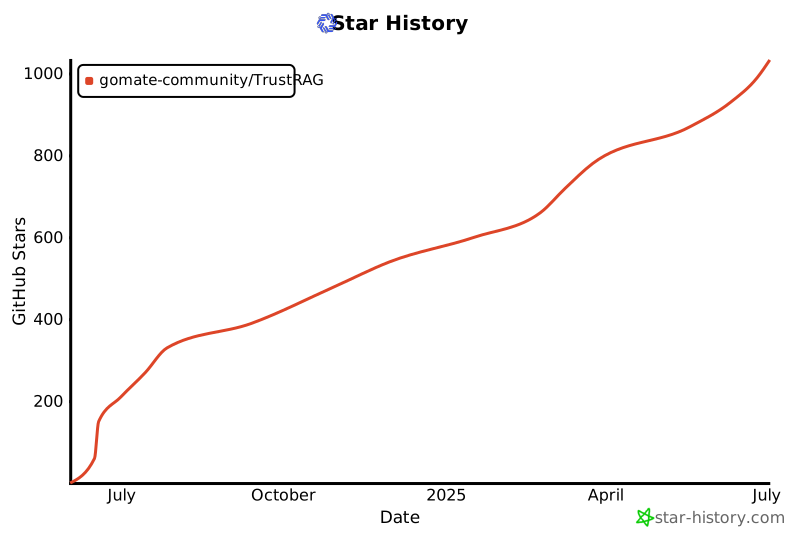
## ⭐️ Star History
[](https://star-history.com/#gomate-community/TrustRAG&Date)
## 研究与开发团队
本项目由网络数据科学与技术重点实验室[`GoMate`](https://github.com/gomate-community)团队完成,团队指导老师为郭嘉丰、范意兴研究员。
## 技术交流群
欢迎多提建议、Bad cases,欢迎进群及时交流,也欢迎大家多提PR
 群满或者合作交流可以联系:
 ## 致谢
- 文档解析:[infiniflow/ragflow](https://github.com/infiniflow/ragflow/blob/main/deepdoc/README.md)
- PDF文件解析[opendatalab/MinerU](https://github.com/opendatalab/MinerU)
## 致谢
- 文档解析:[infiniflow/ragflow](https://github.com/infiniflow/ragflow/blob/main/deepdoc/README.md)
- PDF文件解析[opendatalab/MinerU](https://github.com/opendatalab/MinerU)