# evo
**Repository Path**: falin1/evo
## Basic Information
- **Project Name**: evo
- **Description**: No description available
- **Primary Language**: Unknown
- **License**: GPL-3.0
- **Default Branch**: master
- **Homepage**: None
- **GVP Project**: No
## Statistics
- **Stars**: 0
- **Forks**: 0
- **Created**: 2025-11-18
- **Last Updated**: 2025-11-18
## Categories & Tags
**Categories**: Uncategorized
**Tags**: None
## README
# evo
***Python package for the evaluation of odometry and SLAM***
| Linux / macOS / Windows / ROS / ROS2 |
| :---: |
| [](https://github.com/MichaelGrupp/evo/actions/workflows/ci.yml) |
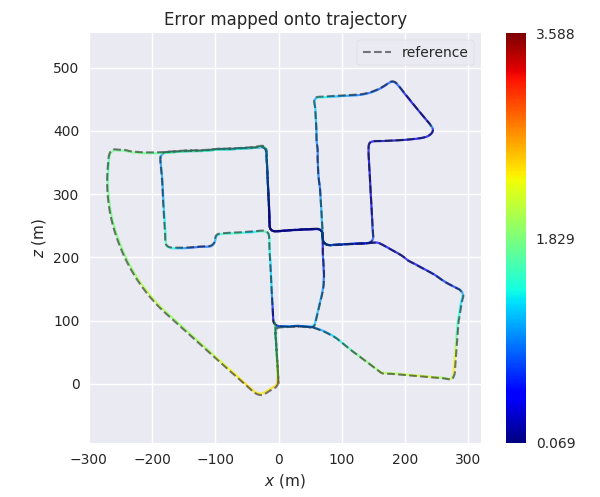
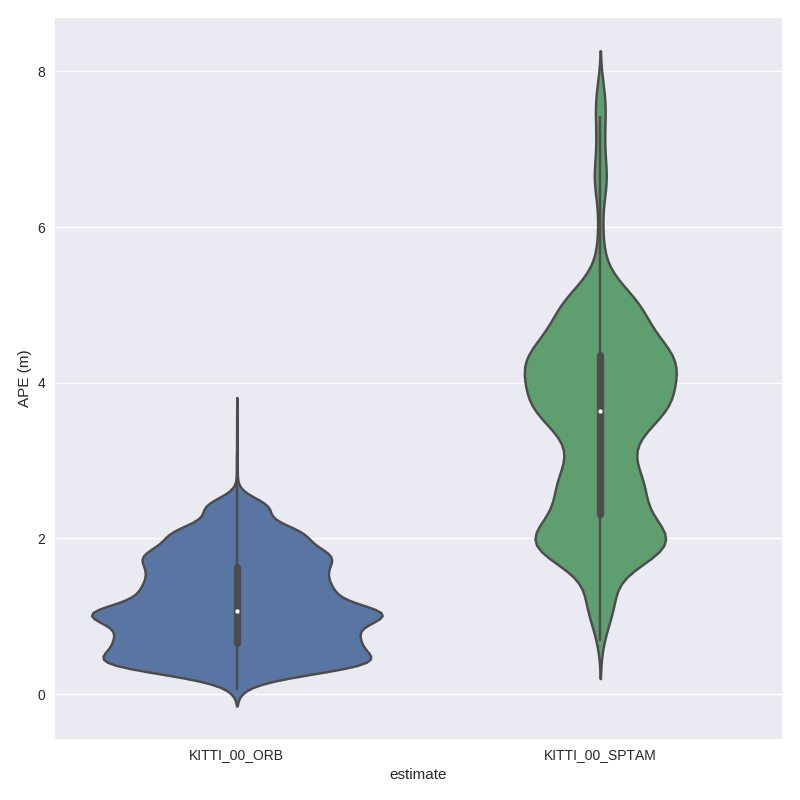
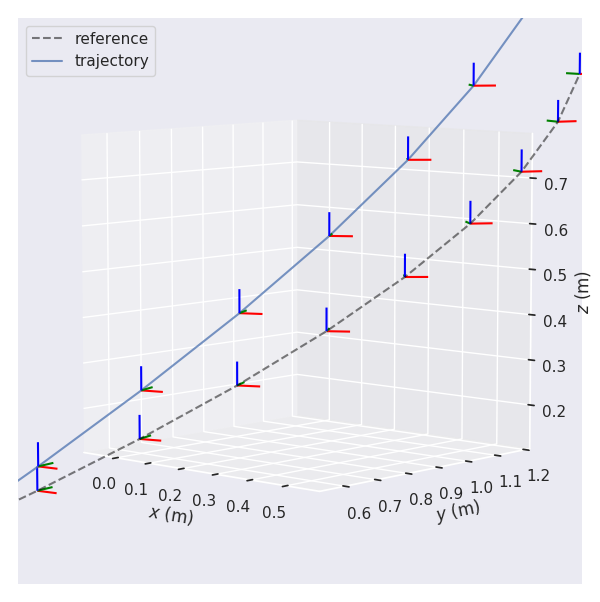
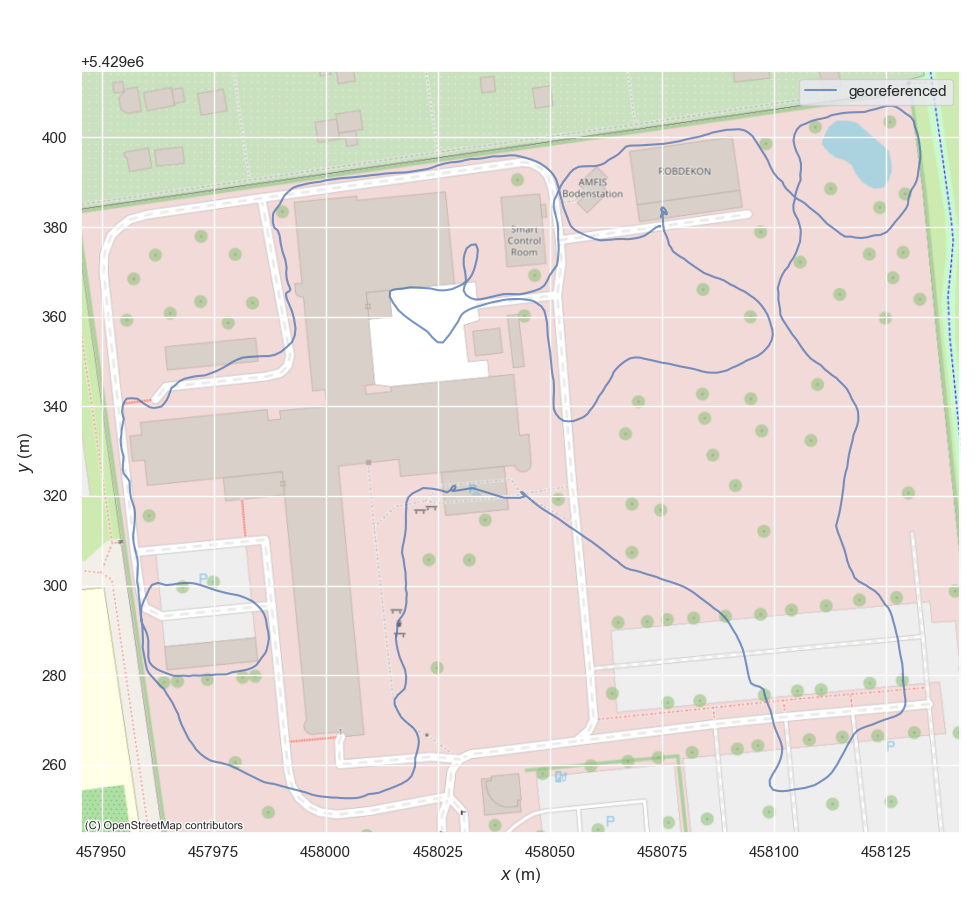
This package provides executables and a small library for handling, evaluating and comparing the trajectory output of odometry and SLAM algorithms.
Supported trajectory formats:
* 'TUM' trajectory files
* 'KITTI' pose files
* 'EuRoC MAV' (.csv groundtruth and TUM trajectory file)
* ROS and ROS2 bagfile with `geometry_msgs/PoseStamped`, `geometry_msgs/TransformStamped`, `geometry_msgs/PoseWithCovarianceStamped`, `geometry_msgs/PointStamped` or `nav_msgs/Odometry` topics or [TF messages](https://github.com/MichaelGrupp/evo/wiki/Formats#bag---ros-bagfile)
See [here](https://github.com/MichaelGrupp/evo/wiki/Formats) for more infos about the formats.
 ---
## Why?
evo has several advantages over other public benchmarking tools:
* common tools for different formats
* algorithmic options for association, alignment, scale adjustment for monocular SLAM etc.
* flexible options for output, [plotting](https://github.com/MichaelGrupp/evo/wiki/Plotting), [visualization](https://github.com/MichaelGrupp/evo/wiki/Rerun-integration) or export (e.g. LaTeX plots or Excel tables)
* a powerful, configurable CLI that can cover many use cases
* modular `core` and `tools` libraries for custom extensions
* faster than other established Python-based tools ([see here](https://github.com/MichaelGrupp/evo/blob/master/doc/performance.md))
**What it's not:** a 1-to-1 re-implementation of a particular evaluation protocol tailored to a specific dataset.
---
## Installation / Upgrade
Installation is easy-peasy if you're familiar with this: https://xkcd.com/1987/#
The latest version of evo supports **Python 3.10+**.
You might also want to use a [virtual environment](https://github.com/MichaelGrupp/evo/blob/master/doc/install_in_virtualenv.md).
### From PyPi
If you just want to use the executables of the latest release version, the easiest way is to run:
```bash
pip install evo
```
This will download the package and its dependencies from [PyPI](https://pypi.org/project/evo/) and install or upgrade them. If you want, you can subscribe to new releases via https://libraries.io/pypi/evo.
To upgrade to a newer version: `pip install --upgrade evo`
### From Source
Run this in the repository's base folder:
```bash
pip install --editable .
```
### Tab completion
Tab completion is supported via the [argcomplete](https://github.com/kislyuk/argcomplete/) package. Run `activate-global-python-argcomplete` after the installation to use it.
### Dependencies
**Python packages**
evo has some required dependencies that are ***automatically resolved*** during installation with pip.
See the `pyproject.toml` file for all details.
**PyQt6 (optional)**
[PyQt6](https://pypi.org/project/PyQt6/) will give you the enhanced GUI for plot figures from the "*qtagg*" matplotlib backend (otherwise: "*TkAgg*"). If PyQt6 is already installed when installing this package, it will be used as a default (see `evo_config show`). To change the plot backend afterwards, run `evo_config set plot_backend qtagg`.
If you run into issues with installing tkinter, trying PyQt6 is a good idea.
**ROS (optional)**
Some ROS-related features require a ROS installation, see [here](http://www.ros.org/). We are testing this package with ROS Kilted.
> Reading ROS bag files works also without a ROS installation thanks to the great [rosbags](https://pypi.org/project/rosbags/) package that is installed together with evo. This allows you also to read ROS 1 & 2 bags even if you don't have one of those ROS distros installed. (except for reading `/tf` topics, because there we need the buffer implementation from ROS)
**contextily (optional)**
[contextily](https://contextily.readthedocs.io/en/latest/index.html) is required for [adding map tiles](https://github.com/MichaelGrupp/evo/wiki/Plotting#geographic-map-tiles) to plots of geo-referenced data.
**Rerun (optional)**
You can log data also to the [rerun](https://rerun.io/) viewer. See the related [Wiki page](https://github.com/MichaelGrupp/evo/wiki/Rerun-integration) for more details.
---
## Command Line Interface
After installation with pip, the following executables can be called globally from your command-line:
**Metrics:**
* `evo_ape` - absolute pose error
* `evo_rpe` - relative pose error
**Tools:**
* `evo_traj` - tool for analyzing, plotting or exporting one or more trajectories
* `evo_res` - tool for comparing one or multiple result files from `evo_ape` or `evo_rpe`
* `evo_config` - tool for global settings and config file manipulation
Call the commands with `--help` to see the options, e.g. `evo_ape --help`. Tab-completion of command line parameters is available on UNIX-like systems.
**More documentation**
Check out the [Wiki on GitHub](https://github.com/MichaelGrupp/evo/wiki).
---
## Example Workflow
There are some example trajectories in the source folder in `test/data`.
### 1.) Plot multiple trajectories
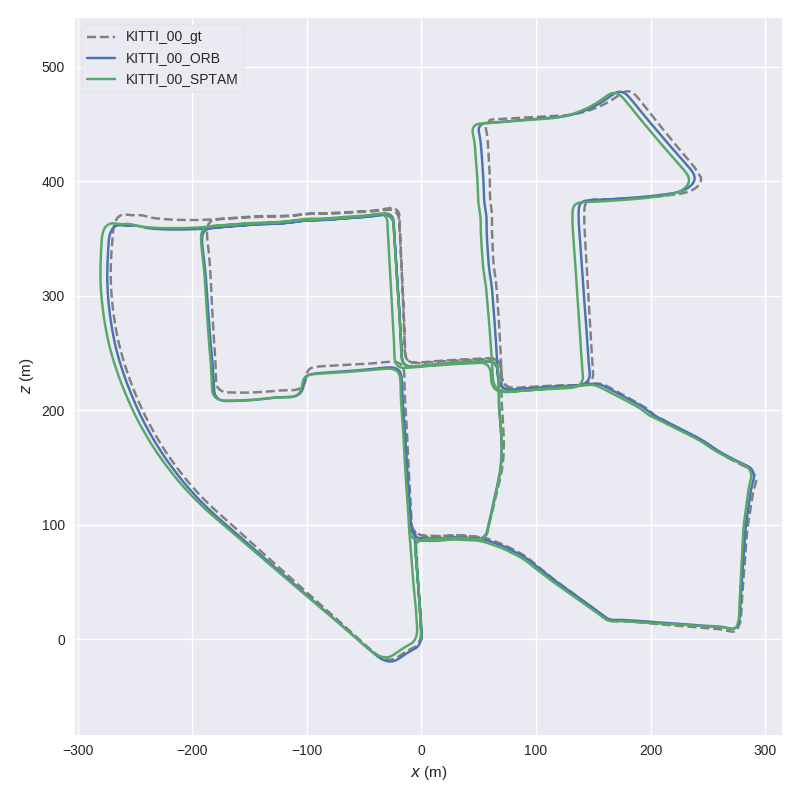
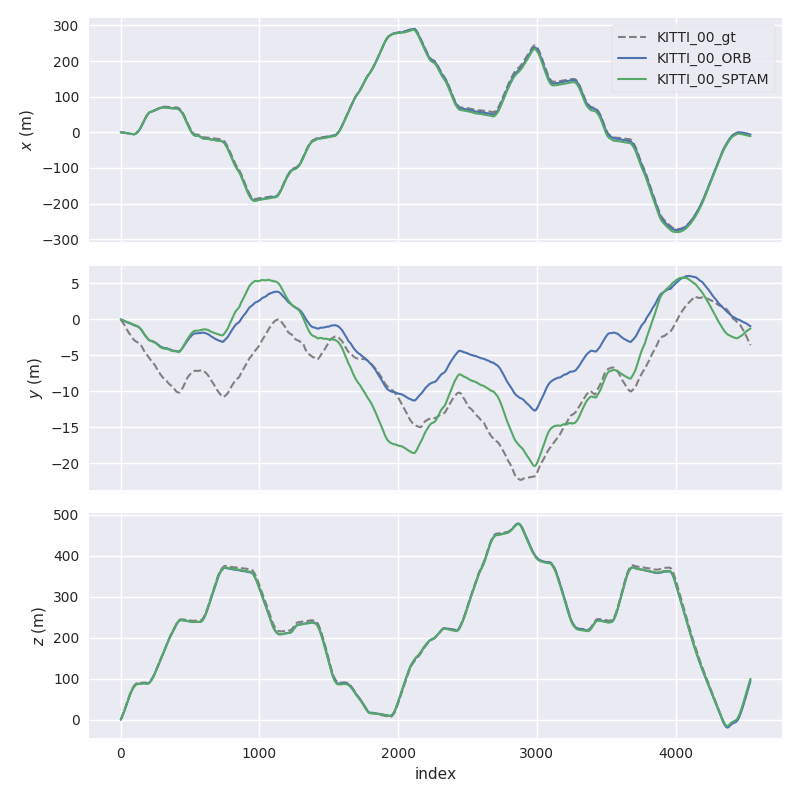
Here, we plot two KITTI pose files and the ground truth using `evo_traj`:
```
cd test/data
evo_traj kitti KITTI_00_ORB.txt KITTI_00_SPTAM.txt --ref=KITTI_00_gt.txt -p --plot_mode=xz
```
---
## Why?
evo has several advantages over other public benchmarking tools:
* common tools for different formats
* algorithmic options for association, alignment, scale adjustment for monocular SLAM etc.
* flexible options for output, [plotting](https://github.com/MichaelGrupp/evo/wiki/Plotting), [visualization](https://github.com/MichaelGrupp/evo/wiki/Rerun-integration) or export (e.g. LaTeX plots or Excel tables)
* a powerful, configurable CLI that can cover many use cases
* modular `core` and `tools` libraries for custom extensions
* faster than other established Python-based tools ([see here](https://github.com/MichaelGrupp/evo/blob/master/doc/performance.md))
**What it's not:** a 1-to-1 re-implementation of a particular evaluation protocol tailored to a specific dataset.
---
## Installation / Upgrade
Installation is easy-peasy if you're familiar with this: https://xkcd.com/1987/#
The latest version of evo supports **Python 3.10+**.
You might also want to use a [virtual environment](https://github.com/MichaelGrupp/evo/blob/master/doc/install_in_virtualenv.md).
### From PyPi
If you just want to use the executables of the latest release version, the easiest way is to run:
```bash
pip install evo
```
This will download the package and its dependencies from [PyPI](https://pypi.org/project/evo/) and install or upgrade them. If you want, you can subscribe to new releases via https://libraries.io/pypi/evo.
To upgrade to a newer version: `pip install --upgrade evo`
### From Source
Run this in the repository's base folder:
```bash
pip install --editable .
```
### Tab completion
Tab completion is supported via the [argcomplete](https://github.com/kislyuk/argcomplete/) package. Run `activate-global-python-argcomplete` after the installation to use it.
### Dependencies
**Python packages**
evo has some required dependencies that are ***automatically resolved*** during installation with pip.
See the `pyproject.toml` file for all details.
**PyQt6 (optional)**
[PyQt6](https://pypi.org/project/PyQt6/) will give you the enhanced GUI for plot figures from the "*qtagg*" matplotlib backend (otherwise: "*TkAgg*"). If PyQt6 is already installed when installing this package, it will be used as a default (see `evo_config show`). To change the plot backend afterwards, run `evo_config set plot_backend qtagg`.
If you run into issues with installing tkinter, trying PyQt6 is a good idea.
**ROS (optional)**
Some ROS-related features require a ROS installation, see [here](http://www.ros.org/). We are testing this package with ROS Kilted.
> Reading ROS bag files works also without a ROS installation thanks to the great [rosbags](https://pypi.org/project/rosbags/) package that is installed together with evo. This allows you also to read ROS 1 & 2 bags even if you don't have one of those ROS distros installed. (except for reading `/tf` topics, because there we need the buffer implementation from ROS)
**contextily (optional)**
[contextily](https://contextily.readthedocs.io/en/latest/index.html) is required for [adding map tiles](https://github.com/MichaelGrupp/evo/wiki/Plotting#geographic-map-tiles) to plots of geo-referenced data.
**Rerun (optional)**
You can log data also to the [rerun](https://rerun.io/) viewer. See the related [Wiki page](https://github.com/MichaelGrupp/evo/wiki/Rerun-integration) for more details.
---
## Command Line Interface
After installation with pip, the following executables can be called globally from your command-line:
**Metrics:**
* `evo_ape` - absolute pose error
* `evo_rpe` - relative pose error
**Tools:**
* `evo_traj` - tool for analyzing, plotting or exporting one or more trajectories
* `evo_res` - tool for comparing one or multiple result files from `evo_ape` or `evo_rpe`
* `evo_config` - tool for global settings and config file manipulation
Call the commands with `--help` to see the options, e.g. `evo_ape --help`. Tab-completion of command line parameters is available on UNIX-like systems.
**More documentation**
Check out the [Wiki on GitHub](https://github.com/MichaelGrupp/evo/wiki).
---
## Example Workflow
There are some example trajectories in the source folder in `test/data`.
### 1.) Plot multiple trajectories
Here, we plot two KITTI pose files and the ground truth using `evo_traj`:
```
cd test/data
evo_traj kitti KITTI_00_ORB.txt KITTI_00_SPTAM.txt --ref=KITTI_00_gt.txt -p --plot_mode=xz
```
 ### 2.) Run a metric on trajectories
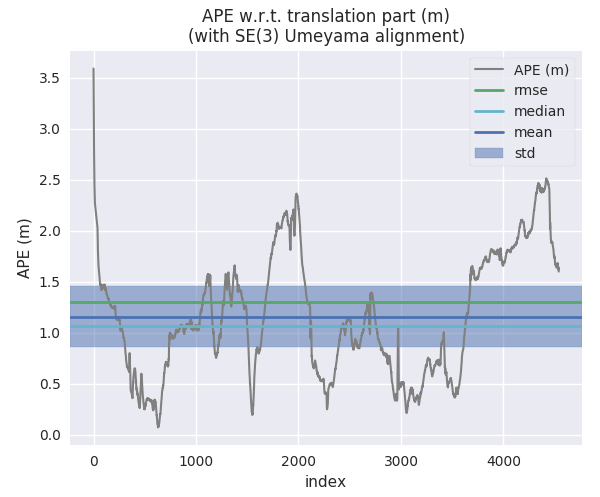
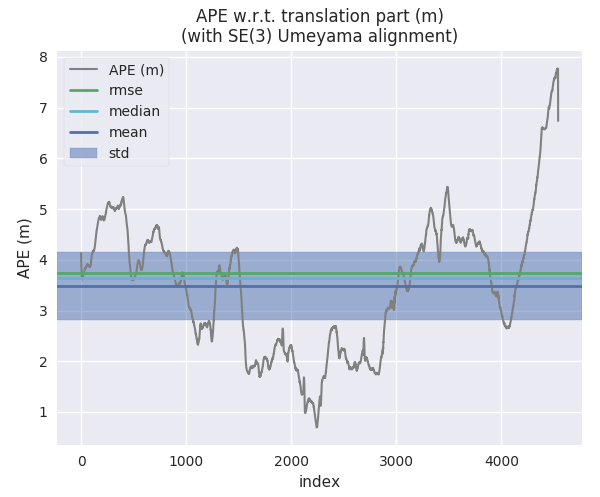
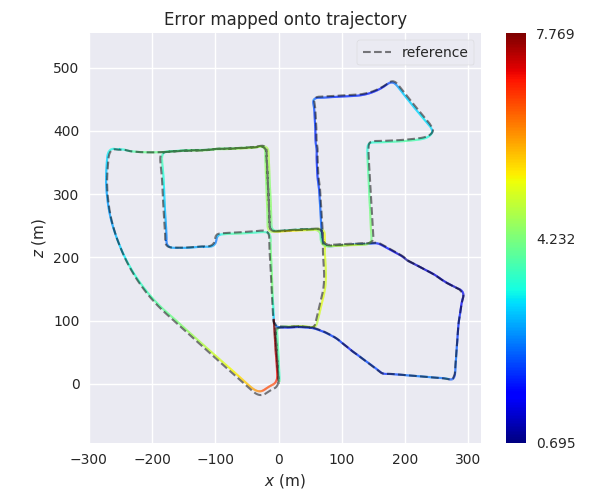
For example, here we calculate the absolute pose error for two trajectories from ORB-SLAM and S-PTAM using `evo_ape` (`KITTI_00_gt.txt` is the reference (ground truth)) and plot and save the individual results to .zip files for `evo_res`:
*First trajectory (ORB Stereo):*
```
mkdir results
evo_ape kitti KITTI_00_gt.txt KITTI_00_ORB.txt -va --plot --plot_mode xz --save_results results/ORB.zip
```
### 2.) Run a metric on trajectories
For example, here we calculate the absolute pose error for two trajectories from ORB-SLAM and S-PTAM using `evo_ape` (`KITTI_00_gt.txt` is the reference (ground truth)) and plot and save the individual results to .zip files for `evo_res`:
*First trajectory (ORB Stereo):*
```
mkdir results
evo_ape kitti KITTI_00_gt.txt KITTI_00_ORB.txt -va --plot --plot_mode xz --save_results results/ORB.zip
```
 *Second trajectory (S-PTAM):*
```
evo_ape kitti KITTI_00_gt.txt KITTI_00_SPTAM.txt -va --plot --plot_mode xz --save_results results/SPTAM.zip
```
*Second trajectory (S-PTAM):*
```
evo_ape kitti KITTI_00_gt.txt KITTI_00_SPTAM.txt -va --plot --plot_mode xz --save_results results/SPTAM.zip
```
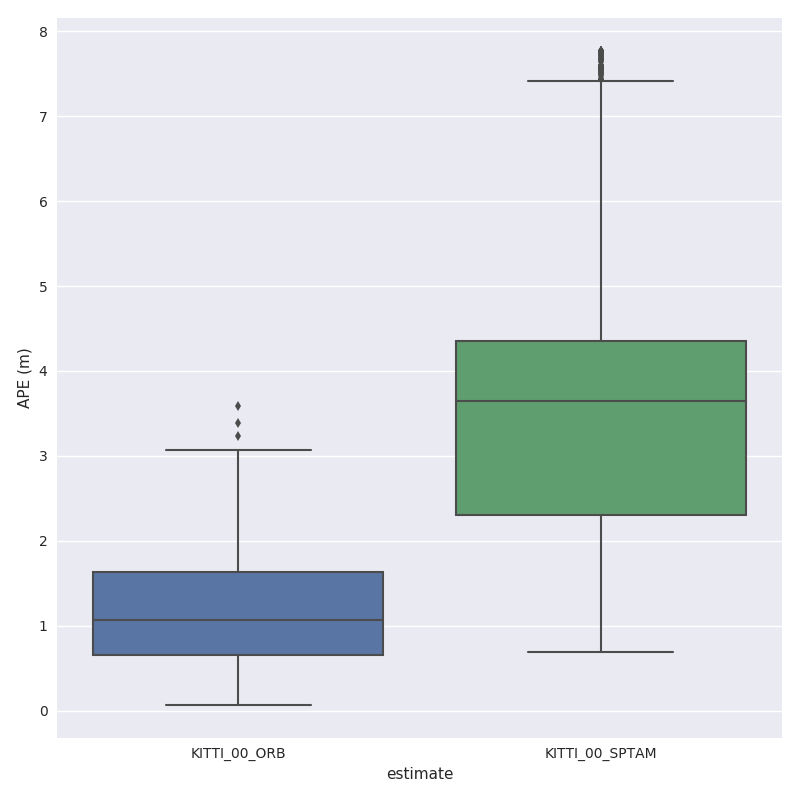
 ### 3.) Process multiple results from a metric
`evo_res` can be used to compare multiple result files from the metrics, i.e.:
* print infos and statistics (default)
* plot the results
* save the statistics in a table
Here, we use the results from above to generate a plot and a table:
```
evo_res results/*.zip -p --save_table results/table.csv
```
### 3.) Process multiple results from a metric
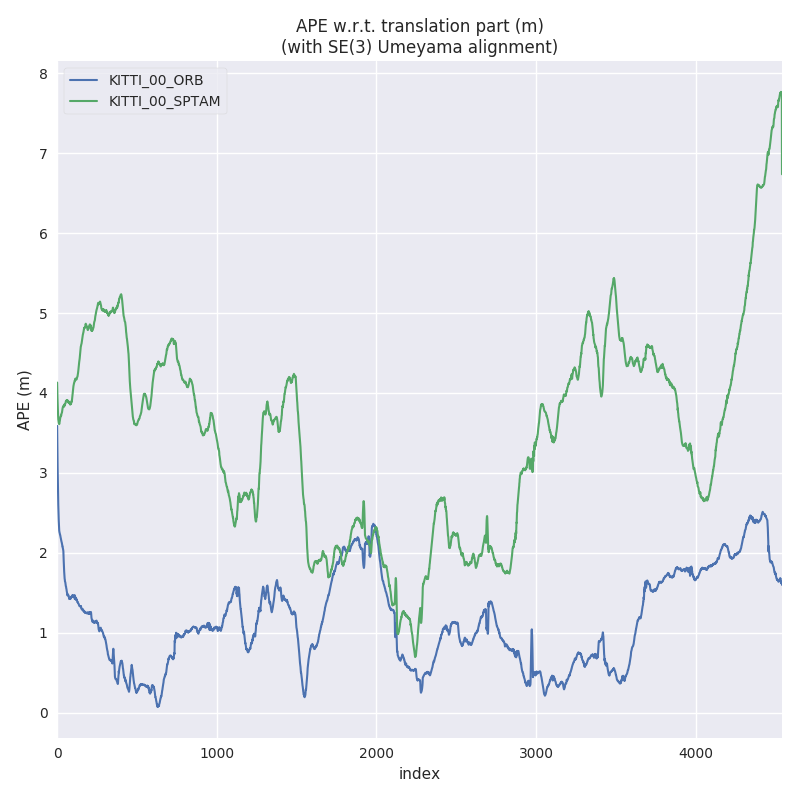
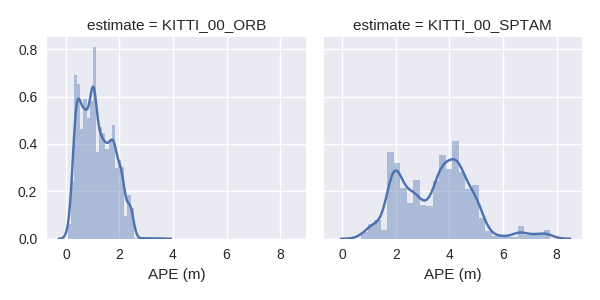
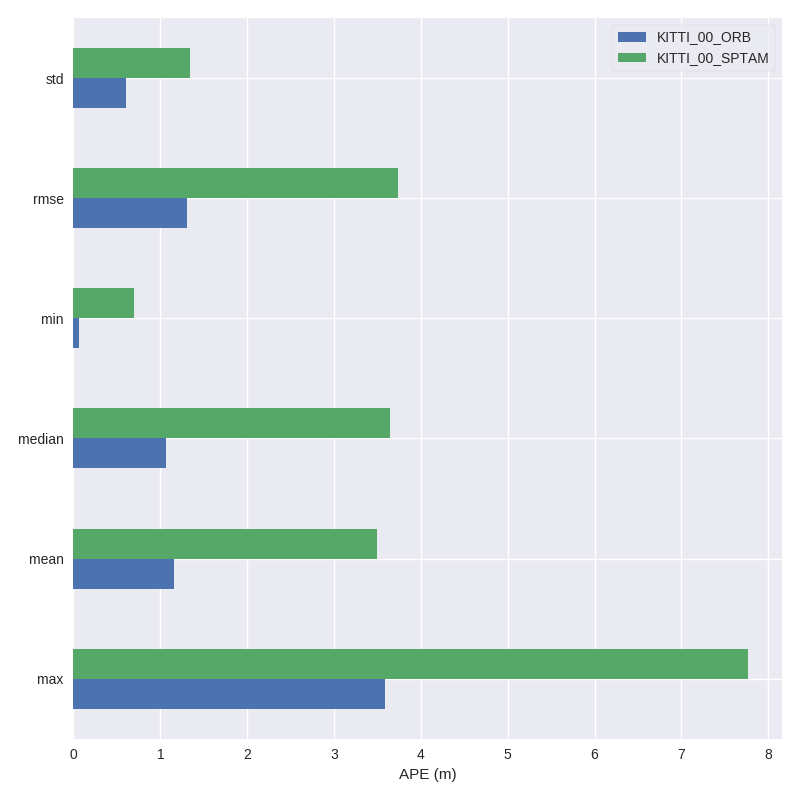
`evo_res` can be used to compare multiple result files from the metrics, i.e.:
* print infos and statistics (default)
* plot the results
* save the statistics in a table
Here, we use the results from above to generate a plot and a table:
```
evo_res results/*.zip -p --save_table results/table.csv
```
 ---
## IPython / Jupyter Resources
For an interactive source code documentation, open the [Jupyter notebook](http://jupyter.readthedocs.io/en/latest/install.html) `metrics_tutorial.ipynb` in the `notebooks` folder of the repository. More infos on Jupyter notebooks: see [here](https://github.com/MichaelGrupp/evo/blob/master/doc/jupyter_notebook.md)
If you have IPython installed, you can launch an IPython shell with a custom evo profile with the command `evo_ipython`.
---
## Contributing Utilities
A few "inoffical" scripts for special use-cases are collected in the `contrib/` directory of the repository. They are inofficial in the sense that they don't ship with the package distribution and thus aren't regularly tested in continuous integration.
---
## Trouble
*"😱, this piece of 💩 software doesn't do what I want!!1!1!!"*
**First aid:**
* append `-h`/ `--help` to your command
* check the [Wiki](https://github.com/MichaelGrupp/evo/wiki)
* check the [previous issues](https://github.com/MichaelGrupp/evo/issues?q=is%3Aissue+is%3Aclosed)
* open a [new issue](https://github.com/MichaelGrupp/evo/issues)
---
## Contributing
Patches are welcome, preferably as pull requests.
## License
[GPL-3.0 or later](https://www.gnu.org/licenses/gpl-3.0.html)
If you use this package for your research, a footnote with the link to this repository is appreciated: `github.com/MichaelGrupp/evo`.
...or, for citation with BibTeX:
```
@misc{grupp2017evo,
title={evo: Python package for the evaluation of odometry and SLAM.},
author={Grupp, Michael},
howpublished={\url{https://github.com/MichaelGrupp/evo}},
year={2017}
}
```
---
## IPython / Jupyter Resources
For an interactive source code documentation, open the [Jupyter notebook](http://jupyter.readthedocs.io/en/latest/install.html) `metrics_tutorial.ipynb` in the `notebooks` folder of the repository. More infos on Jupyter notebooks: see [here](https://github.com/MichaelGrupp/evo/blob/master/doc/jupyter_notebook.md)
If you have IPython installed, you can launch an IPython shell with a custom evo profile with the command `evo_ipython`.
---
## Contributing Utilities
A few "inoffical" scripts for special use-cases are collected in the `contrib/` directory of the repository. They are inofficial in the sense that they don't ship with the package distribution and thus aren't regularly tested in continuous integration.
---
## Trouble
*"😱, this piece of 💩 software doesn't do what I want!!1!1!!"*
**First aid:**
* append `-h`/ `--help` to your command
* check the [Wiki](https://github.com/MichaelGrupp/evo/wiki)
* check the [previous issues](https://github.com/MichaelGrupp/evo/issues?q=is%3Aissue+is%3Aclosed)
* open a [new issue](https://github.com/MichaelGrupp/evo/issues)
---
## Contributing
Patches are welcome, preferably as pull requests.
## License
[GPL-3.0 or later](https://www.gnu.org/licenses/gpl-3.0.html)
If you use this package for your research, a footnote with the link to this repository is appreciated: `github.com/MichaelGrupp/evo`.
...or, for citation with BibTeX:
```
@misc{grupp2017evo,
title={evo: Python package for the evaluation of odometry and SLAM.},
author={Grupp, Michael},
howpublished={\url{https://github.com/MichaelGrupp/evo}},
year={2017}
}
```