# BioDrop
**Repository Path**: dyc_dyc/BioDrop
## Basic Information
- **Project Name**: BioDrop
- **Description**: linkFree
- **Primary Language**: Unknown
- **License**: MIT
- **Default Branch**: contributions
- **Homepage**: None
- **GVP Project**: No
## Statistics
- **Stars**: 0
- **Forks**: 0
- **Created**: 2024-08-09
- **Last Updated**: 2024-08-09
## Categories & Tags
**Categories**: Uncategorized
**Tags**: None
## README
> [!IMPORTANT]
> From **10 June 2024** BioDrop will be archived. What does this mean?
>
> ### Profile
> You will not be able to use your Profile from 10 June so remember to stop using your BioDrop url before then
> You will not be able to access your Dashboard (meaning you will not be able to see any Stats or make changes to your Profile)
> All database data will be deleted
>
> ### GitHub Repo
>
> No Issues or PRs can be raised
>
> If you have an existing Issue or PR assigned to you this will not be reviewed/merged
> A big thank you to our users and contributors, without which this project would not have been possible.
[](https://repo-rater.eddiehub.io/rate?owner=EddieHubCommunity&name=BioDrop)
[](https://gitpod.io/#https://github.com/EddieHubCommunity/BioDrop)

[](https://github.com/EddieHubCommunity/BioDrop/releases)

**Project renamed from `LinkFree` to `BioDrop`**(please update your local git clones with the new remote name)

# What is BioDrop?
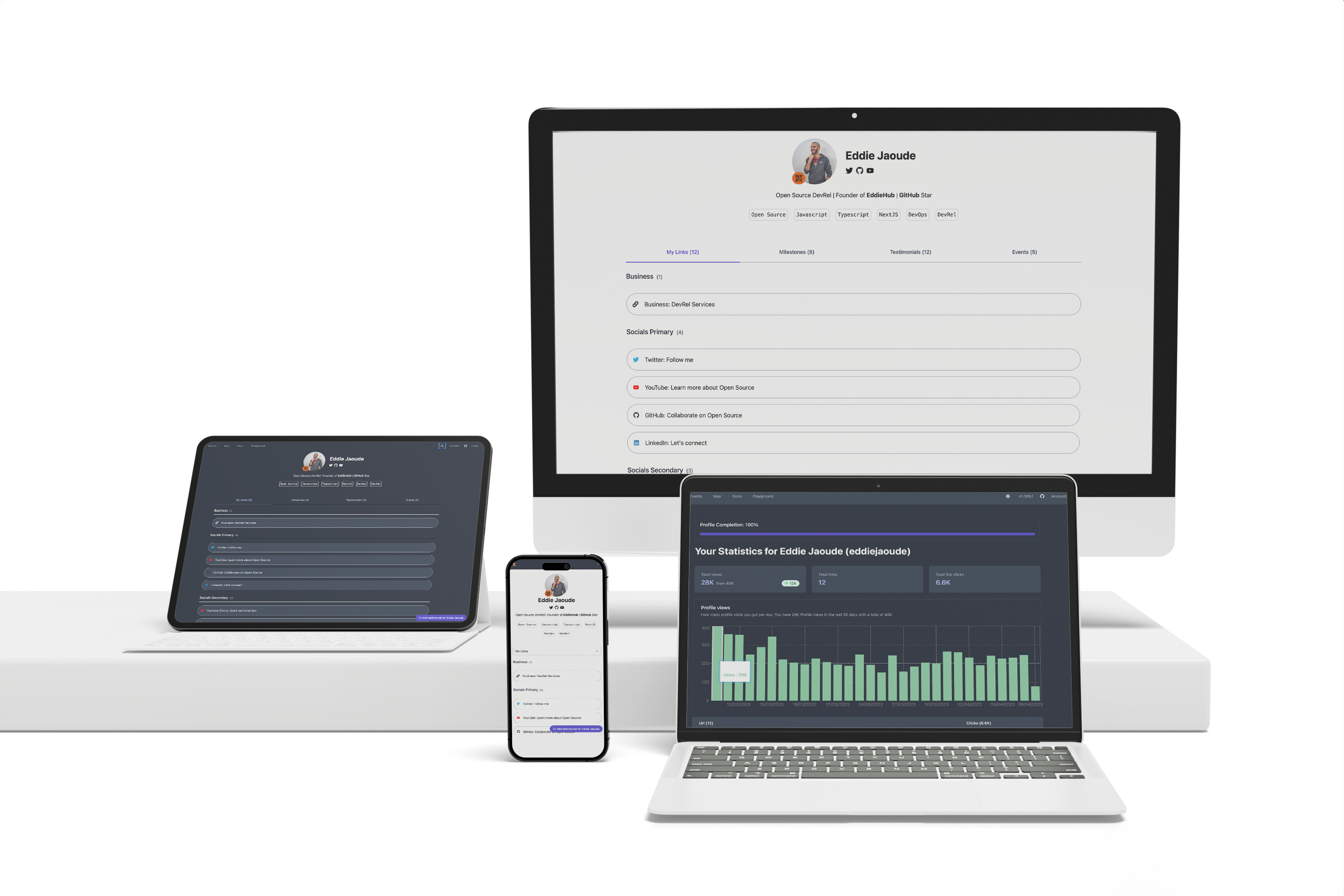
A platform where people in tech can have a single hub to showcase their content in order to accelerate their career, whilst contributing to an Open Source project and being part of a community that has a say in where the project is going.
Your profile will have links to your social media and content. You can also add your timeline, testimonials, and upcoming events that you are participating in.
Here is an example of a BioDrop Profile https://biodrop.io/eddiejaoude
## Hacktoberfest
> [!IMPORTANT]
> Creating/Changing/Deleting your JSON Profile do **not** count towards hacktoberfest and will automatically be marked with the label `invalid` so that Hacktoberfest ignores your Pull Request
> But this does not affect your Pull Request being accepted and merged into BioDrop
All other Pull Requests will count towards Hacktoberfest.
If you are a new contributor to this project, have a look out for issues that have the [Hacktoberfest](https://github.com/EddieHubCommunity/BioDrop/issues?q=is%3Aissue+is%3Aopen+label%3AHacktoberfest) label.
## Tech Stack
BioDrop is built using the following technologies:
- [Next.js](https://nextjs.org/) - a framework for building server-rendered React applications
- [MongoDB](https://www.mongodb.com/) - a NoSQL database
- [Tailwind CSS](https://tailwindcss.com/) - a utility-first CSS framework
## Quickstart
You have 4 options to contribute to the repo, please pick your favourite from:
1. [GitHub UI (recommended for adding/editing your profile)](https://github.com/EddieHubCommunity/BioDrop#github-ui)
2. [Gitpod](https://github.com/EddieHubCommunity/BioDrop#gitpod)
3. [Local development](https://github.com/EddieHubCommunity/BioDrop#local-development)
4. [Local development with Docker Compose](https://github.com/EddieHubCommunity/BioDrop#local-development-with-docker-compose)
Brief documentation is below, but full documentation can be found here https://biodrop.io/docs
> **Warning**:
> Your DB will be empty, you will need to load the data into the database! You can do this by visiting the url `/api/system/reload?secret=development`
### GitHub UI
This is great if you only want to add your Profile or make changes to it.
Here is the **QuickStart** guide to add your profile
- With JSON https://biodrop.io/docs/quickstart-json
- With Forms https://biodrop.io/docs/quickstart-forms
> **Note**: give extra attention to JSON formatting and the GitHub Action after you create the Pull Request
Read more in the official documentation - https://biodrop.io/docs/environments/github-ui
### Gitpod
In the cloud-free development environment which will have all the dependencies you need (for example MongoDB).
[](https://gitpod.io/#https://github.com/EddieHubCommunity/BioDrop)
Read more in the official documentation - https://biodrop.io/docs/environments/gitpod
### Local development
This environment is fully on your computer and requires each dependency (for example MongoDB) to be installed and set up, but it gives you the most flexibility for customisation.
#### Prerequisites
Before contributing or adding a new feature, please make sure you have already installed the following tools:
- [NodeJs](https://nodejs.org/en/download/) (Works with Node LTS version v18.16.1)
- [MongoDB](https://www.mongodb.com/home) (v6+)
- Optional [NVM](https://github.com/nvm-sh/nvm): Switch Node version by using `nvm use` (on Windows, use `nvm use v18.16.1`). If this is not installed, run `nvm install v18.16.1`.
#### Commands
You can set this up locally with the following steps:
1. copy the `.env.example` file to `.env` and update any details required
1. MongoDB is required, it is possible to use `docker compose up` to start the MongoDB service
1. `npm ci`
1. `npm run dev`
Read more in the official documentation https://biodrop.io/docs/environments/local-development#local-development
### Local development with Docker Compose
This will allow you to run your favourite IDE but not have to install any dependencies on your computer like NodeJS and MongoDB.
#### Prerequisites
- [Git](https://git-scm.com/)
- [Docker](https://www.docker.com/) and [Docker Compose](https://github.com/docker/compose) V2. or [Docker Desktop](https://docs.docker.com/desktop/#:~:text=Docker%20Desktop%20is%20a%20one,share%20containerized%20applications%20and%20microservices)
#### Commands
1. `git clone https://github.com/EddieHubCommunity/BioDrop`
2. `cd BioDrop`
3. `docker compose up`
4. In your browser on localhost:3000 you should now see the project up and running.
5. Now you need to upload the data in your mongoDB instance. `localhost:3000/api/system/reload?secret=development`
6. Recheck localhost:3000 to confirm data is uploaded, you should see current amount of active users.
> **Note**
> If you wanna look at the database, you can use [MongoDB Compass](https://www.mongodb.com/products/compass) with connection string as `mongodb://localhost:27017/biodrop`
Read more in the official documentation - https://biodrop.io/docs/environments/local-development#docker-compose
### How to add YOUR Profile
Step by step quickstart guide can be found in the full docs here
- With JSON https://biodrop.io/docs/quickstart-json
- With Forms https://biodrop.io/docs/quickstart-forms
## Testimonials
Here are some testimonials from individuals who have used BioDrop:-
### Francesco Ciulla

> "I had another similar (paid) service. I tried BioDrop for a week and I got almost double the clicks on the links in the same period, redirecting from the same link. I decided to start using it regularly. I am very satisfied. It's not just a list of links but it's backed by a great Open Source community."
- **Name :** Francesco Ciulla
- **Bio :** Developer Advocate at daily.dev, Docker Captain, Public Speaker, Community Builder
- **Username :** Francesco Ciulla
### Amanda Martin

> "Where BioDrop really stands out is the ability to make meaningful connections and find collaborators due to thoughtful features that are not simply about chasing ways to build your audience. The fact that it's also Open Source really makes it the tool I was waiting for in this space."
- **Name :** Amanda Martin
- **Bio :** Developer Advocate | Always Curious | Always Silly
- **Username :** Amanda Martin
### Pradumna Saraf

> "BioDrop is very close to me because I have seen it evolve. With BioDrop, I have discovered so many amazing people in tech. Some of my favorite features are the barcode for profiles and testimonials. If you are reading this and don't have a profile, I highly recommend doing that. Thank you, Eddie and EddieHub community, for building this incredible app."
- **Name :** Pradumna Saraf
- **Bio :** Developer Advocate 🥑 | DevOps | Golang Developer | EddieHub Ambassador
- **Username :** Pradumna Saraf
## GitHub Accelerator
BioDrop was accepted into the GitHub Accelerator program...

https://accelerator.github.com
## Support
Don't forget to leave a star ⭐️.
## Our Pledge
We take participation in our community as a harassment-free experience for everyone and we pledge to act in ways to contribute to an open, welcoming, diverse and inclusive community.
If you have experienced or been made aware of unacceptable behaviour, please remember that you can report this. Read our [Code of Conduct](https://github.com/EddieHubCommunity/BioDrop/blob/main/CODE_OF_CONDUCT.md) for more details.