# Axiom
**Repository Path**: dear2moon/Axiom
## Basic Information
- **Project Name**: Axiom
- **Description**: No description available
- **Primary Language**: Unknown
- **License**: GPL-3.0
- **Default Branch**: master
- **Homepage**: None
- **GVP Project**: No
## Statistics
- **Stars**: 0
- **Forks**: 1
- **Created**: 2023-05-09
- **Last Updated**: 2023-05-09
## Categories & Tags
**Categories**: Uncategorized
**Tags**: None
## README

# Axiom
An FFmpeg GUI for Windows
* [Overview](#overview)
* [Features](#features)
* [Downloads](#downloads)
* [Installation](#installation)
* [Examples](https://github.com/MattMcManis/Axiom/wiki/Examples)
* [Build](#build)
## Overview
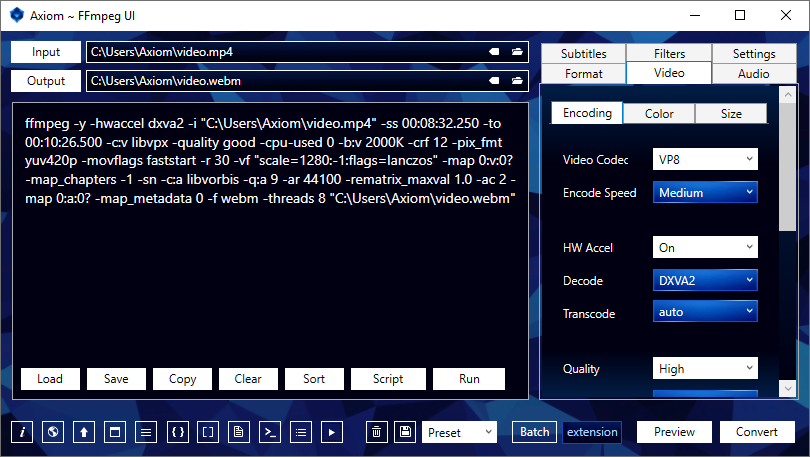
Axiom generates command scripts to be processed by the multimedia encoder, [FFmpeg](https://www.ffmpeg.org), and streams analyzer, [FFprobe](https://ffmpeg.org/ffprobe.html).
Convert to `webm`, `mp4`, `mkv`, `avi`, `ogv`, `mp3`, `m4a`, `ogg`, `flac`, `wav`, `png`, `jpg`, `webp` and more.
### Features
* The Power of FFmpeg in a Minimal Interface
* Convert any media file to multiple formats
* Cut Video and Audio timeline
* Resize Video to standard aspect ratios
* Lossless, Constant and Variable Quality
* Auto-Quality and Copy Modes
* Advanced Batch Processing
* Video to Image Sequence
* Custom User Defined Settings
* Command Script Generator
## Downloads
### Axiom
[Latest Release](https://github.com/MattMcManis/Axiom/releases)
**Included Files**
- Axiom UI
- [FFmpeg](http://www.ffmpeg.org/download.html#build-windows)
- [youtube-dl](https://github.com/ytdl-org/youtube-dl/releases)
- Install Instructions
- [User Guide pdf](https://github.com/MattMcManis/Axiom/blob/master/docs/User%20Guide.pdf)
- Troubleshooter
**Requirements**
- Extract 7z file with [7-Zip](https://www.7-zip.org)
- Axiom [Microsoft .NET Framework 4.5](https://www.microsoft.com/en-us/download/details.aspx?id=30653)
- youtube-dl [Visual C++ 2010 x86](https://www.microsoft.com/en-US/download/details.aspx?id=5555) & [Python](https://www.python.org) (2.6, 2.7, or 3.2+)
### FFmpeg Builds
https://www.gyan.dev/ffmpeg/builds
https://github.com/BtbN/FFmpeg-Builds/releases
## Installation
Axiom is portable and can be run from any location on the computer.
1. Extract `Axiom.FFmpeg.7z` to a location of your choice.
2. Run `Axiom.exe` or create a shortcut on the Desktop.
3. It will automatically detect `ffmpeg.exe` and `ffprobe.exe` in the included `ffmpeg` folder.
4. If you move the `ffmpeg` folder, set the Windows Environment Variable or specify a path in the Axiom Settings Tab.
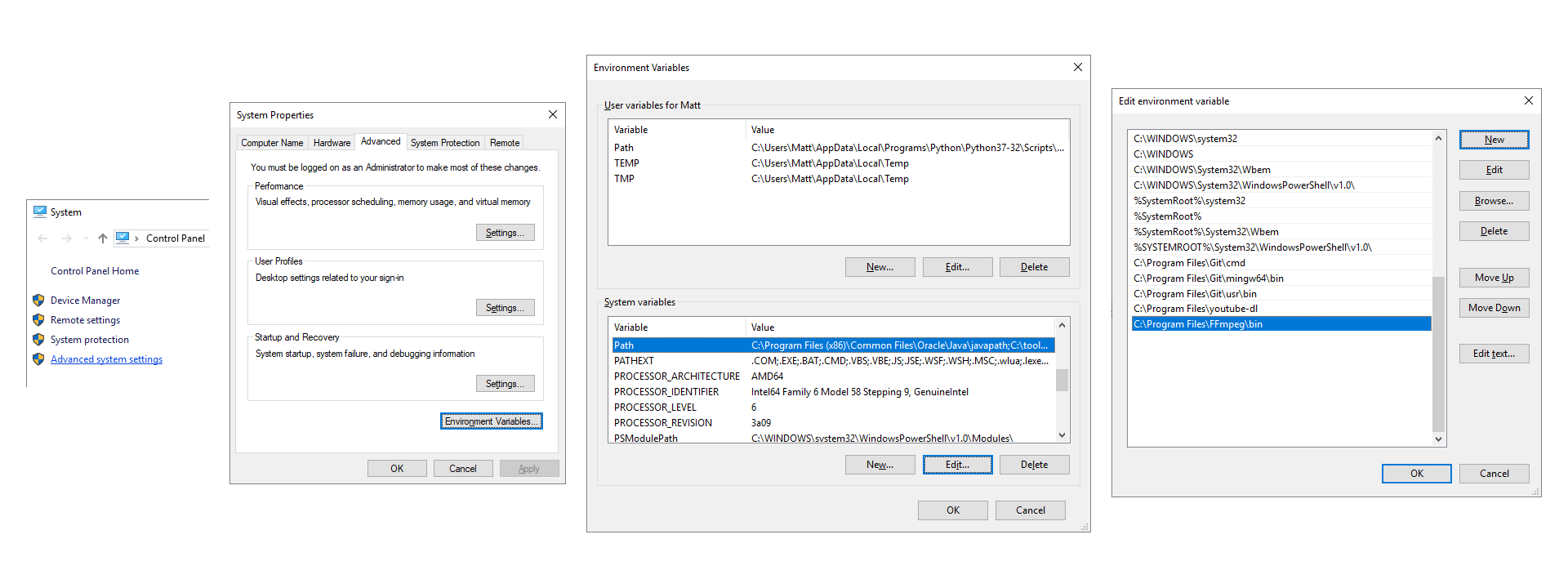
#### Add FFmpeg to Environment Variables (optional):
1. Move the `ffmpeg` folder to a location of your choice, such as `C:\Program Files\`.
2. Go to Control Panel → System and Security → System → Advanced system settings
3. Advanced Tab → Environment Variables → System variables → Path
4. Add `C:\Program Files\ffmpeg\bin\`
5. Separate multiple paths with a semicolon `;` (Windows 7, 8, 8.1)
6. Typing `ffmpeg` in Command Prompt will now execute without needing to specify a direct path.
 ---
#### YouTube Download
`youtube-dl.exe` is included in `Axiom.FFmpeg.7z`.
Requires [Microsoft Visual C++ 2010 x86](https://www.microsoft.com/en-US/download/details.aspx?id=5555) & [Python](https://www.python.org) (2.6, 2.7, or 3.2+) installed.
Axiom will auto-detect it in its included folder. You can also add it to Windows Environment Variables or specify a path in the Axiom Settings Tab.
1. Paste a YouTube URL into the Input TextBox
2. Download file only:
- Select Preset: `YouTube-DL` → `Video` or `Music`, Press `Download`
3. Download and Convert:
- Select any Presets or Settings you need and Press `Convert`
4. Generate a Script without Downloading:
- Select any Settings you need and Press `Script`
## Resources
* [Axiom Wiki](https://github.com/MattMcManis/Axiom/wiki)
* [FFmpeg Wiki](https://trac.ffmpeg.org/wiki)
* [FFmpeg Documentation](https://ffmpeg.org/ffmpeg.html)
* [FFmpeg Filters](https://ffmpeg.org/ffmpeg-filters.html)
* Video Codecs [VP8](https://trac.ffmpeg.org/wiki/Encode/VP8), [VP9](https://trac.ffmpeg.org/wiki/Encode/VP9), [x264](https://trac.ffmpeg.org/wiki/Encode/H.264), [x265](https://trac.ffmpeg.org/wiki/Encode/H.265), [AV1](https://trac.ffmpeg.org/wiki/Encode/AV1)
* Audio Codecs [AC3](https://en.wikipedia.org/wiki/Dolby_Digital), [AAC](https://trac.ffmpeg.org/wiki/Encode/AAC), [Opus](https://en.wikipedia.org/wiki/Opus_(audio_format)), [Vorbis](https://en.wikipedia.org/wiki/Vorbis), [MP3](https://trac.ffmpeg.org/wiki/Encode/MP3), [FLAC](https://en.wikipedia.org/wiki/FLAC)
* [CRF Quality Guide](https://slhck.info/video/2017/02/24/crf-guide.html)
* [VBR Quality Guide](https://slhck.info/video/2017/02/24/vbr-settings.html)
* [Scaling Algorithms](https://i.imgur.com/5jO3ay1.png)
* x264/x265 [Profiles](https://en.wikipedia.org/wiki/Advanced_Video_Coding#Profiles), [Levels](https://en.wikipedia.org/wiki/Advanced_Video_Coding#Levels), [Tune](https://superuser.com/a/564404)
* [Color Space](https://www.richardlackey.com/choosing-video-color-space/)
* [Hardware Acceleration](https://trac.ffmpeg.org/wiki/HWAccelIntro)
## Build
Visual Studio 2015
---
#### YouTube Download
`youtube-dl.exe` is included in `Axiom.FFmpeg.7z`.
Requires [Microsoft Visual C++ 2010 x86](https://www.microsoft.com/en-US/download/details.aspx?id=5555) & [Python](https://www.python.org) (2.6, 2.7, or 3.2+) installed.
Axiom will auto-detect it in its included folder. You can also add it to Windows Environment Variables or specify a path in the Axiom Settings Tab.
1. Paste a YouTube URL into the Input TextBox
2. Download file only:
- Select Preset: `YouTube-DL` → `Video` or `Music`, Press `Download`
3. Download and Convert:
- Select any Presets or Settings you need and Press `Convert`
4. Generate a Script without Downloading:
- Select any Settings you need and Press `Script`
## Resources
* [Axiom Wiki](https://github.com/MattMcManis/Axiom/wiki)
* [FFmpeg Wiki](https://trac.ffmpeg.org/wiki)
* [FFmpeg Documentation](https://ffmpeg.org/ffmpeg.html)
* [FFmpeg Filters](https://ffmpeg.org/ffmpeg-filters.html)
* Video Codecs [VP8](https://trac.ffmpeg.org/wiki/Encode/VP8), [VP9](https://trac.ffmpeg.org/wiki/Encode/VP9), [x264](https://trac.ffmpeg.org/wiki/Encode/H.264), [x265](https://trac.ffmpeg.org/wiki/Encode/H.265), [AV1](https://trac.ffmpeg.org/wiki/Encode/AV1)
* Audio Codecs [AC3](https://en.wikipedia.org/wiki/Dolby_Digital), [AAC](https://trac.ffmpeg.org/wiki/Encode/AAC), [Opus](https://en.wikipedia.org/wiki/Opus_(audio_format)), [Vorbis](https://en.wikipedia.org/wiki/Vorbis), [MP3](https://trac.ffmpeg.org/wiki/Encode/MP3), [FLAC](https://en.wikipedia.org/wiki/FLAC)
* [CRF Quality Guide](https://slhck.info/video/2017/02/24/crf-guide.html)
* [VBR Quality Guide](https://slhck.info/video/2017/02/24/vbr-settings.html)
* [Scaling Algorithms](https://i.imgur.com/5jO3ay1.png)
* x264/x265 [Profiles](https://en.wikipedia.org/wiki/Advanced_Video_Coding#Profiles), [Levels](https://en.wikipedia.org/wiki/Advanced_Video_Coding#Levels), [Tune](https://superuser.com/a/564404)
* [Color Space](https://www.richardlackey.com/choosing-video-color-space/)
* [Hardware Acceleration](https://trac.ffmpeg.org/wiki/HWAccelIntro)
## Build
Visual Studio 2015
WPF, C#, XAML
Visual C++ 19.0 Compiler
[](https://www.paypal.com/cgi-bin/webscr?cmd=_s-xclick&hosted_button_id=VTUE7KQ8RS3DN)
Thank you for your support.