# chat2db
**Repository Path**: dahezi/chat2db
## Basic Information
- **Project Name**: chat2db
- **Description**: Chat2DB 是一款有开源免费的多数据库客户端工具,支持windows、mac本地安装,也支持服务器端部署,web网页访问
- **Primary Language**: Java
- **License**: Apache-2.0
- **Default Branch**: main
- **Homepage**: https://www.oschina.net/p/chat2db
- **GVP Project**: No
## Statistics
- **Stars**: 0
- **Forks**: 26
- **Created**: 2023-06-05
- **Last Updated**: 2023-06-05
## Categories & Tags
**Categories**: Uncategorized
**Tags**: None
## README
Chat2DB
🔥🔥🔥 智能且多功能的SQL客户端和报表工具,适用于各种数据库
[](https://www.apache.org/licenses/LICENSE-2.0.html)
[](https://openjdk.java.net/)
[](https://github.com/alibaba/ali-dbhub/releases)
[](https://github.com/alibaba/ali-dbhub/stargazers)
[](https://github.com/alibaba/ali-dbhub/fork)
[](https://github.com/alibaba/ali-dbhub/graphs/contributors)
语言: 中文 | [English](README_CN.md)
## 📖 简介
Chat2DB 是一款有开源免费的多数据库客户端工具,支持windows、mac本地安装,也支持服务器端部署,web网页访问。和传统的数据库客户端软件Navicat、DBeaver 相比Chat2DB集成了AIGC的能力,能够将自然语言转换为SQL,也可以将SQL转换为自然语言,可以给出研发人员SQL的优化建议,极大的提升人员的效率,是AI时代数据库研发人员的利器,未来即使不懂SQL的运营业务也可以使用快速查询业务数据、生成报表能力。
## ✨ 特性
- 🌈 AI智能助手,支持自然语言转SQL、SQL转自然语言、SQL优化建议
- 👭 支持团队协作,研发无需知道线上数据库密码,解决企业数据库账号安全问题
- ⚙️ 强大的数据管理能力,支持数据表、视图、存储过程、函数、触发器、索引、序列、用户、角色、授权等管理
- 🔌 强大的扩展能力,目前已经支持MySQL、PostgreSQL、Oracle、SQLServer、ClickHouse、OceanBase、H2、SQLite等等,未来会支持更多的数据库
- 🛡 前端使用 Electron 开发,提供 Windows、Mac、Linux 客户端、网页版本一体化的解决方案
- 🎁 支持环境隔离、线上、日常数据权限分离
## ⏬ 下载安装
| 描述 | 下载地址 |
|-----------------------|--------------------------------------------------------------------------------------------------------------------------------------------------------------------------------------------------------------------------------------------|
| Windows | [https://oss-chat2db.alibaba.com/release/1.0.9/Chat2DB%20Setup%201.0.9.exe](https://oss-chat2db.alibaba.com/release/1.0.9/Chat2DB%20Setup%201.0.9.exe) |
| MacOS ARM64 (Apple芯片) | [https://oss-chat2db.alibaba.com/release/1.0.9/Chat2DB-1.0.9-arm64.dmg](https://oss-chat2db.alibaba.com/release/1.0.9/Chat2DB-1.0.9-arm64.dmg) |
| MacOS X64 (Intel芯片) | [https://oss-chat2db.alibaba.com/release/1.0.9/Chat2DB-1.0.9.dmg](https://oss-chat2db.alibaba.com/release/1.0.9/Chat2DB-1.0.9.dmg) |
| Jar包 | [https://oss-chat2db.alibaba.com/release/1.0.9/ali-dbhub-server-start.jar](https://oss-chat2db.alibaba.com/release/1.0.9/ali-dbhub-server-start.jar) |
## 🌰 使用Demo
### 创建数据源
 ### 数据源管理
 ### SQL控制台 及 AI智能助手
 ## 📦 Docker部署
```bash
docker pull chat2db/chat2db:latest
// 前台运行,运行后不能关闭命令行
docker run -ti --name=chat2db -p 10824:10824 chat2db/chat2db:latest
// 后台运行,运行后可以关闭命令行
docker run --name=chat2db -p 10824:10824 chat2db/chat2db:latest
// 这里正常会提示 Tomcat started on port(s): 10824 (http) with context path 就可以结束了
// 如果这里提示 The container name "/chat2db" is already in use by container, 代表已经存在容器了 运行
dcoker run chat2db
// 如果想更新chat2db 则需要先rm 再运行
dcoker rm chat2db
```
## 🎯 运行环境
注意:
如果需要本地调试
- java运行 Open JDK 17
- Node运行环境Node16 Node.js.
## 💻 本地调试
- git clone到本地
```bash
$ git clone git@github.com:alibaba/Chat2DB.git
```
- 前端安装
```bash
$ cd Chat2DB/ali-dbhub-client
$ npm install # 安装前端依赖
$ npm run build:prod # 把js打包生成到后端的source目录
```
- 后端调试
```bash
$ cd ../ali-dbhub-server
$ mvn clean install # 需要安装maven 3.8以上版本
$ cd ali-dbhub-server/ali-dbhub-server-start/target/
$ java -jar -Dchatgpt.apiKey=xxxxx ali-dbhub-server-start.jar # 启动应用 chatgpt.apiKey 需要输入ChatGPT的key,如果不输入无法使用AIGC功能
$ # 打开 http://127.0.0.1:10821 开启调试 注:需要进行前端安装
```
- 前端调试
```bash
$ cd Chat2DB/ali-dbhub-client
$ npm install
$ npm run start
$ # 打开 http://127.0.0.1:10821 开启前端调试
$ # 注:前端页面完全赖服务,所以前端同学调试也需要把后端项目跑起来
```
但是前端调试需要映射下资源,可以下载[XSwitch](https://chrome.google.com/webstore/detail/idkjhjggpffolpidfkikidcokdkdaogg),添加以下配置文件
``` json
{
"proxy": [
[
"http://127.0.0.1:10821/(.*).js$",
"http://127.0.0.1:8001/$1.js",
],
[
"http://127.0.0.1:10821/(.*).css$",
"http://127.0.0.1:8001/$1.css",
],
[
"http://127.0.0.1:10821/static/front/(.*)",
"http://127.0.0.1:8001/$1",
],
[
"http://127.0.0.1:10821/static/(.*)$",
"http://127.0.0.1:8001/static/$1",
],
],
}
```
## 📑 文档
* WIKI
* Issue tracker
## Stargazers
[](https://github.com/alibaba/Chat2DB/stargazers)
## Forkers
[](https://github.com/alibaba/Chat2DB/network/members)
## ☎️ 联系我们
加群前请先Star和Fork,谢谢~
## 📦 Docker部署
```bash
docker pull chat2db/chat2db:latest
// 前台运行,运行后不能关闭命令行
docker run -ti --name=chat2db -p 10824:10824 chat2db/chat2db:latest
// 后台运行,运行后可以关闭命令行
docker run --name=chat2db -p 10824:10824 chat2db/chat2db:latest
// 这里正常会提示 Tomcat started on port(s): 10824 (http) with context path 就可以结束了
// 如果这里提示 The container name "/chat2db" is already in use by container, 代表已经存在容器了 运行
dcoker run chat2db
// 如果想更新chat2db 则需要先rm 再运行
dcoker rm chat2db
```
## 🎯 运行环境
注意:
如果需要本地调试
- java运行 Open JDK 17
- Node运行环境Node16 Node.js.
## 💻 本地调试
- git clone到本地
```bash
$ git clone git@github.com:alibaba/Chat2DB.git
```
- 前端安装
```bash
$ cd Chat2DB/ali-dbhub-client
$ npm install # 安装前端依赖
$ npm run build:prod # 把js打包生成到后端的source目录
```
- 后端调试
```bash
$ cd ../ali-dbhub-server
$ mvn clean install # 需要安装maven 3.8以上版本
$ cd ali-dbhub-server/ali-dbhub-server-start/target/
$ java -jar -Dchatgpt.apiKey=xxxxx ali-dbhub-server-start.jar # 启动应用 chatgpt.apiKey 需要输入ChatGPT的key,如果不输入无法使用AIGC功能
$ # 打开 http://127.0.0.1:10821 开启调试 注:需要进行前端安装
```
- 前端调试
```bash
$ cd Chat2DB/ali-dbhub-client
$ npm install
$ npm run start
$ # 打开 http://127.0.0.1:10821 开启前端调试
$ # 注:前端页面完全赖服务,所以前端同学调试也需要把后端项目跑起来
```
但是前端调试需要映射下资源,可以下载[XSwitch](https://chrome.google.com/webstore/detail/idkjhjggpffolpidfkikidcokdkdaogg),添加以下配置文件
``` json
{
"proxy": [
[
"http://127.0.0.1:10821/(.*).js$",
"http://127.0.0.1:8001/$1.js",
],
[
"http://127.0.0.1:10821/(.*).css$",
"http://127.0.0.1:8001/$1.css",
],
[
"http://127.0.0.1:10821/static/front/(.*)",
"http://127.0.0.1:8001/$1",
],
[
"http://127.0.0.1:10821/static/(.*)$",
"http://127.0.0.1:8001/static/$1",
],
],
}
```
## 📑 文档
* WIKI
* Issue tracker
## Stargazers
[](https://github.com/alibaba/Chat2DB/stargazers)
## Forkers
[](https://github.com/alibaba/Chat2DB/network/members)
## ☎️ 联系我们
加群前请先Star和Fork,谢谢~

 微信:yxccw132 钉钉:9135032392
## ❤️ 致谢
感谢所有为Chat2DB贡献力量的同学们~
微信:yxccw132 钉钉:9135032392
## ❤️ 致谢
感谢所有为Chat2DB贡献力量的同学们~
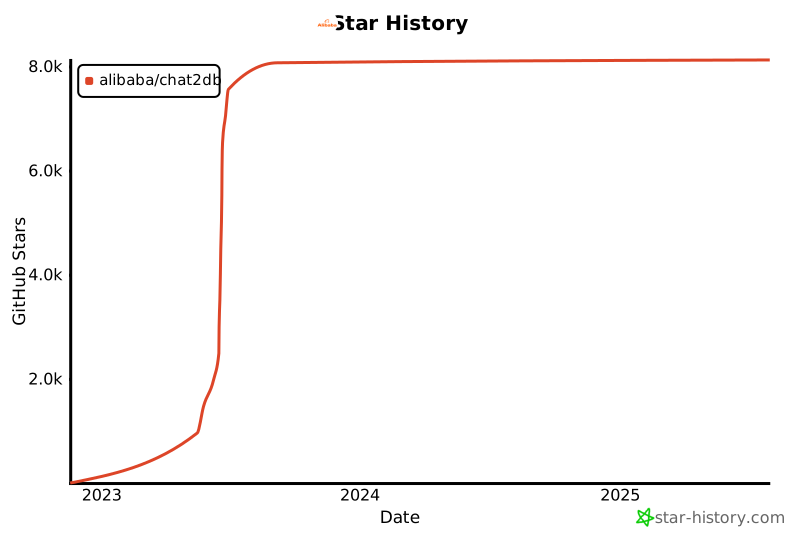
 ## Star History