# QQSystem
**Repository Path**: YwMoyu/QQSystem
## Basic Information
- **Project Name**: QQSystem
- **Description**: Java
- **Primary Language**: Java
- **License**: Not specified
- **Default Branch**: master
- **Homepage**: None
- **GVP Project**: No
## Statistics
- **Stars**: 0
- **Forks**: 0
- **Created**: 2020-07-18
- **Last Updated**: 2020-12-18
## Categories & Tags
**Categories**: Uncategorized
**Tags**: None
## README
# QQSystem - Java
## 项目描述
结合本学期java课程中所学的有关GUI,TCP/UDP通信协议,进程/线程创立,I/O输入输出等相关知识,参考聊天软件QQ实现一个简单的聊天系统,要求能够实现点对点的聊天和群聊,同时具有添加,删除好友等基本功能。
## 系统需求分析
1、注册界面:一个聊天系统最基本的需要由注册功能,用户通过界面注册系统后注册一个新的账号,拥有一个 独一无二的ID和自己的网名,并且可以使用ID登录该聊天系统。
2、登录界面:用户根据注册得到的ID号登录系统,当密码与ID不相匹配时会提示密码错误,密码正确则登陆成功,进入用户界面。
3、用户界面:用户成功登陆到用户界面,在用户界面具有添加/删除好友,进入私聊和进入群聊等功能。
4、添加好友界面:用户在此界面可以通过搜索其他人的ID进行添加好友,ID不存在时则提示对应用户不存在。
5、私聊界面;用户进入私聊界面后,当对方上线或者下线是给出提示,并且当对方在线时可以与对方进行实时聊天。
6、群聊界面:两个及其以上的用户可以组成一个群聊,当用户在群聊里面发送消息时,系统会自动发送到群内各个其他成员的群聊消息中。
## 项目设计
### 1、QQ用户与好友实体类设计

### 2、Java对Mysql数据库操作的方法工具类设计

###3、QQ图形界面类图

### 4、连接数据库以及数据处理工具类设计:
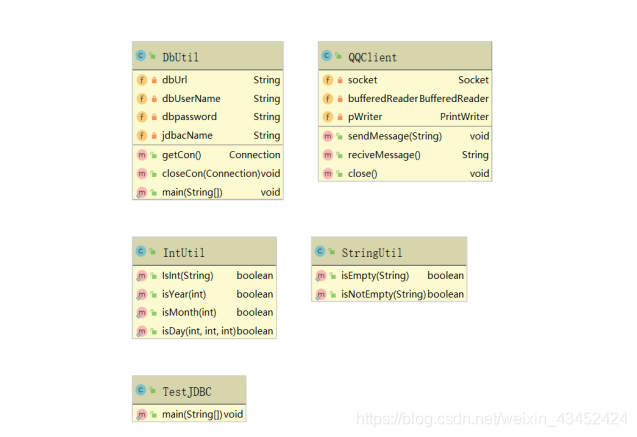
### 5、数据类、工具类、数据库操作类、界面类包之间的调用关系

## 数据库系统设计
1、用户数据表设计实现

2、用户关系(好友表)数据表设计

3、群信息数据表设计

4、用户与群之间的关系(群表)数据表设计

## QQ项目系统设计与实现
### 1、服务后端端设计
(1)实现效果图

public class ChatRoomServer {
private ServerSocket serverSocket;
private HashSet allSockets;
public ChatRoomServer() {
try {
serverSocket =new ServerSocket(11112);
} catch (IOException e) {
e.printStackTrace();
}
allSockets = new HashSet();
}
@SuppressWarnings("deprecation")
public void startService(String temp) throws IOException {
if(temp=="1") {
while(true) {
Socket s= serverSocket.accept();
System.out.println("用户已进入群聊");
allSockets.add(s);
new ServerThread(s).start();
}
}else if(temp=="0"){
System.exit(0);
}
}
/**
* 线程内部类
*/
private class ServerThread extends Thread {
Socket socket;
public ServerThread(Socket socket) {
this.socket=socket;
}
public void run() {
BufferedReader br =null;
try {
br =new BufferedReader(new InputStreamReader(socket.getInputStream()));
while(true) {
String str=br.readLine();
if(str.contains("%EXIR%")){
allSockets.remove(socket);
sendMessageTOAllClient(str.split(":")[1]+"用户退出群聊");
socket.close();
return;
}
if(str.contains("%EXIT%")){
allSockets.remove(socket);
sendMessageTOAllClient(str.split(":")[1]+"用户已已经下线");
socket.close();
return;
}
sendMessageTOAllClient(str);
}
} catch (IOException e) {
System.out.println("用户退出");
//e.printStackTrace();
}
}
}
public void sendMessageTOAllClient(String message) throws IOException {
for(Socket s:allSockets) {
PrintWriter pw;
pw = new PrintWriter(s.getOutputStream());
pw.println(message);
pw.flush();
}
}
}
### 2、客户端设计并实现
(1)、登录实现效果图

(2)注册实现效果图
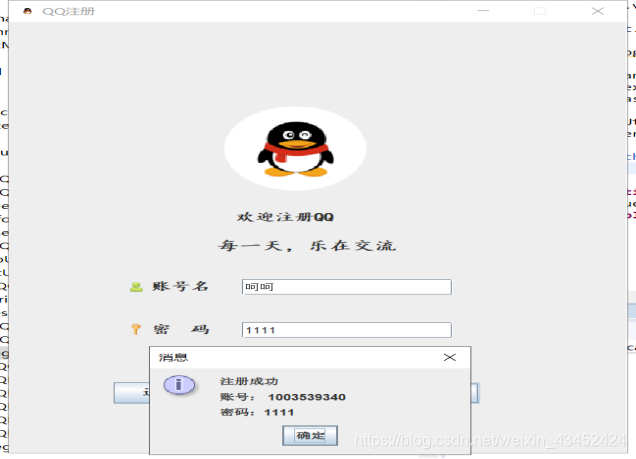
(3)好友列表实现效果图

(4)好友群列表实现效果图

(5)用户数据库表实现效果图
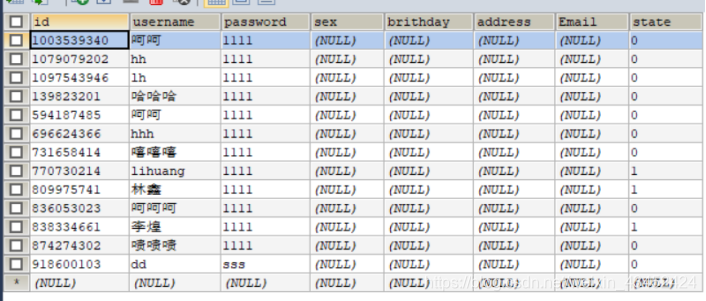
(6)好友数据表

(7)群信息数据表
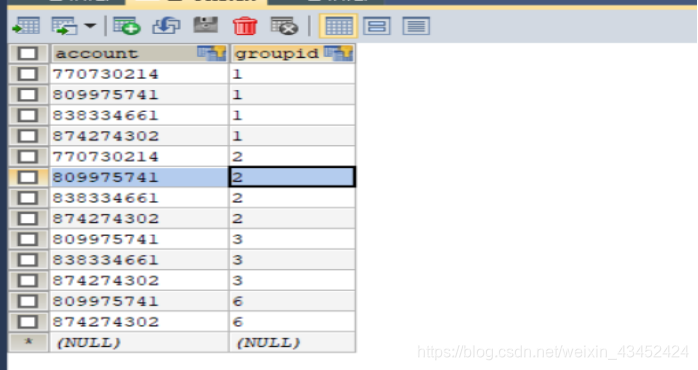
(8)群与好友关系数据列表

(9)好友聊天实现效果图

(10) 群聊天实现效果图

(11)加好友实现效果图


(12)加群聊实现效果图


### 3、主要实现代码
(1)连接数据
public class DbUtil {
private String dbUrl="jdbc:mysql://localhost:3306/qqdatebase?serverTimezone=UTC&characterEncoding=utf-8";
private String dbUserName="root";
private String dbpassword="lh2222";
private String jdbacName="com.mysql.cj.jdbc.Driver";
/**
* 获取数据库连接
* @return
* @throws Exception
*/
public Connection getCon()throws Exception{
Class.forName(jdbacName);
Connection con=DriverManager.getConnection(dbUrl, dbUserName, dbpassword);
return con;
}
/**
* 关闭数据库连接
*/
public void closeCon(Connection con)throws Exception{
if(con!=null) {
con.close();
}
}
public static void main(String[] args) {
DbUtil dbUtil =new DbUtil();
try {
dbUtil.getCon();
System.out.println("数据库连接成功");
} catch (Exception e) {
// TODO Auto-generated catch block
e.printStackTrace();
System.out.println("数据库连接失败!");
}
}
}
(2)操作数据库工具类
/**
* 用户Dao类
* @author dell
*
*/
public class UserDao {
public int regedit(Connection con,User User) throws Exception{
String sql="insert into information values(?,?,?,null,null,null,null,?)";
PreparedStatement pstmt=con.prepareStatement(sql);
int num =(int)(100000000+Math.random()*1000000000);
pstmt.setInt(1, num);
pstmt.setString(2, User.getUsername());
pstmt.setString(3, User.getPassword());
pstmt.setString(4, "0");
return pstmt.executeUpdate();
}
/**
* 显示账号
* @return
*
*/
public ResultSet Disploy(Connection con,User User) throws Exception{
StringBuffer sb=new StringBuffer("select id from information ");
if(StringUtil.isNotEmpty(User.getUsername())){
sb.append(" and username like '%"+User.getUsername()+"%'");
}
PreparedStatement pstmt=con.prepareStatement(sb.toString().replaceFirst("and", "where"));
return pstmt.executeQuery();
}
/**
* 登陆验证
* @param con
* @param User
* @return
* @throws Exception
*/
public User login(Connection con,User User) throws Exception{
User resultUser =null;
String sql="select id ,password from information where id=? and password=?";
PreparedStatement pstmt=con.prepareStatement(sql);
pstmt.setString(1, User.getId());
pstmt.setString(2, User.getPassword());
ResultSet rs=pstmt.executeQuery();
if(rs.next()) {
resultUser=new User();
//resultUser.setId(rs.getInt("id"));
resultUser.setUsername(rs.getString("id"));
resultUser.setPassword(rs.getString("password"));
}
return resultUser;
}
public int update(Connection con,User User) throws Exception{
String sql="update information set sex=?,year=?,month=?,day=?,address=?,Email=?";
PreparedStatement pstmt=con.prepareStatement(sql);
pstmt.setString(1, User.getSex());
pstmt.setString(2, User.getYear());
pstmt.setString(3, User.getMonth());
pstmt.setString(4, User.getDay());
pstmt.setString(5, User.getAddress());
pstmt.setString(6, User.getEmail());
return pstmt.executeUpdate();
}
public User loginToShowUserName(Connection con,User User) throws Exception{
User resultUser =null;
String sql="select username from information where id=?";
PreparedStatement pstmt=con.prepareStatement(sql);
pstmt.setString(1, User.getId());
ResultSet rs=pstmt.executeQuery();
if(rs.next()) {
resultUser=new User();
resultUser.setUsername(rs.getString("username"));
}
return resultUser;
}
public int LoginState(Connection con,String account) throws Exception{
String sql="update information set state=? where id =?";
PreparedStatement pstmt=con.prepareStatement(sql);
pstmt.setString(1, "1");
pstmt.setString(2, account);
return pstmt.executeUpdate();
}
public int ExitState(Connection con) throws Exception{
String sql="update information set state=?";
PreparedStatement pstmt=con.prepareStatement(sql);
pstmt.setString(1, "0");
return pstmt.executeUpdate();
}
(3)处理好友关系
public class FriendDao {
/**
* 加好友操作
* @param con
* @param User
* @return
* @throws Exception
*/
public int regedit(Connection con,Friend friend) throws Exception{
String sql="insert into friends values(null,?,?)";
PreparedStatement pstmt=con.prepareStatement(sql);
pstmt.setString(1, friend.getMyaccount());
pstmt.setString(2, friend.getFriendAccount());
return pstmt.executeUpdate();
}
/**
* 查看好友列表
* @param con
* @param User
* @return
* @throws Exception
*/
public ResultSet ShowFriendList(Connection con,Friend friend) throws Exception{
String sql="select account_id2 from friends where account_id1=?";
PreparedStatement pstmt=con.prepareStatement(sql);
pstmt.setString(1, friend.getMyaccount());
return pstmt.executeQuery();
}
/**
* 展现用户的群
*/
public ResultSet ShowGroupList(Connection con,Friend friend) throws Exception{
String sql="select groupname from group where account=? ";
PreparedStatement pstmt=con.prepareStatement(sql);
pstmt.setString(1, friend.getMyaccount());
return pstmt.executeQuery();
}
/
public int update(Connection con,User User) throws Exception{
String sql="update information set sex=?,brithday=?,address=?,Email=?";
PreparedStatement pstmt=con.prepareStatement(sql);
pstmt.setString(1, User.getSex());
pstmt.setString(2, User.getYear()+"年"+User.getYear()+"月"+User.getDay()+"日");
pstmt.setString(3, User.getAddress());
pstmt.setString(4, User.getEmail());
return pstmt.executeUpdate();
}
public ResultSet IsLogin(Connection con,String Account)throws Exception{
StringBuffer sb=new StringBuffer("select state from information where id = ?");
PreparedStatement pstmt=con.prepareStatement(sb.toString());
pstmt.setString(1, Account);
return pstmt.executeQuery();
}
public int AddFriend(Connection con,Friend friend) throws Exception{
String sql="insert into friends values(?,?)";
PreparedStatement pstmt=con.prepareStatement(sql);
pstmt.setString(1, friend.getMyaccount());
pstmt.setString(2, friend.getFriendAccount());
return pstmt.executeUpdate();
}
public int AddGroup(Connection con,String account,String groupid) throws Exception{
String sql="insert into grouplist values(?,?)";
PreparedStatement pstmt=con.prepareStatement(sql);
pstmt.setString(1, account);
pstmt.setString(2, groupid);
return pstmt.executeUpdate();
}
}
(4)处理用户信息工具类
public class InformationDao {
/**
* 个人信息查询信息查询
*
*
*/
public ResultSet list(Connection con,User user)throws Exception{
StringBuffer sb=new StringBuffer("select * from information where id=?");
PreparedStatement pstmt=con.prepareStatement(sb.toString());
pstmt.setString(1, user.getId());
return pstmt.executeQuery();
}
/**
* 个人信息修改
*
*/
public int update(Connection con,User user)throws Exception{
String sql="update information set sex=?,brithday=?,address=?,Emainl=? where id=?";
PreparedStatement pstmt=con.prepareStatement(sql);
pstmt.setString(1,user.getSex());
pstmt.setString(2, user.getYear()+"-"+user.getMonth()+"-"+ user.getDay());
pstmt.setString(3, user.getAddress());
pstmt.setString(4, user.getEmail());
pstmt.setString(5, user.getId());
return pstmt.executeUpdate();
}
}
## 问题及解决
①eclipse在同一个工作区内不能同时打开两个窗口,导致本聊天系统服务器在eclipse中不能同时打开服务器端和界面端。
解决方法:选择在工作区中再安装一个myeclipse作为服务器端的使用,eclipse用作界面使用端,使用时先打开myeclispe运行服务器端,再打开eclipse运行使用端,成功运行,完美解决此问题。
②QQ中群聊和私聊的实现。
解决方法:初步思路为私聊时通过选择聊天对象时程序确定聊天对象,并将所发送的消息先发送给服务器端,然后经由服务器端在好友列表中找到聊天对象并将消息发送给聊天对象。群聊时则将所有成员放在一张群员数据库表中,当有人在群聊里面发送消息时则服务器将消息发送到其他所有成员的消息列表中。群聊实现是碰到具体实现技术问题有所参考网上的聊天室项目的相关技术实现。
③QQ登录界面中好友列表和群列表的显示。
解决方法:每一次登录时都需要显示出当前的好友列表和群列表,切当添加好友或群时需要实时更新数据。实现思路为设计两张表分别存放好友列表和群列表的信息,每一次登录或相关添加操作后刷新相关表的信息并利用数据库的select语句显示在用户界面。具体技术实现时有参考网上相关QQ列表显示的技术方法。
## 实验总结
项目反思:
①组内成员交流上做的比较好,各自完成内容时组内成员总是保持交流,各个成员对项目熟悉程度较好。
②项目整个操作流程流程设计清晰,操作界面较为美观,人性化。
③数据库元素类型设计有一定缺陷,导致Java内调用数据库时不方便。
④整体工作分配存在一定问题,更多的精力投入在各自完成部分,而导致最终锲合出现问题。
项目收获:
①通过实践组员们对Java的相关知识又有了更深入的了解与认识。
②组员们对Java语言的认识不在局限于理论,代码能力大大提高。
③感受了一个项目从设计到完成的整个流程,对软件工程的知识有了新的理解,为今后做项目开发打下基础。
④收获了自信,通过团队的努力实现聊天系统,证明了大家的能力。