# Stores
**Repository Path**: SeanLWT_USER/Stores
## Basic Information
- **Project Name**: Stores
- **Description**: No description available
- **Primary Language**: Swift
- **License**: MIT
- **Default Branch**: main
- **Homepage**: None
- **GVP Project**: No
## Statistics
- **Stars**: 0
- **Forks**: 0
- **Created**: 2024-11-19
- **Last Updated**: 2025-01-16
## Categories & Tags
**Categories**: Uncategorized
**Tags**: None
## README
# 🗂 Stores
[](https://github.com/omaralbeik/Stores/actions/workflows/CI.yml)
[](https://codecov.io/gh/omaralbeik/Stores)
[](https://swiftpackageindex.com/omaralbeik/Stores)
[](https://swiftpackageindex.com/omaralbeik/Stores)
[](https://opensource.org/licenses/MIT)
A typed key-value storage solution to store `Codable` types in various persistence layers like User Defaults, File System, Core Data, Keychain, and more with a few lines of code!
## Features
- [x] macOS Catalina+, iOS 13+, tvOS 13+, watchOS 6+, any Linux supporting Swift 5.4+.
- [x] Store any `Codable` type.
- [x] Single API with implementations using User Default, file system, Core Data, Keychain, and fakes for testing.
- [x] Thread-safe implementations.
- [x] Swappable implementations with a type-erased store.
- [x] [Modular library](#installation), add all, or only what you need.
---
## Motivation
When working on an app that uses the [composable architecture](https://github.com/pointfreeco/swift-composable-architecture), I fell in love with how reducers use an environment type that holds any dependencies the feature needs, such as API clients, analytics clients, and more.
**Stores** tries to abstract the concept of a store and provide various implementations that can be injected in such environment and swapped easily when running tests or based on a remote flag.
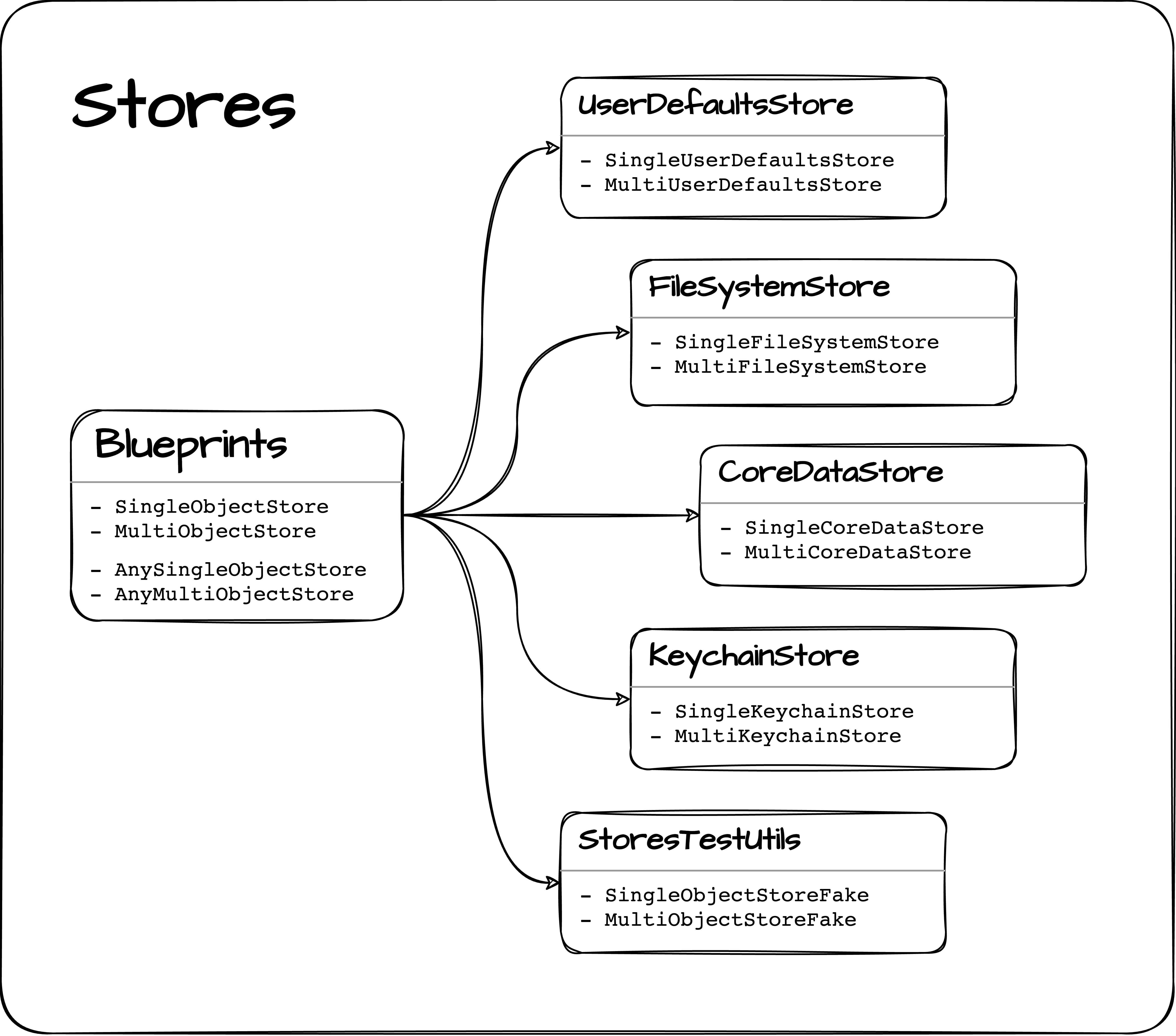
It all boils down to the two protocols [`SingleObjectStore`](https://github.com/omaralbeik/Stores/blob/main/Sources/Blueprints/SingleObjectStore.swift) and [`MultiObjectStore`](https://github.com/omaralbeik/Stores/blob/main/Sources/Blueprints/MultiObjectStore.swift) defined in the [**Blueprints**](https://github.com/omaralbeik/Stores/tree/main/Sources/Blueprints) layer, which provide the abstract concepts of stores that can store a single or multiple objects of a generic `Codable` type.
The two protocols are then implemented in the different modules as explained in the chart below:
---
## Usage
Let's say you have a `User` struct defined as below:
```swift
struct User: Codable {
let id: Int
let name: String
}
```
Here's how you store it using Stores:
1. Conform to Identifiable
This is required to make the store associate an object with its id.
```swift
extension User: Identifiable {}
```
The property `id` can be on any `Hashable` type. [Read more](https://developer.apple.com/documentation/swift/identifiable).
2. Create a store
Stores comes pre-equipped with the following stores:
-
UserDefaults
```swift
// Store for multiple objects
let store = MultiUserDefaultsStore(suiteName: "users")
// Store for a single object
let store = SingleUserDefaultsStore(suiteName: "users")
```
-
FileSystem
```swift
// Store for multiple objects
let store = MultiFileSystemStore(path: "users")
// Store for a single object
let store = SingleFileSystemStore(path: "users")
```
-
CoreData
```swift
// Store for multiple objects
let store = MultiCoreDataStore(databaseName: "users")
// Store for a single object
let store = SingleCoreDataStore(databaseName: "users")
```
-
Keychain
```swift
// Store for multiple objects
let store = MultiKeychainStore(identifier: "users")
// Store for a single object
let store = SingleKeychainStore(identifier: "users")
```
-
Fakes (for testing)
```swift
// Store for multiple objects
let store = MultiObjectStoreFake()
// Store for a single object
let store = SingleObjectStoreFake()
```
You can create a custom store by implementing the protocols in [`Blueprints`](https://github.com/omaralbeik/Stores/tree/main/Sources/Blueprints)
-
Realm
```swift
// Store for multiple objects
final class MultiRealmStore: MultiObjectStore {
// ...
}
// Store for a single object
final class SingleRealmStore: SingleObjectStore {
// ...
}
```
-
SQLite
```swift
// Store for multiple objects
final class MultiSQLiteStore: MultiObjectStore {
// ...
}
// Store for a single object
final class SingleSQLiteStore: SingleObjectStore {
// ...
}
```
3. Inject the store
Assuming we have a view model that uses a store to fetch data:
```swift
struct UsersViewModel {
let store: AnyMultiObjectStore
}
```
Inject the appropriate store implementation:
```swift
let coreDataStore = MultiCoreDataStore(databaseName: "users")
let prodViewModel = UsersViewModel(store: coreDataStore.eraseToAnyStore())
```
or:
```swift
let fakeStore = MultiObjectStoreFake()
let testViewModel = UsersViewModel(store: fakeStore.eraseToAnyStore())
```
4. Save, retrieve, update, or remove objects
```swift
let john = User(id: 1, name: "John Appleseed")
// Save an object to a store
try store.save(john)
// Save an array of objects to a store
try store.save([jane, steve, jessica])
// Get an object from store
let user = store.object(withId: 1)
// Get an array of object in store
let users = store.objects(withIds: [1, 2, 3])
// Get an array of all objects in store
let allUsers = store.allObjects()
// Check if store has an object
print(store.containsObject(withId: 10)) // false
// Remove an object from a store
try store.remove(withId: 1)
// Remove multiple objects from a store
try store.remove(withIds: [1, 2, 3])
// Remove all objects in a store
try store.removeAll()
```
---
## Documentation
Read the full documentation at [Swift Package Index](https://swiftpackageindex.com/omaralbeik/Stores/documentation).
---
## Installation
You can add Stores to an Xcode project by adding it as a package dependency.
1. From the **File** menu, select **Add Packages...**
2. Enter "https://github.com/omaralbeik/Stores" into the package repository URL text field
3. Depending on what you want to use Stores for, add the following target(s) to your app:
- `Stores`: the entire library with all stores.
- `UserDefaultsStore`: use User Defaults to persist data.
- `FileSystemStore`: persist data by saving it to the file system.
- `CoreDataStore`: use a Core Data database to persist data.
- `KeychainStore`: persist data securely in the Keychain.
- `Blueprints`: protocols only, this is a good option if you do not want to use any of the provided stores and build yours.
- `StoresTestUtils` to use the fakes in your tests target.
---
## Credits and thanks
- [Tom Harrington](https://twitter.com/atomicbird) for writing ["Core Data Using Only Code"](https://www.atomicbird.com/blog/core-data-code-only/).
- [Keith Harrison](https://twitter.com/kharrison) for writing ["Testing Core Data In A Swift Package"](https://useyourloaf.com/blog/testing-core-data-in-a-swift-package/).
- [Riccardo Cipolleschi](https://twitter.com/cipolleschir) for writing [Retrieve multiple values from Keychain](https://medium.com/macoclock/retrieve-multiple-values-from-keychain-77641248f4a1).
---
## License
Stores is released under the MIT license. See [LICENSE](https://github.com/omaralbeik/Stores/blob/main/LICENSE) for more information.