# K8S
**Repository Path**: JianHaiFan/K8S
## Basic Information
- **Project Name**: K8S
- **Description**: Kubernetes学习之路!
- **Primary Language**: Unknown
- **License**: Not specified
- **Default Branch**: main
- **Homepage**: None
- **GVP Project**: No
## Statistics
- **Stars**: 0
- **Forks**: 0
- **Created**: 2021-02-23
- **Last Updated**: 2021-02-23
## Categories & Tags
**Categories**: Uncategorized
**Tags**: None
## README
## 项目介绍

**项目地址:** https://github.com/fanjianhai/K8S
Kubernetes学习之路!
**持续更新...**
## 项目结构
```
├── Kubernetes
│ ├── 00-入门
│ ├── 01-初始Kubernetes
│ ├── 02-二进制方式部署kubernetes(测试完成)
│ ├── 03-kubernetes前情回顾及学习路线
│ ├── 04-kubectl详解
│ ├── 05-flannel详解
│ ├── 06-服务发现coredns详解
│ ├── 07-服务暴露详解
│ ├── 08-基于K8S仪表盘(dashboard)
│ ├── 01-实战
│ ├── 01-交付dubbo服务到k8s集群
```
## github图片不显示问题
1. 源码中都含有相应的图片
2. 修改hosts文件
- 打开路径C:\Windows\System32\drivers\etc下的hosts文件,添加如下内容
```
# GitHub Start
192.30.253.112 Build software better, together
192.30.253.119 gist.github.com
199.232.96.133 user-images.githubusercontent.com
151.101.184.133 assets-cdn.github.com
151.101.184.133 raw.githubusercontent.com
151.101.184.133 gist.githubusercontent.com
151.101.184.133 cloud.githubusercontent.com
151.101.184.133 camo.githubusercontent.com
151.101.184.133 avatars0.githubusercontent.com
151.101.184.133 avatars1.githubusercontent.com
151.101.184.133 avatars2.githubusercontent.com
151.101.184.133 avatars3.githubusercontent.com
151.101.184.133 avatars4.githubusercontent.com
151.101.184.133 avatars5.githubusercontent.com
151.101.184.133 avatars6.githubusercontent.com
151.101.184.133 avatars7.githubusercontent.com
151.101.184.133 avatars8.githubusercontent.com
# GitHub End
```
- 清空dns和浏览器缓存,dns缓存清空命令 ipconfig /flushdns
- 刷新浏览器
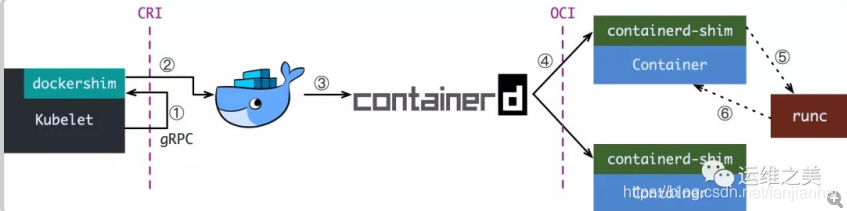
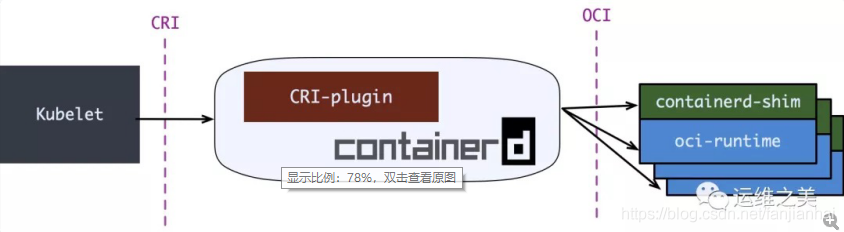
## Kubernetes 1.20 弃用 docker
## 作者
昵称:雪山飞狐
格言:只言片语任我说,提笔句句无需忖。落笔不知寄何人,唯有邀友共斟酌
博客:https://blog.csdn.net/fanjianhai
邮箱:594042358@qq.com