# ZYKeyboardUtil
**Repository Path**: Davie_Choise/ZYKeyboardUtil
## Basic Information
- **Project Name**: ZYKeyboardUtil
- **Description**: 一个Block,全自动处理键盘遮挡输入控件问题。Util Handed all keyboard events with Block Conveniently
- **Primary Language**: Objective-C
- **License**: Not specified
- **Default Branch**: master
- **Homepage**: None
- **GVP Project**: No
## Statistics
- **Stars**: 1
- **Forks**: 0
- **Created**: 2016-06-06
- **Last Updated**: 2024-12-19
## Categories & Tags
**Categories**: Uncategorized
**Tags**: None
## README
ZYKeyboardUtil
Util Handed all keyboard events with Block Conveniently
只需要一个Block,全自动处理任何多层嵌套复杂界面 因键盘升降 造成的输入控件遮挡问题。
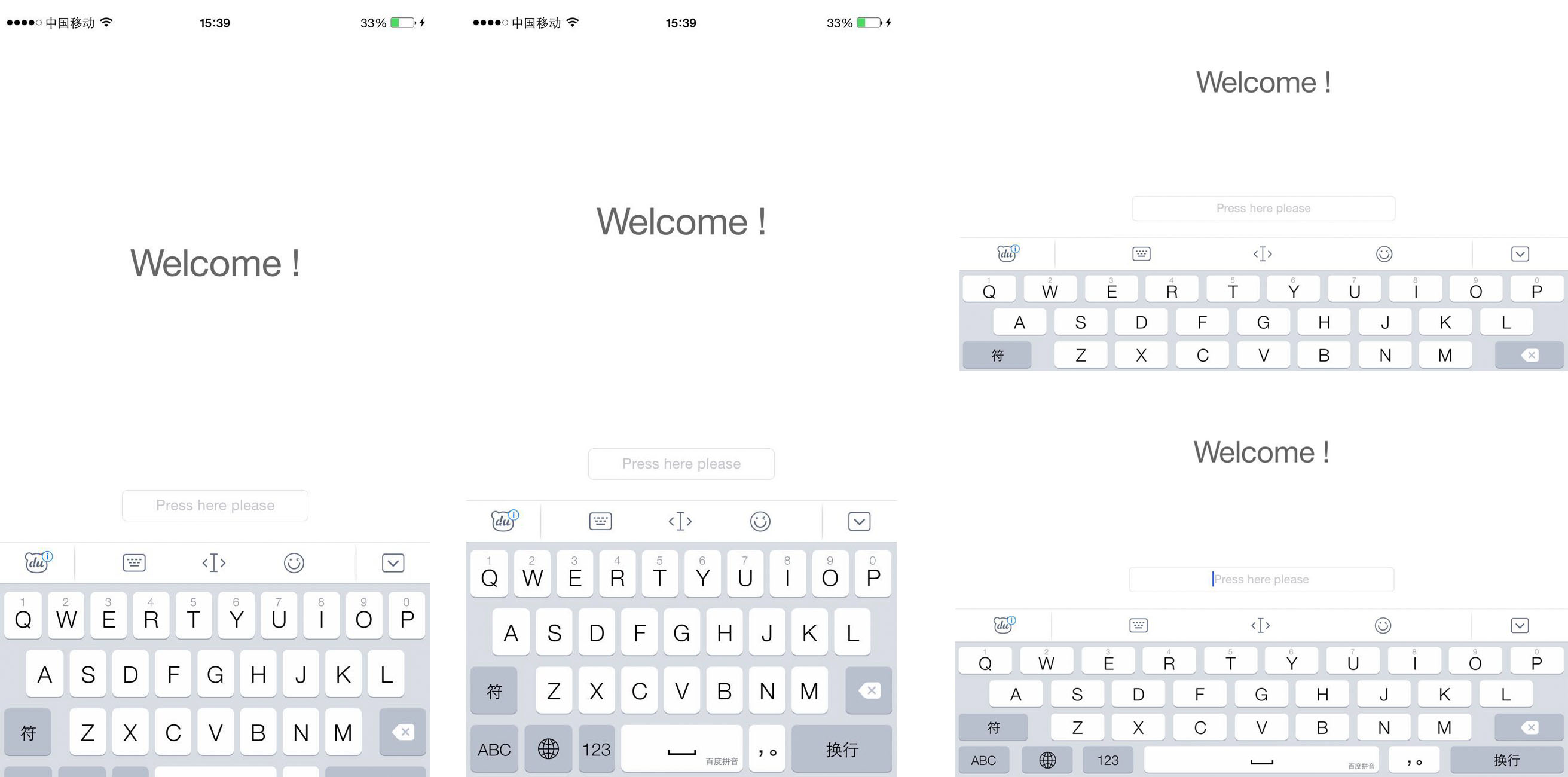
第三方键盘分次弹出问题




- 0.4.1支持一个页面多个输入控件处理(全自动处理键盘升降遮挡输入控件问题)
(仅需配置animateWhenKeyboardAppearAutomaticAnimBlock)
- 0.3.1更新自动处理键盘收起时对界面的还原(需与全自动升起处理同时使用,
无需配置animateWhenKeyboardDisappearBlock)
- 0.2.1更新全自动处理键盘遮盖事件(需配置animateWhenKeyboardAppearAutomaticAnimBlock),具体使用参照Demo
#**Features:**
**第三方键盘分次弹出问题:**
ZYKeyboardUtil 通过对每次键盘展开时的增量heightIncrement作处理 应对 第三方键盘 分次弹出的问题
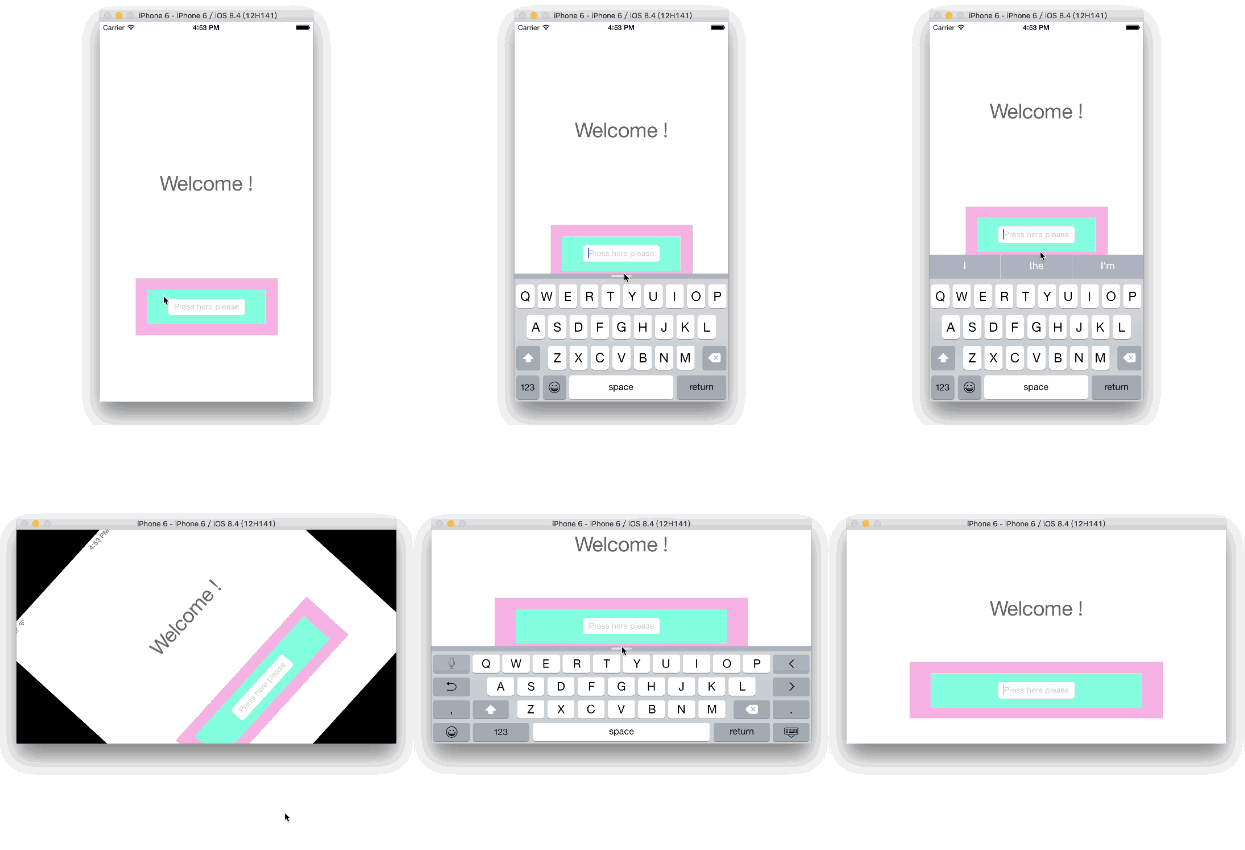
**同时能处理多层嵌套情况下控件的键盘遮盖问题**
UITextField嵌套两层UIView例子演示:
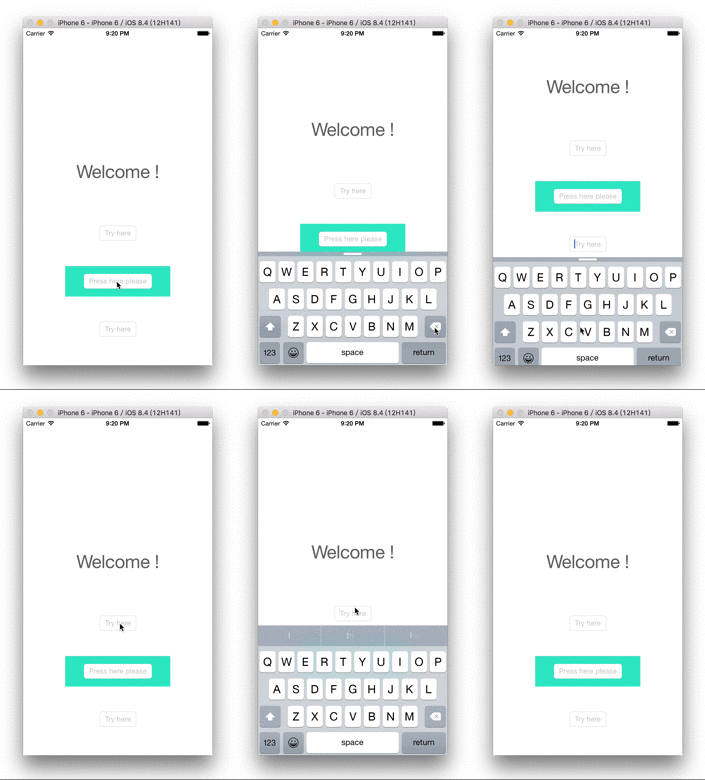
**一个页面内多个输入控件处理:**
#**CocoaPods:**
```pod 'ZYKeyboardUtil', '~> 0.4.1'```
#**Usage:**
创建一个ZYKeyboard对象,为了让其生存在整个页面实现功能的时间段内,让你的controller持有他吧。
```objc
self.keyboardUtil = [[ZYKeyboardUtil alloc] init];
```
配置animateWhenKeyboardAppearAutomaticAnimBlock,即可全自动处理键盘升降遮挡输入控件问题,且控件resignFirstResponder后自动还原。
只需在Block里利用参数keyboardUtil调用adaptiveViewHandleWithController:adaptiveView:,第一个参数为当前页面controller,第二个参数接收一个可变参数,为当前页面内的单个/多个输入控件或者包裹输入控件的View。
```objc
__weak ViewController *weakSelf = self;
[_keyboardUtil setAnimateWhenKeyboardAppearAutomaticAnimBlock:^(ZYKeyboardUtil *keyboardUtil) {
[keyboardUtil adaptiveViewHandleWithController:weakSelf adaptiveView:weakSelf.inputViewOne, weakSelf.inputViewSecond, weakSelf.inputViewThird, weakSelf.inputViewFourth, nil];
}];
```
**Attach:**
另外提供自定义处理键盘升/降遮挡输入控件处理(自定义处理方案优先级高于自动处理方案):
```objc
[_keyboardUtil setAnimateWhenKeyboardAppearBlock:^(int appearPostIndex, CGRect keyboardRect, CGFloat keyboardHeight, CGFloat keyboardHeightIncrement) {
//do something when keyboard appear
}];
[_keyboardUtil setAnimateWhenKeyboardDisappearBlock:^(CGFloat keyboardHeight) {
//do something when keyboard dismiss
}];
[_keyboardUtil setPrintKeyboardInfoBlock:^(ZYKeyboardUtil *keyboardUtil, KeyboardInfo *keyboardInfo) {
//you can get keyboardInfo hear when animation ended
}];
```
#**explain:**
ZYKeyboardUtil 通过lazy方式注册键盘通知监听者,核心工作围绕一个model和四个Block(一个主功能Block和三个附加Block),内部类KeyboardInfo作为model存储着每次处理时所需的键盘信息。animateWhenKeyboardAppearAutomaticAnimBlock作全自动处理,animateWhenKeyboardAppearBlock作键盘展示时的处理,animateWhenKeyboardDisappearBlock作键盘收起时的处理,而printKeyboardInfoBlock用作在必要时输出键盘信息。AppearBlock和DisappearBlock统一做了UIViewAnimation,自定义处理事件时只需要编写需要的界面变化即可。
###Class:
####-KeyboardInfo:
**property:**
- animationDuration: 响应动画的过程时长
- frameBegin:触发键盘事件前键盘frame
- frameEnd:变化后键盘frame
- heightIncrement:单次键盘变化增量
- action:键盘事件枚举
- isSameAction:是否同一种动作
**func:**
- fillKeyboardInfoWithDuration:frameBegin:frameEnd:heightIncrement:action:isSameAction:
为KeyboardInfo各属性赋值。
####-ZYKeyboardUtil:
**property:**
- appearPostIndex:键盘分次弹出情况中 弹出 的次数
- keyboardInfo
- haveRegisterObserver:是否已经注册监听者
- animateWhenKeyboardAppearBlock:弹出Block
- animateWhenKeyboardDisappearBlock:收起Block
- printKeyboardInfoBlock:输出键盘信息Block
- animateWhenKeyboardAppearBlockAutomaticAnim:全自动处理键盘遮盖事件Block
**func:**
- setAnimateWhenKeyboardAppearBlock:
- setAnimateWhenKeyboardDisappearBlock:
- setPrintKeyboardInfoBlock:
- setAnimateWhenKeyboardAppearBlockAutomaticAnim:
- setAnimateWhenKeyboardAppearAutomaticAnimBlock:
That all, thanks。
#**License:**
ZYKeyboardUtil is available under the MIT license. See the LICENSE file for more info.