# ST_FeaturePointThreshold
**Repository Path**: CodeAlan3/st_-feature-point-threshold
## Basic Information
- **Project Name**: ST_FeaturePointThreshold
- **Description**: 基于ORB-SLAM3_V1.0版本的改进:
1. 基于自适应阈值改进了四叉树特征点筛选流程,在保证特征点分布均匀性的同时尽可能多的保留高响应的特征点,剔除其中孤立的弱响应特征点;
2. 引入了BEBLID替换了原始ORB中的rBRIEF描述子;
3. 自主训练了基于改进BEBLID的二进制视觉词典,并应用到了视觉SLAM中。
- **Primary Language**: Unknown
- **License**: GPL-3.0
- **Default Branch**: master
- **Homepage**: None
- **GVP Project**: No
## Statistics
- **Stars**: 3
- **Forks**: 1
- **Created**: 2023-06-02
- **Last Updated**: 2024-08-21
## Categories & Tags
**Categories**: Uncategorized
**Tags**: None
## README
# ORB-SLAM3
The raw address:
https://github.com/UZ-SLAMLab/ORB_SLAM3
Reference article 参考文章:
>EVO Evaluation of SLAM 4 --- ORB-SLAM3 编译和利用数据集运行
>https://blog.csdn.net/shanpenghui/article/details/109354918
>EVO Evaluation of SLAM 5 --- ORB-SLAM3 精度和性能效果评估
>https://blog.csdn.net/shanpenghui/article/details/109361766
## Update to V1.0
Examples Monocular/Monocular-Inertial is available
### V1.0, December 22th, 2021
**Authors:** Carlos Campos, Richard Elvira, Juan J. Gómez Rodríguez, [José M. M. Montiel](http://webdiis.unizar.es/~josemari/), [Juan D. Tardos](http://webdiis.unizar.es/~jdtardos/).
The [Changelog](https://github.com/UZ-SLAMLab/ORB_SLAM3/blob/master/Changelog.md) describes the features of each version.
ORB-SLAM3 is the first real-time SLAM library able to perform **Visual, Visual-Inertial and Multi-Map SLAM** with **monocular, stereo and RGB-D** cameras, using **pin-hole and fisheye** lens models. In all sensor configurations, ORB-SLAM3 is as robust as the best systems available in the literature, and significantly more accurate.
We provide examples to run ORB-SLAM3 in the [EuRoC dataset](http://projects.asl.ethz.ch/datasets/doku.php?id=kmavvisualinertialdatasets) using stereo or monocular, with or without IMU, and in the [TUM-VI dataset](https://vision.in.tum.de/data/datasets/visual-inertial-dataset) using fisheye stereo or monocular, with or without IMU. Videos of some example executions can be found at [ORB-SLAM3 channel](https://www.youtube.com/channel/UCXVt-kXG6T95Z4tVaYlU80Q).
This software is based on [ORB-SLAM2](https://github.com/raulmur/ORB_SLAM2) developed by [Raul Mur-Artal](http://webdiis.unizar.es/~raulmur/), [Juan D. Tardos](http://webdiis.unizar.es/~jdtardos/), [J. M. M. Montiel](http://webdiis.unizar.es/~josemari/) and [Dorian Galvez-Lopez](http://doriangalvez.com/) ([DBoW2](https://github.com/dorian3d/DBoW2)).
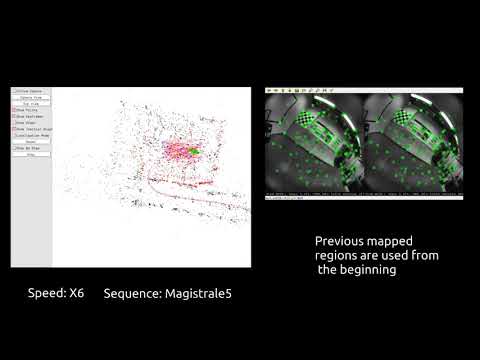 ## Add instructions for running with your own T265 camera / 新增实际用T265相机运行的说明
## 新增了MLPnP算法的详细注释
## 新增了RGBD运行shell
## 1、Install Third Party
Pangolin:
```shell script
git clone https://github.com/stevenlovegrove/Pangolin.git
sudo apt install libglew-dev
cd Pangolin && mkdir build && cd build
cmake ..
make -j 32
sudo make install
```
Googlelog:
```shell script
git clone https://github.com/google/glog
cd glog
cmake -H. -Bbuild -G "Unix Makefiles"
cmake --build build
cmake --build build --target test
cd build
sudo make install
```
OpenCV:
[https://docs.opencv.org/master/d0/d3d/tutorial_general_install.html](https://docs.opencv.org/master/d0/d3d/tutorial_general_install.html)
```shell script
git clone https://github.com/opencv/opencv
git -C opencv checkout 4.5.1
git clone https://github.com/opencv/opencv_contrib
git -C opencv_contrib checkout 4.5.1
git clone https://github.com/opencv/opencv_extra
git -C opencv_extra checkout 4.5.1
cmake ..
make -j4
sudo make install
```
OpenCV:
```
git clone https://github.com/opencv/opencv
cd opencv
mkdir build
cd build
cmake ..
make -j 32
sudo make install
```
ippicv_2020_lnx_intel64_20191018_general.tgz 下载地址:
链接: https://pan.baidu.com/s/1XwhaDnTaCxAIpmZCRijYvg
提取码: rq4r
## 2、Build ORB-SLAM3:
Work in shells path, continue the operation upon:
```shell script
cd shells
./build.sh
```
## 3、Run ORB-SLAM3 in shell
Before running, you should change the path in tum_vi.sh where you save the dataset, such as:
```shell script
pathDatasetTUM_VI='/home/sph/Downloads' #Example, it is necesary to change it by the dataset path
```
**Remember to unzip the ORBvoc.txt.tar.gz into Vocabulary folder!!!**
Work in shells path
```shell script
cd shells
./tum_vi.sh
or
./euroc.sh
```
## 4、Run ORB-SLAM3 in ros
Build ros version
```shell script
cd shells
./build_ros.sh
```
Set ROS_PACKAGE_PATH:
```shell script
export ROS_PACKAGE_PATH=${ROS_PACKAGE_PATH}:/home/sph/Documents/ORB_SLAM3_Fixed/Examples/ROS
```
Run ros-version ORB-SLAM3 in root path:
```shell script
cd ORB_SLAM3_Fixed
rosrun ORB_SLAM3 Mono Vocabulary/ORBvoc.txt Examples/Monocular-Inertial/TUM_512.yaml
```
## 5、Attention:
### 1. Update setting with your own PC.
目前只有单目带IMU的被激活,里面的配置需要对应自己的电脑更新
### 2. Old version bug might be fixed.
原版出现的错误(因为本工程是在ORB3刚开放的时候就建立了,所以有些问题应该被作者修复了,如果有遗漏或冗余请读者自行忽略)
原版ros的编译会出现ORBSLAM2的错误
```C++
error: ‘ORB_SLAM2’ has not been declared
ImageGrabber(ORB_SLAM2::System* pSLAM):mpSLAM(pSLAM){}
```
需要用指令修复:
```shell script
sed -i "s/ORB_SLAM2/ORB_SLAM3/g" `grep -rl "ORB_SLAM2"`
```
原版ros的编译也有可能出现找不到文件的错误:
```C++
fatal error: GeometricCamera.h: No such file or directory #include "GeometricCamera.h"
```
需要在CMakeList添加文件路径:
```shell script
${PROJECT_SOURCE_DIR}/../../../include/CameraModels
```
## 6、Use usb_cam to run camera_node
But!!!! You can`t run ORB-SLAM3 without run the camera_node!!!!
So, if you want to test ros-version, just use your computer camera(wish you have)
```shell script
git clone https://github.com/bosch-ros-pkg/usb_cam.git
```
Build and launch it, so you can see the /usb_cam/image_raw in rostopic.
But, that is not enough!!!!!
You should change the rostopic name in ORB-SLAM3, which is in Line 62, ros_mono.cc
```C++
ros::Subscriber sub = nodeHandler.subscribe("/usb_cam/image_raw", 1, &ImageGrabber::GrabImage,&igb);
```
After the steps up, it work finally!
#### Problem with using own camera
When I first run it, error come out:
```C++
Failed to load module "canberra-gtk-module"
```
To solve this problem, install the module:
```shell script
sudo apt-get install libcanberra-gtk-module
```
## 7、Run ORB-SLAM3 with Intel Realsense T265(ros1-noetic)
Make sure docker is installed please !!!
### 7.1 Pull docker images
```shell script
docker pull registry.cn-hangzhou.aliyuncs.com/slam_docker/slam_docker:gpu
```
### 7.2 Run docker
```shell script
cd ORB_SLAM3_Fixed/shells
sudo ./run_docker_gpu.sh host
```
The project realsense-ros link is [https://github.com/IntelRealSense/realsense-ros](https://github.com/IntelRealSense/realsense-ros)
If you can not launch roscore, you can solve by add hostname which is needed by roscore into the file /etc/hosts.
If want to debug remote by clion, try in docker after run with run_docker_gpu.sh shells:
```shell
service ssh restart
service rsync restart
```
And then use sftp name/password :
```shell
user/crc
```
Or
```shell
remoter_user/crc
```
If cannot create a directory, delete the cmake-build-debug-remote-host folder and reload cmake project.
If you want to add dataset, just add the text:
```shell
--volume="/home/:/home/" \
```
into ORB_SLAM3_Fixed/shells/run_docker_gpu.sh file.
### 7.3 Set Camera Intrinsic & Extrinsic Parameters
Run the command below:
```shell script
rs-enumerate-devices -c
```
Modify the file ORB-SLAM3-Fixed/Examples/Monocular-Inertial/TUM_512.yaml.
The relation of .yaml file and realsense-sdk info is :
Intrinsic/Extrinsic from "Gyro" To "Fisheye 1" (realsense-sdk info) = Rotation matrix of Tbc #Transformation from body-frame (imu) to camera (ORB-SLAM3-Fixed/Examples/Monocular-Inertial/TUM_512.yaml)
Intrinsic Params:
```shell
PPX --> Camera.cx
PPY --> Camera.cy
Fx --> Camera.fx
Fy --> Camera.fy
Coeffs[0] --> Camera.k1
Coeffs[1] --> Camera.k2
Coeffs[2] --> Camera.k3
Coeffs[3] --> Camera.k4
```


Extrinsic Params:
```shell
Rotation_Matrix (Extrinsic from "Gyro" To "Fisheye 1") --> Tbc.data.R
Rotation_Matrix[0][0] --> Tbc.data[0][0]
Rotation_Matrix[0][1] --> Tbc.data[0][1]
Rotation_Matrix[0][2] --> Tbc.data[0][2]
Rotation_Matrix[1][0] --> Tbc.data[1][0]
Rotation_Matrix[1][1] --> Tbc.data[1][1]
Rotation_Matrix[1][2] --> Tbc.data[1][2]
Rotation_Matrix[2][0] --> Tbc.data[2][0]
Rotation_Matrix[2][1] --> Tbc.data[2][1]
Rotation_Matrix[2][2] --> Tbc.data[2][2]
Translation Vector (Extrinsic from "Gyro" To "Fisheye 1") --> Tbc.data.t
Translation_Vector[0] --> Tbc.data[0][3]
Translation_Vector[1] --> Tbc.data[1][3]
Translation_Vector[2] --> Tbc.data[2][3]
```


### 7.4 Set IMU Intrinsic Parameters
#### 7.4.1 Launch T265 Camera to save imu calibration rosbag
1. terminal one
```shell
mkdir -p imu_utils_ws/src && cd imu_utils_ws/src && git clone https://github.com/IntelRealSense/realsense-ros.git
cd .. && source /opt/ros/noetic/setup.bash && catkin_make && source devel/setup.bash
roslaunch realsense2_camera rs_t265.launch fisheye_width:=848 fisheye_height:=800 enable_fisheye1:=true enable_fisheye2:=true unite_imu_method:=copy
```
2. terminal two
```shell
rosbag record -O imu_calibration /camera/imu
```
#### 7.4.2 Launch imu utils to generate IMU intrinsic parameters
1. terminal one
```shell
mkdir -p imu_utils_ws/src && cd imu_utils_ws/src && git clone https://github.com/shanpenghui/imu_utils.git
cd .. && source /opt/ros/noetic/setup.bash && catkin_make && source devel/setup.bash
roslaunch imu_utils realsense.launch
```
2. terminal two
```shell
rosbag play -r 200 imu_calibration.bag
```
The result is in imu_utils/imu_utils/data/t265_imu_calibration_imu_param.yaml, map to ORB-SLAM3-Fixed/Examples/Monocular-Inertial/TUM_512.yaml
```shell
Gyr.avg-axis.gyr_n --> IMU.NoiseGyro
Gyr.avg-axis.gyr_w --> IMU.GyroWalk
Acc.avg-axis.acc_n --> IMU.NoiseAcc
Acc.avg-axis.acc_w --> IMU.AccWalk
```
### 7.5 Launch T265 ros node
So git checkout tag , then build and run (don't forget changing the unite_imu_method param in rs_t265.launch) :
```shell
git clone https://github.com/IntelRealSense/realsense-ros
cd realsense-ros
git checkout development
git pull
```
Run rs_t265.launch with params :
```shell script
roslaunch realsense2_camera rs_t265.launch fisheye_width:=848 fisheye_height:=800 enable_fisheye1:=true enable_fisheye2:=true unite_imu_method:=copy
```
### 7.5 Set imu topic
To make this code suitable for dataset, so the topic change is not commited in code.
Before use own camera, you should change imu topic name from /imu to :
(in Line 98 of ORB_SLAM3_Fixed/Examples/ROS/ORB_SLAM3/src/ros_mono_inertial.cc)
```shell script
/camera/imu
```
### 7.6 Run ORB-SLAM3(Monocular-Inertial)
Before do this step, change the file_path in mono_inertial.launch file to your own env.
This example is :
```shell
args="/home/user/Downloads/ORB_SLAM3_Fixed/Vocabulary/ORBvoc.txt /home/user/Downloads/ORB_SLAM3_Fixed/Examples/Monocular-Inertial/TUM_512.yaml"
```
The format is :
```shell
args="/ORB_SLAM3_Fixed/Vocabulary/ORBvoc.txt /ORB_SLAM3_Fixed/Examples/Monocular-Inertial/TUM_512.yaml"
```
Then run :
```shell script
source /opt/ros/noetic/setup.bash
export ROS_PACKAGE_PATH=${ROS_PACKAGE_PATH}:/ORB_SLAM3_Fixed/Examples/ROS
roslaunch ORB_SLAM3 mono_inertial.launch
```
--------------------------------------------------
--------------------------------------------------
# ORB-SLAM3
### V1.0, December 22th, 2021
**Authors:** Carlos Campos, Richard Elvira, Juan J. Gómez Rodríguez, [José M. M. Montiel](http://webdiis.unizar.es/~josemari/), [Juan D. Tardos](http://webdiis.unizar.es/~jdtardos/).
The [Changelog](https://github.com/UZ-SLAMLab/ORB_SLAM3/blob/master/Changelog.md) describes the features of each version.
ORB-SLAM3 is the first real-time SLAM library able to perform **Visual, Visual-Inertial and Multi-Map SLAM** with **monocular, stereo and RGB-D** cameras, using **pin-hole and fisheye** lens models. In all sensor configurations, ORB-SLAM3 is as robust as the best systems available in the literature, and significantly more accurate.
We provide examples to run ORB-SLAM3 in the [EuRoC dataset](http://projects.asl.ethz.ch/datasets/doku.php?id=kmavvisualinertialdatasets) using stereo or monocular, with or without IMU, and in the [TUM-VI dataset](https://vision.in.tum.de/data/datasets/visual-inertial-dataset) using fisheye stereo or monocular, with or without IMU. Videos of some example executions can be found at [ORB-SLAM3 channel](https://www.youtube.com/channel/UCXVt-kXG6T95Z4tVaYlU80Q).
This software is based on [ORB-SLAM2](https://github.com/raulmur/ORB_SLAM2) developed by [Raul Mur-Artal](http://webdiis.unizar.es/~raulmur/), [Juan D. Tardos](http://webdiis.unizar.es/~jdtardos/), [J. M. M. Montiel](http://webdiis.unizar.es/~josemari/) and [Dorian Galvez-Lopez](http://doriangalvez.com/) ([DBoW2](https://github.com/dorian3d/DBoW2)).
### Related Publications:
[ORB-SLAM3] Carlos Campos, Richard Elvira, Juan J. Gómez Rodríguez, José M. M. Montiel and Juan D. Tardós, **ORB-SLAM3: An Accurate Open-Source Library for Visual, Visual-Inertial and Multi-Map SLAM**, *IEEE Transactions on Robotics 37(6):1874-1890, Dec. 2021*. **[PDF](https://arxiv.org/abs/2007.11898)**.
[IMU-Initialization] Carlos Campos, J. M. M. Montiel and Juan D. Tardós, **Inertial-Only Optimization for Visual-Inertial Initialization**, *ICRA 2020*. **[PDF](https://arxiv.org/pdf/2003.05766.pdf)**
[ORBSLAM-Atlas] Richard Elvira, J. M. M. Montiel and Juan D. Tardós, **ORBSLAM-Atlas: a robust and accurate multi-map system**, *IROS 2019*. **[PDF](https://arxiv.org/pdf/1908.11585.pdf)**.
[ORBSLAM-VI] Raúl Mur-Artal, and Juan D. Tardós, **Visual-inertial monocular SLAM with map reuse**, IEEE Robotics and Automation Letters, vol. 2 no. 2, pp. 796-803, 2017. **[PDF](https://arxiv.org/pdf/1610.05949.pdf)**.
[Stereo and RGB-D] Raúl Mur-Artal and Juan D. Tardós. **ORB-SLAM2: an Open-Source SLAM System for Monocular, Stereo and RGB-D Cameras**. *IEEE Transactions on Robotics,* vol. 33, no. 5, pp. 1255-1262, 2017. **[PDF](https://arxiv.org/pdf/1610.06475.pdf)**.
[Monocular] Raúl Mur-Artal, José M. M. Montiel and Juan D. Tardós. **ORB-SLAM: A Versatile and Accurate Monocular SLAM System**. *IEEE Transactions on Robotics,* vol. 31, no. 5, pp. 1147-1163, 2015. (**2015 IEEE Transactions on Robotics Best Paper Award**). **[PDF](https://arxiv.org/pdf/1502.00956.pdf)**.
[DBoW2 Place Recognition] Dorian Gálvez-López and Juan D. Tardós. **Bags of Binary Words for Fast Place Recognition in Image Sequences**. *IEEE Transactions on Robotics,* vol. 28, no. 5, pp. 1188-1197, 2012. **[PDF](http://doriangalvez.com/php/dl.php?dlp=GalvezTRO12.pdf)**
# 1. License
ORB-SLAM3 is released under [GPLv3 license](https://github.com/UZ-SLAMLab/ORB_SLAM3/LICENSE). For a list of all code/library dependencies (and associated licenses), please see [Dependencies.md](https://github.com/UZ-SLAMLab/ORB_SLAM3/blob/master/Dependencies.md).
For a closed-source version of ORB-SLAM3 for commercial purposes, please contact the authors: orbslam (at) unizar (dot) es.
If you use ORB-SLAM3 in an academic work, please cite:
@article{ORBSLAM3_TRO,
title={{ORB-SLAM3}: An Accurate Open-Source Library for Visual, Visual-Inertial
and Multi-Map {SLAM}},
author={Campos, Carlos AND Elvira, Richard AND G\´omez, Juan J. AND Montiel,
Jos\'e M. M. AND Tard\'os, Juan D.},
journal={IEEE Transactions on Robotics},
volume={37},
number={6},
pages={1874-1890},
year={2021}
}
# 2. Prerequisites
We have tested the library in **Ubuntu 16.04** and **18.04**, but it should be easy to compile in other platforms. A powerful computer (e.g. i7) will ensure real-time performance and provide more stable and accurate results.
## C++11 or C++0x Compiler
We use the new thread and chrono functionalities of C++11.
## Pangolin
We use [Pangolin](https://github.com/stevenlovegrove/Pangolin) for visualization and user interface. Dowload and install instructions can be found at: https://github.com/stevenlovegrove/Pangolin.
## OpenCV
We use [OpenCV](http://opencv.org) to manipulate images and features. Dowload and install instructions can be found at: http://opencv.org. **Required at leat 3.0. Tested with OpenCV 3.2.0 and 4.4.0**.
## Eigen3
Required by g2o (see below). Download and install instructions can be found at: http://eigen.tuxfamily.org. **Required at least 3.1.0**.
## DBoW2 and g2o (Included in Thirdparty folder)
We use modified versions of the [DBoW2](https://github.com/dorian3d/DBoW2) library to perform place recognition and [g2o](https://github.com/RainerKuemmerle/g2o) library to perform non-linear optimizations. Both modified libraries (which are BSD) are included in the *Thirdparty* folder.
## Python
Required to calculate the alignment of the trajectory with the ground truth. **Required Numpy module**.
* (win) http://www.python.org/downloads/windows
* (deb) `sudo apt install libpython2.7-dev`
* (mac) preinstalled with osx
## ROS (optional)
We provide some examples to process input of a monocular, monocular-inertial, stereo, stereo-inertial or RGB-D camera using ROS. Building these examples is optional. These have been tested with ROS Melodic under Ubuntu 18.04.
# 3. Building ORB-SLAM3 library and examples
Clone the repository:
```
git clone https://github.com/UZ-SLAMLab/ORB_SLAM3.git ORB_SLAM3
```
We provide a script `build.sh` to build the *Thirdparty* libraries and *ORB-SLAM3*. Please make sure you have installed all required dependencies (see section 2). Execute:
```
cd ORB_SLAM3
chmod +x build.sh
./build.sh
```
This will create **libORB_SLAM3.so** at *lib* folder and the executables in *Examples* folder.
# 4. Running ORB-SLAM3 with your camera
Directory `Examples` contains several demo programs and calibration files to run ORB-SLAM3 in all sensor configurations with Intel Realsense cameras T265 and D435i. The steps needed to use your own camera are:
1. Calibrate your camera following `Calibration_Tutorial.pdf` and write your calibration file `your_camera.yaml`
2. Modify one of the provided demos to suit your specific camera model, and build it
3. Connect the camera to your computer using USB3 or the appropriate interface
4. Run ORB-SLAM3. For example, for our D435i camera, we would execute:
```
./Examples/Stereo-Inertial/stereo_inertial_realsense_D435i Vocabulary/ORBvoc.txt ./Examples/Stereo-Inertial/RealSense_D435i.yaml
```
# 5. EuRoC Examples
[EuRoC dataset](http://projects.asl.ethz.ch/datasets/doku.php?id=kmavvisualinertialdatasets) was recorded with two pinhole cameras and an inertial sensor. We provide an example script to launch EuRoC sequences in all the sensor configurations.
1. Download a sequence (ASL format) from http://projects.asl.ethz.ch/datasets/doku.php?id=kmavvisualinertialdatasets
2. Open the script "euroc_examples.sh" in the root of the project. Change **pathDatasetEuroc** variable to point to the directory where the dataset has been uncompressed.
3. Execute the following script to process all the sequences with all sensor configurations:
```
./euroc_examples
```
## Evaluation
EuRoC provides ground truth for each sequence in the IMU body reference. As pure visual executions report trajectories centered in the left camera, we provide in the "evaluation" folder the transformation of the ground truth to the left camera reference. Visual-inertial trajectories use the ground truth from the dataset.
Execute the following script to process sequences and compute the RMS ATE:
```
./euroc_eval_examples
```
# 6. TUM-VI Examples
[TUM-VI dataset](https://vision.in.tum.de/data/datasets/visual-inertial-dataset) was recorded with two fisheye cameras and an inertial sensor.
1. Download a sequence from https://vision.in.tum.de/data/datasets/visual-inertial-dataset and uncompress it.
2. Open the script "tum_vi_examples.sh" in the root of the project. Change **pathDatasetTUM_VI** variable to point to the directory where the dataset has been uncompressed.
3. Execute the following script to process all the sequences with all sensor configurations:
```
./tum_vi_examples
```
## Evaluation
In TUM-VI ground truth is only available in the room where all sequences start and end. As a result the error measures the drift at the end of the sequence.
Execute the following script to process sequences and compute the RMS ATE:
```
./tum_vi_eval_examples
```
# 7. ROS Examples
### Building the nodes for mono, mono-inertial, stereo, stereo-inertial and RGB-D
Tested with ROS Melodic and ubuntu 18.04.
1. Add the path including *Examples/ROS/ORB_SLAM3* to the ROS_PACKAGE_PATH environment variable. Open .bashrc file:
```
gedit ~/.bashrc
```
and add at the end the following line. Replace PATH by the folder where you cloned ORB_SLAM3:
```
export ROS_PACKAGE_PATH=${ROS_PACKAGE_PATH}:PATH/ORB_SLAM3/Examples/ROS
```
2. Execute `build_ros.sh` script:
```
chmod +x build_ros.sh
./build_ros.sh
```
### Running Monocular Node
For a monocular input from topic `/camera/image_raw` run node ORB_SLAM3/Mono. You will need to provide the vocabulary file and a settings file. See the monocular examples above.
```
rosrun ORB_SLAM3 Mono PATH_TO_VOCABULARY PATH_TO_SETTINGS_FILE
```
### Running Monocular-Inertial Node
For a monocular input from topic `/camera/image_raw` and an inertial input from topic `/imu`, run node ORB_SLAM3/Mono_Inertial. Setting the optional third argument to true will apply CLAHE equalization to images (Mainly for TUM-VI dataset).
```
rosrun ORB_SLAM3 Mono PATH_TO_VOCABULARY PATH_TO_SETTINGS_FILE [EQUALIZATION]
```
### Running Stereo Node
For a stereo input from topic `/camera/left/image_raw` and `/camera/right/image_raw` run node ORB_SLAM3/Stereo. You will need to provide the vocabulary file and a settings file. For Pinhole camera model, if you **provide rectification matrices** (see Examples/Stereo/EuRoC.yaml example), the node will recitify the images online, **otherwise images must be pre-rectified**. For FishEye camera model, rectification is not required since system works with original images:
```
rosrun ORB_SLAM3 Stereo PATH_TO_VOCABULARY PATH_TO_SETTINGS_FILE ONLINE_RECTIFICATION
```
### Running Stereo-Inertial Node
For a stereo input from topics `/camera/left/image_raw` and `/camera/right/image_raw`, and an inertial input from topic `/imu`, run node ORB_SLAM3/Stereo_Inertial. You will need to provide the vocabulary file and a settings file, including rectification matrices if required in a similar way to Stereo case:
```
rosrun ORB_SLAM3 Stereo_Inertial PATH_TO_VOCABULARY PATH_TO_SETTINGS_FILE ONLINE_RECTIFICATION [EQUALIZATION]
```
### Running RGB_D Node
For an RGB-D input from topics `/camera/rgb/image_raw` and `/camera/depth_registered/image_raw`, run node ORB_SLAM3/RGBD. You will need to provide the vocabulary file and a settings file. See the RGB-D example above.
```
rosrun ORB_SLAM3 RGBD PATH_TO_VOCABULARY PATH_TO_SETTINGS_FILE
```
**Running ROS example:** Download a rosbag (e.g. V1_02_medium.bag) from the EuRoC dataset (http://projects.asl.ethz.ch/datasets/doku.php?id=kmavvisualinertialdatasets). Open 3 tabs on the terminal and run the following command at each tab for a Stereo-Inertial configuration:
```
roscore
```
```
rosrun ORB_SLAM3 Stereo_Inertial Vocabulary/ORBvoc.txt Examples/Stereo-Inertial/EuRoC.yaml true
```
```
rosbag play --pause V1_02_medium.bag /cam0/image_raw:=/camera/left/image_raw /cam1/image_raw:=/camera/right/image_raw /imu0:=/imu
```
Once ORB-SLAM3 has loaded the vocabulary, press space in the rosbag tab.
**Remark:** For rosbags from TUM-VI dataset, some play issue may appear due to chunk size. One possible solution is to rebag them with the default chunk size, for example:
```
rosrun rosbag fastrebag.py dataset-room1_512_16.bag dataset-room1_512_16_small_chunks.bag
```
# 8. Running time analysis
A flag in `include\Config.h` activates time measurements. It is necessary to uncomment the line `#define REGISTER_TIMES` to obtain the time stats of one execution which is shown at the terminal and stored in a text file(`ExecTimeMean.txt`).
# 9. Calibration
You can find a tutorial for visual-inertial calibration and a detailed description of the contents of valid configuration files at `Calibration_Tutorial.pdf`
## Add instructions for running with your own T265 camera / 新增实际用T265相机运行的说明
## 新增了MLPnP算法的详细注释
## 新增了RGBD运行shell
## 1、Install Third Party
Pangolin:
```shell script
git clone https://github.com/stevenlovegrove/Pangolin.git
sudo apt install libglew-dev
cd Pangolin && mkdir build && cd build
cmake ..
make -j 32
sudo make install
```
Googlelog:
```shell script
git clone https://github.com/google/glog
cd glog
cmake -H. -Bbuild -G "Unix Makefiles"
cmake --build build
cmake --build build --target test
cd build
sudo make install
```
OpenCV:
[https://docs.opencv.org/master/d0/d3d/tutorial_general_install.html](https://docs.opencv.org/master/d0/d3d/tutorial_general_install.html)
```shell script
git clone https://github.com/opencv/opencv
git -C opencv checkout 4.5.1
git clone https://github.com/opencv/opencv_contrib
git -C opencv_contrib checkout 4.5.1
git clone https://github.com/opencv/opencv_extra
git -C opencv_extra checkout 4.5.1
cmake ..
make -j4
sudo make install
```
OpenCV:
```
git clone https://github.com/opencv/opencv
cd opencv
mkdir build
cd build
cmake ..
make -j 32
sudo make install
```
ippicv_2020_lnx_intel64_20191018_general.tgz 下载地址:
链接: https://pan.baidu.com/s/1XwhaDnTaCxAIpmZCRijYvg
提取码: rq4r
## 2、Build ORB-SLAM3:
Work in shells path, continue the operation upon:
```shell script
cd shells
./build.sh
```
## 3、Run ORB-SLAM3 in shell
Before running, you should change the path in tum_vi.sh where you save the dataset, such as:
```shell script
pathDatasetTUM_VI='/home/sph/Downloads' #Example, it is necesary to change it by the dataset path
```
**Remember to unzip the ORBvoc.txt.tar.gz into Vocabulary folder!!!**
Work in shells path
```shell script
cd shells
./tum_vi.sh
or
./euroc.sh
```
## 4、Run ORB-SLAM3 in ros
Build ros version
```shell script
cd shells
./build_ros.sh
```
Set ROS_PACKAGE_PATH:
```shell script
export ROS_PACKAGE_PATH=${ROS_PACKAGE_PATH}:/home/sph/Documents/ORB_SLAM3_Fixed/Examples/ROS
```
Run ros-version ORB-SLAM3 in root path:
```shell script
cd ORB_SLAM3_Fixed
rosrun ORB_SLAM3 Mono Vocabulary/ORBvoc.txt Examples/Monocular-Inertial/TUM_512.yaml
```
## 5、Attention:
### 1. Update setting with your own PC.
目前只有单目带IMU的被激活,里面的配置需要对应自己的电脑更新
### 2. Old version bug might be fixed.
原版出现的错误(因为本工程是在ORB3刚开放的时候就建立了,所以有些问题应该被作者修复了,如果有遗漏或冗余请读者自行忽略)
原版ros的编译会出现ORBSLAM2的错误
```C++
error: ‘ORB_SLAM2’ has not been declared
ImageGrabber(ORB_SLAM2::System* pSLAM):mpSLAM(pSLAM){}
```
需要用指令修复:
```shell script
sed -i "s/ORB_SLAM2/ORB_SLAM3/g" `grep -rl "ORB_SLAM2"`
```
原版ros的编译也有可能出现找不到文件的错误:
```C++
fatal error: GeometricCamera.h: No such file or directory #include "GeometricCamera.h"
```
需要在CMakeList添加文件路径:
```shell script
${PROJECT_SOURCE_DIR}/../../../include/CameraModels
```
## 6、Use usb_cam to run camera_node
But!!!! You can`t run ORB-SLAM3 without run the camera_node!!!!
So, if you want to test ros-version, just use your computer camera(wish you have)
```shell script
git clone https://github.com/bosch-ros-pkg/usb_cam.git
```
Build and launch it, so you can see the /usb_cam/image_raw in rostopic.
But, that is not enough!!!!!
You should change the rostopic name in ORB-SLAM3, which is in Line 62, ros_mono.cc
```C++
ros::Subscriber sub = nodeHandler.subscribe("/usb_cam/image_raw", 1, &ImageGrabber::GrabImage,&igb);
```
After the steps up, it work finally!
#### Problem with using own camera
When I first run it, error come out:
```C++
Failed to load module "canberra-gtk-module"
```
To solve this problem, install the module:
```shell script
sudo apt-get install libcanberra-gtk-module
```
## 7、Run ORB-SLAM3 with Intel Realsense T265(ros1-noetic)
Make sure docker is installed please !!!
### 7.1 Pull docker images
```shell script
docker pull registry.cn-hangzhou.aliyuncs.com/slam_docker/slam_docker:gpu
```
### 7.2 Run docker
```shell script
cd ORB_SLAM3_Fixed/shells
sudo ./run_docker_gpu.sh host
```
The project realsense-ros link is [https://github.com/IntelRealSense/realsense-ros](https://github.com/IntelRealSense/realsense-ros)
If you can not launch roscore, you can solve by add hostname which is needed by roscore into the file /etc/hosts.
If want to debug remote by clion, try in docker after run with run_docker_gpu.sh shells:
```shell
service ssh restart
service rsync restart
```
And then use sftp name/password :
```shell
user/crc
```
Or
```shell
remoter_user/crc
```
If cannot create a directory, delete the cmake-build-debug-remote-host folder and reload cmake project.
If you want to add dataset, just add the text:
```shell
--volume="/home/:/home/" \
```
into ORB_SLAM3_Fixed/shells/run_docker_gpu.sh file.
### 7.3 Set Camera Intrinsic & Extrinsic Parameters
Run the command below:
```shell script
rs-enumerate-devices -c
```
Modify the file ORB-SLAM3-Fixed/Examples/Monocular-Inertial/TUM_512.yaml.
The relation of .yaml file and realsense-sdk info is :
Intrinsic/Extrinsic from "Gyro" To "Fisheye 1" (realsense-sdk info) = Rotation matrix of Tbc #Transformation from body-frame (imu) to camera (ORB-SLAM3-Fixed/Examples/Monocular-Inertial/TUM_512.yaml)
Intrinsic Params:
```shell
PPX --> Camera.cx
PPY --> Camera.cy
Fx --> Camera.fx
Fy --> Camera.fy
Coeffs[0] --> Camera.k1
Coeffs[1] --> Camera.k2
Coeffs[2] --> Camera.k3
Coeffs[3] --> Camera.k4
```


Extrinsic Params:
```shell
Rotation_Matrix (Extrinsic from "Gyro" To "Fisheye 1") --> Tbc.data.R
Rotation_Matrix[0][0] --> Tbc.data[0][0]
Rotation_Matrix[0][1] --> Tbc.data[0][1]
Rotation_Matrix[0][2] --> Tbc.data[0][2]
Rotation_Matrix[1][0] --> Tbc.data[1][0]
Rotation_Matrix[1][1] --> Tbc.data[1][1]
Rotation_Matrix[1][2] --> Tbc.data[1][2]
Rotation_Matrix[2][0] --> Tbc.data[2][0]
Rotation_Matrix[2][1] --> Tbc.data[2][1]
Rotation_Matrix[2][2] --> Tbc.data[2][2]
Translation Vector (Extrinsic from "Gyro" To "Fisheye 1") --> Tbc.data.t
Translation_Vector[0] --> Tbc.data[0][3]
Translation_Vector[1] --> Tbc.data[1][3]
Translation_Vector[2] --> Tbc.data[2][3]
```


### 7.4 Set IMU Intrinsic Parameters
#### 7.4.1 Launch T265 Camera to save imu calibration rosbag
1. terminal one
```shell
mkdir -p imu_utils_ws/src && cd imu_utils_ws/src && git clone https://github.com/IntelRealSense/realsense-ros.git
cd .. && source /opt/ros/noetic/setup.bash && catkin_make && source devel/setup.bash
roslaunch realsense2_camera rs_t265.launch fisheye_width:=848 fisheye_height:=800 enable_fisheye1:=true enable_fisheye2:=true unite_imu_method:=copy
```
2. terminal two
```shell
rosbag record -O imu_calibration /camera/imu
```
#### 7.4.2 Launch imu utils to generate IMU intrinsic parameters
1. terminal one
```shell
mkdir -p imu_utils_ws/src && cd imu_utils_ws/src && git clone https://github.com/shanpenghui/imu_utils.git
cd .. && source /opt/ros/noetic/setup.bash && catkin_make && source devel/setup.bash
roslaunch imu_utils realsense.launch
```
2. terminal two
```shell
rosbag play -r 200 imu_calibration.bag
```
The result is in imu_utils/imu_utils/data/t265_imu_calibration_imu_param.yaml, map to ORB-SLAM3-Fixed/Examples/Monocular-Inertial/TUM_512.yaml
```shell
Gyr.avg-axis.gyr_n --> IMU.NoiseGyro
Gyr.avg-axis.gyr_w --> IMU.GyroWalk
Acc.avg-axis.acc_n --> IMU.NoiseAcc
Acc.avg-axis.acc_w --> IMU.AccWalk
```
### 7.5 Launch T265 ros node
So git checkout tag , then build and run (don't forget changing the unite_imu_method param in rs_t265.launch) :
```shell
git clone https://github.com/IntelRealSense/realsense-ros
cd realsense-ros
git checkout development
git pull
```
Run rs_t265.launch with params :
```shell script
roslaunch realsense2_camera rs_t265.launch fisheye_width:=848 fisheye_height:=800 enable_fisheye1:=true enable_fisheye2:=true unite_imu_method:=copy
```
### 7.5 Set imu topic
To make this code suitable for dataset, so the topic change is not commited in code.
Before use own camera, you should change imu topic name from /imu to :
(in Line 98 of ORB_SLAM3_Fixed/Examples/ROS/ORB_SLAM3/src/ros_mono_inertial.cc)
```shell script
/camera/imu
```
### 7.6 Run ORB-SLAM3(Monocular-Inertial)
Before do this step, change the file_path in mono_inertial.launch file to your own env.
This example is :
```shell
args="/home/user/Downloads/ORB_SLAM3_Fixed/Vocabulary/ORBvoc.txt /home/user/Downloads/ORB_SLAM3_Fixed/Examples/Monocular-Inertial/TUM_512.yaml"
```
The format is :
```shell
args="/ORB_SLAM3_Fixed/Vocabulary/ORBvoc.txt /ORB_SLAM3_Fixed/Examples/Monocular-Inertial/TUM_512.yaml"
```
Then run :
```shell script
source /opt/ros/noetic/setup.bash
export ROS_PACKAGE_PATH=${ROS_PACKAGE_PATH}:/ORB_SLAM3_Fixed/Examples/ROS
roslaunch ORB_SLAM3 mono_inertial.launch
```
--------------------------------------------------
--------------------------------------------------
# ORB-SLAM3
### V1.0, December 22th, 2021
**Authors:** Carlos Campos, Richard Elvira, Juan J. Gómez Rodríguez, [José M. M. Montiel](http://webdiis.unizar.es/~josemari/), [Juan D. Tardos](http://webdiis.unizar.es/~jdtardos/).
The [Changelog](https://github.com/UZ-SLAMLab/ORB_SLAM3/blob/master/Changelog.md) describes the features of each version.
ORB-SLAM3 is the first real-time SLAM library able to perform **Visual, Visual-Inertial and Multi-Map SLAM** with **monocular, stereo and RGB-D** cameras, using **pin-hole and fisheye** lens models. In all sensor configurations, ORB-SLAM3 is as robust as the best systems available in the literature, and significantly more accurate.
We provide examples to run ORB-SLAM3 in the [EuRoC dataset](http://projects.asl.ethz.ch/datasets/doku.php?id=kmavvisualinertialdatasets) using stereo or monocular, with or without IMU, and in the [TUM-VI dataset](https://vision.in.tum.de/data/datasets/visual-inertial-dataset) using fisheye stereo or monocular, with or without IMU. Videos of some example executions can be found at [ORB-SLAM3 channel](https://www.youtube.com/channel/UCXVt-kXG6T95Z4tVaYlU80Q).
This software is based on [ORB-SLAM2](https://github.com/raulmur/ORB_SLAM2) developed by [Raul Mur-Artal](http://webdiis.unizar.es/~raulmur/), [Juan D. Tardos](http://webdiis.unizar.es/~jdtardos/), [J. M. M. Montiel](http://webdiis.unizar.es/~josemari/) and [Dorian Galvez-Lopez](http://doriangalvez.com/) ([DBoW2](https://github.com/dorian3d/DBoW2)).
### Related Publications:
[ORB-SLAM3] Carlos Campos, Richard Elvira, Juan J. Gómez Rodríguez, José M. M. Montiel and Juan D. Tardós, **ORB-SLAM3: An Accurate Open-Source Library for Visual, Visual-Inertial and Multi-Map SLAM**, *IEEE Transactions on Robotics 37(6):1874-1890, Dec. 2021*. **[PDF](https://arxiv.org/abs/2007.11898)**.
[IMU-Initialization] Carlos Campos, J. M. M. Montiel and Juan D. Tardós, **Inertial-Only Optimization for Visual-Inertial Initialization**, *ICRA 2020*. **[PDF](https://arxiv.org/pdf/2003.05766.pdf)**
[ORBSLAM-Atlas] Richard Elvira, J. M. M. Montiel and Juan D. Tardós, **ORBSLAM-Atlas: a robust and accurate multi-map system**, *IROS 2019*. **[PDF](https://arxiv.org/pdf/1908.11585.pdf)**.
[ORBSLAM-VI] Raúl Mur-Artal, and Juan D. Tardós, **Visual-inertial monocular SLAM with map reuse**, IEEE Robotics and Automation Letters, vol. 2 no. 2, pp. 796-803, 2017. **[PDF](https://arxiv.org/pdf/1610.05949.pdf)**.
[Stereo and RGB-D] Raúl Mur-Artal and Juan D. Tardós. **ORB-SLAM2: an Open-Source SLAM System for Monocular, Stereo and RGB-D Cameras**. *IEEE Transactions on Robotics,* vol. 33, no. 5, pp. 1255-1262, 2017. **[PDF](https://arxiv.org/pdf/1610.06475.pdf)**.
[Monocular] Raúl Mur-Artal, José M. M. Montiel and Juan D. Tardós. **ORB-SLAM: A Versatile and Accurate Monocular SLAM System**. *IEEE Transactions on Robotics,* vol. 31, no. 5, pp. 1147-1163, 2015. (**2015 IEEE Transactions on Robotics Best Paper Award**). **[PDF](https://arxiv.org/pdf/1502.00956.pdf)**.
[DBoW2 Place Recognition] Dorian Gálvez-López and Juan D. Tardós. **Bags of Binary Words for Fast Place Recognition in Image Sequences**. *IEEE Transactions on Robotics,* vol. 28, no. 5, pp. 1188-1197, 2012. **[PDF](http://doriangalvez.com/php/dl.php?dlp=GalvezTRO12.pdf)**
# 1. License
ORB-SLAM3 is released under [GPLv3 license](https://github.com/UZ-SLAMLab/ORB_SLAM3/LICENSE). For a list of all code/library dependencies (and associated licenses), please see [Dependencies.md](https://github.com/UZ-SLAMLab/ORB_SLAM3/blob/master/Dependencies.md).
For a closed-source version of ORB-SLAM3 for commercial purposes, please contact the authors: orbslam (at) unizar (dot) es.
If you use ORB-SLAM3 in an academic work, please cite:
@article{ORBSLAM3_TRO,
title={{ORB-SLAM3}: An Accurate Open-Source Library for Visual, Visual-Inertial
and Multi-Map {SLAM}},
author={Campos, Carlos AND Elvira, Richard AND G\´omez, Juan J. AND Montiel,
Jos\'e M. M. AND Tard\'os, Juan D.},
journal={IEEE Transactions on Robotics},
volume={37},
number={6},
pages={1874-1890},
year={2021}
}
# 2. Prerequisites
We have tested the library in **Ubuntu 16.04** and **18.04**, but it should be easy to compile in other platforms. A powerful computer (e.g. i7) will ensure real-time performance and provide more stable and accurate results.
## C++11 or C++0x Compiler
We use the new thread and chrono functionalities of C++11.
## Pangolin
We use [Pangolin](https://github.com/stevenlovegrove/Pangolin) for visualization and user interface. Dowload and install instructions can be found at: https://github.com/stevenlovegrove/Pangolin.
## OpenCV
We use [OpenCV](http://opencv.org) to manipulate images and features. Dowload and install instructions can be found at: http://opencv.org. **Required at leat 3.0. Tested with OpenCV 3.2.0 and 4.4.0**.
## Eigen3
Required by g2o (see below). Download and install instructions can be found at: http://eigen.tuxfamily.org. **Required at least 3.1.0**.
## DBoW2 and g2o (Included in Thirdparty folder)
We use modified versions of the [DBoW2](https://github.com/dorian3d/DBoW2) library to perform place recognition and [g2o](https://github.com/RainerKuemmerle/g2o) library to perform non-linear optimizations. Both modified libraries (which are BSD) are included in the *Thirdparty* folder.
## Python
Required to calculate the alignment of the trajectory with the ground truth. **Required Numpy module**.
* (win) http://www.python.org/downloads/windows
* (deb) `sudo apt install libpython2.7-dev`
* (mac) preinstalled with osx
## ROS (optional)
We provide some examples to process input of a monocular, monocular-inertial, stereo, stereo-inertial or RGB-D camera using ROS. Building these examples is optional. These have been tested with ROS Melodic under Ubuntu 18.04.
# 3. Building ORB-SLAM3 library and examples
Clone the repository:
```
git clone https://github.com/UZ-SLAMLab/ORB_SLAM3.git ORB_SLAM3
```
We provide a script `build.sh` to build the *Thirdparty* libraries and *ORB-SLAM3*. Please make sure you have installed all required dependencies (see section 2). Execute:
```
cd ORB_SLAM3
chmod +x build.sh
./build.sh
```
This will create **libORB_SLAM3.so** at *lib* folder and the executables in *Examples* folder.
# 4. Running ORB-SLAM3 with your camera
Directory `Examples` contains several demo programs and calibration files to run ORB-SLAM3 in all sensor configurations with Intel Realsense cameras T265 and D435i. The steps needed to use your own camera are:
1. Calibrate your camera following `Calibration_Tutorial.pdf` and write your calibration file `your_camera.yaml`
2. Modify one of the provided demos to suit your specific camera model, and build it
3. Connect the camera to your computer using USB3 or the appropriate interface
4. Run ORB-SLAM3. For example, for our D435i camera, we would execute:
```
./Examples/Stereo-Inertial/stereo_inertial_realsense_D435i Vocabulary/ORBvoc.txt ./Examples/Stereo-Inertial/RealSense_D435i.yaml
```
# 5. EuRoC Examples
[EuRoC dataset](http://projects.asl.ethz.ch/datasets/doku.php?id=kmavvisualinertialdatasets) was recorded with two pinhole cameras and an inertial sensor. We provide an example script to launch EuRoC sequences in all the sensor configurations.
1. Download a sequence (ASL format) from http://projects.asl.ethz.ch/datasets/doku.php?id=kmavvisualinertialdatasets
2. Open the script "euroc_examples.sh" in the root of the project. Change **pathDatasetEuroc** variable to point to the directory where the dataset has been uncompressed.
3. Execute the following script to process all the sequences with all sensor configurations:
```
./euroc_examples
```
## Evaluation
EuRoC provides ground truth for each sequence in the IMU body reference. As pure visual executions report trajectories centered in the left camera, we provide in the "evaluation" folder the transformation of the ground truth to the left camera reference. Visual-inertial trajectories use the ground truth from the dataset.
Execute the following script to process sequences and compute the RMS ATE:
```
./euroc_eval_examples
```
# 6. TUM-VI Examples
[TUM-VI dataset](https://vision.in.tum.de/data/datasets/visual-inertial-dataset) was recorded with two fisheye cameras and an inertial sensor.
1. Download a sequence from https://vision.in.tum.de/data/datasets/visual-inertial-dataset and uncompress it.
2. Open the script "tum_vi_examples.sh" in the root of the project. Change **pathDatasetTUM_VI** variable to point to the directory where the dataset has been uncompressed.
3. Execute the following script to process all the sequences with all sensor configurations:
```
./tum_vi_examples
```
## Evaluation
In TUM-VI ground truth is only available in the room where all sequences start and end. As a result the error measures the drift at the end of the sequence.
Execute the following script to process sequences and compute the RMS ATE:
```
./tum_vi_eval_examples
```
# 7. ROS Examples
### Building the nodes for mono, mono-inertial, stereo, stereo-inertial and RGB-D
Tested with ROS Melodic and ubuntu 18.04.
1. Add the path including *Examples/ROS/ORB_SLAM3* to the ROS_PACKAGE_PATH environment variable. Open .bashrc file:
```
gedit ~/.bashrc
```
and add at the end the following line. Replace PATH by the folder where you cloned ORB_SLAM3:
```
export ROS_PACKAGE_PATH=${ROS_PACKAGE_PATH}:PATH/ORB_SLAM3/Examples/ROS
```
2. Execute `build_ros.sh` script:
```
chmod +x build_ros.sh
./build_ros.sh
```
### Running Monocular Node
For a monocular input from topic `/camera/image_raw` run node ORB_SLAM3/Mono. You will need to provide the vocabulary file and a settings file. See the monocular examples above.
```
rosrun ORB_SLAM3 Mono PATH_TO_VOCABULARY PATH_TO_SETTINGS_FILE
```
### Running Monocular-Inertial Node
For a monocular input from topic `/camera/image_raw` and an inertial input from topic `/imu`, run node ORB_SLAM3/Mono_Inertial. Setting the optional third argument to true will apply CLAHE equalization to images (Mainly for TUM-VI dataset).
```
rosrun ORB_SLAM3 Mono PATH_TO_VOCABULARY PATH_TO_SETTINGS_FILE [EQUALIZATION]
```
### Running Stereo Node
For a stereo input from topic `/camera/left/image_raw` and `/camera/right/image_raw` run node ORB_SLAM3/Stereo. You will need to provide the vocabulary file and a settings file. For Pinhole camera model, if you **provide rectification matrices** (see Examples/Stereo/EuRoC.yaml example), the node will recitify the images online, **otherwise images must be pre-rectified**. For FishEye camera model, rectification is not required since system works with original images:
```
rosrun ORB_SLAM3 Stereo PATH_TO_VOCABULARY PATH_TO_SETTINGS_FILE ONLINE_RECTIFICATION
```
### Running Stereo-Inertial Node
For a stereo input from topics `/camera/left/image_raw` and `/camera/right/image_raw`, and an inertial input from topic `/imu`, run node ORB_SLAM3/Stereo_Inertial. You will need to provide the vocabulary file and a settings file, including rectification matrices if required in a similar way to Stereo case:
```
rosrun ORB_SLAM3 Stereo_Inertial PATH_TO_VOCABULARY PATH_TO_SETTINGS_FILE ONLINE_RECTIFICATION [EQUALIZATION]
```
### Running RGB_D Node
For an RGB-D input from topics `/camera/rgb/image_raw` and `/camera/depth_registered/image_raw`, run node ORB_SLAM3/RGBD. You will need to provide the vocabulary file and a settings file. See the RGB-D example above.
```
rosrun ORB_SLAM3 RGBD PATH_TO_VOCABULARY PATH_TO_SETTINGS_FILE
```
**Running ROS example:** Download a rosbag (e.g. V1_02_medium.bag) from the EuRoC dataset (http://projects.asl.ethz.ch/datasets/doku.php?id=kmavvisualinertialdatasets). Open 3 tabs on the terminal and run the following command at each tab for a Stereo-Inertial configuration:
```
roscore
```
```
rosrun ORB_SLAM3 Stereo_Inertial Vocabulary/ORBvoc.txt Examples/Stereo-Inertial/EuRoC.yaml true
```
```
rosbag play --pause V1_02_medium.bag /cam0/image_raw:=/camera/left/image_raw /cam1/image_raw:=/camera/right/image_raw /imu0:=/imu
```
Once ORB-SLAM3 has loaded the vocabulary, press space in the rosbag tab.
**Remark:** For rosbags from TUM-VI dataset, some play issue may appear due to chunk size. One possible solution is to rebag them with the default chunk size, for example:
```
rosrun rosbag fastrebag.py dataset-room1_512_16.bag dataset-room1_512_16_small_chunks.bag
```
# 8. Running time analysis
A flag in `include\Config.h` activates time measurements. It is necessary to uncomment the line `#define REGISTER_TIMES` to obtain the time stats of one execution which is shown at the terminal and stored in a text file(`ExecTimeMean.txt`).
# 9. Calibration
You can find a tutorial for visual-inertial calibration and a detailed description of the contents of valid configuration files at `Calibration_Tutorial.pdf`