# Tofita
**Repository Path**: CallCateIn58/Tofita
## Basic Information
- **Project Name**: Tofita
- **Description**: No description available
- **Primary Language**: TypeScript
- **License**: LGPL-3.0
- **Default Branch**: kawaii
- **Homepage**: None
- **GVP Project**: No
## Statistics
- **Stars**: 0
- **Forks**: 0
- **Created**: 2024-12-06
- **Last Updated**: 2025-04-08
## Categories & Tags
**Categories**: Uncategorized
**Tags**: None
## README
# Tofita
[](https://github.com/sponsors/PeyTy)
All-new engine to-fit-a [Greentea OS](https://github.com/GreenteaOS) (hence "Tofita")
[](https://t.me/s/greenteaos_news)
[](https://telegram.me/greenteaos)
[](https://discord.gg/UGZq8GB)
[](https://github.com/sponsors/PeyTy)
[](https://ci.appveyor.com/project/PeyTy/tofita/build/artifacts)
[](https://github.com/hexalang/hexa)
Greentea OS is aimed to provide complete operating system [compatible with existing apps, games and drivers](https://github.com/GreenteaOS/Greentea#compatibility-goals)
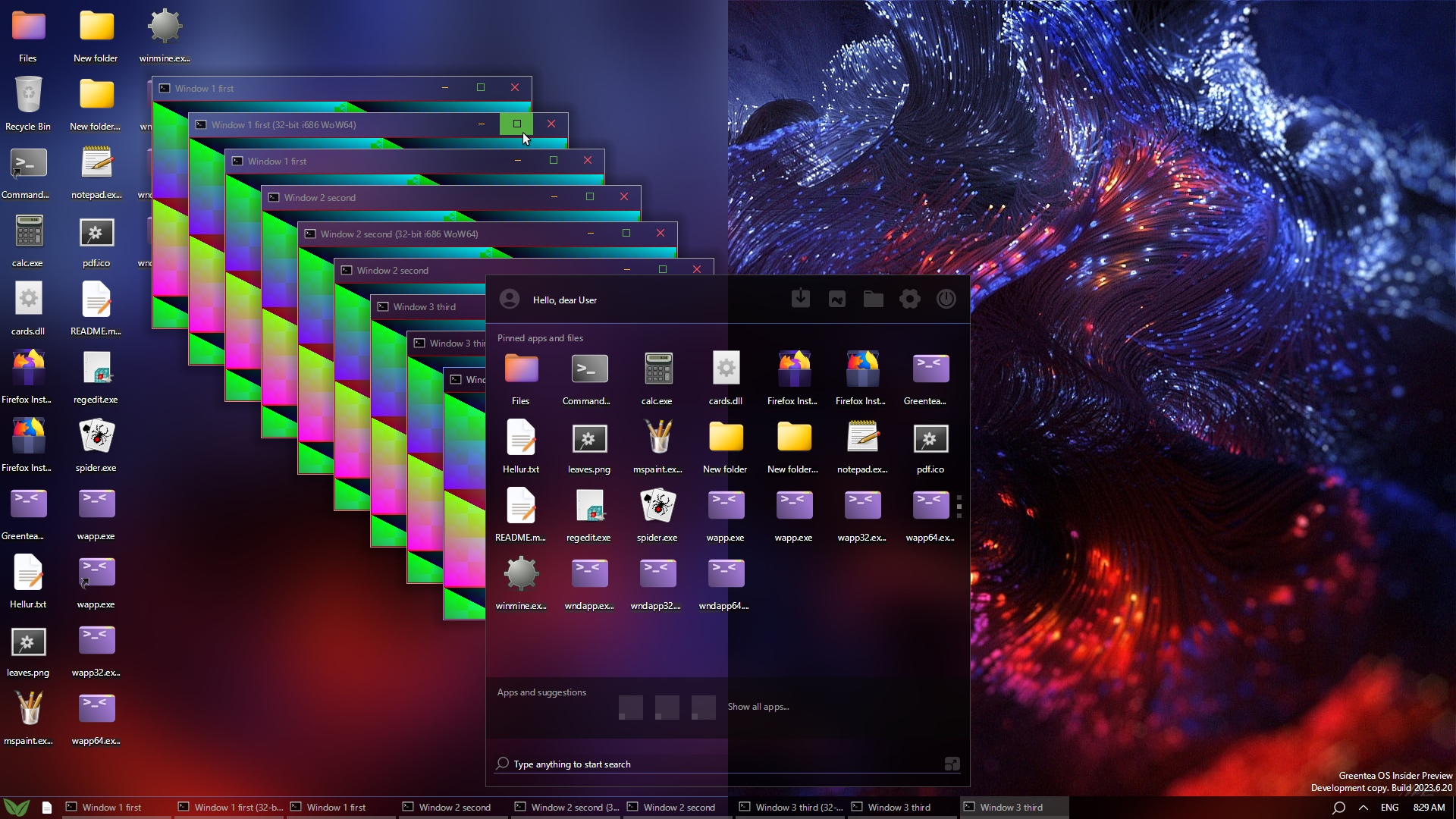
## GreenteaOS (Tofita) system requirements
- 64-bit UEFI
- Very low on resources, just 2 GB RAM minimum required
- Motherboard with SATA (AHCI) or NVMe, PCIe and USB 2.0+
- Multicore modern 64-bit CPU (most AMD and Intel CPUs from [Q3 2011 and newer](https://github.com/GreenteaOS/Greentea/blob/kawaii/Developer-Guide/CPUID.md#notes-on-cpu-compatibility))
- Try [Greentea OS Compatibility Assistant on your PC](https://t.me/s/greenteaos_official/7)
[](https://github.com/GreenteaOS/Tofita/stargazers)
Give some attention for Greentea OS be noticed and attract more contributors, thank you!
[](https://github.com/sponsors/PeyTy)
[](https://www.patreon.com/PeyTy)
Become a sponsor to help us hire developers and test more hardware
## Made with Hexa
 This project is made with [Hexa programming language](https://github.com/hexalang)
> [!NOTE]
>
> Learn more at [hexalang.github.io](https://hexalang.github.io)
## Tools
- [`listen.js`](tools/listen.js) - listen to VirtualBox COM port in TCP socket mode
- [`pipe.js`](tools/pipe.js) - listen to VirtualBox\Hyper-V COM port in pipe mode
- [`vbox.js`](tools/vbox.js) - starts VirtualBox Tofita VM and exits
- [`webui.bat`](tools/webui/webui.bat) - web-based UI for COM port
- [`gos-devlist.bat`](tools/gos-devlist.bat) - show useful device names and PCI IDs to gather user hardware stats
- [`OVMF.fd`](https://t.me/s/greenteaos_official/6) - speed of light UEFI bootloader for QEMU
- [`Greentea OS Compat`](https://t.me/s/greenteaos_official/7) - Greentea OS compatibility assistant
- [`build.bat`](build.bat) - check comments for examples of how to re-inject .iso file in VirtualBox and avoid full VM reboot for faster testing iterations
## Edit Online
You may edit and commit directly from the browser:
https://github.dev/GreenteaOS/Tofita/blob/kawaii/README.md
Remember to open `Extensions` and install **Hexa**!
Reload the tab if you don't see file icons.
Making a commit in the `Source Control` panel will create a *Fork* automatically for you.
## Build
Get automatic build or make yours with Teapot (if you want to edit the code)
Teapot is a bundle containing all of the build tools you need like LLVM and NASM.
### Automatic builds
If you don't want to build Tofita, you may [download the latest automatic GitHub build](https://ci.appveyor.com/project/PeyTy/tofita/build/artifacts).
### Build using Teapot
Download or clone [Teapot repo](https://github.com/GreenteaOS/Teapot#download-latest-zip) and others. Place alongside of Tofita repo:
```
.\Teapot
.\Tofita
.\Greentea
.\Tongue
.\NjRAA
.\Caramel
```
You should have extracted `Teapot-kawaii` and have folders like this `.\Teapot\LLVM-*.*.*`.
Teapot will take less space if cloned with limited depth of commit history:
```sh
git clone --recursive --depth 1 https://github.com/GreenteaOS/Tofita.git
git clone --recursive --depth 1 https://github.com/GreenteaOS/Teapot.git
git clone --recursive --depth 1 https://github.com/GreenteaOS/Greentea.git
git clone --recursive --depth 1 https://github.com/GreenteaOS/Tongue.git
git clone --recursive --depth 1 https://github.com/GreenteaOS/NjRAA.git
```
#### Configure
Add your apps, folders and other files into `assets\desktop` of the `Greentea` repo to see them in the built image.
Create `R:` ram disk about 1 GB (you may download a free [AMD Radeon™ RAMDisk](http://radeonramdisk.com/files/Radeon_RAMDisk_4_4_0_RC36.msi)) for faster builds and configure `config.json > tempFolder`.
Otherwise `C:` is used to store builds by default.
#### Install Hexa
You also need to install [Hexa compiler](https://hexalang.github.io/book/installation).
Simply use the latest graphical installer from the automated builds.
You may build Hexa manually too. [Follow instructions.](https://github.com/hexalang/hexa#build) Remember to add Hexa into your PATH.
#### Compile and generate disk image
```sh
cmd /c build
```
Or just open `build.bat` file with Explorer.
You'll find `Tea` subfolder with binaries and disk image.
## License
This program is free software: you can redistribute it and/or modify
it under the terms of the GNU Lesser General Public License as published by
the Free Software Foundation, version 3 of the License.
This program is distributed in the hope that it will be useful,
but WITHOUT ANY WARRANTY; without even the implied warranty of
MERCHANTABILITY or FITNESS FOR A PARTICULAR PURPOSE. See the
GNU Lesser General Public License for more details.
You should have received a copy of the GNU Lesser General Public License
along with this program. If not, see .
[More information about legal issues](https://github.com/GreenteaOS/Greentea/blob/kawaii/README.md#license)
This project is made with [Hexa programming language](https://github.com/hexalang)
> [!NOTE]
>
> Learn more at [hexalang.github.io](https://hexalang.github.io)
## Tools
- [`listen.js`](tools/listen.js) - listen to VirtualBox COM port in TCP socket mode
- [`pipe.js`](tools/pipe.js) - listen to VirtualBox\Hyper-V COM port in pipe mode
- [`vbox.js`](tools/vbox.js) - starts VirtualBox Tofita VM and exits
- [`webui.bat`](tools/webui/webui.bat) - web-based UI for COM port
- [`gos-devlist.bat`](tools/gos-devlist.bat) - show useful device names and PCI IDs to gather user hardware stats
- [`OVMF.fd`](https://t.me/s/greenteaos_official/6) - speed of light UEFI bootloader for QEMU
- [`Greentea OS Compat`](https://t.me/s/greenteaos_official/7) - Greentea OS compatibility assistant
- [`build.bat`](build.bat) - check comments for examples of how to re-inject .iso file in VirtualBox and avoid full VM reboot for faster testing iterations
## Edit Online
You may edit and commit directly from the browser:
https://github.dev/GreenteaOS/Tofita/blob/kawaii/README.md
Remember to open `Extensions` and install **Hexa**!
Reload the tab if you don't see file icons.
Making a commit in the `Source Control` panel will create a *Fork* automatically for you.
## Build
Get automatic build or make yours with Teapot (if you want to edit the code)
Teapot is a bundle containing all of the build tools you need like LLVM and NASM.
### Automatic builds
If you don't want to build Tofita, you may [download the latest automatic GitHub build](https://ci.appveyor.com/project/PeyTy/tofita/build/artifacts).
### Build using Teapot
Download or clone [Teapot repo](https://github.com/GreenteaOS/Teapot#download-latest-zip) and others. Place alongside of Tofita repo:
```
.\Teapot
.\Tofita
.\Greentea
.\Tongue
.\NjRAA
.\Caramel
```
You should have extracted `Teapot-kawaii` and have folders like this `.\Teapot\LLVM-*.*.*`.
Teapot will take less space if cloned with limited depth of commit history:
```sh
git clone --recursive --depth 1 https://github.com/GreenteaOS/Tofita.git
git clone --recursive --depth 1 https://github.com/GreenteaOS/Teapot.git
git clone --recursive --depth 1 https://github.com/GreenteaOS/Greentea.git
git clone --recursive --depth 1 https://github.com/GreenteaOS/Tongue.git
git clone --recursive --depth 1 https://github.com/GreenteaOS/NjRAA.git
```
#### Configure
Add your apps, folders and other files into `assets\desktop` of the `Greentea` repo to see them in the built image.
Create `R:` ram disk about 1 GB (you may download a free [AMD Radeon™ RAMDisk](http://radeonramdisk.com/files/Radeon_RAMDisk_4_4_0_RC36.msi)) for faster builds and configure `config.json > tempFolder`.
Otherwise `C:` is used to store builds by default.
#### Install Hexa
You also need to install [Hexa compiler](https://hexalang.github.io/book/installation).
Simply use the latest graphical installer from the automated builds.
You may build Hexa manually too. [Follow instructions.](https://github.com/hexalang/hexa#build) Remember to add Hexa into your PATH.
#### Compile and generate disk image
```sh
cmd /c build
```
Or just open `build.bat` file with Explorer.
You'll find `Tea` subfolder with binaries and disk image.
## License
This program is free software: you can redistribute it and/or modify
it under the terms of the GNU Lesser General Public License as published by
the Free Software Foundation, version 3 of the License.
This program is distributed in the hope that it will be useful,
but WITHOUT ANY WARRANTY; without even the implied warranty of
MERCHANTABILITY or FITNESS FOR A PARTICULAR PURPOSE. See the
GNU Lesser General Public License for more details.
You should have received a copy of the GNU Lesser General Public License
along with this program. If not, see .
[More information about legal issues](https://github.com/GreenteaOS/Greentea/blob/kawaii/README.md#license)