# quantum-circuit
**Repository Path**: AmberHan/quantum-circuit
## Basic Information
- **Project Name**: quantum-circuit
- **Description**: Quantum Circuit Simulator
- **Primary Language**: JavaScript
- **License**: MIT
- **Default Branch**: master
- **Homepage**: None
- **GVP Project**: No
## Statistics
- **Stars**: 0
- **Forks**: 1
- **Created**: 2020-11-08
- **Last Updated**: 2022-05-25
## Categories & Tags
**Categories**: Uncategorized
**Tags**: None
## README
Quantum Circuit Simulator
=========================
Quantum circuit simulator implemented in javascript. Smoothly runs 20+ qubit simulations in browser or at server (node.js). You can use it in your javascript program to run quantum simulations. Circuit can be imported from and exported to [OpenQASM](https://github.com/Qiskit/openqasm). You can export circuit to [pyQuil](http://docs.rigetti.com/en/latest/index.html), [Quil](https://arxiv.org/abs/1608.03355), [Qiskit](https://qiskit.org/documentation/) and [Cirq](https://github.com/quantumlib/Cirq) so it can be used for conversion from QASM to other languages. Circuit drawing can be exported to [SVG](https://www.w3.org/Graphics/SVG/) vector image.
Live examples
-------------
### Quantum Programming Studio
[Quantum Programming Studio](https://quantum-circuit.com) is web based quantum programming IDE and simulator. Circuit can be executed on real quantum computer directly from the UI. See example video:
 ### Other examples
- [qasm2pyquil](https://quantum-circuit.com/qasm2pyquil) QASM to pyQuil/Quil online converter
- [example.html](https://quantum-circuit.com/example.html)
Using in browser
----------------
Simply include [quantum-circuit.min.js](dist/) into your html page (available via unpkg CDN [https://unpkg.com/quantum-circuit](https://unpkg.com/quantum-circuit))
```html
Quantum Circuit Simulator Example
```
Using at server with node.js
----------------------------
Add [quantum-circuit](https://www.npmjs.com/package/quantum-circuit) npm module to your node.js project:
```bash
npm install --save quantum-circuit
```
And then import it into your program:
```javascript
var QuantumCircuit = require("quantum-circuit");
// Your code here
```
### Node.js examples
See [/example/nodejs](example/nodejs/) directory.
Using with Jupyter notebook
---------------------------
You need to install [ijavascript](https://github.com/n-riesco/ijavascript) kernel for [Jupyter notebook](http://jupyter.org/)
You can install quantum-circuit npm module globally and invoke jupyter notebook from any directory:
```
npm install -g quantum-circuit
```
Or inside new directory do:
```
npm init
npm install --save quantum-circuit
jupyter notebook
```
### Jupyter notebook examples
See [/example/jupyter](example/jupyter/) directory.
Getting started
===============
Create circuit
--------------
Create instance of `QuantumCircuit` class, optionally passing number of qubits (wires) to constructor:
```javascript
var circuit = new QuantumCircuit(3);
```
*Note: number of qubits is optional argument - circuit will expand automatically if you add gates to non-existing wires*
Add single-qubit gates
----------------------
Call `addGate` method passing gate name, column index and qubit (wire) index:
```javascript
circuit.addGate(gateName, column, wire);
```
For example, to add Hadamard gate as a first gate (column 0) at second qubit (wire 1) type:
```javascript
circuit.addGate("h", 0, 1);
```
Result is:
```
Column 0
Wire 0 -----------
|---|
Wire 1 ---| H |---
|---|
```
*Note: if `column` is negative integer then gate will be added to the end of the wire*
Add multi-qubit gates
---------------------
Call `addGate` method passing gate name, column index and array of connected qubits (wires):
```javascript
circuit.addGate(gateName, column, arrayOfWires);
```
For example, to add CNOT as a second gate (column 1) controlled by second qubit (wire 1) at third qubit as target (wire 2) do:
```javascript
circuit.addGate("cx", 1, [1, 2]);
```
```
Column 0 Column 1
Wire 0 ------------------------
Wire 1 -----------------o------
|
|-----|
Wire 2 --------------| CX |---
|-----|
```
*Note: if `column` is negative integer then gate will be added to the end*
Implemented gates
-----------------
| Name | pyQuil | Cirq | Qubits | Params | Description |
| --- | --- | --- | --- | --- | --- |
| **id** | I | Rz(0) | 1 | | Single qubit identity gate |
| **x** | X | X | 1 | | Pauli X (PI rotation over X-axis) aka "NOT" gate |
| **y** | Y | Y | 1 | | Pauli Y (PI rotation over Y-axis) |
| **z** | Z | Z | 1 | | Pauli Z (PI rotation over Z-axis) |
| **h** | H | H | 1 | | Hadamard gate |
| **srn** | | X**(1/2) | 1 | | Square root of NOT |
| **r2** | S | Rz(pi/2) | 1 | | PI/2 rotation over Z-axis aka "Phase PI/2" |
| **r4** | T | Rz(pi/4) | 1 | | PI/4 rotation over Z-axis aka "Phase PI/4" |
| **r8** | RZ(pi/8) | Rz(pi/2) | 1 | | PI/8 rotation over Z-axis aka "Phase PI/8" |
| **rx** | RX | Rx | 1 | theta | Rotation around the X-axis by given angle |
| **ry** | RY | Ry | 1 | theta | Rotation around the Y-axis by given angle |
| **rz** | RZ | Rz | 1 | phi | Rotation around the Z-axis by given angle |
| **u1** | PHASE | Rz | 1 | lambda | 1-parameter 0-pulse single qubit gate |
| **u2** | def u2 | def u2 | 1 | phi, lambda | 2-parameter 1-pulse single qubit gate |
| **u3** | def u3 | def u3 | 1 | theta, phi, lambda | 3-parameter 2-pulse single qubit gate |
| **s** | S | S | 1 | | PI/2 rotation over Z-axis (synonym for `r2`) |
| **t** | T | T | 1 | | PI/4 rotation over Z-axis (synonym for `r4`) |
| **sdg** | RZ(-pi/2) | Rz(-pi/2) | 1 | | (-PI/2) rotation over Z-axis |
| **tdg** | RZ(-pi/4) | Rz(-pi/4) | 1 | | (-PI/4) rotation over Z-axis |
| **swap** | SWAP | SWAP | 2 | | Swaps the state of two qubits. |
| **srswap** | | SWAP**(1/2) | 2 | | Square root of swap |
| **cx** | CNOT | CNOT | 2 | | Controlled Pauli X (PI rotation over X-axis) aka "CNOT" gate |
| **cy** | | | 2 | | Controlled Pauli Y (PI rotation over Y-axis) |
| **cz** | CZ | CZ | 2 | | Controlled Pauli Z (PI rotation over Z-axis) |
| **ch** | | | 2 | | Controlled Hadamard gate |
| **csrn** | | | 2 | | Controlled square root of NOT |
| **ms** | def ms | MS | 2 | theta | Mølmer-Sørensen gate |
| **yy** | def yy | | 2 | theta | YY gate |
| **cr2** | CPHASE(pi/2) | cu1(pi/2) | 2 | | Controlled PI/2 rotation over Z-axis |
| **cr4** | CPHASE(pi/4) | cu1(pi/4) | 2 | | Controlled PI/4 rotation over Z-axis |
| **cr8** | CPHASE(pi/8) | cu1(pi/8) | 2 | | Controlled PI/8 rotation over Z-axis |
| **crx** | def crx | | 2 | theta | Controlled rotation around the X-axis by given angle |
| **cry** | def cry | | 2 | theta | Controlled rotation around the Y-axis by given angle |
| **crz** | CPHASE | def cu1 | 2 | phi | Controlled rotation around the Z-axis by given angle |
| **cu1** | CPHASE | def cu1 | 2 | lambda | Controlled 1-parameter 0-pulse single qubit gate |
| **cu2** | def cu2 | def cu2 | 2 | phi, lambda | Controlled 2-parameter 1-pulse single qubit gate |
| **cu3** | def cu3 | def cu3 | 2 | theta, phi, lambda | Controlled 3-parameter 2-pulse single qubit gate |
| **cs** | CPHASE(pi/2) | cu1(pi/2) | 2 | | Controlled PI/2 rotation over Z-axis (synonym for `cr2`) |
| **ct** | CPHASE(pi/4) | cu1(pi/4) | 2 | | Controlled PI/4 rotation over Z-axis (synonym for `cr4`) |
| **csdg** | CPHASE(-pi/2) | cu1(-pi/2) | 2 | | Controlled (-PI/2) rotation over Z-axis |
| **ctdg** | CPHASE(-pi/4) | cu1(-pi/4) | 2 | | Controlled (-PI/4) rotation over Z-axis |
| **ccx** | CCNOT | CCX | 3 | | Toffoli aka "CCNOT" gate |
| **cswap** | | CSWAP | 3 | | Controlled swap aka "Fredkin" gate |
| **csrswap** | | | 3 | | Controlled square root of swap |
| **reset** | RESET | reset | 1 | | Resets qubit |
| **measure** | MEASURE | measure | 1 | | Measures qubit and stores chance (0 or 1) into classical bit |
*For more details see [gate reference](#gates)*
Run circuit
-----------
Simply call `run` method.
```javascript
circuit.run();
```
Initial state
-------------
By default, initial state of each qubit is `|0>`. You can pass initial values as array of bool (`true` or `false`) or integers (`0` or `1`). This will set first two qubits to `|1>` and evaluate circuit:
```javascript
circuit.run([1, 1]);
```
Measurement
-----------
Method `probabilities()` will return array of probabilities (real numbers between 0 and 1) for each qubit:
```javascript
console.log(circuit.probabilities());
```
Method `probability(wire)` will return probability (real number between 0 and 1) for given qubit:
```javascript
console.log(circuit.probability(0));
```
Method `measureAll()` returns array of chances (as integers 0 or 1) for each qubit:
Example:
```javascript
console.log(circuit.measureAll());
```
Method `measure(wire)` returns chance (as integer 0 or 1) for given qubit:
Example:
```javascript
console.log(circuit.measure(0));
```
You can store measurement into classical register. For example, to measure first qubit (wire 0) and store result into classical register named `c` as fourth bit (bit 3):
```javascript
circuit.measure(0, "c", 3);
```
You can add `measure` gate to circuit and then measurement will be done automatically and result will be stored into classical register:
```javascript
circuit.addGate("measure", -1, 0, { creg: { name: "c", bit: 3 } });
```
Short form of writing this is `addMeasure(wire, creg, cbit)`:
```javascript
circuit.addMeasure(0, "c", 3);
```
*Note:*
- *Measurement gate will reset qubit to measured value only if there are gates with classical control (gates controlled by classical registers). Otherwise, measurement gate will leave qubit as is - measured value will be written to classical register and qubit will remain unchanged. This "nondestructive" behavior is handy when experimenting. However, it will automatically switches to "destructive" mode when needed (when classical control is present)*
- *If specified classical register doesn't exists - it will be created automatically.*
Classical registers
-------------------
**Create register**
Classical registers are created automatically if you add measurement gate to the circuit but you can also manually create registers by calling `createCreg(name, len)`.
Example: create classical 5-bit register named `ans`:
```javascript
circuit.createCreg("ans", 5);
```
**Read register**
To get register value as integer, call `getCregValue(name)`.
Example:
```javascript
var value = circuit.getCregValue("ans");
```
**Read single bit**
Example: get bit 3 from register named `ans`:
```javascript
console.log(circuit.getCregBit("ans", 3));
```
*Returns integer: 0 or 1*
**Set single bit**
Example: set bit 3 to `1` in register named `ans`:
```javascript
circuit.setCregBit("ans", 3, 1);
```
Control by classical register
-----------------------------
Each quatum gate in the circuit (except "measure" gate) can be controlled by classical register - gate will be executed only if classical register contains specified value. Pass `options` object as fourth argument to `addGate` method:
Example:
```javascript
circuit.addGate("x", -1, 0, {
condition: {
creg: "ans",
value: 7
}
});
```
In this example, "x" gate will execute on qubit 0 only if value of register named "ans" equals 7.
Reset qubit
-----------
You can reset qubit to value `|0>` or `|1>` with `resetQubit` method:
```javascript
circuit.resetQubit(3, 0);
```
In this example, qubit 3 will be set to `0|>`.
*Note that all entangled qubits will be changed as well*
View/print final amplitudes
---------------------------
You can get state as string with method `stateAsString(onlyPossible)`:
```javascript
var s = circuit.stateAsString(false);
```
If you want only possible values (only values with probability > 0) then pass `true`:
```javascript
var s = circuit.stateAsString(true);
```
Or, you can print state to javascript console with method `print(onlyPossible)`:
```javascript
circuit.print(false);
```
If you want to print only possible values (only values with probability > 0) then pass `true`:
```javascript
var s = circuit.print(true);
```
Export/Import circuit
---------------------
You can export circuit to javascript object (format internally used by QuantumCircuit) by calling `save` method:
```javascript
var obj = circuit.save();
// now do something with obj, save to file or whatever...
```
And load previously saved circuit by calling `load` method:
```javascript
var obj = // ...load object from file or from another circuit or whatever
circuit.load(obj);
```
Use circuit as a gate in another circuit
----------------------------------------
You can "compile" any circuit and use it as a gate in another circuit like this:
```javascript
// export circuit to variable
var obj = someCircuit.save();
// register it as a gate in another circuit
anotherCircuit.registerGate("my_gate", obj);
// use it as a gate in another circuit
// assuming original circuit has three qubits then gate must spread to 3 qubits, in this example: 2, 3, 4)
anotherCircuit.addGate("my_gate", 0, [2, 3, 4]);
```
Decompose circuit
-----------------
If your circuit contains user defined gates (created from another circuit), you can decompose it into equivalent circuit containing only basic gates.
If you pass `true` as argument to function `save`, you'll get decomposed circuit.
Example:
```javascript
var obj = circuit.save(true);
// now obj contains decomposed circuit. You can load it:
circuit.load(obj);
```
Export to python (Qiskit)
-------------------------
Circuit can be exported to [Qiskit](https://qiskit.org/documentation/) with following limitation:
- User defined gates are not generated. Instead, circuit is decomposed to basic gates and exported. Effect is the same but code is less readable. **TODO**
- Gates not directly supported by Qiskit are exported as-is - their definition is not generated. **TODO**
To export circuit to Qiskit use `exportQiskit(comment, decompose, null, versionStr)` method:
Example:
```javascript
var qiskit = circuit.exportQiskit("Comment to insert at the beginning.\nCan be multi-line comment as this one.", false, null, null);
```
- `comment` - comment to insert at the beginning of the file.
- `decompose` - if set to `true` and circuit contains user defined gates then it will be decomposed to basic gates and then exported. If set to `false` then user defined gates will exported as subroutines.
- `versionStr` - Qiskit version. Can be `"0.7"`. Exports to latest supported version when empty string is provided. Remember - it is a string.
Export to QASM
--------------
Circuit can be exported to [OpenQASM](https://github.com/Qiskit/openqasm) with following limitation:
- at the moment, gates not directly supported by QASM and qelib1.inc are exported as-is - their definition is not generated. **TODO**
To export circuit to OpenQASM use `exportQASM(comment, decompose)` method:
Example:
```javascript
var qasm = circuit.exportQASM("Comment to insert at the beginning.\nCan be multi-line comment as this one.", false);
```
- `comment` - comment to insert at the beginning of the file.
- `decompose` - if set to `true` and circuit contains user defined gates then it will be decomposed to basic gates and then exported. If set to `false` then user defined gates will exported as subroutines.
Import from QASM
----------------
Circuit can be imported from [OpenQASM](https://github.com/Qiskit/openqasm) with following limitations:
- `import` directive is ignored (but most of gates defined in `qelib1.inc` are supported) **TODO**
- `barrier` is ignored. **TODO**
- `reset` is ignored. **TODO**
To import circuit from OpenQASM use `importQASM(input, errorCallback)` method:
Example:
```javascript
circuit.importQASM("OPENQASM 2.0;\nimport \"qelib1.inc\";\nqreg q[2];\nh q[0];\ncx q[0],q[1];\n", function(errors) {
console.log(errors);
});
```
- `input` is string containing QASM source code.
- `errorCallback` (optional) function will be called after parsing with array containing syntax errors.
Export to python (pyQuil)
-------------------------
Circuit can be exported to [pyQuil](http://docs.rigetti.com/en/latest/index.html)
To export circuit to pyQuil use `exportPyquil(comment, decompose, null, versionStr, lattice, asQVM)` method:
Example:
```javascript
var pyquil = circuit.exportPyquil("Comment to insert at the beginning.\nCan be multi-line comment as this one.", false, null, "2.1", "", false);
```
- `comment` - comment to insert at the beginning of the file.
- `decompose` - if set to `true` and circuit contains user defined gates then it will be decomposed to basic gates and then exported. If set to `false` then user defined gates will exported as subroutines.
- `versionStr` - pyQuil version. Can be `"1.9"`, `"2.0"` or `"2.1"`. Exports to latest supported version when empty string is provided. Remember - it is a string.
- `lattice` - You can optionally pass then name of the lattice.
- `asQVM` - If this argument is `true` (and if `lattice` is specified) then produced code will run on QVM mimicking running on QPU. Otherwise, produced code will run on QPU.
Export to Quil
--------------
Circuit can be exported to [Quil](https://arxiv.org/abs/1608.03355)
To export circuit to Quil use `exportQuil(comment, decompose, null, versionStr)` method:
Example:
```javascript
var quil = circuit.exportQuil("Comment to insert at the beginning.\nCan be multi-line comment as this one.", false, null, "2.0");
```
- `comment` - comment to insert at the beginning of the file.
- `decompose` - if set to `true` and circuit contains user defined gates then it will be decomposed to basic gates and then exported. If set to `false` then user defined gates will exported as subroutines (DEFCIRCUIT).
- `versionStr` - Quil version. Can be `"1.0"` or `"2.0"` or empty string. Exports to latest supported version when empty string is provided. Remember - it is a string.
Export to python (Cirq)
-----------------------
Circuit can be exported to [Cirq](https://github.com/quantumlib/Cirq) with following limitation:
- Gates not directly supported by Cirq are exported as-is - their definition is not generated. **TODO**
- Classical control is ignored (comment with warning is generated). **TODO**
To export circuit to Cirq use `exportCirq(comment, decompose, null, versionStr)` method:
Example:
```javascript
var cirq = circuit.exportCirq("Comment to insert at the beginning.\nCan be multi-line comment as this one.", false, null, null);
```
- `comment` - comment to insert at the beginning of the file.
- `decompose` - if set to `true` and circuit contains user defined gates then it will be decomposed to basic gates and then exported. If set to `false` then user defined gates will exported as subroutines.
- `versionStr` - Cirq version. Can be `"0.5"` or empty string. Exports to latest supported version when empty string is provided. Remember - it is a string.
Export to SVG
-------------
Vector `.svg` image of circuit can be created with `exportSVG(embedded)` function with following limitations:
- Gate symbols are non-standard. **TODO** *(BTW, do we have standard?)*
**Example 1**
Show circuit in browser:
```javascript
// Assuming we have somewhere in HTML
var container = document.getElementById("drawing");
// SVG is returned as string
var svg = circuit.exportSVG(true);
// add SVG into container
container.innerHTML = svg;
```
**Example 2**
Generate standalone SVG image at server with node.js:
```javascript
// export as standalone SVG
var svg = circuit.exportSVG(false);
// do something with svg string (e.g. save to file)
...
// Or, export as embedded SVG for use in browser
svg = circuit.exportSVG(true);
// do something with svg string (e.g. serve via HTTP)
...
```
Export to Quirk
---------------
Circuit can be exported to popular open-source drag-and-drop quantum circuit simulator [Quirk](https://algassert.com/quirk) with following limitations:
- Quirk doesn't support more than 16 qubits.
- Quirk can possibly incorrectly interpret circuit if we have multiple controlled gates in the same column.
- Quirk doesn't support non-sequentially positioned multi-qubit user-defined gates (for example gate on wires [3, 0, 1]) so it's best to export decomposed circuit.
Example:
```javascript
var quirkData = circuit.exportQuirk(true);
var quirkURL = "http://algassert.com/quirk#circuit=" + JSON.stringify(quirkData);
// Now do something with quirkURL. Assuming this code runs in browser and we have somewhere, you can:
var quirkLink = document.getElementById("quirk");
quirkLink.setAttr("href", quirkLink);
```
About simulator algorithm
=========================
Memory usage: up to `2 * (2^numQubits) * sizeOfComplexNumber`
- Naive implementation stores entire state vector in an array of size `2^numQubits`. We are storing state in a "map", and only amplitudes with non-zero probabilities are stored. So, in worst case, size of state map is `2^n`, but it's less most of the time because we don't store zeroes.
- Naive implementation creates transformation matrix and multiplies it with state vector. We are not creating and not storing entire transformation matrix in memory. Instead, elements of transformation matrix are calculated one by one and state is multiplied and stored in new state map on the fly. This way, memory usage is minimal (in worst case we have two `2^n` state vectors at a time).
- Algorithm is parallelizable so it could use GPU, but GPU support is not implemented yet (work in progress).
Benchmark
---------
*Performance is measured on MacBook Pro MJLT2 mid-2015 (Core i7 2.5 GHz, 16GB RAM)*
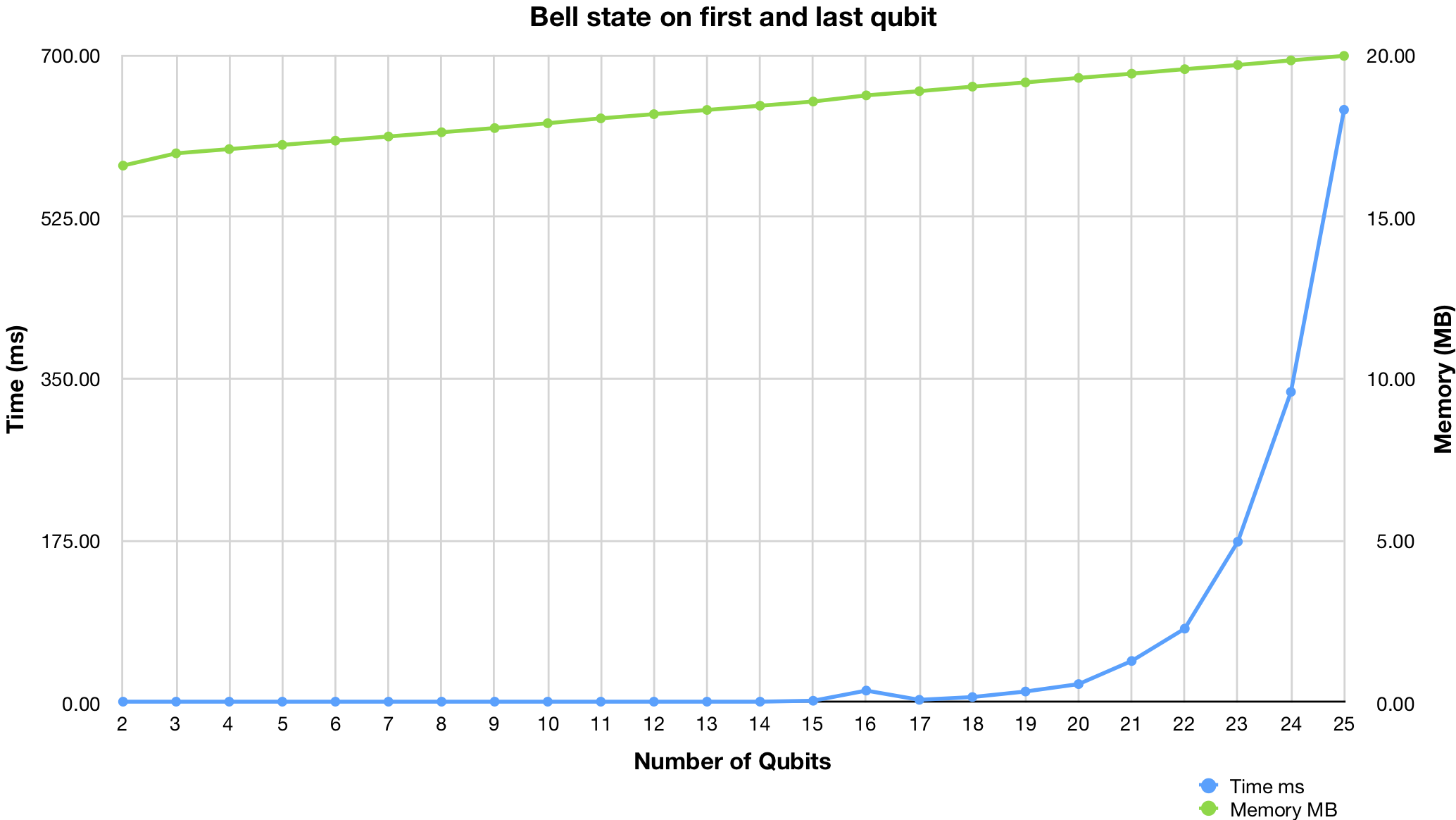
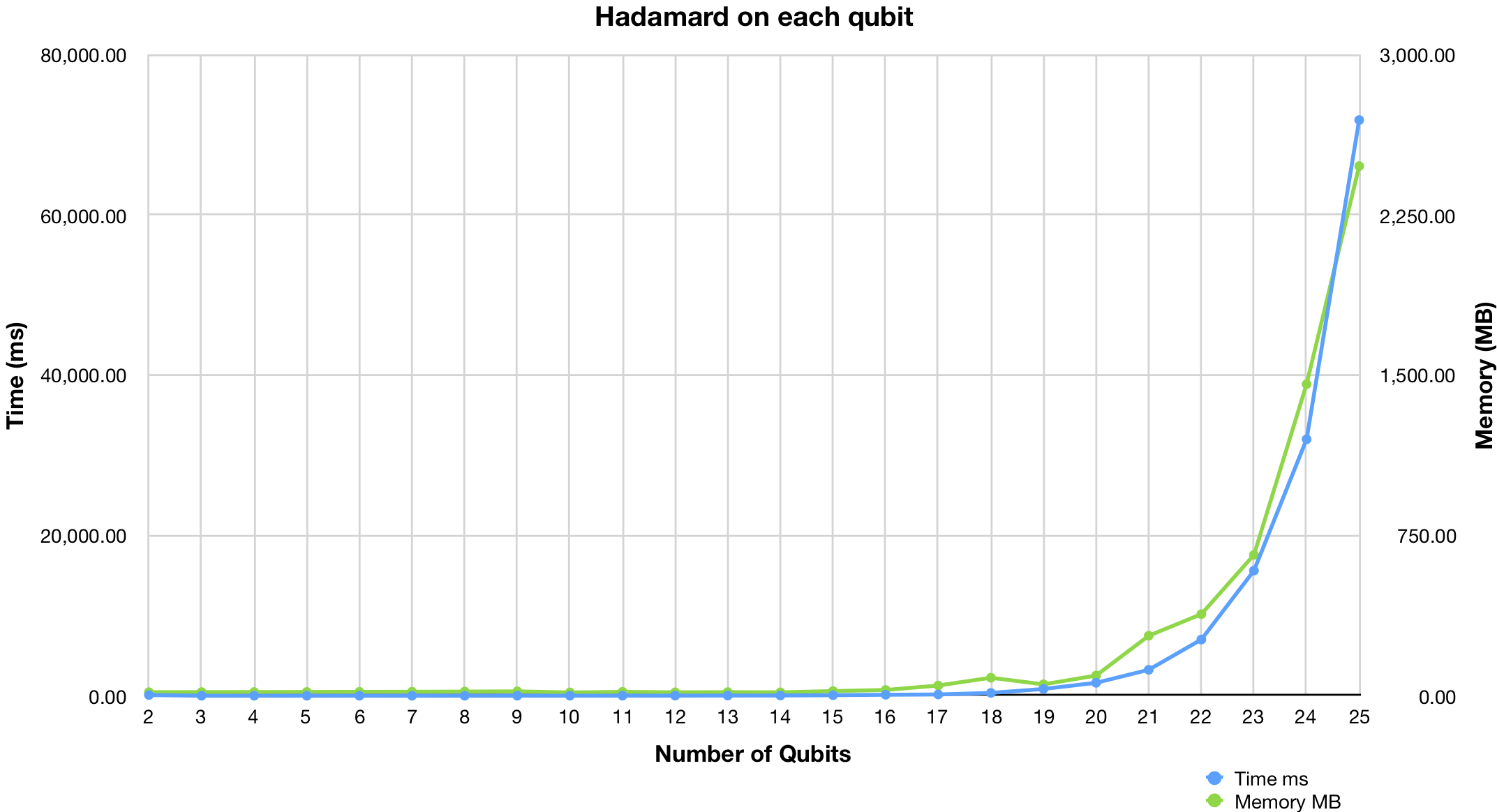
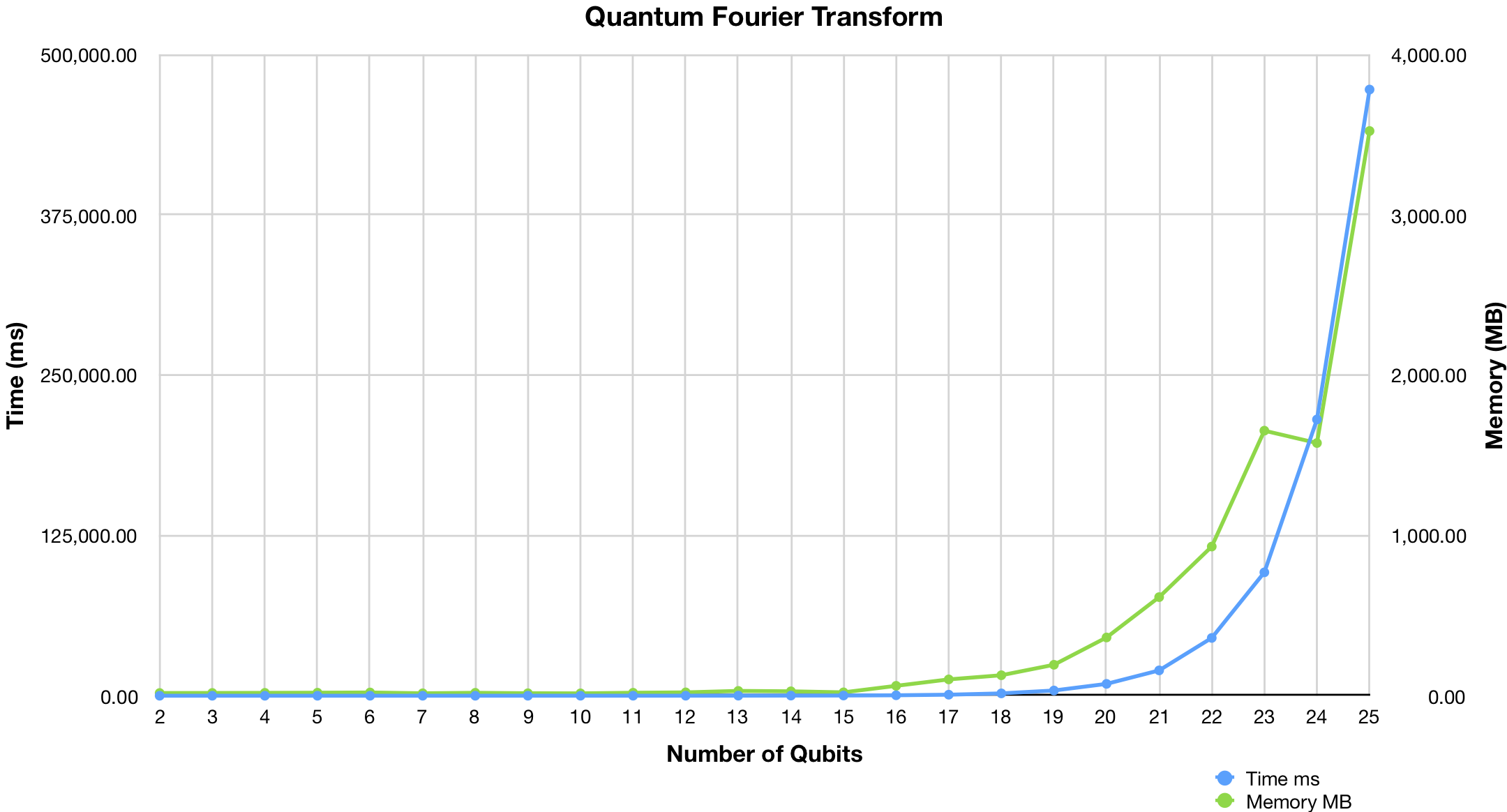
*You can find scripts in [/benchmark](benchmark/) directory.*
Gates
=====
## id
Single qubit identity gate
**Qubits:** 1
**Matrix:**
```javascript
[
[1,0]
[0,1]
]
```
**Example:**
```javascript
circuit.addGate("id", -1, 0);
```
## x
Pauli X (PI rotation over X-axis) aka "NOT" gate
**Qubits:** 1
**Matrix:**
```javascript
[
[0,1]
[1,0]
]
```
**Example:**
```javascript
circuit.addGate("x", -1, 0);
```
## y
Pauli Y (PI rotation over Y-axis)
**Qubits:** 1
**Matrix:**
```javascript
[
[0,"multiply(-1, i)"]
["i",0]
]
```
**Example:**
```javascript
circuit.addGate("y", -1, 0);
```
## z
Pauli Z (PI rotation over Z-axis)
**Qubits:** 1
**Matrix:**
```javascript
[
[1,0]
[0,-1]
]
```
**Example:**
```javascript
circuit.addGate("z", -1, 0);
```
## h
Hadamard gate
**Qubits:** 1
**Matrix:**
```javascript
[
["1 / sqrt(2)","1 / sqrt(2)"]
["1 / sqrt(2)","0 - (1 / sqrt(2))"]
]
```
**Example:**
```javascript
circuit.addGate("h", -1, 0);
```
## srn
Square root of NOT
**Qubits:** 1
**Matrix:**
```javascript
[
["1 / sqrt(2)","-1 / sqrt(2)"]
["-1 / sqrt(2)","1 / sqrt(2)"]
]
```
**Example:**
```javascript
circuit.addGate("srn", -1, 0);
```
## r2
PI/2 rotation over Z-axis aka "Phase PI/2"
**Qubits:** 1
**Matrix:**
```javascript
[
[1,0]
[0,"pow(e, multiply(i, PI / 2))"]
]
```
**Example:**
```javascript
circuit.addGate("r2", -1, 0);
```
## r4
PI/4 rotation over Z-axis aka "Phase PI/4"
**Qubits:** 1
**Matrix:**
```javascript
[
[1,0]
[0,"pow(e, multiply(i, PI / 4))"]
]
```
**Example:**
```javascript
circuit.addGate("r4", -1, 0);
```
## r8
PI/8 rotation over Z-axis aka "Phase PI/8"
**Qubits:** 1
**Matrix:**
```javascript
[
[1,0]
[0,"pow(e, multiply(i, PI / 8))"]
]
```
**Example:**
```javascript
circuit.addGate("r8", -1, 0);
```
## rx
Rotation around the X-axis by given angle
**Qubits:** 1
**Parameters:**
- theta
**Matrix:**
```javascript
[
["cos(theta / 2)","multiply(-i, sin(theta / 2))"]
["multiply(-i, sin(theta / 2))","cos(theta / 2)"]
]
```
**Example:**
```javascript
circuit.addGate("rx", -1, 0, {
params: {
theta: "pi/2"
}
});
```
## ry
Rotation around the Y-axis by given angle
**Qubits:** 1
**Parameters:**
- theta
**Matrix:**
```javascript
[
["cos(theta / 2)","multiply(-1, sin(theta / 2))"]
["sin(theta / 2)","cos(theta / 2)"]
]
```
**Example:**
```javascript
circuit.addGate("ry", -1, 0, {
params: {
theta: "pi/2"
}
});
```
## rz
Rotation around the Z-axis by given angle
**Qubits:** 1
**Parameters:**
- phi
**Matrix:**
```javascript
[
[1,0]
[0,"pow(e, multiply(i, phi))"]
]
```
**Example:**
```javascript
circuit.addGate("rz", -1, 0, {
params: {
phi: "pi/2"
}
});
```
## u1
1-parameter 0-pulse single qubit gate
**Qubits:** 1
**Parameters:**
- lambda
**Matrix:**
```javascript
[
[1,0]
[0,"pow(e, multiply(i, lambda))"]
]
```
**Example:**
```javascript
circuit.addGate("u1", -1, 0, {
params: {
lambda: "pi/2"
}
});
```
## u2
2-parameter 1-pulse single qubit gate
**Qubits:** 1
**Parameters:**
- phi
- lambda
**Matrix:**
```javascript
[
["1 / sqrt(2)","pow(-e, multiply(i, lambda)) / sqrt(2)"]
["pow(e, multiply(i, phi)) / sqrt(2)","pow(e, multiply(i, lambda) + multiply(i, phi)) / sqrt(2)"]
]
```
**Example:**
```javascript
circuit.addGate("u2", -1, 0, {
params: {
phi: "pi/2",
lambda: "pi/2"
}
});
```
## u3
3-parameter 2-pulse single qubit gate
**Qubits:** 1
**Parameters:**
- theta
- phi
- lambda
**Matrix:**
```javascript
[
["cos(theta / 2)","pow(-e, multiply(i, lambda)) * sin(theta / 2)"]
["pow(e, multiply(i, phi)) * sin(theta / 2)","pow(e, multiply(i, lambda) + multiply(i, phi)) * cos(theta / 2)"]
]
```
**Example:**
```javascript
circuit.addGate("u3", -1, 0, {
params: {
theta: "pi/2",
phi: "pi/2",
lambda: "pi/2"
}
});
```
## s
PI/2 rotation over Z-axis (synonym for `r2`)
**Qubits:** 1
**Matrix:**
```javascript
[
[1,0]
[0,"pow(e, multiply(i, PI / 2))"]
]
```
**Example:**
```javascript
circuit.addGate("s", -1, 0);
```
## t
PI/4 rotation over Z-axis (synonym for `r4`)
**Qubits:** 1
**Matrix:**
```javascript
[
[1,0]
[0,"pow(e, multiply(i, PI / 4))"]
]
```
**Example:**
```javascript
circuit.addGate("t", -1, 0);
```
## sdg
(-PI/2) rotation over Z-axis
**Qubits:** 1
**Matrix:**
```javascript
[
[1,0]
[0,"pow(e, multiply(i, (-1 * PI) / 2))"]
]
```
**Example:**
```javascript
circuit.addGate("sdg", -1, 0);
```
## tdg
(-PI/4) rotation over Z-axis
**Qubits:** 1
**Matrix:**
```javascript
[
[1,0]
[0,"pow(e, multiply(i, (-1 * PI) / 4))"]
]
```
**Example:**
```javascript
circuit.addGate("tdg", -1, 0);
```
## swap
Swaps the state of two qubits.
**Qubits:** 2
**Matrix:**
```javascript
[
[1,0,0,0]
[0,0,1,0]
[0,1,0,0]
[0,0,0,1]
]
```
**Example:**
```javascript
circuit.addGate("swap", -1, [0, 1]);
```
## srswap
Square root of swap
**Qubits:** 2
**Matrix:**
```javascript
[
[1,0,0,0]
[0,"multiply(0.5, add(1, i))","multiply(0.5, subtract(1, i))",0]
[0,"multiply(0.5, subtract(1, i))","multiply(0.5, add(1, i))",0]
[0,0,0,1]
]
```
**Example:**
```javascript
circuit.addGate("srswap", -1, [0, 1]);
```
## cx
Controlled Pauli X (PI rotation over X-axis) aka "CNOT" gate
**Qubits:** 2
**Matrix:**
```javascript
[
[1,0,0,0]
[0,1,0,0]
[0,0,0,1]
[0,0,1,0]
]
```
**Example:**
```javascript
circuit.addGate("cx", -1, [0, 1]);
```
## cy
Controlled Pauli Y (PI rotation over Y-axis)
**Qubits:** 2
**Matrix:**
```javascript
[
[1,0,0,0]
[0,1,0,0]
[0,0,0,"multiply(-1, i)"]
[0,0,"i",0]
]
```
**Example:**
```javascript
circuit.addGate("cy", -1, [0, 1]);
```
## cz
Controlled Pauli Z (PI rotation over Z-axis)
**Qubits:** 2
**Matrix:**
```javascript
[
[1,0,0,0]
[0,1,0,0]
[0,0,1,0]
[0,0,0,-1]
]
```
**Example:**
```javascript
circuit.addGate("cz", -1, [0, 1]);
```
## ch
Controlled Hadamard gate
**Qubits:** 2
**Matrix:**
```javascript
[
[1,0,0,0]
[0,1,0,0]
[0,0,"1 / sqrt(2)","1 / sqrt(2)"]
[0,0,"1 / sqrt(2)","0 - (1 / sqrt(2))"]
]
```
**Example:**
```javascript
circuit.addGate("ch", -1, [0, 1]);
```
## csrn
Controlled square root of NOT
**Qubits:** 2
**Matrix:**
```javascript
[
[1,0,0,0]
[0,1,0,0]
[0,0,"1 / sqrt(2)","-1 / sqrt(2)"]
[0,0,"-1 / sqrt(2)","1 / sqrt(2)"]
]
```
**Example:**
```javascript
circuit.addGate("csrn", -1, [0, 1]);
```
## ms
Mølmer-Sørensen gate
**Qubits:** 2
**Parameters:**
- theta
**Matrix:**
```javascript
[
["cos(theta)",0,0,"-i*sin(theta)"]
[0,"cos(theta)","-i*sin(theta)",0]
[0,"-i*sin(theta)","cos(theta)",0]
["-i*sin(theta)",0,0,"cos(theta)"]
]
```
**Example:**
```javascript
circuit.addGate("ms", -1, [0, 1], {
params: {
theta: "pi/2"
}
});
```
## yy
YY gate
**Qubits:** 2
**Parameters:**
- theta
**Matrix:**
```javascript
[
["cos(theta)",0,0,"i*sin(theta)"]
[0,"cos(theta)","-i*sin(theta)",0]
[0,"-i*sin(theta)","cos(theta)",0]
["i*sin(theta)",0,0,"cos(theta)"]
]
```
**Example:**
```javascript
circuit.addGate("yy", -1, [0, 1], {
params: {
theta: "pi/2"
}
});
```
## cr2
Controlled PI/2 rotation over Z-axis
**Qubits:** 2
**Matrix:**
```javascript
[
[1,0,0,0]
[0,1,0,0]
[0,0,1,0]
[0,0,0,"pow(e, multiply(i, PI / 2))"]
]
```
**Example:**
```javascript
circuit.addGate("cr2", -1, [0, 1]);
```
## cr4
Controlled PI/4 rotation over Z-axis
**Qubits:** 2
**Matrix:**
```javascript
[
[1,0,0,0]
[0,1,0,0]
[0,0,1,0]
[0,0,0,"pow(e, multiply(i, PI / 4))"]
]
```
**Example:**
```javascript
circuit.addGate("cr4", -1, [0, 1]);
```
## cr8
Controlled PI/8 rotation over Z-axis
**Qubits:** 2
**Matrix:**
```javascript
[
[1,0,0,0]
[0,1,0,0]
[0,0,1,0]
[0,0,0,"pow(e, multiply(i, PI / 8))"]
]
```
**Example:**
```javascript
circuit.addGate("cr8", -1, [0, 1]);
```
## crx
Controlled rotation around the X-axis by given angle
**Qubits:** 2
**Parameters:**
- theta
**Matrix:**
```javascript
[
[1,0,0,0]
[0,1,0,0]
[0,0,"cos(theta / 2)","multiply(-i, sin(theta / 2))"]
[0,0,"multiply(-i, sin(theta / 2))","cos(theta / 2)"]
]
```
**Example:**
```javascript
circuit.addGate("crx", -1, [0, 1], {
params: {
theta: "pi/2"
}
});
```
## cry
Controlled rotation around the Y-axis by given angle
**Qubits:** 2
**Parameters:**
- theta
**Matrix:**
```javascript
[
[1,0,0,0]
[0,1,0,0]
[0,0,"cos(theta / 2)","multiply(-1, sin(theta / 2))"]
[0,0,"sin(theta / 2)","cos(theta / 2)"]
]
```
**Example:**
```javascript
circuit.addGate("cry", -1, [0, 1], {
params: {
theta: "pi/2"
}
});
```
## crz
Controlled rotation around the Z-axis by given angle
**Qubits:** 2
**Parameters:**
- phi
**Matrix:**
```javascript
[
[1,0,0,0]
[0,1,0,0]
[0,0,1,0]
[0,0,0,"pow(e, multiply(i, phi))"]
]
```
**Example:**
```javascript
circuit.addGate("crz", -1, [0, 1], {
params: {
phi: "pi/2"
}
});
```
## cu1
Controlled 1-parameter 0-pulse single qubit gate
**Qubits:** 2
**Parameters:**
- lambda
**Matrix:**
```javascript
[
[1,0,0,0]
[0,1,0,0]
[0,0,1,0]
[0,0,0,"pow(e, multiply(i, lambda))"]
]
```
**Example:**
```javascript
circuit.addGate("cu1", -1, [0, 1], {
params: {
lambda: "pi/2"
}
});
```
## cu2
Controlled 2-parameter 1-pulse single qubit gate
**Qubits:** 2
**Parameters:**
- phi
- lambda
**Matrix:**
```javascript
[
[1,0,0,0]
[0,1,0,0]
[0,0,"1 / sqrt(2)","pow(-e, multiply(i, lambda)) / sqrt(2)"]
[0,0,"pow(e, multiply(i, phi)) / sqrt(2)","pow(e, multiply(i, lambda) + multiply(i, phi)) / sqrt(2)"]
]
```
**Example:**
```javascript
circuit.addGate("cu2", -1, [0, 1], {
params: {
phi: "pi/2",
lambda: "pi/2"
}
});
```
## cu3
Controlled 3-parameter 2-pulse single qubit gate
**Qubits:** 2
**Parameters:**
- theta
- phi
- lambda
**Matrix:**
```javascript
[
[1,0,0,0]
[0,1,0,0]
[0,0,"cos(theta / 2)","pow(-e, multiply(i, lambda)) * sin(theta / 2)"]
[0,0,"pow(e, multiply(i, phi)) * sin(theta / 2)","pow(e, multiply(i, lambda) + multiply(phi, lambda)) * cos(theta / 2)"]
]
```
**Example:**
```javascript
circuit.addGate("cu3", -1, [0, 1], {
params: {
theta: "pi/2",
phi: "pi/2",
lambda: "pi/2"
}
});
```
## cs
Controlled PI/2 rotation over Z-axis (synonym for `cr2`)
**Qubits:** 2
**Matrix:**
```javascript
[
[1,0,0,0]
[0,1,0,0]
[0,0,1,0]
[0,0,0,"pow(e, multiply(i, PI / 2))"]
]
```
**Example:**
```javascript
circuit.addGate("cs", -1, [0, 1]);
```
## ct
Controlled PI/4 rotation over Z-axis (synonym for `cr4`)
**Qubits:** 2
**Matrix:**
```javascript
[
[1,0,0,0]
[0,1,0,0]
[0,0,1,0]
[0,0,0,"pow(e, multiply(i, PI / 4))"]
]
```
**Example:**
```javascript
circuit.addGate("ct", -1, [0, 1]);
```
## csdg
Controlled (-PI/2) rotation over Z-axis
**Qubits:** 2
**Matrix:**
```javascript
[
[1,0,0,0]
[0,1,0,0]
[0,0,1,0]
[0,0,0,"pow(e, multiply(i, (-1 * PI) / 2))"]
]
```
**Example:**
```javascript
circuit.addGate("csdg", -1, [0, 1]);
```
## ctdg
Controlled (-PI/4) rotation over Z-axis
**Qubits:** 2
**Matrix:**
```javascript
[
[1,0,0,0]
[0,1,0,0]
[0,0,1,0]
[0,0,0,"pow(e, multiply(i, (-1 * PI) / 4))"]
]
```
**Example:**
```javascript
circuit.addGate("ctdg", -1, [0, 1]);
```
## ccx
Toffoli aka "CCNOT" gate
**Qubits:** 3
**Matrix:**
```javascript
[
[1,0,0,0,0,0,0,0]
[0,1,0,0,0,0,0,0]
[0,0,1,0,0,0,0,0]
[0,0,0,1,0,0,0,0]
[0,0,0,0,1,0,0,0]
[0,0,0,0,0,1,0,0]
[0,0,0,0,0,0,0,1]
[0,0,0,0,0,0,1,0]
]
```
**Example:**
```javascript
circuit.addGate("ccx", -1, [0, 1, 2]);
```
## cswap
Controlled swap aka "Fredkin" gate
**Qubits:** 3
**Matrix:**
```javascript
[
[1,0,0,0,0,0,0,0]
[0,1,0,0,0,0,0,0]
[0,0,1,0,0,0,0,0]
[0,0,0,1,0,0,0,0]
[0,0,0,0,1,0,0,0]
[0,0,0,0,0,0,1,0]
[0,0,0,0,0,1,0,0]
[0,0,0,0,0,0,0,1]
]
```
**Example:**
```javascript
circuit.addGate("cswap", -1, [0, 1, 2]);
```
## csrswap
Controlled square root of swap
**Qubits:** 3
**Matrix:**
```javascript
[
[1,0,0,0,0,0,0,0]
[0,1,0,0,0,0,0,0]
[0,0,1,0,0,0,0,0]
[0,0,0,1,0,0,0,0]
[0,0,0,0,1,0,0,0]
[0,0,0,0,0,"multiply(0.5, add(1, i))","multiply(0.5, subtract(1, i))",0]
[0,0,0,0,0,"multiply(0.5, subtract(1, i))","multiply(0.5, add(1, i))",0]
[0,0,0,0,0,0,0,1]
]
```
**Example:**
```javascript
circuit.addGate("csrswap", -1, [0, 1, 2]);
```
## reset
Resets qubit
**Qubits:** 1
**Example:**
```javascript
circuit.addGate("reset", -1, 0);
```
## measure
Measures qubit and stores chance (0 or 1) into classical bit
**Qubits:** 1
**Example:**
```javascript
circuit.addGate("measure", -1, 0, {
creg: {
name: "c",
bit: 3
}
});
```
**Or:**
```javascript
circuit.addMeasure(0, "c", 3);
```
API docs
========
*To be written...*
License
=======
[MIT](LICENSE.txt)
### Other examples
- [qasm2pyquil](https://quantum-circuit.com/qasm2pyquil) QASM to pyQuil/Quil online converter
- [example.html](https://quantum-circuit.com/example.html)
Using in browser
----------------
Simply include [quantum-circuit.min.js](dist/) into your html page (available via unpkg CDN [https://unpkg.com/quantum-circuit](https://unpkg.com/quantum-circuit))
```html
Quantum Circuit Simulator Example
```
Using at server with node.js
----------------------------
Add [quantum-circuit](https://www.npmjs.com/package/quantum-circuit) npm module to your node.js project:
```bash
npm install --save quantum-circuit
```
And then import it into your program:
```javascript
var QuantumCircuit = require("quantum-circuit");
// Your code here
```
### Node.js examples
See [/example/nodejs](example/nodejs/) directory.
Using with Jupyter notebook
---------------------------
You need to install [ijavascript](https://github.com/n-riesco/ijavascript) kernel for [Jupyter notebook](http://jupyter.org/)
You can install quantum-circuit npm module globally and invoke jupyter notebook from any directory:
```
npm install -g quantum-circuit
```
Or inside new directory do:
```
npm init
npm install --save quantum-circuit
jupyter notebook
```
### Jupyter notebook examples
See [/example/jupyter](example/jupyter/) directory.
Getting started
===============
Create circuit
--------------
Create instance of `QuantumCircuit` class, optionally passing number of qubits (wires) to constructor:
```javascript
var circuit = new QuantumCircuit(3);
```
*Note: number of qubits is optional argument - circuit will expand automatically if you add gates to non-existing wires*
Add single-qubit gates
----------------------
Call `addGate` method passing gate name, column index and qubit (wire) index:
```javascript
circuit.addGate(gateName, column, wire);
```
For example, to add Hadamard gate as a first gate (column 0) at second qubit (wire 1) type:
```javascript
circuit.addGate("h", 0, 1);
```
Result is:
```
Column 0
Wire 0 -----------
|---|
Wire 1 ---| H |---
|---|
```
*Note: if `column` is negative integer then gate will be added to the end of the wire*
Add multi-qubit gates
---------------------
Call `addGate` method passing gate name, column index and array of connected qubits (wires):
```javascript
circuit.addGate(gateName, column, arrayOfWires);
```
For example, to add CNOT as a second gate (column 1) controlled by second qubit (wire 1) at third qubit as target (wire 2) do:
```javascript
circuit.addGate("cx", 1, [1, 2]);
```
```
Column 0 Column 1
Wire 0 ------------------------
Wire 1 -----------------o------
|
|-----|
Wire 2 --------------| CX |---
|-----|
```
*Note: if `column` is negative integer then gate will be added to the end*
Implemented gates
-----------------
| Name | pyQuil | Cirq | Qubits | Params | Description |
| --- | --- | --- | --- | --- | --- |
| **id** | I | Rz(0) | 1 | | Single qubit identity gate |
| **x** | X | X | 1 | | Pauli X (PI rotation over X-axis) aka "NOT" gate |
| **y** | Y | Y | 1 | | Pauli Y (PI rotation over Y-axis) |
| **z** | Z | Z | 1 | | Pauli Z (PI rotation over Z-axis) |
| **h** | H | H | 1 | | Hadamard gate |
| **srn** | | X**(1/2) | 1 | | Square root of NOT |
| **r2** | S | Rz(pi/2) | 1 | | PI/2 rotation over Z-axis aka "Phase PI/2" |
| **r4** | T | Rz(pi/4) | 1 | | PI/4 rotation over Z-axis aka "Phase PI/4" |
| **r8** | RZ(pi/8) | Rz(pi/2) | 1 | | PI/8 rotation over Z-axis aka "Phase PI/8" |
| **rx** | RX | Rx | 1 | theta | Rotation around the X-axis by given angle |
| **ry** | RY | Ry | 1 | theta | Rotation around the Y-axis by given angle |
| **rz** | RZ | Rz | 1 | phi | Rotation around the Z-axis by given angle |
| **u1** | PHASE | Rz | 1 | lambda | 1-parameter 0-pulse single qubit gate |
| **u2** | def u2 | def u2 | 1 | phi, lambda | 2-parameter 1-pulse single qubit gate |
| **u3** | def u3 | def u3 | 1 | theta, phi, lambda | 3-parameter 2-pulse single qubit gate |
| **s** | S | S | 1 | | PI/2 rotation over Z-axis (synonym for `r2`) |
| **t** | T | T | 1 | | PI/4 rotation over Z-axis (synonym for `r4`) |
| **sdg** | RZ(-pi/2) | Rz(-pi/2) | 1 | | (-PI/2) rotation over Z-axis |
| **tdg** | RZ(-pi/4) | Rz(-pi/4) | 1 | | (-PI/4) rotation over Z-axis |
| **swap** | SWAP | SWAP | 2 | | Swaps the state of two qubits. |
| **srswap** | | SWAP**(1/2) | 2 | | Square root of swap |
| **cx** | CNOT | CNOT | 2 | | Controlled Pauli X (PI rotation over X-axis) aka "CNOT" gate |
| **cy** | | | 2 | | Controlled Pauli Y (PI rotation over Y-axis) |
| **cz** | CZ | CZ | 2 | | Controlled Pauli Z (PI rotation over Z-axis) |
| **ch** | | | 2 | | Controlled Hadamard gate |
| **csrn** | | | 2 | | Controlled square root of NOT |
| **ms** | def ms | MS | 2 | theta | Mølmer-Sørensen gate |
| **yy** | def yy | | 2 | theta | YY gate |
| **cr2** | CPHASE(pi/2) | cu1(pi/2) | 2 | | Controlled PI/2 rotation over Z-axis |
| **cr4** | CPHASE(pi/4) | cu1(pi/4) | 2 | | Controlled PI/4 rotation over Z-axis |
| **cr8** | CPHASE(pi/8) | cu1(pi/8) | 2 | | Controlled PI/8 rotation over Z-axis |
| **crx** | def crx | | 2 | theta | Controlled rotation around the X-axis by given angle |
| **cry** | def cry | | 2 | theta | Controlled rotation around the Y-axis by given angle |
| **crz** | CPHASE | def cu1 | 2 | phi | Controlled rotation around the Z-axis by given angle |
| **cu1** | CPHASE | def cu1 | 2 | lambda | Controlled 1-parameter 0-pulse single qubit gate |
| **cu2** | def cu2 | def cu2 | 2 | phi, lambda | Controlled 2-parameter 1-pulse single qubit gate |
| **cu3** | def cu3 | def cu3 | 2 | theta, phi, lambda | Controlled 3-parameter 2-pulse single qubit gate |
| **cs** | CPHASE(pi/2) | cu1(pi/2) | 2 | | Controlled PI/2 rotation over Z-axis (synonym for `cr2`) |
| **ct** | CPHASE(pi/4) | cu1(pi/4) | 2 | | Controlled PI/4 rotation over Z-axis (synonym for `cr4`) |
| **csdg** | CPHASE(-pi/2) | cu1(-pi/2) | 2 | | Controlled (-PI/2) rotation over Z-axis |
| **ctdg** | CPHASE(-pi/4) | cu1(-pi/4) | 2 | | Controlled (-PI/4) rotation over Z-axis |
| **ccx** | CCNOT | CCX | 3 | | Toffoli aka "CCNOT" gate |
| **cswap** | | CSWAP | 3 | | Controlled swap aka "Fredkin" gate |
| **csrswap** | | | 3 | | Controlled square root of swap |
| **reset** | RESET | reset | 1 | | Resets qubit |
| **measure** | MEASURE | measure | 1 | | Measures qubit and stores chance (0 or 1) into classical bit |
*For more details see [gate reference](#gates)*
Run circuit
-----------
Simply call `run` method.
```javascript
circuit.run();
```
Initial state
-------------
By default, initial state of each qubit is `|0>`. You can pass initial values as array of bool (`true` or `false`) or integers (`0` or `1`). This will set first two qubits to `|1>` and evaluate circuit:
```javascript
circuit.run([1, 1]);
```
Measurement
-----------
Method `probabilities()` will return array of probabilities (real numbers between 0 and 1) for each qubit:
```javascript
console.log(circuit.probabilities());
```
Method `probability(wire)` will return probability (real number between 0 and 1) for given qubit:
```javascript
console.log(circuit.probability(0));
```
Method `measureAll()` returns array of chances (as integers 0 or 1) for each qubit:
Example:
```javascript
console.log(circuit.measureAll());
```
Method `measure(wire)` returns chance (as integer 0 or 1) for given qubit:
Example:
```javascript
console.log(circuit.measure(0));
```
You can store measurement into classical register. For example, to measure first qubit (wire 0) and store result into classical register named `c` as fourth bit (bit 3):
```javascript
circuit.measure(0, "c", 3);
```
You can add `measure` gate to circuit and then measurement will be done automatically and result will be stored into classical register:
```javascript
circuit.addGate("measure", -1, 0, { creg: { name: "c", bit: 3 } });
```
Short form of writing this is `addMeasure(wire, creg, cbit)`:
```javascript
circuit.addMeasure(0, "c", 3);
```
*Note:*
- *Measurement gate will reset qubit to measured value only if there are gates with classical control (gates controlled by classical registers). Otherwise, measurement gate will leave qubit as is - measured value will be written to classical register and qubit will remain unchanged. This "nondestructive" behavior is handy when experimenting. However, it will automatically switches to "destructive" mode when needed (when classical control is present)*
- *If specified classical register doesn't exists - it will be created automatically.*
Classical registers
-------------------
**Create register**
Classical registers are created automatically if you add measurement gate to the circuit but you can also manually create registers by calling `createCreg(name, len)`.
Example: create classical 5-bit register named `ans`:
```javascript
circuit.createCreg("ans", 5);
```
**Read register**
To get register value as integer, call `getCregValue(name)`.
Example:
```javascript
var value = circuit.getCregValue("ans");
```
**Read single bit**
Example: get bit 3 from register named `ans`:
```javascript
console.log(circuit.getCregBit("ans", 3));
```
*Returns integer: 0 or 1*
**Set single bit**
Example: set bit 3 to `1` in register named `ans`:
```javascript
circuit.setCregBit("ans", 3, 1);
```
Control by classical register
-----------------------------
Each quatum gate in the circuit (except "measure" gate) can be controlled by classical register - gate will be executed only if classical register contains specified value. Pass `options` object as fourth argument to `addGate` method:
Example:
```javascript
circuit.addGate("x", -1, 0, {
condition: {
creg: "ans",
value: 7
}
});
```
In this example, "x" gate will execute on qubit 0 only if value of register named "ans" equals 7.
Reset qubit
-----------
You can reset qubit to value `|0>` or `|1>` with `resetQubit` method:
```javascript
circuit.resetQubit(3, 0);
```
In this example, qubit 3 will be set to `0|>`.
*Note that all entangled qubits will be changed as well*
View/print final amplitudes
---------------------------
You can get state as string with method `stateAsString(onlyPossible)`:
```javascript
var s = circuit.stateAsString(false);
```
If you want only possible values (only values with probability > 0) then pass `true`:
```javascript
var s = circuit.stateAsString(true);
```
Or, you can print state to javascript console with method `print(onlyPossible)`:
```javascript
circuit.print(false);
```
If you want to print only possible values (only values with probability > 0) then pass `true`:
```javascript
var s = circuit.print(true);
```
Export/Import circuit
---------------------
You can export circuit to javascript object (format internally used by QuantumCircuit) by calling `save` method:
```javascript
var obj = circuit.save();
// now do something with obj, save to file or whatever...
```
And load previously saved circuit by calling `load` method:
```javascript
var obj = // ...load object from file or from another circuit or whatever
circuit.load(obj);
```
Use circuit as a gate in another circuit
----------------------------------------
You can "compile" any circuit and use it as a gate in another circuit like this:
```javascript
// export circuit to variable
var obj = someCircuit.save();
// register it as a gate in another circuit
anotherCircuit.registerGate("my_gate", obj);
// use it as a gate in another circuit
// assuming original circuit has three qubits then gate must spread to 3 qubits, in this example: 2, 3, 4)
anotherCircuit.addGate("my_gate", 0, [2, 3, 4]);
```
Decompose circuit
-----------------
If your circuit contains user defined gates (created from another circuit), you can decompose it into equivalent circuit containing only basic gates.
If you pass `true` as argument to function `save`, you'll get decomposed circuit.
Example:
```javascript
var obj = circuit.save(true);
// now obj contains decomposed circuit. You can load it:
circuit.load(obj);
```
Export to python (Qiskit)
-------------------------
Circuit can be exported to [Qiskit](https://qiskit.org/documentation/) with following limitation:
- User defined gates are not generated. Instead, circuit is decomposed to basic gates and exported. Effect is the same but code is less readable. **TODO**
- Gates not directly supported by Qiskit are exported as-is - their definition is not generated. **TODO**
To export circuit to Qiskit use `exportQiskit(comment, decompose, null, versionStr)` method:
Example:
```javascript
var qiskit = circuit.exportQiskit("Comment to insert at the beginning.\nCan be multi-line comment as this one.", false, null, null);
```
- `comment` - comment to insert at the beginning of the file.
- `decompose` - if set to `true` and circuit contains user defined gates then it will be decomposed to basic gates and then exported. If set to `false` then user defined gates will exported as subroutines.
- `versionStr` - Qiskit version. Can be `"0.7"`. Exports to latest supported version when empty string is provided. Remember - it is a string.
Export to QASM
--------------
Circuit can be exported to [OpenQASM](https://github.com/Qiskit/openqasm) with following limitation:
- at the moment, gates not directly supported by QASM and qelib1.inc are exported as-is - their definition is not generated. **TODO**
To export circuit to OpenQASM use `exportQASM(comment, decompose)` method:
Example:
```javascript
var qasm = circuit.exportQASM("Comment to insert at the beginning.\nCan be multi-line comment as this one.", false);
```
- `comment` - comment to insert at the beginning of the file.
- `decompose` - if set to `true` and circuit contains user defined gates then it will be decomposed to basic gates and then exported. If set to `false` then user defined gates will exported as subroutines.
Import from QASM
----------------
Circuit can be imported from [OpenQASM](https://github.com/Qiskit/openqasm) with following limitations:
- `import` directive is ignored (but most of gates defined in `qelib1.inc` are supported) **TODO**
- `barrier` is ignored. **TODO**
- `reset` is ignored. **TODO**
To import circuit from OpenQASM use `importQASM(input, errorCallback)` method:
Example:
```javascript
circuit.importQASM("OPENQASM 2.0;\nimport \"qelib1.inc\";\nqreg q[2];\nh q[0];\ncx q[0],q[1];\n", function(errors) {
console.log(errors);
});
```
- `input` is string containing QASM source code.
- `errorCallback` (optional) function will be called after parsing with array containing syntax errors.
Export to python (pyQuil)
-------------------------
Circuit can be exported to [pyQuil](http://docs.rigetti.com/en/latest/index.html)
To export circuit to pyQuil use `exportPyquil(comment, decompose, null, versionStr, lattice, asQVM)` method:
Example:
```javascript
var pyquil = circuit.exportPyquil("Comment to insert at the beginning.\nCan be multi-line comment as this one.", false, null, "2.1", "", false);
```
- `comment` - comment to insert at the beginning of the file.
- `decompose` - if set to `true` and circuit contains user defined gates then it will be decomposed to basic gates and then exported. If set to `false` then user defined gates will exported as subroutines.
- `versionStr` - pyQuil version. Can be `"1.9"`, `"2.0"` or `"2.1"`. Exports to latest supported version when empty string is provided. Remember - it is a string.
- `lattice` - You can optionally pass then name of the lattice.
- `asQVM` - If this argument is `true` (and if `lattice` is specified) then produced code will run on QVM mimicking running on QPU. Otherwise, produced code will run on QPU.
Export to Quil
--------------
Circuit can be exported to [Quil](https://arxiv.org/abs/1608.03355)
To export circuit to Quil use `exportQuil(comment, decompose, null, versionStr)` method:
Example:
```javascript
var quil = circuit.exportQuil("Comment to insert at the beginning.\nCan be multi-line comment as this one.", false, null, "2.0");
```
- `comment` - comment to insert at the beginning of the file.
- `decompose` - if set to `true` and circuit contains user defined gates then it will be decomposed to basic gates and then exported. If set to `false` then user defined gates will exported as subroutines (DEFCIRCUIT).
- `versionStr` - Quil version. Can be `"1.0"` or `"2.0"` or empty string. Exports to latest supported version when empty string is provided. Remember - it is a string.
Export to python (Cirq)
-----------------------
Circuit can be exported to [Cirq](https://github.com/quantumlib/Cirq) with following limitation:
- Gates not directly supported by Cirq are exported as-is - their definition is not generated. **TODO**
- Classical control is ignored (comment with warning is generated). **TODO**
To export circuit to Cirq use `exportCirq(comment, decompose, null, versionStr)` method:
Example:
```javascript
var cirq = circuit.exportCirq("Comment to insert at the beginning.\nCan be multi-line comment as this one.", false, null, null);
```
- `comment` - comment to insert at the beginning of the file.
- `decompose` - if set to `true` and circuit contains user defined gates then it will be decomposed to basic gates and then exported. If set to `false` then user defined gates will exported as subroutines.
- `versionStr` - Cirq version. Can be `"0.5"` or empty string. Exports to latest supported version when empty string is provided. Remember - it is a string.
Export to SVG
-------------
Vector `.svg` image of circuit can be created with `exportSVG(embedded)` function with following limitations:
- Gate symbols are non-standard. **TODO** *(BTW, do we have standard?)*
**Example 1**
Show circuit in browser:
```javascript
// Assuming we have somewhere in HTML
var container = document.getElementById("drawing");
// SVG is returned as string
var svg = circuit.exportSVG(true);
// add SVG into container
container.innerHTML = svg;
```
**Example 2**
Generate standalone SVG image at server with node.js:
```javascript
// export as standalone SVG
var svg = circuit.exportSVG(false);
// do something with svg string (e.g. save to file)
...
// Or, export as embedded SVG for use in browser
svg = circuit.exportSVG(true);
// do something with svg string (e.g. serve via HTTP)
...
```
Export to Quirk
---------------
Circuit can be exported to popular open-source drag-and-drop quantum circuit simulator [Quirk](https://algassert.com/quirk) with following limitations:
- Quirk doesn't support more than 16 qubits.
- Quirk can possibly incorrectly interpret circuit if we have multiple controlled gates in the same column.
- Quirk doesn't support non-sequentially positioned multi-qubit user-defined gates (for example gate on wires [3, 0, 1]) so it's best to export decomposed circuit.
Example:
```javascript
var quirkData = circuit.exportQuirk(true);
var quirkURL = "http://algassert.com/quirk#circuit=" + JSON.stringify(quirkData);
// Now do something with quirkURL. Assuming this code runs in browser and we have somewhere, you can:
var quirkLink = document.getElementById("quirk");
quirkLink.setAttr("href", quirkLink);
```
About simulator algorithm
=========================
Memory usage: up to `2 * (2^numQubits) * sizeOfComplexNumber`
- Naive implementation stores entire state vector in an array of size `2^numQubits`. We are storing state in a "map", and only amplitudes with non-zero probabilities are stored. So, in worst case, size of state map is `2^n`, but it's less most of the time because we don't store zeroes.
- Naive implementation creates transformation matrix and multiplies it with state vector. We are not creating and not storing entire transformation matrix in memory. Instead, elements of transformation matrix are calculated one by one and state is multiplied and stored in new state map on the fly. This way, memory usage is minimal (in worst case we have two `2^n` state vectors at a time).
- Algorithm is parallelizable so it could use GPU, but GPU support is not implemented yet (work in progress).
Benchmark
---------
*Performance is measured on MacBook Pro MJLT2 mid-2015 (Core i7 2.5 GHz, 16GB RAM)*



*You can find scripts in [/benchmark](benchmark/) directory.*
Gates
=====
## id
Single qubit identity gate
**Qubits:** 1
**Matrix:**
```javascript
[
[1,0]
[0,1]
]
```
**Example:**
```javascript
circuit.addGate("id", -1, 0);
```
## x
Pauli X (PI rotation over X-axis) aka "NOT" gate
**Qubits:** 1
**Matrix:**
```javascript
[
[0,1]
[1,0]
]
```
**Example:**
```javascript
circuit.addGate("x", -1, 0);
```
## y
Pauli Y (PI rotation over Y-axis)
**Qubits:** 1
**Matrix:**
```javascript
[
[0,"multiply(-1, i)"]
["i",0]
]
```
**Example:**
```javascript
circuit.addGate("y", -1, 0);
```
## z
Pauli Z (PI rotation over Z-axis)
**Qubits:** 1
**Matrix:**
```javascript
[
[1,0]
[0,-1]
]
```
**Example:**
```javascript
circuit.addGate("z", -1, 0);
```
## h
Hadamard gate
**Qubits:** 1
**Matrix:**
```javascript
[
["1 / sqrt(2)","1 / sqrt(2)"]
["1 / sqrt(2)","0 - (1 / sqrt(2))"]
]
```
**Example:**
```javascript
circuit.addGate("h", -1, 0);
```
## srn
Square root of NOT
**Qubits:** 1
**Matrix:**
```javascript
[
["1 / sqrt(2)","-1 / sqrt(2)"]
["-1 / sqrt(2)","1 / sqrt(2)"]
]
```
**Example:**
```javascript
circuit.addGate("srn", -1, 0);
```
## r2
PI/2 rotation over Z-axis aka "Phase PI/2"
**Qubits:** 1
**Matrix:**
```javascript
[
[1,0]
[0,"pow(e, multiply(i, PI / 2))"]
]
```
**Example:**
```javascript
circuit.addGate("r2", -1, 0);
```
## r4
PI/4 rotation over Z-axis aka "Phase PI/4"
**Qubits:** 1
**Matrix:**
```javascript
[
[1,0]
[0,"pow(e, multiply(i, PI / 4))"]
]
```
**Example:**
```javascript
circuit.addGate("r4", -1, 0);
```
## r8
PI/8 rotation over Z-axis aka "Phase PI/8"
**Qubits:** 1
**Matrix:**
```javascript
[
[1,0]
[0,"pow(e, multiply(i, PI / 8))"]
]
```
**Example:**
```javascript
circuit.addGate("r8", -1, 0);
```
## rx
Rotation around the X-axis by given angle
**Qubits:** 1
**Parameters:**
- theta
**Matrix:**
```javascript
[
["cos(theta / 2)","multiply(-i, sin(theta / 2))"]
["multiply(-i, sin(theta / 2))","cos(theta / 2)"]
]
```
**Example:**
```javascript
circuit.addGate("rx", -1, 0, {
params: {
theta: "pi/2"
}
});
```
## ry
Rotation around the Y-axis by given angle
**Qubits:** 1
**Parameters:**
- theta
**Matrix:**
```javascript
[
["cos(theta / 2)","multiply(-1, sin(theta / 2))"]
["sin(theta / 2)","cos(theta / 2)"]
]
```
**Example:**
```javascript
circuit.addGate("ry", -1, 0, {
params: {
theta: "pi/2"
}
});
```
## rz
Rotation around the Z-axis by given angle
**Qubits:** 1
**Parameters:**
- phi
**Matrix:**
```javascript
[
[1,0]
[0,"pow(e, multiply(i, phi))"]
]
```
**Example:**
```javascript
circuit.addGate("rz", -1, 0, {
params: {
phi: "pi/2"
}
});
```
## u1
1-parameter 0-pulse single qubit gate
**Qubits:** 1
**Parameters:**
- lambda
**Matrix:**
```javascript
[
[1,0]
[0,"pow(e, multiply(i, lambda))"]
]
```
**Example:**
```javascript
circuit.addGate("u1", -1, 0, {
params: {
lambda: "pi/2"
}
});
```
## u2
2-parameter 1-pulse single qubit gate
**Qubits:** 1
**Parameters:**
- phi
- lambda
**Matrix:**
```javascript
[
["1 / sqrt(2)","pow(-e, multiply(i, lambda)) / sqrt(2)"]
["pow(e, multiply(i, phi)) / sqrt(2)","pow(e, multiply(i, lambda) + multiply(i, phi)) / sqrt(2)"]
]
```
**Example:**
```javascript
circuit.addGate("u2", -1, 0, {
params: {
phi: "pi/2",
lambda: "pi/2"
}
});
```
## u3
3-parameter 2-pulse single qubit gate
**Qubits:** 1
**Parameters:**
- theta
- phi
- lambda
**Matrix:**
```javascript
[
["cos(theta / 2)","pow(-e, multiply(i, lambda)) * sin(theta / 2)"]
["pow(e, multiply(i, phi)) * sin(theta / 2)","pow(e, multiply(i, lambda) + multiply(i, phi)) * cos(theta / 2)"]
]
```
**Example:**
```javascript
circuit.addGate("u3", -1, 0, {
params: {
theta: "pi/2",
phi: "pi/2",
lambda: "pi/2"
}
});
```
## s
PI/2 rotation over Z-axis (synonym for `r2`)
**Qubits:** 1
**Matrix:**
```javascript
[
[1,0]
[0,"pow(e, multiply(i, PI / 2))"]
]
```
**Example:**
```javascript
circuit.addGate("s", -1, 0);
```
## t
PI/4 rotation over Z-axis (synonym for `r4`)
**Qubits:** 1
**Matrix:**
```javascript
[
[1,0]
[0,"pow(e, multiply(i, PI / 4))"]
]
```
**Example:**
```javascript
circuit.addGate("t", -1, 0);
```
## sdg
(-PI/2) rotation over Z-axis
**Qubits:** 1
**Matrix:**
```javascript
[
[1,0]
[0,"pow(e, multiply(i, (-1 * PI) / 2))"]
]
```
**Example:**
```javascript
circuit.addGate("sdg", -1, 0);
```
## tdg
(-PI/4) rotation over Z-axis
**Qubits:** 1
**Matrix:**
```javascript
[
[1,0]
[0,"pow(e, multiply(i, (-1 * PI) / 4))"]
]
```
**Example:**
```javascript
circuit.addGate("tdg", -1, 0);
```
## swap
Swaps the state of two qubits.
**Qubits:** 2
**Matrix:**
```javascript
[
[1,0,0,0]
[0,0,1,0]
[0,1,0,0]
[0,0,0,1]
]
```
**Example:**
```javascript
circuit.addGate("swap", -1, [0, 1]);
```
## srswap
Square root of swap
**Qubits:** 2
**Matrix:**
```javascript
[
[1,0,0,0]
[0,"multiply(0.5, add(1, i))","multiply(0.5, subtract(1, i))",0]
[0,"multiply(0.5, subtract(1, i))","multiply(0.5, add(1, i))",0]
[0,0,0,1]
]
```
**Example:**
```javascript
circuit.addGate("srswap", -1, [0, 1]);
```
## cx
Controlled Pauli X (PI rotation over X-axis) aka "CNOT" gate
**Qubits:** 2
**Matrix:**
```javascript
[
[1,0,0,0]
[0,1,0,0]
[0,0,0,1]
[0,0,1,0]
]
```
**Example:**
```javascript
circuit.addGate("cx", -1, [0, 1]);
```
## cy
Controlled Pauli Y (PI rotation over Y-axis)
**Qubits:** 2
**Matrix:**
```javascript
[
[1,0,0,0]
[0,1,0,0]
[0,0,0,"multiply(-1, i)"]
[0,0,"i",0]
]
```
**Example:**
```javascript
circuit.addGate("cy", -1, [0, 1]);
```
## cz
Controlled Pauli Z (PI rotation over Z-axis)
**Qubits:** 2
**Matrix:**
```javascript
[
[1,0,0,0]
[0,1,0,0]
[0,0,1,0]
[0,0,0,-1]
]
```
**Example:**
```javascript
circuit.addGate("cz", -1, [0, 1]);
```
## ch
Controlled Hadamard gate
**Qubits:** 2
**Matrix:**
```javascript
[
[1,0,0,0]
[0,1,0,0]
[0,0,"1 / sqrt(2)","1 / sqrt(2)"]
[0,0,"1 / sqrt(2)","0 - (1 / sqrt(2))"]
]
```
**Example:**
```javascript
circuit.addGate("ch", -1, [0, 1]);
```
## csrn
Controlled square root of NOT
**Qubits:** 2
**Matrix:**
```javascript
[
[1,0,0,0]
[0,1,0,0]
[0,0,"1 / sqrt(2)","-1 / sqrt(2)"]
[0,0,"-1 / sqrt(2)","1 / sqrt(2)"]
]
```
**Example:**
```javascript
circuit.addGate("csrn", -1, [0, 1]);
```
## ms
Mølmer-Sørensen gate
**Qubits:** 2
**Parameters:**
- theta
**Matrix:**
```javascript
[
["cos(theta)",0,0,"-i*sin(theta)"]
[0,"cos(theta)","-i*sin(theta)",0]
[0,"-i*sin(theta)","cos(theta)",0]
["-i*sin(theta)",0,0,"cos(theta)"]
]
```
**Example:**
```javascript
circuit.addGate("ms", -1, [0, 1], {
params: {
theta: "pi/2"
}
});
```
## yy
YY gate
**Qubits:** 2
**Parameters:**
- theta
**Matrix:**
```javascript
[
["cos(theta)",0,0,"i*sin(theta)"]
[0,"cos(theta)","-i*sin(theta)",0]
[0,"-i*sin(theta)","cos(theta)",0]
["i*sin(theta)",0,0,"cos(theta)"]
]
```
**Example:**
```javascript
circuit.addGate("yy", -1, [0, 1], {
params: {
theta: "pi/2"
}
});
```
## cr2
Controlled PI/2 rotation over Z-axis
**Qubits:** 2
**Matrix:**
```javascript
[
[1,0,0,0]
[0,1,0,0]
[0,0,1,0]
[0,0,0,"pow(e, multiply(i, PI / 2))"]
]
```
**Example:**
```javascript
circuit.addGate("cr2", -1, [0, 1]);
```
## cr4
Controlled PI/4 rotation over Z-axis
**Qubits:** 2
**Matrix:**
```javascript
[
[1,0,0,0]
[0,1,0,0]
[0,0,1,0]
[0,0,0,"pow(e, multiply(i, PI / 4))"]
]
```
**Example:**
```javascript
circuit.addGate("cr4", -1, [0, 1]);
```
## cr8
Controlled PI/8 rotation over Z-axis
**Qubits:** 2
**Matrix:**
```javascript
[
[1,0,0,0]
[0,1,0,0]
[0,0,1,0]
[0,0,0,"pow(e, multiply(i, PI / 8))"]
]
```
**Example:**
```javascript
circuit.addGate("cr8", -1, [0, 1]);
```
## crx
Controlled rotation around the X-axis by given angle
**Qubits:** 2
**Parameters:**
- theta
**Matrix:**
```javascript
[
[1,0,0,0]
[0,1,0,0]
[0,0,"cos(theta / 2)","multiply(-i, sin(theta / 2))"]
[0,0,"multiply(-i, sin(theta / 2))","cos(theta / 2)"]
]
```
**Example:**
```javascript
circuit.addGate("crx", -1, [0, 1], {
params: {
theta: "pi/2"
}
});
```
## cry
Controlled rotation around the Y-axis by given angle
**Qubits:** 2
**Parameters:**
- theta
**Matrix:**
```javascript
[
[1,0,0,0]
[0,1,0,0]
[0,0,"cos(theta / 2)","multiply(-1, sin(theta / 2))"]
[0,0,"sin(theta / 2)","cos(theta / 2)"]
]
```
**Example:**
```javascript
circuit.addGate("cry", -1, [0, 1], {
params: {
theta: "pi/2"
}
});
```
## crz
Controlled rotation around the Z-axis by given angle
**Qubits:** 2
**Parameters:**
- phi
**Matrix:**
```javascript
[
[1,0,0,0]
[0,1,0,0]
[0,0,1,0]
[0,0,0,"pow(e, multiply(i, phi))"]
]
```
**Example:**
```javascript
circuit.addGate("crz", -1, [0, 1], {
params: {
phi: "pi/2"
}
});
```
## cu1
Controlled 1-parameter 0-pulse single qubit gate
**Qubits:** 2
**Parameters:**
- lambda
**Matrix:**
```javascript
[
[1,0,0,0]
[0,1,0,0]
[0,0,1,0]
[0,0,0,"pow(e, multiply(i, lambda))"]
]
```
**Example:**
```javascript
circuit.addGate("cu1", -1, [0, 1], {
params: {
lambda: "pi/2"
}
});
```
## cu2
Controlled 2-parameter 1-pulse single qubit gate
**Qubits:** 2
**Parameters:**
- phi
- lambda
**Matrix:**
```javascript
[
[1,0,0,0]
[0,1,0,0]
[0,0,"1 / sqrt(2)","pow(-e, multiply(i, lambda)) / sqrt(2)"]
[0,0,"pow(e, multiply(i, phi)) / sqrt(2)","pow(e, multiply(i, lambda) + multiply(i, phi)) / sqrt(2)"]
]
```
**Example:**
```javascript
circuit.addGate("cu2", -1, [0, 1], {
params: {
phi: "pi/2",
lambda: "pi/2"
}
});
```
## cu3
Controlled 3-parameter 2-pulse single qubit gate
**Qubits:** 2
**Parameters:**
- theta
- phi
- lambda
**Matrix:**
```javascript
[
[1,0,0,0]
[0,1,0,0]
[0,0,"cos(theta / 2)","pow(-e, multiply(i, lambda)) * sin(theta / 2)"]
[0,0,"pow(e, multiply(i, phi)) * sin(theta / 2)","pow(e, multiply(i, lambda) + multiply(phi, lambda)) * cos(theta / 2)"]
]
```
**Example:**
```javascript
circuit.addGate("cu3", -1, [0, 1], {
params: {
theta: "pi/2",
phi: "pi/2",
lambda: "pi/2"
}
});
```
## cs
Controlled PI/2 rotation over Z-axis (synonym for `cr2`)
**Qubits:** 2
**Matrix:**
```javascript
[
[1,0,0,0]
[0,1,0,0]
[0,0,1,0]
[0,0,0,"pow(e, multiply(i, PI / 2))"]
]
```
**Example:**
```javascript
circuit.addGate("cs", -1, [0, 1]);
```
## ct
Controlled PI/4 rotation over Z-axis (synonym for `cr4`)
**Qubits:** 2
**Matrix:**
```javascript
[
[1,0,0,0]
[0,1,0,0]
[0,0,1,0]
[0,0,0,"pow(e, multiply(i, PI / 4))"]
]
```
**Example:**
```javascript
circuit.addGate("ct", -1, [0, 1]);
```
## csdg
Controlled (-PI/2) rotation over Z-axis
**Qubits:** 2
**Matrix:**
```javascript
[
[1,0,0,0]
[0,1,0,0]
[0,0,1,0]
[0,0,0,"pow(e, multiply(i, (-1 * PI) / 2))"]
]
```
**Example:**
```javascript
circuit.addGate("csdg", -1, [0, 1]);
```
## ctdg
Controlled (-PI/4) rotation over Z-axis
**Qubits:** 2
**Matrix:**
```javascript
[
[1,0,0,0]
[0,1,0,0]
[0,0,1,0]
[0,0,0,"pow(e, multiply(i, (-1 * PI) / 4))"]
]
```
**Example:**
```javascript
circuit.addGate("ctdg", -1, [0, 1]);
```
## ccx
Toffoli aka "CCNOT" gate
**Qubits:** 3
**Matrix:**
```javascript
[
[1,0,0,0,0,0,0,0]
[0,1,0,0,0,0,0,0]
[0,0,1,0,0,0,0,0]
[0,0,0,1,0,0,0,0]
[0,0,0,0,1,0,0,0]
[0,0,0,0,0,1,0,0]
[0,0,0,0,0,0,0,1]
[0,0,0,0,0,0,1,0]
]
```
**Example:**
```javascript
circuit.addGate("ccx", -1, [0, 1, 2]);
```
## cswap
Controlled swap aka "Fredkin" gate
**Qubits:** 3
**Matrix:**
```javascript
[
[1,0,0,0,0,0,0,0]
[0,1,0,0,0,0,0,0]
[0,0,1,0,0,0,0,0]
[0,0,0,1,0,0,0,0]
[0,0,0,0,1,0,0,0]
[0,0,0,0,0,0,1,0]
[0,0,0,0,0,1,0,0]
[0,0,0,0,0,0,0,1]
]
```
**Example:**
```javascript
circuit.addGate("cswap", -1, [0, 1, 2]);
```
## csrswap
Controlled square root of swap
**Qubits:** 3
**Matrix:**
```javascript
[
[1,0,0,0,0,0,0,0]
[0,1,0,0,0,0,0,0]
[0,0,1,0,0,0,0,0]
[0,0,0,1,0,0,0,0]
[0,0,0,0,1,0,0,0]
[0,0,0,0,0,"multiply(0.5, add(1, i))","multiply(0.5, subtract(1, i))",0]
[0,0,0,0,0,"multiply(0.5, subtract(1, i))","multiply(0.5, add(1, i))",0]
[0,0,0,0,0,0,0,1]
]
```
**Example:**
```javascript
circuit.addGate("csrswap", -1, [0, 1, 2]);
```
## reset
Resets qubit
**Qubits:** 1
**Example:**
```javascript
circuit.addGate("reset", -1, 0);
```
## measure
Measures qubit and stores chance (0 or 1) into classical bit
**Qubits:** 1
**Example:**
```javascript
circuit.addGate("measure", -1, 0, {
creg: {
name: "c",
bit: 3
}
});
```
**Or:**
```javascript
circuit.addMeasure(0, "c", 3);
```
API docs
========
*To be written...*
License
=======
[MIT](LICENSE.txt)